

Fastly reference
This page provides detailed explanations of Fastly VCL configuration components. For installation and setup, see the main Fastly guide.
Crawler detection approaches
Both approaches route only crawler traffic to Edge Gateway. Regular users always go directly to origin. The difference is how crawlers are identified:
| Approach | Description | Use when |
|---|---|---|
| Broad (default) | Generic keywords (bot, crawl, spider) + explicit patterns | You want to catch more crawlers including unknown ones |
| Conservative | Explicit list of known crawlers | You want predictable behavior with no false positives |
Broad detection (default)
Catches crawlers using generic keywords plus explicit patterns for crawlers without these keywords in their name.
# Generic crawler keywords
if (req.http.User-Agent ~ "(?i)(bot|crawl|spider|slurp)") {
    set var.is_crawler = true;
}

# Crawlers without generic keywords in name
if (req.http.User-Agent ~ "(?i)(WhatsApp|Snapchat|facebookexternalhit|AMZN-User|Claude-User|Perplexity-User|ChatGPT-User)") {
    set var.is_crawler = true;
}
Conservative detection
Explicit patterns for known search engines, AI crawlers, social media, and messengers based on bot aliases.
To use this approach, replace the crawler detection block in the recv snippet:
declare local var.is_crawler BOOL;
set var.is_crawler = false;

# Search engines ($SearchBots alias)
if (req.http.User-Agent ~ "(?i)Googlebot") { set var.is_crawler = true; }
if (req.http.User-Agent ~ "(?i)bingbot") { set var.is_crawler = true; }

# AI crawlers ($AIBots alias)
if (req.http.User-Agent ~ "(?i)ChatGPT-User") { set var.is_crawler = true; }
if (req.http.User-Agent ~ "(?i)GPTBot") { set var.is_crawler = true; }
if (req.http.User-Agent ~ "(?i)OAI-SearchBot") { set var.is_crawler = true; }
if (req.http.User-Agent ~ "(?i)OAI-AdsBot") { set var.is_crawler = true; }
if (req.http.User-Agent ~ "(?i)PerplexityBot") { set var.is_crawler = true; }
if (req.http.User-Agent ~ "(?i)Perplexity-User") { set var.is_crawler = true; }
if (req.http.User-Agent ~ "(?i)ClaudeBot") { set var.is_crawler = true; }
if (req.http.User-Agent ~ "(?i)Claude-User") { set var.is_crawler = true; }
if (req.http.User-Agent ~ "(?i)Claude-SearchBot") { set var.is_crawler = true; }
if (req.http.User-Agent ~ "(?i)Amazonbot") { set var.is_crawler = true; }
if (req.http.User-Agent ~ "(?i)AMZN-User") { set var.is_crawler = true; }
if (req.http.User-Agent ~ "(?i)Google-Agent") { set var.is_crawler = true; }

# Google Ads bots
if (req.http.User-Agent ~ "(?i)AdsBot-Google") { set var.is_crawler = true; }
if (req.http.User-Agent ~ "(?i)AdsBot-Google-Mobile") { set var.is_crawler = true; }

# Social media ($Socials alias)
if (req.http.User-Agent ~ "(?i)facebookexternalhit") { set var.is_crawler = true; }
if (req.http.User-Agent ~ "(?i)twitterbot") { set var.is_crawler = true; }
if (req.http.User-Agent ~ "(?i)Pinterestbot") { set var.is_crawler = true; }
if (req.http.User-Agent ~ "(?i)Applebot") { set var.is_crawler = true; }
if (req.http.User-Agent ~ "(?i)LinkedInBot") { set var.is_crawler = true; }

# Messengers ($Messengers alias)
if (req.http.User-Agent ~ "(?i)WhatsApp") { set var.is_crawler = true; }
if (req.http.User-Agent ~ "(?i)Telegrambot") { set var.is_crawler = true; }
if (req.http.User-Agent ~ "(?i)ViberBot") { set var.is_crawler = true; }
if (req.http.User-Agent ~ "(?i)Snapchat") { set var.is_crawler = true; }
if (req.http.User-Agent ~ "(?i)Discordbot") { set var.is_crawler = true; }
if (req.http.User-Agent ~ "(?i)Slackbot") { set var.is_crawler = true; }
Static asset detection
The recv snippet skips rendering for static files to avoid unnecessary requests to Edge Gateway:
if (req.url.ext ~ "(?i)^(avif|css|eot|gif|gz|ico|jpeg|jpg|js|json|map|mp3|mp4|ogg|otf|pdf|png|svg|ttf|txt|wasm|wav|webm|webp|woff|woff2|xml|zip)$") {
    return(pass);
}
Fastly extracts the file extension from the URL into req.url.ext, making extension checks straightforward. This saves a round-trip to Edge Gateway for requests that never need rendering.
Loop prevention
When Edge Gateway renders a page, the Render Service fetches the target URL from your origin server. Without loop prevention, Fastly would detect the Render Service request as a crawler and route it back to Edge Gateway, creating an infinite loop.
EdgeComet adds an X-Edge-Render header to all its outgoing requests, both from the Render Service (Chrome fetches) and the Edge Gateway (bypass fetches, including bypass pre-cache). The recv snippet detects this header and passes the request directly to origin:
if (req.http.X-Edge-Render) {
    return(pass);
}
Error handling (fail-open)
The VCL configuration uses Fastly's restart mechanism to implement fail-open behavior. If Edge Gateway returns a server error, the request restarts and goes to origin instead:
# In vcl_backend_error or vcl_error
if (req.restarts == 0 && beresp.status >= 500 && req.backend == edge_comet) {
    restart;
}
On restart, the recv snippet detects req.restarts > 0 and skips the Edge Gateway routing:
# Top of vcl_recv
if (req.restarts > 0) {
    return(pass);
}
This ensures crawlers receive content even if Edge Gateway is temporarily unavailable. They get unrendered JavaScript content rather than an error page.
Fastly-level caching (optional)
The default configuration uses return(pass) for crawler requests, which bypasses Fastly's cache. Edge Gateway manages its own caching layer, so this works well for most setups.
For high-traffic sites, you can enable Fastly-level caching to reduce round-trips to Edge Gateway on repeat crawler visits. This requires two changes:
1. Allow caching in vcl_recv
Remove return(pass) from the crawler routing block and replace it with return(lookup) to let Fastly cache Edge Gateway responses:
if (var.is_crawler) {
    set req.backend = edge_comet;
    set req.http.X-Render-Key = "your_render_key_here";
    set req.http.X-Forwarded-Proto = if(req.is_ssl, "https", "http");
    set req.http.X-Forwarded-For = client.ip;
    set req.url = "/render?url=" + urlencode(if(req.is_ssl, "https", "http") + "://" + req.http.Host + req.url);

    return(lookup);
}
2. Add User-Agent to cache key
Without this change, Fastly could serve cached rendered HTML to regular users. Add a vcl_hash snippet that includes the User-Agent in the cache key for crawler requests:
# In vcl_hash
if (req.backend == edge_comet) {
    set req.hash += req.http.User-Agent;
}
When using Fastly-level caching, configure appropriate TTLs in vcl_backend_response to control how long rendered content stays in Fastly's cache. Edge Gateway sets Cache-Control headers on its responses that Fastly respects by default.
Alternative: configure cache key via UI
Instead of writing a vcl_hash snippet, you can modify the cache key through the Fastly management console:
- Navigate to Settings > Cache settings
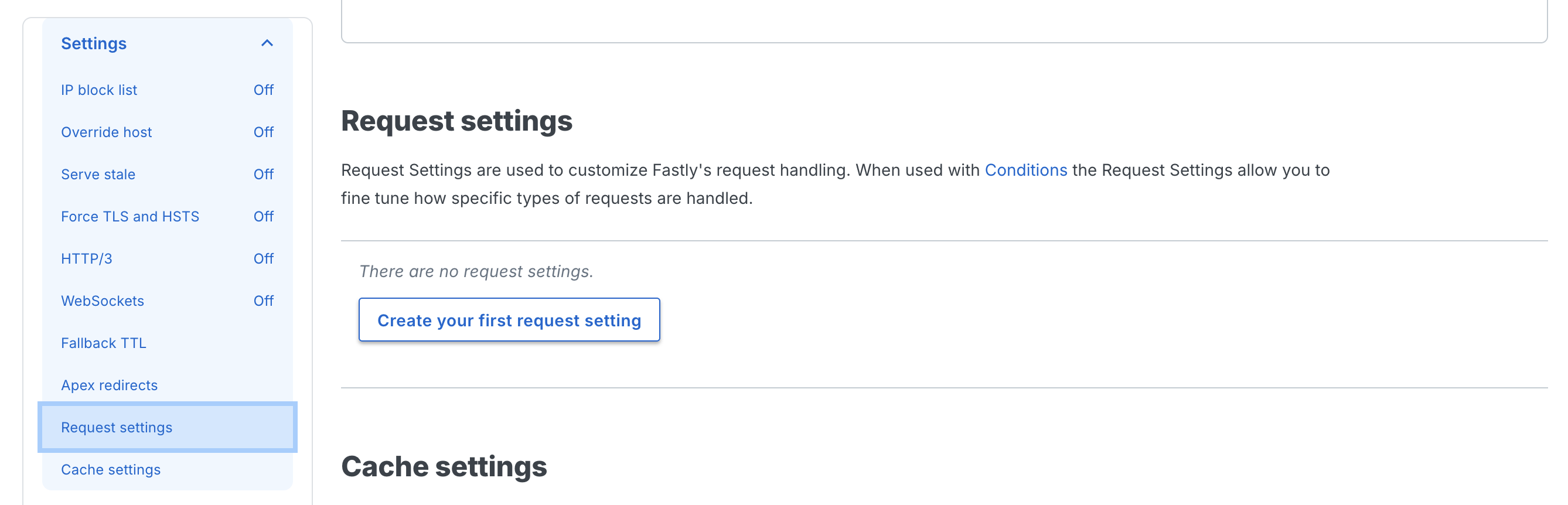
- Create a cache setting and set Cache keys to
req.url, req.http.host, req.http.User-Agent
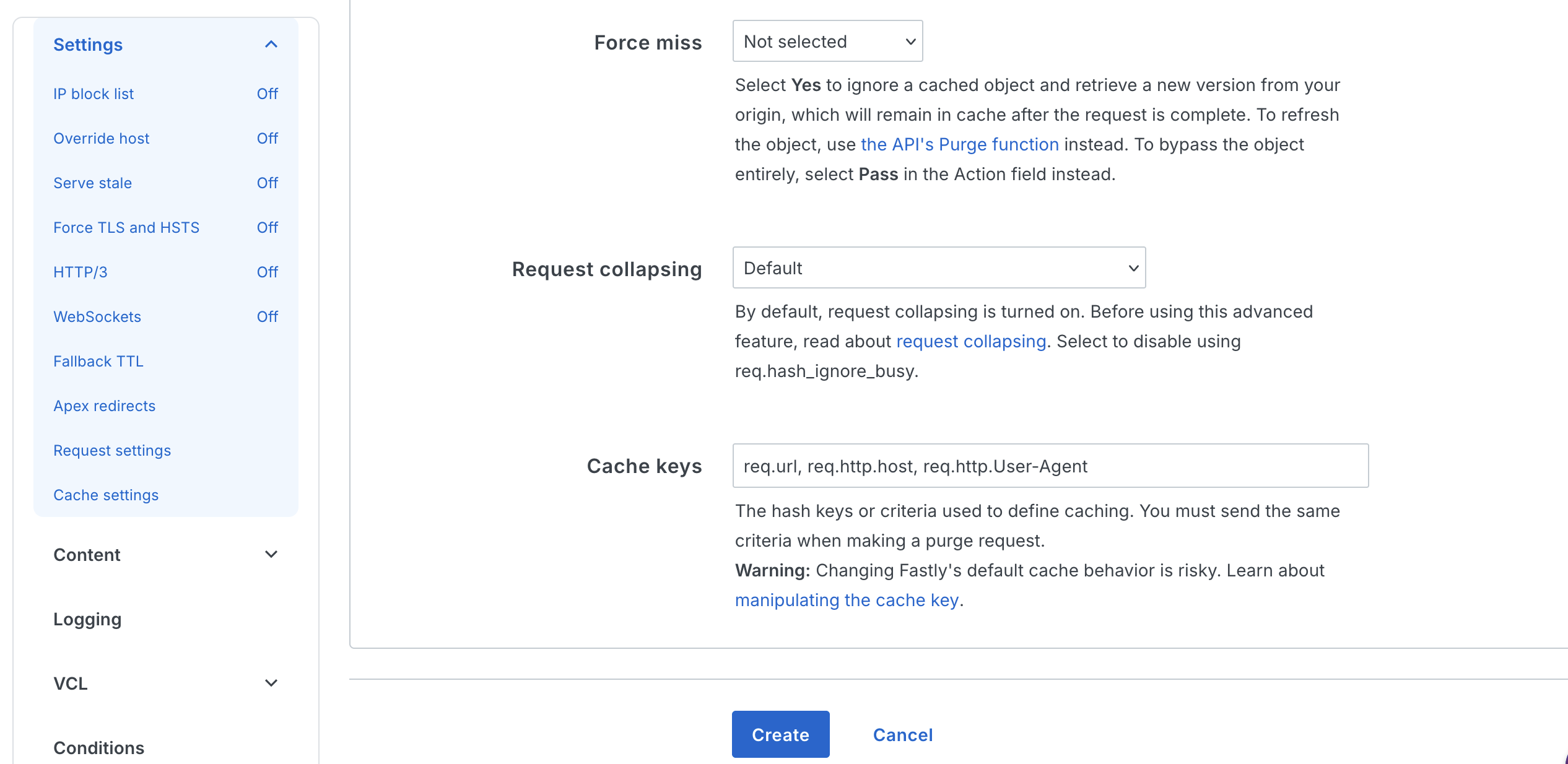
This achieves the same result as the vcl_hash snippet without writing VCL code.
Headers reference
Headers sent to Edge Gateway
| Header | Description |
|---|---|
X-Render-Key | Authentication token from host configuration. |
User-Agent | Original client User-Agent for dimension matching. Fastly preserves this by default. |
X-Forwarded-For | Original client IP address (client.ip). |
X-Forwarded-Proto | Original request protocol (http/https). |
Backend configuration reference
| Setting | Value | Description |
|---|---|---|
.host | Your EG hostname | Edge Gateway hostname (e.g., render.example.com). |
.port | "443" | HTTPS port. |
.ssl | true | Enable TLS for the backend connection. |
.ssl_sni_hostname | Same as .host | Server Name Indication hostname for TLS handshake. |
.ssl_cert_hostname | Same as .host | Expected hostname in the backend's TLS certificate. |
.share_key | Your service ID | Optional. Enables connection pooling and health check sharing across multiple Fastly services using the same Edge Gateway backend. |
.connect_timeout | 10s | Maximum time to establish a TCP connection. |
.first_byte_timeout | 60s | Maximum time to receive the first byte. Must exceed EG render.timeout. |
.between_bytes_timeout | 15s | Maximum time between bytes after the first byte. |
.probe.request | "GET /health HTTP/1.1" ... | Health check request sent to Edge Gateway's /health endpoint. |
.probe.interval | 30s | Time between health checks. |
.probe.timeout | 5s | Maximum time to wait for a probe response. |
.probe.window | 5 | Number of most recent probes to evaluate. |
.probe.threshold | 3 | Minimum successful probes (out of window) to consider backend healthy. |
.probe.initial | 3 | Assumed successful probes at startup before real probes complete. |
Logging
Use Fastly's real-time logging to track rendering decisions and debug issues.
Inline logging with std.log
Add temporary logging to the recv snippet:
import std;

if (var.is_crawler) {
    std.log("eg-render: routing crawler to EG, ua=" + req.http.User-Agent + " url=" + req.url);
}
View output in the Fastly management console under Observability > Logs.
Structured logging endpoint
For production monitoring, configure a logging endpoint (S3, BigQuery, Datadog, etc.) and add a log line in vcl_deliver:
# In vcl_deliver
if (resp.http.EC-Source) {
    log {"syslog "} req.service_id {" eg-logging :: "}
        {"{"}
            {""url": ""} req.url {"", "}
            {""render_source": ""} resp.http.EC-Source {"", "}
            {""cache_age": ""} resp.http.EC-Cache-Age {"", "}
            {""user_agent": ""} req.http.User-Agent {"", "}
            {""client_ip": ""} client.ip {"" "}
        {"}"};
}
Related documentation
- Fastly setup - Installation and configuration
- Diagnostic headers - Response header reference
- Dimensions - Crawler detection via User-Agent matching
- Caching - Cache configuration