

AWS CloudFront
Configure AWS CloudFront with Lambda@Edge function to route crawler traffic through Edge Gateway for server-side rendering of JavaScript-heavy pages.
Prerequisites
- Running Edge Gateway instance
- Configured host with
render_keyanddomain - AWS account with permissions for CloudFront, Lambda, IAM, and ACM
- EC2 instance (Ubuntu 22.04 or 24.04, t2.medium or larger) running the engine
- Docker
- A registered domain with DNS access
How it works
Two Lambda@Edge functions work together to route crawler traffic to Edge Gateway while letting regular users pass through unchanged.
Why two functions instead of one?
The viewer-request event can read and modify request headers but cannot rewrite the origin. The origin-request event can rewrite the origin but cannot read the original User-Agent without the header forwarding trick below. Splitting across two events solves both constraints:
edge-comet-detectorruns onviewer-request: reads theUser-Agent, and if it matches a crawler, injectsX-Render-KeyandX-Render-Hostheaders into the requestedge-comet-routeruns onorigin-request: checks forX-Render-Keyand, if found, rewrites the request origin to Edge Gateway
The injected headers act as a signal between the two functions. CloudFront forwards them from the viewer-request stage to origin-request via Legacy cache settings (see step 7.2).
Request flow — crawler (e.g. Googlebot)
- Googlebot sends a request to
aws.yourdomain.com - CloudFront triggers the
viewer-requestLambda edge-comet-detectordetects the Googlebot User-Agent- Injects
X-Render-KeyandX-Render-Hostheaders into the request - CloudFront forwards these headers to the origin-request stage via Legacy cache settings
edge-comet-routefires, detectsX-Render-Key, rewrites the origin torender.yourdomain.com- Edge Gateway renders the page with headless Chrome
- Returns fully rendered HTML to Googlebot
- CloudFront caches the rendered response
Request flow — regular user
- Browser sends a request to
aws.yourdomain.com - CloudFront checks cache — if hit, serves immediately
viewer-requestLambda fires — User-Agent is not a crawler, no headers injectedorigin-requestLambda fires — noX-Render-Keyfound, passes through unchanged- Request goes to
yourdomain.comorigin, returns normal HTML
DNS configuration
Create the following DNS records pointing to your EC2 instance's public IP:
| Subdomain | Purpose |
|---|---|
render.yourdomain.com | Edge Gateway endpoint (Nginx reverse proxy to port 10070) |
aws.yourdomain.com | CloudFront distribution CNAME alias |
yourdomain.com | Main site origin |
Replace
yourdomain.comwith your actual domain throughout this guide.
1. Deploy EdgeComet Engine
1.1 Clone and configure
SSH into your EC2 instance and clone the engine repository:
git clone https://github.com/EdgeComet/engine
cd engine
Create your host configuration file:
nano configs/docker/hosts.d/01-mysite.yamlAdd the following content:
hosts:
  - id: 1
    domain: "aws.yourdomain.com"
    render_key: "your-render-key-here"
    enabled: true
    render:
      timeout: 45s
Generate a secure render key:
openssl rand -hex 161.2 Build and start
docker compose build
docker compose up -d
docker compose ps   # All services should show 'healthy'
1.3 Test the engine locally
curl -i \
  -H "X-Render-Key: your-render-key-here" \
  -H "User-Agent: Mozilla/5.0 (compatible; Googlebot/2.1)" \
  "http://localhost:10070/render?url=https://yourdomain.com/"
Expected response header: EC-Source: render
2. Nginx reverse proxy + SSL
2.1 Install dependencies
apt update
apt install nginx certbot python3-certbot-nginx -y
2.2 SSL certificates
certbot --nginx -d render.yourdomain.com
certbot --nginx -d yourdomain.com -d www.yourdomain.com -d aws.yourdomain.com
2.3 Nginx configuration for the render engine
Create /etc/nginx/sites-available/edgecomet:
server {
    server_name render.yourdomain.com;

    location / {
        proxy_pass http://localhost:10070;
        proxy_set_header Host $host;
        proxy_set_header X-Forwarded-For $remote_addr;
        proxy_set_header X-Forwarded-Proto https;
        proxy_set_header X-Render-Key $http_x_render_key;
        proxy_read_timeout 60s;
    }

    listen 443 ssl;
    ssl_certificate /etc/letsencrypt/live/render.yourdomain.com/fullchain.pem;
    ssl_certificate_key /etc/letsencrypt/live/render.yourdomain.com/privkey.pem;
    include /etc/letsencrypt/options-ssl-nginx.conf;
}
2.4 Nginx configuration for the origin site
Create /etc/nginx/sites-available/mysite:
server {
    server_name yourdomain.com www.yourdomain.com aws.yourdomain.com;

    root /var/www/html;
    index index.html;

    location / {
        try_files $uri $uri/ /index.html;
    }

    listen 80;
    listen 443 ssl;
    ssl_certificate /etc/letsencrypt/live/yourdomain.com/fullchain.pem;
    ssl_certificate_key /etc/letsencrypt/live/yourdomain.com/privkey.pem;
    include /etc/letsencrypt/options-ssl-nginx.conf;
}
Enable both sites and reload:
ln -s /etc/nginx/sites-available/edgecomet /etc/nginx/sites-enabled/
ln -s /etc/nginx/sites-available/mysite /etc/nginx/sites-enabled/
nginx -t && systemctl reload nginx
2.5 Test the render endpoint over HTTPS
curl -i \
  -H "X-Render-Key: your-render-key-here" \
  -H "User-Agent: Mozilla/5.0 (compatible; Googlebot/2.1)" \
  "https://render.yourdomain.com/render?url=https://yourdomain.com/"
Expected:
HTTP/1.1 200 OK
EC-Source: render
Do not proceed until this test passes. If you see an SSL handshake error, confirm the certificate was issued for render.yourdomain.com and that Nginx has been reloaded.
3. ACM certificate for CloudFront
ACM region requirement
ACM certificates used with CloudFront must be created in us-east-1 (N. Virginia). CloudFront cannot use certificates from any other region. Confirm the region selector shows N. Virginia before proceeding.
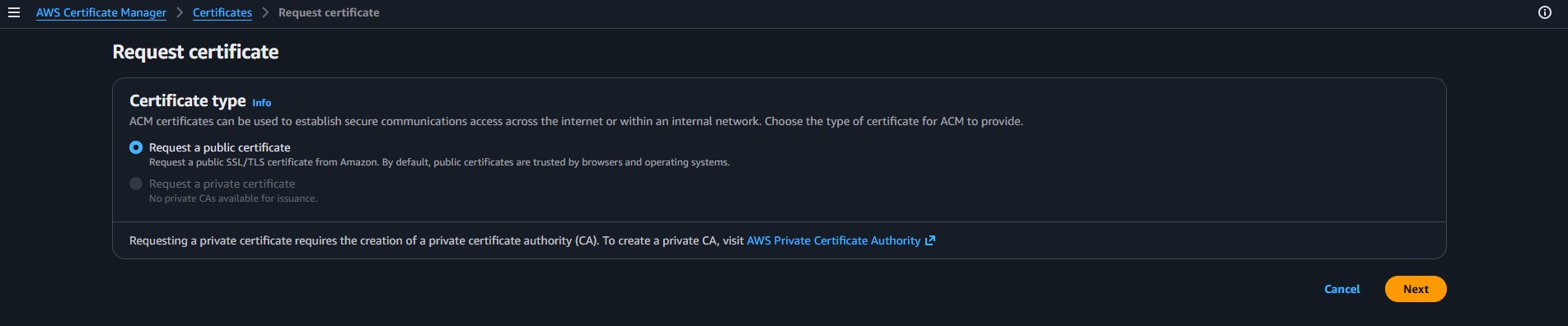
- Open AWS Certificate Manager, click Request a certificate, select Request a public certificate and click Next
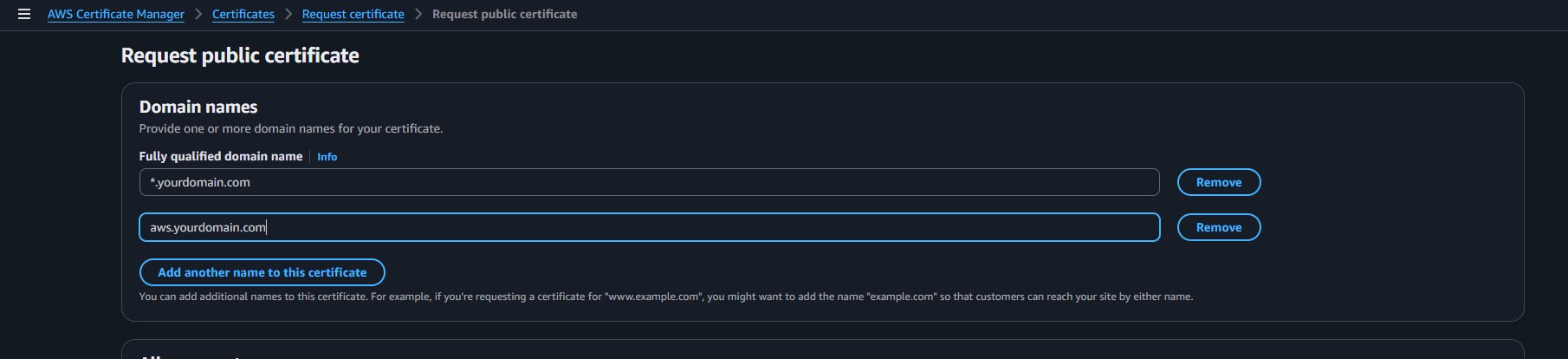
Under Fully qualified domain name, add two entries — a wildcard to cover all subdomains and your specific
awssubdomain:*.yourdomain.comaws.yourdomain.com
Set validation method to DNS validation and click Request
Use a wildcard certificate
Adding *.yourdomain.com alongside aws.yourdomain.com means the same certificate covers any future subdomains — you won't need to re-issue it later.
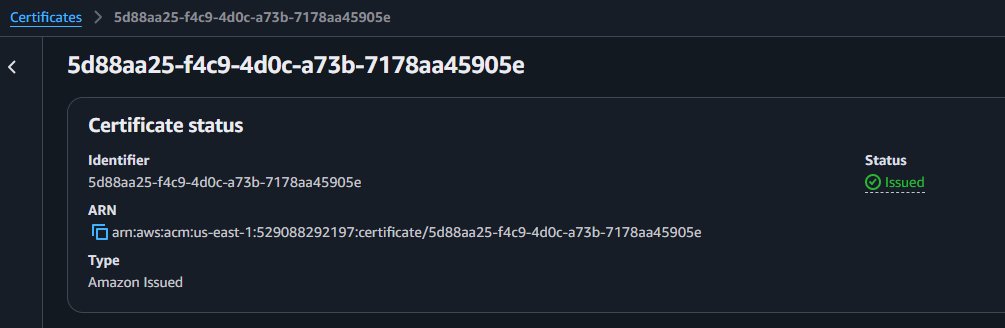
- Copy the CNAME name and value shown under Domains and add the record in your DNS provider. Wait for the status to change to Issued (5–30 minutes)
TIP
Do not proceed to the next step until the certificate status shows Issued. CloudFront will not let you select a pending certificate.
4. IAM role for Lambda@Edge
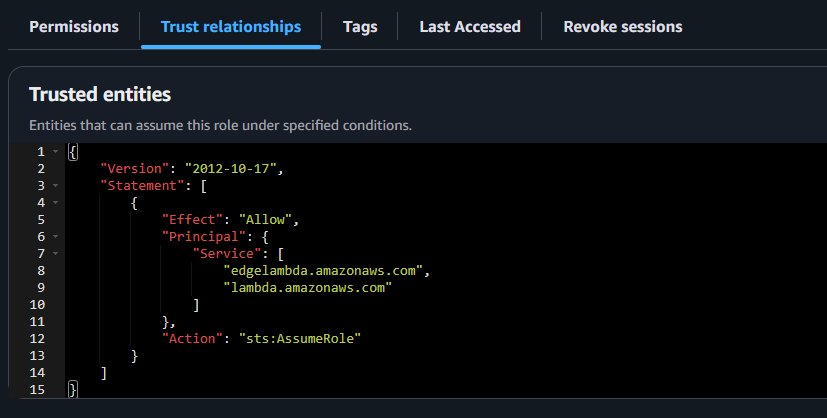
Create a single IAM role that both Lambda functions share. Both lambda.amazonaws.com and edgelambda.amazonaws.com must be in the trust policy — without edgelambda.amazonaws.com, CloudFront cannot execute the functions and returns a 503 LambdaExecutionError.
aws iam create-role \
  --role-name edge-comet-lambda-edge-role \
  --assume-role-policy-document '{
    "Version": "2012-10-17",
    "Statement": [{
      "Effect": "Allow",
      "Principal": {
        "Service": ["edgelambda.amazonaws.com", "lambda.amazonaws.com"]
      },
      "Action": "sts:AssumeRole"
    }]
  }'

aws iam attach-role-policy \
  --role-name edge-comet-lambda-edge-role \
  --policy-arn arn:aws:iam::aws:policy/service-role/AWSLambdaBasicExecutionRole
If you prefer the console, create the role in IAM then click the Trust relationships tab and edit the policy to match the JSON above — both service principals must be present.
5. Lambda function 1 — Crawler detector
This function runs on the viewer-request event. It detects crawlers by User-Agent and injects X-Render-Key and X-Render-Host headers into the request so the origin-request function can act on them.
us-east-1 required
Switch the Lambda console region to us-east-1 (N. Virginia) before creating either function. Lambda@Edge functions created in any other region cannot be associated with CloudFront.
5.1 Create the function
- Open the Lambda console — confirm region is us-east-1
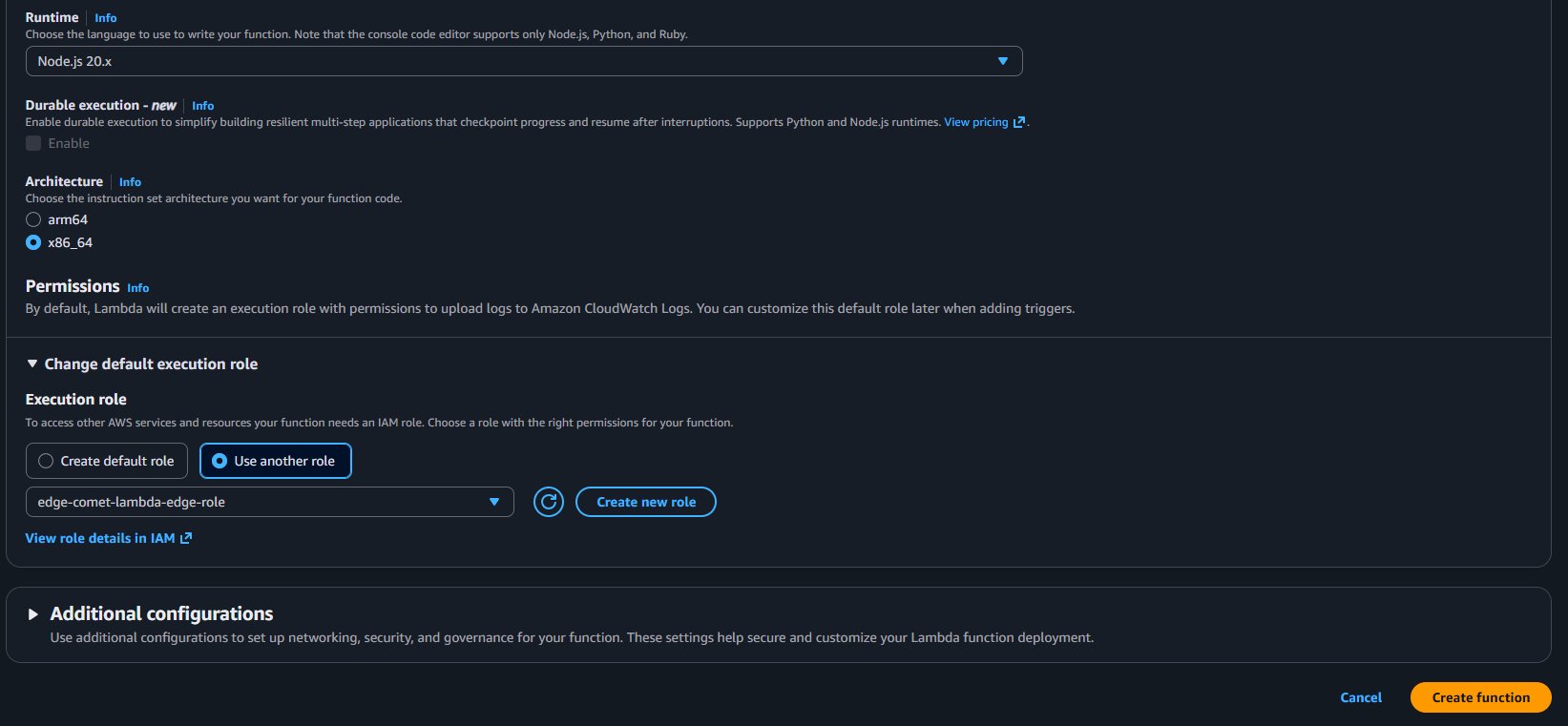
- Click Create function → Author from scratch and fill in:
- Function name:
edge-comet-detector - Runtime:
Node.js 20.x - Architecture:
x86_64 - Execution role: Use an existing role →
edge-comet-lambda-edge-role
- Function name:
- Click Create function
5.2 Function code
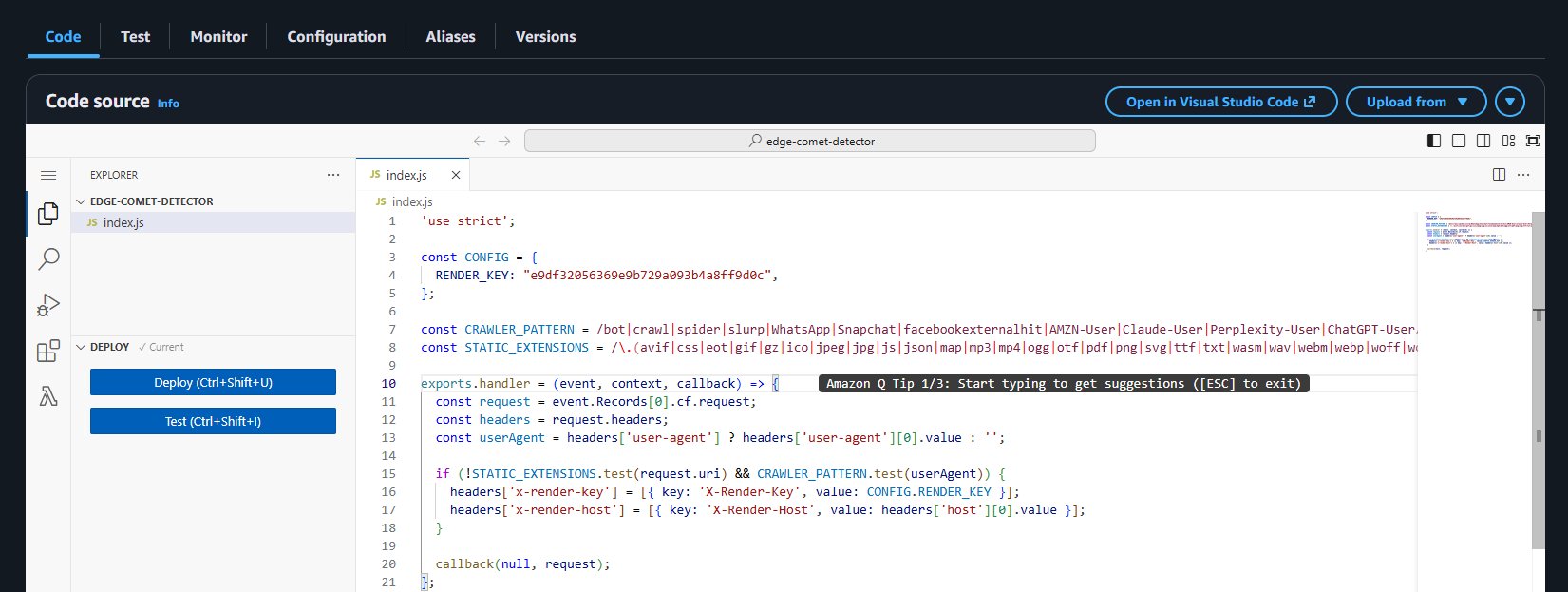
Replace the default code in index.js with:
'use strict';

const CONFIG = {
  RENDER_KEY: "your-render-key-here",
};

const CRAWLER_PATTERN = /bot|crawl|spider|slurp|WhatsApp|Snapchat|facebookexternalhit|AMZN-User|Claude-User|Perplexity-User|ChatGPT-User/i;

const STATIC_EXTENSIONS = /\.(avif|css|eot|gif|gz|ico|jpeg|jpg|js|json|map|mp3|mp4|ogg|otf|pdf|png|svg|ttf|txt|wasm|wav|webm|webp|woff|woff2|xml|zip)$/i;

exports.handler = (event, context, callback) => {
  const request = event.Records[0].cf.request;
  const headers = request.headers;
  const userAgent = headers['user-agent']
    ? headers['user-agent'][0].value : '';

  if (!STATIC_EXTENSIONS.test(request.uri) && CRAWLER_PATTERN.test(userAgent)) {
    headers['x-render-key'] = [{
      key: 'X-Render-Key', value: CONFIG.RENDER_KEY
    }];
    headers['x-render-host'] = [{
      key: 'X-Render-Host', value: headers['host'][0].value
    }];
  }

  callback(null, request);
};
Set RENDER_KEY to the key in your host configuration.
5.3 Deploy and publish
- Click Deploy
- Click Actions → Publish new version → leave description blank → Publish
- Copy the full version ARN — it ends with
:1:
arn:aws:lambda:us-east-1:YOUR_ACCOUNT_ID:function:edge-comet-detector:1Published version required
Lambda@Edge cannot use $LATEST. Always publish a numbered version and use that ARN when associating with CloudFront.
6. Lambda function 2 — Origin router
This function runs on the origin-request event. It checks for X-Render-Key. If found, it rewrites the request origin to the EdgeComet render engine and rewrites the path to /render?url=<original-url>.
6.1 Create the function
- In the Lambda console (still us-east-1), click Create function → Author from scratch:
- Function name:
edge-comet-route - Runtime:
Node.js 20.x - Architecture:
x86_64 - Execution role: Use an existing role →
edge-comet-lambda-edge-role
- Function name:
- Click Create function
6.2 Function code
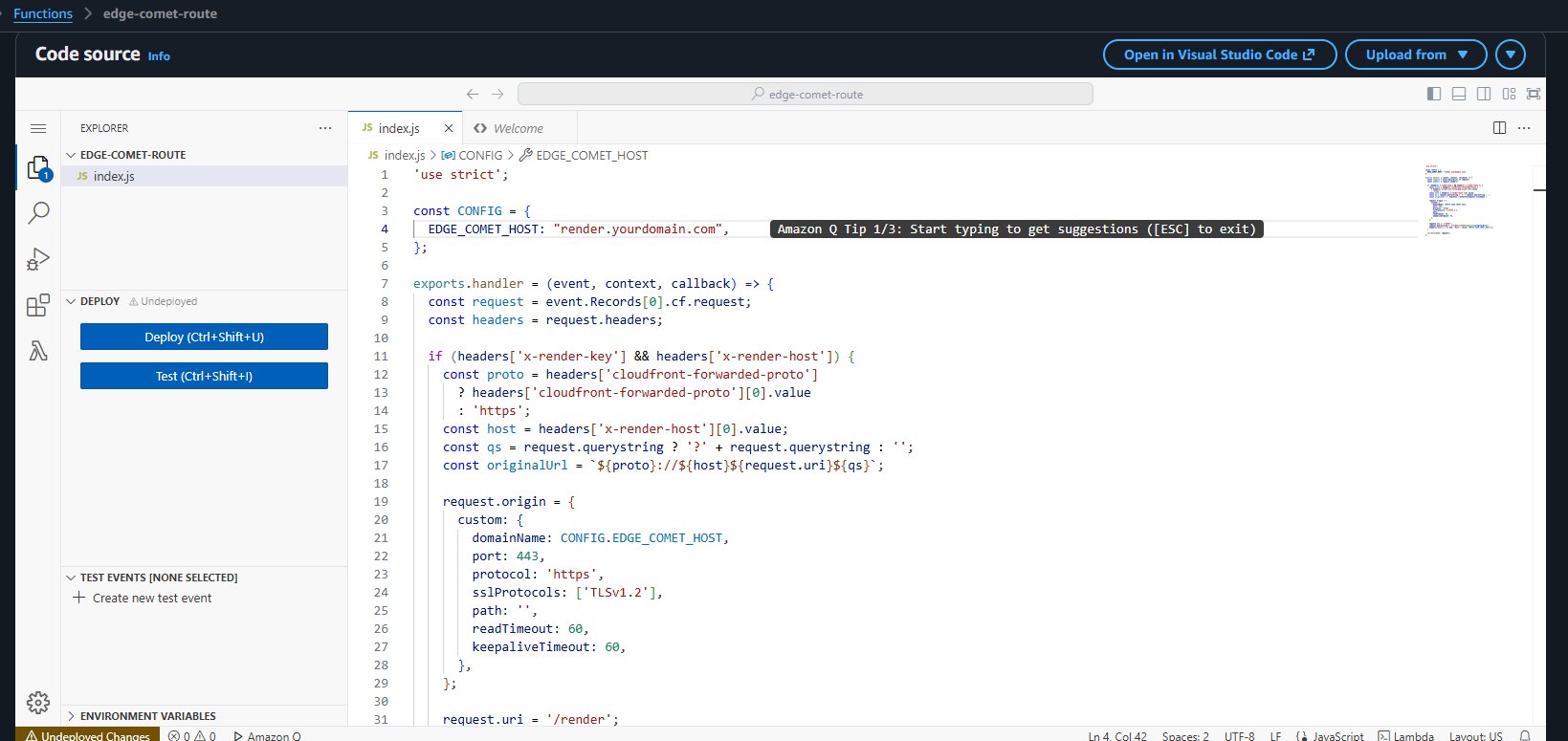
Replace the default code in index.js with:
'use strict';

const CONFIG = {
  // Bare hostname only — no https://, no trailing slash
  EDGE_COMET_HOST: "render.yourdomain.com",
};

exports.handler = (event, context, callback) => {
  const request = event.Records[0].cf.request;
  const headers = request.headers;

  if (headers['x-render-key'] && headers['x-render-host']) {
    const proto = headers['cloudfront-forwarded-proto']
      ? headers['cloudfront-forwarded-proto'][0].value : 'https';
    const host = headers['x-render-host'][0].value;
    const qs = request.querystring ? '?' + request.querystring : '';
    const originalUrl = `${proto}://${host}${request.uri}${qs}`;

    request.origin = {
      custom: {
        domainName: CONFIG.EDGE_COMET_HOST,
        port: 443,
        protocol: 'https',
        sslProtocols: ['TLSv1.2'],
        path: '',
        readTimeout: 60,
        keepaliveTimeout: 60,
      },
    };

    request.uri = '/render';
    request.querystring = `url=${encodeURIComponent(originalUrl)}`;

    headers['host'] = [{
      key: 'Host', value: CONFIG.EDGE_COMET_HOST
    }];
  }

  callback(null, request);
};
Set EDGE_COMET_HOST to your render engine hostname (e.g. render.yourdomain.com).
EDGE_COMET_HOST format
Bare hostname only — no https:// prefix, no trailing slash. The origin object handles the protocol. Getting this wrong causes immediate 502 errors.
Blacklisted headers at origin-request
Do not set x-forwarded-for or x-forwarded-proto in this function. CloudFront treats these as blacklisted headers at the origin-request stage and returns a 502 LambdaValidationError.
6.3 Deploy and publish
- Click Deploy
- Click Actions → Publish new version → Publish
- Copy the version ARN:
arn:aws:lambda:us-east-1:YOUR_ACCOUNT_ID:function:edge-comet-route:17. CloudFront distribution
7.1 Create the distribution
Go to CloudFront → Create distribution.
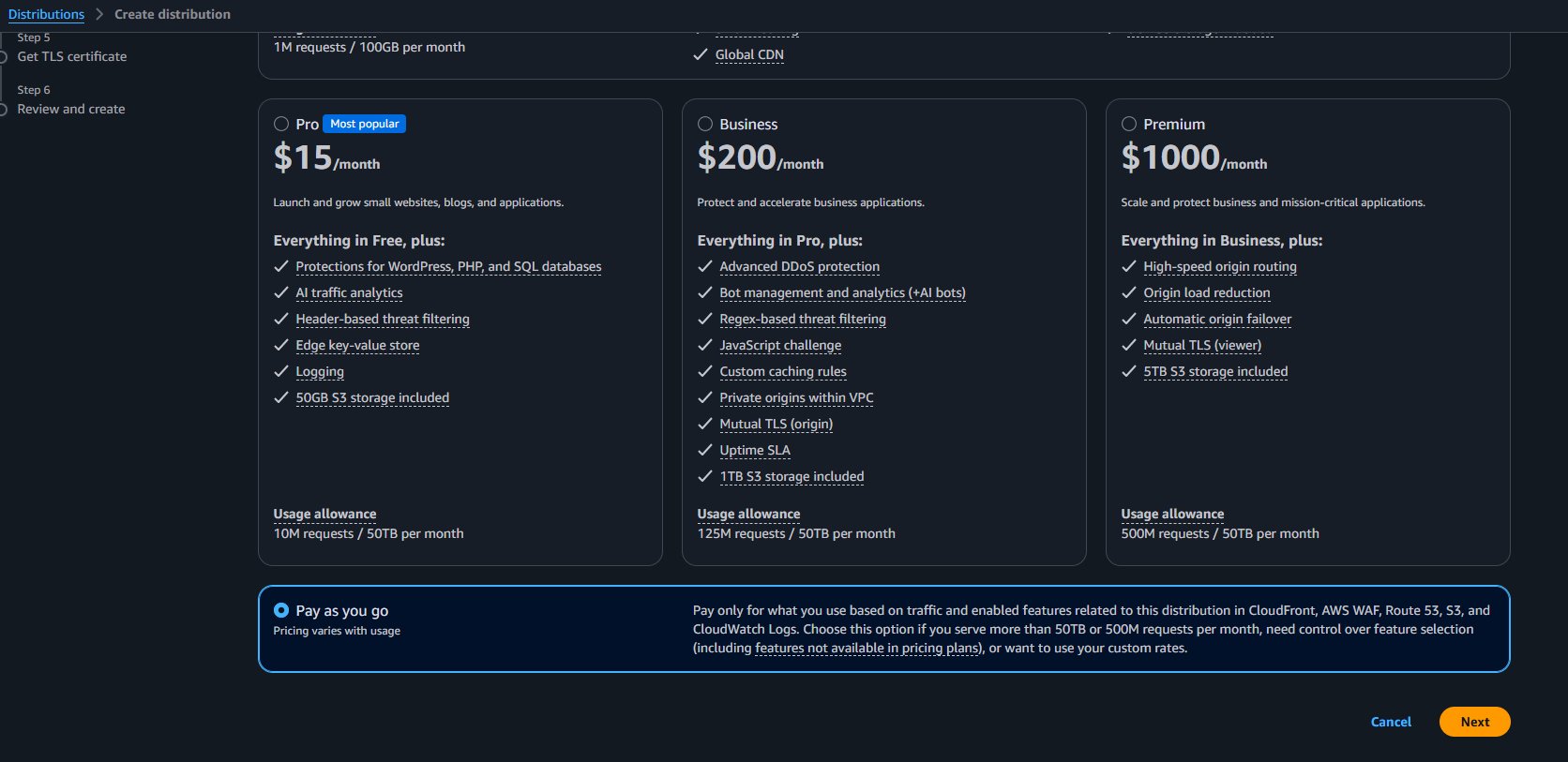
When prompted for a pricing plan, select Pay as you go — this gives you full control over feature selection and custom rates, and is the correct choice for this setup.
Configure the Origin section:
| Setting | Value |
|---|---|
| Origin domain | yourdomain.com |
| Origin protocol policy | HTTP only (port 80) |
| Origin response timeout | 60 seconds |
Origin protocol policy
Set to HTTP only. If you see 502 Bad Gateway errors from origin, this is the first setting to check.
Origin response timeout
Increase from the default 30 seconds to at least 60. This must be higher than your Edge Gateway render.timeout or CloudFront will 504 while the engine is still rendering.
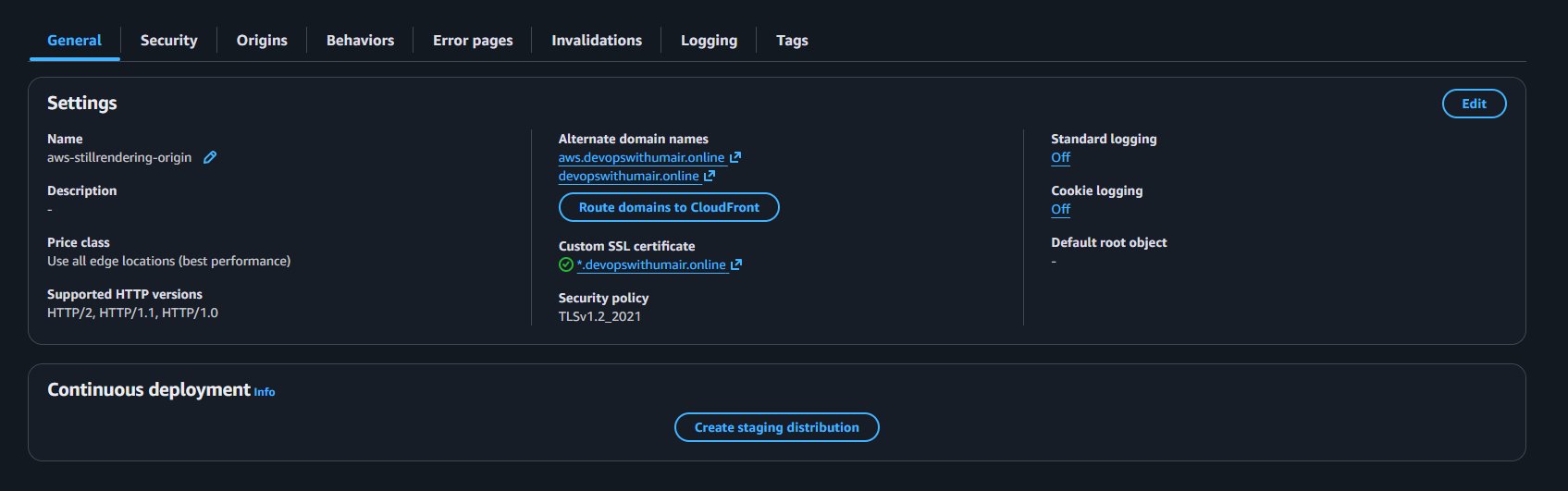
Configure the Settings section:
| Setting | Value |
|---|---|
| Alternate domain names (CNAMEs) | aws.yourdomain.com, yourdomain.com |
| Custom SSL certificate | Select the wildcard certificate issued in step 3 |
| Price class | Use all edge locations (best performance) |
After creating the distribution, the General tab confirms the settings — alternate domain names, wildcard SSL certificate, and security policy TLSv1.2_2021.
7.2 Cache behavior — Legacy cache settings
Use Legacy cache settings, not a managed origin request policy
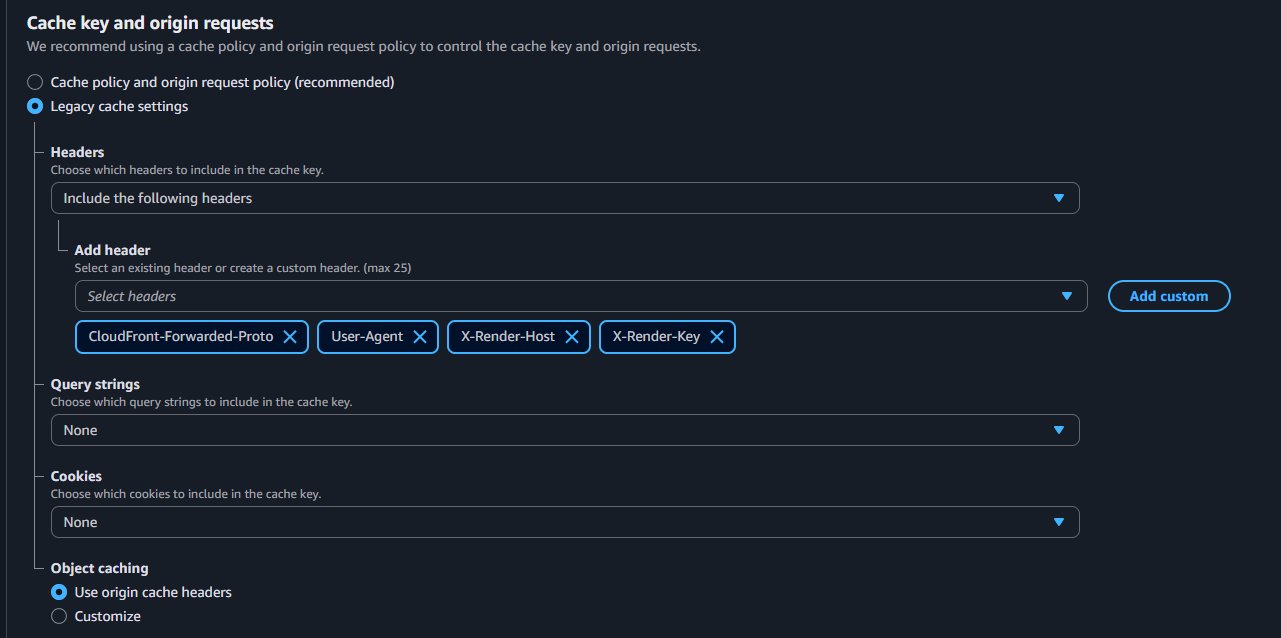
This is the step that makes the two-function architecture work. CloudFront strips custom X- headers when using managed cache/origin request policies. Legacy cache settings is what allows X-Render-Key and X-Render-Host — injected by the viewer-request Lambda — to survive through to the origin-request Lambda.
In the distribution's Behaviors tab, edit the default behavior. Under Cache key and origin requests, select Legacy cache settings and configure:
| Setting | Value |
|---|---|
| Headers | Include the following headers |
| Header list | CloudFront-Forwarded-Proto, User-Agent, X-Render-Host, X-Render-Key |
| Query strings | None |
| Cookies | None |
| Object caching | Use origin cache headers |
7.3 Lambda function associations
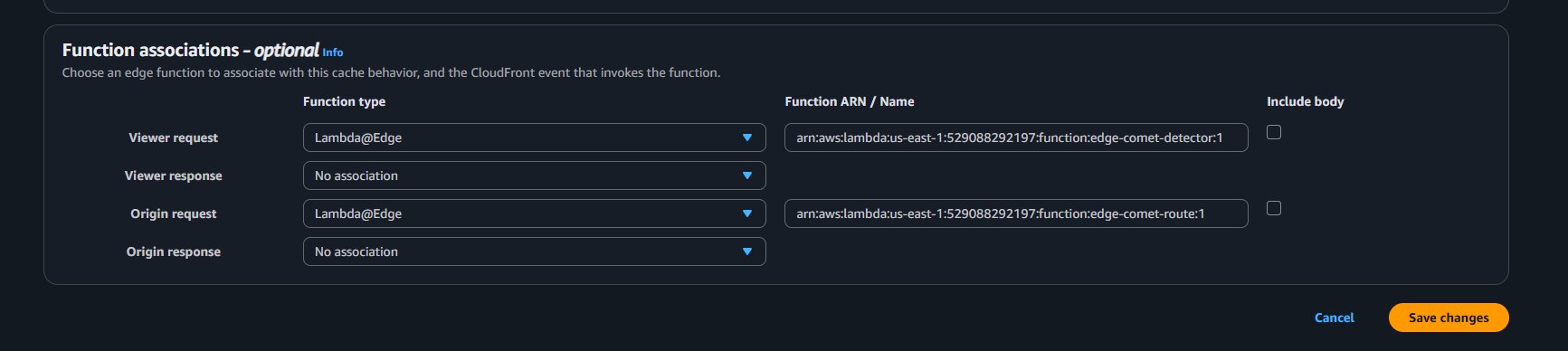
In the same behavior edit screen, under Function associations, add both functions:
| Event type | Function type | ARN |
|---|---|---|
| Viewer request | Lambda@Edge | arn:aws:lambda:us-east-1:YOUR_ACCOUNT_ID:function:edge-comet-detector:1 |
| Viewer response | No association | — |
| Origin request | Lambda@Edge | arn:aws:lambda:us-east-1:YOUR_ACCOUNT_ID:function:edge-comet-route:1 |
| Origin response | No association | — |
Use versioned ARNs
Always use ARNs ending in :1, :2, etc. Never use $LATEST — CloudFront will reject it.
Click Save changes and wait for the distribution status to show Deployed (5–10 minutes).
8. DNS — point aws subdomain at CloudFront
Copy your distribution's Domain name from the CloudFront General tab (e.g. d1abc2defgh3ij.cloudfront.net) and add a CNAME record in your DNS provider:
| Field | Value |
|---|---|
| Type | CNAME |
| Name | aws |
| Value | d1abc2defgh3ij.cloudfront.net |
| TTL | 300 |
9. Verification
Test crawler request
curl -v \
  -H "User-Agent: Mozilla/5.0 (compatible; Googlebot/2.1)" \
  "https://aws.yourdomain.com/"
Expected response headers:
HTTP/1.1 200 OK
EC-Source: render
A second request to the same URL should return EC-Source: render_cache.
Test regular user request
curl -I \
  -H "User-Agent: Mozilla/5.0 (Macintosh; Intel Mac OS X 10_15_7) AppleWebKit/537.36" \
  "https://aws.yourdomain.com/"
Expected: 200 OK with no X-Render-* headers — regular users bypass EdgeComet entirely.
Visual verification
Use jsbug.org to visually confirm rendering:
- Enter your CloudFront URL
- Select Googlebot as the User-Agent and click Analyze
- The JS Rendered panel should show all dynamic content populated
- The Non JS panel shows empty placeholders
Updating Lambda functions
After updating either function's code:
- Click Deploy in the Lambda console
- Click Actions → Publish new version
- Update the CloudFront behavior's function association with the new version ARN
- Wait for the distribution to deploy (5–15 minutes)
You cannot delete a Lambda@Edge version while any CloudFront distribution references it. Wait for full deployment before deleting old versions.
Troubleshooting
503 LambdaExecutionError
The IAM role trust policy is missing edgelambda.amazonaws.com. Edit the Trust relationships for edge-comet-lambda-edge-role and ensure both edgelambda.amazonaws.com and lambda.amazonaws.com are present.
502 LambdaValidationError: blacklisted header
The origin-request Lambda (edge-comet-route) is setting x-forwarded-for or x-forwarded-proto. These headers are blacklisted at the origin-request stage. Remove them from the router function.
401 — X-Render-Key header required
X-Render-Key is not reaching the origin-request Lambda. Verify X-Render-Key is listed in the Legacy cache settings forwarded headers. Without it, CloudFront strips the header between the viewer-request and origin-request stages.
401 — Invalid render key or domain mismatch
The domain in your host configuration must exactly match the host in the URL being rendered. If the engine receives https://aws.yourdomain.com/page but the config has domain: "yourdomain.com", it rejects the request.
502 Bad Gateway from origin
The origin protocol policy is mismatched. Change the Origin protocol policy to HTTP only in the CloudFront origin settings.
Regular users receiving rendered HTML
The CRAWLER_PATTERN regex in edge-comet-detector is matching regular browser User-Agents. Review the pattern and verify it does not match standard desktop or mobile browsers.
X-Cache: Miss on every request
The cache key is inconsistent between requests. Verify the Legacy cache settings header list does not include headers that vary per-request.
Lambda@Edge logs not appearing in us-east-1
Lambda@Edge logs appear in CloudWatch in the AWS region closest to the viewer, not in us-east-1. Log group names follow the pattern:
/aws/lambda/us-east-1.edge-comet-detector
/aws/lambda/us-east-1.edge-comet-route
SSL/TLS errors connecting to the render engine
Test with curl -k https://render.yourdomain.com/render?url=https://yourdomain.com/. If -k (skip certificate verification) works but normal curl does not, the certificate is self-signed or issued for a different hostname. Reissue with certbot for the correct domain.
Lambda@Edge constraints
| Constraint | Value | Impact |
|---|---|---|
| Deployment region | us-east-1 only | Both functions must be created in N. Virginia |
| Environment variables | Not supported | All configuration embedded in code |
| Published version required | Cannot use $LATEST | Publish after every code change |
| viewer-request timeout | 5 seconds | Header injection only — no HTTP calls here |
| origin-request timeout | 30 seconds | Sufficient for origin rewriting |
| Blacklisted headers at origin-request | x-forwarded-for, x-forwarded-proto | Do not set these in the router function |
| CloudWatch Logs region | Viewer's nearest region | Logs are not in us-east-1 |
| Deployment propagation | 5–15 minutes | Distribution updates propagate globally |
Related documentation
- CloudFront reference - Detailed code explanations
- Diagnostic headers - Response header reference
- Dimensions - Crawler detection via User-Agent matching
- Caching - Cache configuration
- Cloudflare Worker integration - Alternative integration method