EdgeComet
Alpha For e-commerce teams and agencies

Shelf Edge:
product feeds
for AI shopping

Give your whole catalog the facts AI shopping assistants look for. More of your products get recommended, clicked, and bought.

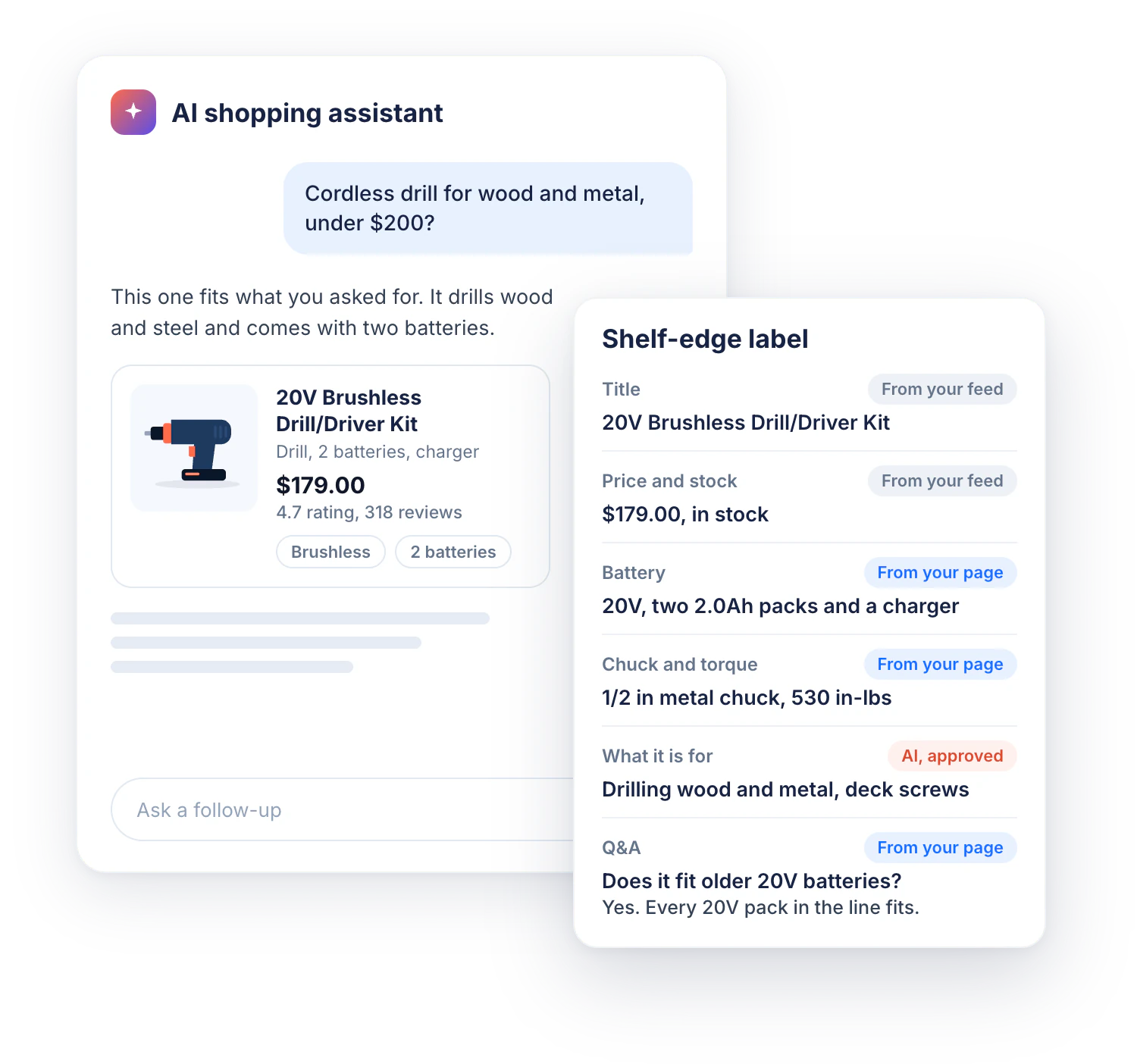
An AI shopping assistant recommends a cordless drill kit. Next to it, the product's shelf-edge label lists title, price, stock and facts, each tagged From your feed, From your page or AI, approved
Google Shopping and AI results Live

Through your Google Merchant Center feed

ChatGPT shopping Coming soon

US only today, Alpha members get it first

Performance impact

Complete product data brings more clicks and more sales, and shoppers who arrive from AI assistants are worth more than average.

+33%

product clicks

After filling missing feed attributes, in published retailer case studies

+28%

Shopping revenue

Google Shopping, after feed enrichment, in a retailer case study

+60%

AI shopper conversion

AI-referred visits against other traffic, US retail sites, Adobe, July 2026

+53%

revenue per AI visit

Revenue per AI-referred visit against other traffic, Adobe, July 2026

Why product data matters for AI shopping

Only a few products shown

A shopper describes what they need, and the AI assistant answers with a few products. Products outside that list are not seen.

Assistants read the feed

Assistants choose from the product feed and the facts on the product page. A well-designed page does not help when the data behind it is thin.

Feeds stop at the basics

Merchant Center requires a title, price, image, and stock. To compare products, assistants also need specs, compatibility, and buyer Q&A.

Missing facts get skipped

When the feed does not answer what the shopper asked, the assistant has nothing to match. It recommends a product that has the answer.

83%

of ChatGPT shopping products come from Google Shopping

Peec AI, study of about 43,000 products, March 2026

62%

year-on-year growth in retail visits from AI assistants

Adobe Digital Insights, US retail sites, July 2026

44%

of shoppers abandoned a purchase over thin product details

Syndigo, survey of 8,500+ consumers, June 2025

What is Shelf Edge?

Shelf Edge enriches your product feed for Google Shopping and AI shopping answers. Complete product data matches more shopper searches and brings more clicks and sales.

  • Finds missing attributes Highlights, specs, Q&A, related products, and variant details. In an average catalog, 40-50% of attributes are empty
  • Fills them from your own pages Facts from your rendered product pages first, AI only where the pages say nothing
  • Makes the feed ready for Google Shopping Each value follows Merchant Center rules and matches the live page
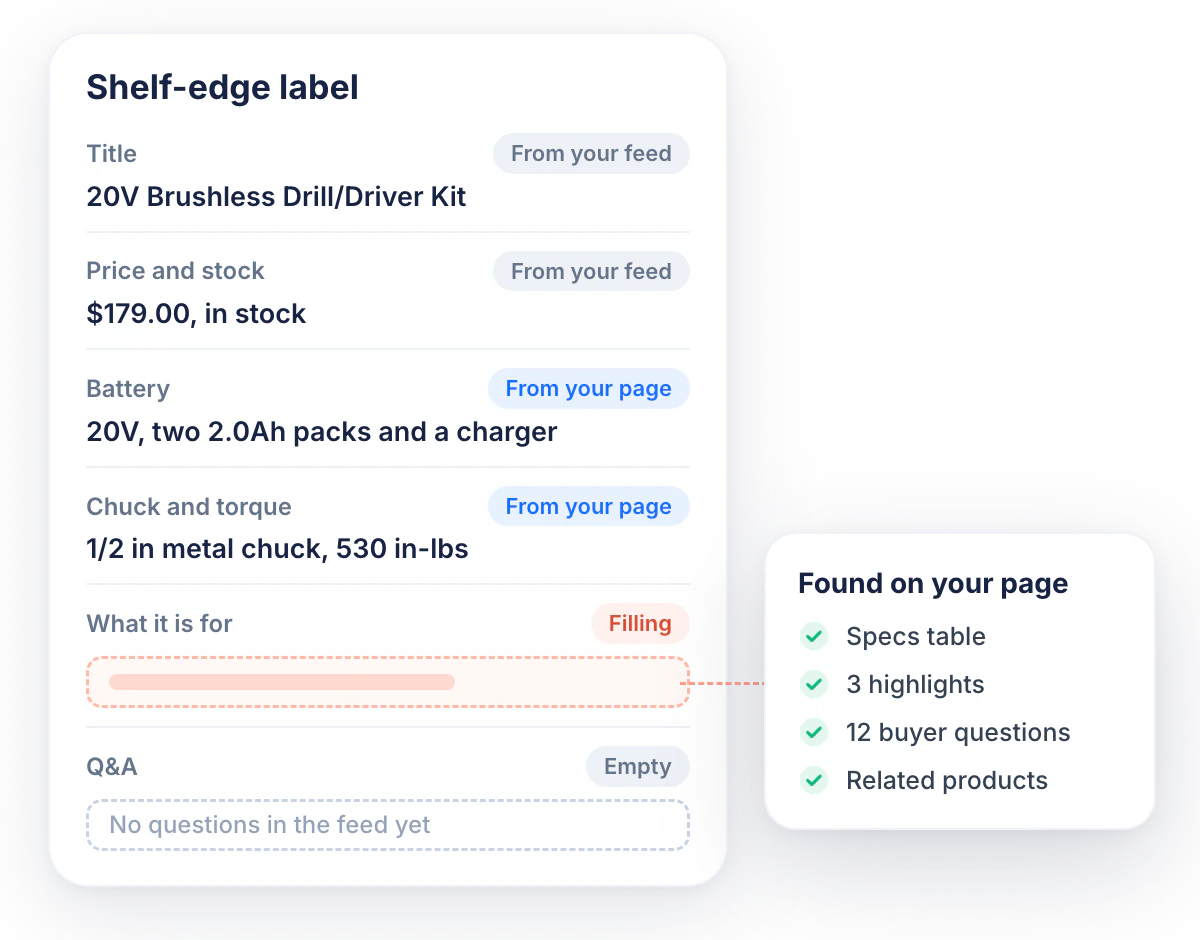
A shelf-edge label for a cordless drill kit: title, price and stock from the feed, battery and chuck filled from the product page, one field filling and one still empty

How Shelf Edge works

Connect your site to EdgeComet and your Google Merchant Center feed to Shelf Edge. It fills the feed from your product pages and sends changes only after you approve them.

  1. Step 1

    Store Connected

    Connect your site to EdgeComet through your CDN, then add your Google Merchant Center feed. Your current feed and feed tool stay as they are.

  2. Step 2

    Facts Extracted

    EdgeComet renders your product pages, and Shelf Edge takes the facts already there: specs, highlights, Q&A, reviews, and related products. AI fills only what the pages do not cover.

  3. Step 3

    Values Checked

    Each value is checked against the live page before it goes out. Price, stock, and title must match.

  4. Step 4

    Updates Approved

    You review and approve the updates, and Shelf Edge sends them to Google as a supplemental feed. ChatGPT delivery Coming soon

  5. Step 5

    Results Measured

    Clicks per product come from your own Merchant Center data, with filled products compared against untouched ones.

Which product attributes does Shelf Edge fill?

Google and ChatGPT read different product attributes. Shelf Edge sends each destination only the attributes it uses.

Google Live

Merchant Center, for Google Shopping and Google's AI shopping results

  • Product highlights
  • Product details (specs)
  • Questions and answers
  • Related products and accessories
  • Variant options and group title
  • Popularity rank, from your real traffic

ChatGPT Coming soon

ChatGPT shopping, US only today

  • Review count and star rating
  • Returns policy per product
  • Dimensions and weight
  • Seller details
  • Description

Shelf Edge features

Fill product attributes from your own pages, check them against the live page,
approve each change, and measure the results per product.

Fill

Product attributes from your own pages

Fill missing product attributes with facts from your rendered product pages. Let AI write only what the pages do not say, with the source shown on each value.

  • Use page data first Specs, highlights, Q&A, reviews, and related products from your product pages
  • See the source of each value Each value is tagged "From your page" or "AI-written" and marked as created or improved
  • Follow Google's content rules No promotional text, no prices or shipping in highlights, no repeated facts
  • Set your brand voice Describe the tone and the words to use or avoid in plain language
Impact: complete product facts across the catalog, without writing them by hand.
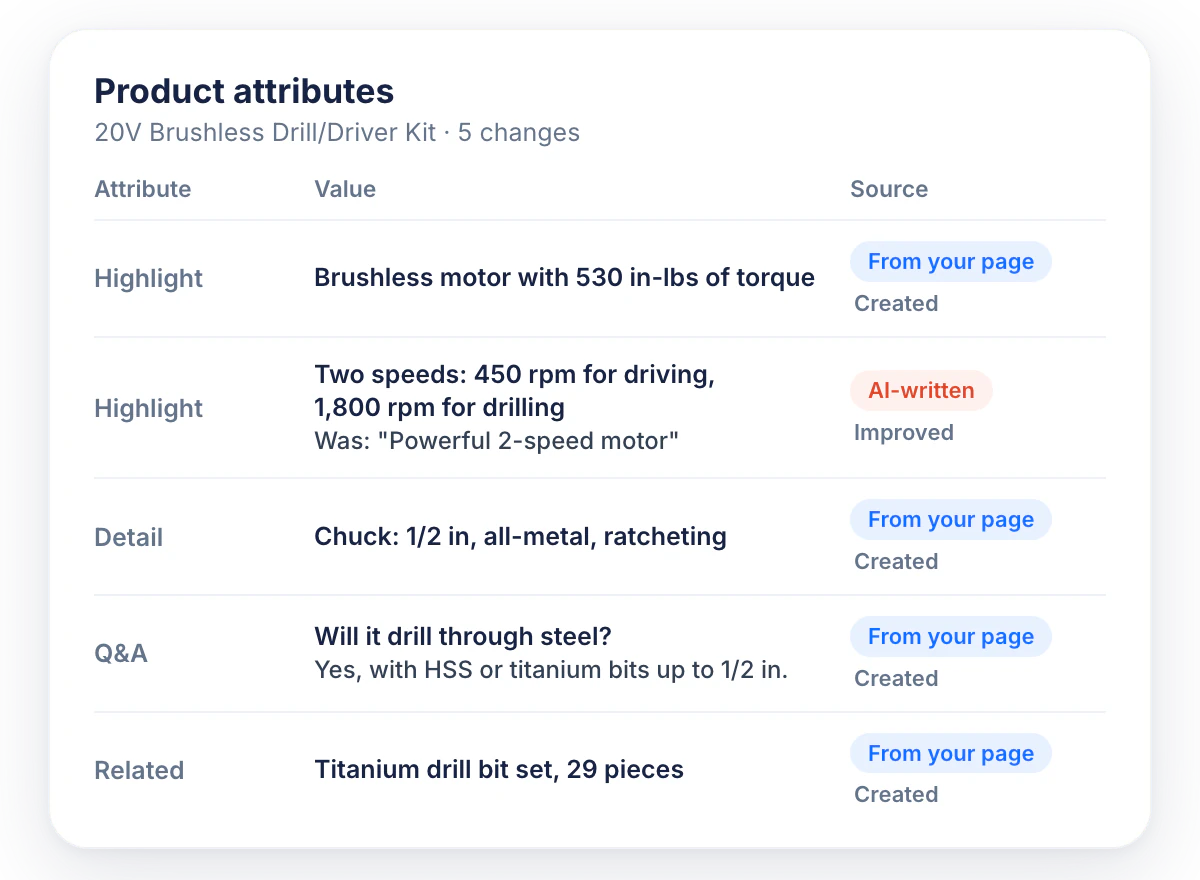
Product attributes for a cordless drill kit. Each value is tagged From your page or AI-written and marked Created or Improved
Check

Feed checks against the live page

Shelf Edge reads your live product pages and catches a wrong value in the feed before it reaches Google. The checks run before each push.

  • Price check The price on the page matches the price in the feed
  • Stock check Stock on the page matches the availability in the feed
  • Missing price check Each product in the feed shows a price on its page
  • Markup check The page and its product markup agree on price and stock
Impact: products with a price or stock mismatch are held back instead of being sent to Google.
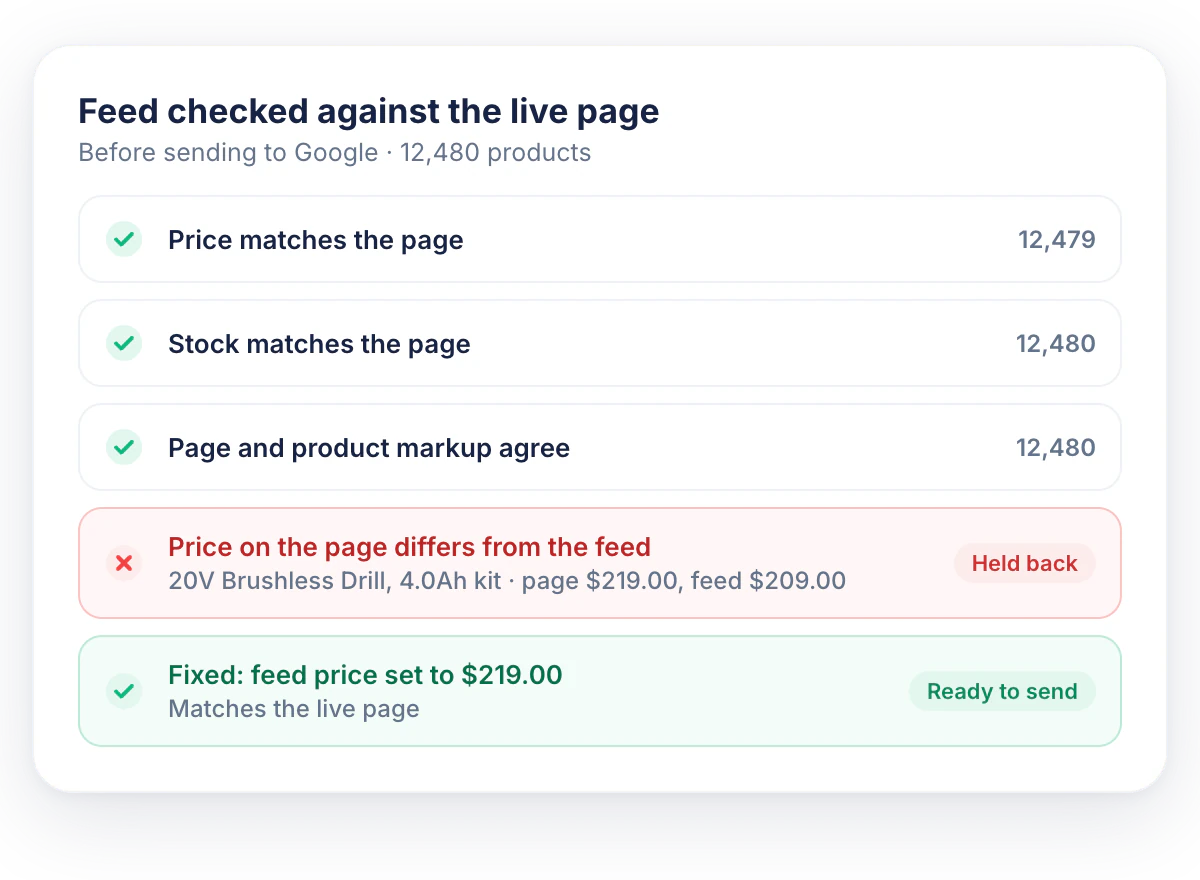
Feed checked against the live page before sending to Google: price, stock and markup checks pass, one product is held back for a price mismatch, then fixed
Approve

Approval, rules, and rollback

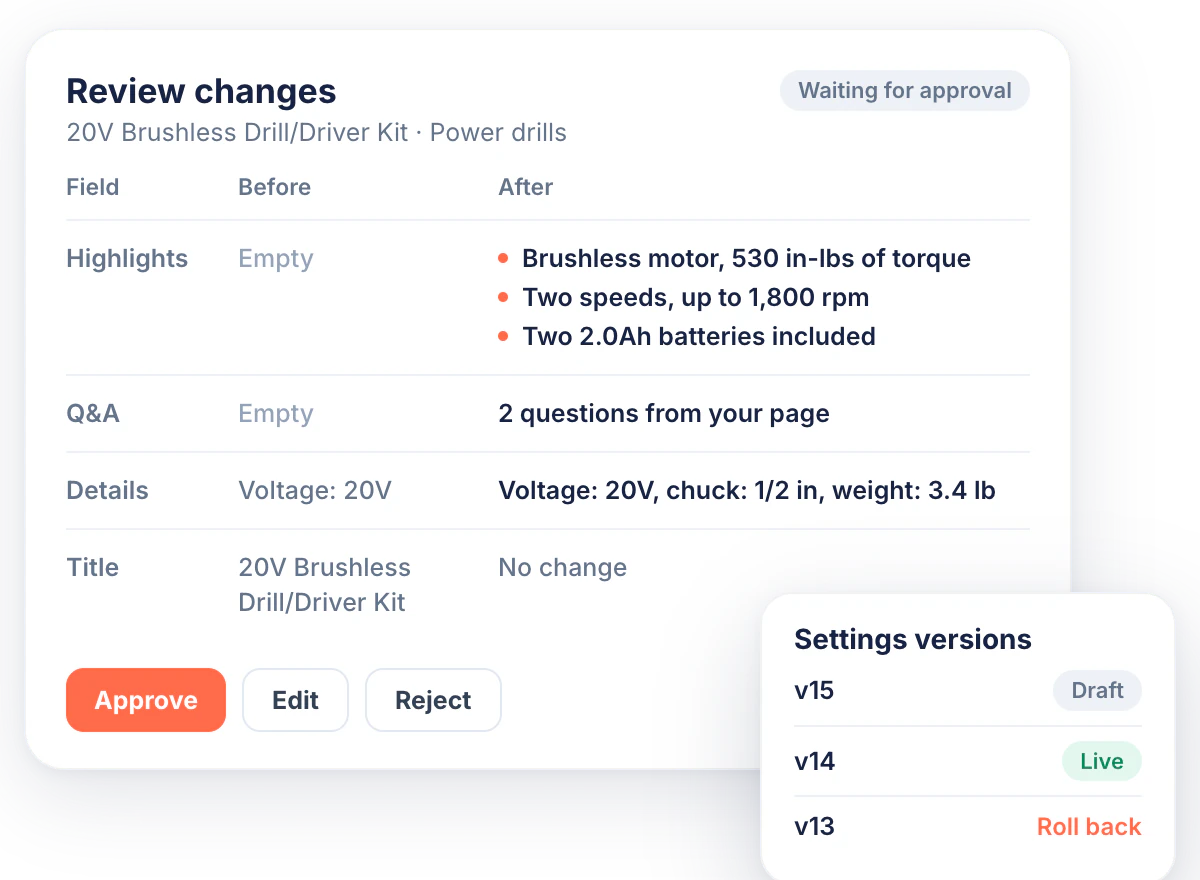
Review each change before it goes out. Start with one category, check the results, then add more.

  • Set rules per field Always fill, fill only when empty, never fill, or use a fixed value
  • Limit by category or price range Start with one category, then expand to the rest of the catalog
  • Roll back any setting Draft, live, and earlier versions, restored in one click
  • Check the delivery log What was sent, when, and what Google accepted
Impact: you decide what goes live, and any change can be undone.
Review screen for one product with the fields before and after filling, Approve, Edit and Reject buttons, and a list of settings versions with a roll back link
Measure

Per-product results from your own data

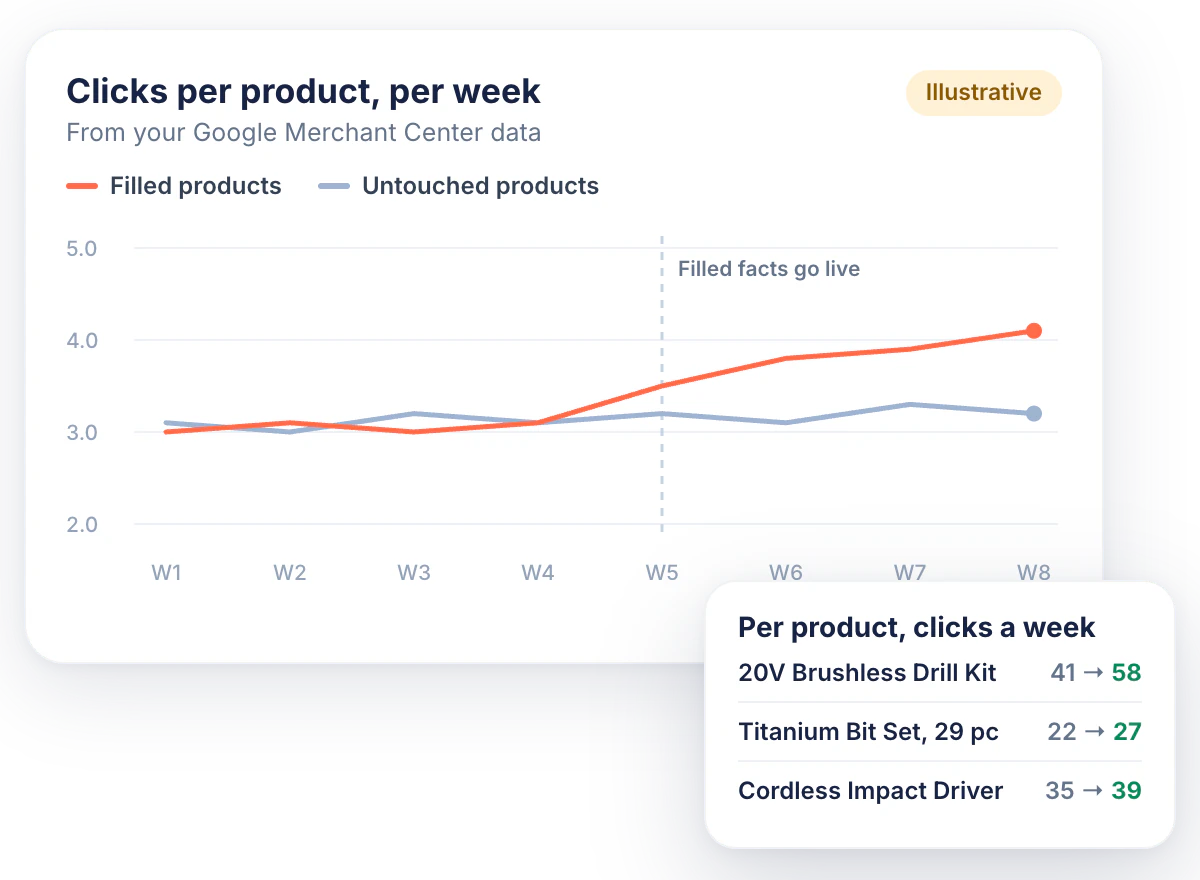
Measure the results per product in your own Merchant Center data. Compare filled products with untouched ones to see what changed.

  • Track clicks per product From Google Merchant Center, before and after filling
  • Compare filled and untouched products See the difference between the products Shelf Edge filled and the ones it did not
  • Follow AI referral traffic Visits from AI assistants to your product pages, with ChatGPT data once ChatGPT delivery is live Coming soon
  • See crawler fetches Which product pages Google and AI crawlers fetch, from EdgeComet data
Impact: a per-product answer to whether filling worked, in your own numbers.
Illustrative chart of clicks per product per week: filled products rise after the filled facts go live, untouched products stay flat. A side card lists clicks per product before and after

Start with one category in the
Shelf Edge Alpha

Our team connects your site and your feed, you approve the first changes, and you see the results per product.

Results per product
You approve every change

Shelf Edge vs. feed tools and AI prompt trackers

Shelf Edge works next to your feed tool. It adds facts to the feed you already have and does not replace the tool.

Shelf Edge

Feed tool

AI prompt tracker

Sends feeds to Google
Supplemental feed in Merchant Center
Yes
No
Fills facts from your own pages
From your rendered product pages
No
No
Checks the feed against the live page
Price, stock, and title, before each push
No
No
Different facts per destination
Each destination gets the fields it reads
Partly
No
Approval and rollback
Approve each change, roll back in one click
Partly
No
Results per product from your own data
Clicks per product from your Merchant Center
No
Sampled prompts
Sends feeds to Google
Supplemental feed in Merchant Center
Fills facts from your own pages
From your rendered product pages
Checks the feed against the live page
Price, stock, and title, before each push
Different facts per destination
Each destination gets the fields it reads
Approval and rollback
Approve each change, roll back in one click
Results per product from your own data
Clicks per product from your Merchant Center
Sends feeds to Google
Yes
Fills facts from your own pages
No
Checks the feed against the live page
No
Different facts per destination
Partly
Approval and rollback
Partly
Results per product from your own data
No
Sends feeds to Google
No
Fills facts from your own pages
No
Checks the feed against the live page
No
Different facts per destination
No
Approval and rollback
No
Results per product from your own data
Sampled prompts

Shelf Edge for agencies

Offer your e-commerce clients better product data for AI shopping as a new service, with no code changes on their sites.

Learn more about EdgeComet for agencies
  • Manage all clients in one account Each client approves its own changes
  • Set up each client in a few steps Connect the client's site to EdgeComet and add their Merchant Center feed
  • Report results per product Clicks per product from each client's own Merchant Center data, ready for the monthly review

Part of the EdgeComet platform

Shelf Edge fixes the product feed. When the problem is on the product page itself, other EdgeComet features fix it there.

Edge SEO

Fix missing facts and markup on the product page, without developers.

Discover Edge SEO

Feed checks

Find problems in your product feed on each fetch, not once a quarter.

E-commerce features

Action Board

See missing product facts as tasks on one board, next to your other SEO fixes.

Discover Action Board

AI bot data

See which product pages AI crawlers fetch and what each crawler received.

Discover Log Analyzer

Join the Shelf Edge Alpha

Shelf Edge is in Alpha with a small group of stores, and our team sets up each one. Google delivery is live. ChatGPT delivery Coming soon

Who it is for

  • You sell through Google Merchant Center
  • You have a product feed today
  • Your catalog is too big to write facts by hand

What you get

  • Hands-on setup of EdgeComet and your feed by our team
  • A direct line to the people building Shelf Edge
  • First access to ChatGPT delivery Coming soon
  • A say in what we build next

Apply for the Alpha

Who are you?
ChatGPT shopping is US only today.

All your questions answered

No. Shelf Edge adds a supplemental feed in Merchant Center. Your main feed and your feed tool stay as they are.

Not on Google. Google ignores AI-written titles when your own title exists. Shelf Edge leaves your titles alone.

No. A supplemental feed only adds facts to products that are already in your feed.

Yes, within Google's rules. Shelf Edge follows them: no promotional text, no prices or shipping in highlights, no repeats. Facts from your pages always come first.

Two connections. Your site connects to EdgeComet, which renders your product pages for Shelf Edge. Only bot requests go through EdgeComet, and your visitors load your site as before. Your Merchant Center account connects with the one permission level Google offers, read and write. Shelf Edge writes only to its own supplemental feed, and only after you approve the changes.

Fix it or remove it, or roll back to an earlier version in one click.

ChatGPT delivery is Coming soon. Alpha members get it first. ChatGPT shopping is US only today.

Any store with a Google Merchant Center feed and a site EdgeComet can connect to: through Cloudflare, Fastly, AWS, Nginx, or a custom setup. The store platform itself does not matter.

No code changes are needed. On Cloudflare, you connect EdgeComet from your Cloudflare account in about a minute. On Fastly, AWS, or Nginx, it is a routing change, and our team sets it up with whoever manages your CDN. Then you add your Merchant Center feed.

Look at clicks per product in your own Merchant Center data. Shelf Edge compares the products it filled with the ones it left untouched. You see the difference in your own numbers.

Get your product feed ready
for AI shopping

Join the Shelf Edge Alpha. Google delivery is live, with ChatGPT delivery next Coming soon

Set up by our team
No code changes on your site