JavaScript websites have become the norm over the past few years, and SEOs have more or less learned to live with them. Plenty of sites have migrated from aging PHP-based CMSes to modern React frontends. Those migrations usually mean a faster, nicer experience for users, but from an SEO perspective they come with their own set of problems. The biggest one is making sure all the content actually renders, so Googlebot and AI bots can see it, and that nothing breaks along the way.
The trouble for the average SEO is that these problems are technical. Debugging a JavaScript website looks much more like developer QA than SEO work. An SEO manager isn’t a JavaScript developer and shouldn’t have to know how a JS application works under the hood; ultimately, the dev team fixes these issues anyway. Still, this is the reality we work in now, and we need some way to understand what’s going on before we can even describe a problem to a developer.
Plenty of good guides explain how to debug the rendering process on a website. I’ve been writing code for 15 years, and when I read them, I struggle to imagine how an SEO without a development background gets through them. With Claude and Playwright MCP, the process gets much simpler: Claude does the technical digging, and you get findings in a form a developer can pick up and act on.
What is a JavaScript website?
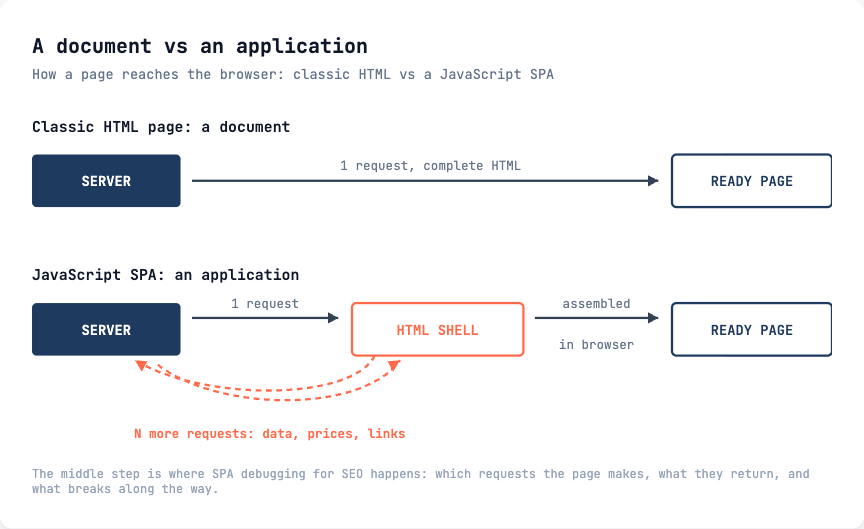
HTML was designed as a document. The page arrives from the server self-contained, with everything already in it, and that’s still what a search engine expects when it requests a URL.
These days, an HTML page is often an application instead. The server sends a small HTML shell, and the JavaScript inside it makes more requests back to the server and assembles the page right in the user’s browser. The page stops being a document and becomes an application.
A JavaScript website isn’t defined by its framework. When SEOs say “JavaScript site”, they usually mean React, Angular, Next.js, or Vue, but the label really depends on how much of the page gets assembled through requests in the browser. By that measure, an ordinary Magento or WordPress shop can behave exactly like a single-page application, depending on what the developers put into it. We’ll see this later with real numbers from two Magento stores.
Most SPA debugging for SEO comes down to that middle part: which requests the page makes, what they return, and how the page gets rendered.
Chrome DevTools
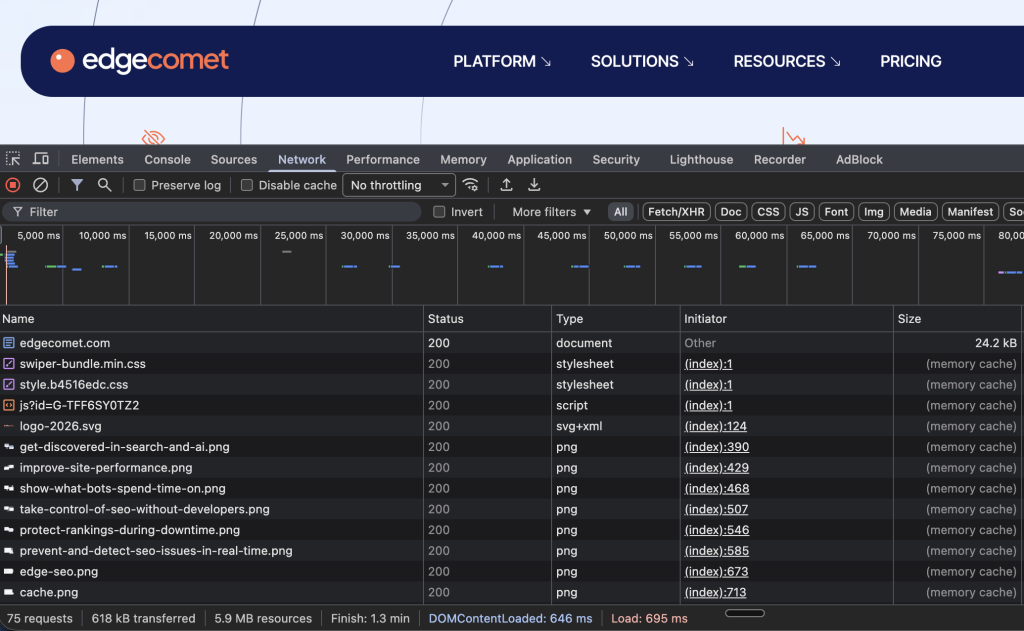
You’ve almost certainly used Chrome DevTools: right-click a page, choose Inspect, and you get the HTML, the console, the network requests, and plenty of other debugging information.
What’s less well known is how it works. Chrome has a rendering engine and a debugging protocol. DevTools is essentially a separate app living inside the browser: it connects to the browser core over that protocol and displays whatever debug information comes back. That design matters here, because anything DevTools can show you is also available to any other program that speaks the same protocol.
Using Claude and Playwright MCP
The whole idea is to stop digging through DevTools ourselves. A single page can fire off hundreds of requests, and working out what each one does is hard even for a developer. Claude is good at exactly this kind of work, and it now has the machinery to connect to Chrome over the debugging protocol and read the same data DevTools shows us.
Playwright MCP is Microsoft’s MCP server for browser control. One command adds it to Claude Code:
claude mcp add playwright npx @playwright/mcp@latestAfter that, Claude drives a real Chrome and gets a set of tools for it: browser_navigate opens a URL, browser_network_requests lists everything the page requested, browser_console_messages shows errors and warnings, browser_evaluate runs JavaScript against the loaded page, and browser_snapshot returns the accessibility tree.
To check that everything works, start with a simple prompt:
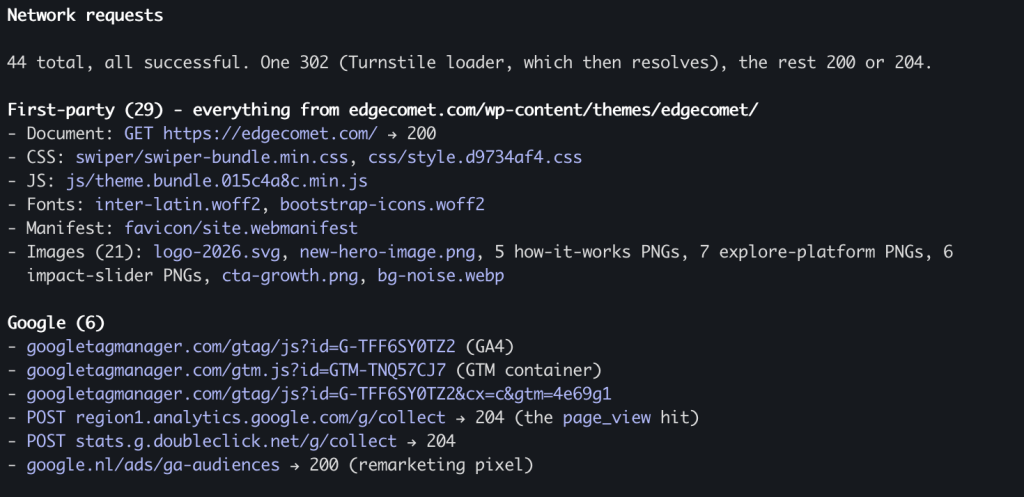
Open https://edgecomet.com with Playwright and tell me what you see on the page. Then list the network requests it made along the way.Claude opens a Chrome window and comes back with a list of requests, you’re set.
The browser can also be configured differently: it can identify itself as Googlebot, block specific trackers, or emulate a phone. These are startup options of the MCP server, and you don’t need to learn them. Just tell Claude what you want:
Reconfigure the Playwright MCP server so the browser uses the Googlebot user agent.Set up Playwright MCP to block all requests to scripts.clarity.ms. I want to see what breaks without that tracker.Make the browser emulate a Pixel 10 so I can check the mobile version.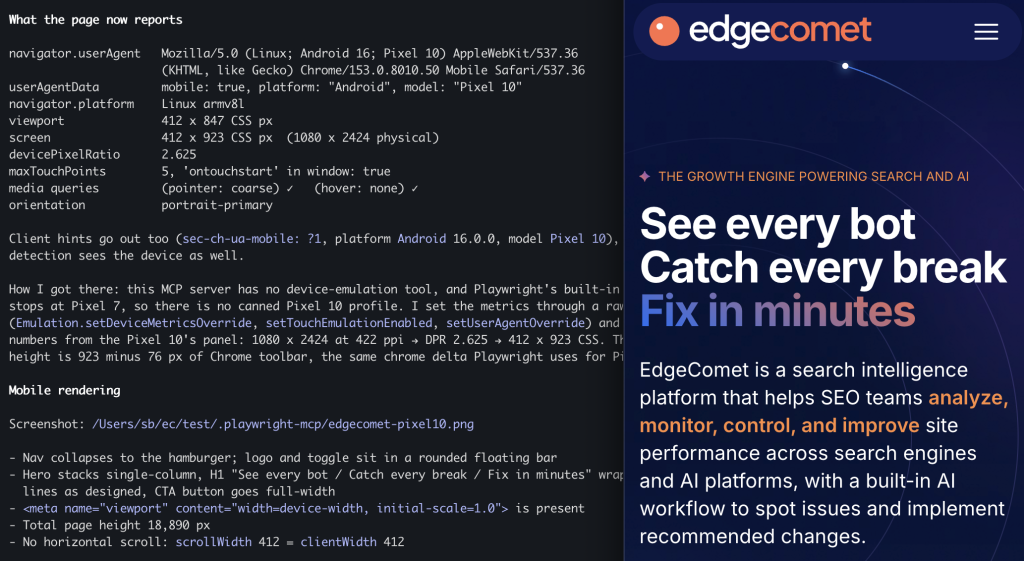
The Googlebot user agent is the fastest way to catch a site that serves crawlers something different.
Googlebot and Page Requests
The key thing to remember is that Googlebot has to fetch the AJAX resources a page needs before it can render it, and every one of those fetches costs crawl budget. If a page needs 50 extra requests before its HTML is complete, crawling it costs far more than a single request.
In practice, it’s not a simple multiplication, because Google caches resources. Its documentation says: “Googlebot caches aggressively in order to reduce network requests and resource usage. WRS may ignore caching headers.” Google has also said this render cache can hold a resource for up to 30 days.
Keep in mind that this caching cuts both ways. If Google cached the response that carries, say, your related products or a category listing, it can keep rendering your pages with that stale copy for weeks. You update the content on your side, and Google simply doesn’t see it until the cache expires.
What doesn’t get reused:
- API and XHR calls with per-page parameters, because the URL is different every time
- cache-busted URLs, where a build hash or a timestamp changes on every deploy
- POST requests, which the render cache doesn’t cover at all
- anything Googlebot decides to skip; Google says it “continuously analyze[s] and identif[ies] resources that don’t contribute to essential page content and may not fetch such resources”, which is fine when it skips your session recorder and much worse when it guesses wrong about the call that carries your prices
Worth knowing: the cheapest win in this area has nothing to do with JavaScript. Google’s crawl budget documentation asks you to support 304 (Not Modified) responses. If a page hasn’t changed since the last crawl, a 304 lets Google reuse its copy, and your server sends nothing at all.
What to look at in website network requests?
Broadly, a page’s requests split into two groups: useful and not useful.
Useful requests load the information the page is built from: product catalog, prices, descriptions, images, internal links, structured data. When one fails, content goes missing from the version of the page a crawler indexes, and you won’t notice it by looking at the page in a browser.
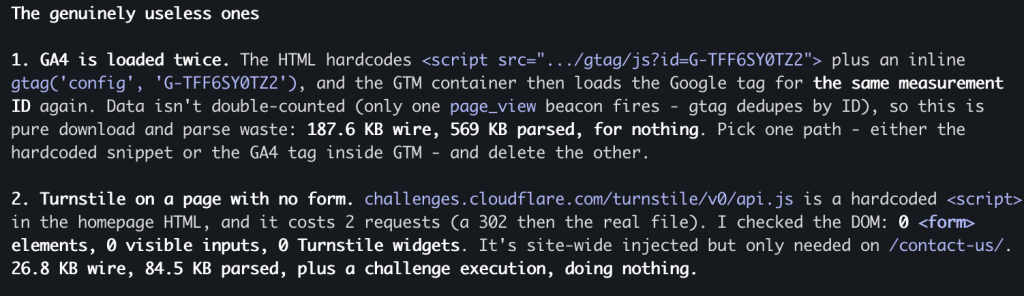
The not-useful ones are mostly tracking: analytics, session recording, consent management, A/B testing, chat widgets, payment SDKs. None of it adds anything to the page content, and all of it still costs time and requests.
The analysis has a few targets.
First, broken requests: failures, 4xx, 5xx, timeouts. A stylesheet that 404s is a cosmetic problem. A product data endpoint that 500s once in twenty crawls means a page gets indexed without its content, and nobody knows why.
Second, POST requests. The render cache doesn’t cover them, so every POST gets fetched fresh on each render, and the render waits for it. Page content arriving over POST is the first thing to fix; tracking over POST is merely wasteful.
Third, duplicates: the same URL requested more than once in a single page load, or the same image fetched under different cache keys. That’s almost always a bug, and usually a cheap one to fix.
Fourth, requests that aren’t needed for rendering and can be blocked in robots.txt. Blocking only works on your own domain: disallowing /customer/section/load in your robots.txt does stop Googlebot from fetching it, but your robots.txt says nothing about scripts.clarity.ms, because for resources on a third-party host Googlebot reads that host’s rules, not yours. Third-party trackers, you get rid of by removing them outright or loading them after render.
Hands-on with Claude
Both examples below are ordinary live e-shops running Magento 2.
The first prompt does the inventory:
Open [URL] with Playwright and wait until it settles. List every network request the page made.
Group them into first-party and third-party, and by what they do: page content, images, analytics, chat, payments, consent.
Flag every request that failed or returned 4xx or 5xx, every POST, and every URL requested more than once. Then tell me which of these Googlebot actually needs in order to render the page.
On the auto parts store, a single product page produced 74 requests. Nineteen were POSTs, and none carried page content. The checkout widget alone accounted for 28 requests and pulled in four more from Apple Pay. The same shipping-estimate endpoint got POSTed four times, identically, in one page load.
The bathroom appliances store has a different profile. One category page produced 566 requests across 33 different hosts:
- 244 separate first-party JavaScript files, plus 37 more from third parties; that’s RequireJS loading the site module by module instead of one bundle
- 190 images
- 18 POSTs, all of them analytics: GA4, Clarity, Bing UET, two email platforms, a chat widget, a price comparison pixel, and a server-side tag manager endpoint
- 16 calls to one internal endpoint with a single product ID per call, filling one block of the page one product at a time
- 2 web fonts requested from another company’s domain and blocked by CORS on every page load, probably since the day the theme was copied
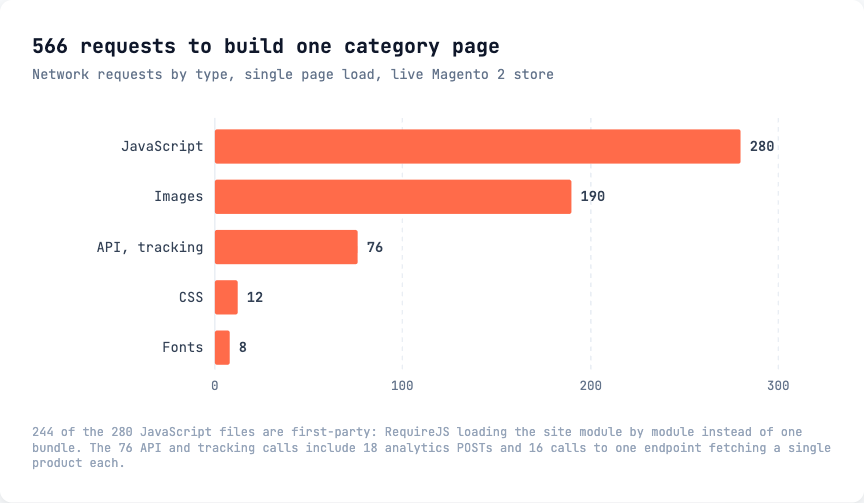
The homepage came in at around 460. Those 16 product calls illustrate the two groups nicely: the data itself is genuinely needed; fetching it 16 times instead of once is not.
The second prompt answers the question the first one can’t:
Fetch the raw HTML of the same URL without executing JavaScript, and compare it to the rendered DOM. Tell me what exists only after JavaScript runs: H1, price, stock status, description, product links, canonical, structured data. List anything in the DOM that is missing from the raw HTML.On both stores, the answer came back clean: nothing a crawler needs depended on JavaScript.
The third prompt looks for systemic problems rather than page-specific ones:
Do the same for the homepage and one category page, then tell me which requests appear on every template. Those are the ones worth fixing first.The last prompt turns the findings into something a developer will act on:
Write this up as a ticket for the frontend team. One section per issue. For each one: the exact request URL, what happens, why it matters for crawling or indexing, and a suggested fix. Order by impact. Leave out anything cosmetic.“The site makes too many requests” isn’t a ticket.
“The shipping-estimate endpoint gets POSTed four times per product page view, here’s the URL, Google doesn’t cache POST responses, so every render pays for all four, please deduplicate” is a ticket, and once the browser has told you what happened, it takes two minutes to produce.
Is a Magento Shop a JavaScript Site?
Neither store runs React, Angular, or anything like that, and both server-render their content properly. On the bathroom store’s category page, the H1, all 104 product tiles, 106 price strings, and the JSON-LD were sitting in the raw HTML before a single line of JavaScript ran. On the auto parts product page, the price and four JSON-LD blocks were in the source. On the rendering question, both pass.
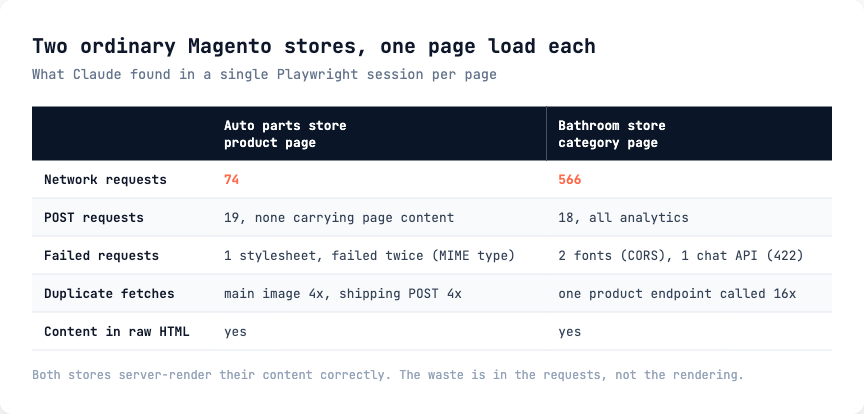
In request terms, though, they behave like heavy single-page applications: 74 requests on a product page is more than plenty of React apps make, and 566 on a category page is worse than most of them. The same goes for WordPress: the wrong plugin stack produces the same picture.
The request count comes from what the developers added, not from the platform underneath, so you can’t guess it from the tech stack.
AI Bots and JS Rendering
Googlebot is a sophisticated crawler with a rendering queue. It executes JavaScript, imperfectly and on its own schedule, but it does.
AI bots are simple text fetchers. GPTBot, ClaudeBot, PerplexityBot, OAI-SearchBot, ChatGPT-User, and Claude-User execute no JavaScript at all; we confirmed this for each of them in our testing on OpenSeoTest. If content isn’t in the HTML your server returns, it doesn’t exist for them.
ChatGPT does rely on Google/Bing search for discovery, so a page can appear in an answer even though no AI crawler ever rendered it. That doesn’t help at the moment it matters, though. When ChatGPT fetches your product page to ground an answer about price, availability, or specifications, it reads what the server sent. If the price arrives over XHR two seconds later, the answer gets written without it.
Where EdgeComet Fits
Everything above is diagnosis: one page at a time, from one browser, on one run. It doesn’t tell you what Googlebot actually received, on which URLs, or whether a fix held after the next deploy.
At EdgeComet, we build a platform that closes that gap. It sits as a proxy layer in the bot request path, between the site and everything that crawls it. Cache is the core of it: bots get served in under 15 milliseconds. JavaScript rendering is one module on that layer, pre-rendering pages so the crawlers that can’t execute JavaScript receive finished HTML instead of a shell. And because every bot request passes through the layer, the log analysis runs on real in-path traffic, so you can see, per bot, what was served on every request, not just the one you happened to check.
FAQ
How do I check whether a page needs JavaScript to show its content? Fetch the raw HTML the server returns, then compare it to the DOM after the page has finished loading. Anything present in the second and missing from the first depends on JavaScript. Claude with Playwright MCP does both in one prompt. View Source against Inspect Element does the same thing by hand, more slowly.
Do all the requests a page makes count against crawl budget? Partly. Googlebot caches resources aggressively across a crawl, so a shared bundle costs one fetch rather than one per page. Per-page API calls, cache-busted URLs, and POST requests get no such treatment, and that’s where the waste concentrates.
Why do POST requests matter more than GETs? Google’s rendering cache doesn’t cover them. Every POST gets fetched fresh on each render, and the render waits for the response. Content that only arrives over POST is the first thing to move to a GET.
Can I block tracking requests in robots.txt to save crawl budget? Only the ones served from your own domain. A Disallow in your robots.txt applies to your URLs. For a resource on a third-party host, Googlebot reads that host’s robots.txt, not yours. To stop a third-party script, you remove it or defer it.
Do AI crawlers run JavaScript yet? No. In our OpenSeoTest checks, none of GPTBot, ClaudeBot, PerplexityBot, OAI-SearchBot, ChatGPT-User, or Claude-User executed JavaScript. They read the HTML the server returns and nothing else.
Is it safe to point Playwright MCP at a production site? It opens an ordinary Chrome and loads the page like any visitor would. Keep the work read-only: navigate, list, compare. Don’t let an agent click its way through checkout on a live store.
Conclusion
JavaScript websites are hard for the average SEO specialist to debug, and that’s the gap Claude with Playwright MCP closes: it reads the browser’s debug output for you, flags what’s broken and what makes no sense, and turns the findings into a ticket the dev team can act on.
Start with the request list, because broken requests, POSTs, and duplicates are where crawl budget goes. Judge a site by what it requests rather than by its framework. The two Magento stores here produced 74 and 566 requests on a single page while server-rendering their content correctly. And check what survives with JavaScript switched off, because that’s exactly what every AI bot sees, and none of them come back for a second pass.