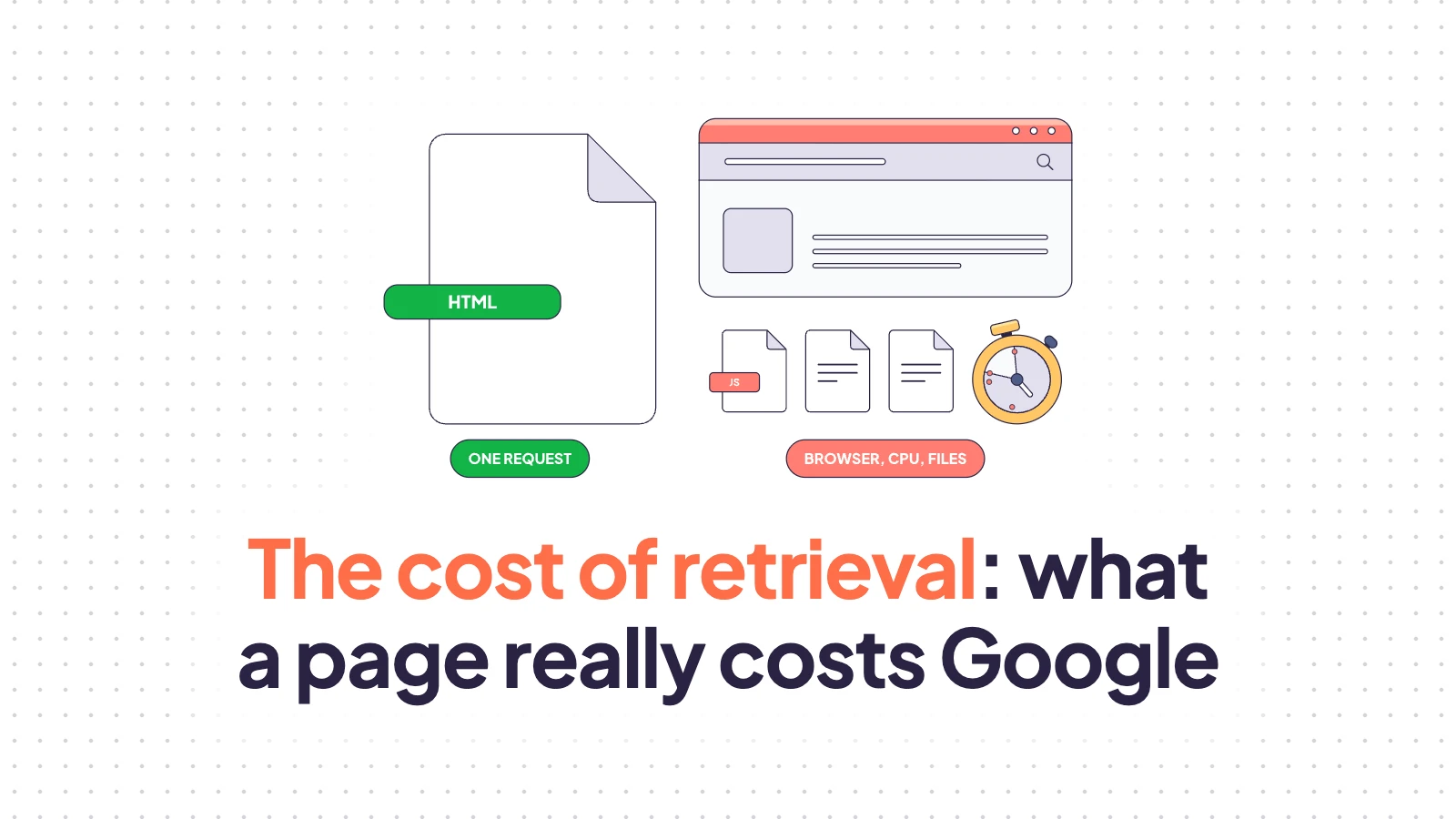
I started digging into crawl budget around 2016, and in 2018 I gave my first talk built on crawl data at scale. Since then I’ve given dozens of talks and had more conversations with colleagues and clients about crawl budget than I can count. You’d think a topic that old would be exhausted by late 2026, but there’s still a part of it I don’t see discussed enough: the cost of retrieval, or how much it costs Googlebot to get one of your pages.
I first heard the term from Koray Tuğberk Gübür, who kept insisting that pages have to reach bots fast. It matched what I had been seeing in client data for years: a direct correlation between speed, crawl budget and indexation, where faster sites got crawled more and got more of their pages indexed.
Koray’s definition is broad: cost of retrieval is the ratio between what a search engine spends crawling, understanding, evaluating, indexing, ranking and serving a source, and the value it gets back. That reaches all the way into topical authority and content structure, and it’s a practitioner’s framework, not a metric Google publishes.
I want to cover a narrower slice, the part you can measure in requests and milliseconds: what it takes to fetch and render a page.
Plain HTML vs JavaScript pages
Google crawls an enormous number of pages every minute. Ten years ago most of them were plain HTML documents: cheap to fetch, cheap to parse, with the content sitting right there for indexing.
Today nearly every page ships JavaScript that has to run before the page is complete, and running it is expensive. A crawler that only downloads HTML needs one request per page, while a crawler that renders needs a browser, CPU time, and every file and API response the page asks for along the way.
A popular belief still holds that Google indexes in two waves: it fetches the HTML now and renders it days or weeks later, whenever it gets around to it. Google itself introduced that model at I/O in 2018, and it no longer describes what happens. Google’s JavaScript documentation now says that “Googlebot queues all pages with a 200 HTTP status code for rendering, unless a robots meta tag or header tells Google not to index the page.” In 2024, Vercel and MERJ analyzed more than 100,000 Googlebot fetches on nextjs.org. Every HTML page got a full render, with a median delay of 10 seconds between crawl and render. The tail stretched to about 3 hours at the 90th percentile, which is still hours rather than weeks.
The exceptions are the ones you’d expect. Pages with a noindex in the initial HTML don’t get rendered, and neither do pages that return errors or redirects.
Which raises a fair question. If Google renders everything anyway, why should anyone still care about crawl budget, JavaScript and performance?
Because rendering everything doesn’t mean rendering everything for free.
What a render costs
To fetch and render a page, your SEO crawler has to spend resources, and Googlebot has to spend them too. Some sites render quickly with no drama. Others run megabytes of code and fire dozens of background (AJAX) requests to the server before the full content appears.
You can watch this happen in the Network tab of Chrome DevTools. Some of those requests are tracking pixels, analytics, consent tools and chat widgets. Others carry the page itself: the product listing, the reviews, the description, the price.
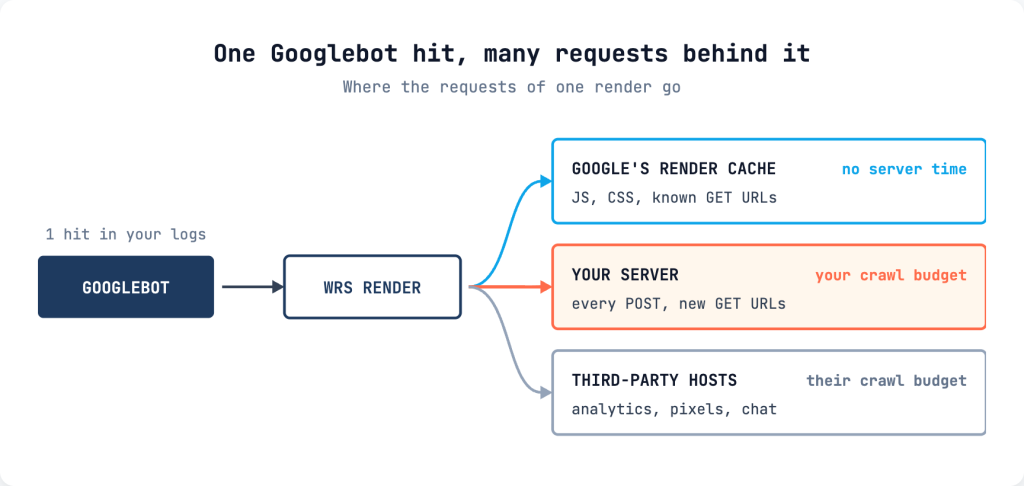
Googlebot goes through the same motions. Martin Splitt and Gary Illyes described the flow in December 2024: Googlebot downloads the HTML and hands it to the Web Rendering Service (WRS), which then uses Googlebot to download every resource the page references and builds the page the way a browser would. Their post is blunt about the consequence: “Crawling the resources needed to render a page will chip away from the crawl budget of the hostname that’s hosting the resource.”
A single Googlebot hit on a product page in your logs can stand for 50, 100 or 200 requests behind it. Crawl budget is the total number of requests Google makes to your host, AJAX calls included, not the number of HTML pages it fetches.
I’ve seen what that looks like at scale. In 2020 I published a log analysis on the JetOctopus blog of a real-estate site with more than a million pages. Out of 38 million Googlebot requests in a month, 23.5 million went to AJAX content, which means 62% of the crawl budget paid for background requests instead of pages.
GET and POST
Background requests come in two main types. GET requests read information and change nothing on the server, and most requests on any page are GETs. POST requests exist to change something: when you log in, post a comment or submit a form, the browser sends a POST.
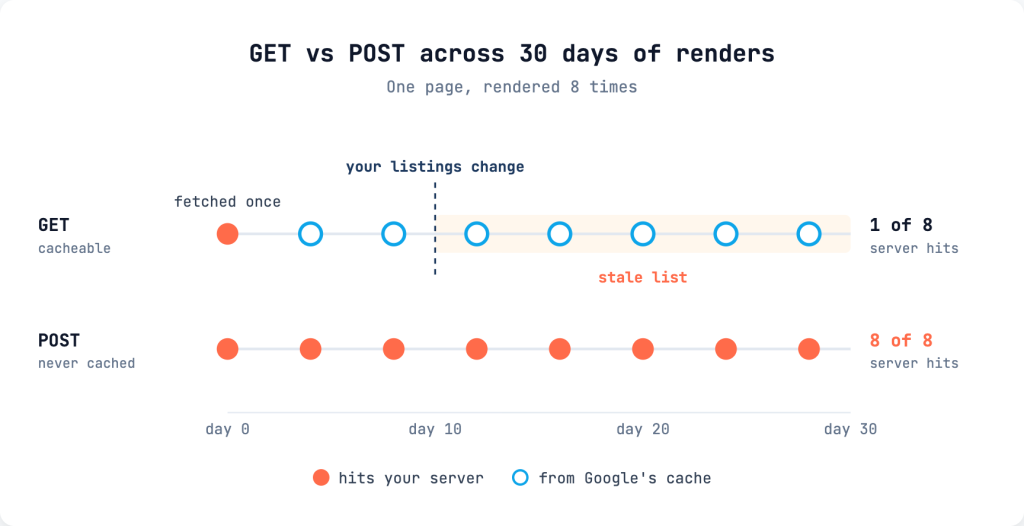
The difference matters because Googlebot caches GET responses. Instead of asking your server again, it fetches a resource once, stores the response, and reads from its own storage whenever another render needs the same URL. Google’s documentation puts it plainly: “Googlebot caches aggressively in order to reduce network requests and resource usage. WRS may ignore caching headers.” The December 2024 post adds that WRS keeps resources for up to 30 days and that the cache lifetime “is unaffected by HTTP caching directives.” Your cache headers don’t enter into it.
Google does this for speed. Your server might need a second to answer, while a lookup in Google’s own storage takes around a millisecond. That’s three orders of magnitude, repeated across billions of renders.
The flip side gets less attention than it deserves. Google’s post names JavaScript and CSS, but in my experience GET responses from your own API get the same treatment. If your listing page loads its products through a background GET, Google can keep rendering that page with a product list that’s weeks old: the HTML is fresh, and the list inside it isn’t. For classifieds, job boards, real estate and any site where listings turn over daily, that’s an indexing problem you’ll actually run into.
POST requests are worse, for the opposite reason. Their responses can’t be cached by design, because the same POST can legitimately return something different every time. Search Engine Land reported back in 2019 that WRS doesn’t cache XHR POST responses and that each one counts against crawl budget. On every render of every page, Googlebot sends the POST again and waits for your server to answer, spending that time on one page when it could have fetched ten others.
The cost formula
Counting requests is a good start, but requests aren’t the currency. Time is.
Google’s current crawl budget documentation defines the crawl capacity limit this way: it “limits the total amount of time your server spends holding connections open for Google, factoring in both the number of parallel connections and their duration.” Gary Illyes described the same mechanism on the Inside Googlebot episode of Search Off the Record: when a site’s connection times keep climbing, Google’s crawling infrastructure throttles it, and a 503 slows it down even more.
That makes server time the right unit for the cost of a page:
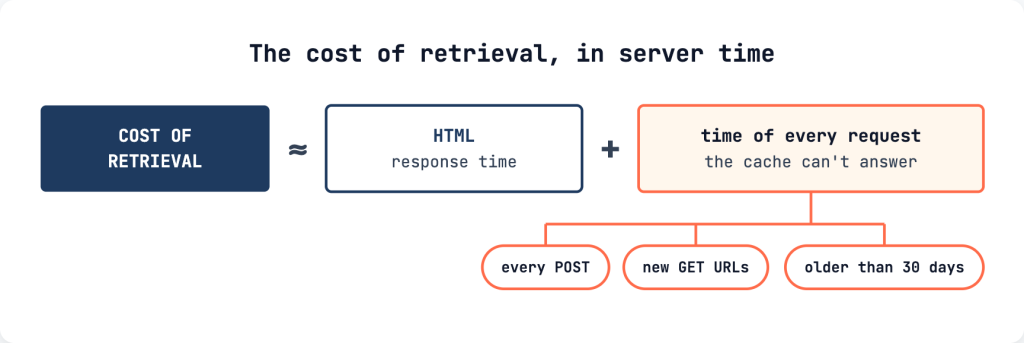
The render cache can’t answer:
- every POST, on every render
- GET URLs it hasn’t seen before, such as per-page API calls with a product or category ID in the URL, or script bundles whose names change on every deploy (Google’s own post says to “use cache-busting parameters cautiously”)
- anything that has aged out of the 30-day window
Suppose you have two product pages. Page A comes out of a cache in 15 milliseconds, with the content already in the HTML and the shared scripts and CSS sitting in Google’s render cache. Page B takes 1.2 seconds to generate, then fires four POSTs to your own endpoints at 400 ms each and twelve per-product API calls at 150 ms each. Page A costs 0.015 seconds of server time, and page B costs 1.2 + 1.6 + 1.8 = 4.6 seconds, roughly 300 times more. With the same capacity, Google could fetch about 300 pages like A for every page like B.
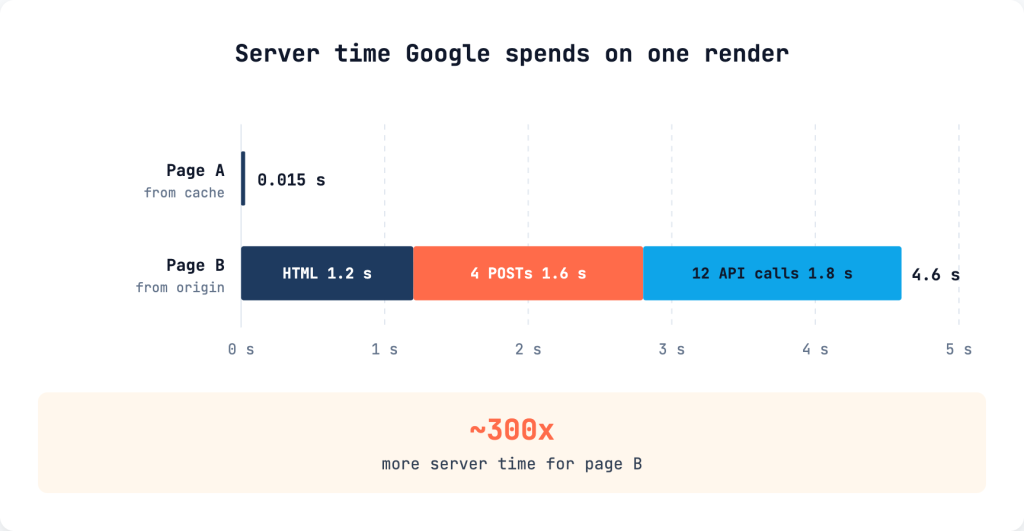
Third-party requests stay out of your total. Google charges them to the hostname that serves them, which means your analytics vendor pays for its own pixel. They can still stretch the render when the page waits for them, but they don’t eat your crawl budget.
The rule behind the formula fits in one sentence: the harder a page is to render, and the more requests it makes that the cache can’t absorb, the higher its cost of retrieval.
The other side: demand
Cost is one side of the ledger. The other side is how badly Google wants your pages.
Google says crawl demand varies with a site’s size, update frequency, page quality and relevance compared to other sites. In practice, a well-established brand with real authority gets crawled and rendered as much as it needs, because people search for it and Google can’t afford to show a stale copy. That’s why some notoriously heavy sites never seem to have a crawl budget problem: their demand covers the cost.
If you’re a new site built on modern, shiny React, the math works against you from both sides: low demand and a high price per page. Good luck.
We covered the two halves in detail in crawl rate vs crawl budget. The short version is that demand moves slowly, over months of content and links, while the cost is something you can cut this quarter.
The paradox of the ordinary website
This is usually where a team relaxes. “We run an old-school site with server-side rendering and the server returns full HTML. This isn’t about us.”
JavaScript-heavy doesn’t automatically mean React or Angular, and most server-rendered sites already carry a lot of JavaScript. When I debugged two live Magento 2 stores, one product page made 74 requests. Nineteen of them were POSTs, not one of those POSTs carried page content, and one endpoint got the identical POST four times in a single page load. The other store’s category page made 566 requests across 33 hosts, including 16 separate calls to one internal endpoint, each fetching a single product.
That’s the paradox: both stores passed the rendering test. The H1, the prices, the product tiles and the structured data were all in the raw HTML. Googlebot still has to run every one of those scripts to render the page, because it has no way of knowing in advance that they add nothing.
Now multiply. A 10,000-product catalog at 74 requests per product page comes to 740,000 requests for one pass over the products, before categories, filters and the homepage. If prices and stock change daily, Google wants to come back often, and every visit pays again for everything the cache can’t serve.
How to reduce the cost of retrieval
The good news is that this cost comes down with fairly ordinary work, and it can come down a lot.
Start by looking. Take one page per template (a product, a category, a listing, the homepage) and run each through JsBug. It renders the page and lists every network request with its method, type, status, size and timing. Filter by method to see the POSTs and by type to see the XHR and Fetch calls, then open the URLs and check what each one actually loads.
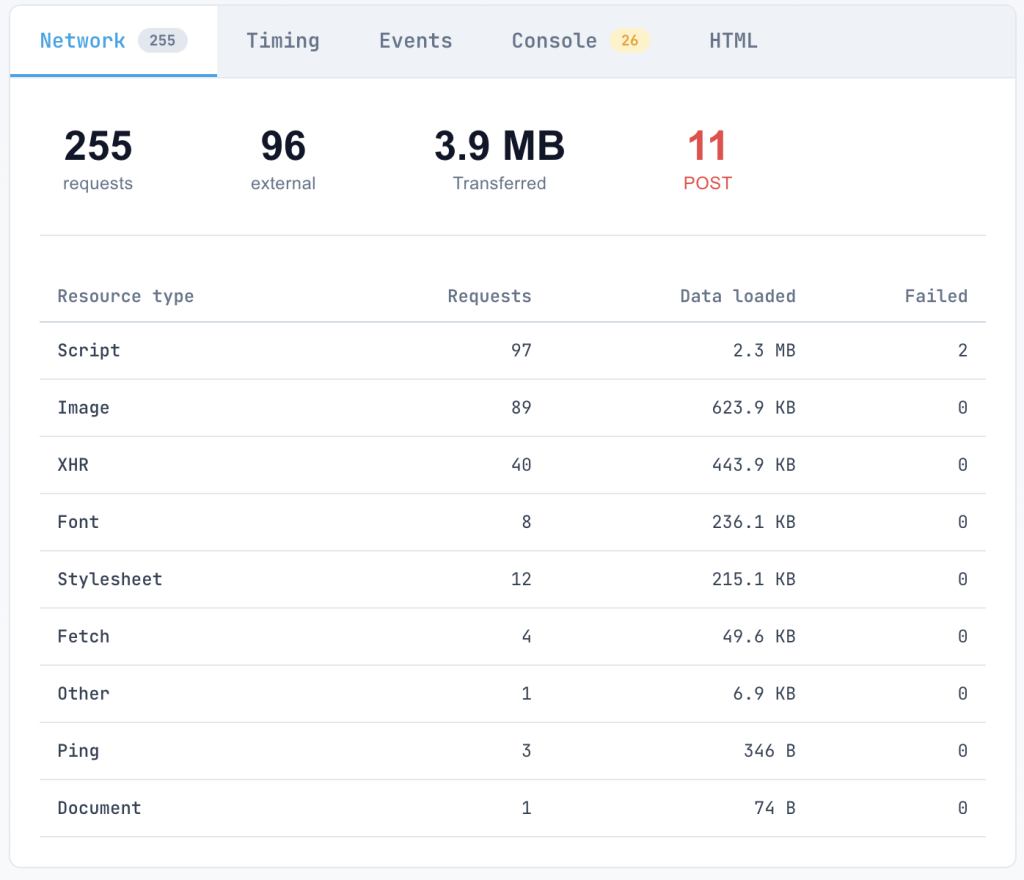
What you find falls into two groups.
Tracking, analytics, pixels, personalization and session endpoints on your own domain give a crawler nothing it needs, and you can block them in robots.txt; Magento’s /customer/section/load is a typical candidate. Two caveats apply. Your robots.txt only governs your own host: a tracker on a third-party domain follows that domain’s robots.txt, and the only fix is to remove it or load it after render. And never block anything the page needs to build its content, because Google warns that when WRS can’t fetch a rendering-critical resource, the page may have trouble ranking. After blocking, render the page again and compare.
Requests that load a real part of the content mean a conversation with your developers, and the goal of that conversation is to get the content into the HTML the server returns. Where a background request has to stay, these changes help:
- switch content requests from POST to GET, which the render cache can reuse
- batch per-item calls, because sixteen requests for sixteen products should be one
- keep asset URLs stable across deploys that didn’t change the file
- remove duplicates; an endpoint that receives the same POST four times per page view deserves its own ticket
Then make the HTML itself cheap. Cache it, and answer 304 Not Modified when a page hasn’t changed since Google’s last visit, which Google’s documentation asks for explicitly.
Check the result in your logs rather than trusting one test. The number to watch is the share of Googlebot requests that go to API endpoints instead of pages, and the Crawl Stats report in Search Console shows a similar split by file type alongside average response time.
AI bots give you one more reason to move content into the HTML. GPTBot, ClaudeBot and PerplexityBot don’t execute JavaScript at all, as our OpenSeoTest checks confirmed. For them, content that arrives through a background request doesn’t exist.
Where EdgeComet fits
EdgeComet came out of exactly this problem. The whole idea behind it was to help websites cut the cost of retrieval.
For sites that already render on the server, we serve pages to bots from our edge cache in under 15 milliseconds instead of the 2 to 3 seconds a busy origin often needs. The first term of the formula drops to almost nothing, and we see crawl budget improve on those sites from that change alone.
JavaScript sites go through prerendering. Bots receive finished HTML with the executable scripts stripped out and the structured data kept. With no JavaScript to execute and no background requests to fire, the formula collapses to one fast response.
FAQ
What is the cost of retrieval in SEO?
It’s the resources a search engine spends to get and process a page, relative to what the page is worth to it. Koray Tuğberk Gübür’s definition covers the whole pipeline, from crawling to serving. On the technical side it comes down to server time: how long your HTML takes, plus every request the render needs that Google can’t serve from its own cache.
Does Google still index JavaScript in two waves?
Not in the sense of days or weeks. Google queues every page that returns 200 for rendering unless it’s noindexed, and the Vercel and MERJ study measured a median crawl-to-render delay of 10 seconds.
Do AJAX requests count against crawl budget?
Yes. Google says resources fetched during rendering come out of the crawl budget of the host that serves them. Requests to your own API spend your budget; requests to third-party hosts spend theirs.
Why are POST requests worse than GET?
Google’s render cache keeps GET responses for up to 30 days and reuses them across renders. POST responses don’t get cached: every render sends them again and waits for your server.
Should I block tracking requests in robots.txt?
The ones on your own domain, yes, as long as the page doesn’t need them to show its content. Third-party trackers follow their own host’s robots.txt; remove or defer those instead.
Does a small site need to care?
Less. Google aims its crawl budget guide at sites with over a million pages that change weekly, or over 10,000 pages that change daily. A new site with little demand, though, feels a high cost per page much sooner than an established site of the same size.
Conclusion
Googlebot runs on rails of efficiency. It will still crawl badly built sites that fire 400 requests per page and need 30 seconds to render, because people search for them; those sites have the demand and don’t have to care.
Most sites aren’t in their country’s top 10, and for them the cost of retrieval deserves attention. It’s work you do once. Done right, it keeps paying off and gives you a stable base for everything that comes after it: content, internal linking, backlinks.