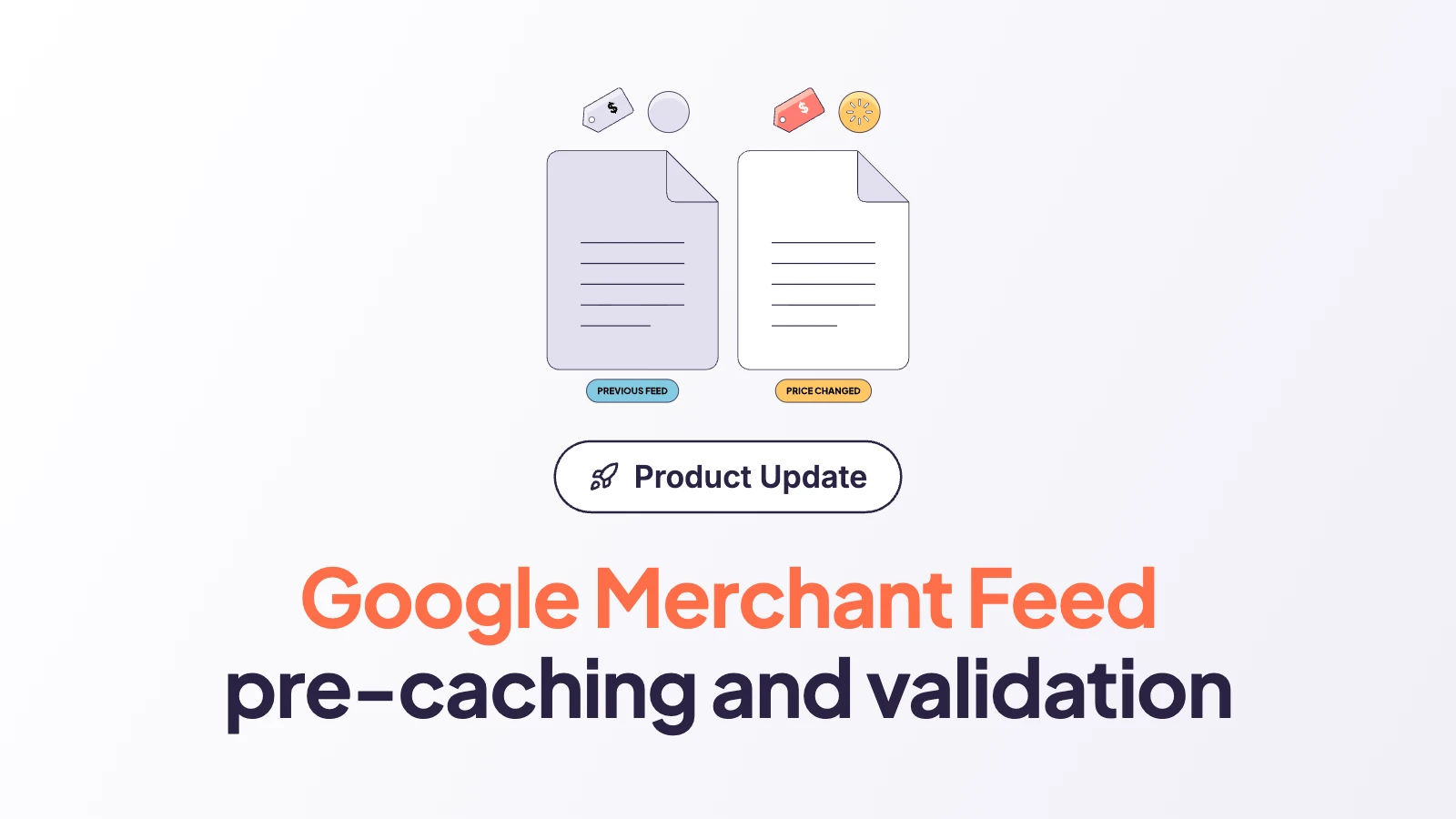
EdgeComet now reads your Google Merchant feed. Every fetch compares the feed with its previous version, re-caches the product pages whose price, availability or title changed, and runs the whole catalog through 32 checks. The report under E-commerce > Product Feed then shows what moved, what’s broken, and how much of it Google has actually fetched since.
Why the feed deserves its own report
For most online stores the merchant feed is one of the most important files on the site, and almost nobody opens it. It makes products eligible for Shopping ads and free listings, and Google doesn’t take it on trust. Merchant Center’s crawler compares the feed with the landing page and the checkout, and when the price or the availability disagree, it disapproves the item before a shopper ever sees the wrong number.
Price and availability mismatches are among the most common reasons products get pulled, and a large share of them aren’t data errors at all. They’re latency. The ERP changed the price at 3am, the feed picked it up, and the page Google fetched at 9am still showed yesterday’s figure.
We know that latency well, because it has a name in our line of work: caching. A site that serves bots pre-rendered HTML can create a mismatch entirely on its own. The feed is correct, the live page is correct, and the cached copy that Googlebot and Storebot-Google receive keeps the old price until it expires, so the product gets disapproved anyway. Merchant Center’s automatic item updates won’t save you here either; Google describes them as a safety net, and if the page it fetched was a stale cached copy, the “correction” moves your offer toward the stale price.
So we built two things on top of the feed: pre-caching driven by what the feed says has changed, and validation that runs on every single fetch.
What this means for you. The feed stops being a file that only Merchant Center reads. You see every fetch, every change and every problem in the same dashboard where you already watch Googlebot.
Keeping product pages in step with the feed
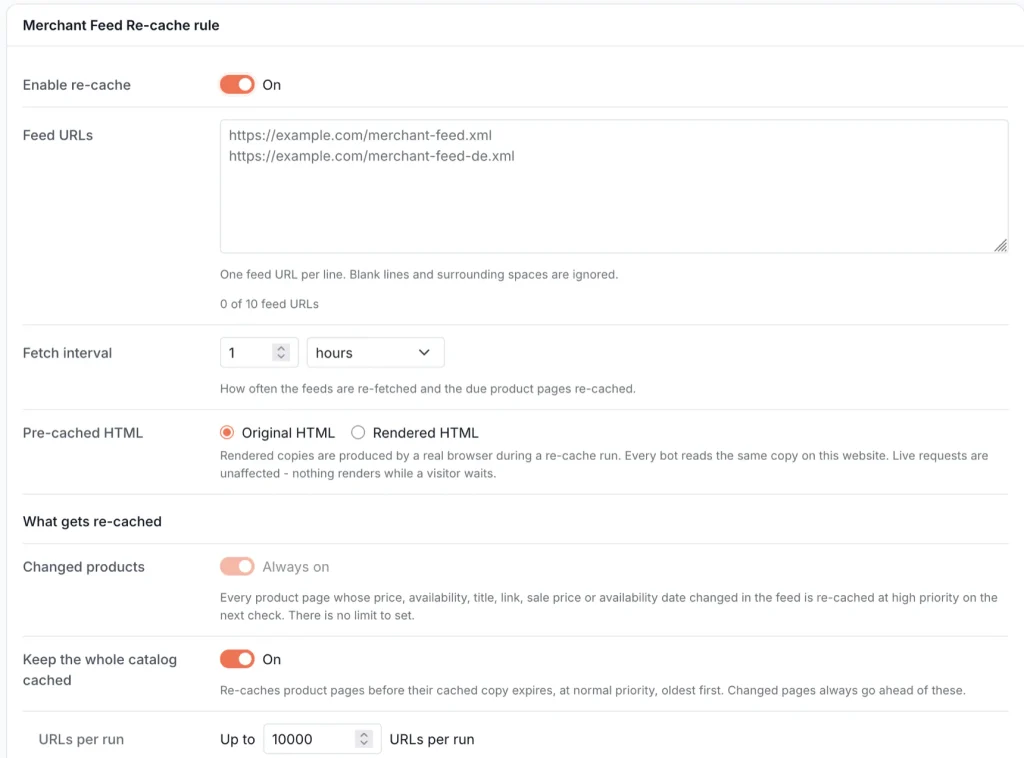
You paste your feed URL (up to ten of them) into Configuration > Caching > Merchant Feed Re-cache, and we fetch it every hour by default; you can stretch that interval to once a day. We accept RSS 2.0 and Atom feeds with Google’s g: namespace, plain or gzipped. The parser streams the document instead of loading it into memory, so a feed with a million items goes through the same path as one with fifty.
On every fetch we diff each item against the version we stored last time, and the fields fall into two groups. Page fields are the ones Google verifies against the landing page: link, title, price, sale price, sale price dates, availability and availability date. Feed-only fields, such as brand, GTIN and product type, never render on the page.
A change in a page field puts the URL in the change lane, and we re-cache the page at high priority on the next run, with no limit for you to configure. A change in the GTIN touches nothing in the cache, because the page a bot receives reads exactly as it did before.
The second lane, “Keep the whole catalog cached”, is optional. It refreshes product pages shortly before their cached copy expires, oldest first, at normal priority. You choose how many URLs a run may refresh (between 100 and 50,000) and can narrow the lane with filters on brand, product type, availability or price, and the form tells you whether your number is enough to keep the full catalog fresh at your fetch interval. Changed pages always jump the queue.
A document that isn’t RSS or Atom fails the fetch before a single item is read, because the most destructive thing a feed importer can do is read an HTML maintenance page as an empty feed and mark the entire catalog as removed. We also refuse a feed in which 99% or more of the items link outside your site’s domains, because it’s almost certainly the wrong feed for this site rather than a good feed with some bad rows.
What this means for you. When a price changes in your feed, the page Googlebot and Storebot-Google receive changes with it within one fetch interval. Nobody waits for an old cache entry to expire, and bots get a ready page instead of waiting on a render.
Spotting changes
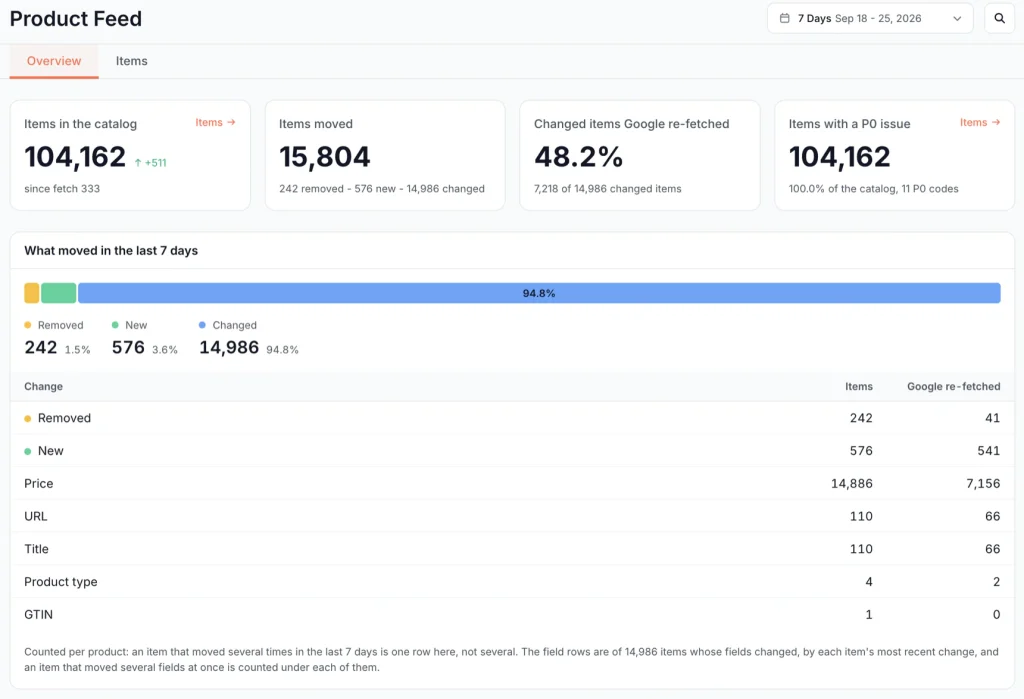
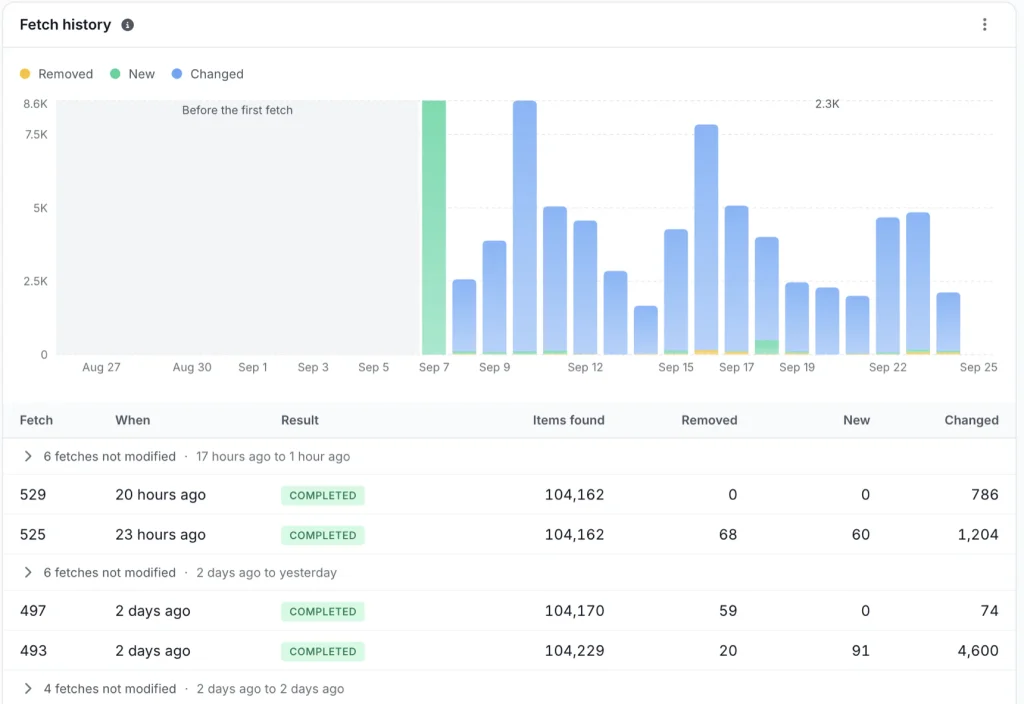
Every fetch sorts the items it touched into four classes: new, removed, page-field changes and feed-only changes. The report reads them over a period, the last 24 hours, 7 days or 30 days, and deliberately not per fetch.
Our first version anchored the report on the last fetch. A feed fetched every hour but regenerated once a night answers 304 Not Modified to most fetches, so at 9am that version told a reader nothing had changed, even though almost 800 products had moved at 3am.
The two change classes break down into the fields that carried them, because a merchant acts on “Price: 14.9k items” and not on “page-field changes: 15k”. Each item counts once per period by its most recent change, and an item that changed price and availability at once shows up under both.
EdgeComet sits in the bot request path, so we know when each Google crawler actually fetched each product page, with its IP verified, rather than guessing from a sitemap lastmod. Every movement row carries a “Google re-fetched” count, and the lead card turns it into one figure: the share of changed items that any Google crawler has fetched since the change. A card called “Waiting for Google” splits that by crawler, Googlebot, AdsBot-Google and Storebot-Google, each with the changed items it has caught up on and the ones it hasn’t.
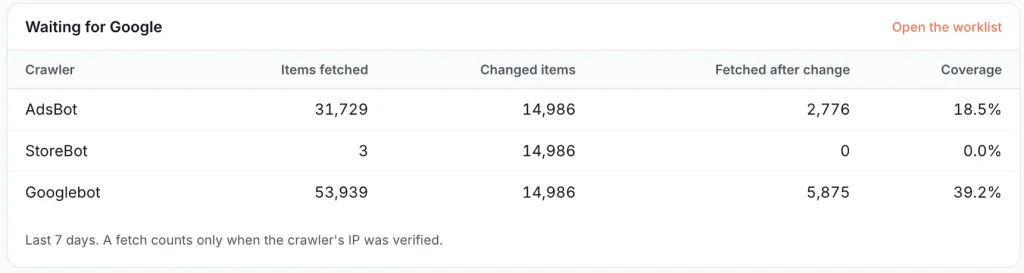
On one catalog of roughly 104k items we tested this on, 15k items changed in a single week, and Google had re-fetched fewer than half of them since. Storebot-Google hadn’t come back for a single one. The feed was fine; for more than half of those offers, Google was matching them against pages it had last seen before the edit.
When an item leaves the feed but the latest Evergreen crawl still finds its page indexable, the report flags it, because the store has stopped advertising a product that Google may still be showing. It’s then your call per item: put it back in the feed, or redirect or noindex the page.
What this means for you. Next to every change in the catalog you see whether Google has noticed it. “Changed yesterday, Storebot hasn’t been back” is a very different problem from “changed yesterday, already re-fetched”.
Validation on every fetch
Google’s product data specification is strict, and most of its rules are the kind nobody remembers until an item is disapproved: a GTIN whose check digit doesn’t add up, a sale price that isn’t below the regular price, a preorder item with no availability date. Every fetch runs the full catalog through 32 checks in four groups.
| Group | Checks | Examples |
|---|---|---|
| Feed health | 2 | a feed failed on the last fetch (error status, not a feed, parse stopped early, truncated at the item cap), a feed that has never imported |
| Item data | 20 | missing id, title, price, availability, description or image link; price without a currency; GTIN failing its length or GS1 check digit; sale price not below the price; preorder or backorder with no availability date; duplicate ids; title over 150 characters |
| Links & scope | 6 | missing or malformed link, links outside your configured domains, image links not on HTTPS, tracking parameters in the link |
| Coverage | 4 | changed items Google hasn’t re-fetched, pre-cache failing on the landing page, no Google fetch in 30 days, left the feed but still indexable |
Every check carries a fixed severity on the same P0 to P3 ladder our crawl reports and the Action Board use. That ladder is ours, and in a few places it deliberately disagrees with Google. Google doesn’t care whether a link sits on the domains you configured in EdgeComet, but we mark it P0, because such an item can never be re-cached. A duplicate id is P1 rather than a warning, because the second entry is dropped and your catalog comes up quietly short by that many products. The evidence modal says in plain words which codes Google itself rejects an item for.
The table is sorted by severity first. Within one severity, the rows carrying demand go to the top: Google impressions from Search Console over the last 28 days, and AI visits over the last 30, meaning fetches ChatGPT, Claude or Perplexity made because a person asked them something. The two figures sit side by side and never get added together, and a landing page shared by five variants counts its demand once, not five times.
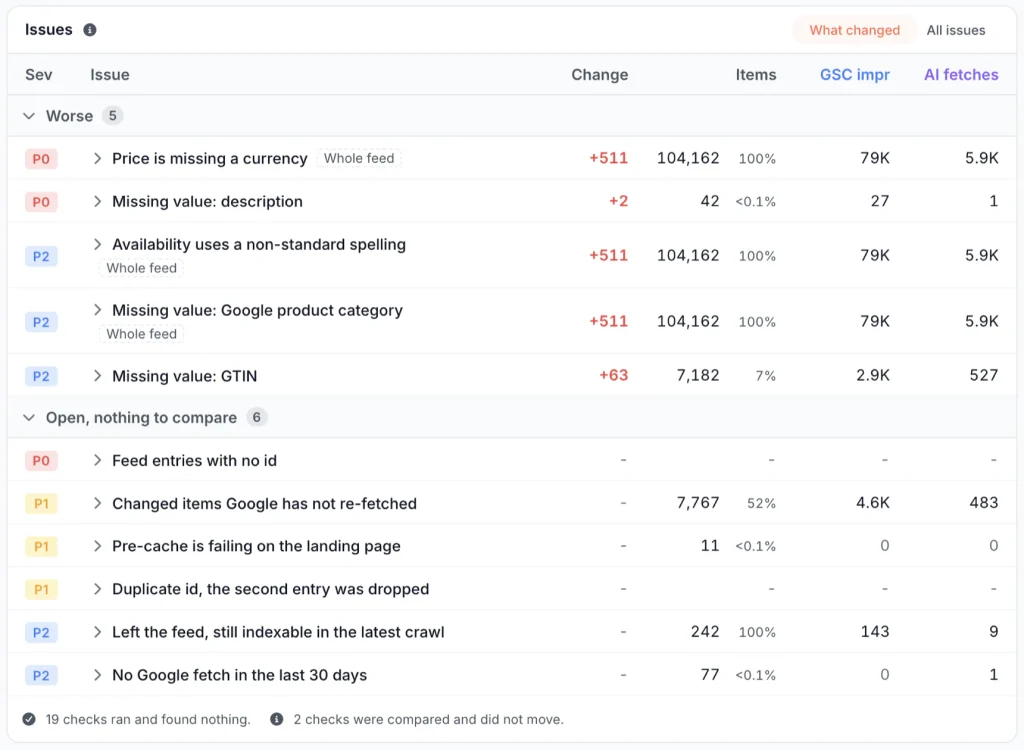
Each row has a Change column, a signed delta against the catalog as it stood at a fetch before the period opened, so “+63 items missing a GTIN” tells you that the GTIN export started losing values this week. And under the last row the card accounts for every check it didn’t show: how many ran and found nothing, and how many couldn’t be evaluated on this fetch. You know we asked 32 questions, not four.
Validation also drives notifications. When a fetch fails or a new issue shows up, you learn about it from an alert rather than from a drop in Shopping traffic two weeks later.
What this means for you. A broken export shows up on the very next fetch, ranked by severity and by the traffic it puts at risk, with the list of affected items one click away.
A raw view for a 100 MB file
Merchant feeds are heavy. A catalog of 100,000 products with full descriptions easily passes 100 MB of XML, and at that size a text editor either refuses the file or takes a minute to scroll to the item you’re after. Merchant Center shows you its diagnostics but not the file.
The Items tab is a data explorer over the stored catalog, one row per item. The columns cover what the feed says (item id, URL, title, price, sale price, currency, availability, availability date, brand, product type, GTIN, the source feed and its validation issues) alongside what happened to it: which fields changed and when, first seen, removed from the feed, last cached, the page status at the last re-cache attempt, and the last fetch by Googlebot, AdsBot and Storebot. You can filter and sort on any of them.
It opens on the live catalog, but removed items stay in the store, so you can still look up what a product said the day before it disappeared. Every number on the Overview is a link into this tab, filtered to the same period and the same condition, and the explorer builds its rows from the same expressions the report counted with; the count you clicked and the length of the list it opens always match.
What this means for you. You can answer “what exactly does the feed say about this SKU, and when did Google last see its page?” without downloading anything.
What comes next
The next release compares the feed with the landing page. For every item, we’ll check the price, availability and title in the feed against the page a bot actually receives and against the schema.org Product and Offer markup on that page. A template that prints a different price than the feed, or markup generated from the wrong variant, will show up as a finding next to the feed checks.
Google already cross-checks the feed, the visible page and the structured data against each other, and it disapproves the item when they disagree. Once the comparison ships, you’ll see those disagreements in one report before Merchant Center acts on them.
Conclusion
The merchant feed is the most direct statement of your catalog that Google receives, and more and more AI shopping answers, ChatGPT’s among them, draw on the same product data. Keeping it valid, and keeping the pages it points to in step with it, used to take a feed tool plus somebody reading server logs by hand. EdgeComet now does both from the file you already publish, and the next release adds the page and its markup to the comparison.
Add your feed URL in Configuration > Caching > Merchant Feed Re-cache, and wait a couple of minutes for the first fetch. The analysis appears under E-commerce > Product Feed.