For fifteen years, the technical SEO job has started the same way: point a crawler at a site, wait, export the rows, and hunt for duplicate titles, broken canonicals, and indexation gaps. It works. But on a large site, it may answer the wrong question. It tells me what the crawler sees, not what Googlebot/AI bots see. Those are two different websites, and the gap between them is where the real problems live.
If you have ever completed a month-long crawl of a 1M-URL site only to find the export was stale before it landed and still couldn’t say which pages Googlebot actually cared about, you know the problem. The fix is not a faster crawler. On big sites, increasingly, it is not crawling at all.
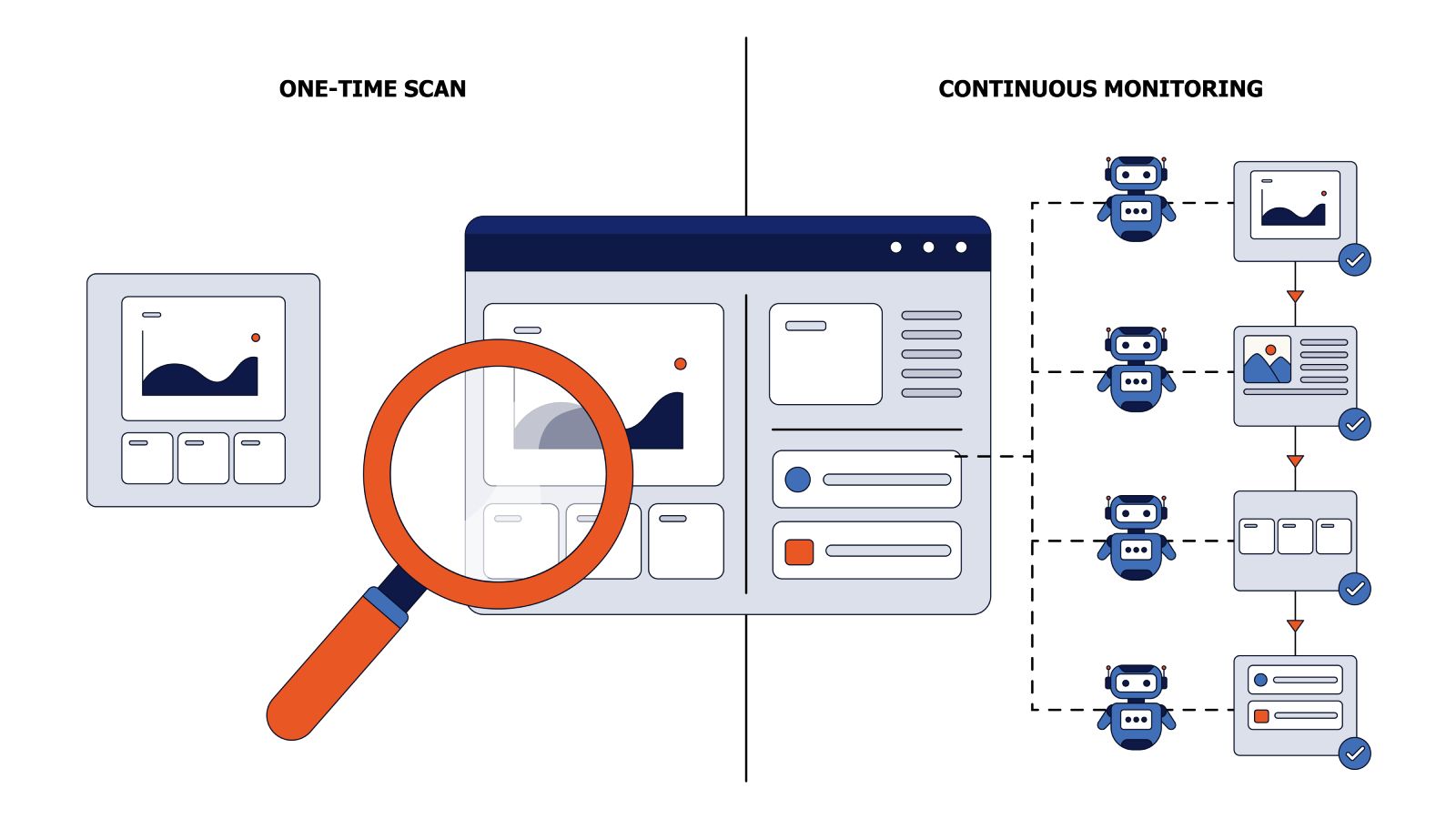
Bots provide insights into what they see; it’s essential to analyze the data they collect rather than just crawl. This analysis consists of two key methods: log file analysis, which records every bot visit, and evergreen crawl, which captures the actual rendered page a bot receives. Both methods complement your crawler. Think of this as a hierarchy: crawler, then logs, then evergreen crawl.
How a Standard SEO Crawler Works
The tools we rely on, Screaming Frog on the desktop, Sitebulb for richer audits, the cloud crawlers when the site becomes too large for a laptop crawl, all run the same algorithm:
- You give it a starting URL.
- It fetches the page, parses it, and extracts the links.
- It follows those links to new pages, extracts their links, and repeats, layer by layer, deeper into the site.
- When the link graph is exhausted, it pulls remaining URLs from the sitemaps. URLs that show up only in sitemaps, never in the internal link graph, are your orphans.
This is a robust, time-proven way to map a site’s structure as it exists right now. It is irreplaceable for day-to-day SEO: spotting issues early and verifying what developers shipped.
Why Googlebot Doesn’t Crawl Like Your Crawler
Googlebot is not an SEO crawler, and that single fact changes everything. Your crawler exists to audit a site from top to bottom. Googlebot exists to find and refresh content worth serving to searchers. The same activity, fetching pages, but a completely different objective, and therefore a completely different algorithm.
It helps to separate two things your crawler treats as one:
- Discovery – how Googlebot finds a URL. Here it behaves a little like your crawler: it follows links and reads sitemaps.
- Scheduling – how Googlebot decides which known URLs to crawl, how often, and in what order. This is where it diverges completely. Your crawler tries to fetch everything once. Googlebot is selective and recurring.
I spent a couple of months reading Google’s crawl-related patents, the actual filings spanning the last twenty-odd years, not AI summaries of them. That is its own article. But the parameters that matter most come down to three:
- Technical health. Response time, error rate, and page weight. A slow or 5xx-prone origin makes Googlebot throttle itself down; a fast, stable one lets it crawl more.
- Content quality and search demand. Pages users actually want, and that change and stay fresh, earn more frequent revisits; thin or static pages drift to the back of the queue.
- Link signals. Internal and external links. Well-linked URLs are visited far more often than deep, weakly linked ones.
The practical consequence: crawl-budget patterns are not universal. Two e-commerce sites in the same niche, one a national top-ten retailer, the other a small shop, will show completely different patterns. There is no clean rule of thumb for “normal.” It depends on the site, which is exactly why observation beats assumptions.
Where This Breaks: Medium and Large Sites
On a 20-page SaaS site, none of this matters, crawl it however you like. The cracks appear on catalogs and marketplaces, somewhere north of hundreds of thousands of pages.
Three problems compound:
- Volume. Screaming Frog can crawl 100k URLs, but your laptop will run hot. Then you still have to analyze the data: Python over CSV exports, Claude burning tokens, and reports built by hand for leadership.
- Origin load. DevOps gives you two crawling threads because more would strain production. At that rate, a full crawl takes so long that the data is outdated by the time it finishes. Crawling a large shop for two months tells you what the site looked like two months ago.
- The wrong lens. Even with infinite threads, you would be measuring your crawler’s view of the site, not Googlebot’s. On the sites we have seen, a large share of crawl budget goes to non-canonical and parameter URLs Googlebot should never have spent time on. A standard crawl doesn’t surface that, because it was never looking through Googlebot’s eyes.
That last point is the one that nags. Why do we analyze a site in a fundamentally different way than the only crawler whose opinion ranks us?
Log File Analysis: You Already Have the Data
You do not have to crawl to learn what Googlebot does, because your server already wrote it down. Every bot request (Googlebot, Bingbot, GPTBot, ClaudeBot) lands in your access logs. That record is the original “observe the bots instead of crawling them” technique, and SEOs have leaned on it for years for good reason:
- Spot issues earlier. Status-code spikes, redirect chains, and pages that fell out of rotation show up in the logs before they show up in your rankings.
- Quantify crawl-budget waste. You can see how much of Googlebot’s attention goes to parameter URLs, out-of-stock products, and dead archive tails rather than to the pages that earn revenue.
- Validate who is really crawling. Anyone can set Googlebot as the user agent. Logs plus an IP/reverse-DNS check separate genuine hits from scrapers wearing the costume.
- Track AI bots next to Googlebot. The AI crawlers are growing rapidly and behave nothing like search bots; the log is where you first see them arrive.
Unlike a crawler, this costs your origin nothing; the requests have already happened. And unlike Google Search Console, which is sampled and delayed, the log is the unfiltered record of what actually occurred.
A log line is a record of the request, not the page. It knows the URL, the status code, the timestamp, and the bytes sent, but it never saw the title, the canonical, or whether the JavaScript rendered. By the time the line is written, the content is gone. So the logs show that Googlebot fetched a URL and received a 200. They cannot tell you what Googlebot actually received. Closing that gap is the next rung.
Evergreen Crawl: Add the Rendered Page
Evergreen crawl starts exactly where log analysis stops. Keep observing real bot traffic at the edge, but instead of recording only the request line, parse the page the bot is being served and store that too. The log entry stops being a transport record and starts carrying the content: the same timestamped bot hit, now with the title, canonical, and render outcome attached.
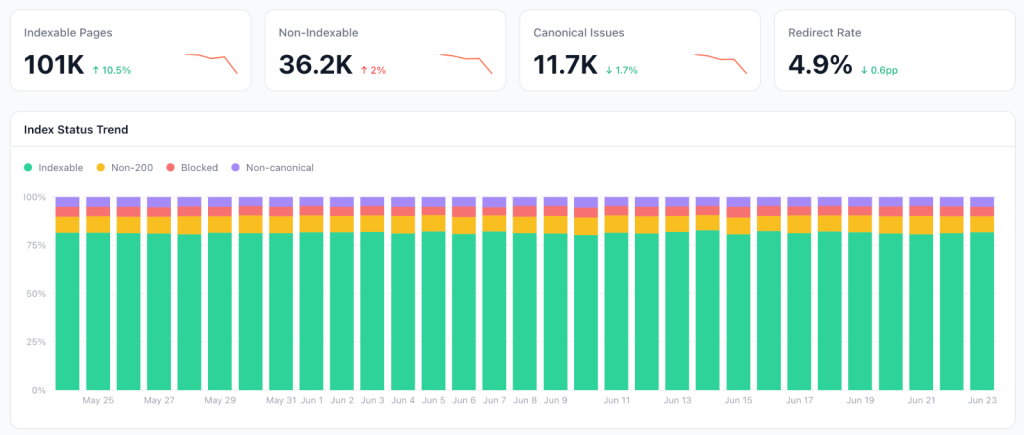
Put simply: evergreen crawl = the log line plus the rendered page. Intercept the request at the CDN or edge, parse the SEO attributes as they are served to a verified bot, and store a timestamped snapshot. Do that on every hit and the dataset builds itself, no synthetic crawl, no origin load, no staleness. And because bots return to important and fast-changing pages on their own, your freshest data lands exactly where it matters most.
This does not replace the other two tools; it joins them. They win on different rows:
| Dimension | Traditional crawl | Log file analysis | Evergreen crawl |
|---|---|---|---|
| Who generates the data | you (synthetic) | real bots (request) | real bots (request + page) |
| Load on your origin | adds load (DevOps-capped) | none | none |
| Freshness | a snapshot, stale once done | continuous | continuous |
| Whose view | your crawler’s | the bot’s request | the bot’s rendered page |
| Sees page content | yes (as it crawls) | no (transport record) | yes (as served to the bot) |
| Pages bots never visit | found (catches orphans) | invisible | invisible |
| Best at | full-graph audits | bot behavior, crawl waste | what bots actually see, always-on |
Evergreen crawl can always have fresh data. Analyze how your website changes when issues occur and when they are resolved. Everything and the tips of your fingers are always available right now.
Because every snapshot is timestamped, the dataset is a time machine: you can pull what any URL looked like to Googlebot three months ago, confirm whether a fix actually took effect, and watch a regression appear and then clear. Your crawler gives you today. Evergreen crawl gives you the history.
The AI-bot angle
We tend to write “Googlebot and AI bots” as if they behave the same way. They do not. GPTBot, ClaudeBot, and PerplexityBot crawl on their own schedules, and none of them execute JavaScript at all, a client-rendered page hands them an empty shell.
Evergreen crawl is one of the few ways to see what AI bots actually fetched, per bot, in real time, whether they got your content or a blank page, and how often they come back. As these systems start citing pages in answers, that record stops being a curiosity and becomes the only evidence you have.
Pros and Cons
The coverage blind spot: the biggest con of evergreen crawling is that we only see what Google or AI bots see. In practical terms, it means that your orphaned or uncrawled pages may be hidden from it. In practice, however, Google and AI crawlers cover a large portion of the URLs that matter. What you see is often a close approximation of their actual crawl priorities, particularly for Googlebot. If Googlebot gives attention to a page and re-crawls it, it’s a good sign that the page has some quality and is eligible for indexation. If a page has only one bot hit in half a year, it is likely a low-value page (except the publishers’ websites).
Verification latency. A traditional crawl is on-demand: ship a fix, re-crawl now, confirm. Evergreen crawl is passive, you wait for the bot to come back.
Against those, the advantages are real and hard to get any other way:
- Ground truth. You see the site through Googlebot’s eyes: exactly which URLs it fetches, how often, and what it renders into the page it indexes. That is the real picture of what feeds the index, not your crawler’s reconstruction of it. And it scales, a corpus of millions of pages you can finally query and work with normally.
- Zero origin load. You ride traffic that already happened. No extra requests, no production strain, no DevOps negotiation over crawl threads.
- Continuously fresh. No scheduled scans, no snapshot crawls that go stale before they finish. The dataset updates itself with every bot hit, and it is freshest on the pages bots return to most often.
- A full history. Every snapshot is timestamped, so the dataset is a time machine. Replay every title and canonical change on a URL and line it up against its Search Console performance, confirm a fix took, or watch a regression appear and clear.
- Monitoring. Technical issues surface the moment a bot hits them. You catch indexation and content regressions the same day, instead of waiting on the next scheduled crawl.
Build It Yourself: A Cloudflare Workers Proof of Concept
To make the idea concrete, we built a small working version on Cloudflare, a worker plus a dashboard. It is open source, so you can run it on your own site and change whatever you like.
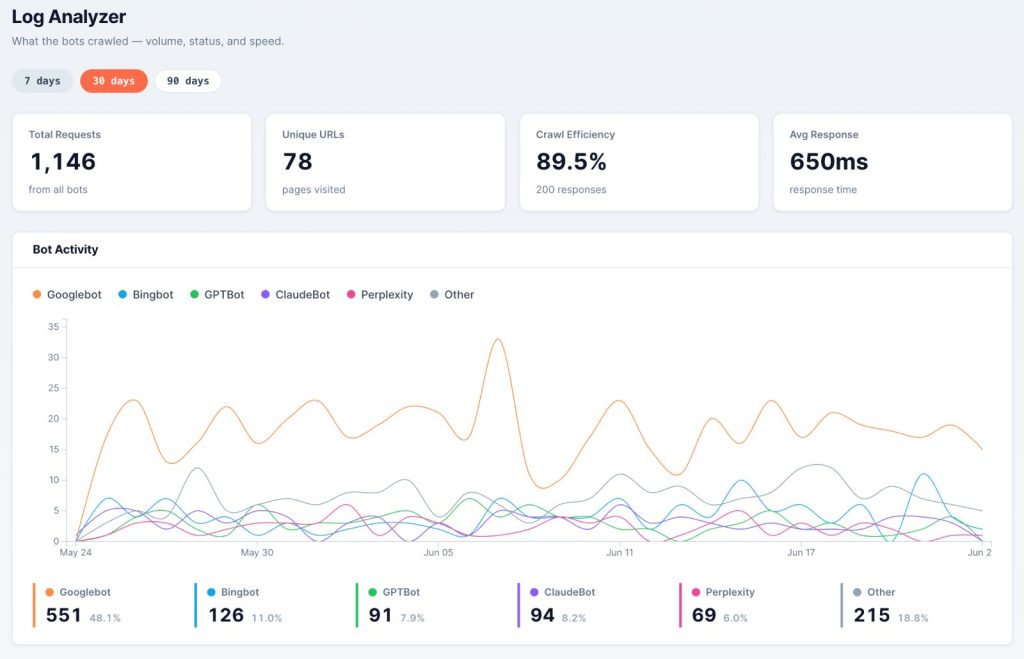
You do not need to be a developer to follow along. The goal is to see the moving parts; the actual build is a short job for whoever owns your edge setup. As the SEO manager, your job is to scope it, which bots, which fields, and which questions it has to answer.
Here is what it does, in plain terms:
- A small piece of code runs on every request and checks one thing: is it a real user or a bot? User traffic is left untouched; nothing about your visitors’ experience changes or slows down.
- When a bot arrives, the page is served first, exactly as with a normal request. Only afterward does the worker note the visit and read the page the bot was just handed. That order matters: the analysis runs off to the side (Cloudflare’s waitUntil), so the bot never waits on it.
- Each visit, the request and the rendered page are saved to a database (Cloudflare’s D1).
- You read it back in a dashboard. Because everything is stored in a structured, queryable way, you can point Claude at it and just ask: which URLs lost their canonical this week, which AI bots got an empty shell, where budget is leaking. The worker collects, Claude queries, and the judgment stays with you.
The full process is in the GitHub readme, and most of it is automated: a Claude skill does the work; you just create a Cloudflare API key, and it stands up the worker, the database, and the dashboard for you. The dashboard sits behind Cloudflare Access, so only your team can reach it. The source is here: https://github.com/EdgeComet/comet-trail/.
Conclusion
Crawling, log analysis, and evergreen crawl are not rivals; they are three rungs of one ladder. The crawler walks the link graph and tells you what should be there, orphans included. Logs tell you which pages the bots actually reach, at no cost to your origin. Evergreen crawl adds the missing piece, the rendered page each bot received, so you finally see not just that Googlebot visited, but what it got. Run all three and reconcile them, and the gap between your view of the site and Googlebot’s closes.
If you take three things from this:
- Stop treating your crawl as Googlebot’s view. It is your crawler’s view. On large sites, they diverge hard.
- Observe the bots you already have. Start with the logs you are already collecting, then extend them with the rendered page. It is the cheapest, freshest SEO dataset there is; it is walking through your edge right now.
- Validate, render, and reconcile. Trust only verified bots, capture the rendered result (not the raw HTML), and always check observed URLs against the ones that should have been crawled.
Everything above is how EdgeComet works. We shipped the first production-ready Evergreen Crawl: every time a verified bot fetches a page through EdgeComet, the rendered snapshot is captured in the request path and folded into a continuously current audit of your site, the full page as the bot saw it, title to canonical to rendered content. No synthetic crawl, no origin load, no waiting weeks for a scan that is stale on arrival. The teams running it have stopped scheduling big crawls; they catch indexation and content regressions the same day a bot hits them.
The fastest way to judge the idea is on your own traffic. Run the open-source Worker above, or connect your site to EdgeComet and see what Googlebot and the AI bots fetched from you this week, your logs are already full of answers.