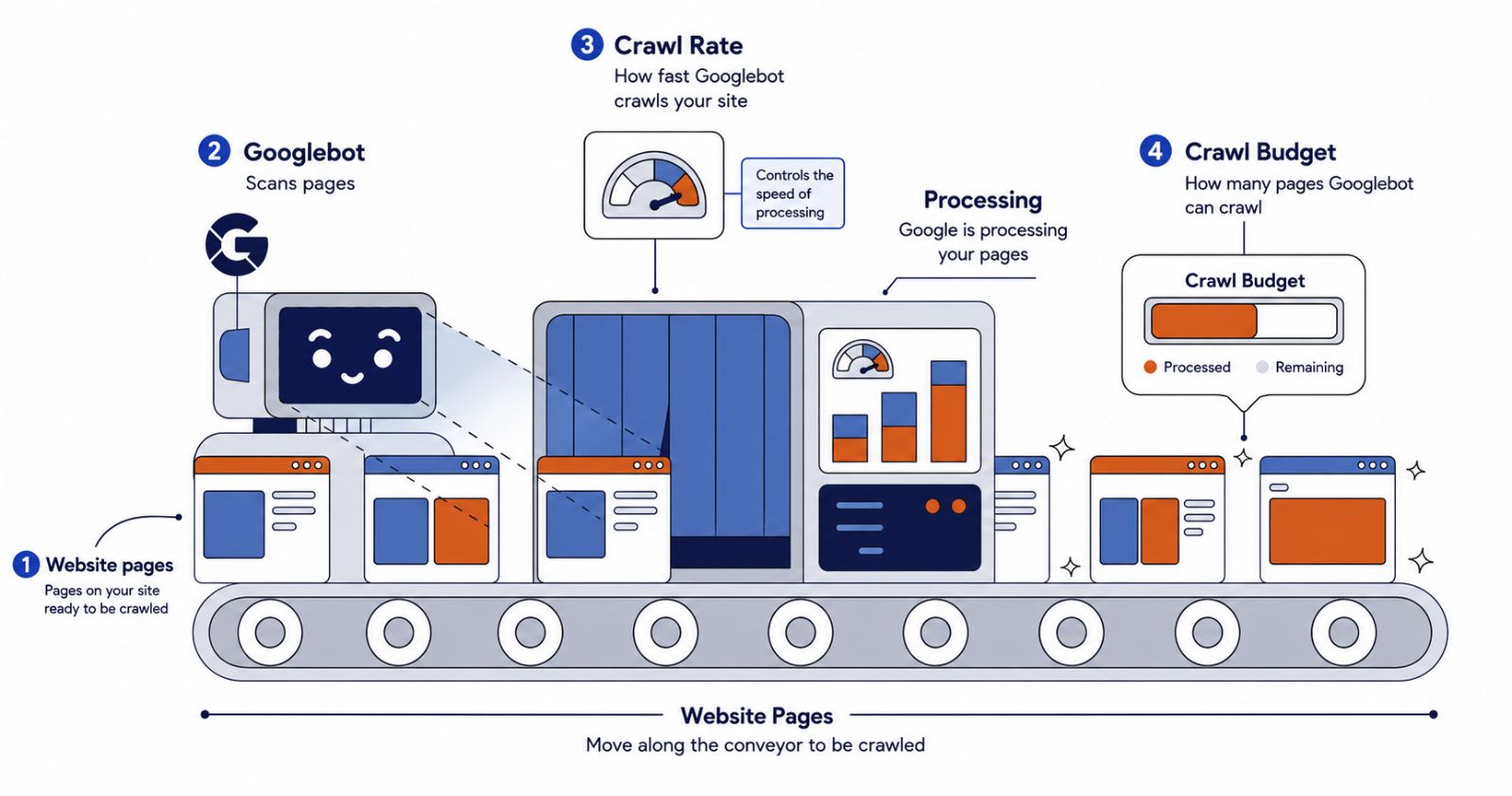
Crawl rate and crawl budget are two core concepts every technical SEO team should understand. Crawl rate is the speed at which search engine bots request pages from your site, while crawl budget is the overall volume of pages Googlebot can and wants to crawl within a given timeframe. Managing both effectively guarantees that your most important content gets discovered and indexed promptly. The way you manage crawlers’ attention will influence how fast your content gets indexed.
In this article, you will get answers to the questions “What is crawl budget?” and “What is crawl rate?” as well as learn about technical factors that affect them. We also provide recommendations on what to improve and do to make sure Google explores the pages that matter most for your business.
Table of Contents
- What Is Crawl Rate and Why Does It Matter?
- What Is Crawl Budget in SEO
- What is Crawl Demand How Google Chooses What to Visit
- Crawl Rate vs Crawl Budget: What’s the Difference?
- How Google Determines Crawl Budget
- 4 Technical SEO Metrics That Affect Crawl Efficiency
- How to Measure Crawl Activity and Crawl Budget Usage
- Where Crawl Budget Goes to Waste
- How to Improve Crawl Rate and Optimize Crawl Budget
- Crawl Challenges on JavaScript Websites
- FAQ
What is a Crawl Rate and Why does It Matter?
A crawl rate is the number of requests search bots, such as Googlebot, make to your website every second. It defines how fast and how frequently crawlers find and index your content.
Crawl rates for small and large websites differ. According to Google Search Central, crawl budget optimization matters primarily for very large or rapidly changing sites. Portals with 1 million+ unique pages and moderately changing content, or medium and larger sites (10,000+ unique pages) with very rapidly changing content published daily can get thousands of requests per hour, while small websites may be crawled only every few weeks.
Crawl rate is closely connected with crawl budget, but don’t confuse these two notions.
What Is Crawl Budget in SEO?
A crawl budget seo definition refers to the total number of URLs search engines explore on your website within a certain timeframe.
Google defines crawl budget as the set of URLs that Googlebot can and wants to crawl. The crawl capacity limit determines the upper boundary of how much Google can crawl without overloading your server. However, the actual crawl budget depends on both crawl capacity and crawl demand: even if the capacity limit is high, low demand means Google will crawl the site less.
Technically, your website may have a generous crawl budget from Google. However, if the crawl rate slows down due to 5xx errors or slow server response, the budget can’t be fully spent.
In practice, managing the crawl budget for large sites, especially JS-heavy, is not about the budget size but crawl rate effectiveness. Here, crawlers waste their capacity on low-value URLs. The budget is burnt before high-priority content gets explored.
What is Crawl Demand? How Google Chooses What to Visit
Google doesn’t explore every page equally. It demonstrates a kind of preference, which is called crawl demand. It reflects how likely Google is to inspect your website or specific pages first. This interest often depends on several factors: content freshness, information updates, URL popularity, and high user interest in content. Websites that update their content frequently tend to get higher crawl demand. However, this is just one factor working alongside others, such as site authority, content quality, and how useful your pages are to users.
Let’s take a news site and a static “About us” page. As a lot of news is added each hour, the news homepage drives thousands of visits a day, so Googlebot will return to it constantly. On the contrary, the “About us” page usually doesn’t change for years and gets a small quantity of visits a month. Thus, Google checks it far less often. As you see, your site and crawl budget are the same, but demand is different.
Crawl Rate vs Crawl Budget: What’s the Difference?
Crawl rate is about speed as it measures how quickly Google inspects your website. It is mainly influenced by your server capacity. If the server can process many requests without slowing down, Google crawls faster.
Crawling budget is about volume – how many pages Google can crawl on your website. It combines two things: crawl rate and crawl demand, and means a lot for large websites, where thousands of pages compete for Google’s attention.
Effective crawl budget optimization isn’t only about speed. Efficiency here is more important, make sure Google spends its crawling resources on those pages that really matter for your business.
Сrawl rate is how fast Google moves, crawl budget is how far it gets.
| Metric | Crawl rate | Crawl budget |
| Definition | How quickly Google crawls | How many pages Google can crawl |
| Main factors | Server capacity | Crawl rate + crawl demand |
| Most important for | Server performance | Large websites |
| Optimization focus | Response times | Crawl efficiency |
How Google Determines Crawl Budget
Google doesn’t explore your website randomly. It evaluates different aspects before deciding how much attention to pay to your site. Understanding these aspects is the basis for effectively managing the crawl budget in SEO.
- The crawl capacity limit is the number of URLs a crawler can visit without overloading your server.
- Crawl demand defines how much a crawler wants to explore your website.
- Site health is the speed at which your site loads, its level of security, and the frequency of its outages.
- Internal linking structure is defined as a set of links connecting pages within your site.
- Fresh content refers to updated or recently published content.
- Server performance is about how efficiently your server processes requests.
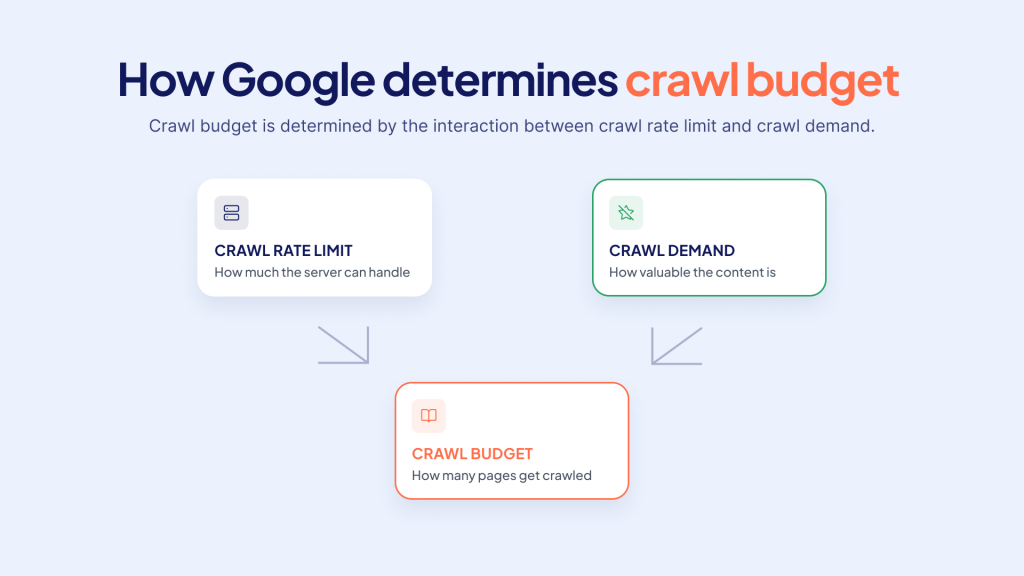
Crawl budget is determined by the interaction between the crawl rate limit and the crawl demand.
Site health, crawl capacity, crawl demand, and internal linking all appear as real, trackable data on your website. The metrics below show you how to measure each one and what to fix.
4 Technical SEO Metrics That Affect Crawl Efficiency
Crawl rate and crawl budget are not abstract things. You will see them as real numbers by performing regular website log analysis and monitoring Google Search Console. Below you can see four of the most important signal groups and how to improve crawl rate, and apply crawl budget best practices for large sites.
Your server’s ability to respond quickly and reliably is one of the main signals Googlebot uses when deciding how fast it can crawl your site. When pages load fast and without errors, Googlebot gains confidence and can increase the crawl rate. When the server struggles, Googlebot slows down to avoid making things worse. Below is a detailed look at how each performance factor influences crawling.
- Server Performance Signals
How server performance affects crawl rate and crawl budget
Your server’s ability to respond quickly and reliably is one of the main signals Googlebot uses when deciding how fast it can crawl your site. When pages load fast and without errors, Googlebot gains confidence and can increase the crawl rate. When the server struggles, Googlebot slows down to avoid making things worse. Below is a detailed look at how each performance factor influences crawling.
Response time and TTFB. Response time measures how long it takes for your server to start sending data after receiving a request. This includes network latency and the time needed to generate the page. Googlebot monitors these signals over time. If your server consistently responds slowly, Googlebot treats it as a sign that your infrastructure is under pressure and reduces the crawl rate to protect your site from overload. Time to first byte (TTFB) is often used as a practical proxy for server responsiveness, but Google does not publish an official TTFB threshold that guarantees better crawling. The goal should be to keep response times stable and as low as possible through caching, database optimization, and efficient application code, rather than chasing a specific number.
5xx errors. Server-side errors such as 502 Bad Gateway, 503 Service Unavailable, and 504 Gateway Timeout tell Googlebot that something is wrong with your infrastructure. These errors usually appear when a server is overloaded, a backend service is down, or a proxy cannot reach the origin. Even short periods of 5xx errors can cause Googlebot to pull back significantly. If the errors continue, Google may lower your site’s crawl capacity limit, meaning fewer pages are crawled even after the errors are fixed. Fast detection and resolution of 5xx errors is essential to maintain crawl trust.
Timeouts. A timeout happens when a server fails to respond within a reasonable window, leaving the request unanswered. Unlike a slow response, a timeout gives Googlebot no content at all, which signals severe availability problems. Repeated timeouts are treated as a strong indicator that your server cannot handle its current load. This can trigger an immediate and sharp reduction in crawl rate. Recovery after frequent timeouts may take time, because Googlebot needs to see consistent stability before it increases crawling again. Monitoring connection timeouts and adjusting server capacity, firewall rules, or network configuration can help prevent this issue.
Uptime. Uptime reflects how consistently your site is available to visitors and crawlers. Frequent downtime, connection resets, or intermittent failures suggest that your infrastructure is unreliable. Googlebot aims to crawl without harming your server, so it becomes more conservative when it detects recurring availability problems. On the other hand, high uptime and stable responses reassure Googlebot that it can safely crawl more pages. Investing in reliable hosting, redundant infrastructure, and failover mechanisms helps maintain the availability that supports a healthy crawl rate.
Server response time, time to first byte (TTFB), 5xx and 4xx errors rate, and uptime – all define the site performance. Typically, the latter affects crawl rate as Google adapts it based on how quick your origin responds. If users wait too long for your content to load or it has too many errors, Google slows down, affecting how much crawl budget can be spent.
To make site performance better, consider using an advanced website cache service, fixing database query time, resolving errors, and maintaining consistent server uptime.
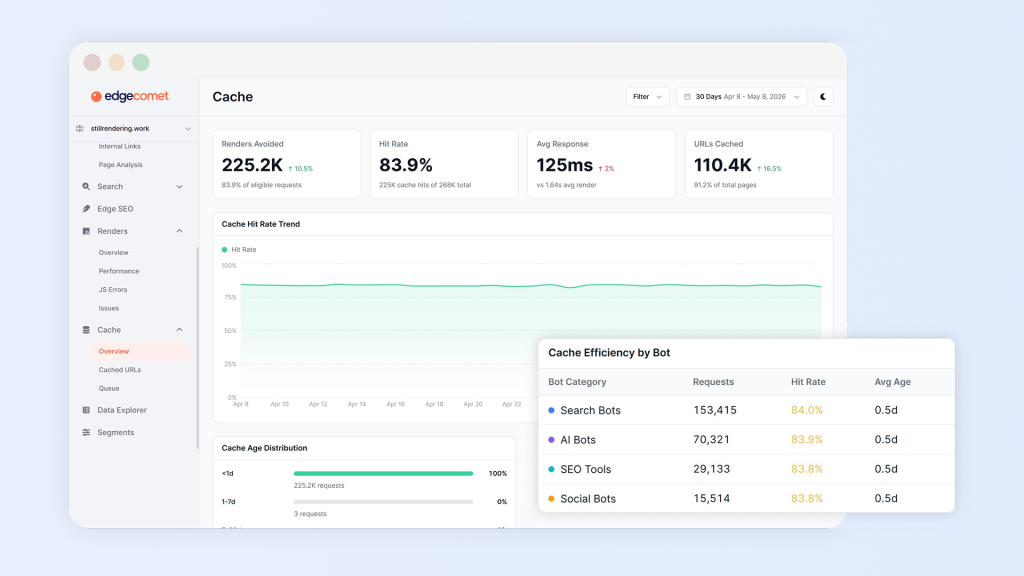
Source: Product interface of Cache service from EdgeComet
2. Internal Linking and Click Depth Signals
How internal linking and click depth affect crawl budget
Crawl path is the structure search and AI crawlers use to explore your content, including click depth, interlinking, and orphan pages. It usually affects the crawl budget. When pages lack internal links or are hardly accessible, bots rarely inspect them. Instead, your crawl budget is spent on easy-to-reach, low-value, pages.
For effective crawl optimization, you should make your focus pages easily accessible (with 1-2 clicks), add relevant internal links to the most important pages, and fix orphan pages by adding internal links.
3. Duplicate and Parameterized URL Signals
How duplicate and parameterized URLs waste crawl budget
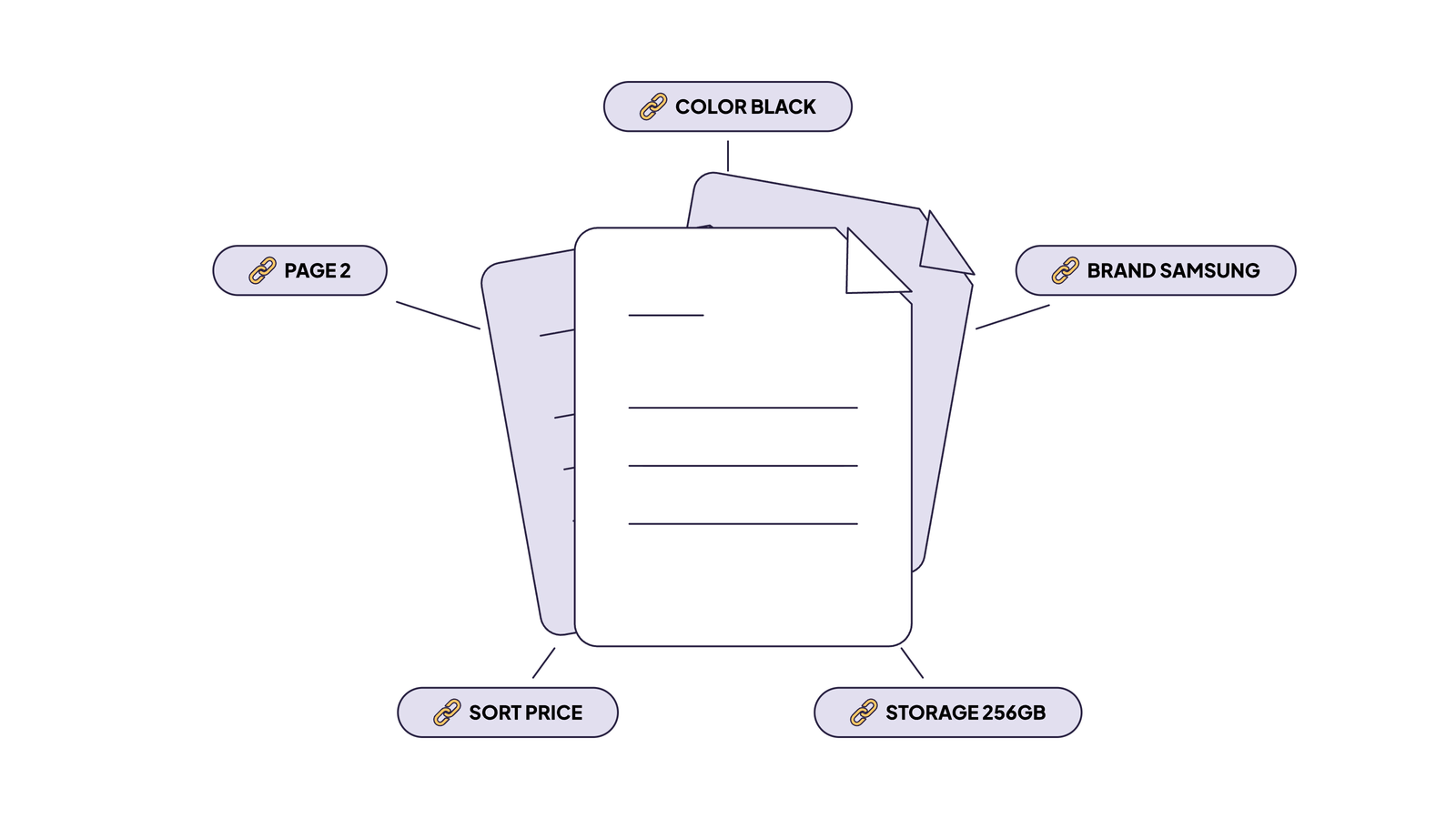
If you want to increase Google crawl rate efficiency, start by eliminating crawl waste. Crawl waste includes faceted navigation, duplicate content, URL versions, and session IDs. The crawl budget is affected by the crawl waste. Take a single listing page – when users start sorting and filtering products, the page can generate hundreds of duplicates. Common sources include query strings, URL parameters, filters and sorting options, faceted navigation, and session IDs. For example, an e-commerce site may create unique URLs for every combination of color, size, and price filter, resulting in thousands of parameterized duplicates that compete for the same crawl budget. Thus, instead of exploring your updated or new content, Googlebot will inspect those duplicates.
To resolve these issues with waste, you may do the following: set up canonicals, no-index low-priority content pages, and block paths in your robots.txt file.
4. JavaScript Rendering Signals
How JavaScript affects crawl efficiency
Typically, JavaScript-related issues refer to the delay between Googlebot crawling a JS-rendered page and rendering performance.
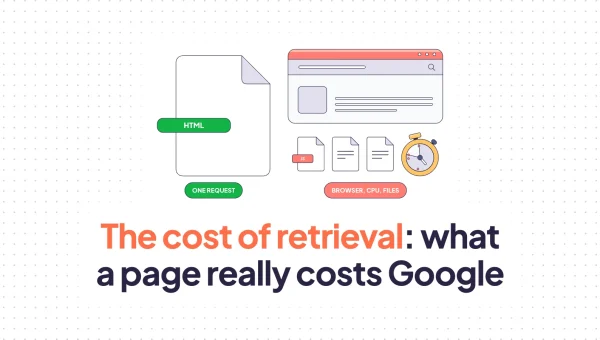
The crawl budget is heavily affected by these issues; understanding how rendering affects crawling is critical because client-side execution is resource-intensive. Google made a huge improvement in JavaScript rendering infrastructure during the last years, and now it renders way faster and more.
It is important to understand the distinction between crawling, rendering, and indexing. Googlebot first crawls the HTML of a page, then may queue the page for rendering to execute JavaScript and see the final content, and only then can it index what was found. Single-page applications (SPAs) and heavy reliance on render-blocking resources can delay how quickly Google sees your core content, which may reduce the overall number of pages processed within your crawl budget. Using server-side rendering (SSR) or static generation for critical content helps ensure bots receive fully rendered HTML on the first request.
For teams looking for crawl budget monitoring tools, log file analysis and Google Search Console’s Crawl Stats report remain the most reliable ways to track how JavaScript and rendering delays affect crawl efficiency.
How to Measure Crawl Activity and Crawl Budget Usage
Start with verified Googlebot requests in your server log data. Compare a 28-day window with the previous 28 days to identify changes in crawl volume, coverage, and waste. Verify bots by IP, not by user agent, because impersonation is common and unverified requests will inflate every figure you calculate.
These figures show how Googlebot actually crawls your site. They do not reveal a fixed crawl budget allocation: Google determines crawling based on both crawl capacity and crawl demand.
| Metric | Formula |
| Daily crawl budget | Verified Googlebot requests / days |
| Crawl waste share | Wasted requests / all Googlebot requests |
| Naive recrawl cycle | Indexable URLs / unique indexable URLs crawled per day |
| 7-day coverage | Indexable URLs fetched in the last 7 days / all indexable URLs |
These numbers only mean something if the input is clean. So, verify the bots, segment your URLs by template, and join the result with Search Console, so you never treat crawled and indexed as the same thing.
If you don’t keep log files, you can read the same numbers from the request path. EdgeComet’s log analyzer records every bot request as it is served, verifies bots by IP, and splits crawl budget allocation into valuable, questionable, and wasted requests, with waste broken down by cause.
Where Crawl Budget Goes to Waste
The four signal groups above show you what to measure. Below you can see what those measurements usually turn up. Crawl budget goes to waste when crawlers spend requests on URLs that can’t be indexed or don’t need recrawling. Each cause shows up as its own pattern in bot data, so you can name it before you change anything.
| Cause | How it shows in bot data | Fix |
| 5xx errors and slow responses | Error share and response time rise before crawl rate falls | Fix origin errors, cache bot responses, and keep origin response time low. Google lowers the crawl capacity limit when a site slows down or returns 5xx or 429 |
| Faceted and parameter URLs | Many unique URLs per template, few of them indexable | Disallow low-value parameters in robots.txt and link only to canonical versions. Search Console’s URL Parameters tool was deprecated on 26 April 2022, so it is no longer an option |
| Redirects and chains | A high 3xx share and repeated hops to reach one destination | Link to final URLs and collapse chains. Google states that long redirect chains have a negative effect on crawling |
| Removed pages, 404 and soft 404 | Recurring 4xx on expired products or listings, and soft 404s that keep being crawled | Return 410 for permanently removed items, and remove the internal links and sitemap entries that point to them |
| Deep and orphan pages | Requested rarely or never, while shallow pages are refetched | Add internal links from pages bots already fetch. See how to find orphan pages |
| Non-canonical and noindex URLs still crawled | Requests to URLs that point elsewhere or can’t be indexed | Stop linking to them, and drop them from your sitemaps |
| XML sitemaps | Sitemap URLs that return 3xx or 4xx, or carry noindex | List only indexable canonical URLs with an accurate lastmod. Nothing in Google’s sitemap documentation gives crawl priority to the order sitemaps appear in robots.txt: Google ignores priority and changefreq, and uses lastmod only when it is consistently accurate |
| JavaScript render errors | A 200 status with empty or broken content | Serve bots rendered HTML. See Crawl Challenges on JavaScript Websites below |
Server errors and response time should be fixed first, since a slow server lowers the crawl rate for everything else. Usually, the fix belongs to the template that generates the URLs, not to the individual URLs. The checklist below follows the same order.
How to Improve Crawl Rate and Optimize Crawl Budget
Use your findings to prioritize fixes in two areas: server capacity and crawl waste. Address active availability problems first, then focus on the URL patterns that consume unnecessary requests or leave important pages difficult to discover.
A reliable technical SEO crawler can help investigate page-level and structural issues alongside your bot request data.
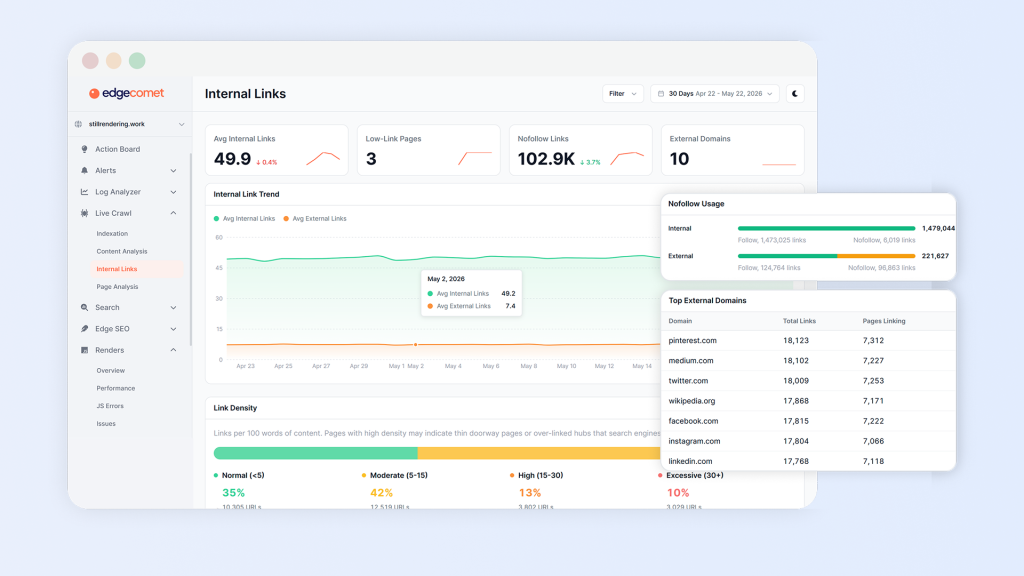
Source: Product interface of Evergreen Crawler service from EdgeComet
How to increase Google’s crawl rate
A higher crawl rate means Googlebot visits your pages more frequently, which helps new and updated content get indexed faster. To earn that higher crawl rate, your server needs to prove it can handle the extra load without slowing down or failing. The four areas below are the most important levers you can pull to send the right signals to Googlebot:
- Enhance server response times and reduce latency. Explore slow database queries, inefficient backend code, and missing caches.
- Fix 5xx errors promptly to signal crawl health to Googlebot. Monitor error spikes and resolve failing services, overloaded servers, or proxy issues.
- Maintain high uptime and resolve timeout issues. Address timeouts, connection failures, and firewall rules that unintentionally block verified Googlebot requests.
- Remove redirect chains that slow down crawling. Link directly to destination URLs and reduce unnecessary hops.
Note that manual configuration of Googlebot crawl rate in Search Console is no longer available. Google deprecated and removed the crawl rate limiter tool on January 8, 2024. Today, Googlebot automatically adjusts crawl rate based on server signals such as response time and error rates. (Source: Google Search Central Blog)
How to optimize crawl budget
When your server is consistently responding, pay attention to helping Google find useful pages and in reducing the number of unnecessary URL requests:
- Improve internal linking. Make priority pages easy to reach and connect orphan pages to relevant sections.
- Keep XML sitemaps clean. Include canonical, indexable URLs and update modification dates when there are significant changes to the content.
- Consolidate duplicates. Align canonical tags, internal links, and sitemap entries around preferred URLs.
- Control low-value URL patterns. Reduce low-value URLs such as filtered, sorted, or session-based variants.
- Improve JavaScript rendering. Ensure critical content and links are available in the rendered page, and fix failed scripts or resources.
Wherever possible, apply the fixes at either the template or URL-generation level so that the problem doesn’t reoccur on thousands of pages.
Crawl Challenges on JavaScript Websites: Why Rendering Matters
The recommendations above explain how to increase crawl rate and optimize crawl budget. For websites that rely heavily on JavaScript, the rendering stage deserves closer attention: helping bots reach your pages is not enough; you also need to ensure they can access the content.
A successful request does not necessarily mean that the main content is available. If content and links rely on client-side JavaScript, Googlebot needs to render the page to process them. Rendering failures or unavailable resources can leave content missing even when the server returns a 200 status code.
Alongside monitoring the URLs that bots request, check whether the content and links on those pages are accessible after rendering.
The main JavaScript-related challenges to investigate are:
Googlebot → Crawl → Render → Index
For static HTML pages, rendering is almost instant since the content is already in the HTML response. For client-side rendered (CSR) pages, that step is a little bit more expensive:
CSR → Render Queue → Delayed Indexing
Below are other challenges related to JS-based sites.
JavaScript rendering delays. Bots have to execute JavaScript before they can see your website. Crawlers will see your content later, once resources are available.
Crawl budget waste caused by rendering. Google can’t render every page right after crawling it because rendering is a compute-intensive process. The queue of pages becomes a bottleneck. The crawl budget is wasted and doesn’t turn into timely indexing.
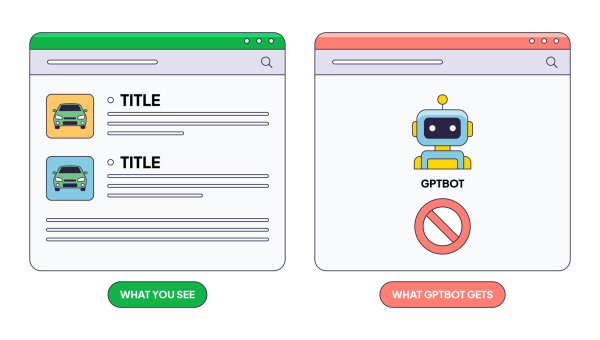
Client-side rendering vs SSR. While CSR serves an empty HTML file requiring JavaScript to build the page, pre-rendering sends fully rendered HTML instantly, ensuring bots index all content on the first visit.
AI crawler limitations. Many AI crawlers do not execute or unreliably process client-side JavaScript. Research by Vercel and MERJ published in December 2024 found that major AI crawlers, including OpenAI’s GPTBot, Anthropic’s ClaudeBot, Meta’s Meta-ExternalAgent, ByteDance’s Bytespider, and Perplexity’s PerplexityBot, do not render JavaScript, though some may fetch JS files as static text without executing them. Apple’s AppleBot and Google’s Gemini (via Googlebot) are notable exceptions with full or strong JavaScript rendering capabilities. (Sources: Vercel / MERJ Research; SearchVIU AI Crawler Analysis).
So, how do modern crawlers process JavaScript? For better understanding, check out our guide on how Googlebot renders JavaScript. To put it simply, Googlebot uses modern Chromium for rendering, but it still is executed as a delayed step. That’s the challenge that EdgeComet overcomes by providing a pre-rendered HTML, so every bot gets full content on the first request.
To check how to set this up for your tech stack, explore EdgeComet Setup Documentation.
FAQ
How does Google calculate crawl budget?
Crawl budget is calculated by combining the crawl rate limit and the crawl demand. Your origin’s ability to process incoming traffic without performance drops establishes an upper limit for your crawl rate. Meanwhile, crawl demand reflects Google’s desire to visit your website, based on its content freshness, popularity, and published updates.
How to increase crawl rate?
You can do this by enhancing server performance, meaning faster response times, fewer 5xx errors, and stable uptime signal to Google that your server can process more requests seamlessly.
Does JavaScript affect crawl budget?
Yes, it influences crawl budget since JS rendering requires more resources than inspecting static HTML. Websites relying on server-side rendering don’t face these issues because crawlers get complete HTML on the first request.
What is the difference between crawl rate and crawl budget?
Crawl rate is about how fast Google explores your website; crawl budget is about how many pages Google inspects in total.
How does Google manage crawl rate?
Google manages crawl rate dynamically based on how your server responds to requests. If your server responds quickly, Google increases the rate. If it detects delays, errors, or timeouts, it goes back to avoid overloading you.