Faceted navigation SEO comes down to two decisions for every filter URL: may search engines crawl it, and may they index it. For most facet combinations the answer to both is no, so keep crawlers from fetching them at all, and index only the few facet pages that match real searches, on clean URLs with crawlable links and a self-referencing canonical.
Nobody builds a facet problem on purpose. A developer adds a brand filter, someone adds sort options, the newsletter starts linking with UTM tags, and a couple of years later Googlebot spends its visits on URLs nobody meant to publish. At least the damage is measurable: you don’t have to guess whether filters eat your crawl, because your server logs already recorded it.
The tricky part is order, since a robots.txt rule shipped one release too early hides the noindex you were counting on. Below you’ll find a log-based way to classify facet URLs, one treatment per URL class, a rollout order that keeps those treatments from colliding, and a routine to check the results.
What is faceted navigation in SEO?
Faceted navigation is the set of filters on a listing page, such as a product category, job board or property search, that narrows results by attributes like color, size, brand, location or salary. Each attribute is a facet. When a selection changes the URL, every combination of facet values becomes a separate address that crawlers can fetch and index.
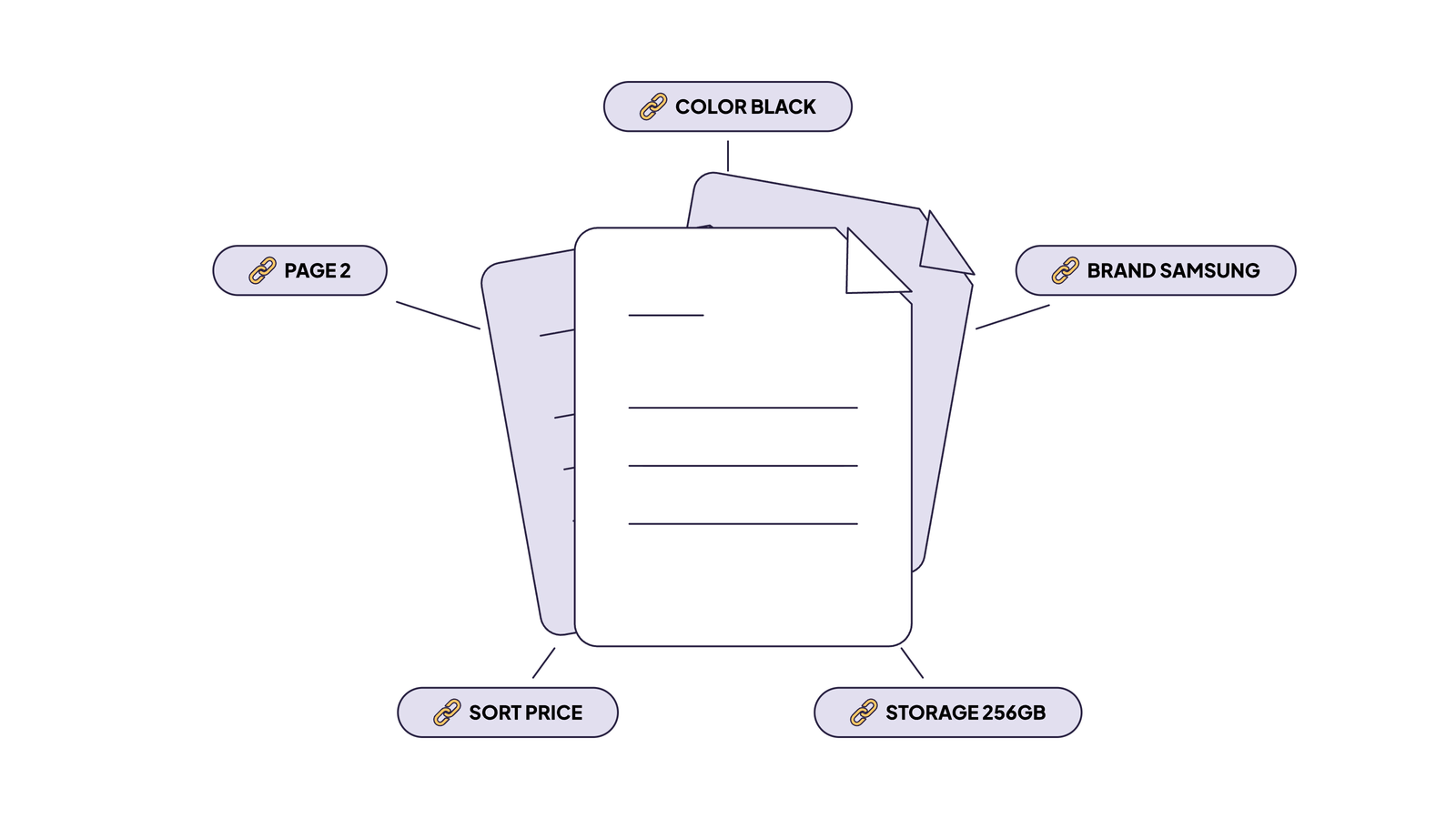
Facets share the URL with two other kinds of parameter, and each one needs its own treatment. Here’s a single URL carrying all of them:
https://example.com/phones/?color=black&storage=256gb&brand=samsung&sort=price_asc&page=2| URL part | Type | What it changes |
|---|---|---|
/phones/ | Base listing (category) | Defines the full result set |
color=black | Facet | Narrows the set |
storage=256gb | Facet | Narrows the set |
brand=samsung | Facet | Narrows the set |
sort=price_asc | Sort parameter | Reorders the same set |
page=2 | Pagination parameter | Picks one slice of the set |
I keep these apart on purpose, because they look alike in a URL and behave nothing alike in search. A sort parameter never earns indexing, pagination follows whatever its parent page gets, and facets are where the real decisions sit.
A job board works the same way. In /jobs/?location=berlin&level=senior&sort=newest&page=3, location and level are facets, sort is a sort parameter and page handles pagination. Faceted search SEO follows the same rules too; it doesn’t matter whether a category or an internal search query defines the base set.
How faceted navigation hurts crawling, indexing and performance
Every facet combination can become a new URL, so a crawler that follows your filters walks into a crawl trap: a URL space with no practical end. Google doesn’t soften this. Its documentation on managing crawling of faceted navigation URLs warns that facets “can generate infinite URL spaces”, and Gary Illyes’ December 2024 post names what that costs you: crawling “countless URLs that aren’t valuable to search users”, and slower discovery of “your important, new content.”
Overcrawling and slower discovery of new pages
Googlebot can’t know a facet URL is worthless until it has fetched it. So every useless combination costs a request, and your new products and listings wait in line behind it. Illyes called faceted navigation “by far the most common source of overcrawl issues site owners report to us.” I won’t repeat the crawl budget basics here; we covered how crawl budget gets spent in a separate article.
Most teams assume Googlebot spends its visits on products and categories. Check that assumption in your logs before you rely on it, because our own data says it often fails.
On a couple of EdgeComet client sites with faceted listings, we see verified Googlebot spent more than 54% of its requests on facet URLs, while product pages got just 20-30%.
Index bloat and duplicate content
Indexed facet URLs are mostly near-copies of each other. ?color=black and ?color=black&storage=256gb may list almost the same products, and a sort parameter lists the very same ones in a different order, so Google picks one URL from each duplicate cluster. It treats rel=canonical as “a strong signal”, not an instruction, which means its pick may not be yours. Deep combinations add their own mess: thin pages with one item, or empty ones that answer 200 where a 404 belongs.
Diluted internal links and server load
Facet links spread your internal linking across thousands of filter URLs, and each one Googlebot fetches costs your server a response. I should be upfront about the first half of that sentence. Google’s facet documentation doesn’t discuss link equity at all, so dilution is practitioner reasoning, not documented behavior. The reasoning is simple enough: every facet value is a link on every listing page, and each of those links points away from the pages you want to rank.
Server load is easier to pin down. Each facet request reaches your origin, usually with a database query behind it, and on a JavaScript site it adds one more page to render. I don’t have a universal number for that cost, so measure it on your own stack.
Worked example: how many URLs one category can create
Four ordinary facets turn one category into 7,722 URLs, and multi-select pushes it past 34 billion. Start with one value or none per facet. Each facet then contributes its values plus “not selected”, and the options multiply:
| Facet | Values | Options including “not selected” |
|---|---|---|
| Color | 10 | 11 |
| Price band | 8 | 9 |
| Brand | 12 | 13 |
| Storage | 5 | 6 |
| URL states | 11 × 9 × 13 × 6 = 7,722 |
That count includes the unfiltered page and leaves out sort and pagination. Add an optional four-value sort parameter and it multiplies by five, to 38,610.
How to run a faceted navigation SEO audit before you change anything
Audit before you touch robots.txt. The right fix depends on where each URL class stands today: a pattern that’s already indexed needs a different sequence from one Google has never seen, and a Disallow shipped too early can strand indexed URLs where Google can’t read your noindex.
I run the audit in four steps, always in this order:
Inventory parameters → Classify requests from logs → Compare crawl vs organic clicks → Check what is indexed
Step 1: Inventory facet, sort and session parameters
Start with the parameters bots actually request, not the ones you think the templates emit. EdgeComet’s Log Analyzer builds that list from your own bot traffic: its crawl budget analysis reads the requests, finds the parameters the site generates and proposes a rule for each pattern, with facet combinations filed as “questionable” by default rather than written off. Then open the listing templates and add whatever bots haven’t found yet. Check one listing page with JavaScript on and off as well, because facet links that appear only after rendering behave differently (the JavaScript section explains why). Record each parameter’s type:
| Parameter | Type | Example values | In crawlable links? | Distinct values |
|---|---|---|---|---|
color | Facet | black, blue | Yes | 10 |
brand | Facet | samsung, google | Yes | 12 |
sort | Sort parameter | price_asc, newest | Yes | 4 |
page | Pagination | 2 to 40 | Yes | Varies by facet |
sessionid, utm_source | Session and tracking | Any | No, external only | Unbounded |
The last row is the one people forget. Tracking parameters never appear in your own links, so a template review won’t find them; they arrive from newsletters, ads and other sites. Bot logs catch them anyway, and EdgeComet’s default rules already file utm_, gclid and sessionid URLs as wasted crawl.
Step 2: Measure Googlebot’s share on facet URLs with log analysis
One number sets the priorities: the share of verified Googlebot requests that land on facet URLs instead of category and product pages. Crawl Stats in Search Console shows trends and a sample of URLs, not every request. Bot logs show all of them, and EdgeComet records each bot request it serves along with the status code, the indexability of the page the bot received and a verdict on whether the bot is real.
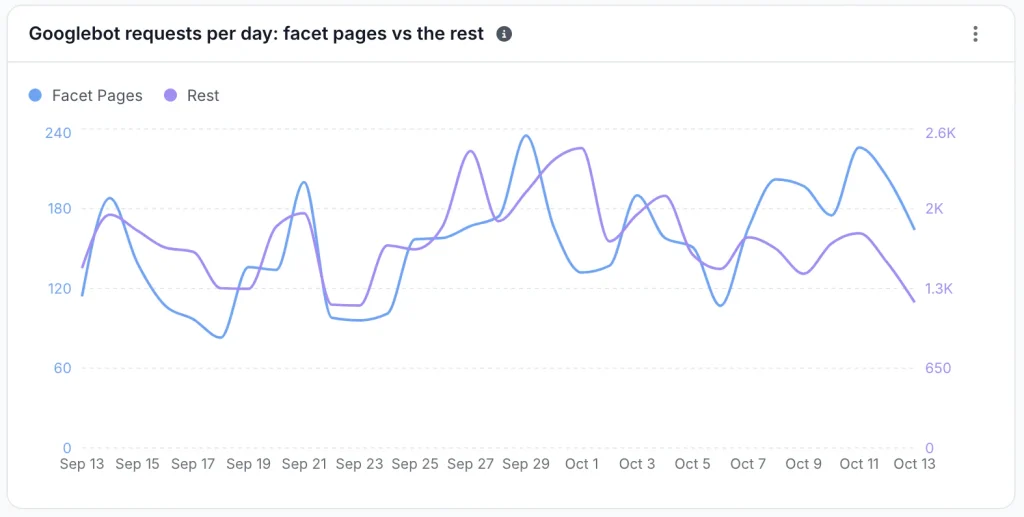
Count only requests EdgeComet identifies as Googlebot and verifies against Google’s published IP ranges. You need both checks. User agents are trivial to fake, and Google’s IP ranges also cover other Google crawlers, AdsBot among them, which ignores User-agent: *. Then assign each request to the first class it matches:
facet       [?&](color|storage|brand|price)=
sort/view   [?&](sort|view|per_page)=
tracking    [?&](utm_[a-z]+|gclid|sessionid)=
pagination  [?&]page=[0-9]+
product     ^/p/[a-z0-9-]+/?$
category everything else under a category pathfacet crawl share = Googlebot HTML requests to facet URLs / all Googlebot HTML requestsSplit the result by parameter key and by facet depth (zero, one, two, three or more). While you’re in the logs, record one more figure: the median time from a product going live to its first Googlebot request. You’ll want that baseline later, when you check whether the fix freed anything up.
I do this in EdgeComet’s Data Explorer. The parameter patterns above work as URL regex filters as written (EdgeComet stores full URLs, so drop the ^ from the product pattern), and saving each one as a segment makes the class available across the Log Analyzer, so “facet” gets its own row in the status code, response time and crawl budget tables.
![EdgeComet Data Explorer, Bot log requests filtered by the URL regex /p/[a-z0-9-]+/?$ for product pages over the last 30 days](https://edgecomet.com/wp-content/uploads/2026/10/faceted-nav-bot-log-url-regex-filter-1024x588.webp)
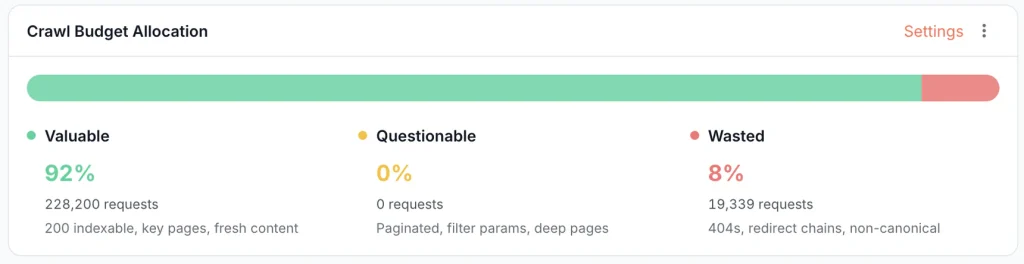
The Googlebot Efficiency tab handles the rest of the sorting. It’s server log analysis that separates valuable from wasted crawl: one bar splits Googlebot’s requests into valuable, questionable and wasted, using the rules from Step 1, which you can refine in plain English (“treat /outlet/ as valuable”).
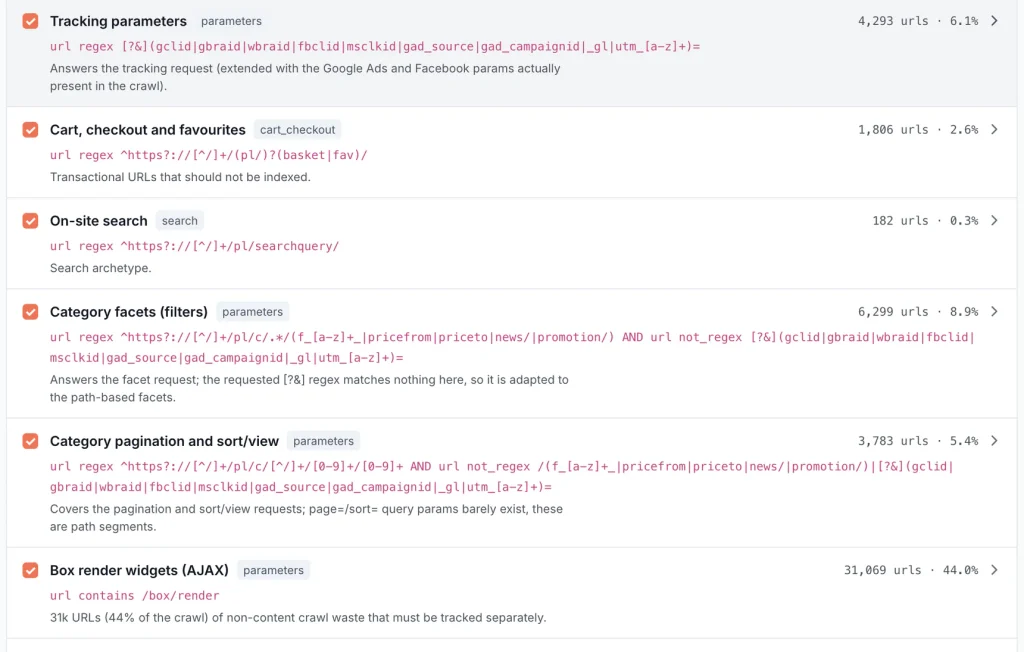
EdgeComet’s AI segmentation reads the query parameters in your bot traffic and proposes a “Parameters and facets” segment next to the product and category segments.
Step 3: Compare crawl volume with organic clicks
EdgeComet pulls Search Console performance data every day and matches it to the same URLs the bots requested, so there’s nothing to export and join by hand. In Data Explorer, take the facet segment, switch to unique pages and add a Search Console filter: pages with no Search Console data in the period are facet URLs Googlebot fetched that never once appeared in search.
Then look at two outcomes per class. A pattern that takes a large share of Googlebot requests and earns no clicks or impressions is a crawl control candidate. A pattern that does earn impressions might deserve its own landing page, but only after it passes the demand check in the next section.
Step 4: Check what is already indexed
This step decides the order of the whole fix. Facet URLs already in the index need noindex before any robots.txt rule goes live, while patterns Google never indexed can go straight to crawl control. Check which facet patterns appear in each of these Page indexing report views:
| Search Console view | What it tells you about facet URLs |
|---|---|
| Page is indexed, with the sitemap filter set to “Unsubmitted pages only” | Facet URLs Google indexed outside your landing page list |
| Indexed, though blocked by robots.txt | Blocked facet URLs indexed from links; Google can’t read a noindex on them |
| Crawled – currently not indexed | Fetched and rejected; those requests bought nothing |
| Discovered – currently not indexed | Known and queued; growth means the URL space keeps expanding |
| Duplicate, Google chose different canonical than user | Your canonical didn’t hold, often because the result set differs too much |
| Duplicate without user-selected canonical | Variants with no canonical, such as the same facets in another order |
| Alternate page with proper canonical tag | Canonical works for indexing, but Googlebot still fetches every variant |
| URL marked ‘noindex’ | Google reads your noindex, so the URL is still crawlable |
That’s Google’s verdict, and only Search Console has it. The declared side comes from your bot data: EdgeComet records the indexability of every page a bot received, so the facet segment shows how many crawled facet URLs carry a noindex or a canonical pointing elsewhere right now. When the two disagree, you’ve found your next ticket.
Then run URL Inspection on one URL per class to compare the declared canonical with the one Google selected, and to see the rendered HTML. Skip site: counts. They’re estimates, and you can’t plan a rollout on an estimate.
Which faceted pages should be indexed?
Index a facet combination only when it has real search demand, a result set distinct from its parent, and enough inventory to stay useful week after week. Every other class gets exactly one of the other treatments:
| URL class | Example | Demand check | Treatment | Mechanism |
|---|---|---|---|---|
| High-demand single facet, or an approved pair | /phones/samsung/, /rentals/berlin/2-bedroom/ | Stable volume for the matching query; enough products or listings | Indexable landing page | Clean path URL, 200, self-referencing canonical, <a href> links, in the XML sitemap, own title and H1 |
| Low-demand combination already indexed | /phones/?color=green&brand=samsung | Crawled and indexed, no clicks or impressions | noindex, crawlable until it drops out | <meta name="robots" content="noindex">; after the drop, remove links, then Disallow in a later release |
| Deep filter stacks and multi-select | /jobs/berlin/?level=senior&type=contract&salary=60-80k, ?color=black&color=blue | None needed: demand collapses as facets stack | robots.txt Disallow | One Disallow rule per facet parameter |
| Sort, view and page-size parameters | /phones/samsung/?sort=price_asc, ?view=grid | None: order never matches a query | robots.txt Disallow | Disallow the parameter; render the control without <a href> |
| Variant with the same result set as an approved page | /phones/samsung/?utm_source=newsletter | None | Canonical to the parent | <link rel="canonical"> to the approved URL |
| Shopper-only facets | Delivery date, store pickup, price slider | None: results change daily | No crawlable link | <button> or checkbox; state in a fragment, or in a History API URL with no <a href> and a Disallow on its parameter |
| Zero-result or impossible combination | /rentals/?city=berlin&district=soho | Not applicable | 404 | HTTP 404 on the requested URL, not a redirect |
Checking demand doesn’t take anything fancy, and I start with the queries you already appear for. In EdgeComet’s Search Console keywords view, filter to the parent category’s URLs and look for queries that contain facet values, such as samsung phone 256gb landing on /phones/ or 2 bedroom apartment berlin landing on /rentals/berlin/. Steady impressions there mean Google already connects the category with the facet, and that demand currently lands on a page that doesn’t match it exactly. A keyword tool only matters for facet queries you don’t show for yet. Then look at who ranks for them. If Google shows category-style pages, a facet page can compete; if it shows single products or articles, it probably can’t. Count inventory over several weeks, not on one day, because stock moves and a facet that looks healthy today can be empty next month.
If you need a starting point, these are my defaults. Brand × category and location × listing type are indexing candidates; color, material and style earn it selectively; size, stock, delivery date and price sliders stay shopper-only; and multi-select or three-plus-facet combinations stay out unless the evidence says otherwise.
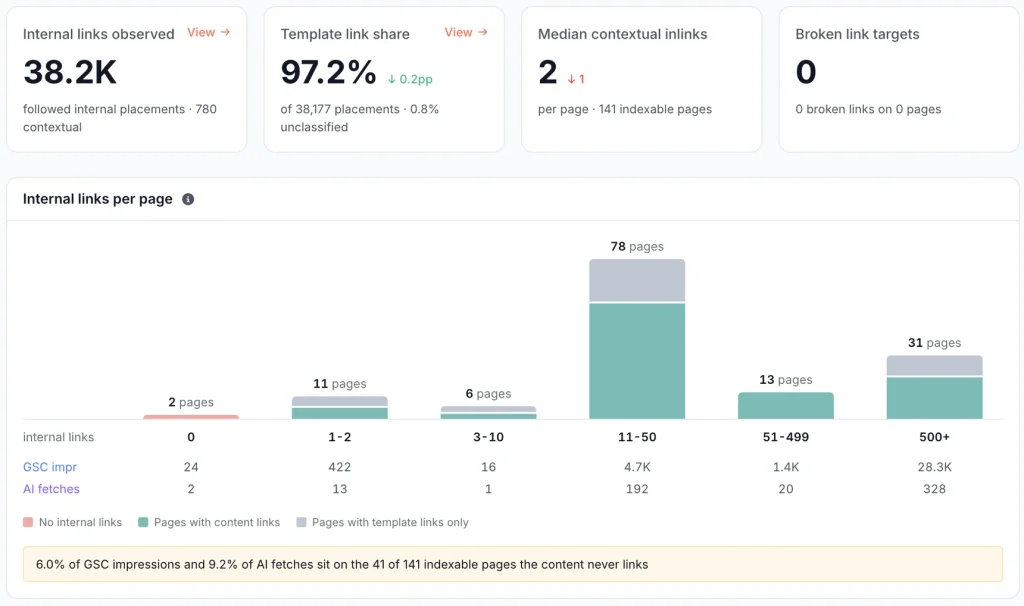
Whatever you promote, link it from the category template and list it in the sitemap. Indexable facet pages that nothing links to are orphans, and turning facet links into buttons creates them by accident.
Crawl control or index control: pick the right tool
A robots.txt Disallow controls crawling and noindex controls indexing. A facet URL gets one of them, never both at once, because Googlebot never sees the noindex on a URL it doesn’t fetch. Google puts it plainly: a noindexed page “must not be blocked by a robots.txt file”, and robots.txt “is not a mechanism for keeping a web page out of Google”.
This is the mistake I run into most in facet cleanups. Someone ships a Disallow and a noindex in the same release, expecting double protection, and gets the opposite: the Disallow hides the noindex, and URLs that were already indexed can stay there.
| Control | Acts on | Does Googlebot fetch the URL? | Use it for |
|---|---|---|---|
| robots.txt Disallow (“blocked”) | Crawling | No | Patterns that should never be fetched |
| noindex (“noindexed”) | Indexing | Yes, on every crawl | Taking URLs out of the index |
| rel=canonical | Consolidation | Yes | Duplicates whose signals should merge |
| No crawlable link | Discovery | Only if it finds the URL elsewhere | Shopper-only states |
Sequencing rule. Facet URLs that are already indexed get noindex and stay crawlable until they drop out. Only then, once links to them are gone, add the Disallow in a later release.
That makes noindex a cleanup state, not a permanent home for unbounded patterns. Google’s crawl budget documentation is blunt about it: “Don’t use noindex, as Google will still request, but then drop the page when it sees a noindex meta tag or header in the HTTP response, wasting crawling time.”
robots.txt Disallow for URL classes that should never be crawled
Use Disallow for patterns that should never be fetched. I write one rule per parameter, in the style of Google’s facet documentation:
User-agent: *
Disallow: /*?color=
Disallow: /*&color=
Disallow: /*?storage=
Disallow: /*&storage=
Disallow: /*?price=
Disallow: /*&price=
Disallow: /*?sort=
Disallow: /*&sort=
Disallow: /*?view=
Disallow: /*&view=
These rules leave /phones/ and /phones/samsung/ crawlable, and that’s the reason approved landing pages belong on path URLs: once no indexable page uses a facet parameter, you can block each parameter by name without collateral damage. Pagination follows its parent, so /phones/samsung/?page=2 stays open while /phones/?color=black&page=2 is blocked.
If the unfiltered listing lives on a parameter URL, as in Google’s own example, add an exact-match Allow line. Google applies the most specific matching rule, so the longer Allow wins:
Disallow: /*?brand=
Allow: /*?brand=all$
Broader rules block real pages. Disallow: /*? hits every query string, and an unanchored /*?*view= also matches ?review=, which is why each rule above starts at ? or &. Test every rule against URLs from your logs before it ships. One more catch: if your file has a User-agent: Googlebot group, Googlebot ignores the * group completely, so the rules need to go there too.
A Disallow doesn’t remove indexed URLs either. A blocked URL with links pointing to it can still appear as a URL-only result, per the robots.txt introduction, and Search Console lists it as “Indexed, though blocked by robots.txt”. The crawl budget documentation also says not to use robots.txt to temporarily reallocate crawl budget; it’s for URLs you never want crawled.
noindex for facet pages that are crawlable but must leave the index
A noindex works only on a URL Googlebot can fetch, so keep the pattern out of robots.txt for as long as Google needs to read the directive. I use it in two situations: the cleanup state described above, and low-value pages that must stay reachable when their crawl volume is affordable. Add the tag below, or send an X-Robots-Tag: noindex response header instead, which is often easier because you can set it by URL pattern at the server or CDN without touching templates:
<meta name="robots" content="noindex">If EdgeComet already serves your bot traffic, you don’t need a template change or a server rule at all. Edge SEO adds the tag to the HTML that EdgeComet delivers to bots, and one rule covers a whole URL class: scope it to many pages, filter the URL query with a regex such as (^|&)(color|storage|price)=, and set Indexing to noindex. Before the rule goes live, the editor shows how many known URLs it matches and a before/after diff for any URL you test, and archiving the rule rolls it back. The tag sits in the HTML Googlebot downloads, so Google reads it on the first pass instead of waiting for rendering. One limit: Edge SEO edits HTML only, so it can’t send the X-Robots-Tag header.
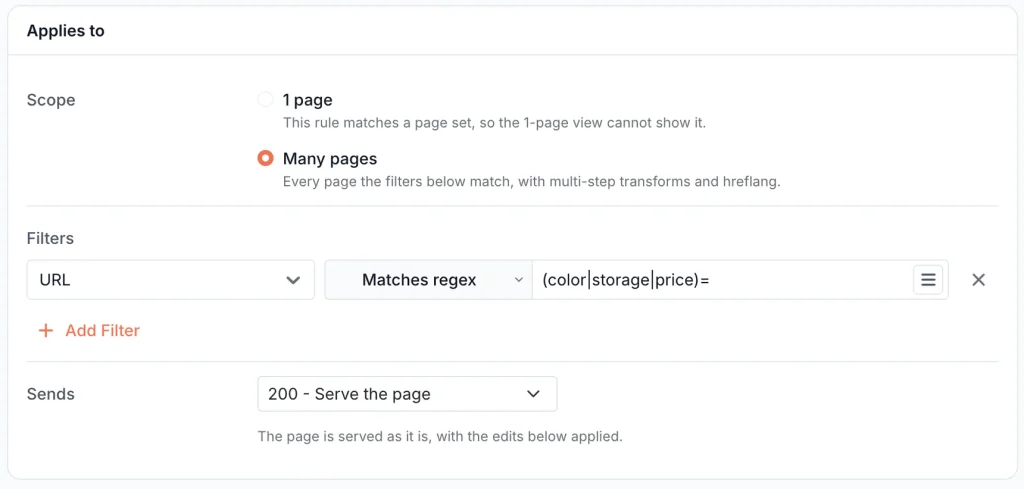
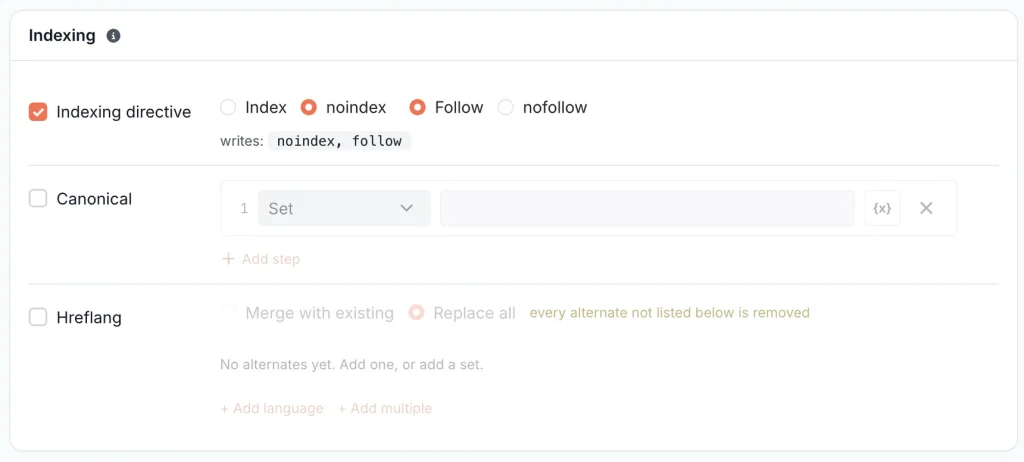
While you wait for the drop, watch the “Blocked but Crawled” row in EdgeComet’s crawl waste breakdown. It counts noindexed pages that bots keep requesting (“blocked” by a robots meta tag there, not by robots.txt). For a facet class in cleanup that’s the expected state, because it means Google is still coming back to read the noindex.
rel=canonical for near-duplicate variants
Canonical merges duplicates. Don’t count on it to stop crawling. Google’s facet documentation says a canonical to the unfiltered URL “may, over time, decrease the crawl volume” of the variants, and “may, over time” is about as weak as crawl control gets. Use it for URLs that show the same result set, with tracking parameters as the classic case:
<!-- on /phones/samsung/?utm_source=newsletter -->
<link rel="canonical" href="https://example.com/phones/samsung/">

<!-- on /phones/samsung/ itself -->
<link rel="canonical" href="https://example.com/phones/samsung/">
Every indexable facet page carries a self-referencing canonical. What you shouldn’t do is point a materially different result set at its parent: Google picks its own canonical when content, links or sitemaps disagree, and those URLs end up in the “Google chose different canonical” bucket from Step 4. Also keep canonicalized variants out of robots.txt. Google can’t read a canonical on a page it can’t fetch, and its duplicate URL guidance says so directly: “Don’t use the robots.txt file for canonicalization purposes.”
Internal links and nofollow
Link only to facet URLs you want crawled and indexed, and use plain HTML <a href> elements for them, because Google generally crawls links only when they’re an <a> element with an href. Every other facet should be a control, not a link.
Don’t lean on nofollow. Per Google’s facet documentation it works only if every anchor pointing at a URL carries it, and even then the URL can still turn up through sitemaps or external links. Google itself rates robots.txt and fragments as stronger long-term controls than canonical or nofollow.
URL structure rules
These faceted navigation best practices keep one state on one URL. The first three come from Google’s facet documentation; the fourth is how you enforce them in code.
- Separate parameters with
&. Commas, semicolons and brackets “are hard for crawlers to detect as parameter separators”, per Google. - In path-based URLs, keep facets in one fixed order:
/phones/samsung/black/, never also/phones/black/samsung/. - Reject duplicate facets such as
?color=black&color=black. - Return the same URL no matter what order the shopper clicked in. Put parameter keys in a fixed order and lowercase values on the server, then redirect the variants.
Empty combinations and facet pagination
Google’s facet documentation leaves no room for interpretation here: “Return an HTTP 404 status code when a filter combination doesn’t return results”, rather than redirecting to a generic not-found page. Impossible states like /rentals/?city=berlin&district=soho and duplicate-filter URLs get the same 404. A landing page that empties out temporarily, such as a brand between model launches, is a different case and needs its own policy.
Pagination inside a facet is less dramatic. Treat each paginated page as an ordinary page that links to the next one with an <a href>, and let page 2 inherit its facet’s treatment. Page numbers past the last page return 404, like any other empty combination.
Facets that never become URLs
Fragments and client-side filtering create no crawlable URLs, which settles crawling and rules out ranking in the same move. Google’s facet documentation says “Google Search generally doesn’t support URL fragments in crawling and indexing”, so to Google, /phones/#price=200-400 is simply /phones/, and a filter that repaints the grid without touching the URL behaves the same way. That’s exactly what you want for shopper-only states. For a combination you hope to rank, it’s a dead end.
Faceted navigation on JavaScript sites
JavaScript facets play by the same rules: an indexable facet needs a crawlable <a href> and a URL that returns the right content and status code on a direct request. What JavaScript changes is when Googlebot sees the link, and whether it sees it at all.
In my experience this is the section where SEO and development teams talk past each other most, so I’ll stay close to the markup.
Per Google’s JavaScript SEO basics, Googlebot parses links in the initial HTML, renders pages that return 200, then parses the rendered HTML for links a second time. A facet link injected by JavaScript can be found, but later, and only if rendering succeeds; Google publishes no success rate or queue delay for that second pass. We cover how Googlebot renders JavaScript pages in more detail separately.
Links that aren’t <a href>. A <span> with an onclick handler, a <button> or a <div> with a router attribute gives Googlebot no URL to extract. An <a href> that JavaScript intercepts, on the other hand, still exposes its URL. So when someone tells you “our filters use AJAX”, that says nothing about crawlability. The markup does.
<!-- No URL in the markup: Googlebot can't follow it -->
<span class="facet" onclick="applyFacet('brand', 'samsung')">Samsung</span>

<!-- Crawlable: the URL is in the markup, and JavaScript can still handle the click -->
<a href="/phones/samsung/" class="facet">Samsung</a>

<!-- Shopper-only: a control, deliberately not a link -->
<button type="button" class="facet" data-pickup="today">Pick up today</button>
History API URL changes. history.pushState() updates the address bar but publishes no link, so discovery still depends on an <a href>, a sitemap entry or an external link. A price slider that writes ?price=200-400 without a matching <a href> sharply reduces discovery, but it doesn’t make the URL invisible: shared and already-known URLs can still get crawled, so disallow shopper-only parameters too. Google recommends the History API with real <a href> links for views you want indexed, and fragments for facet states you want kept out of search.
Direct requests. An indexable facet URL must return its content on a cold request, with no prior clicks, cookies or local storage. Test it that way, because that’s how Google loads it: its rendering service clears local storage, session storage and cookies between page loads.
Status codes. A zero-result facet in a single-page app often answers 200 with an empty grid. Return the 404 from the server on a direct request. Where the server can’t tell the result is empty, Google’s JavaScript SEO basics allows adding <meta name="robots" content="noindex"> with JavaScript. The same page offers a second option, a JavaScript redirect to a 404 URL, which I’d skip, because the facet documentation advises against redirecting empty combinations.
Directives. A noindex in the original HTML may lead Google to skip rendering, so JavaScript can’t remove it later. Google also says not to use JavaScript to change the canonical to a different URL than the one in the original HTML. In both cases, get the directive right in the raw HTML and leave it alone.
Verify the rendered HTML, not the source. Compare the raw and rendered versions of a listing page to find facet links that exist only after JavaScript runs; our free jsbug.org lists the links JavaScript adds or removes. Server-side rendering or pre-rendering reduces your dependence on Google’s render queue, and Google still recommends it, because not every bot executes JavaScript. See also technical SEO for JavaScript-driven catalogs.
Faceted navigation best practices: checklist and rollout order
Ship the changes in an order that never hides a noindex behind a robots.txt rule. This is the checklist I’d hand to a development team:
- Parameters inventoried
- URL classes assigned a treatment, one per class
- Indexable facets have a clean URL, unique title and H1, self-referencing canonical and internal links
- noindex shipped for already-indexed low-value classes, which stay crawlable
- Parameter order, duplicates and letter case normalized on the server
- Zero-result combinations return 404
- Links to non-indexable facets turned into controls before their Disallow ships
- Disallow rules tested against real URLs from the logs
- Baselines saved from the audit
noindex indexed classes → wait for drop → turn non-indexable facet links into controls → Disallow never-crawl patterns
Why does the Disallow come last? Because robots.txt rules match patterns, not classes. Disallow: /*?color= catches never-indexed color combinations and the indexed ones still dropping out, so in the first release you can block only the parameters that no indexed URL contains.
The links change before the Disallow, and the timing cuts both ways. Remove them too early and you slow the recrawl that drops noindexed URLs; leave them in place behind a Disallow and blocked URLs can get indexed from those links. While you’re in the templates anyway, check the other crawlability problems worth fixing alongside.
How to verify faceted navigation changes worked
Compare five numbers against your audit baseline a week after each release, then monthly until the noindexed classes drop out. That’s my working cadence, not a window Google documents.
| Check | Source | What you want to see |
|---|---|---|
| Googlebot share of facet requests | EdgeComet Log Analyzer, facet segment | Falls for blocked patterns; once Google has the new robots.txt, any request to a URL a rule should cover means the rule doesn’t match it |
| Facet URLs in the index | Search Console Page indexing | Noindexed classes move to “URL marked ‘noindex'”; “Indexed, though blocked by robots.txt” stays flat; approved landing pages stay indexed |
| Crawl frequency of new category and product pages | EdgeComet Log Analyzer | Median time from going live to first Googlebot request, against the baseline |
| 404 volume from empty combinations | EdgeComet Log Analyzer, Status Codes | 404s come from empty and impossible combinations, never from approved landing pages |
| Clicks and impressions of approved facet landing pages | EdgeComet Search Analytics, landing page segment | Steady or growing while the duplicates leave the index |
For the first row, run Data Explorer’s period comparison on the facet segment across the release date: URLs from blocked patterns should show up as lost, and any that keep returning point to a rule that doesn’t match.
Judge the first two rows before the third, and don’t panic if product crawling doesn’t jump the following week. Google’s crawl budget documentation says freed capacity moves to other pages only when a site already hits its crawl capacity limit. A smaller facet share is a real result on its own.
If you take one thing from this article, make it the first step: pull a month of logs and calculate your facet crawl share. Every decision above gets easier once that number is in front of you.