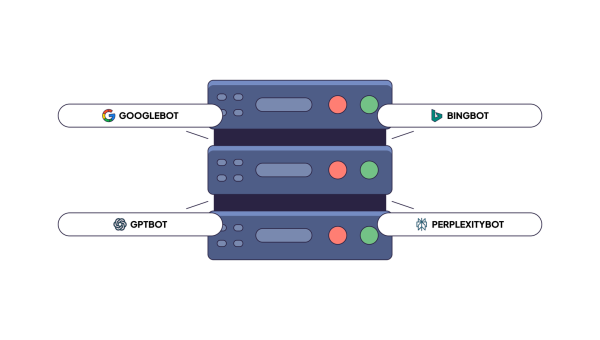
What are the best log file analyzer tools? The answer depends on which bots you need to track, and that list has changed. Earlier, there were only a few bots, like Googlebot and Bingbot. Today, we also deal with GPTBot, ClaudeBot, PerplexityBot, and many more. According to Cloudflare Radar, AI bots created 4.2% of HTML requests in 2025, while Googlebot created 4.5%. The share of AI bots has almost caught up with Googlebot, so you can’t ignore it in 2026-2027.
AI bots scan your website differently from Google. They can spend server resources and bring nothing back. Or they won’t reach your most important pages at all.
You can’t process such huge volumes of data. You need a tool. The choice is big, from free platforms to enterprise-grade ones. Some focus on SEO, others on DevOps. Not all can distinguish AI crawlers from common bots.
In this article, we compare the best log analysis tools and explain how to choose the right one.
Table of content:
- Best SEO Log Analysis Tools in 2027
- SEO Log Analysis Tools Comparison
- What Makes a Log Analysis Tool Useful for SEO?
- Best SEO Log Analysis Tools Reviewed
- How We Compared the Tools
- How to Choose an SEO Log Analysis Tool
Best SEO Log Analysis Tools in 2027
If you are looking for the best SEO log analyzer, you can check our list below.
- EdgeComet – Best for search and AI crawler analysis
- Oncrawl – Best for segmentation on large sites
- Botify – Best for enterprise teams that want crawl, log, and keyword data in one place
- seoClarity (Bot Clarity) – Best for tying bot activity to rankings and analytics
- Lumar – Best for overlaying log data on crawl reports
- Conductor – Best for marketing teams that want AI bot visibility without data engineering
SEO Log Analysis Tools Comparison
What are the best log analyzer tools? If you need to compare log-file analyzers that show crawler frequency, status codes, and budget waste by site section, the table below will be useful.
| Tool | AI crawlers | Crawl frequency | Status codes | Crawl budget | Site sections | Log access |
|---|---|---|---|---|---|---|
| EdgeComet | 19 AI bots by purpose | Yes | Yes | Valuable vs wasted split | Segment filter | Bot requests EdgeComet serves; CSV export |
| Oncrawl | OpenAI, Perplexity, Claude, Gemini, Mistral | Yes, near real time | Yes | Over-crawled and abandoned pages | Custom segments | Apache, Nginx, IIS, JSON; S3, GCS, FTPS |
| Botify | Yes, plan-dependent | Daily, 30-day view | Yes | Crawls vs visits | Yes | Daily files (Apache, Nginx, Varnish, IIS) |
| seoClarity | GPTBot, PerplexityBot | Yes | Yes | Yes | Bot groups, URL drill-down | Daily file; SFTP, S3, Azure |
| Lumar | Yes, GEO add-on | Hits per URL | Yes | Yes | Via crawl segments | Logz.io, Splunk |
| Conductor | GPTBot, Perplexity Bot | Yes | Yes | Yes | Yes | No information |
Which vendors analyze server logs to expose crawl budget waste and indexing blockers? Compare how uploads are handled and retention windows. EdgeComet, Oncrawl, and Botify document section-level breakdowns most clearly. Lumar and seoClarity depend on a log pipeline you should create first. EdgeComet offers a convenient way to track bot requests: it records requests as it serves them, so you won’t need to export log files. Conductor doesn’t publish its log formats. Below is our approach to the best log file analyzer tools comparison.
How we selected and ranked the tools
We looked for the best log-based SEO performance analysis tools. So each tool had to work with server log data and report on search and AI bots. We left out general SEO suites where logs are a side feature without bot reports.
We read vendor documentation, product pages, and third-party reviews. Then we asked each tool the same six questions from the table. Does it show Googlebot data? Does it separate AI crawlers? Does it track crawl frequency over time? Does it show status codes? Does it expose crawl budget waste? Can it break results down by site section? We also checked how logs reach the tool and which formats it accepts.
The order in the list follows four factors. First, how fully the tool answers the six questions. Second, how deeply it separates AI bots, for example by purpose and with IP checks. Third, how much setup work the logs need. Fourth, how much the vendor documents. Where a vendor publishes no details, as Conductor does with log formats, we say so and rank the tool lower. We left pricing out of the ranking because most vendors don’t publish it.
What Makes a Log Analysis Tool Useful for SEO?
Website log analysis tools help generate lists of all requests your server gets. Best tools for log file analysis will turn those lists into answers covering the following.
- Bot verification. A log analysis tool should provide you with the information whether a visitor is a real human or a bot.
- AI bot separation. GPTBot, ClaudeBot and Perplexity behave differently from Googlebot. Training bots, search bots and user-triggered fetchers also differ from each other. Look for separate views.
- Crawl budget optimization. The tool should tell you where crawlers spend requests on duplicates, filters, redirects and error pages.
- Crawl frequency over time. A single snapshot of bot activity shows very little because daily crawl numbers may fluctuate across a site. Monitoring crawl frequency over time helps detect sudden drops on critical pages.
- Status codes by bot and section. Monitoring 404s or 5xx errors on website sections allows to detect deployment issues.
- Segmentation by site section. Aggregated totals can mask serious problems. Product pages, category pages and blog posts require their own numbers.
- Log access and formats. Check what the tool accepts (Apache, Nginx, IIS, JSON, W3C) and how files arrive (S3, SFTP, CDN, direct capture).
- Data freshness. Daily logs show yesterday’s problems. Live logs show immediate incidents.
Best SEO Log Analysis Tools Reviewed
Discover best log file analysis tools: read what each is best for, explore their features, pros, and cons.
EdgeComet – Best for search and AI crawler analysis
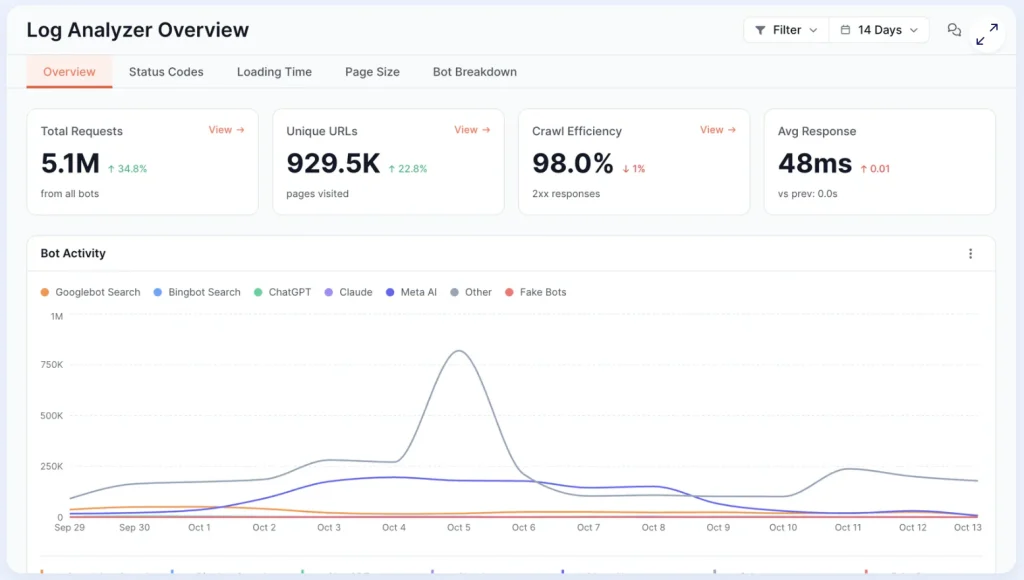
EdgeComet is a technical SEO platform, and its Log Analyzer captures every Googlebot, Bing and AI bot request, and attaches the page state the bot got after JavaScript ran. Each request carries about 90 fields, from status code and serve time to title, canonical, and structured data.
Best for: SEO teams that want to track search and AI bots in one place and need to understand what each bot got.
Key SEO features:
- Overview with KPIs: total requests, unique URLs, crawl efficiency (share of 2xx responses) and average response time, each with period-over-period change
- Status codes: trend by code, churn against the previous period, and a 2xx to 5xx breakdown by site section
- Googlebot and Bing reports: crawl rate, pages per day, and a desktop, mobile and image split with failure rates
- Crawl budget allocation in three buckets (valuable, questionable, wasted), with rules you set up per website
- Crawl waste: 404s, 5xx errors, non-canonical pages, blocked-but-crawled pages, render errors, and redirects
- URL inventory: new and lost indexable URLs between two periods
- AI bots split by purpose: training (GPTBot, ClaudeBot, CCBot), search (OAI-SearchBot, Claude-SearchBot, PerplexityBot) and user fetches (ChatGPT-User, Claude-User, Perplexity-User).
- AI Attention Map: which page types ChatGPT, Claude and Perplexity fetch
- Bot identification: 93 bots from 124 user-agent patterns, with 31 identities checked against vendors’ published IP ranges and a fake-bot report by risk tier
- Page snapshot per request: 23 SEO fields captured after JavaScript runs (title, canonical, robots, headings, word count, index status, links, hreflang, structured data), plus a link graph and up to 50 custom extraction fields such as price or stock
- Data Explorer: SEO-aware filters, period comparison, saved segments and CSV export up to 1 million rows
- Log access: data comes from the requests EdgeComet serves, with no extra crawl and no added load on your origin
Pros:
- Captures what the bot got after JavaScript ran
- Offers training, search and user-fetch traffic in separate views
- Custom extractions answer business questions, such as which products under $20 GPTBot has never fetched
- Log Analyzer is part of the EdgeComet’s platform, from $99 per month, with a 14-day free trial
Cons:
- It tracks fetches, not AI citations.
- Data Explorer filters combine with AND only, with no OR logic
- Real-time notifications come from the separate Alerts module
Best suited for:
- JavaScript-heavy sites where rendered content matters
- Teams that monitor how AI systems use their content
- E-commerce and classifieds sites that want crawl waste grouped by page template
- Agencies that report crawl efficiency per client every month
Oncrawl – Best for segmentation on large sites
Oncrawl’s Log Analyzer can read Apache, Nginx, IIS and JSON logs and manage a huge number of filtered log lines per day. Its advantage is segmentation. You can group URLs into your own categories and compare how bots treat them. What it monitors: Google, Bing, Yandex, Baidu, different AI bots.
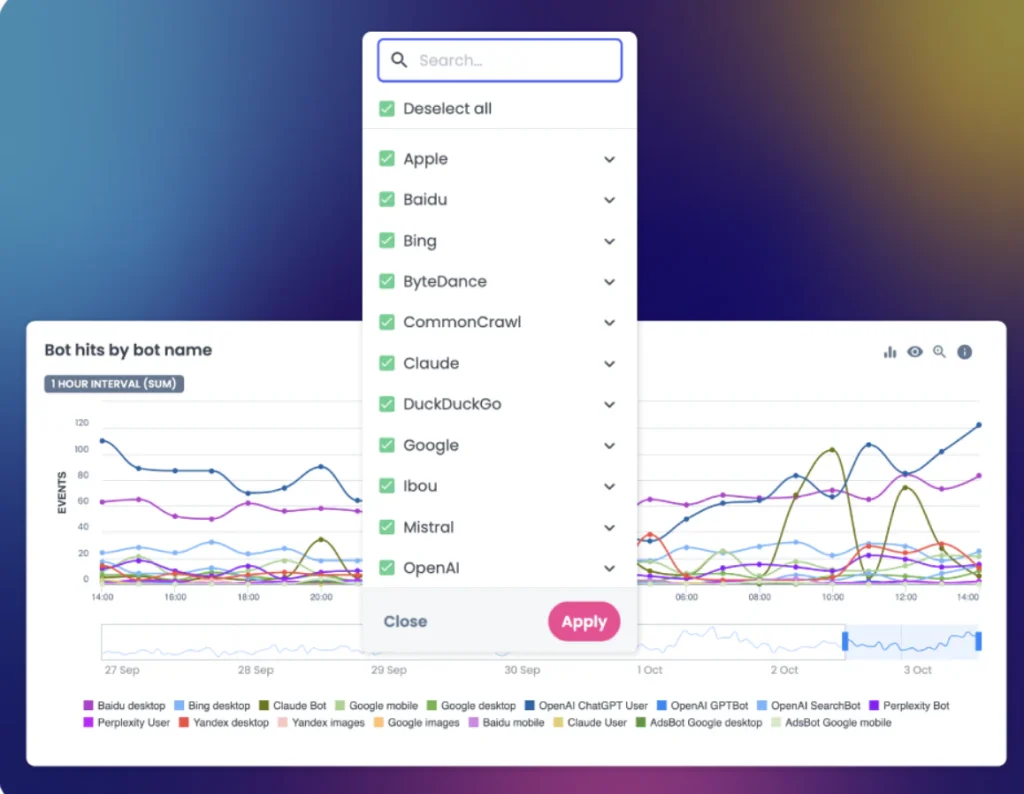
Best for: Websites that need to compare bot behavior across sections.
Key SEO features:
- Live log monitoring in near real time
- Status codes, bot hits and SEO visits over time, by segment
- Dedicated AI bots dashboard that separates training bots from user bots
- IP checks against vendor-published ranges for supported AI brands
- Crawl budget analysis that flags over-crawled and abandoned pages
- Log access: S3, GCS, Akamai or FTPS upload; Apache, Nginx, IIS and JSON formats
- Email alert when recent usable log data stops arriving
Pros:
- Deep segmentation
- Many ingestion routes
- Combines log data with crawl data
Cons:
- Log monitoring requires its own subscription
- No public pricing; a demo is needed to get a quote
- Setup and interpretation call for technical SEO skills
Best suited for:
- Enterprise sites and marketplaces
- Agencies with technical SEO staff
Botify – Best for enterprise teams that want crawl, log, and keyword data in one place
Botify’s LogAnalyzer is part of its Analytics Suite and comes with all Botify plans. A dashboard refreshes daily with crawl activity and organic visits from your logs. Segments show when Google finds new pages and when those pages start earning visits.
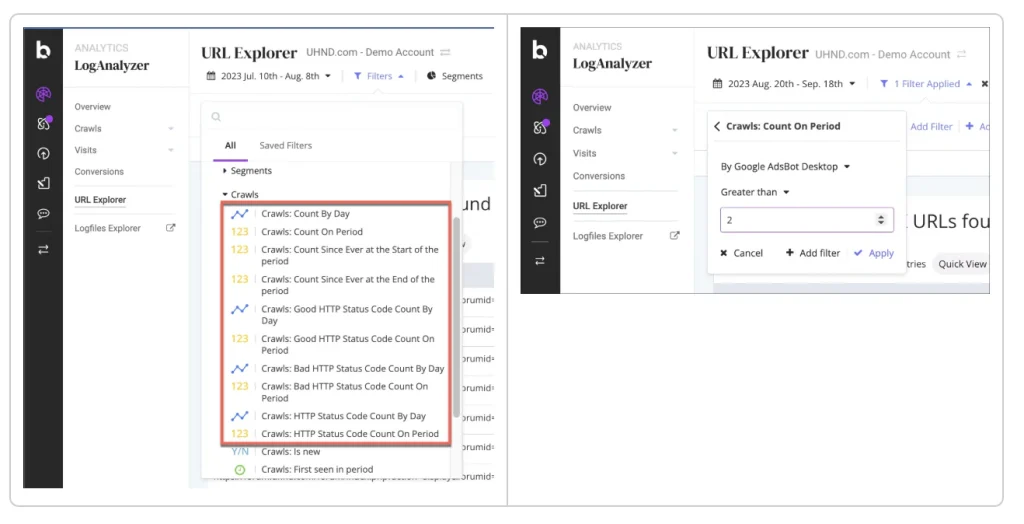
Best for: Large sites with SEO and engineering support.
Key SEO features:
- Daily crawl distribution by bot and segment across a 30-day window
- HTTP code reports by segment, with click-through to the URL Explorer
- Crawls shown next to visits by segment to expose crawl budget waste
- Migration monitoring
- Report on crawled resources that pages do not need for rendering
- Log access: Botify support sets up delivery; files arrive daily; Apache, Nginx, Varnish and IIS default formats; each file compressed on its own (gzip, bzip2, zip or xz)
Pros:
- Crawl, log and keyword data in one platform
- Support-led log setup
- Segment views link crawl activity to organic visits
Cons:
- Daily refresh, not real time
- Available bots and log retention depend on your plan
- Strict file rules: tar.gz, 7zip, rar and multi-file zips are not accepted
Best suited for:
- Enterprise e-commerce and publishers
seoClarity (Bot Clarity) – Best for tying bot activity to rankings and analytics
Bot Clarity processes server logs filtered to bot hits. It links bot activity to rankings and analytics at site level and at URL level. It also flags spoofed bot activity.
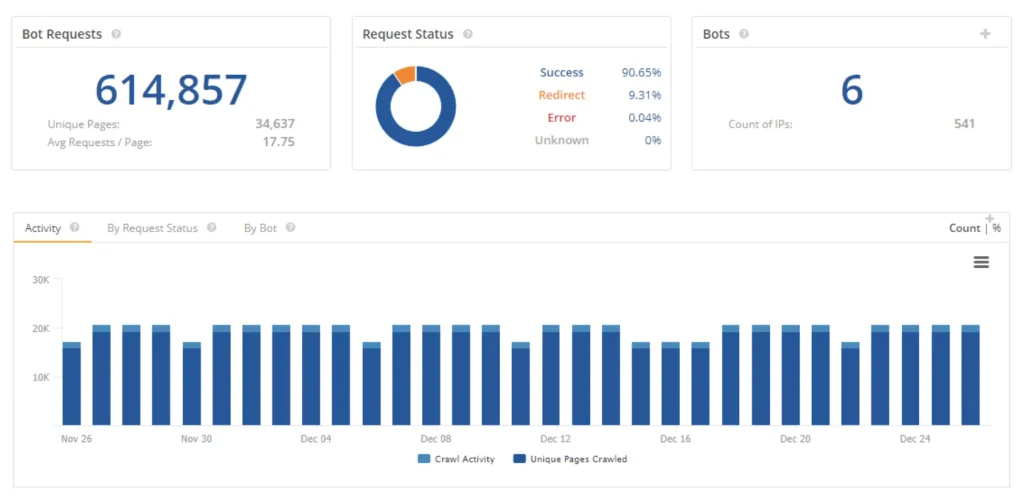
Best for: SEO teams that need to check if bot attention converts into traffic.
Key SEO features:
- Bot crawl frequency and bot IP activity
- Trends by bot and by bot group, with URL-level drill-down
- Bot detection
- Mobile crawl monitoring
- Bots listed in the docs: Googlebot, bingbot, Baiduspider, GPTBot, PerplexityBot
- Log access: one daily file with date, URL, response code and user agent; delivery by SFTP, S3 or Azure; W3C, Apache/Nginx and ELB formats; PII removed before delivery
Pros:
- Connects bot hits to rankings and analytics
- Accepts most common log formats
- Several delivery methods
Cons:
- Processing limit of 1 GB of uncompressed logs per day, with $100 per extra GB
- Multiple servers must be merged into one file before delivery
- The documented AI bot list is short
Best suited for:
- Sites with moderate log volume
Lumar – Best for overlaying log data on crawl reports
Lumar pulls bot data into its crawl through a Logz.io integration and shows it next to crawl data. The reports sit under Discoverability – Crawl Budget. Customers with GEO reporting also get AI Crawlability and AI Indexability views.
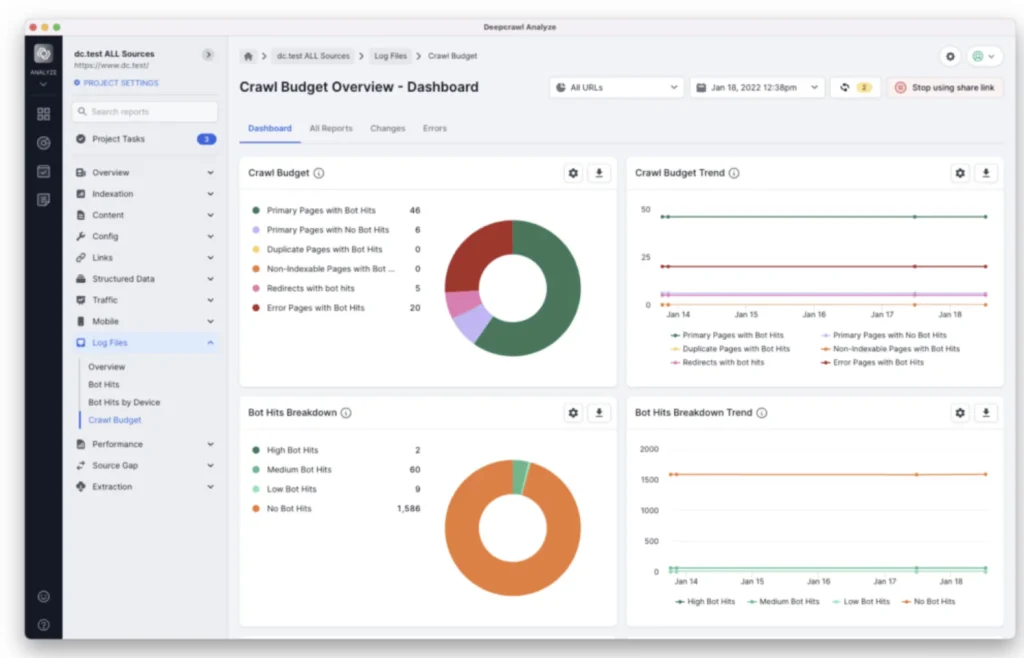
Best for: Teams that already crawl with Lumar.
Key SEO features:
- Bot hits per URL, with separate counts for Google desktop and mobile crawlers
- Reports on pages with bot hits that return errors or hold outdated content
- Crawl budget inefficiency reports
- AI Discovery reports with a GEO subscription
- Log access: minimum fields are URI, host, user agent string, HTTP response and timestamp; optional fields include IP, request size, TTFB, device and country; data arrives through Logz.io (a Splunk integration was also documented)
Pros:
- No tool switch if you already crawl in Lumar
- Only bot data is shipped to Logz.io, with no user PII
Cons:
- Logz.io must be added to your Lumar subscription, and setup runs through customer success
- Data arrives with each crawl, so it is not live
- Summary hits per URL, not a full raw log explorer
- GEO reports need a separate subscription
Best suited for:
- Sites that already ship logs to S3
Conductor – Best for marketing teams that want AI bot visibility
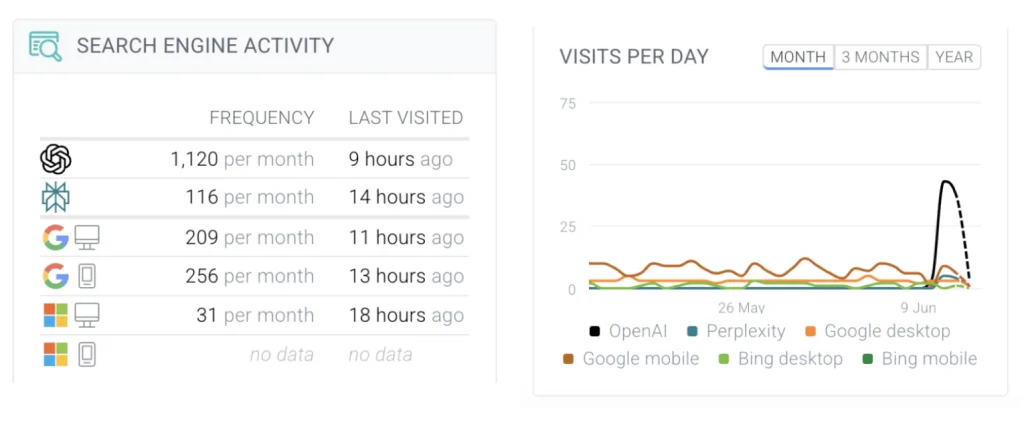
Conductor’s log file analysis feeds one dashboard with search engine and AI bot activity. Conductor says most marketing and SEO teams lack the data engineering help that raw logs usually require, and it offers the feature around that gap. It belongs to Conductor’s enterprise AEO platform.
Best for: Marketing and SEO teams that want a ready dashboard.
Key SEO features:
- Unified view of search engine bots and AI bots such as GPTBot and Perplexity Bot
- Crawl budget view
- Crawl error detection with the URLs, error codes and bot types involved
- Migration tracking
- Log access: unknown
Pros:
- One dashboard for search and AI bots
- Needs little technical work from the team
- Three-week free trial
Cons:
- Log formats and delivery methods are not available publicly
- Pricing can be learnt from sales
- Log analysis is one feature of a larger platform
Best suited for:
- Teams without developers for log pipelines
How We Compared the Tools
Our team compared six tools that provide data on search and AI bots activity, using log files. To compare the best log analysis tools for SEO auditing, we read vendor documentation, product pages, and third-party reviews.
We asked the same six questions about each tool:
- Does it provide data on Googlebot?
- Does it separate AI crawlers?
- Does it report crawl frequency over time?
- Does it show status codes?
- Can you see a crawl budget waste with this tool?
- Can it break results down by site section?
Also, we checked how logs gain each tool and which formats it accepts. Where a tool provider doesn’t give the information about a feature, the table says so instead of guessing. The price is left out of the table because most providers don’t publish it on their sites. So, check each provider’s actual documentation before you purchase. Functionalities change quickly, especially around AI bots.
How to Choose an SEO Log Analysis Tool
If you need to shortlist platforms that analyze server logs to reveal crawl budget waste and indexing blockers, including imports from a CDN or object storage, here are the six tools from this article in ranking order:
- EdgeComet. No log import. It stores bot requests as it serves them and integrates with Nginx, CloudFront, Cloudflare and Fastly. Reports export to CSV.
- Oncrawl. Apache, Nginx, IIS or JSON logs. Connect S3, GCS, Akamai or FTPS.
- Botify. Daily log files in your storage bucket, each compressed on its own (gzip, bzip2, zip or xz). Botify support sets up delivery.
- seoClarity. One daily file with date, URL, response code and user agent. Delivery by SFTP, S3 or Azure. Remove PII first. Limit: 1 GB per day.
- Lumar. Logs shipped to Logz.io, which Lumar queries. Minimum fields: URI, host, user agent, HTTP response and timestamp.
- Conductor. Formats and access are not published on the vendor’s website.
To choose the best SEO log file analysis tools, begin with your needs.
| Your need | What to consider when choosing a tool |
|---|---|
| Check which site sections waste crawl budget | Segmentation by URL pattern or page type, with hits and status codes per segment |
| Monitor AI bots | Separate reports per crawler, a split between training bots and user fetches, IP checks against published ranges |
| Which tools can separate verified search engine bots from spoofed crawlers in server logs | IP checks against providers’ published ranges, a fake-bot report by risk tier, a split between real and impersonated Googlebot and AI crawlers |
| Analyze what bots get after JavaScript ran | A page snapshot per request (title, canonical, robots, structured data after rendering), not only URL and status code |
| Detect crawl errors fast | Status codes by bot and section, alerts, near real-time data instead of daily files |
| Measure crawl frequency | Hits per URL over time, trends by bot, a way to spot drops on key sections |
| Show crawl budget waste | A split between valuable and wasted requests, plus lists of over-crawled and orphan URLs |
| Logs sit in S3, GCS or a CDN | Native connectors for your storage or CDN (S3, GCS, Azure, SFTP, Akamai, Cloudflare, Fastly) |
| You only have raw access.log files | Accepted formats (Apache, Nginx, IIS, JSON, W3C, ELB) and compression rules |
| You run several servers or a load balancer | Whether the tool merges logs itself or requires one file per day |
| No developers needed | Provider-assisted setup |
| Privacy rules | Whether the tool strips PII or anonymizes IPs before storing data |
| You want to link bots to rankings and traffic | Rankings and analytics correlation at URL level |
| Budget is tight | Public pricing, a free trial, and clear volume overage terms |
EdgeComet provides clear information on what each search and AI bot received after JavaScript ran, and you can test it on your own traffic with a 14-day free trial, no credit card needed.
FAQ
What is the best log analysis tool for SEO?
Choosing the right tool will depend on your log access, website size, and team. Test your shortlist on about a month of your own logs, since that period shows weekly crawl patterns and the effect of releases. Small websites can start with the Crawl Stats report in Google Search Console, which covers Googlebot only, or get a free 14-day trial on EdgeComet.
What should an SEO log analysis tool track?
The most basic things to track are as follows: the time, the URL, the status code, the user agent and the IP address. Also, it will be useful to log how fast your origin responds, because slow answers can reduce the frequency of crawlers visits. Analyze your CDN or load balancer logs too, since your main server may not see every request.
Can log analysis tools track Googlebot and AI crawlers?
Yes, Googlebot and AI bots are identified in the user-agent fields. You can compare their visits with your robots.txt rules: repeated requests to blocked paths mean the bot ignores them or is an impostor. A 200 response doesn’t prove an AI bot saw your content, because many AI crawlers don’t run JavaScript.
Can log analysis identify crawl budget waste?
Yes, log analysis allows you to check sections that get many bot hits but bring little traffic (for example, filters, duplicates, or redirects). Crawl budget is important mostly for large sites: 1 million pages that are updated weekly, or 10,000 pages that change every day. Calculate your pages first. If your website is smaller than these numbers, crawl budget is perhaps not your key problem.