We released a new version of Evergreen Crawl V2, and it is now available on all accounts. The release adds full internal link analysis with every link classified by the region of the page it sits in. Site audit checks are ranked by the GSC and AI impressions at stake, with changes tracked between periods.
What Evergreen Crawl is
Evergreen Crawl is a new concept we introduced in 2026, and the idea is simple: instead of running an artificial crawl, we analyze the site exactly as Googlebot and AI bots do. EdgeComet sits in the request path between your site and the bots that fetch it. Every page served to Googlebot, Bingbot, GPTBot, or ClaudeBot is parsed as that bot receives it, and the audit is built from requests that have already happened.
The whole idea behind Evergreen Crawl is that Googlebot does not crawl the way an SEO crawler does. An SEO crawler’s task is to find and crawl as many pages as possible from a website. Googlebot discovers URLs and then re-crawls selectively based on demand, link signals, and technical health. The pages it visits and how often it returns diverge sharply from what a spider produces.
AI crawlers diverge again, on their own schedules, and most of them do not execute JavaScript at all. Your crawler and Googlebot are looking at two different websites, and evergreen crawl is the chance to see yours through the bots’ eyes.
The first release, in spring 2026, was a limited version of the concept, and feedback from early adopters told us we were headed in the right direction. Honestly, it was closer to a log analyzer with page content processing: for every URL, it recorded the title, canonical, robots directives, headings, word count, status code, and render outcome, which covers everything you can judge one page at a time.
The main limitation was internal linking. Whether a page has a title is a fact about that page, while how many links point at it is an aggregation over every other page on the site, and an aggregation needs a fixed set of pages to run. V2 adds that snapshot layer, and everything below is what it made possible.
What this means for you. You never start a crawl, and you never wait for one. The crawl is always fresh and ready.
Your site carries no extra load, and what you read is what Google and the AI bots actually received.
Region-based internal linking analysis
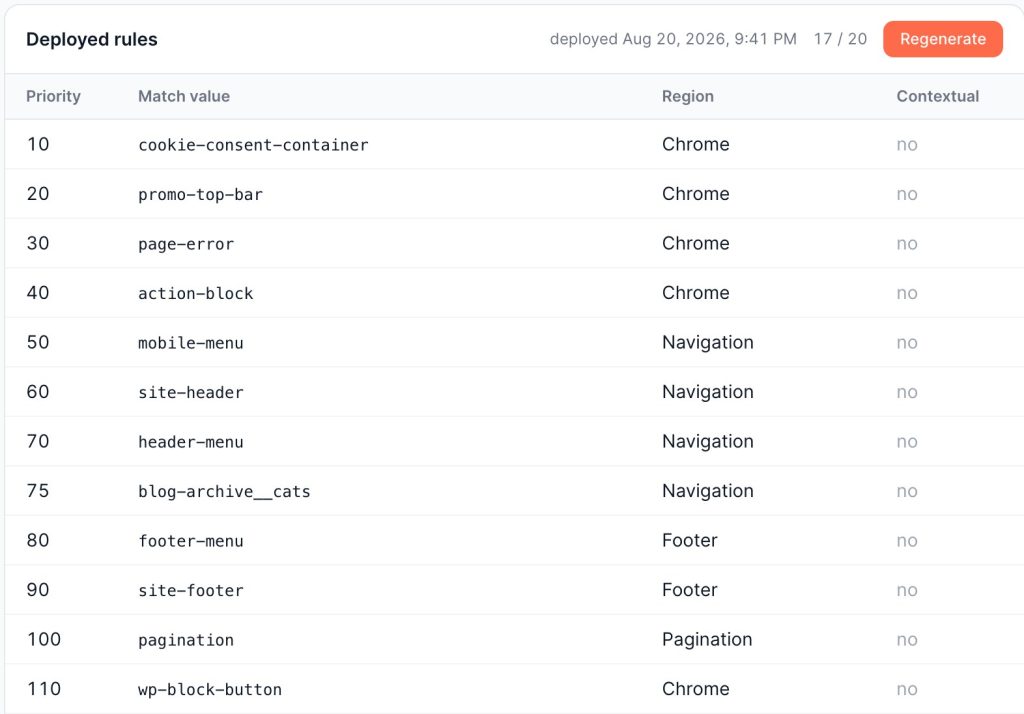
Every internal link EdgeComet captures has a page region: the main menu, the footer, faceted navigation, a listing block, or the body content of the page itself.
An automatic setup reads your templates, determines where each region starts and ends, writes the rules, and updates them automatically when the website changes its layout.
Back to the Reasonable surfer: Google’s patent says link placement matters. A link from the body of a related article is an editorial signal about one specific page, whereas the same URL in the footer appears everywhere and says very little about relevance.
Broken links work the same way: one dead link in a product description is a typo, one dead link in the main menu is on every page you own, and those arrive as separate findings with separate urgency.
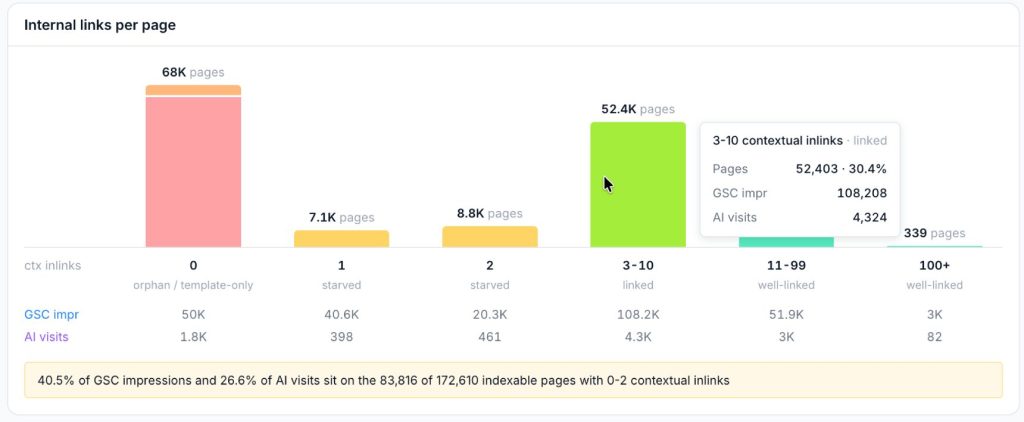
The placement split is also what makes the page states meaningful. Every indexable page gets exactly one of them, so nothing is counted twice:
- Orphan. No observed internal inlink at all.
- Template-only. Reachable through the navigation and the footer, with no links from body content anywhere on the site. Without region data, this state cannot be expressed, which is why conventional audits report these pages as ordinary linked pages.
- Starved. Has contextual links, but very few relative to the rest of the site.
- Linked. Everything else, which on a healthy site is most of it.
Crossed against traffic, those states produce the findings worth acting on: pages that rank or get cited by AI systems while nothing points at them, pages with almost no contextual links behind real demand, and templates absorbing a large share of every internal link on the site while earning nothing back.
What this means for you. Internal linking analysis that tells a link in an article apart from a link in the footer, with nothing to set up and nothing to maintain when your templates change. You get a short list of pages earning traffic that nothing real links to, and a list of templates spending your links on pages that earn nothing.
Snapshots you never have to schedule
The key feature of Evergreen Crawl is that you do not need to do it. It is always ready and always fresh.
| Snapshot | Window | When it appears |
|---|---|---|
| Current | trailing 30 days | rebuilt every three days |
| Monthly | the calendar month it covers | cut at the start of each month |
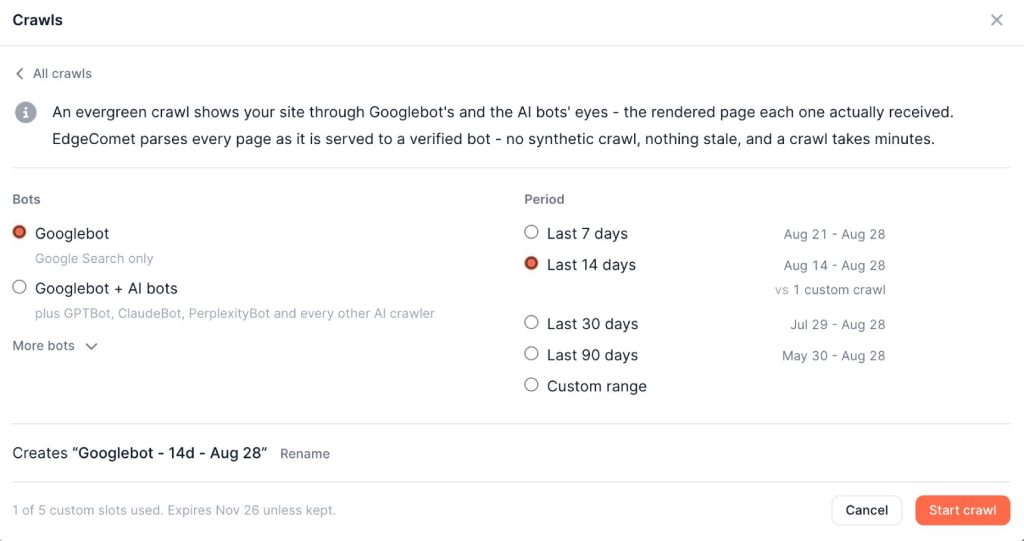
| Custom | 7, 14, 30 or 90 days, or a date range up to a year | on demand, ready in minutes |
Current is always available, and for most work it is the only one you need. Monthly crawls are time-machine snapshots, useful for comparisons. Custom snapshots cover cases like investigating particular issues tied to a specific date range or bot.
What this means for you. You always have a fresh crawl, and you do not have to think about it. If you need a different period, or want to see the site as a particular bot saw it, it takes minutes, not days.
A ranked worklist instead of a wall of issues
A checklist is basic functionality for any SEO crawler. It’s a starting point to get an overview of issues on the website.
Every Crawl is evaluated against over a hundred checks in nine categories. The evaluation is deterministic, involves no AI model, and its results are frozen per snapshot so every report and the Action Board agent read the same numbers.
| Category | Examples |
|---|---|
| Crawlability & Response | 5xx on pages with demand, redirect loops and chains, URLs Googlebot has never fetched |
| Indexation & Directives | noindex on pages still earning clicks, conflicting robots directives, pages surfaced in Google and untouched by any AI system |
| Canonicals | canonical loops, canonicals pointing at 404s or noindex pages, canonicals Google has ignored |
| Internal Linking | the four page states above, broken links by page region, generic and empty anchors |
| On-Page Tags | duplicate titles, titles that diverge from the H1, missing or multiple H1s |
| Content | thin pages with demand, thin pages fetched only by AI bots, soft 404s, placeholder copy left in a template |
| Hreflang | broken targets, missing return links, invalid language codes |
| URL & Transport Hygiene | indexable HTTP URLs, indexable tracking parameters and internal search results |
| Structured Data & Images | schema missing on pages with demand, absent breadcrumbs, images without alt text |
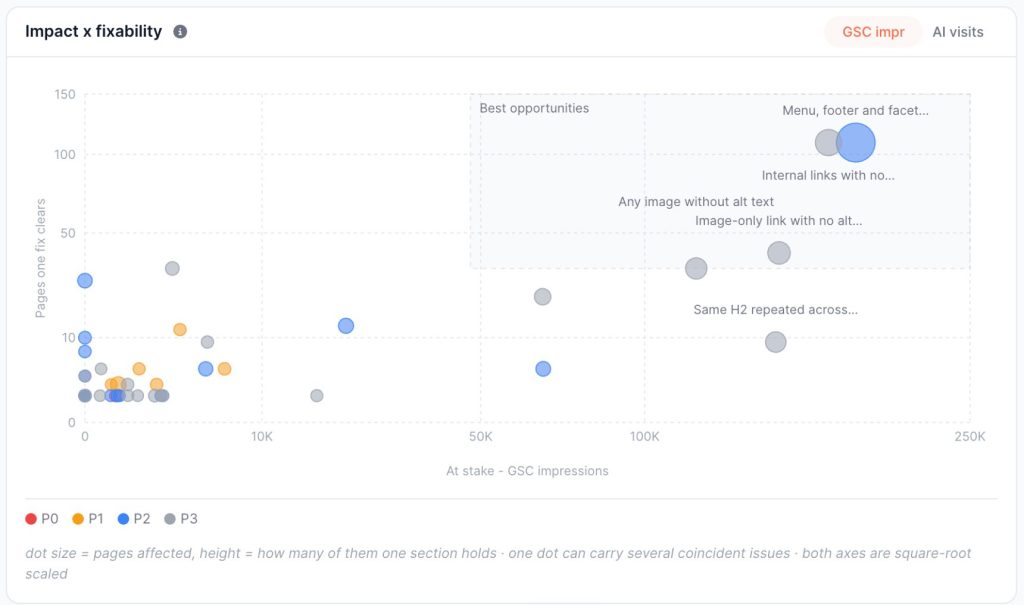
Ranking issues by priority is tricky; page count alone is a poor choice. 100k images missing an alt attribute is a smaller problem than one noindex directive, if that directive is on the home page.
Every row carries two demand figures: GSC Impressions and AI Impressions (AI user bot visits). Based on the metrics, each issue receives a priority level of P0, P1, or P2.
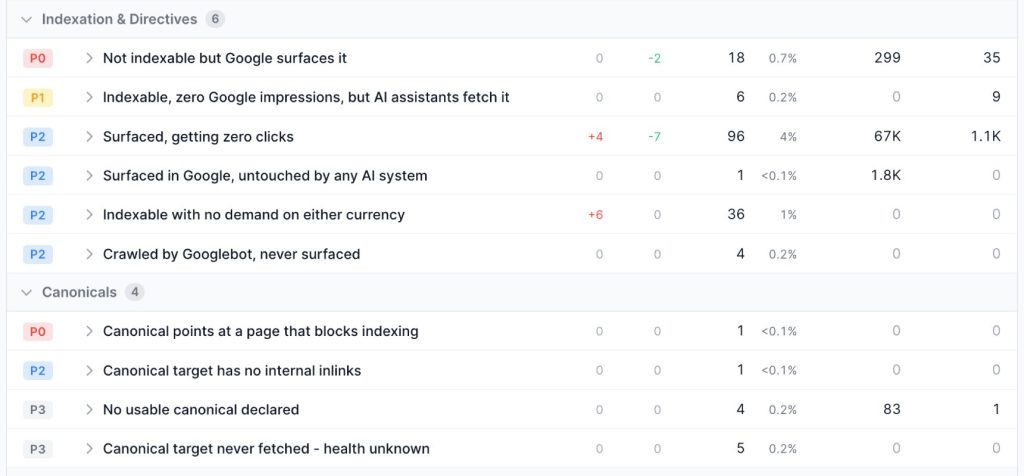
The agent on top of this decides what is worth examining and how to describe it, while the engine computes every number from a query against the snapshot.
What this means for you. P0 issues on the list are genuinely what you should fix first, measured by the traffic at risk rather than by how many pages are affected. You can send it to a client or a developer without re-sorting it by hand.
What changed since last time
On almost any website, pages appear and disappear constantly. What matters is the gap between what you expected and what happened. 20k new non-canonical URLs overnight is worth a conversation with whoever shipped it.
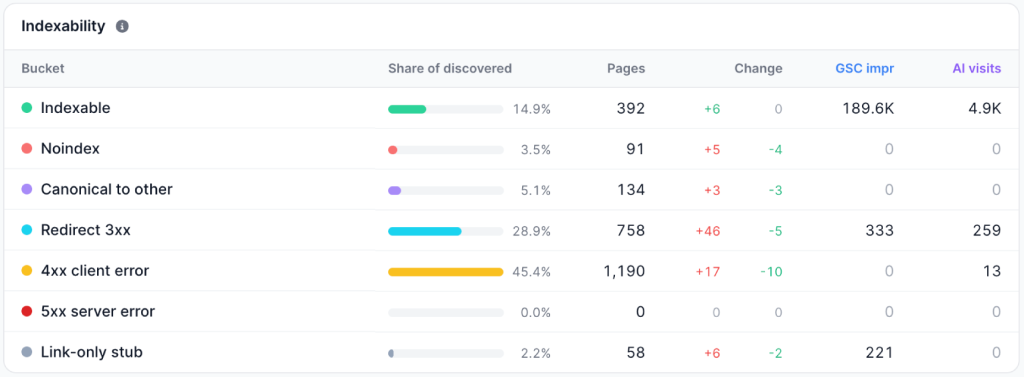
Each report therefore compares two snapshots bucket by bucket, one row per transition, sorted so the most damaging movement is at the top: indexable to noindex, self-canonical to canonicalized away, a 200 that is now a redirect.
What this means for you. A bad deployment shows up as a row in a report within days, instead of as an unexplained traffic drop a month later.
Automatic Configuration
In a conventional platform, extractions, segments, and link regions are manually configured by someone who knows the templates, and they quietly stop being correct the next time a developer renames a class.
In EdgeComet, we follow the principle of zero configuration needed. The system analyzes the website, traffic, pages structure, and automatically creates all needed configurations: custom extractions, segmentation, link regions, crawl budget waste, and so on.
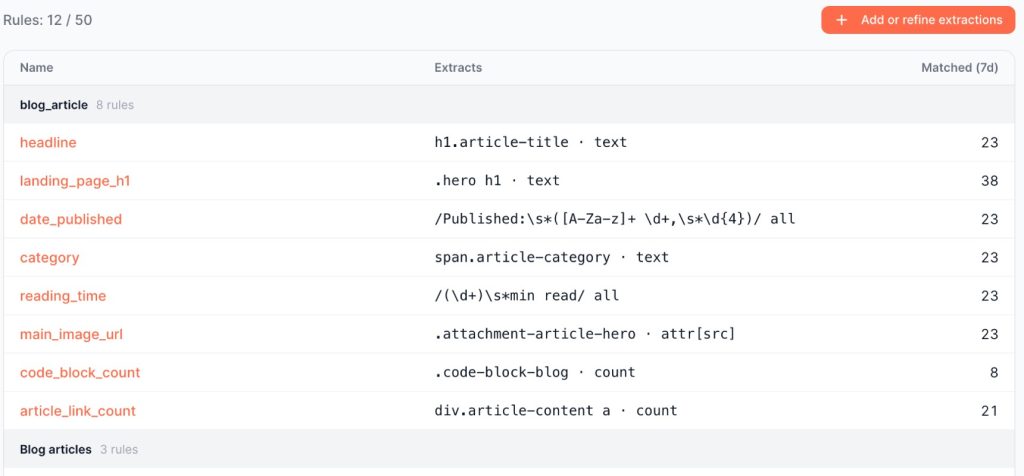
It clearly understands that your website is an ecommerce catalog and will create custom extractions for product availability, items per listing, etc. These metrics will be used in AI Action Board, crawl budget analysis, and alerting.
A health check then runs daily against every extraction rule, looking both for rules whose match rate has dropped and for rules that still match but return values that no longer make sense, and it repairs what it can before the affected data reaches a report.
What this means for you. No week-long setup and no need to read manuals or talk to support. The system is smart enough to understand your website structure and set up the tool for it.
The limitation of Evergreen Crawl
Evergreen Crawl reports on what bots fetched. A page no bot has ever requested has no row of its own, so if your question is about pages Google is ignoring entirely, a desktop crawler plus your sitemaps still answers it better, and the same applies to staging environments with no bot traffic.
Conclusion
Evergreen Crawl lets you work with crawling data without the hassle of crawls, schedules, and custom setup. It is always available, puts no load on your website, and shows the site as Google and AI systems see it. V2 extends that to internal linking without handing the scheduling back to you.
Two things in this release are worth more than they sound. Classifying links by where they sit on the page, automatically, turns internal linking from one flat number into an answer you can act on. And prioritizing issues by the search and AI demand genuinely at stake is the difference between an audit that becomes a worklist and one that becomes a document nobody reads to the end.