

AI generation runs: how EdgeComet drafts SEO fixes
An EdgeComet generation run is the AI job that writes the drafts for a fix: new values for each page, a developer brief, or content briefs. It starts when you choose a route, and nothing it writes reaches your site until a person deploys it. Also called a draft run.
Each run grounds every draft in the page's own data: its Search Console queries, its content as bots receive it, and its extracted fields. Your Guidelines and the focus you typed apply to every draft.
A run belongs to a task, and the task page is where you watch it, review the drafts and deploy them. See Review and deploy fixes from the Action Board.
What starts a run
A run starts in one of three ways:
- A route on a finding. Fix at the edge, Fix the top 100 at the edge, Create dev task and Write N content briefs each start a run. See Fix routes a step offers.
- A request in Ask. When you ask for a change on many pages, Ask records the job as a finding and starts a run, such as new titles and meta descriptions for a section. See Rewrite titles and meta descriptions.
- Run again on a task. See Run a generation again.
Fix at the edge with one rule and Just track it create a task without a run. Every run belongs to a task, and confirming the route opens its task page.
What a run reads for each page
What a run reads depends on what it writes:
- New values for each page: the page's current values, its top 10 Search Console queries and its custom extraction fields, such as product name, brand or price. Where a current value could not be read, the run reads the page's content.
- Content briefs: the same data, plus the page's content and keyword research for its topics.
- Developer briefs: the finding itself: its pages, counts, sample URLs, criteria and recommendation.
A run reads page content through EdgeComet's serving pipeline: the same page bots receive. Keyword research you pinned to the finding from a chat feeds the run. When you start a run from Ask, you can ask it to use live keyword research.
Keyword research uses one market, in this order:
- The market the chat researched.
- The country of a country-code domain, such as
.deor.co.uk. - The United States, in English.
In review, a draft written without Search Console queries or keyword data carries No keyword grounding. A draft written without those and without page content carries Thin grounding. See Review flags.
The three generation skills
Three built-in generation skills write the drafts. You find them under Action Board > Skills > Built-in skills:
- Rewrite page fields writes one consistent set of values per page, such as a title, meta description and H1 aimed at the same intent. It writes in the page's language, gives every page its own values and uses only facts the page and its data support. See Rewrite titles and meta descriptions.
- Draft a developer brief writes one brief for the whole finding, with Problem, Evidence, Recommended fix and Acceptance criteria. It describes the observable problem and the correct output, never a guessed line of code. See SEO developer briefs and tickets from the Action Board.
- Draft per-page content briefs writes one brief per page: what the page does now, where it falls short, and what to improve, grounded in its queries and content. A page with little to go on gets a short, honest brief. See Write content briefs for existing pages.
Titles lead with the page's main subject and end with the brand. Meta descriptions are one or two sentences a searcher can act on. Drafts aim for 60 (title) and 155 (meta description) characters.
EdgeComet sets values that need no writing, such as a self-referencing canonical or a fixed robots directive, without the AI.
Watch a run
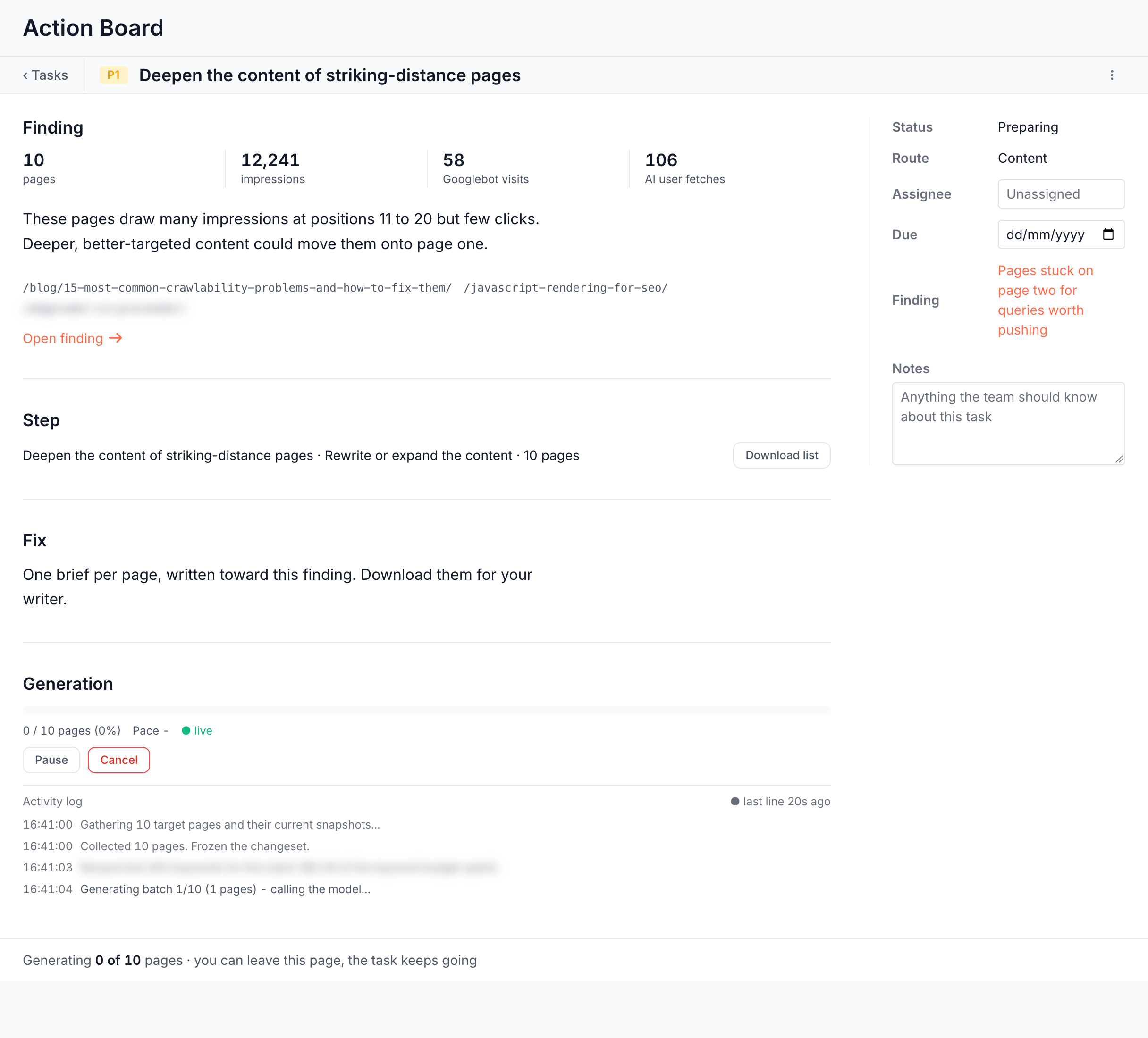
While a run works, the task shows Preparing, and the task list shows Generating 7/20 or Paused. On the task page:
- A run over many pages shows a progress bar with pages done, the pace and the estimated time left, the latest step, and an Activity log. The footer reads "Generating 7 of 20 pages · you can leave this page, the task keeps going".
- A run that writes one brief shows the document's outline filling in, through Queued, Reading the finding, Writing the brief and Finishing up. The footer reads "You can leave this page - the task keeps going". Details shows the controls and the log.
The run keeps going after you close the page. It saves its progress at checkpoints as it goes.
The run also shows outside the task page:
- On the finding page: The fix reads "EdgeComet is drafting the new values. Nothing reaches bots until you review and deploy them."
- In an Ask conversation: a card shows the run, such as "Drafting content (12/40) - nothing goes live.", then "40 drafts ready - review before anything goes live." with Review 40 drafts.
Pause, resume or cancel a run
- Click Pause to stop the run at its next checkpoint. The run shows Paused: "Picks up from the last checkpoint."
- Click Resume to continue from there.
- Click Cancel to stop the run for good. You keep what it already wrote, for review.
When a run stops early
A run that stops early says how far it got and what it kept:
- Cancelled with drafts: "Cancelled after 12 of 40 pages - what had already been generated is kept." Review the drafts it wrote.
- Cancelled before any draft: "Cancelled after 0 of 40 pages · nothing was created".
- Failed: the run shows Couldn't finish with the reason, and the footer reads "Stopped after 3 of 40 pages · nothing was created".
- Drafts discarded: "Discarded · nothing was live".
Each of these offers Run again with a focus, or Run again for fixed values.
Run a generation again
Run again with a focus opens the dialog "Run this generation again?", which takes one of two forms:
- Regenerate redoes every row on the same pages and the same targets: "Every row is redone against the same targets. To change what the fix touches, start a new run from the finding." The dialog lists what the run changes and takes a new focus.
- A fresh run on the task, offered after a run was discarded, failed or cancelled: "A fresh run on this task. You can change what it touches." The dialog opens the target picker on the same targets.
To redo one draft, use Regenerate on its row in review. See Review the drafts.
Nothing goes live from a run
A run writes drafts on its task and nothing else. A person decides what happens next: Save as drafts, Download CSV or Deploy at the edge on the task page, or a deploy from the Edge SEO rules list. See Deploy the drafts.
All runs in Outputs
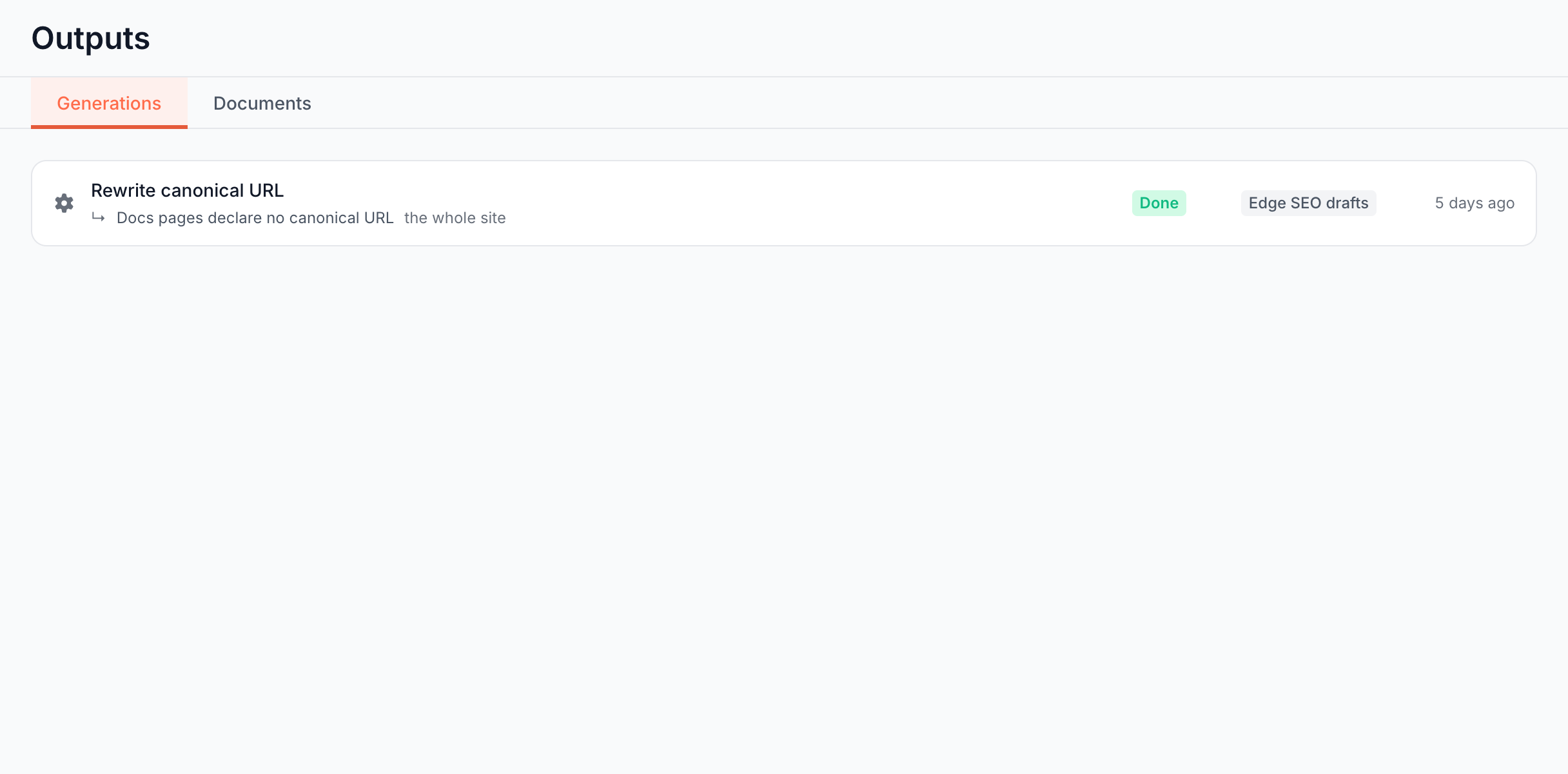
Action Board > Outputs > Generations lists every run on the site, from the board and from Ask. Runs in progress come first, and the tab's badge counts them. Each row shows:
- Name: such as Rewrite canonical URL or Rewrite H1, and the finding or conversation it came from.
- Progress: such as 12/40, while it runs.
- Status: Queued, Running, Pausing, Paused, Cancelling, Cancelled, Done or Failed.
- Destination: Edge SEO drafts, CSV or Bundle, a ZIP of briefs.
- Time: when it ran.
Click a row to open its task. Load more shows older runs. With no runs, the tab reads "No generations yet. When you ask the assistant to generate fixes or content, the runs show up here."
The Documents tab next to it lists the briefs and research the runs and Ask wrote. See SEO briefs, research and exports in Outputs.
Where to find it
In the dashboard: Action Board > Outputs > Generations, or the task page of the fix.