

Track SEO tasks on the Tasks page
A task is the fix you committed to on an EdgeComet Action Board finding: values deployed at the edge, a developer brief, content briefs, or a follow-up you track by hand. The Tasks page, also called the SEO task list, lists every task on the site, with what waits on you at the top.
An edge task's state follows its fix: Preparing while EdgeComet drafts, Needs your review once the drafts are written, and Live since a date after deploy. You set the status only on briefs and tracked tasks. See Change a task's status.
You set the Assignee, Due date and Notes. The assignee is free text, which covers people without an EdgeComet account.
What a task holds
Every task has a route, which says how the fix gets done:
- Edge SEO: EdgeComet drafts new page values or one rule, you review them, and the edge serves them.
- Developers: one developer brief. See SEO developer briefs and tickets from the Action Board.
- Content: one content brief per page for your writers. See Write content briefs for existing pages.
- Tracked manually: a reminder with nothing generated or deployed, from Just track it.
A task also carries:
- Title: up to 255 characters. Rename changes it.
- Assignee: free text up to 120 characters, such as a name or a team.
- Due: a due date.
- Notes: up to 5,000 characters for anything the team should know.
- Finding and step: where the task came from, with the step's page count and Download list.
Where tasks come from
A task starts from a fix on a finding or from a chat in Ask:
- A fix on a finding. Every route you start under The fix creates a task, including Just track it. See Fix routes a step offers.
- Ask. A chat can open a task on a finding. A fix the chat drafts as one Edge SEO rule becomes a task too. See Draft Edge SEO fixes from a chat.
A task with no finding behind it reads Site-level. When a task's finding leaves the board, the row keeps the finding's title with an orphaned badge.
The Tasks page
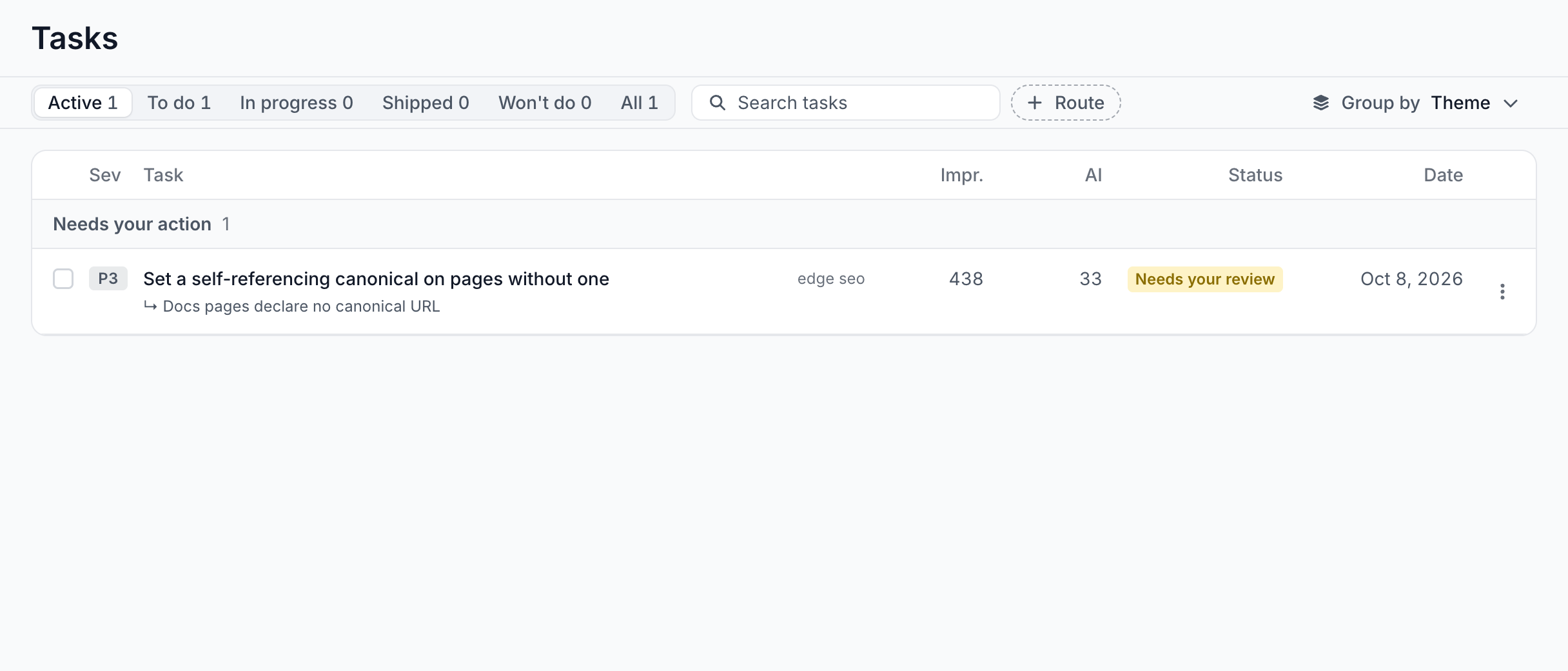
The page opens on Active tasks, grouped by theme, with the tasks that wait on you pinned first.
- Needs your action: every task in Needs your review or Ready to deploy, oldest first, whatever the grouping. It reads "Nothing waiting on you." when empty.
- Status: Active, To do, In progress, Shipped, Won't do and All, each with its count. Active hides shipped and won't-do tasks but keeps every task that waits on you.
- Search tasks and + Route: narrow the list by title and by route. Clear all removes both.
- Group by: Theme, the default, groups by the board's areas, with tasks that have none under Site-level. Status groups by state, and Assignee by person, with an Unassigned group.
Each row shows the columns Sev, Task, Impr., AI, Status and Date:
- Task: the title, the route with the fix's size, such as Edge SEO · 1 rule · 3,120 pages or Edge SEO · 84 rules, and a second line with the finding, the assignee and the verification label.
- Impr. and AI: the search impressions and AI visits on the finding's pages.
- Status: the task's state. While EdgeComet drafts, it shows progress, such as Generating 7/20, or Paused.
- Date: Due and the date once a due date is set, in red when overdue. Otherwise the date the task was created.
Within a group, the tasks whose findings have the most at stake come first, then those with the most search impressions. A filter that leaves nothing reads "No tasks match these filters."
Task states
| State | What it means |
|---|---|
| Preparing | EdgeComet is writing the drafts or briefs. See Watch a run. |
| Needs your review | The drafts are written and wait for you. See Review the drafted values. |
| Ready to deploy | The drafts are saved as Edge SEO draft rules and nothing is live. |
| Live since a date | The rules have served the new values at the edge since that date. |
| Partly live | Some rules are live and others are still drafts. |
| Rolled back | Someone rolled back the rules, and the pages serve their previous values again. |
| Discarded | The drafts were discarded and nothing was ever live. |
| Failed | The run stopped before it wrote anything. |
| Cancelled | Someone stopped the run. What it already wrote is kept. |
| To do, In progress, Shipped, Won't do | The task has no Edge SEO drafts or rules, such as a written brief or a tracked task. Its status is the one you set. |
Change a task's status
You set the status of a task that has no Edge SEO drafts or rules, such as a written brief or a tracked task. Every other task takes its status from the work.
- On the task page: the Status row of the side panel is a menu with To do, In progress, Shipped and Won't do.
- On the Tasks page: tick rows, then choose a status from Set status in the bar that reads "N selected". EdgeComet skips tasks whose status follows their fix and shows a note such as "1 task was left alone: its status follows its fix."
Setting Shipped starts verification. See When verification starts.
Rename or delete a task
The row menu on the Tasks page and the menu beside the title on the task page hold Rename and Delete.
Delete asks "Delete this task?" and behaves in one of two ways:
- A task that never shipped anything is removed: "This permanently removes the task. The finding it came from stays on your board. This cannot be undone."
- A task that shipped something is archived: "This task already shipped something, so the record of what was deployed is kept. The task leaves your board and nothing that is live changes. This cannot be undone."
Deleting a task never rolls back live rules. To stop a live fix, use Roll back first.
The task page
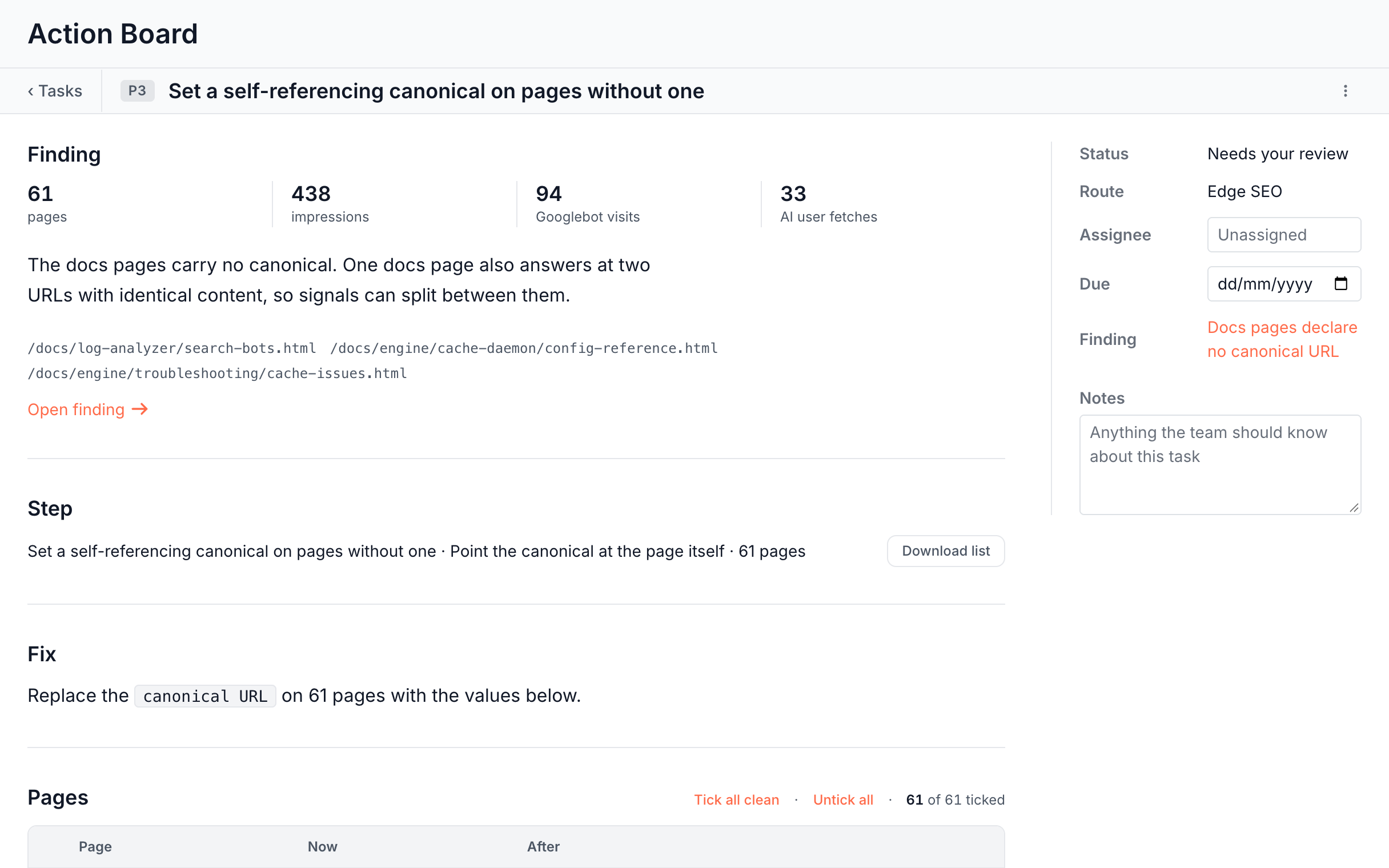
The task page holds one fix from start to finish: the finding, the step, the work and the hand-off details. Open it from its row. The strip shows Back, the finding's priority, the task title and the menu.
The main column, top to bottom:
- Finding: the page count, impressions, Googlebot visits and AI user fetches, the recommendation, sample URLs and Open finding. AI user fetches are the figure the board shows as AI visits. See What the figures on a finding mean.
- Step: the step's name, its action and page count, such as "Set a self-referencing canonical on pages without one · Point the canonical at the page itself · 61 pages", with Download list.
- Fix: one sentence on what the task does, such as "Replace the canonical URL on 61 pages with the values below." A fix written as one rule adds Edit rule.
- Dev brief or Content brief: the written brief, read in place with Export.
- The work itself: the drafts, the deployed rules or the run's progress. See Review and deploy fixes from the Action Board.
The side panel holds Status, Route, Assignee, Due, Finding, Batch with Open in Edge SEO for edge fixes, and Notes with Save.
Where to find it
In the dashboard: Action Board > Tasks. A finding's task also opens from Open the task under The fix.