

Find pages Google cannot index
The Evergreen Crawl Indexation report sorts every page in the crawl by whether search engines can index it, judged from the HTML bots received. It then shows which indexable pages anything actually surfaces: Google in search results, or AI assistants answering users.
Each page lands in exactly one bucket, such as Indexable, Noindex or Redirect 3xx, and the buckets add up to every page the crawl discovered. Every bucket carries the Google impressions and AI fetches on its pages, and the pages that entered or left it since the comparison crawl.
What the report shows
The report answers three questions in turn: how much of the site can be indexed, why the rest cannot, and what changed.
Cards: how much is indexable, and how much is surfaced?
The cards at the top count the indexable pages:
- Indexable: pages search engines can index, with their share of every page discovered.
- Index leak: the share of indexable pages in the index leak, with the footer "indexable, no GSC or AI demand".
- Surfaced: the surfaced indexable pages, with their share of indexable pages.
Without Search Console, Index leak and Surfaced read "no Search Console data for this crawl window".
Each card shows its change against the comparison crawl in percentage points. View on a card opens its pages in Data Explorer.
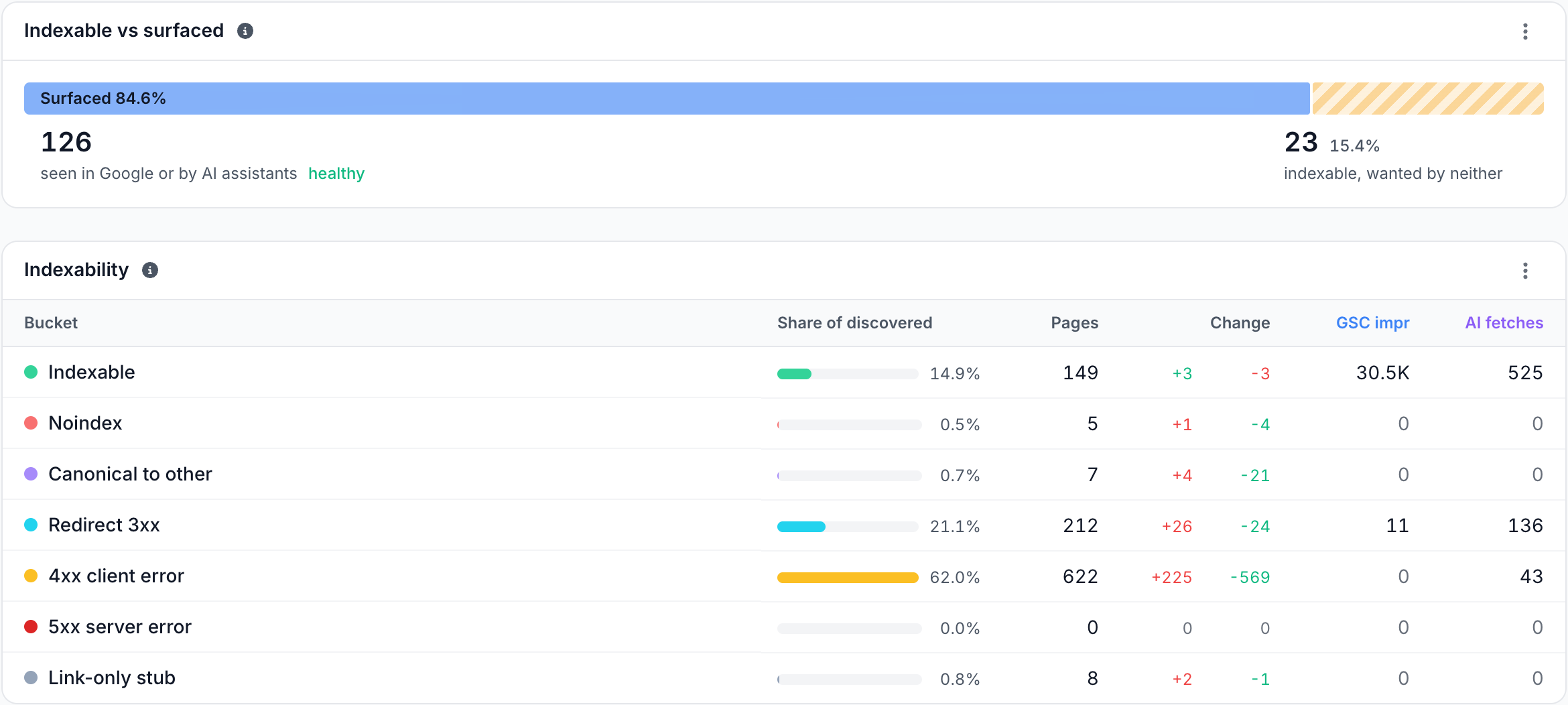
Indexable vs surfaced: are indexable pages being seen?
The Indexable vs surfaced bar splits the indexable pages in two:
- Surfaced: seen in Google or by AI assistants, with at least one Google impression or one AI assistant fetch in the crawl's window.
- Index leak: indexable, wanted by neither.
A surfaced page is evidence that something showed the page, not proof that Google indexed it. Without Search Console, the bar states that it cannot answer.
Indexability: why can a page not be indexed?
The Indexability table puts each page in one bucket, decided in this order: the status code first, then a noindex directive, then the canonical. The buckets are:
| Bucket | The page |
|---|---|
| Indexable | Answered 200, carries no noindex, and its canonical points at itself or is absent |
| Noindex | Answered 200 with a noindex robots meta tag |
| Canonical to other | Answered 200 with a canonical that points at another URL |
| Redirect 3xx | Answered with a redirect |
| 4xx client error | Answered with a 4xx status |
| 5xx server error | Answered with a 5xx status |
| Link-only stub | Was linked from crawled pages, but no bot fetched it in the window. See link-only stub |
Each row shows its Share of discovered, Pages, Change (pages added and removed since the comparison crawl), GSC impr and AI fetches. Click a bucket to list its pages, or click either side of its change to list the pages that entered or left it, with the bucket each page came from or moved to.
Changed since last crawl: which pages moved, and what was at stake?
Changed since last crawl lists the pages whose indexability changed, such as Indexable -> Noindex, ranked by the demand they carried before the change. Up to five worse or lateral moves come first, then up to three moves for the better.

Moves into Indexable read as better, moves out of it as worse, and the rest as lateral. A link-only stub shows as No verdict (stub). Click a move to see its pages with their status before and now.
When nothing moved, the card reads "No page changed its indexability verdict since" and the comparison crawl, then "Every page both crawls fetched came back in the bucket it was already in."
Issues in this category
The last card lists the Indexation & Directives checks that found pages on this crawl, such as Noindex on a page with demand or Crawled by Googlebot, never surfaced. Click one to open its pages.
How to read it
- The verdict comes from the page bots received. A
noindexadded by JavaScript, or by an Edge SEO rule, counts. A crawler that reads raw HTML can miss both. - A large Index leak is a content or linking question. The pages can be indexed, but nothing in the crawl's window shows that anyone sees them. Check whether they are linked from content on Internal links and whether they deserve to be indexed at all.
- Demand on a non-indexable bucket is the urgent part. Impressions on Noindex, 4xx client error or Redirect 3xx pages are traffic at risk.
The bot log has its own indexability view, per request rather than per page: the Indexability tab on the Googlebot and Bing pages of Log Analyzer. It counts what each bot was served on every request. This report keeps one verdict per page, from the newest copy bots received.
What to do next
- Fix it at the edge. Remove a wrong
noindexwith an Edge SEO robots rule, fix a wrong canonical with a link tag rule, send a removed page to its replacement with a 301 redirect, or start from the matching Action Board finding. - Check the canonicals. The pages in Canonical to other are checked on Canonicals, which shows whether each target is healthy.
- Ask about it. Ask in the header starts with "Why are pages non-indexable?", "Which shifts put demand at risk?" and "How much is indexable but unseen?".
Where to find it
In the dashboard: Evergreen Crawl > Indexation. The page title reads Crawl Indexation.