

Serve 301 redirects and 404 or 410 at the edge
An Edge SEO response rule answers bots with a 301 or 302 redirect, a 404 or a 410 instead of the page. Also called edge redirects.
One rule can cover one URL or thousands matched by filters, and each URL can redirect to its own address. Your server, CDN configuration and CMS stay as they are.
Before you start
- Bots reach EdgeComet through your CDN routing. A response rule changes what those bots get.
- Decide what each URL should answer. See When to use 404, 410 or 301 for removed pages.
Redirect pages
- Open Edge SEO and click New rule.
- Choose the pages:
- For a group of URLs, click Multiple pages and set the filters, such as URL path Starts with
/summer-sale/for a section you merge into one page. Then click Redirect under What should these pages get? - For one URL, click One page, pick the page, then Add an edit > Redirect.
- For a group of URLs, click Multiple pages and set the filters, such as URL path Starts with
- The Response edit opens on 301 - Moved Permanently. Choose 302 - Found (temporary) instead for a short-term move.
- Type the new address in Redirect to, as a path such as
/sale/or a full URL, and click Done. The row reads Now "200, the page" and New "301 redirect to /sale/". On a multiple-pages rule it adds a line such as "All 14 pages go to this one address." - Click Save draft, or Deploy to publish it. See Deploy a response rule.
A response rule holds only the Response edit. A page that redirects is never served, which leaves nothing to edit: Edit on the page and the other edits are turned off with "A 301 response never renders the page."
To send each URL to its own address, see Send each URL to its own address. Ask drafts redirects for you, from a request or from a list of old and new URLs. See Structural fixes with one pattern rule.
Send each URL to its own address
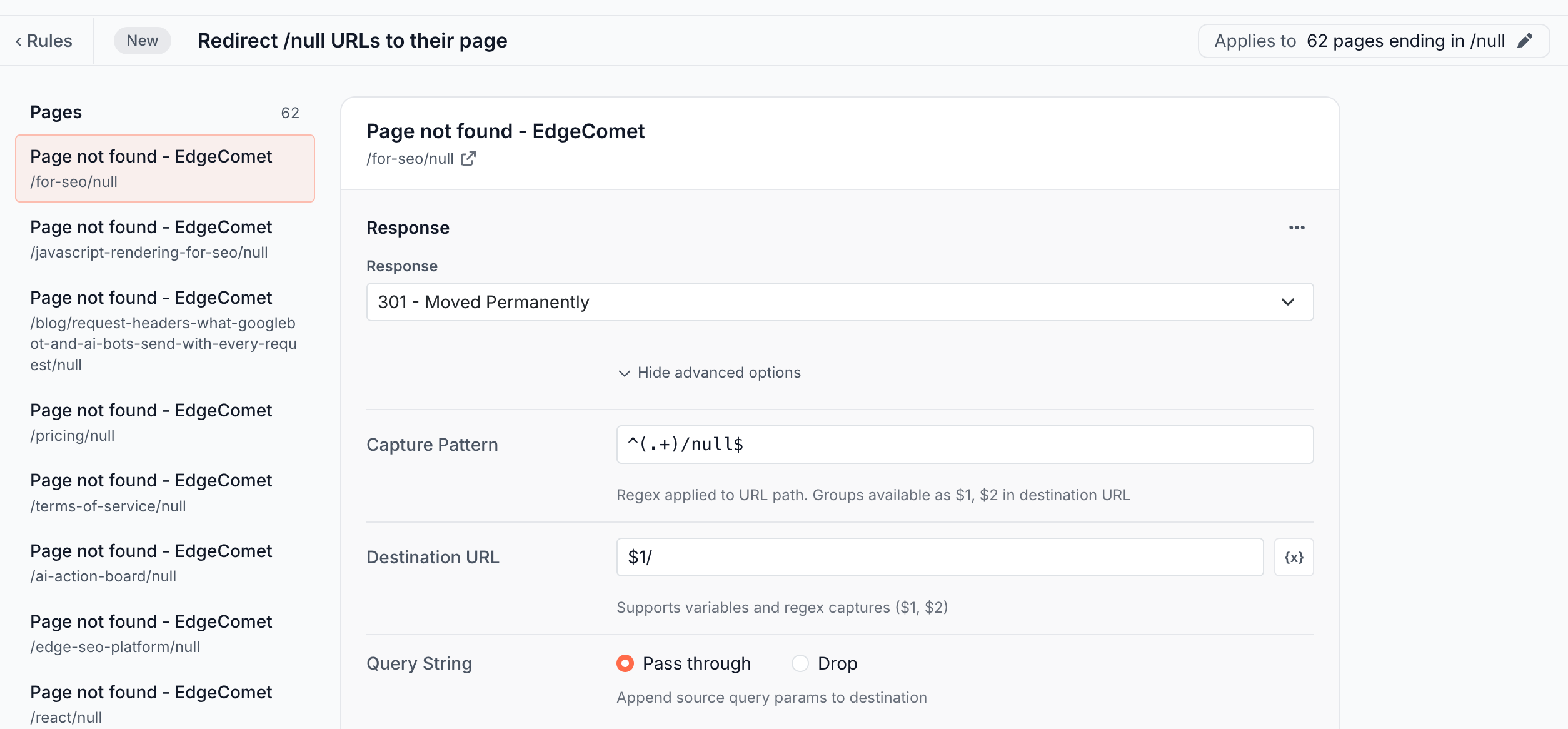
Show advanced options builds the destination from the URL each bot requested. It replaces Redirect to with three fields:
- Capture Pattern: a regular expression run on the URL path, such as
^/old-section/(.+)$. Each group in parentheses becomes$1,$2and so on. - Destination URL: the address, with
$1,$2and the variables from the {x} button, such as{url_path}. See Variables. - Query String: Pass through adds the parameters of the requested URL to the destination. Drop leaves out the requested URL's parameters and keeps the destination's own.
| Capture Pattern | Destination URL | Bot requests | Bot is sent to |
|---|---|---|---|
^(.+)/null$ | $1/ | /pricing/null | /pricing/ |
/blog/(\d+)/(.+) | /articles/$1/$2 | /blog/123/my-post | /articles/123/my-post |
| none | https://www.example.com{url_path} | https://example.com/old/page | https://www.example.com/old/page |
The pattern uses RE2 syntax and runs on the path only, without the domain or the query string. A group that does not exist, or a pattern that does not match the path, reads as empty. With Pass through, a parameter that is in both URLs keeps the destination's value.
Make sure the destination does not match the rule's own filters. Otherwise a bot that follows the redirect gets redirected again.
Return 404 or 410
A 404 or 410 rule answers bots with that status code and a short text body instead of the page.
Gone (410) under What should these pages get? sets a 410. Not found (404) is under More, and on a one-page rule both are in Add an edit. The row reads Now "200, the page" and New "410 Gone".
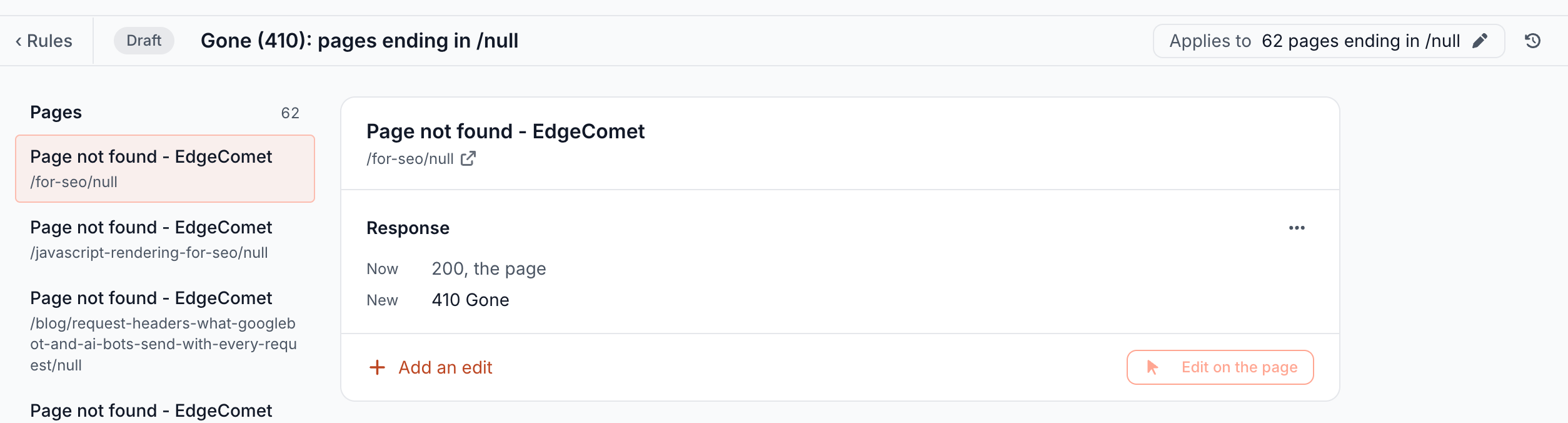
The pages in this example answer 200 with a "Page not found" page. Google calls that a soft 404: "a URL that returns a page telling the user that the page does not exist and also a 200 (success) status code" (Google Search Central).
A 410 rule turns them into real error responses for bots. The redirect in Send each URL to its own address sends each one to the page it came from instead.
When to use 404, 410 or 301 for removed pages
Redirect a removed page when it has a clear replacement, and answer 404 or 410 when it has none. Google's guidance:
- Moved, or a clear replacement: "If your page has moved or has a clear replacement on your site, return a 301 (permanent redirect) to redirect the user." (Google Search Central)
- Removed, no replacement: "return a 404 (not found) or 410 (gone) response (status) code for the page." (Google Search Central)
- 404 or 410: "Currently Google treats 410s (Gone) the same as 404s (Not found)." (Search Console Help) A URL that already answers 404 gains nothing from a 410.
- Not the home page: "Don't redirect many old URLs to one irrelevant single URL destination, such as the home page of the new site. This can confuse users and might be treated as a soft 404 error." (Google Search Central)
Use 301 for a permanent move. With a 302, Google shows the old URL in search results: "Temporary redirects: Show the source page in search results." (Google Search Central) Bing's guidelines say: "Use 302 redirects only for very short-term changes (less than 2 days)" (Bing Webmaster Guidelines).
What bots and visitors get
Bots get a 301 or 302 with a Location header and no page, or a 404 or 410 with a short text body. EdgeComet caches the response like a page and serves it again on later requests.
The first response rule that matches a URL, in deploy order, decides the answer, and no edit from another rule reaches bots on that URL. See In deploy order.
Visitors open your server directly and do not pass through EdgeComet. They follow the redirect only if the Edge SEO snippet is installed, which moves them in the browser. On a 404 or 410 match, the snippet sends them to your site's status page, by default the home page.
For a permanent move, keep bots and people on the same page: install the snippet, or add the same redirect on your server when you can. See Are edge redirects sneaky redirects?
URL rules can answer with a status code too. See URL rule or Edge SEO rule: which one to use.
Deploy a response rule
Deploying a redirect, 404 or 410 always asks you to type your domain, whatever the number of pages: "This changes the response bots and visitors get on 62 pages. Type example.com to deploy." The confirmation also shows the search impressions, clicks and bot fetches of those pages in the last 28 days.
After the deploy, EdgeComet recaches the affected pages and bots get the new response on their next request. See What happens when you deploy.
What you should see
After the deploy and the recache, a bot request for the old URL gets the new status code. Request it with a bot user agent and read the status line and the Location header, as in Check the headers bots receive. A response served from the cache carries EC-Source: render_cache or bypass_cache, and one EdgeComet builds on the request carries EC-Source: status.
The rule is on the Live tab of Edge SEO, and Page Analysis > Edge SEO lists it for each URL it covers.
If it does not work
"Title filters only work on rules that serve the page. A redirect, 404 or 410 never renders it."
A response rule can filter only on URL, URL path, URL query and Status code. Remove the filters on page content, such as Title or H1, or make the rule an edit instead of a response.
"This rule redirects but has no destination. Fill in Redirect to before saving."
Type the address in Redirect to, or in Destination URL under the advanced options. See Create an Edge SEO rule.
Bots are sent to a wrong or empty address
The capture pattern did not match the path, and $1 read as empty. Test the pattern against the path alone, such as /blog/123/my-post, not the full URL. Or the rule has no Capture Pattern, and $1 stays in the address as typed.
Bots get a redirect loop
The destination matches the rule's own filters. Add a filter that leaves the destination out, such as URL path Does not contain the new path.
Bots still get the old page
The rule may not be deployed yet, or the page has not been recached. See Bots still get the old page.