

EdgeComet for developers: architecture and security review
EdgeComet sits behind your CDN and handles requests from bots only: search engines, AI bots and link preview bots. This page is for the developers and security reviewers who check it before you install it.
For those bots, EdgeComet does three things:
- Pre-caching: it keeps current copies of your pages and serves bots from them, which takes bot load off your origin.
- Rendering: for JavaScript sites, it runs pages in headless Chrome before caching them, also called prerendering or dynamic rendering. Server-rendered sites skip this step.
- Analytics: it records every bot request with the page the bot received, which feeds EdgeComet's reports, site audit and alerts.
The change on your side is one routing rule at your CDN or proxy and one firewall allow rule. Your application code and your visitors' requests stay as they are.
The core engine is open source under the Apache 2.0 license at github.com/EdgeComet/engine. The request handling, rendering and caching in EdgeComet's cloud run on that code, which lets your team read how a bot request is authenticated, rendered and cached.
Architecture at a glance
Your CDN sends bot requests to EdgeComet, and EdgeComet answers from its cache or builds the page from your origin. Human visitors never reach EdgeComet's servers: on Cloudflare, the Worker runs in your own zone and passes their requests straight to your origin.
- Your CDN routes. A rule at your CDN or proxy sends page requests from crawler user agents to EdgeComet. Everything else goes to your origin as before.
- EdgeComet authenticates. The request must carry your site's render key, and its URL must belong to your website's domains. Anything else gets
401. - EdgeComet picks a copy. The bot's user agent selects a dimension, a mobile or desktop profile with its own cached copy, and URL rules can render, bypass, block or answer with a fixed status.
- EdgeComet serves. A fresh cached copy is served at once. On a miss, EdgeComet renders the page in headless Chrome and stores the result, or fetches your server's HTML without rendering, which it stores when the bypass cache is on. Then it serves it.
- EdgeComet records. Each request is logged with the bot, the result and the timing. See What EdgeComet stores.
What changes in your stack
EdgeComet needs two changes at your edge, plus one optional script, and none in your application:
- A routing rule. The Cloudflare automatic install adds a Worker and its routes to your zone. Fastly, CloudFront, Akamai, Nginx, Apache and HAProxy each have a setup page, and any other proxy follows the same rules. See Route search and AI bots to EdgeComet.
- A firewall allow rule. EdgeComet fetches your pages through your CDN like any other client. Allow requests whose
X-Render-Keyheader equals your render key. This keeps your WAF, rate limits and bot protection from blocking them. The Cloudflare install adds this rule for you, and Cloudflare's Bot Fight Mode is the one setting it cannot exempt. See Bot Fight Mode. - Optional, for Edge SEO only: a script tag that applies Edge SEO changes for visitors. See The Edge SEO snippet.
EdgeComet publishes no list of outbound IP addresses. Allow its requests by the X-Render-Key header.
Which requests go to EdgeComet
The routing rule sends GET and HEAD page requests from crawler user agents to EdgeComet and leaves every other request on your origin.
- Crawler user agents: any user agent containing
bot,crawl,spiderorslurp, plus a few AI assistant and link preview fetchers. The match is case-insensitive. - Static files stay on your origin, by file extension. Your
robots.txtand XML sitemaps never pass through EdgeComet. - No loops: a request that carries the
X-Edge-Renderheader always goes to your origin. EdgeComet adds that header to its own requests.
The routing rule calls https://{render-host}/render?url={page-url} with the bot's method and the full page URL, URL-encoded. It forwards the bot's original User-Agent, adds X-Render-Key, and passes the bot's IP address in X-Forwarded-For. The render host is in your dashboard guide, in the US or in the EU. For the full patterns, extensions, headers and status codes, see How EdgeComet routes bot traffic.
The Cloudflare Worker forwards the bot's other request headers as they arrive, and EdgeComet records them with the request. See What EdgeComet stores.
What EdgeComet sends to your origin
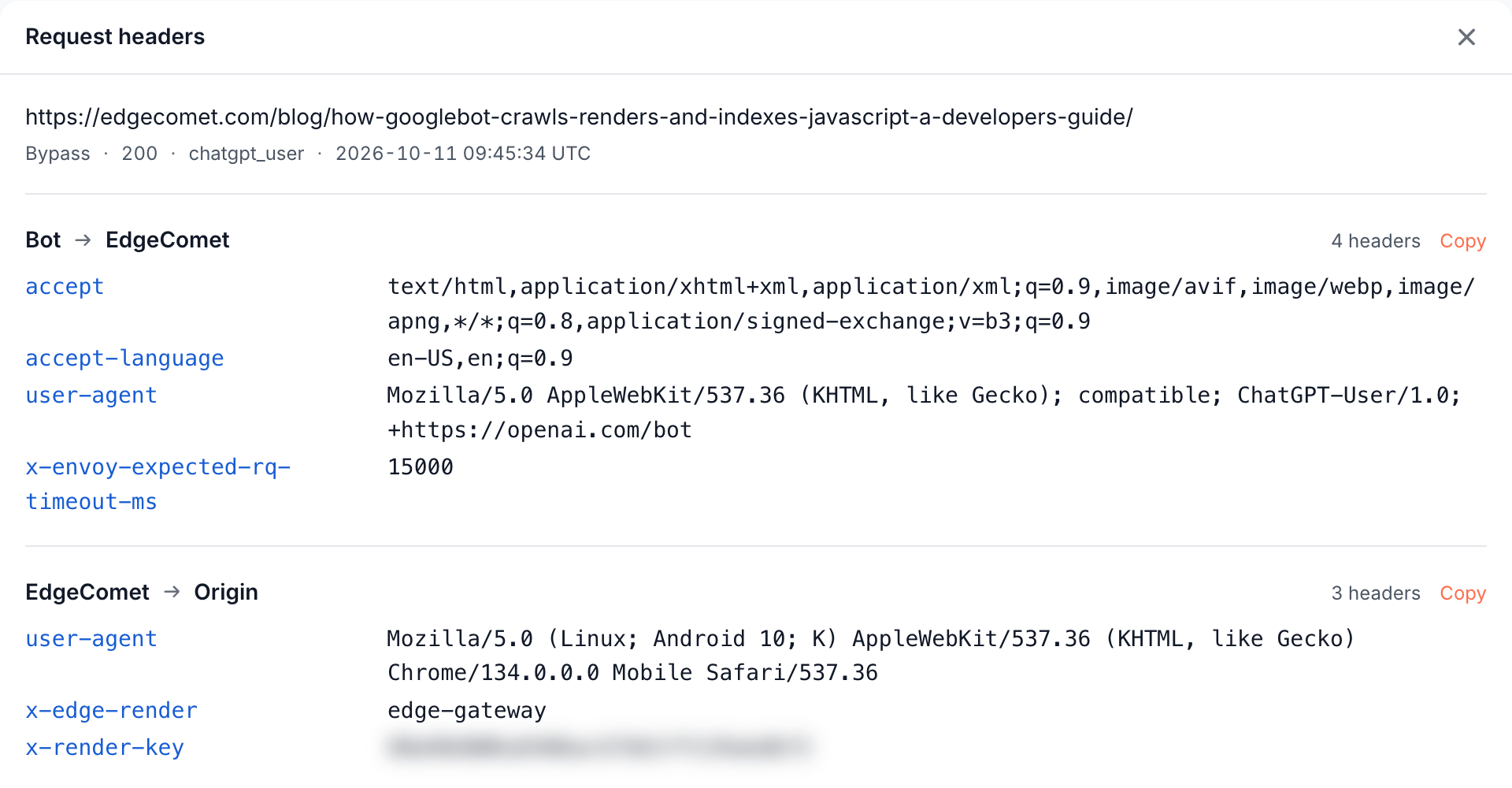
EdgeComet sends your origin two kinds of page requests, both marked with X-Edge-Render and X-Render-Key, and neither carries cookies.
A plain fetch, for server-rendered sites and bots no render profile matches:
- Always
GET, by default with a mobile Chrome user agent, not the bot's. - Headers:
User-Agent,X-Edge-RenderandX-Render-Key. No cookies, and no other headers unless you add them under Request Headers in Configuration > System Settings > Advanced. - Redirects are not followed. The bot gets your
3xxand itsLocation.
A render, in headless Chrome:
- The user agent of the dimension. By default, a mobile Chrome on Android at 412 x 915 pixels, or a desktop Chrome at 1920 x 1080. Neither contains "EdgeComet" or a bot name. You can change both per dimension.
- Chrome starts with no cookies for every render and bypasses service workers.
- Every request Chrome makes carries
X-Edge-Render.X-Render-Keygoes only to your page's own domain, its subdomains and its parent domain, never to other domains. A subdomain you point at a third-party service receives it too. - Images, media and fonts are not downloaded by default. The tags and their
srcandaltattributes stay in the HTML. - A built-in list blocks common analytics, tag manager, advertising, payment, video, social and Google API hosts in every render. Analytics outside that list, such as a self-hosted tool, can still count a render: block it under Blocked AJAX URL Patterns. See Block requests during rendering.
- Same-site API calls the page makes go through your CDN with
X-Edge-Render, and your routing sends them to your origin.
Sitemaps and Merchant Center feeds are fetched by separate fetchers with the user agents EdgeCometSitemapFetcher/1.0 and EdgeCometFeedFetcher/1.0, without the render key. If your firewall blocks unknown user agents, allow these two on your sitemap and feed URLs.
EdgeComet refuses page URLs whose host is a private IP address, and its plain fetches refuse any host that resolves to one.
How much load EdgeComet adds
EdgeComet usually takes load off your origin: bots get cached copies instead of each one making your server build a page.
- One render per page at a time. When several bots ask for the same uncached page at once, EdgeComet renders it once and serves the result to all of them.
- Refreshes are capped. Re-caches, from pre-cache rules, the dashboard, the API or bot requests, run at most 5 at a time by default, from 1 to 50. See Concurrent re-caches.
- Renders load what the page needs: the HTML and the same-site JavaScript, CSS and API calls, without images, media and fonts.
What bots receive
Bots receive the status code, the HTML and a set of headers from your origin, with any Edge SEO changes you deploy, plus EC- headers that say where the response came from.
- Status codes pass through:
200, redirects with theirLocation,404,410and errors. URL rules and Edge SEO response rules can answer with a status of your choice. - Headers kept from your origin:
Content-Type,Cache-Control,Expires,Last-Modified,ETag,Location,X-Robots-TagandLink.Set-Cookieis never cached, and authorization headers are never served. - Rendered HTML is served as
text/html; charset=utf-8. With Strip Scripts on, the default, executable scripts are removed after the render and JSON-LD structured data is kept. A rendered page can be up to 20 MB. - Binary files, such as PDFs, images, video and archives, are never cached. A render that returns one is replaced by your origin's original bytes.
EC-Sourcesays whether the bot got a render, a cached copy, your server's HTML or a status from a rule.EC-Cache-Agegives the copy's age in seconds andEC-Request-IDidentifies the request for support. See Check the headers bots receive.
How caching works
EdgeComet keeps one copy of each page per dimension, keyed by the normalized URL, and pre-cache rules can refresh copies before bots ask.
- Cache key: the URL with the host in lowercase, the query parameters sorted, the fragment dropped and tracking parameters such as
utm_sourceandgclidremoved. The same tracking parameters are also removed from the URL EdgeComet fetches from your origin.httpandhttps, and the apex andwwwhosts, are separate entries. See How the cache key works. - Lifetime: 7 days by default, with an expired copy served for up to 24 hours as a fallback when a fresh render fails. See Cache settings.
- Personalized content: bots get the page your server sends a first-time visitor without cookies, requesting it from EdgeComet's render host in the US or the EU.
- Invalidation: recache or remove URLs in the dashboard or through the HTTP API, for example from a CMS publish hook or a deploy pipeline.
- Freshness: pre-cache rules refresh pages before bots ask. See How EdgeComet keeps cached pages fresh.
What happens when something fails
When EdgeComet cannot answer, a correct routing rule sends the bot to your origin, and visitors are never affected.
- Cloudflare: the EdgeComet Worker fetches the page from your origin when EdgeComet's response has no
EC-Sourceheader, has a5xxstatus, takes longer than 60 seconds or fails. See What bots get when EdgeComet cannot answer. - Other CDNs and proxies: send the request to your origin when the response has no
EC-Sourceheader or a5xxstatus, or when it times out. Pass any response that carriesEC-Sourceto the bot as it is, including a404or a redirect. Each setup page implements this and states what its platform cannot cover. See Fall back to your origin. - A render fails or times out: EdgeComet serves the last cached copy when it has one, otherwise your server's HTML without rendering.
- Your origin is down: cached copies keep being served, and expired copies are served as a fallback for up to the stale period.
Keep the render timeout below your routing rule's timeout. The Cloudflare Worker waits 60 seconds, and EdgeComet's default render timeout is 15 seconds. See Render settings.
For how this affects page speed and Core Web Vitals, see Does EdgeComet slow down your site? For search engine policies on serving bots a rendered page, see Is prerendering for bots cloaking?
Security
A security review covers four parts: the render key, the Cloudflare permissions, the dashboard's access controls and the optional Edge SEO snippet.
Render key
The render key is a random 128-bit value, one per website, and it is accepted only for that website's domains. Your firewall allow rule trusts requests that carry it, which makes it a credential: treat it like a password. To rotate it, open Configuration > System Settings > General and click Regenerate, which sends a rotation request to support. See The render key.
Cloudflare permissions
The Cloudflare automatic install signs in with Cloudflare and asks for these permissions:
| Permission | What EdgeComet uses it for |
|---|---|
| Workers Scripts: Edit | Upload and remove the edgecomet-router-{id} Worker |
| Workers Routes: Edit | Add and remove the routes that run the Worker on your hostnames |
| Zone WAF: Edit | Add and remove the firewall rule that allows the render key |
| Zone: Read, DNS: Read | Find your zone and the hostnames to route |
| Account Settings: Read | Find the account that holds the zone |
| Bot Management: Read | Detect Bot Fight Mode, which can block EdgeComet's requests |
The sign-in also reads your Cloudflare user details and keeps a refresh token. EdgeComet stores Cloudflare tokens encrypted.
To use an API token instead, open Use an API token instead during the install. The prefilled template asks for the same permissions on all your accounts and zones. Narrow it to one zone on Cloudflare's form before you create it.
Disconnect removes the routes, the firewall rule and the Worker. To revoke EdgeComet's access to your Cloudflare account too, remove the authorization. See Remove EdgeComet from Cloudflare.
Dashboard and API access
- Roles: Owner, Admin, Manager and Read-only, per website. See Roles and permissions.
- Two-factor authentication for password sign-in, with recovery codes. See Password and 2FA.
- API tokens are shown once, stored as a hash, can expire, and act with their creator's role. See API tokens.
- MCP clients sign in with OAuth and can be revoked one by one. MCP tools read data and draft Edge SEO changes, and publishing stays in the dashboard. See Connect an AI client.
The Edge SEO snippet
The snippet is optional and only applies Edge SEO changes for visitors. Bots never need it.
- Browsers download it from
https://cdn.edgecomet.comlike any other script, synchronously in the page<head>. Add that host to your Content Security Policyscript-src. - Your rules are built into the file. Once loaded, it makes no requests and collects no data about visitors.
See Apply Edge SEO changes for visitors.
What EdgeComet stores
EdgeComet stores the bot requests it serves and the public pages it caches. It does not record human visitors, because their page requests never reach it.
- Per bot request: the URL, the bot's user agent and IP address, the result of the IP verification, the status code, timings, cache state, and the request and response headers of each step.
- Per page EdgeComet renders or fetches: an SEO snapshot with the title, meta description, canonical, headings, robots directives, structured data, hreflang, links and word count.
- Cached copies of your public pages. Renders run without cookies, which keeps content behind logins out.
- Data you connect: Search Console performance data, read-only, and the sitemaps and product feeds you list.
Bot data is kept for as long as your subscription is active. See Data sources, freshness and retention.
Data protection and compliance
EdgeComet's Privacy Policy and Terms of Service are the binding source for everything in this section.
- Hosting: AWS, Hetzner and OVH, in data centers in the United States, Europe and Australia. To keep all your data in European data centers, contact [email protected].
- Encryption: TLS between your CDN and EdgeComet, and between EdgeComet and your origin when your site uses HTTPS. Data at rest is encrypted, except cached copies of your pages, which hold only content your site already serves publicly.
- AI features use models from Anthropic and OpenAI. Neither trains on your data, and EdgeComet does not use your content or data for model training.
- Sub-processors: listed in the Privacy Policy, section 3.
- GDPR: a Data Processing Agreement, with Standard Contractual Clauses where needed, is available on request at [email protected].
- SOC 2: certification is in progress.
- Staff access: only a support specialist can access your data, and only when you ask for help.
- Deletion: your data is deleted 30 days after your account is deactivated.
Test the integration
Test with a bot user agent and a browser user agent, before and after you switch the routing on:
- Firewall: in a manual guide, Test connection under Step 3: Verify connection fetches your homepage with the render key and passes on
200. It checks the allow rule. - Routing: request a page as Googlebot and as a browser. The bot request returns
EC-headers, and the browser request returns none. See Check the headers bots receive. - Install check: Verify install runs the same two requests through your CDN. The Cloudflare install runs it as its last step.
- Render check: one test render of your homepage reads back its title, meta description and H1, with a screenshot. See Check the render check.
Your site is live in EdgeComet after the first verified bot visit, usually within 24 hours. See Check that search and AI bots reach EdgeComet.
Remove EdgeComet
Removing the routing rule stops EdgeComet at once: bots get your origin again and EdgeComet stops recording. With the Cloudflare install, open Configuration > Connections > CDN integration, click Manage connection, then Disconnect. On other setups, delete the routing rule and the allow rule, or roll back to your previous CDN configuration. See How to pause or remove EdgeComet.