

Crawl budget and crawl waste explained
Crawl budget in brief
Crawl budget is the set of URLs a search engine can and wants to crawl on your site.
Crawl waste, also called wasted crawl, is the part of that crawl spent on URLs that cannot or should not rank, such as removed pages, redirects and duplicate parameter URLs. Reducing it is often called crawl budget optimization.
EdgeComet sorts every bot request it serves into Valuable, Questionable or Wasted, a split called crawl budget allocation.
What Google means by crawl budget
Google defines a site's crawl budget as "the set of URLs that Google can and wants to crawl." Two things set it:
- Crawl capacity limit, what Google can crawl without overloading your server. It "limits the total amount of time your server spends holding connections open for Google".
- Crawl demand, what Google wants to crawl, based on your site's size, update frequency, page quality and relevance.
Demand can cap crawling before capacity does: "Even if the crawl capacity limit isn't reached, if crawl demand is low, Google will crawl your site less." Each hostname has its own budget.
Crawl waste
Crawl waste is crawling spent on URLs that cannot or should not rank: removed pages, server errors, long redirect chains, and duplicates from tracking parameters, sort orders and filters. Google says duplicate and removed URLs can waste "a lot of Google crawling time on your site", and calls the URLs it knows about the factor "that you can positively control the most".
For example, /shoes?sort=price and /shoes?utm_source=newsletter show the same products as /shoes, and /shoes?color=red shows some of them. Every request to these variants is spent on products the bot can already reach from /shoes.
Why it matters for search and AI bots
Crawl waste matters when a search engine does not keep up with your URLs, because new and changed pages then wait. Google warns that when it spends too much time on URLs it shouldn't crawl, its crawlers "might not explore the rest of your site".
Does crawl budget matter for small sites?
Rarely. Google's guide is intended primarily for:
- Sites with over a million pages that change weekly.
- Sites with over 10,000 pages that change daily.
- Sites where Search Console reports a large share of URLs as discovered but not indexed.
These "are not exact thresholds". For other sites: "If your site doesn't have a large number of pages that change rapidly, or if your pages seem to be crawled the same day that they are published, you don't need to read this guide."
On a small site, the Wasted bucket still lists the errors bots keep requesting.
Server speed and the crawl capacity limit
Steady, fast responses can raise the capacity limit: "If the site responds consistently and its response times (including latency and Time-to-First Byte) remain stable or improve, the limit goes up". Slow responses, 5xx errors and 429 responses lower it. A higher limit alone does not bring more crawling when demand is low.
EdgeComet serves a cache hit in under 15 ms, so cached pages do not wait on your origin. See How fast bots get a cached page.
Crawl waste from AI bots
Google's guide covers Google's crawlers. AI bots such as GPTBot and ClaudeBot can request removed pages and duplicate URLs too, and EdgeComet sorts their requests with the same rules on the Efficiency tab of Log Analyzer > AI Bots.
How EdgeComet classifies crawls
EdgeComet sorts every bot request it served with a baseline every site gets plus rules generated for your site. The rules label requests in your reports. They do not change what bots receive.
Crawl budget allocation: valuable, questionable and wasted
Crawl budget allocation is the split of a bot's requests into three buckets:
- Wasted: URLs that should not be crawled, such as removed pages, server errors and tracking parameter copies.
- Questionable: requests that can be legitimate but often are not, such as filter combinations.
- Valuable: everything else.
Wasted rules are checked first, so a request that matches both Wasted and Questionable rules counts once, as Wasted. Valuable is the remainder, including requests for pages whose indexability EdgeComet never recorded.
The split counts requests EdgeComet served to bots. It leaves out pre-cache refreshes, fake bots whose IP address failed verification, and files your routing sends straight to your origin, such as images.
Crawl waste rules every EdgeComet site gets
Every site gets these rules from its first request, and they stay the same on every site.
| Rule | Bucket | Matches |
|---|---|---|
| 404 Not Found | Wasted | Responses with status 404 |
| 410 Gone | Wasted | Responses with status 410 |
| Server errors | Wasted | Responses with status 500 or higher |
| Non-indexable pages | Wasted | Pages EdgeComet recorded as not indexable: a status other than 200, a robots or googlebot meta tag with noindex or none, or a canonical tag that points to another URL |
| Tracking parameters | Wasted | URLs with a tracking or session parameter from the list below |
| Redirects | Questionable | Responses with a status from 300 to 399 |
Tracking and session parameters: any parameter whose name starts with utm_, plus gclid, dclid, gclsrc, gbraid, wbraid, fbclid, msclkid, yclid, twclid, igshid, ttclid, mc_cid, mc_eid, _hsenc, _hsmi, sessionid, phpsessid, jsessionid, add-to-cart and replytocom.
Crawl waste rules EdgeComet generates for your site
EdgeComet adds rules for waste specific to your URL structure, such as sort and filter parameters, session spaces, calendar archives and deep pagination, found in your site's own bot data. Each rule is a URL pattern in Wasted or Questionable, tested against the URLs bots requested before EdgeComet keeps it.
Filter combinations, which can be legitimate, usually go to Questionable. Generated rules add to the baseline: they cannot remove a baseline rule or move a request out of Wasted.
The first run starts on its own once all three are true:
- At least 7 days have passed since the first verified bot visit to your site.
- Bots requested at least 300 distinct URLs of your site in the last 30 days.
- EdgeComet has finished setting up your segments, or 21 days have passed since the first verified bot visit. See What EdgeComet configures on its own.
Until then, only the baseline applies. A site where bots requested fewer than 300 distinct URLs in the last 30 days gets a Run analysis now button on the Crawl Budget Rules page. If the analysis finds no waste beyond the baseline, the page says so, and the baseline stays the only layer.
Where you see crawl budget allocation in EdgeComet
- Log Analyzer > Googlebot, Bing and AI Bots, Efficiency tab. The Crawl Budget Allocation bar shows each bucket's share and request count, and opens the requests in Data Explorer. On the Googlebot and Bing reports, the Crawl Budget tab shows crawl volume, and the Efficiency tab shows how that volume splits. See the Efficiency tab report.

- Data Explorer > Bot log. The Budget Allocation filter lists the requests in one bucket. See Questions the Requests tab answers.
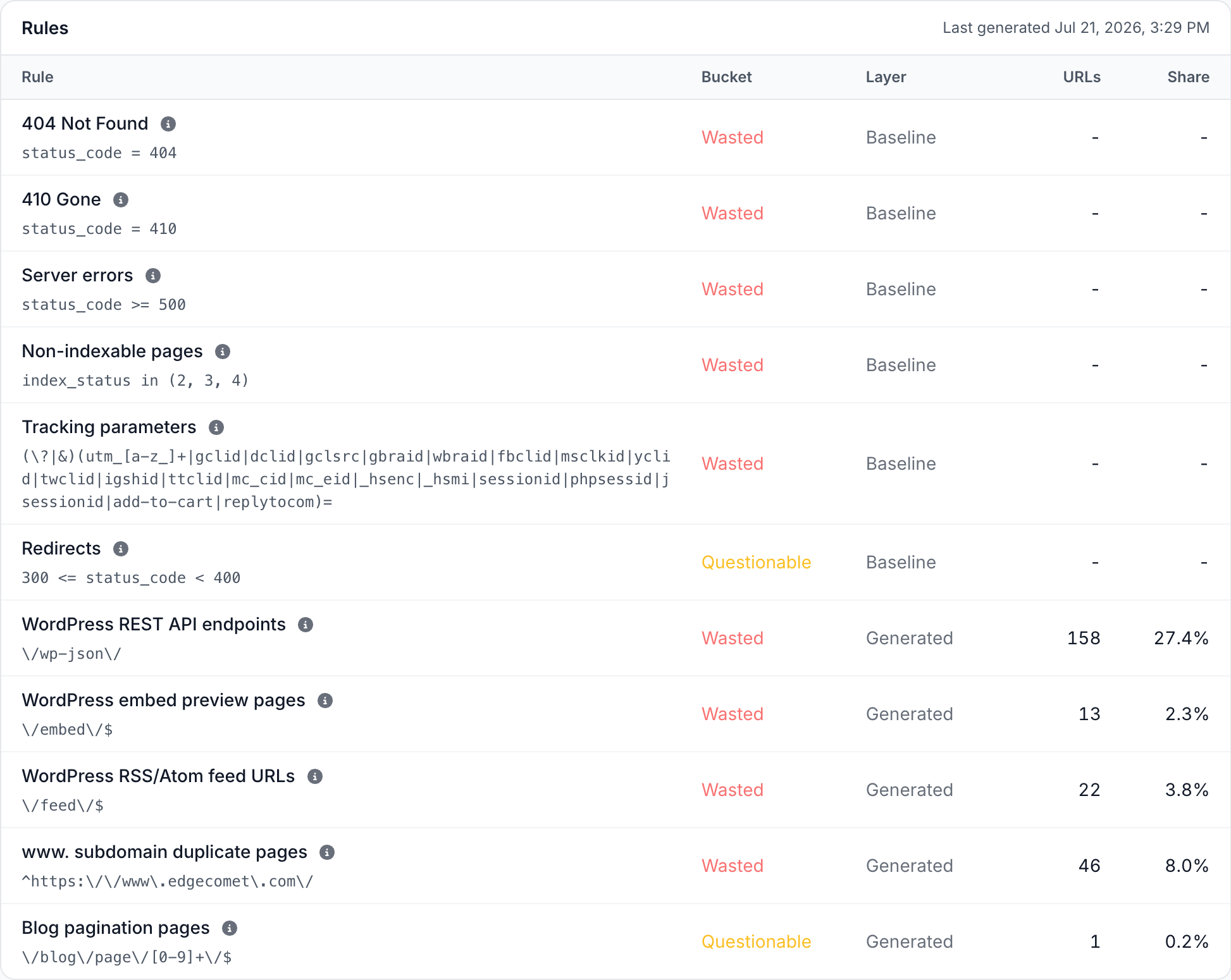
- Configuration > Crawl Budget Rules. Every rule with its Bucket and its Layer, Baseline or Generated. For a generated rule, URLs shows how many distinct URLs its pattern matched in the 30 days before it was generated, and Share shows that count as a part of all distinct URLs bots requested in those 30 days. Click the count to see the URLs the rule matches. See Read the rules table.
How crawl waste data in EdgeComet differs from log file analysis and site crawlers
A server log analyzer or a site crawler can count 404s and redirects. EdgeComet adds three things:
- The page's indexability on each request. A
200for a page withnoindexor a canonical pointing elsewhere still counts as waste. A log file has the status code but not the page, and a crawler has the page but not the bot requests. - Rules that fit your URL structure, found in your site's bot data.
- A split per bot family, with no log files to collect. See How EdgeComet collects data.
For product comparisons, see EdgeComet compared with an SEO platform that combines a crawler and log analysis and with a site crawler.
Common questions
Is a redirect wasted crawl?
Not always. One redirect after a URL change is normal, but Google warns: "Avoid long redirect chains, which have a negative effect on crawling."
The baseline puts Redirects in Questionable. A redirect is not a 200, so when EdgeComet recorded its indexability, it also matches Non-indexable pages and counts as Wasted, because Wasted rules come first. To cut redirect crawl, point internal links and sitemaps at the final URL.
Do URL parameters always waste crawl?
No. Tracking and session parameters such as utm_source, gclid and sessionid copy a page without changing its content, so the baseline counts them as Wasted.
Other parameters depend on the site: ?page=2 can be the only path to some products, and ?color=red can be a landing page you want indexed. Generated rules judge these per site, and parameters no rule matches count as Valuable.
Can I change what EdgeComet counts as crawl waste?
Yes, by steering the generated rules. On Configuration > Crawl Budget Rules, write a note in the Refine the rules card, such as "Treat /outlet as valuable, it is intentionally crawlable", and click Regenerate. See Steer the rules with notes.
The note steers this run and every later one until you delete it. You can keep up to 20 notes of up to 500 characters each. With the box empty, Regenerate just reruns the analysis.
Each completed run replaces the generated rules with new ones from the last 30 days of bot data. A run that fails or stops early leaves the previous rules active.
To change how a generated rule sorts URLs, describe the change in a note and regenerate. EdgeComet applies the rules when it builds a report, so new rules also re-sort past requests and period comparisons stay consistent.
Does EdgeComet stop bots from crawling wasted URLs?
No. The rules label requests in your reports, and bots get the same response as before. To reduce the waste, fix its cause:
| Cause | Fix |
|---|---|
| Removed pages bots keep requesting | Return 404 or 410, or 301 to a replacement. Google calls a 404 "a strong signal not to crawl that URL again" |
| Duplicate parameter URLs | A canonical tag to the main URL, or a robots.txt rule for copies you never want crawled, such as "differently sorted versions of the same page" in Google's example |
| Redirects | Point internal links and sitemaps at the final URL |
| Server errors | Fix them at your origin. Google crawls less when a site returns 5xx |
EdgeComet's Edge SEO can serve a 301 or 302 redirect, a 404 or 410, or a changed canonical tag to bots at the edge, without a release of your site. See Serve 301 redirects and 404 or 410 at the edge and Set canonical, hreflang and other link tags at the edge.
Will fixing crawl waste get my other pages crawled more?
Not necessarily. Freed crawl goes to other pages only when crawl capacity is what limits your site. About URLs blocked in robots.txt, Google says it "won't shift this newly available crawl budget to other pages unless Google is already hitting your site's crawl capacity limit." Fixing waste still cleans up the URLs Google knows about.
To check a fix that removes requests, such as a 404, a 410 or a robots.txt rule, compare the Wasted share before and after it on the Efficiency tab. A canonical tag works differently: the copies count as Wasted as soon as they carry it, and that count falls as bots request them less often.
Related
- Valuable, questionable and wasted crawls on the Efficiency tab
- Crawl Budget Rules: see and steer crawl waste rules
- Analyze how Googlebot and Bingbot crawl your site
- Track GPTBot, ClaudeBot and other AI bot activity
- EdgeComet glossary: terms used in the dashboard
- Crawl rate vs crawl budget: what to monitor and how to optimize
- The cost of retrieval: what a page really costs Googlebot