

Did Googlebot and AI bots refetch your changed pages?
The Recrawl tab of the EdgeComet Changes report shows, for every page that changed in the period, whether each search and AI crawler has fetched it since the change. Also called recrawl tracking or change discovery.
It joins the page change log with the verified bot fetches EdgeComet records as it serves your pages, with no log files to collect or upload.
The tab's note reads "Bot fetch logs, not the index." A crawler that fetched the changed page has received the new version, which is not the same as Google showing it in search.
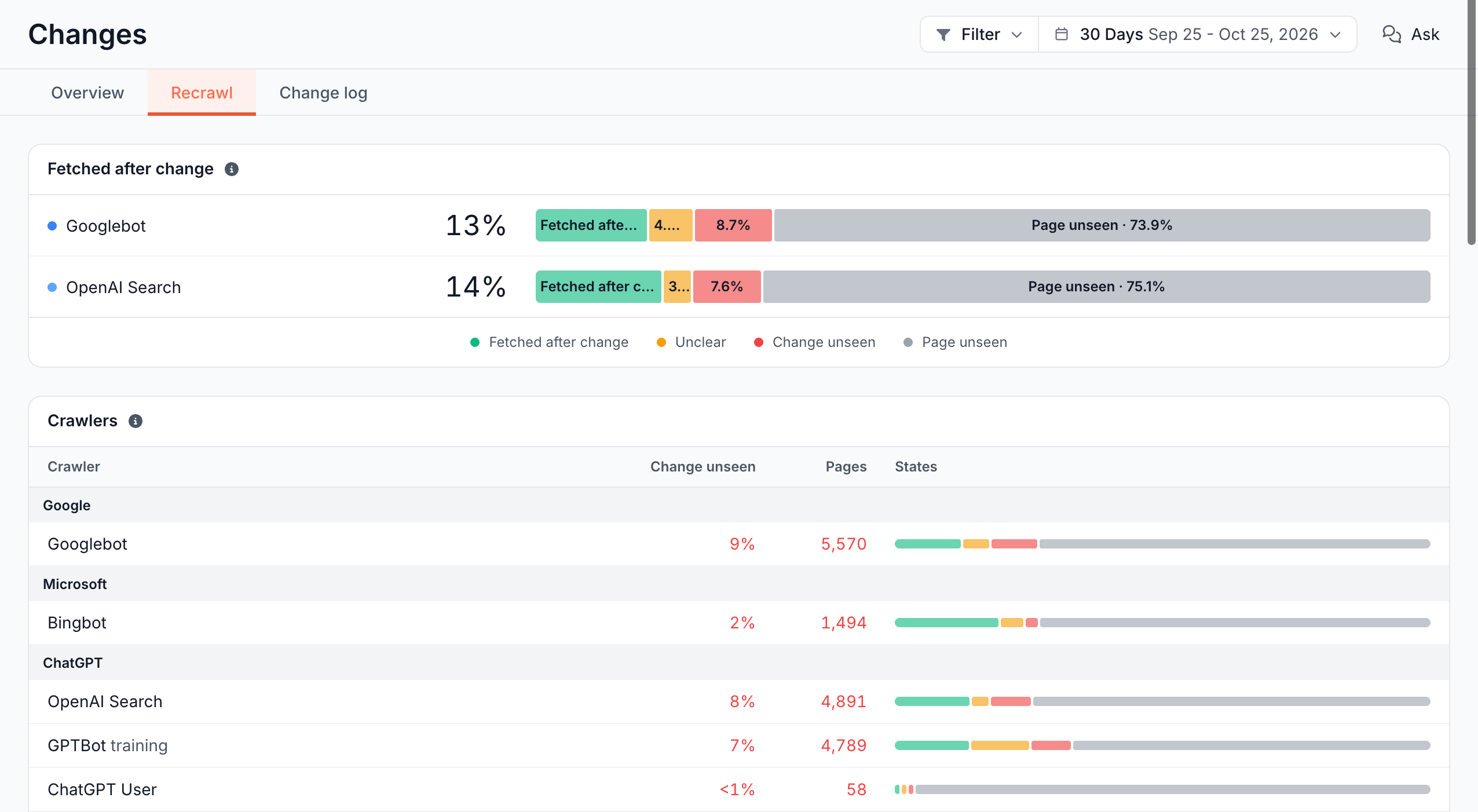
What the four recrawl states mean
Each counted page gets one state per crawler, from that crawler's last verified fetch of the page:
| State | Meaning |
|---|---|
| Fetched after change | "last verified fetch on or after the day the change was observed" |
| Unclear | "last fetch between the previous observation and the change" |
| Change unseen | "the crawler knows the page, but its last fetch predates the change" |
| Page unseen | The crawler has made no recent verified fetch of the page |
A few rules decide which fetches count:
- Verified only: a fetch counts when the bot's IP address checks out. See Verified bots. Pre-cache renders are EdgeComet's own fetches and never count.
- By day: states compare days, not times. A fetch earlier on the day the change was observed counts as Fetched after change.
- The newest change: a page that changed several times is judged on its newest change in the period.
- Status and redirect changes: after a change to the status code or redirect target, a fetch with any status counts. A crawler that fetched the new
404has seen it. For every other change, only fetches answered with200count. - Fetches after the period: a fetch made after the period's end counts too.
Which changed pages Recrawl counts
Recrawl starts from the same changed pages as Pages changed on the Overview tab, for the same period and filter. Some are left out of every total and listed under Not counted:
- Parameter, search and cart pages: pages of the page types for parameters and facets, search results, and cart and checkout.
- Data changes only: pages whose only changes are custom extraction values.
- No longer indexable: pages that are not indexable today, unless the change itself took them out of the index. A page that went from
200to404, or gainednoindex, stays counted.
Indexability is read as the page stands today. The figures of a past period can move as pages change state.
What the report shows
The tab has three cards. Bars split pages into the four states. Hover a band for its count and share, and click it for its pages in the Change log. Under 30 pages, a fraction such as "4/12" replaces a percentage.
Have Googlebot and OpenAI Search fetched the changed pages?
The Fetched after change card compares Googlebot with OpenAI Search (OAI-SearchBot). See AI search bots. Each row shows the share of counted pages the crawler fetched after the change, and a bar with the four states.
A crawler that has made no recent verified request to your site gets a line saying it, in place of a bar.
Which crawlers have not seen the changes?
The Crawlers card has one row per crawler, grouped by vendor: Google, Microsoft, ChatGPT, Claude and Perplexity. AI vendors get one row per purpose, such as GPTBot training, OpenAI Search and ChatGPT User: "One row per crawler, never combined: search, training and user are separate fetches." See Search bots, AI crawlers and AI user agents.
- Change unseen: the share of counted pages the crawler knows but last fetched before the change.
- Pages: the number of those pages.
- States: the four-state bar.
A crawler that fetched none of the counted pages has no row. When no crawler fetched any, the card reads "No crawler has fetched a changed page in this period."
Which page types are behind?
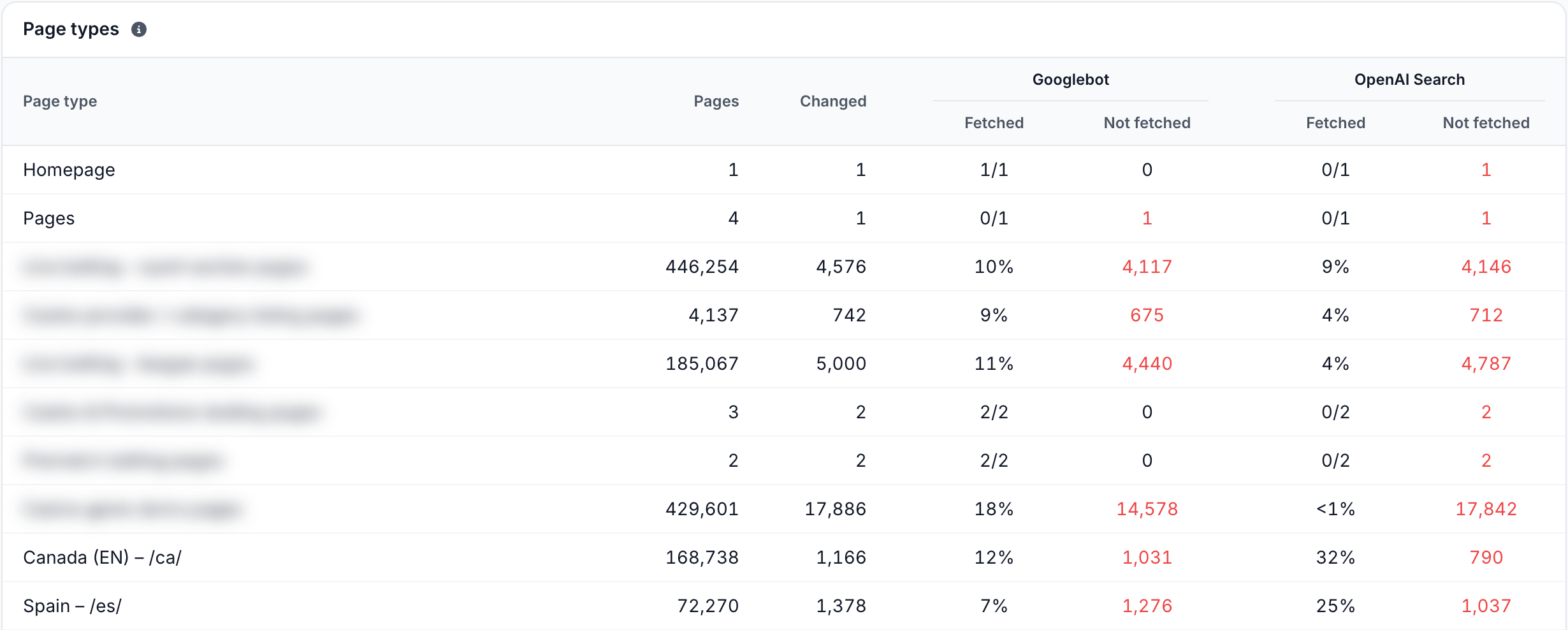
The Page types card has one row per page type, with Other pages last:
- Pages: the page type's tracked pages.
- Changed: its pages that changed in the period.
- Fetched: for Googlebot and for OpenAI Search, the share of the changed pages the crawler fetched after the change.
- Not fetched: the changed pages with no fetch after the change: Unclear, Change unseen and Page unseen together.
The Not counted rows at the bottom list the pages left out, by reason. See Which changed pages Recrawl counts. The Changed column of every row adds up to Pages changed on the Overview tab.
How to read it
Compare the states across crawlers and page types:
- Page unseen dominates. The crawler has not fetched most changed pages recently. Check how often the crawler visits that section in Analyze how Googlebot and Bingbot crawl your site.
- Change unseen is high on a page type that earns impressions. The crawler's latest copy of those pages is from before the change, with the old title, canonical or status.
- Googlebot is ahead of OpenAI Search, or the other way round. Each crawler sets its own pace. Compare them to see which search product has fetched the new version.
- Training bots lag. Training crawlers such as GPTBot and ClaudeBot collect pages for model training, not for live answers. See Training bots.
- A page type you changed on purpose stays behind. Bots have not come back to it yet. EdgeComet already serves the new version, and the next fetch gets it.
What to do next
Recrawl tells you who has seen a change. What you do next depends on whether the change was meant:
- A bad change bots have not fetched yet: fix it and re-cache the pages before they do. See Recache or remove many pages, or Re-cache on a release page.
- A change that should reach bots sooner: keep cached copies fresh with pre-cache rules, which render the new version ahead of the next bot fetch.
- Find the pages: click a band, a count, or a page type's Changed, Fetched or Not fetched cell to list its pages in the Change log, with each page's state for Googlebot and OpenAI Search.
- Watch the result in search: see whether a page's clicks and impressions moved after the change in Page Analysis.
Where to find it
In the dashboard: Changes, tab Recrawl. The period and Filter work as on the Overview tab. See Period and filter.