

Blog fan-out coverage skill
EdgeComet's Blog fan-out coverage skill runs a content gap analysis on your blog: it finds articles that miss the sub-questions a searcher expects a thorough article to answer. Also called query fan-out coverage or a topic coverage audit.
The skill reads a sample of your articles, expands each article's topic into the sub-queries it fans out into, and checks which ones the article covers.
The gaps it confirms become one proposed finding that names the missing sub-queries for each article, ready for a writer.
What you get
A run gives you two things:
- A proposed finding for the articles with gaps. Its recommendation names the sub-queries each article leaves out, and its table lists the affected articles.
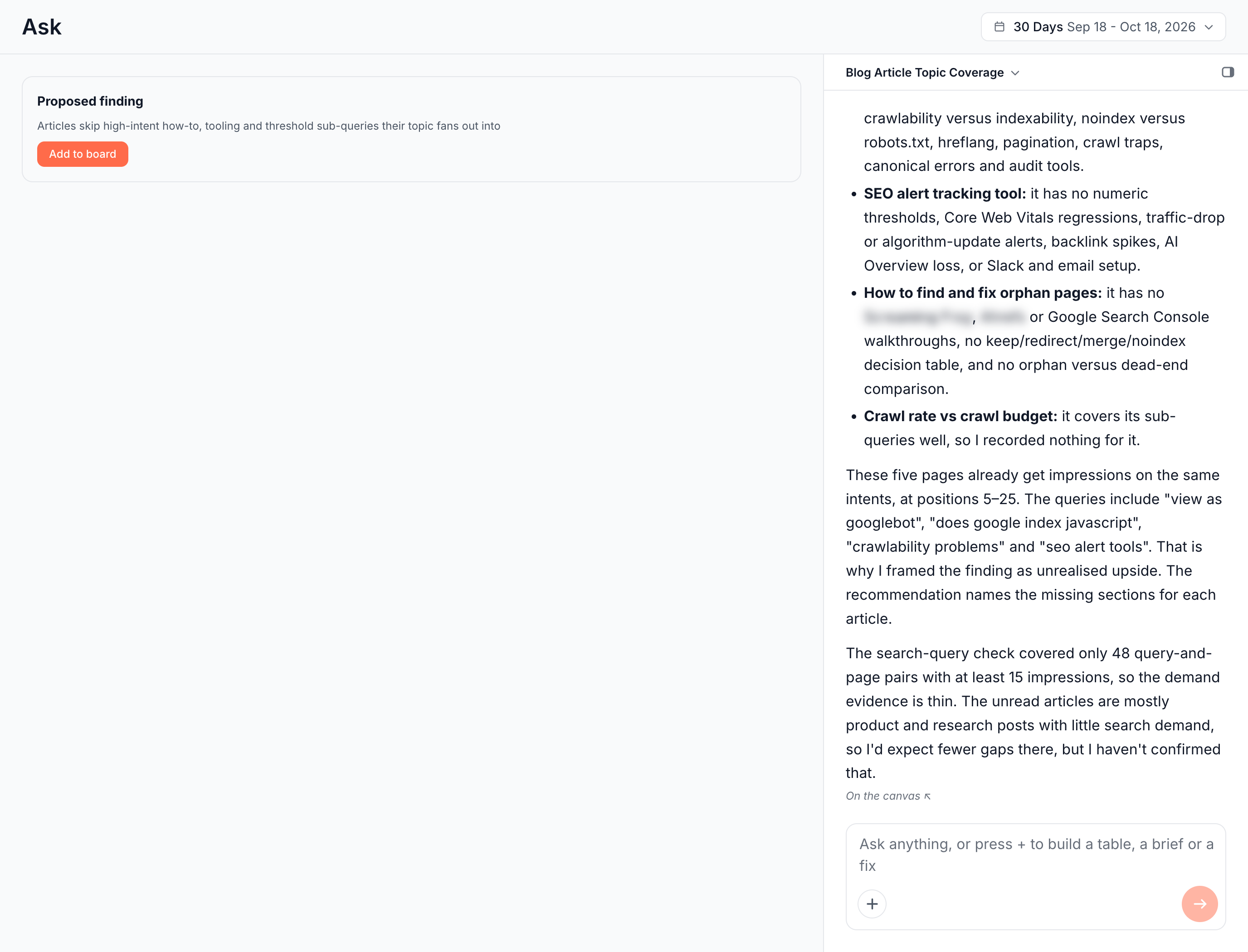
- A summary in the chat: how many articles the run read, what each one misses, which ones already cover their topic, and the Search Console demand behind the gaps.
On edgecomet.com, a run on the Blog articles segment read six of about 33 indexable articles and found gaps in five. The Googlebot JavaScript guide, for example, skips hydration, canonical or meta robots tags set by JavaScript, and History API versus hash URLs.
The crawl rate versus crawl budget article covered its sub-queries, and the run recorded nothing for it. The five articles with gaps already drew impressions for the same intents at positions 5 to 25, which puts that traffic within reach.
How blog fan-out coverage works
The skill works through six steps on every run:
- It maps the blog. It finds the blog section in your site's URL tree and counts the indexable articles in the scope.
- It reads representative articles. It reads each one in full, as EdgeComet renders it for bots, and takes the main topic from the title and H1.
- It expands the topic. It lists the sub-queries a thorough article on that topic should answer.
- It compares. It checks which of those sub-queries the article's headings and body do not address.
- It sizes the gap with your data. Before it records anything, it checks the affected articles and the queries they already draw in Search Console.
- It records the finding. The finding's title names what is missing, and EdgeComet counts the pages from your data.
The run reads a sample of articles, not every one, and the chat says how many it read. When the articles already cover their topics, the run records no finding.
How this skill differs from the Fan-out Queries report
The AI SEO agent writes the sub-queries in this skill from the article's topic. They are the questions a thorough article on the topic should answer: a coverage checklist, not search data.
EdgeComet also sees real fan-out queries: the long searches AI assistants run while they answer people, which reach Search Console with impressions but almost no clicks. The Fan-out Queries report and the Fan-out tab of Page Analysis show them.
The two work together:
- Across the blog: this skill finds articles that leave their topic half covered.
- For one page: the Fan-out tab of Page Analysis lists the questions AI assistants ask about the page, in the card Questions AI asks about this page. Check coverage grades whether the page answers each one, and Fix N gaps in Ask sends the gaps to the Article optimization skill.
Run a content gap analysis on your blog
Run the skill from a new Ask conversation:
- Click the Ask tab at the top of the sidebar, then New conversation.
- Press +, choose Run a skill, then Blog fan-out coverage. You can also click Run next to the skill under Action Board > Skills.
- Under Run against, choose a Segment for your blog articles when you have one. Whole site and a URL list of up to 20 articles also work.
- Optional: in Focus for this run, steer the run in up to 1,000 characters, such as "Focus on pages we published this quarter."
- Click Start.
A blog segment keeps the run on articles instead of product or category pages. To cover articles a run did not read, run it again on a URL list of those articles. A URL list run reports the gaps in the conversation and proposes no finding. See Run a skill for what all skills share.
Read the result
The conversation shows the proposed finding as a card with Add to board, and the chat lists the articles with the sub-queries each one misses. Until you click Add to board, the finding stays in the conversation.
The chat also rates the demand evidence. On edgecomet.com, it noted that the query check covered only query and page pairs with enough impressions. It named the queries behind the gaps, such as "view as googlebot" and "crawlability problems".
Act on the result
- Track the gaps. Click Add to board, and the finding joins the Action Board with its articles counted from your data. See Findings from Ask and skills.
- Fix one article. Run Article optimization on it and list its missing sub-queries in Focus for this run.
- Brief your writers. From the finding on the board, start Write N content briefs for one brief per article. See Content briefs for existing pages.
- Plan a new article. When a sub-query deserves its own page, run the Content brief skill on it.
How this skill differs from a content gap tool
- A content gap tool compares the keywords your domain ranks for with a competitor's. This skill reads the article itself and checks it against the questions its topic raises.
- A coverage score stops at a number. This skill names the missing sub-queries per article and checks which of them already draw impressions on your pages. Those are the gaps with traffic within reach.
Where to find it
In the dashboard: Ask > New conversation > + > Run a skill > Blog fan-out coverage, or Action Board > Skills.