

Check sitemap and Merchant feed URLs against Googlebot
The Feeds tables in EdgeComet Data Explorer list every URL in your XML sitemaps and every item in your Merchant Center feed, next to the last Googlebot fetch, the copy in EdgeComet's cache and the page's Google Search Console numbers. Also called a sitemap audit or a product feed audit.
Use them to find sitemap URLs Googlebot has not fetched since they changed, cached copies older than the page's lastmod, and listed URLs that earn no impressions.
Feeds has three tabs:
- Sitemap: every URL in the latest fetch of your sitemaps.
- Sitemap comparison: what changed between two fetches. See Compare two sitemap fetches.
- Merchant feed: every product in your feed, with its price, availability and validation issues.
Before you start
EdgeComet fetches your sitemaps and your feed on a schedule you set. The tables fill after the first fetch:
- Sitemap: turn on a Sitemap Re-cache rule under Configuration > Caching > Sitemap Re-cache, with your sitemap URLs.
- Merchant feed: turn on a Merchant Feed Re-cache rule under Configuration > Caching > Merchant Feed Re-cache, with your feed URLs.
The same rules keep the cached copies of new and changed URLs fresh. See Pre-cache new and changed sitemap URLs.
Sitemap: every URL in your sitemaps
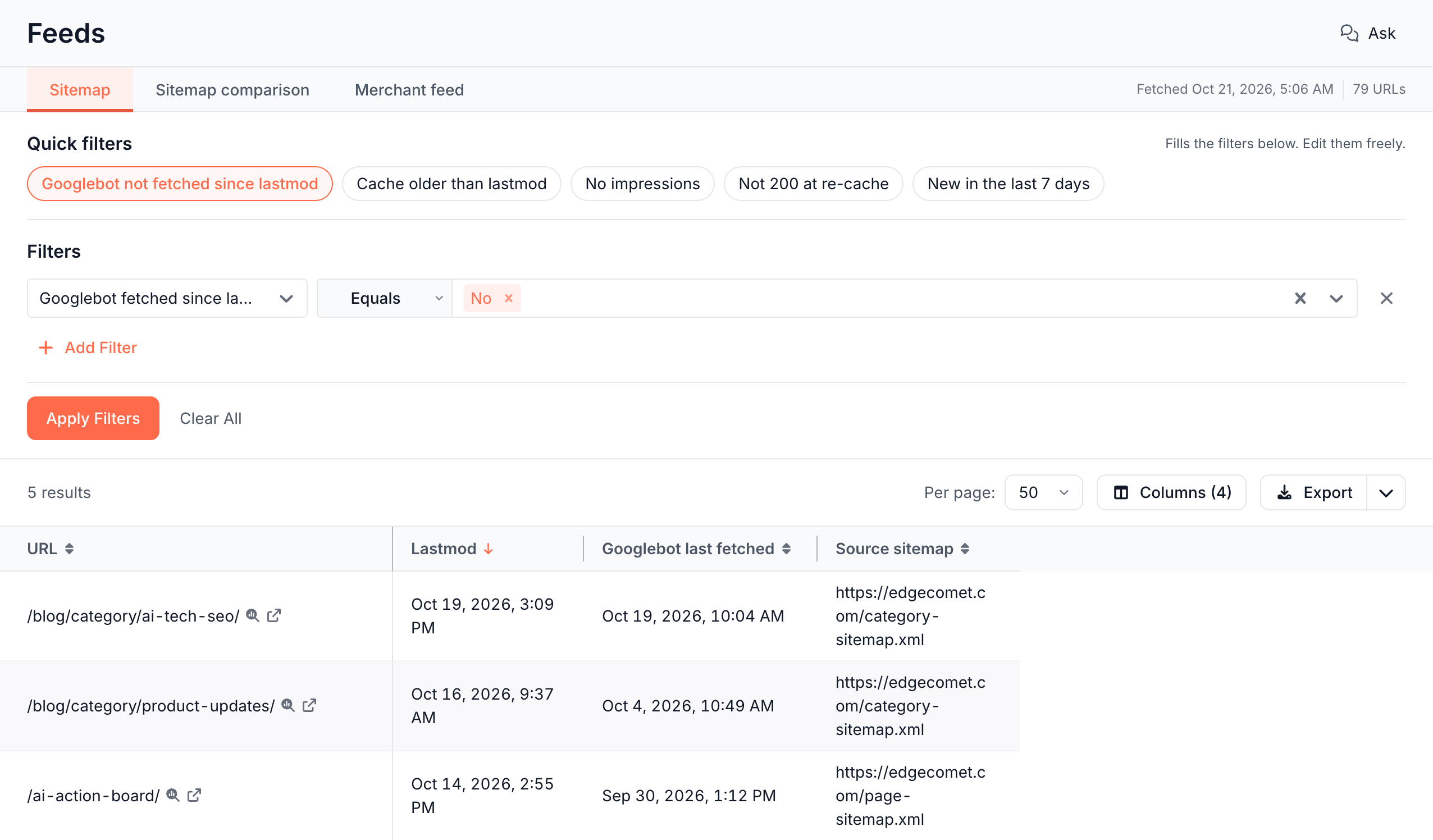
Each row is one URL from the latest sitemap fetch. The facts line at the right of the tabs shows when EdgeComet fetched the sitemaps and how many URLs they list, such as "Fetched Oct 21, 2026, 5:06 AM" and "79 URLs". A fetch that hit errors or was cut short is marked incomplete.
The table opens with URL, Lastmod, Source sitemap and First seen in sitemap, newest lastmod first. Under Columns, four groups put each URL next to what bots and Google did with it:
| Group | Columns |
|---|---|
| Sitemap | URL, Lastmod, Source sitemap, First seen in sitemap, Priority, Change frequency |
| Cache, last 30 days | Last cached, Last re-cache attempt, Status at last re-cache, Lastmod newer than cache |
| Googlebot, last 30 days | Googlebot last fetched, Googlebot fetched since lastmod |
| Search Console, last 28 days | Clicks, Impressions, Average position, Has impressions |
First seen in sitemap is the date of the first fetch that listed the URL. Googlebot last fetched reads only verified Googlebot requests. The Search Console group appears when Search Console is connected.
Priority and Change frequency show what your sitemap lists. Google says: "Google ignores <priority> and <changefreq> values." (Google Search Central)
Sitemap quick filters
Each quick filter sets the filter row and the columns that answer one question:
- Googlebot not fetched since lastmod: URLs that changed after Googlebot's last visit, with Googlebot last fetched.
- Cache older than lastmod: URLs whose cached copy is older than their
lastmod, with Last cached and Last re-cache attempt. - No impressions: with Search Console connected, URLs with no Google impressions in the last 28 days.
- Not 200 at re-cache: URLs that did not return
200the last time EdgeComet re-cached them, with Status at last re-cache. - New in the last 7 days: URLs that first appeared in the sitemap in the last 7 days.
Edit the rows after a quick filter like any other filter. See Start from a quick filter.
How the Yes and No columns are worked out
Two columns compare a URL's lastmod, the last-modified date your sitemap lists for it, with another date, and answer Yes, No or Unknown:
- Googlebot fetched since lastmod: Yes when Googlebot fetched the URL at or after its
lastmod, No when it did not. Unknown when the URL has nolastmod, or when Googlebot made no request for it in the last 30 days and thelastmodis older than that. - Lastmod newer than cache: Yes when the
lastmodis later than the last cached copy, No when it is not. Unknown when the URL has nolastmod, or when it has no cached copy from the last 30 days and thelastmodis older than that.
Both depend on an accurate lastmod. Google says: "Google uses the <lastmod> value if it's consistently and verifiably (for example by comparing to the last modification of the page) accurate." (Google Search Central)
Merchant feed: every product in your feed
Each row is one item of your Merchant Center feed in its current state. The table opens with URL, Title, Price, Availability, Issues, Page fields changed, Last cached, Page status at last re-cache and Google last fetched, with the most recent feed changes first. Google last fetched is the latest fetch by Googlebot, AdsBot or StoreBot.
The default row Removed from feed Is not set keeps the items still in the feed. Remove it to see items that left the feed too.
Other columns include Sale price, Brand, GTIN, Product type, Change kind, Googlebot last fetched, AdsBot last fetched and StoreBot last fetched. To find items with problems, filter Issues with Has any of or Has none of, or set Has errors to Yes.
The same table is the Feed items tab of E-commerce > Product Feed, which also shows what each fetch changed and the feed checks that fail.
If a Feeds tab shows a message
A tab shows a message instead of the table when it has no fetch to read:
| Message | What it means |
|---|---|
| "No sitemap snapshot": "Sitemap Re-cache fetches your sitemaps on a schedule." | No Sitemap Re-cache rule is on, or it lists no sitemap URLs. Configure Sitemap Re-cache opens the rule |
| "First fetch pending": "The next run fetches the sitemaps." | The rule is on and the first fetch has not run yet. If the last run failed, its error shows below |
| "Last fetch expired": "The stored sitemap copy is older than 29 days. The next run fetches the sitemaps." | The rule is on, but its last stored fetch is older than 29 days. Check the rule's Run history for errors |
| "No product feed": "Feed Re-cache fetches your feed on a schedule." | No Merchant Feed Re-cache rule is on, or it lists no feed URLs. Configure Feed Re-cache opens the rule |
| "First fetch pending": "The next run fetches the feed." | The feed rule is on and the first fetch has not run yet |
With Search Console connected but no data for the last 28 days, the tables read "Search Console has no data for the last 28 days. Its columns read zero."
Where to find it
In the dashboard: Data Explorer > Feeds, with the tabs Sitemap, Sitemap comparison and Merchant feed.