

Add and edit structured data (JSON-LD) at the edge
Edge SEO adds, fixes and removes JSON-LD structured data on the pages search engines and AI bots receive, with no release and no CMS plugin.
The markup is built from what each page shows, such as the product name, price and availability. It matches the page and changes when the page does.

What Edge SEO adds
Edge SEO writes the markup each kind of page needs:
| Page | Markup |
|---|---|
| Product pages | Product, with the name, price and availability shown on the page |
| Articles and blog posts | Article, with the headline and dates |
| Pages deeper than the home page | BreadcrumbList |
| The home page, once for the site | Organization and WebSite |
Built-in guards keep the markup correct:
- No duplicates. Markup a page already carries is never added again. Types are matched exactly.
- Microdata respected. Pages that already carry the type as microdata are left alone.
- Linked entities.
brandcomes from the page.sellerandpublisherpoint at your site'sOrganization. - Canonical duplicates get the same block as their canonical URL.
- Only visible values. Every value comes from content visible on the page, and every bot and visitor gets the same markup.
- No
FAQPageorHowTomarkup is written.
Find pages with missing or broken markup
Evergreen Crawl reads the JSON-LD of every page bots received and checks it against schema.org and Google's rich result requirements. The Structured Data report shows which rich results each type can earn and lists every finding. Missing and broken markup also appear as issues under Evergreen Crawl > Issues, in the Structured Data & Images group, such as "No JSON-LD BreadcrumbList on a deep indexable page".
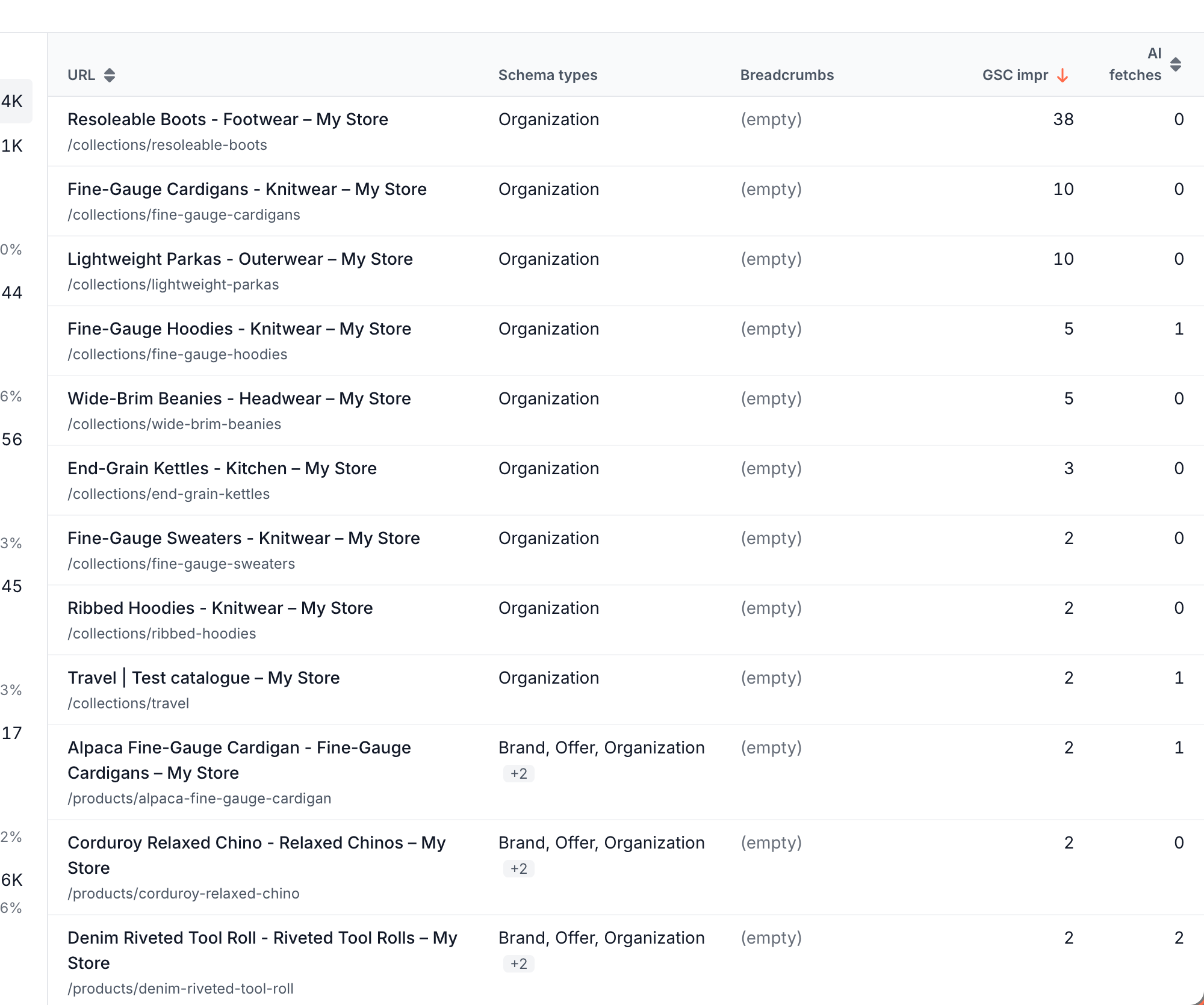
Each issue shows the pages it covers, their Search Console impressions and AI bot fetches, which lets you fix the pages that matter first. Click an issue to list its pages with the Schema types each one carries.
Add markup
The Action Board turns structured data issues into findings with an Edge SEO fix:
- Open the finding on the Action Board and choose the Edge SEO fix. EdgeComet drafts the rules for the affected pages.
- Review the drafts on the task page or the Drafts tab of Edge SEO. Edit on the page in the rule editor shows a page with the block added. See Preview, test and publish Edge SEO rules.
- Deploy. The next Evergreen Crawl confirms the fix: the pages drop out of the issue once bots get the new markup.
How the values are filled in
The values come from the page when EdgeComet serves it, read through your custom extractions under Configuration > Custom extractions, such as the price and stock fields. When the price on the page changes, the next copy EdgeComet caches carries the new price in its markup.
Add a fixed block
You can add a fixed JSON-LD block yourself:
Open a rule, click Edit on the page and click the element the block goes next to, such as the main heading.
Click Add in its bar and choose Add below, or click the + between two blocks. Paste the block under HTML to add, and click Add this edit:
html<script type="application/ld+json"> {"@context": "https://schema.org", "@type": "Organization", "name": "Example", "url": "https://www.example.com/"} </script>Save and deploy.
EdgeComet keeps JSON-LD when it cleans inserted HTML, while it removes executable scripts. See Inserting HTML. The Edge SEO snippet carries the block to visitors too.
Fix or remove existing markup
Broken markup that Evergreen Crawl flags gets the same Action Board fix: a draft rule that replaces or removes the block on the affected pages, ready for you to review and deploy.
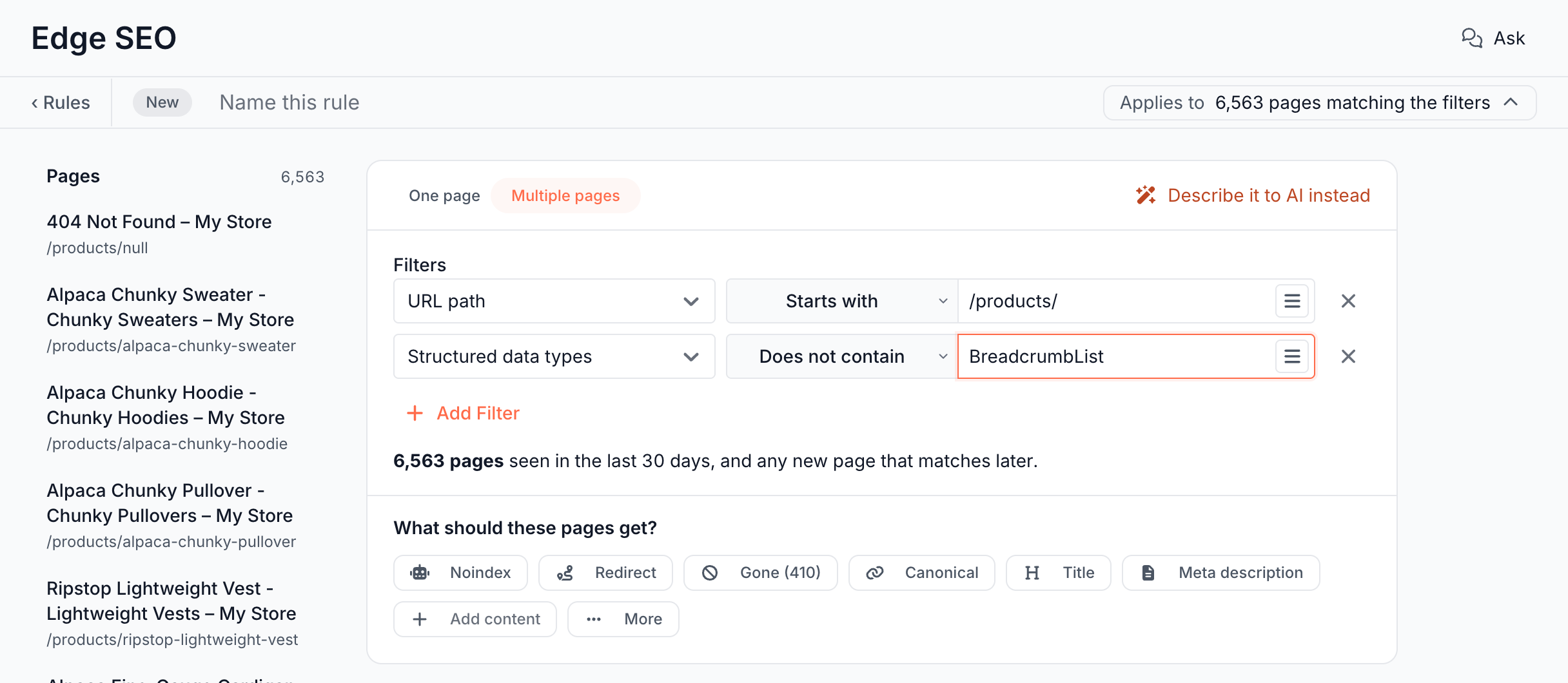
To target pages by the markup they carry, add the filter Structured data types. It reads the @type values of the page's JSON-LD blocks and matches them exactly: Product is not schema:Product. For example, URL path Starts with /products/ with Structured data types Does not contain BreadcrumbList finds product pages without breadcrumb markup.
Is adding structured data at the edge cloaking?
No, when the markup describes what the page shows. Edge SEO builds it only from content visible on the page, and every bot gets the same markup. With the snippet installed, visitors get it too.
See When prerendering becomes cloaking.
What you should see
- The rule editor lists the added block as an Added content edit, and the engine check reports a page where its spot is missing.
- After the deploy, Page Analysis > Cache shows the markup in the copy bots receive, and the next Evergreen Crawl clears the issue for those pages.
If it does not work
The page did not get markup
The page may already carry that type, in JSON-LD or microdata, and the guard skipped it. Or a value the markup needs, such as the price, is not on the page or not read by a custom extraction.