

Track social bots: link previews in chats and social apps
Log Analyzer > Social Bots shows the requests chat and social apps make to draw the preview card under a shared link, and which of those links broke or answered slowly. EdgeComet counts 15 apps, from iMessage and WhatsApp to Facebook, LinkedIn and Pinterest. Also called link preview bots, link unfurlers or social media crawlers.
When someone pastes a link, the app requests the page to build the card: a title, an image and a short description. A link that answers with an error, or answers too slowly, can post as a bare link without a card. Meta, for one, asks that its crawler can fetch the content "within a few seconds".
EdgeComet records each of these requests as it serves it. The page lists the links people actually share and what each app got, with no log files and no test tool.
What the report shows
The Social Bots page counts the period's social bot requests, lists the problems they ran into, and shows which apps and pages they came for. It has a period filter and no segment filter.
- Stat cards: requests, iMessage and WhatsApp shares, pages with errors and slow requests.
- Needs Attention: the checks that found a problem, most severe first.
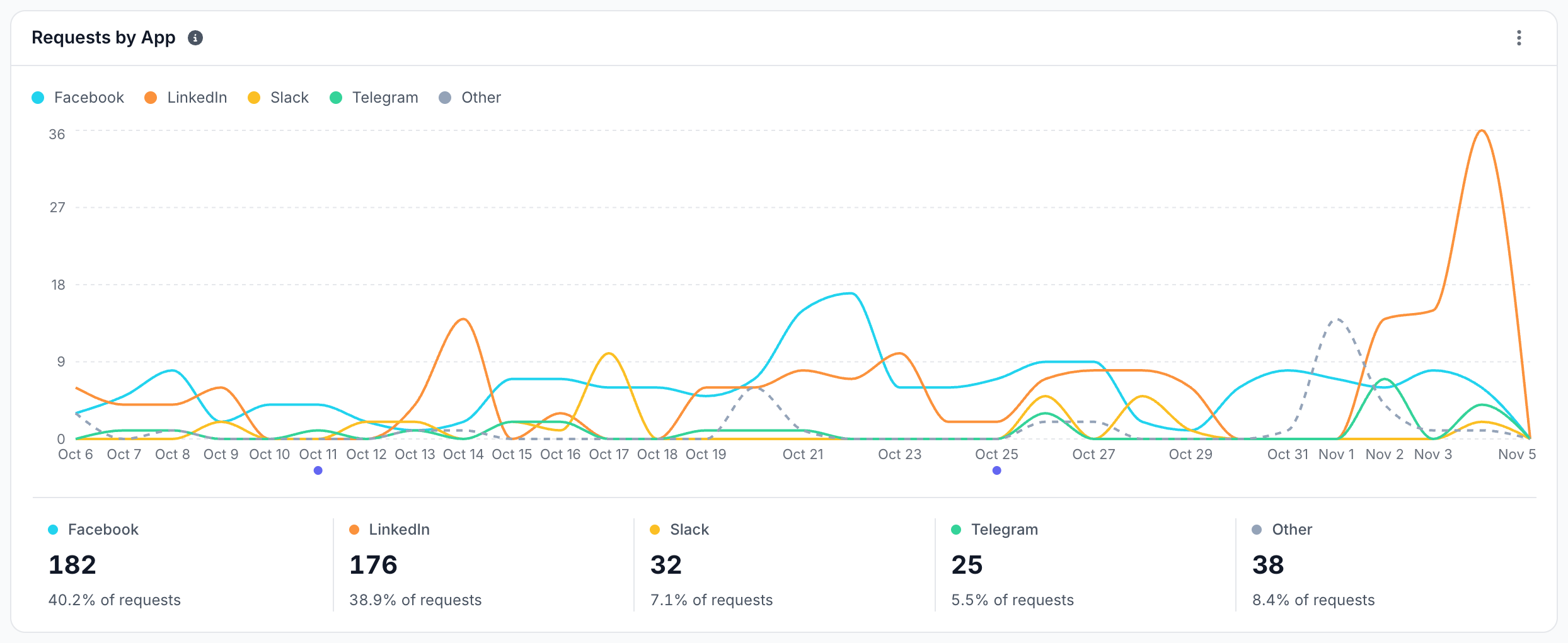
- Requests by App: requests per day for the busiest apps.
- Shared Pages: the pages social bots requested most.
- Apps: every app with its requests, errors and IP check.
The report starts on the day EdgeComet began telling the apps apart. When the period starts earlier, a notice names that day and adds "Earlier days are not counted." With no social bot requests in the period, the page reads "No social bot requests in this period."
Which apps count as social bots?
A social bot is the fetcher a chat or social app sends to build a link preview. EdgeComet counts 15 apps in its Social Bots category: iMessage, WhatsApp, Facebook, LinkedIn, Pinterest, Telegram, X, Slack, Snapchat, Discord, Teams, LINE, KakaoTalk, Google Messages and Xing.
Facebook's fetcher, facebookexternalhit, builds previews for more than one app. Meta names it for apps "such as Facebook, Instagram, or Messenger", and the report shows all three as Facebook.
Other bots from the same companies are not social bots. Amazonbot and Bytespider (TikTok) are AI training bots. Meta Ads, Taboolabot and Slackbot, Slack's plain robot, are Other Bots: only Slackbot-LinkExpanding builds Slack's previews. See Bot categories.
How many social bot requests reach your site?
Four cards sum up the period. Each compares with the previous period once that period lies inside the report's data, and View opens the matching requests in Data Explorer.
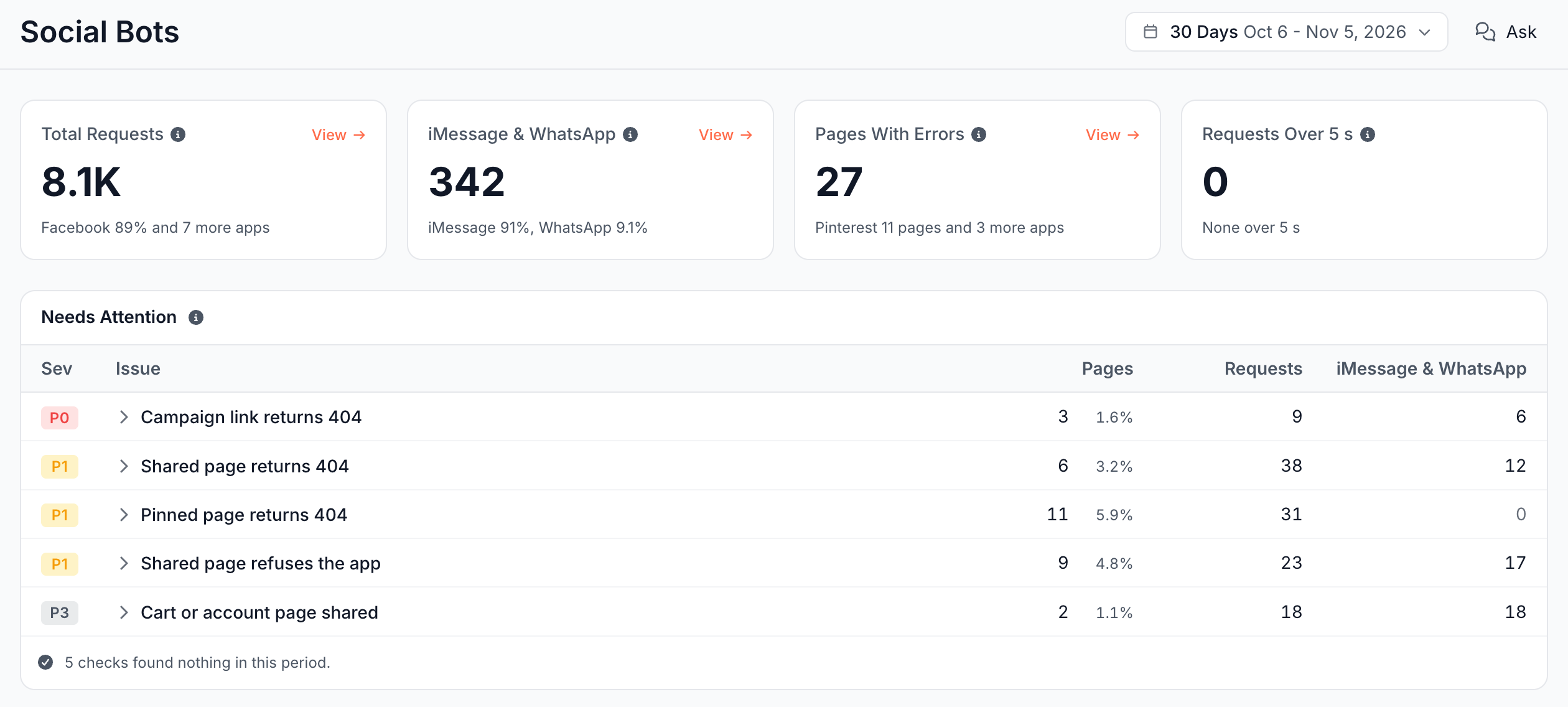
| Card | What it shows |
|---|---|
| Total Requests | Every request from a social bot, re-visits included. The footer names the busiest app and its share, such as "Facebook 40% and 7 more apps" |
| iMessage & WhatsApp | Chat shares: links pasted into iMessage or WhatsApp. The footer splits them, such as "iMessage 74%, WhatsApp 26%" |
| Pages With Errors | Pages that answered a social bot with a 4xx, a 5xx or no response. The footer names the app with the most, such as "Pinterest 14 pages and 2 more apps", or reads "Every request got a page" |
| Requests Over 5 s | Social bot requests answered in over 5 seconds. The footer names the app with the most, or reads "None over 5 s" |
None of the cards counts hidden requests. A page is counted once across its query-string variants, such as /shoes?color=red and /shoes.
What counts as an iMessage & WhatsApp share?
A chat share is one request from iMessage or WhatsApp. EdgeComet counts it as one paste of the link, because both apps request the page from the phone that sends it. WhatsApp says it fetches the URL "on behalf of the sender".
Every other app fetches from its own servers and comes back on its own schedule. Pinterest, for one, revisits the pages behind pins to "detect and remove broken website links behind Pins". Their requests measure how often an app reads the page, not how often people share it.
The cards and columns label chat shares iMessage & WhatsApp. The issue dialog calls the same count chat shares.
Which requests are hidden?
A hidden request is a social bot request that EdgeComet leaves out of every number on the page, because it says nothing about a link someone shared. Needs Attention counts them in a note, by kind:
- Spoofed social bots: requests that claim an app but come from outside its IP ranges, or that probe for files like
/.envfrom an app EdgeComet cannot verify. Fake ones count in the High Risk tier of Bad Bots, and probes on the Security page. - Half-typed links: WhatsApp and Telegram request the link while the sender is still typing it, and the partial address gets a 404.
- Platform checks: Meta and Apple ask for files under
/.well-known/, such asapple-app-site-association.
Which shared links need attention?
Needs Attention lists every check that found a problem in the period, by severity and then by requests. Click a check to open its pages.
- Sev: P0 active loss, P1 broken with demand, P2 strategic, P3 hygiene.
- Pages: the pages the check found, with their share of the period's shared pages: every page a social bot requested.
- Requests: the social bot requests that ran into the problem.
- iMessage & WhatsApp: the chat shares of those pages in the period.
| Sev | Check | What it finds |
|---|---|---|
| P0 | Shared page returns a server error | A social bot got a 5xx or no response from the page on two or more requests |
| P0 | Campaign link returns 404 | A link carrying utm_ or fbclid parameters returns 404. Paid and organic social posts point there |
| P1 | Shared page refuses the app | The site answered 401, 403, 429 or another refusal, usually from a firewall or bot rule |
| P1 | Pinned page returns 404 | Pinterest got a 404 when it rechecked a pin |
| P1 | Shared page returns 404 | A social bot got a 404 or 410 for a page people still send |
| P1 | Social bots wait over 5 s for a live render | The page was not in cache, and EdgeComet rendered it while the social bot waited over 5 seconds |
| P2 | Link pasted with a line break returns an error | The pasted link ends in %0A, %20 or an invisible character, and the server answers with an error |
| P2 | Origin takes over 5 s to answer a social bot | Your server took over 5 seconds to answer |
| P2 | App requests a malformed address | The address holds >, data:image, a backslash or a second https:/, usually from a broken link in the page markup that the app followed |
| P3 | Cart or account page shared | A cart, checkout or account page was shared. It is tied to the sender's session, and the recipient most likely opens their own, empty page |
A note row closes the list. "4 checks found nothing in this period." names the clean checks, and "703 requests hidden from every number on this page." splits the hidden requests by kind.
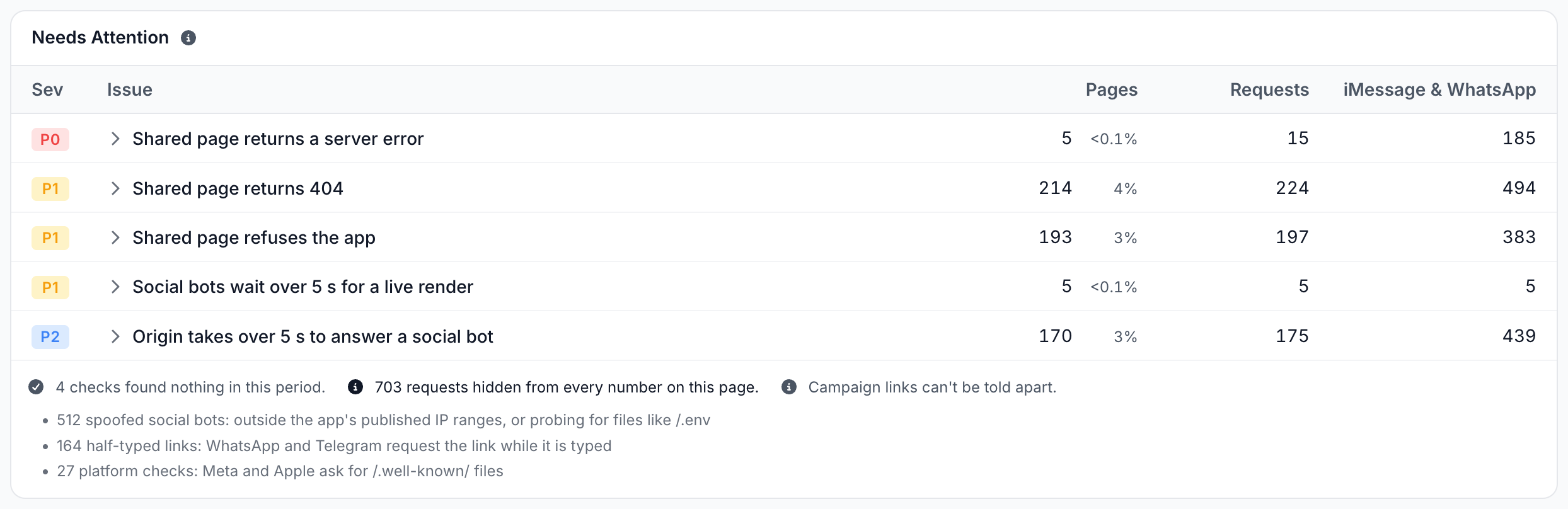
When no request in the period carried a tracking parameter, the note "Campaign links can't be told apart." appears, and campaign 404s count under the other 404 checks. The note adds that sites that strip tracking parameters never log them. See Tracking parameters.
With no problem found, the card reads "Every shared link answered with a page in time."
What does each check list?
Click a check to open its issue dialog. It shows the check's pages with the apps that hit them, where they sit in your site, and when.
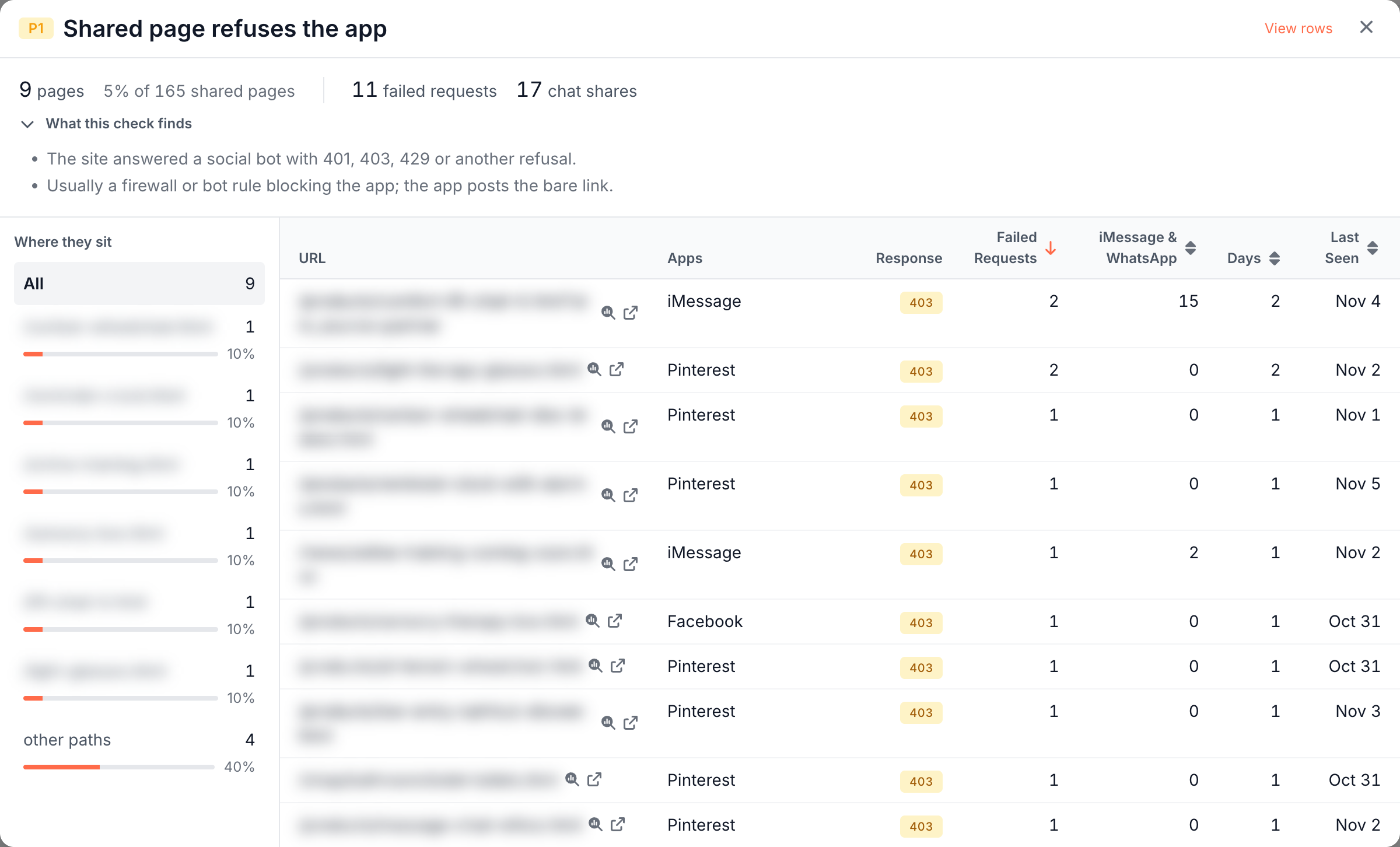
- Figures: the pages and their share of shared pages, the requests that hit the check, and the chat shares of those pages.
- What this check finds: the check's definition, as in the table of checks.
- Where they sit: the folders that hold the pages. Click a folder to list only its pages, or All to list them all.
- The table: one row per page with the Apps that hit it and the columns of the check's kind. A page whose latest answer was an error shows its URL without a title.
- View rows: opens the matching requests in Data Explorer.
| Kind of check | Columns |
|---|---|
| Errors | Response (the latest failing status, or No response), Failed Requests, iMessage & WhatsApp, Days, Last Seen |
| Slow answers | Median Wait, Longest, Slow Requests, iMessage & WhatsApp, Days |
| Cart or account page | Requests, iMessage & WhatsApp, Days |
Click a column header to sort. The table shows up to 300 pages, and a line under it reads "Showing 300 of N pages. View rows opens all of them."
Which apps request the most?
Requests by App draws the social bot requests per day for the four busiest apps by name, and the rest as a dashed Other line. Under the chart, each line shows its requests and share of the total.
The time buckets are in UTC, and their width follows the period. Click a point or a total to open those requests in Data Explorer.
Which pages do people share?
Shared Pages lists the 12 pages social bots requested most in the period, with the apps that requested them.
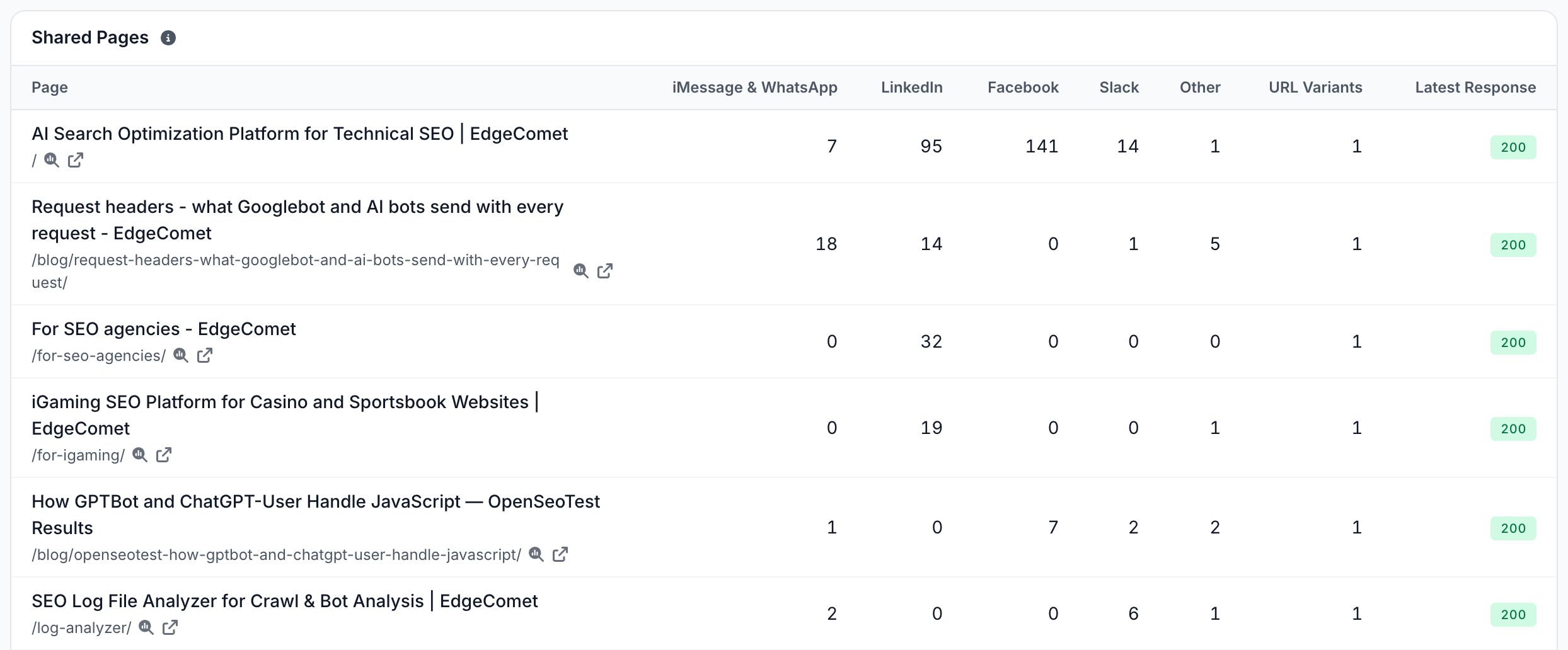
- Page: the page title and URL, with links to Page Analysis and to the page.
- iMessage & WhatsApp: the page's chat shares.
- One column per app: the requests of up to three busiest other apps on these pages, such as LinkedIn, Facebook and Slack. Other adds up every remaining app, and appears only when a row has any.
- URL Variants: how many addresses of the page bots requested, such as the page with ad or tracking parameters.
- Latest Response: the status of the page's latest answer, green for 2xx, grey for 3xx and red for an error or No response. A cart or account page shows an amber Cart instead.
The numbers open the matching requests in Data Explorer.
Which apps can EdgeComet verify?
Apps lists every app that requested your site in the period, with its Requests, Pages, Errors and requests Over 5 s. IP Check says whether EdgeComet can verify the app's requests by IP address.
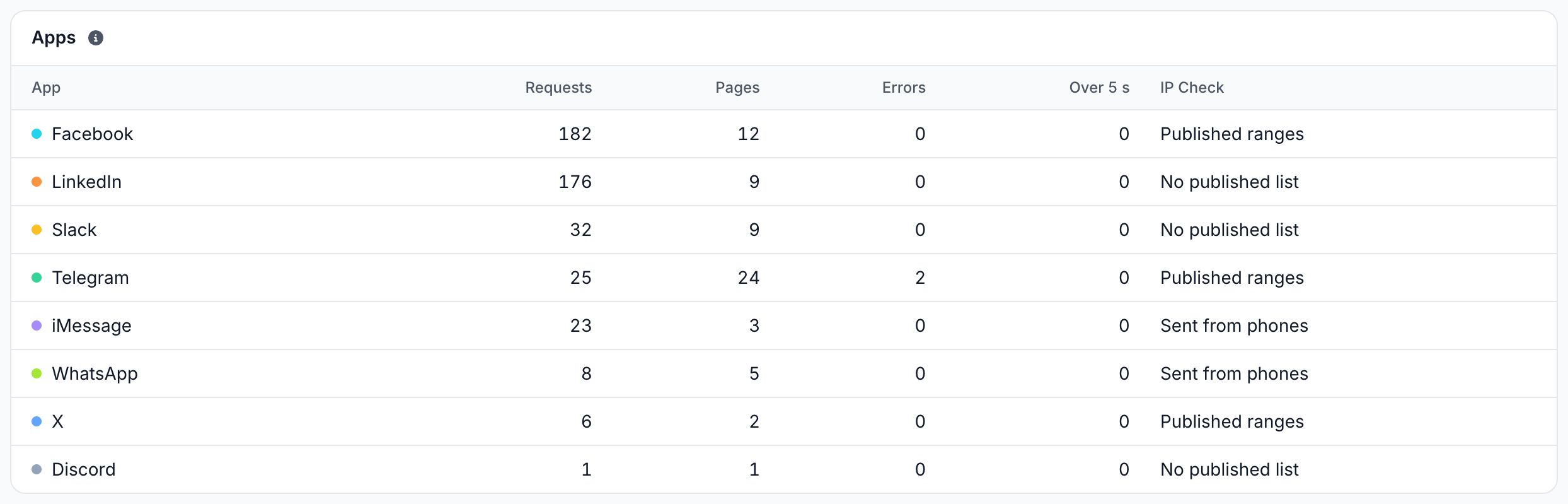
- Published ranges: EdgeComet checks the app's requests against its IP ranges, and at least one request in the period came from them. This applies to Facebook, Telegram and X. See IP validation.
- Sent from phones: iMessage, WhatsApp and Google Messages fetch from the sender's phone, so no address list can verify them.
- No published list: the app publishes no list of its addresses, such as LinkedIn, Pinterest and Slack, or no request in the period came from a verified address.
The Requests and Errors numbers open the matching requests in Data Explorer.
How to read it
Read the Social Bots page by what people lose first, then by where the traffic comes from:
- A P0 check appears. A link people share fails right now: a campaign link returns 404, or a page fails with server errors. Fix it first.
- Shared page refuses the app. A firewall, CDN bot rule or rate limit blocks the app, and links to your site post without a card. Check the Apps column of the issue dialog to see which app.
- Pinned page returns 404. Pinterest found the page behind a pin missing, and it removes broken links behind pins.
- Requests Over 5 s rises. Look at the two slow checks: live render means the page was not cached, origin means your server was slow.
- The hidden count jumps. Spoofed requests went up. Open Bad Bots to see which bot names are faked.
- No social bot requests in this period. EdgeComet saw none. It records the requests your CDN routes to it, so check that your routing rule sends link preview bots.
How to fix a broken shared link
Fix each problem where it starts, then let the apps fetch again:
- 404s, campaign 404s and pinned 404s: fix the link where it was posted if you can. Otherwise redirect the old address to the right page on your server, so people who click it land there too. An Edge SEO redirect changes what bots get, and reaches people only with the snippet. See What bots and visitors get.
- Refusals: allow the app's user agent in your firewall, CDN bot protection and rate limits. Check that no URL rule or Block dimension in EdgeComet answers it with
403or429. - Slow live renders: pre-cache the pages people share, so EdgeComet answers from cache. See Pre-cache a list of URLs and Pre-cache pages before bots request them.
- Slow origin answers: speed up the page on your server, or serve it from cache.
- Line breaks and malformed addresses: an Edge SEO redirect with a capture pattern can send the broken address to the page. See Send each URL to its own address. For malformed addresses, also fix the link in your page markup.
- Server errors: open the URL in Page Analysis to see each answer, and fix the error on your server.
Apps keep their own copy of a preview. Meta lets you "force a crawl" of a fixed page with its Sharing Debugger. A check's row leaves Needs Attention once the period no longer holds a failing request.
What to do next
Inspect the requests, ask about them, and check the bots that fake app names:
- See every request. Data Explorer > Bot log has the Bot Type value Social Bots and the Social bot check filter, which the report's links set for you. Two differences are expected: Data Explorer keeps half-typed 404s, and lists a page's query-string variants as separate rows. See Data Explorer Bot log.
- Ask about it. Ask in the header starts with "Which shared links are broken?", "Which pages get pasted in chats?" and "Which apps fetch this site?". See Ask about any report.
- Use it from an AI assistant. The MCP tool
get_reportreturns the report's numbers through thesocial_botsproviders. Seeget_report. - Check fake app names. Requests that fake a social app count as fake in Bad Bots, and file probes in Security.
How this compares with sharing debuggers and server logs
The Social Bots page shows what each app got when people actually shared your links, from live traffic:
- Sharing debuggers: Meta's Sharing Debugger and similar tools test one URL you pick, when you ask. The Social Bots page lists every link people shared across 15 apps, with what each app got and when.
- Server log analysis: iMessage's user agent also names
facebookexternalhit, which a log filter counts as Facebook. EdgeComet tells the two apart, checks Facebook, Telegram and X by IP, and hides spoofed requests, half-typed links and platform checks. - Uptime monitors: a monitor checks your pages with its own user agent. A firewall rule that blocks only an app's fetcher stays invisible to it, and shows here as Shared page refuses the app.
See How EdgeComet collects data: no log files, no crawler.
Where to find it
In the dashboard: Log Analyzer > Social Bots.