

Find uncrawled, orphan and out-of-stock product pages
The Shelf Edge Products report shows which product pages Googlebot did not fetch in the crawl's dates, which no page links to, and which withdrawn products search engines can still index. Also called a product page audit.
It groups every product page of the crawl by stock state, read from your shop's own wording in any language, with the Googlebot fetches, Google impressions and AI user bot fetches on each group. It also shows which products lost indexability, links or stock since the comparison crawl.
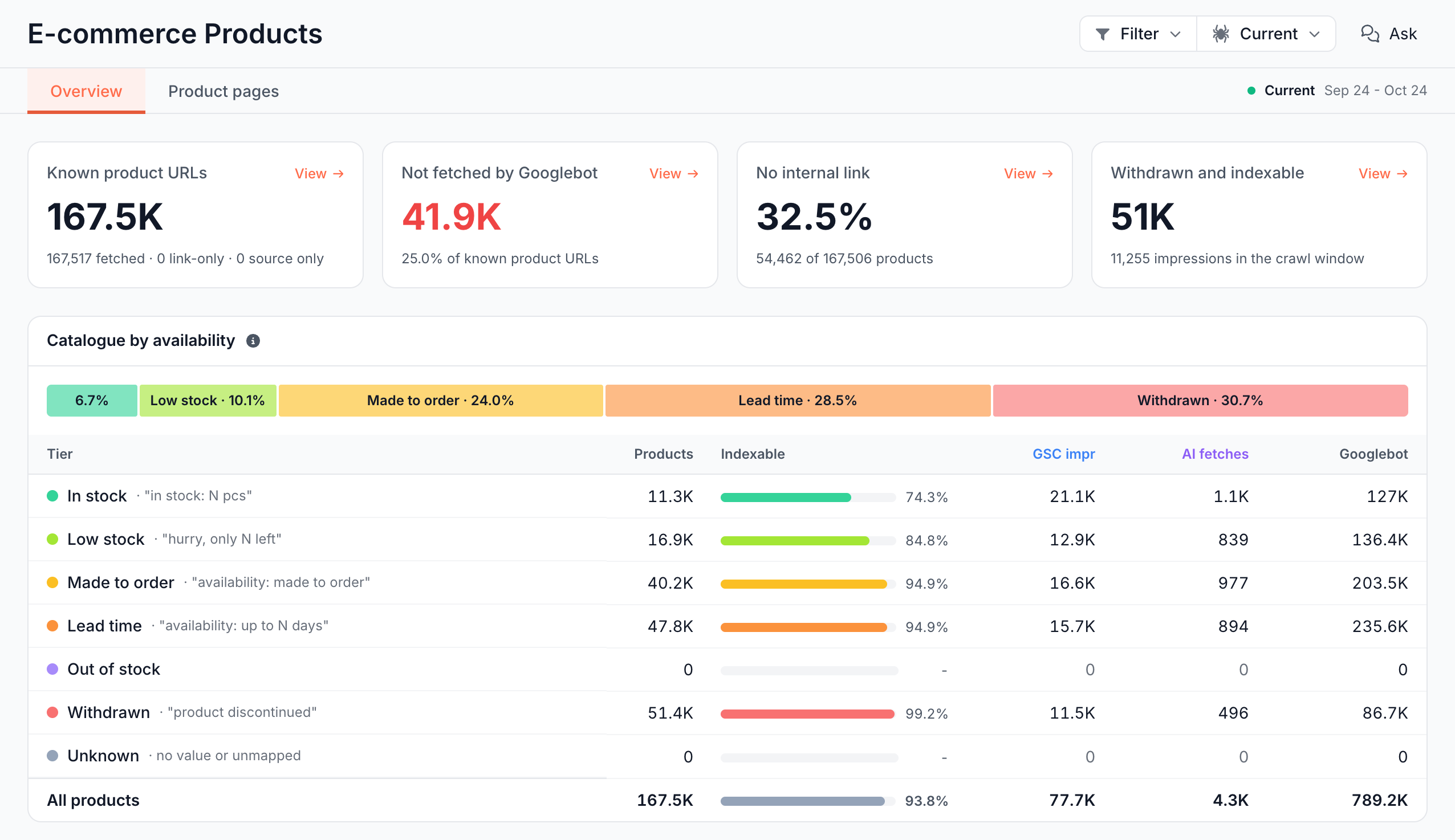
What the report shows
Products reads the product pages of one crawl, plus your Merchant Center feed if you added one. It has two tabs: Overview and Product pages.
Cards: which products do search engines miss?
- Known product URLs: every product URL EdgeComet knows of, each counted once: product pages in the crawl plus the product links in your feed as it is now. On an older crawl, products added to the feed since then count as source only. The footer splits them:
- fetched: the crawl fetched the page.
- link-only: your feed lists it, and the crawl saw it only as a link-only stub.
- source only: your feed lists it, and the crawl never reached it.
- Not fetched by Googlebot: known product URLs with no Googlebot fetch in the crawl's dates, including feed products the crawl never reached. Red above zero.
- No internal link: the share of product pages no crawled page links to, such as "54,462 of 167,506 products". When the crawl extracted links from too few pages, the card shows a dash and the note "The crawl extracted links from too few pages to read the link graph".
- Withdrawn and indexable: indexable products in the Withdrawn tier, whose stock wording says they are gone for good, such as "discontinued". The footer counts their Google impressions.
Without a feed, Known product URLs reads "no product feed configured" and counts crawl pages only.
View on a card opens its pages in the Product pages tab. The list holds the product pages the crawl fetched. Feed URLs the crawl did not fetch count on Known product URLs and Not fetched by Googlebot, but the list leaves them out.
Catalogue by availability: what stock state does each product show?
Each product lands in one availability tier, read from the availability field on its page:
| Tier | What the page says |
|---|---|
| In stock | The product can be bought now |
| Low stock | It can be bought, and the wording says few are left |
| Made to order | It can be bought and is made on demand |
| Lead time | It can be bought and ships after a stated delay |
| Out of stock | It cannot be bought for now: sold out, back-order, "notify me" |
| Withdrawn | It cannot be bought and is not coming back: discontinued, removed, archived |
| Unknown | No value, wording that is not a stock state, or wording that was not mapped to a tier. The row reads "no value or unmapped" |
EdgeComet's AI reads the distinct stock wordings on your pages and sorts them into tiers, once per crawl evaluation. It works in any language and needs no mapping table.
Numbers become N, which means "Only 3 left" and "Only 12 left" are one wording. EdgeComet does not read quantities: a product lands in Low stock only when its wording says few are left.
The table shows each tier's most common wording beside its name, such as In stock · "in stock: N pcs", with Products, Indexable (a share), GSC impr, AI fetches and Googlebot. Click a tier to open its products.
When the crawl's evaluation classified none of your stock wording, the card reads "Availability tiers are classified with the crawl's issue evaluation, and this crawl's evaluation classified none, so products cannot be grouped by stock state." The change card then notes "Stock tier changes are not on this table".
Issues: what is wrong on product pages?
The Issues card lists the Catalog Health checks that found product pages, worst first, with the change since the comparison crawl and the demand on the pages. Examples:
- Out-of-stock products: indexable product pages whose stock value says the product cannot be bought now.
- Withdrawn products indexable and still crawled: discontinued products that are indexable and that Googlebot still fetches.
- Products earning impressions or AI fetches with no internal link: orphan products that still earn Google impressions or AI fetches.
- Page price differs from the feed: the price on the page falls outside the range of the item's price and sale price in your feed. See Product pages against the feed.
All categories opens the full issue catalog in Evergreen Crawl > Issues. See Find and prioritize technical SEO issues.
Products by referring links: are products linked enough?
This card counts the pages that link to each product page, each linking page once. 0 marks an orphan. The bands are 0, 1, 2-3, 4-10, 11-50 and 51+ referring links, each with its products, Google impressions, AI fetches and Googlebot fetches.
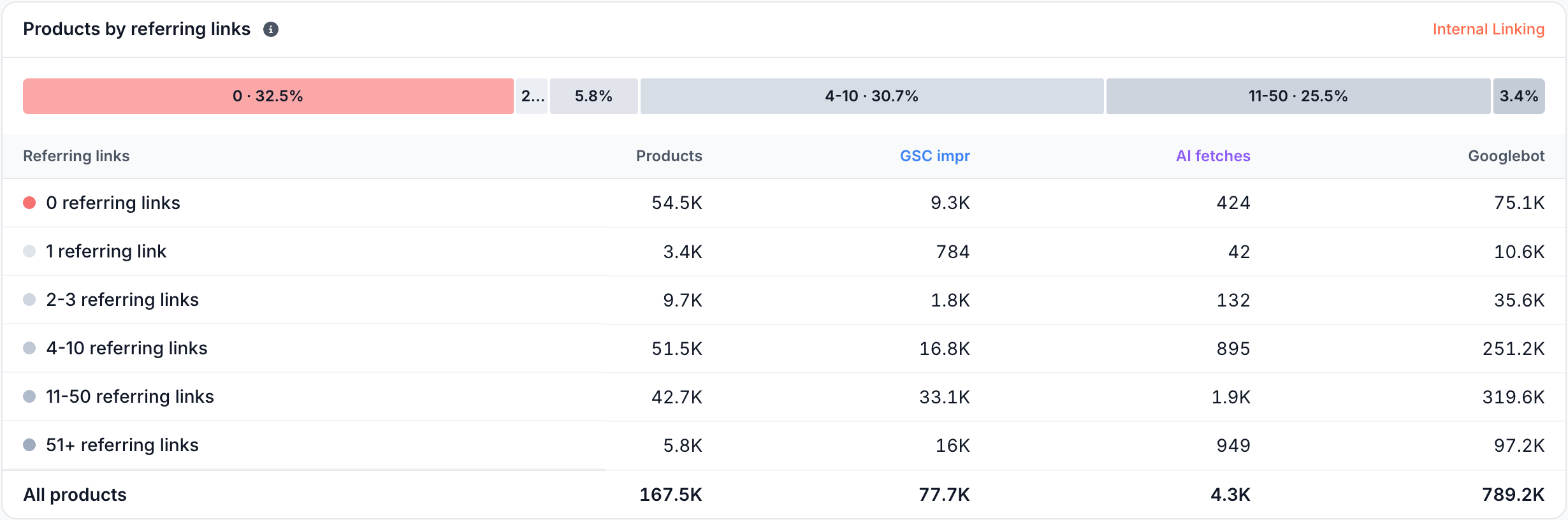
The Internal Linking report counts every placement of a link, which means its histogram differs. When the crawl extracted links from too few pages, the card says it cannot read the link graph.
Changed since last crawl: which products changed state?
This card lists the products whose state changed since the comparison crawl, ranked by the demand at stake. Each row is one move, such as Indexable -> Not indexable, of one of three kinds:
- Indexability: Indexable or Not indexable.
- Links: Linked or Not linked.
- Stock: Sellable tier (In stock, Low stock, Made to order or Lead time), Out of stock, Withdrawn or Unknown tier.
Stock moves start from Sellable tier or Withdrawn. Out of stock and Unknown tier appear only as the new state, which means a product that returns from Out of stock to a sellable tier does not show on this card.
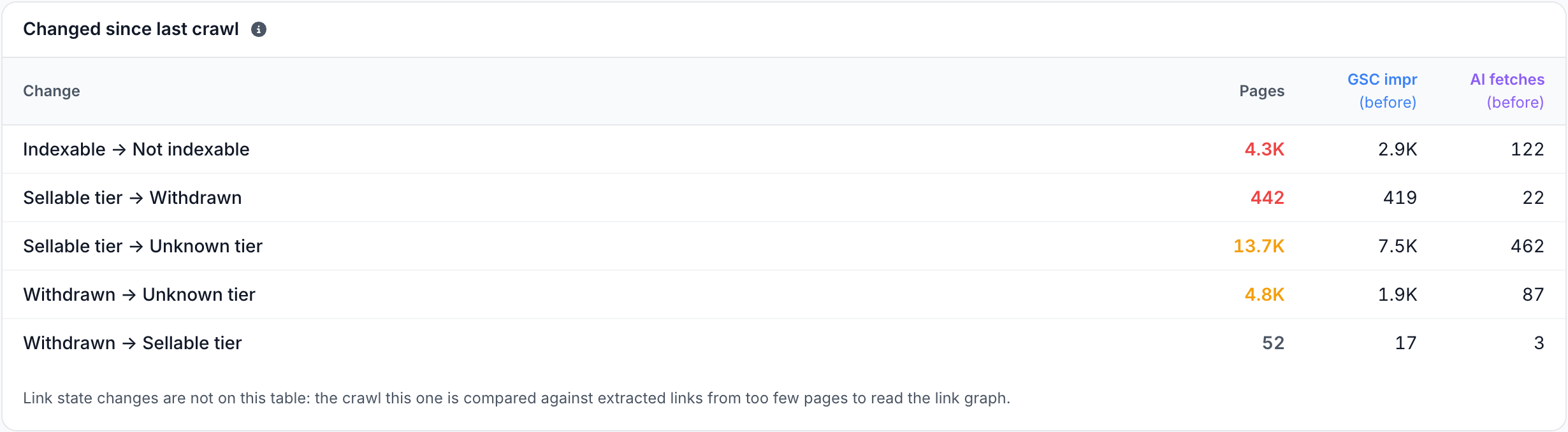
Losses come first, then gains, and smaller moves share one row, such as "1 smaller gain". GSC impr (before) and AI fetches (before) are the demand the pages had in the comparison crawl.
A page that changed in two ways sits in two rows. Click a move to list its pages with the value before and now. Summary rows do not open.
A note under the table explains a missing kind of change, such as "Link state changes are not on this table" when a crawl extracted links from too few pages, or "Stock tier changes are not on this table".
Product pages tab: what does each product page show?
The Product pages tab lists every product page of the crawl. It opens with URL, Availability tier, your price field, Inlinks, Impressions, Clicks, AI user fetches, Googlebot fetches and Indexability verdict, most impressions first.
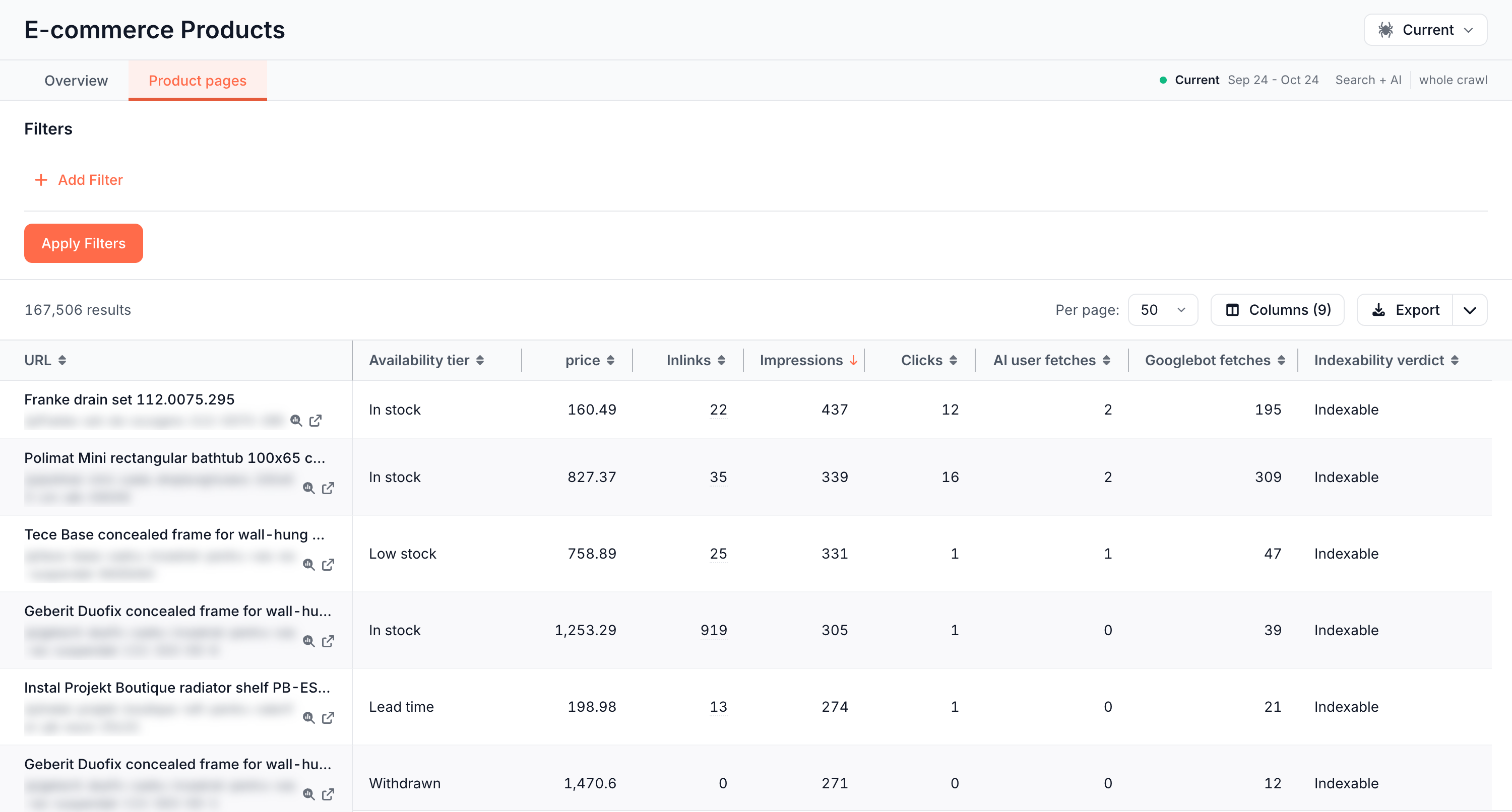
The E-commerce column group adds Product state, Page type, Listing page and the feed fields In feed, Feed items, Feed price min, Feed price max, Feed currency, Sellable in feed and Feed availability.
Feed fields read your feed as it is now. Filter, sort and export the table like any Data Explorer table. See Filter Data Explorer tables by period, field and segment.
How to read it
- A source only count above zero: your feed lists products the crawl did not fetch and recorded no link to. No bot fetched them in the crawl's dates. The feed is read as it is now, which means products added after an older crawl also count here.
- A high Not fetched by Googlebot count: Googlebot did not fetch a large part of the catalog in the crawl's dates. Compare with No internal link and Products by referring links to see whether those products lack links.
- Withdrawn and indexable products with impressions: discontinued products still earn Google impressions. Redirect them to a replacement or category, or let them return 404 or 410.
- A large Unknown tier: pages without a stock value, wording that is not a stock state, or wording that was not mapped to a tier. Check the
availabilityfield in Set up Shelf Edge. - A Sellable tier -> Withdrawn row with demand before: products that earned impressions or AI fetches now read as withdrawn. Decide whether each one needs a redirect.
What to do next
- Link orphan products from categories and content. See Find orphan pages, weak internal linking and broken links.
- Redirect withdrawn products, or return 410, at the edge without a site release. See Serve 301 redirects and 404 or 410 at the edge.
- Keep product pages fresh for bots when price or stock changes. See Re-cache products when your Merchant Center feed changes.
- Get alerted when stock or price fields change on many pages. See Watch your own fields.
- Ask "Are sold-out products indexable?" or "Are products short of inlinks?" with the Ask button.
Where to find it
In the dashboard: E-commerce > Products, with the tabs Overview and Product pages. The crawl picker in the header sets the crawl.