

Find new, lost and missing URLs across periods and crawls
EdgeComet Data Explorer compares the same site at two points in time and lists the URLs that appeared, disappeared or changed. Also called a URL diff, crawl diff or sitemap diff.
Three tables do it, each for one source:
- New and lost URLs in the Bot log: the URLs bots requested in one period and not in the other.
- Crawl comparison in Evergreen Crawl: each URL of one crawl next to the same URL in an earlier crawl.
- Sitemap comparison in Feeds: the URLs added to, removed from or changed in your sitemaps between two fetches.
To find URLs one source has and another lacks, such as sitemap URLs Googlebot has not fetched since they changed, combine the sources in one table. See Find missing URLs by combining sources.
New and lost URLs in the Bot log
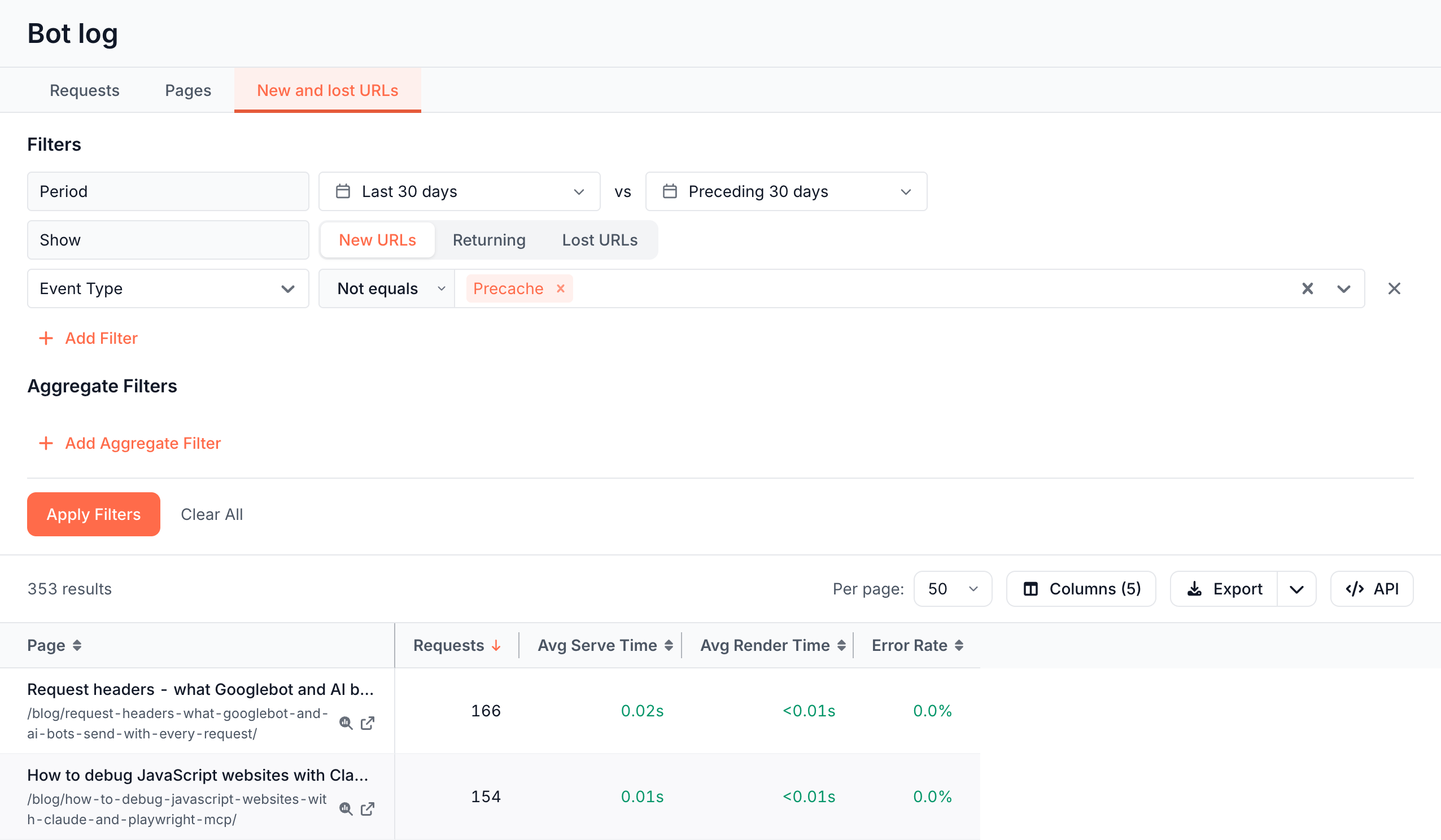
New and lost URLs compares the URLs bots requested in two windows: the Period and the compare window after vs. By default the compare window is the period of the same length just before, such as Preceding 30 days. See Compare with an earlier period.
The Show row picks the set:
- New URLs: requested in the period and not in the compare window. This is the default.
- Returning: requested in both windows.
- Lost URLs: requested in the compare window and not in the period.
Each row is a URL with Requests, Avg Serve Time, Avg Render Time and Error Rate. For New URLs and Returning, the numbers cover the period. For Lost URLs, they cover the compare window, the last time bots requested those URLs.
How filters apply to the two windows
Filters on New and lost URLs work in three ways:
- Bot and event filters apply to both windows: Bot, Bot Type, IP Validation, User Agent, IP, Event Type and Source. With Bot set to Googlebot, New URLs lists URLs Googlebot requested in the period and not before, whatever other bots did.
- Every other filter, such as Status code or Index Status, applies to each URL's latest request in the window the row comes from.
- Aggregate Filters, such as Total Requests, apply to the row's numbers.
Fake bot requests are left out of both windows. See Fake bot requests do not show.
Questions New and lost URLs answers
- Which new URLs return errors to bots? Show New URLs, Status code
>=400. - Which URLs did Googlebot stop requesting? Show Lost URLs, Bot Googlebot Mobile and Googlebot Desktop.
- Which new URLs do AI bots find? Show New URLs, Bot Type AI Bots.
Reports that open New and lost URLs
The Log Analyzer opens New and lost URLs from these figures, with the report's bots and period already set:
- The New URLs Found card and the URL Inventory table on the Efficiency tab of Log Analyzer > Googlebot, Bing and AI Bots. See Crawl efficiency: valuable, questionable and wasted crawls.
- The + and − counts on the Breakdown card of Log Analyzer > Overview > Status Codes, which open views titled New {code} Pages and Gone {code} Pages. See Status codes, response times and page sizes bots receive.
Compare two crawls
Crawl comparison puts each URL of a crawl next to the same URL in the crawl before it. Columns come in pairs, such as Status code - compared crawl and Status code - this crawl, and the facts line names both crawls: "vs {crawl}".
The compared crawl is the one before, with the same bots and the same length: the latest monthly crawl for Current, and last month's crawl for a monthly crawl. Evergreen Crawl reports link here with their own comparison crawl. See Which crawl each report compares with.
The table opens with URL, Movement, Indexability verdict and Status code for both crawls, Issues - this crawl and Impressions - this crawl, sorted by impressions. Movement says where the URL is: Only in this crawl, Only in compared crawl or In both.
To find what changed, filter Movement or a pair of columns:
- New indexable pages: Movement Is any of Only in this crawl, Indexability verdict - this crawl Is any of Indexable.
- Pages that lost indexability: Movement Is any of In both, Indexability verdict - compared crawl Is any of Indexable, Indexability verdict - this crawl Is none of Indexable.
- Pages that gained an issue: Issue - this crawl Has the issue, Issue - compared crawl Does not have the same issue.
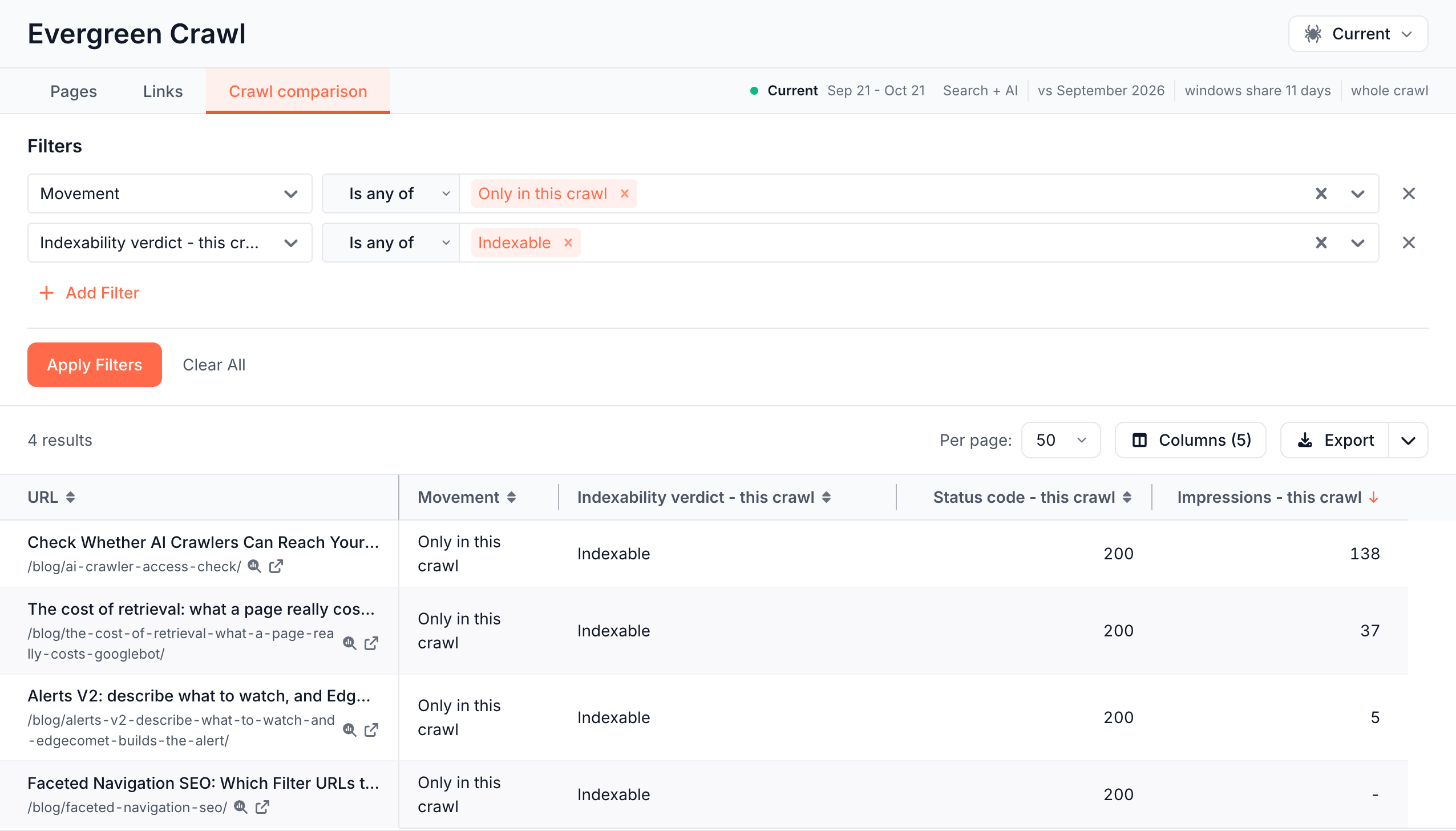
If two crawls overlap in time, the facts line reads "windows share N days": a page fetched once in those days sits on both sides.
Compare two sitemap fetches
Sitemap comparison compares two fetches of your sitemaps. The Fetch row holds the newer fetch, then vs and the older one, each with its time and number of URLs. It opens on the two latest fetches.
Each URL gets a Change:
- Added: in the newer fetch only.
- Removed: in the older fetch only.
- Changed: in both, with a different
lastmod, priority, change frequency or source sitemap, listed in Fields changed. - Unchanged: in both, with nothing different.
The table opens with the row Change Not equals Unchanged, which lists what moved. The facts line counts every change in the pair, such as "7 added", "0 removed", "20 changed" and "52 unchanged".
Quick filters answer the common questions: Added, Removed, Lastmod changed and Moved sitemap. With Search Console connected, Removed with impressions lists removed URLs that had Google impressions in the last 28 days.
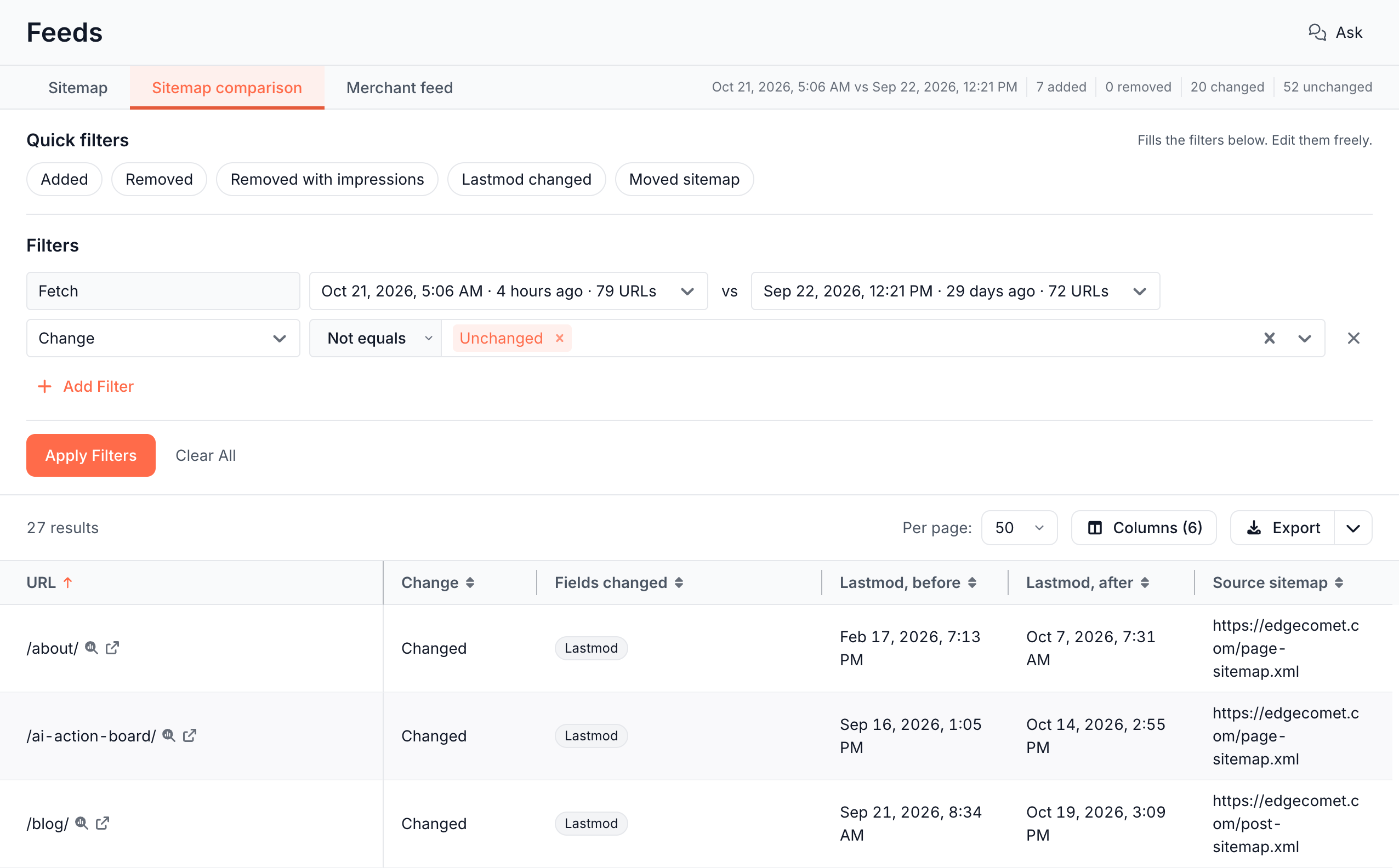
A URL that moved from one child sitemap to another counts as Changed with Source sitemap, not as removed and added.
Find missing URLs by combining sources
Filter one table on another source's columns to find URLs one source has and the other lacks. EdgeComet joins the sources by URL, without SQL or an export. See Combine sources in one table.
- Sitemap URLs Googlebot has not fetched since they changed: Feeds > Sitemap, quick filter Googlebot not fetched since lastmod. See Sitemap quick filters.
- Indexable pages missing from the sitemap: Evergreen Crawl > Pages, In sitemap No and Indexability verdict Is any of Indexable. See Questions the Pages tab answers.
- Pages Google showed that no bot requested in the same dates: Search Console > Pages, Bot log: Requested No, over the period and the compare window. See Add bot data to Search Console rows.
- Pages bots requested that had no Search Console data in the period: Bot log > Pages, GSC: Presence Absent. See Put Google clicks next to bot requests.
If a comparison is empty or missing
"Nothing to compare yet"
Sitemap comparison needs two fetches: "A second fetch is needed. The rule's interval decides when." The next run of your Sitemap Re-cache rule adds the second one.
"No changes between these two fetches."
The two fetches list the same URLs with the same values. Pick an older fetch after vs in the Fetch row.
"One side of this comparison is an incomplete fetch. Removals and additions may be fetch errors."
One of the fetches hit errors or was cut short, which can make URLs look added or removed. Pick two fetches the Fetch row does not mark incomplete.
The Crawl comparison tab is missing
The crawl has no earlier crawl with the same bots and length to compare with, such as the first crawl of a new site. Opening Crawl comparison from a link then reads "Nothing to compare this crawl against". See No earlier crawl to compare this one against.
"These crawls cover different window lengths, so the comparison was dropped"
A link or a bookmarked view names a compared crawl with another window length. A compared crawl of other bots reads "These crawls cover different bot sets, so the comparison was dropped - crawls compare only inside one scope." Open the Crawl comparison tab again to compare with the crawl before.
Where to find it
In the dashboard: Data Explorer > Bot log > New and lost URLs, Data Explorer > Evergreen Crawl > Crawl comparison and Data Explorer > Feeds > Sitemap comparison.