

Smart Re-cache: refresh cached pages when they change
Smart Re-cache refreshes the cached copy of each page bots request as often as that page changes, and refreshes your homepage and top pages on every run. It is the main pre-cache rule under Configuration > Caching. Also called adaptive or change-based re-caching.
Every run sends two groups of pages:
- Priority pages: your homepage, your top Search Console pages, the main pages linked from your homepage, and URLs you add. They go first, at high priority, on every run.
- Due pages: pages bots requested whose copy is older than that page's own re-check interval, up to a daily budget.
A page that has not changed in months is re-checked rarely, and a product page whose price changes every day is re-checked often. A fixed schedule spends the same renders on both.
How Smart Re-cache decides what to refresh
Smart Re-cache gives every page bots request its own re-check interval, learned from that page's history in the page change log.
- An unchanged page waits longer. Each re-check that finds no change makes the page's interval longer.
- A changed page is checked soon again. A re-check that finds a change sets the interval back to the shortest.
- No copy outlives the Cache TTL. The interval never grows past your Cache TTL, which keeps even a page that never changes refreshed before its copy expires.
- A new page starts short. A page with no history yet starts at the shortest interval.
Every field that Changes tracks counts as a change, from the status code, canonical and title to the page body and your custom extraction fields, such as price and availability.
When more pages are due than the budget allows, the pages bots request most and the pages most overdue go first. A page held back stays due and moves up on the next run, which keeps any page from waiting forever.
Smart Re-cache reads each page's last cache write, whatever made it: another pre-cache rule, the API, a manual recache or an Edge SEO publish. A page another rule just refreshed is not due.
Bursts: template-wide changes
A burst is a template-wide change on one page type, such as a template release or a URL migration. During a burst, Smart Re-cache refreshes the pages of that type sooner. The run history names each page type in a burst.
Before you start
- Bot traffic. Smart Re-cache re-checks pages verified bots requested in the lookback period. A page no bot has requested yet is cached on its first bot request and joins the rule after that.
- Search Console and a crawl, optional. The priority pages read your top pages from Search Console and the homepage links from your latest Evergreen Crawl. A source that is not available is skipped, and the rest still go.
Turn on Smart Re-cache
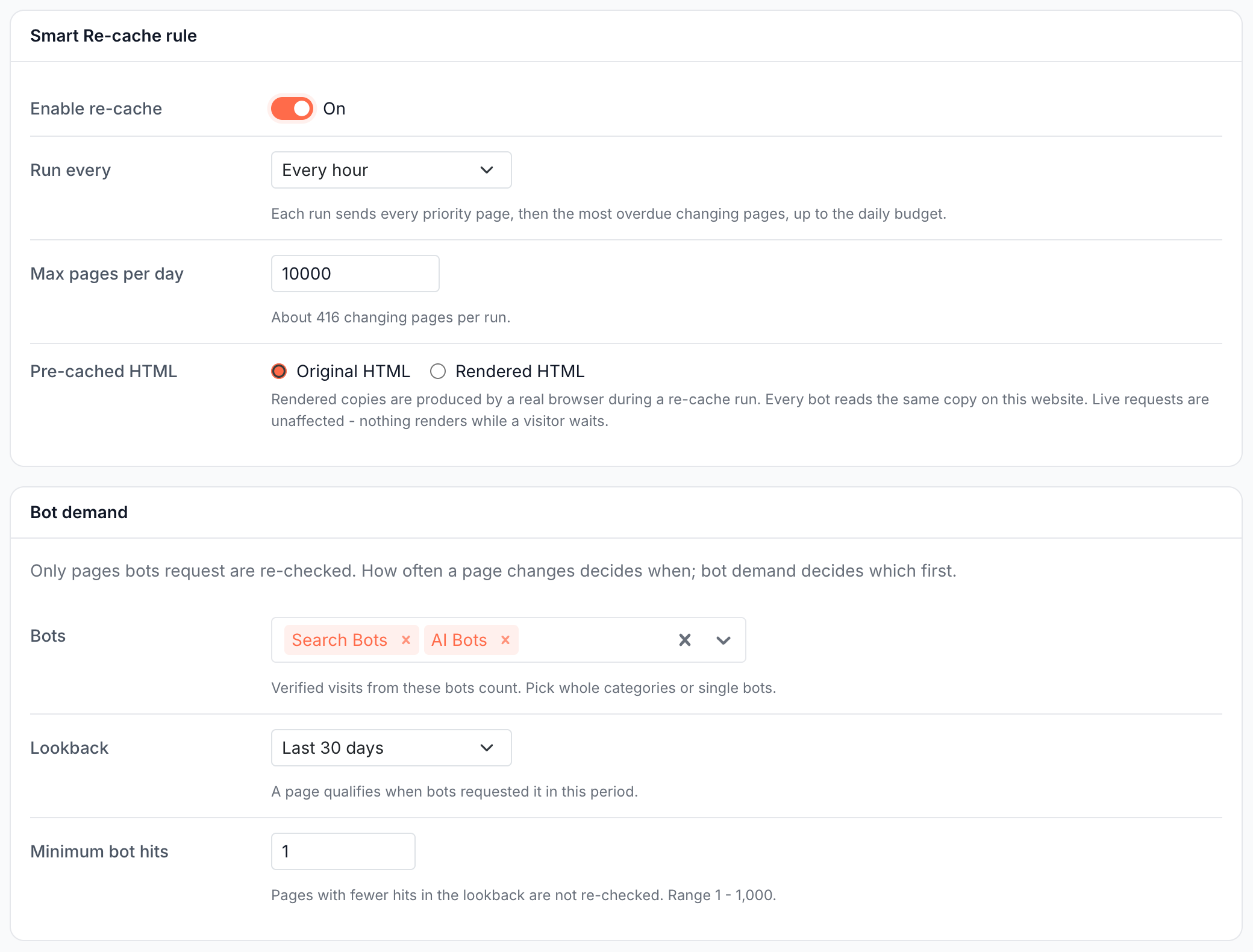
- Open Configuration > Caching > Smart Re-cache and turn on Enable re-cache. The settings appear with their defaults.
- Pick Run every: Every 15 minutes, Every 30 minutes, Every hour (the default), Every 3 hours or Every 6 hours. "Each run sends every priority page, then the most overdue changing pages, up to the daily budget."
- Set Max pages per day, from 100 to 500,000, 10,000 by default. The hint shows the share of one run: "About 416 changing pages per run." at the defaults. Priority pages do not count toward it.
- Choose Pre-cached HTML: Original HTML keeps each copy as the website normally serves it.
- Under Bot demand, pick the Bots whose verified visits count, Search Bots and AI Bots by default. Set Lookback to Last 30 days or Last 60 days, and Minimum bot hits from 1 to 1,000. A page with fewer hits in the lookback is not re-checked.
- Under Priority pages, add Custom URLs if needed. See Priority pages.
- Check the line in the bottom bar, then click Save. Show URLs lists what the next run sends, and Save and recache saves the rule and runs it at once.
The rule takes effect when you save it, without a deploy.
Priority pages: refreshed on every run
Priority pages are sent first on every run at high priority, whether they changed or not. Use them for the pages bots and visitors reach first.
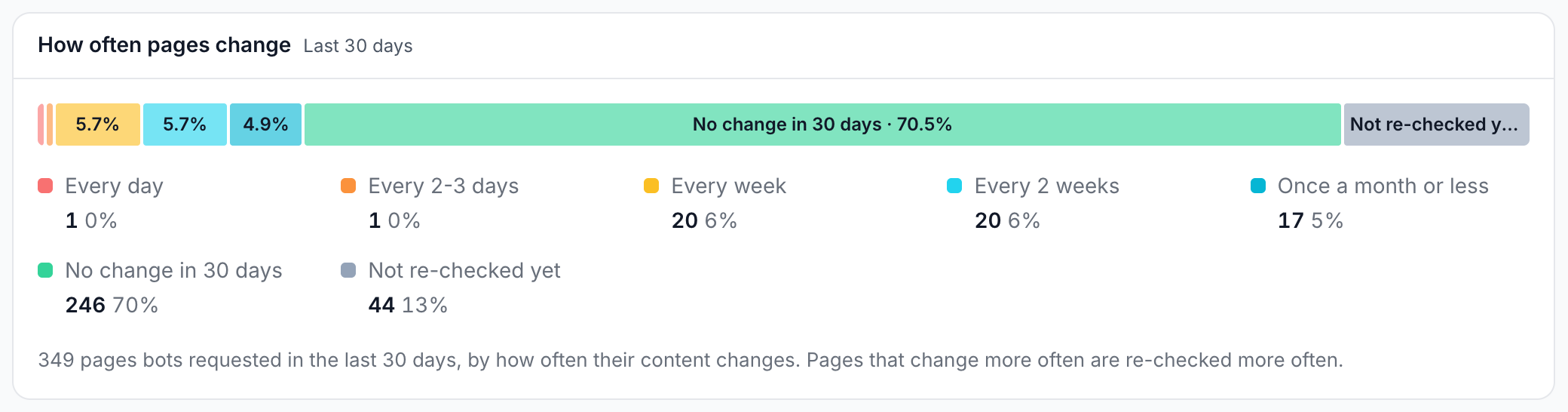
- Base list: "The homepage, the top 100 Search Console pages by clicks and up to 100 main pages linked from the homepage (from the latest crawl)." It is always on and is built again before every run. A new category in your navigation or a new top page joins without an edit.
- Custom URLs: up to 500 URLs, one per line, on the website's domains exactly as configured. The hint under the field lists them, for example "Pages on example.com or www.example.com."
The homepage in the base list is the root of the host your pages are served from, with or without www. A URL that is in more than one source is sent once.
How often pages change
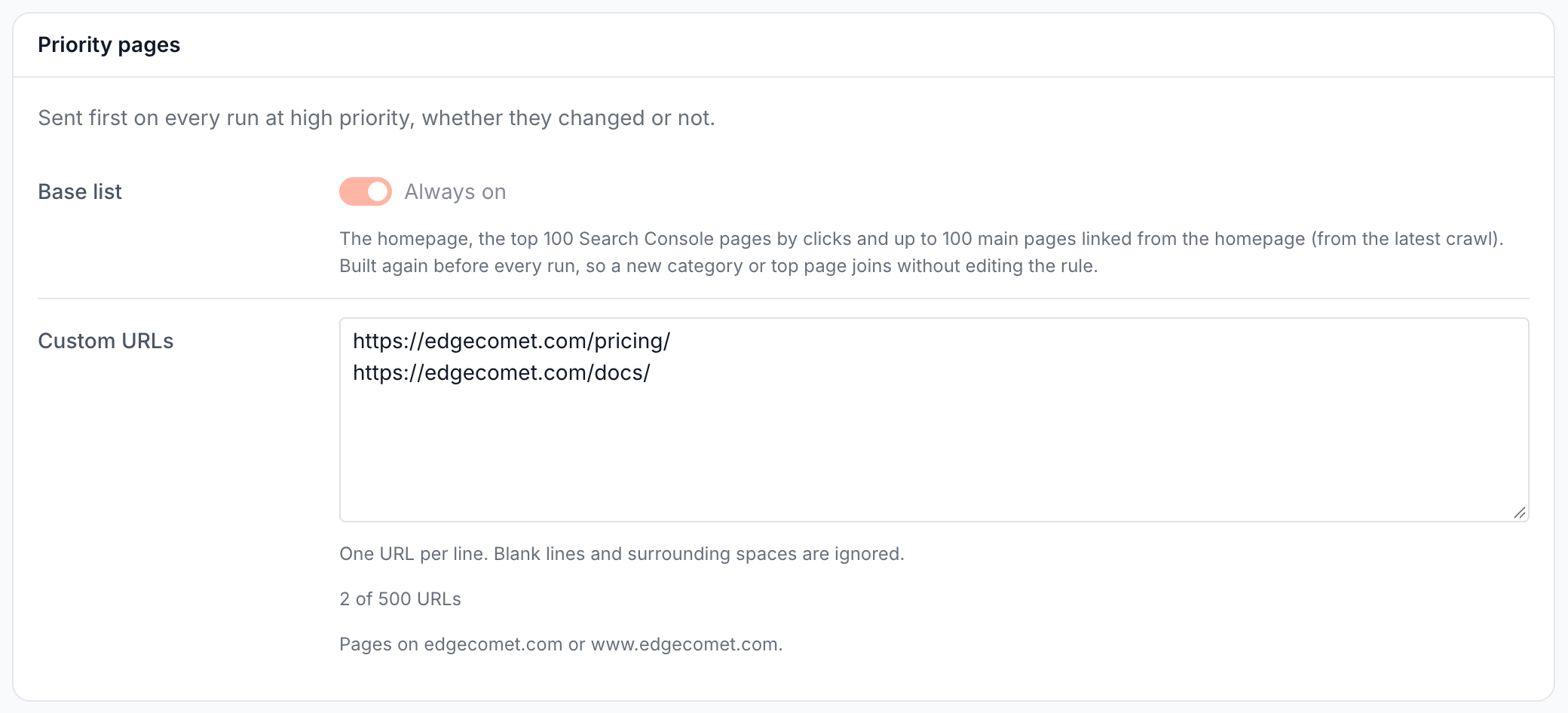
The How often pages change card splits the pages bots requested in the lookback by how often their content changed over the last 30 days. It shows how much of your site the rule re-checks often and how much it leaves alone.
The ranges are Every day, Every 2-3 days, Every week, Every 2 weeks, Once a month or less, No change in 30 days and Not re-checked yet. Not re-checked yet holds pages cached once with no re-check in the last 30 days, which have no change history yet.
The card updates as you change the bots, the lookback or the minimum hits. A change is seen only when a page is re-cached, which means a site that was refreshed weekly shows few pages changing every day until Smart Re-cache has run for a while.
Check the next run with Show URLs
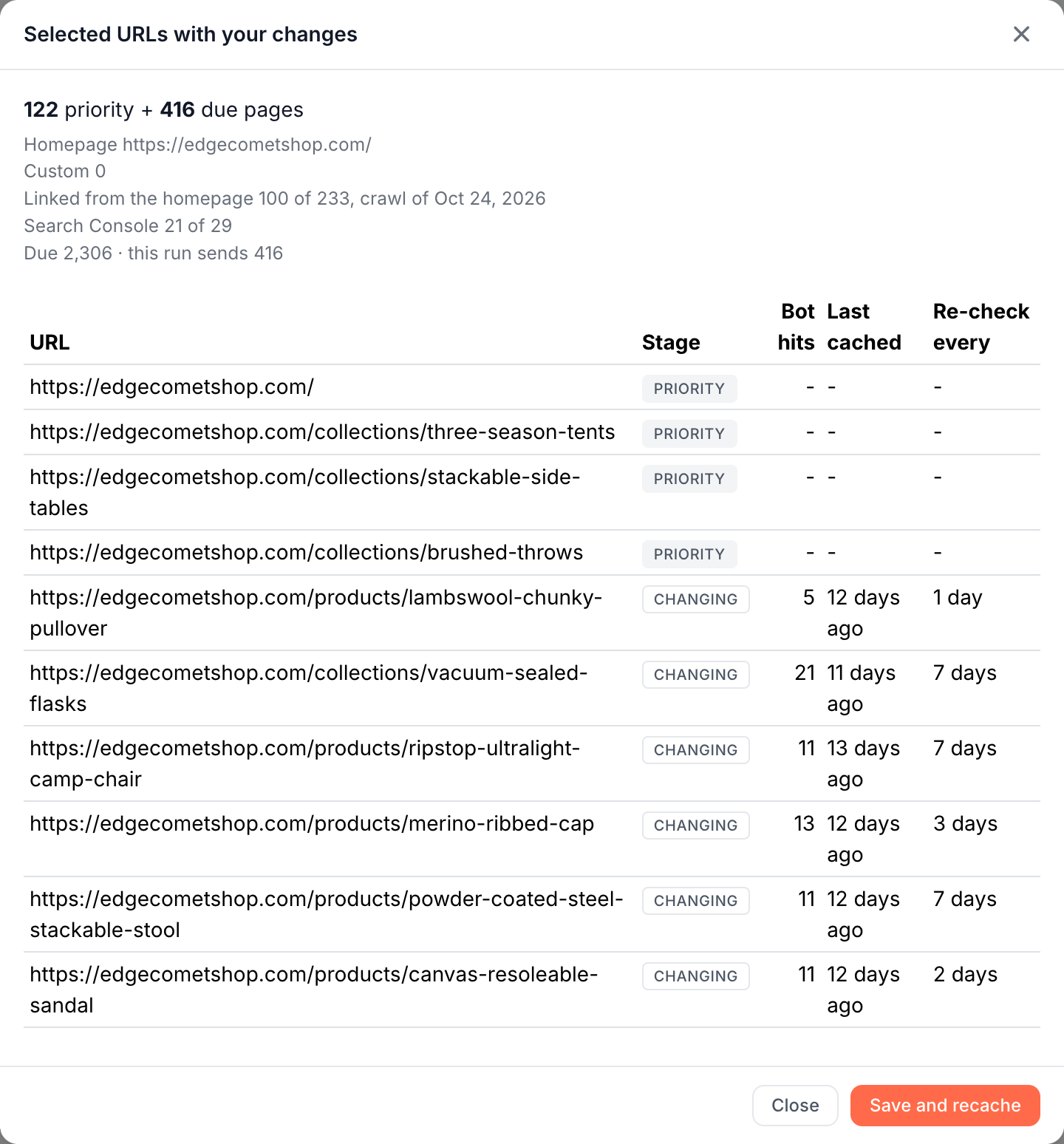
Show URLs in the bottom bar lists the URLs the next run sends, in send order: priority pages first, then due pages. The summary gives the totals, such as "122 priority + 416 due pages", one line per priority source and a line such as "Due 2,306 · this run sends 416".
| Column | What it shows |
|---|---|
| Stage | Priority, Changing for a page past its re-check interval, or Burst for a page of a type in a burst. Hover a Priority label to see its source |
| Bot hits | Verified hits from the selected bots in the lookback |
| Last cached | When the page's copy was last written |
| Re-check every | The page's current re-check interval |
What you should see
- The bottom bar reads "On · next run within 5 minutes" with the number of URLs the rule would send, then "Running · in progress" while a run works.
- The Run history gains a row per run, kept for 14 days:
| Column | What it counts |
|---|---|
| Priority | Priority pages sent. Hover it for the count per source, such as "Homepage 1 · Custom 40 · Linked 100 · GSC 97" |
| Due | Pages that were due |
| Sent | Due pages sent in this run |
| Held back | Due pages over the run's share of the budget, which wait for the next run |
| Bursts | The page types in a burst, or - |
| Rendered | The copies the run rendered |
| Note | Why the due pages were not sent, or the run's error |
- The Pre-cache rules card on Cache > Precache > Statistic lists Smart Re-cache with its last and next run. See Is pre-cache working?
If it does not work
"Page changes are behind by ..."
The page change log is catching up, and Smart Re-cache waits for it: "Changing pages are not re-checked until they catch up; priority pages still are." The run history Note reads Changes lagging, or Changes unavailable when the log cannot be read. Runs resume on their own. If the notice stays for hours, contact [email protected].
"The most a run sends is 20,000 - pick a shorter interval or a smaller budget."
Max pages per day spread over the runs of a day gives more pages per run than one run sends. Pick a shorter Run every, or lower Max pages per day.
Held back stays high on every run
More pages are due than the budget covers. Raise Max pages per day, or narrow the candidates with fewer Bots or a higher Minimum bot hits. Pages held back move up on the next run.
Most pages are under Not re-checked yet
Those pages have only one cached copy, which is common on a new website or on one where few pages were refreshed. The share falls as Smart Re-cache re-checks pages.
A priority source reads "no crawl yet" or "not connected"
"Linked from the homepage - no crawl yet" means the website has no completed crawl. "Search Console - not connected" means Search Console is not connected. The rule sends the other sources meanwhile.
A run failed with "due selection failed"
The priority pages were sent, and selecting the due pages failed. The next run tries again. If it repeats, contact [email protected].
"Select at least one bot or bot category."
Bots is empty. Pick at least one category or bot.
Where is Smart Pre-cache?
Smart Re-cache replaced the Smart Pre-cache rule in October 2026. Smart Pre-cache settings were not carried over: turn on Smart Re-cache and set its bots and budget.
How this differs from fixed-schedule re-caching
Prerender services and cache-warming scripts usually re-render every page on a fixed interval or when its cache expires, whether the page changed or not. Smart Re-cache decides per page:
- Renders go where content changes. Pages that never change are refreshed about once per Cache TTL, and the budget goes to the pages that do.
- Template changes reach bots sooner. After a template-wide change, Smart Re-cache refreshes the affected page type sooner. See Bursts.
- No crawler or webhook to run. The change history comes from the copies EdgeComet already caches for bots.
See EdgeComet compared with a standalone prerender service.
What Smart Re-cache does not do
- It does not see a change before it re-checks the page. To get a change to bots at once, recache the page or call the cache API from your CMS.
- It does not cache pages no bot has requested. Sitemap Re-cache and GSC Re-cache cover those.
- It does not ask search engines to crawl. It does not notify Google or Bing, for example through IndexNow.
Where to find it
In the dashboard: Configuration > Caching > Smart Re-cache, the first tab after Settings.