

Alert rule states: watching, skipped, warming, broken
Every EdgeComet alert rule is in exactly one state: Firing, Watching, Warming, Skipped, Broken or Paused. A rule that is checking and finds nothing never reads the same as a rule that is not looking.
You see the states on Alerts > Rules, one card per category. From the same page you pause, open or delete a rule; its own page edits it and shows its recent checks.
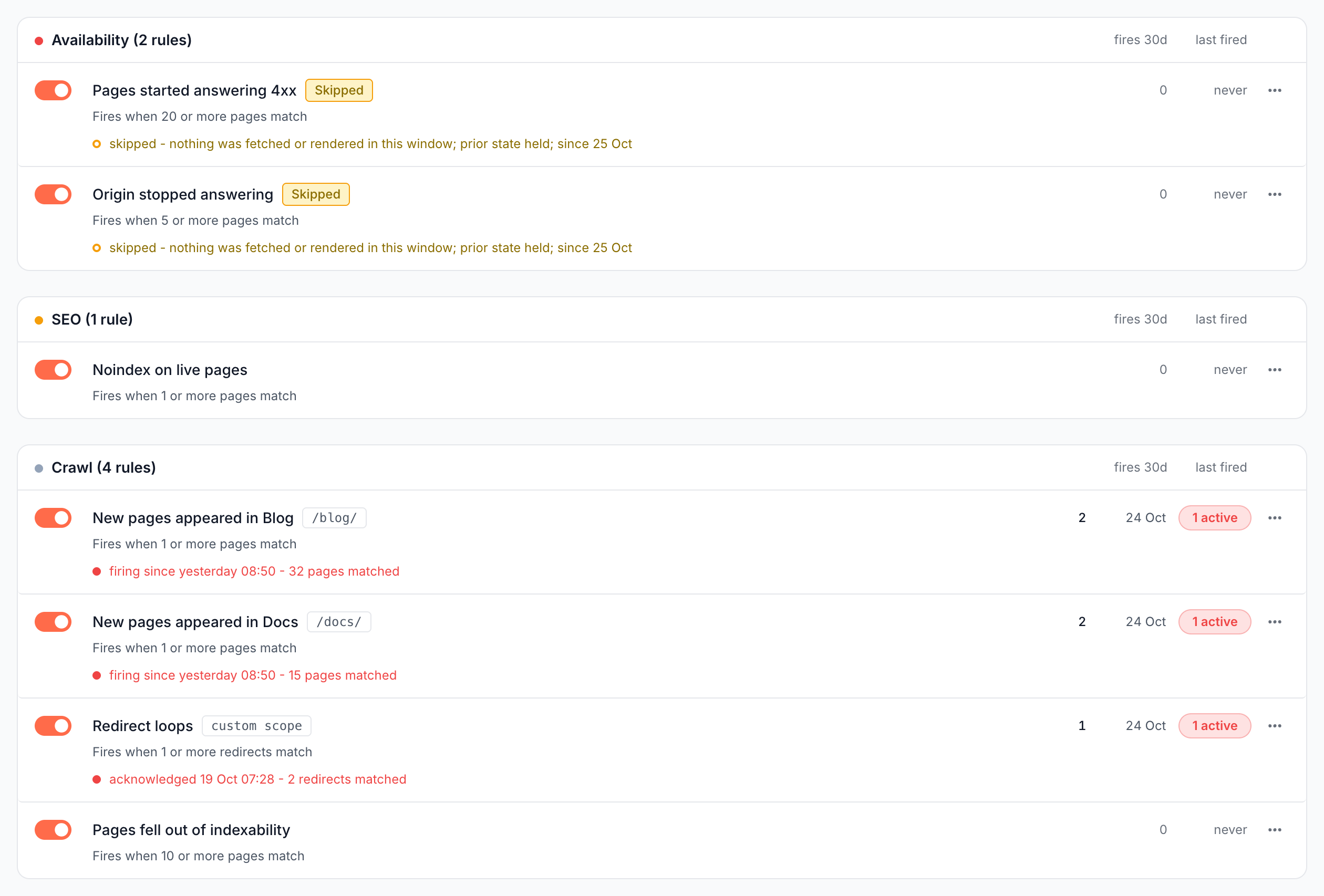
What the rules list shows
The Rules page lists every rule under its category, with its state, trigger line and recent fires. Each category card is titled with its rule count, such as "Crawl (4 rules)", and each row shows:
- A switch that pauses or restarts the rule.
- The rule's name, with a chip when it watches less than the whole site, such as
/blog/or "whole site, except 3". - A badge for Paused, Broken, Skipped or Warming, and the trigger line, such as "Fires when 20 or more pages match".
- The state sentence, for every state except Watching, such as "firing since yesterday 08:50 - 32 pages matched".
- Its fires in the last 30 days, when it last fired, and 1 active when an incident is open, linking to it.
- A menu with Open, View history and Delete.
What each state means
A rule's state comes from its switch and its last check:
| State | Row sentence | What it means |
|---|---|---|
| Firing | "firing since {time} - {what happened}", or "acknowledged {time} - ..." or "snoozed until {time} - ..." | The rule has an open incident. See Why an alert fired and what to do next |
| Watching | none on the list; "Watching" on the rule page | The rule checks on schedule and nothing matches, or it waits for its first check |
| Warming | "warming - the field it watches does not have data for enough pages yet" | The rule reads a custom extraction field that does not cover half the pages over 7 days yet. It starts on its own |
| Skipped | "skipped - {reason}; prior state held" | The last check had no answer. The rule keeps its previous state, reads nothing as zero, and resumes on its own |
| Broken | "broken since {date} - not checked until it is valid again" | The rule cannot run as it is written. It needs an edit |
| Paused | "paused - not checked while disabled" | You switched it off |
After two or more skips in a row, the sentence adds "; since {date}". Every state except Firing adds when the rule last fired.
Skipped and broken rules are blind spots. The band on the Alerts page counts them as "N rules not watching", with the breakdown, such as "1 broken, 2 skipping", and links here.
A rule whose section or pattern matches no pages runs correctly, finds nothing, and reads Watching. Check the page count when you choose the scope. See When nothing matches.
Why a rule skipped a check
The row names the reason in plain words:
| Reason on the row | What to do |
|---|---|
| nothing was fetched or rendered in this window | Nothing for a quiet site or window. The rule resumes with the next traffic |
| the data this rule reads is not available for this site | Connect the source the rule reads, such as Search Console or a crawl |
| this site has too little history for the comparison it asks for | Wait until the site has the history, such as a week for a week-over-week rule |
| Search Console has published no new complete day | Wait. Search Console runs about three days behind |
| the latest crawl cannot honestly be compared with the one before it | Wait for the next crawl |
| this crawl's issues are still being calculated | Wait. The rule reads them as soon as they are ready |
| the pages it watches resolve to none | Widen the scope, or check the paths it names |
| no page in this window had an earlier observation to compare with | For a Pages changed rule: wait until bots fetch the pages again |
| the read ran out of time before it could answer | Narrow the pages it watches, check it less often, or compare less far back |
| there is no Search Console data to measure its impressions floor against | Connect Search Console, or drop the floor |
| the page change log for this site is not ready yet | Wait. The log is still being built for a new site |
| the read failed | Nothing. It is retried automatically |
| the run did not reach it this time | Nothing. It goes first next time |
On the rule page, a yellow notice repeats the reason: "Last check skipped: {reason}. The alert holds its previous state and resumes on its own - nothing is read as zero."
Broken rules
A broken rule is not checked until you fix it, and its page shows the reason in red.
One reason is a rule that keeps running out of read time: "This rule keeps running out of read time before it can answer. There are three ways to make it affordable: narrow the pages it watches, check it less often, or shorten how far back it compares." Its row then reads "not checked until it reads inside its budget".
Edit the rule to fix it, or describe the change to Ask. See Change an existing alert.
Pause, restart or delete a rule
Use the switch on the row, or Stop watching on the rule page: "Stopped watching. This alert will not fire until you start it again." Start watching turns it back on.
Restarting runs the same checks as a new rule. It can be refused, for example when the site already runs five faster-than-daily rules. When switching a rule off, the page may warn "Switching it back on will need an edit first: {reason}".
Delete in the row menu, or Delete alert on the rule page, asks "Delete this alert": "{name} stops watching this site. The incidents it already raised stay readable from their own snapshots." Its open incidents close without an email, and its check history is removed.
To silence every alert during a migration without touching the rules, mute the site's notifications instead. See Mute a website.
Edit a rule
The Rule tab of a rule's page shows What this alert watches: what it watches, its pages, when it fires, how often it is checked, its severity and its cooldown. The footer names who created it and when, "EdgeComet AI" for a rule that Ask or a site analysis drafted.
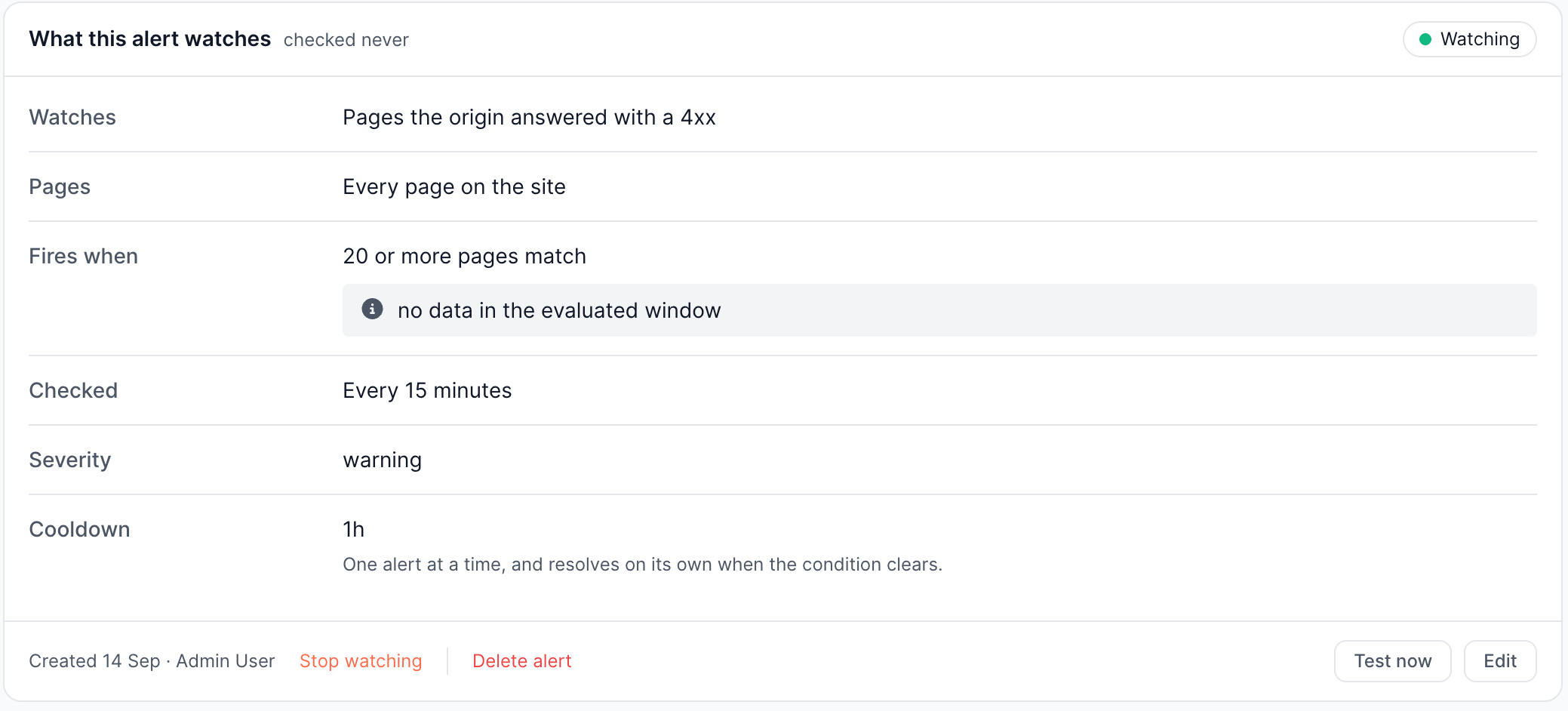
Edit opens the fields:
- Name and Pages. Changing the pages runs the check again.
- Fires when: the template's own settings, such as the threshold and its floors, or, on a rule Ask drafted, its condition.
- How often it is checked, on templates that offer it.
- Severity: critical, warning or info.
- Cooldown: 15m, 1h, 6h, 12h, 24h, 2d or 7d. See Repeat fires and the cooldown.
What the rule watches is read-only: "the signal is read-only - changing it re-arms the alert and goes through a new draft". To change it, describe the change in the field under the rule, which sends it to Ask. Press Save, or Cancel to leave the rule as it was.
Replay a change
While you edit, a replay line under Fires when applies the new numbers to the rule's own checks over the last 30 days and counts the alerts they would have raised. It counts alerts, not crossings: repeats inside one cooldown count once.
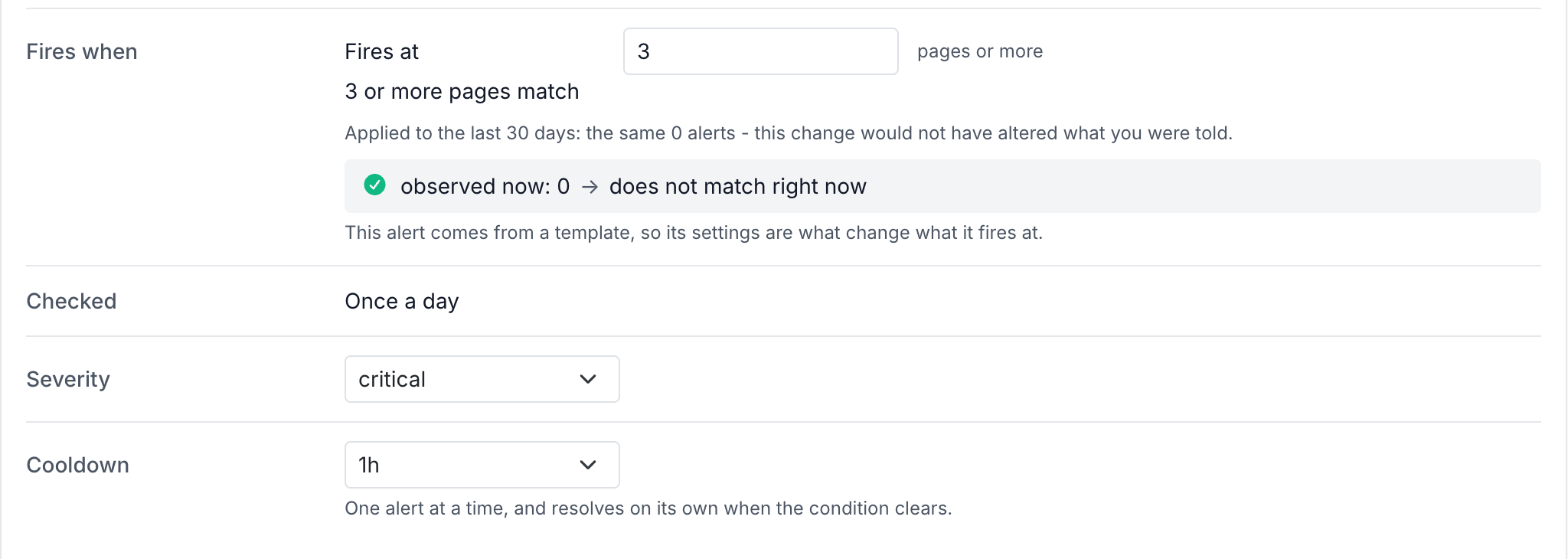
It answers in one sentence, such as "Applied to the last 30 days: 1 alert instead of 3." Replay declines rather than guesses when the change alters which data the rule counts, or when the rule compares with the same window yesterday or last week. It then suggests reading the check of the window that just closed instead.
Read a rule's check history
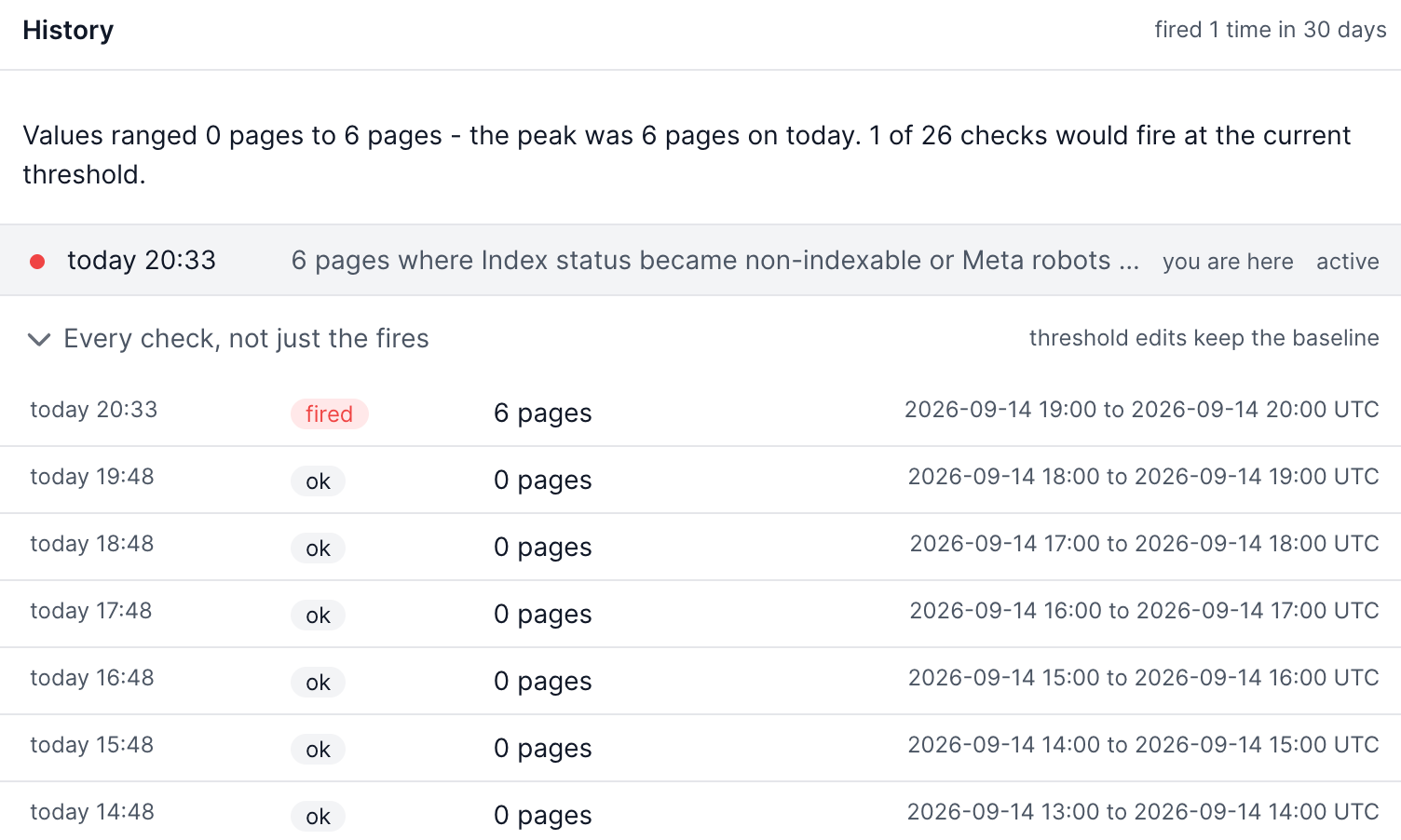
The History card on the What happened tab shows how often the rule fired in the last 30 days and a chart of its recent checks against the threshold, with a reading such as "4 of 14 checks would fire at the current threshold."
Every check, not just the fires lists the newest checks with their time, outcome (fired, ok, skipped or error), the value measured and the window read. EdgeComet keeps a rule's checks for 180 days.
View history in a rule's menu opens the Alerts page filtered to that rule over 90 days. See Open incidents and alert history.
Where to find it
In the dashboard: Alerts > Rules. Each rule's page opens from Open in its row menu, or from its name on the Alerts page.