

AI SEO agent guidelines: brand, rules and competitors
Guidelines are standing instructions about your business that the EdgeComet AI SEO agent applies on every run: Action Board analyses, Ask answers, skill runs, rewrites and briefs. Also called site guidelines or brand rules.
Use them for what every answer should respect, such as your audience, tone, product names and the claims you never make. A list of competitor domains sits beside them and feeds the agent's keyword and competitor research.
A run's focus steers one run. Guidelines steer all of them, which saves you from repeating the same rules in every question.
Where guidelines apply
The agent reads your guidelines everywhere it writes or analyzes for you:
- Action Board analyses: the analysis that builds your board and writes each finding.
- Ask: every answer in a conversation, beside a report and on a finding.
- Skill runs: the skills that come with your site and the ones you write.
- Generation runs: new titles, meta descriptions and H1s, developer briefs and per-page content briefs.
- Document edits: changes Ask makes to a document you ask it to revise.
When a guideline conflicts with the format a skill or a tool requires, the required format wins. A guideline can change what a brief recommends, but not the sections the brief must have.
Write site guidelines
- In the dashboard, open Action Board > Skills and the Guidelines tab. Every skill's Run dialog links here too, from the line "Standing style rules live in Guidelines and apply to every run."
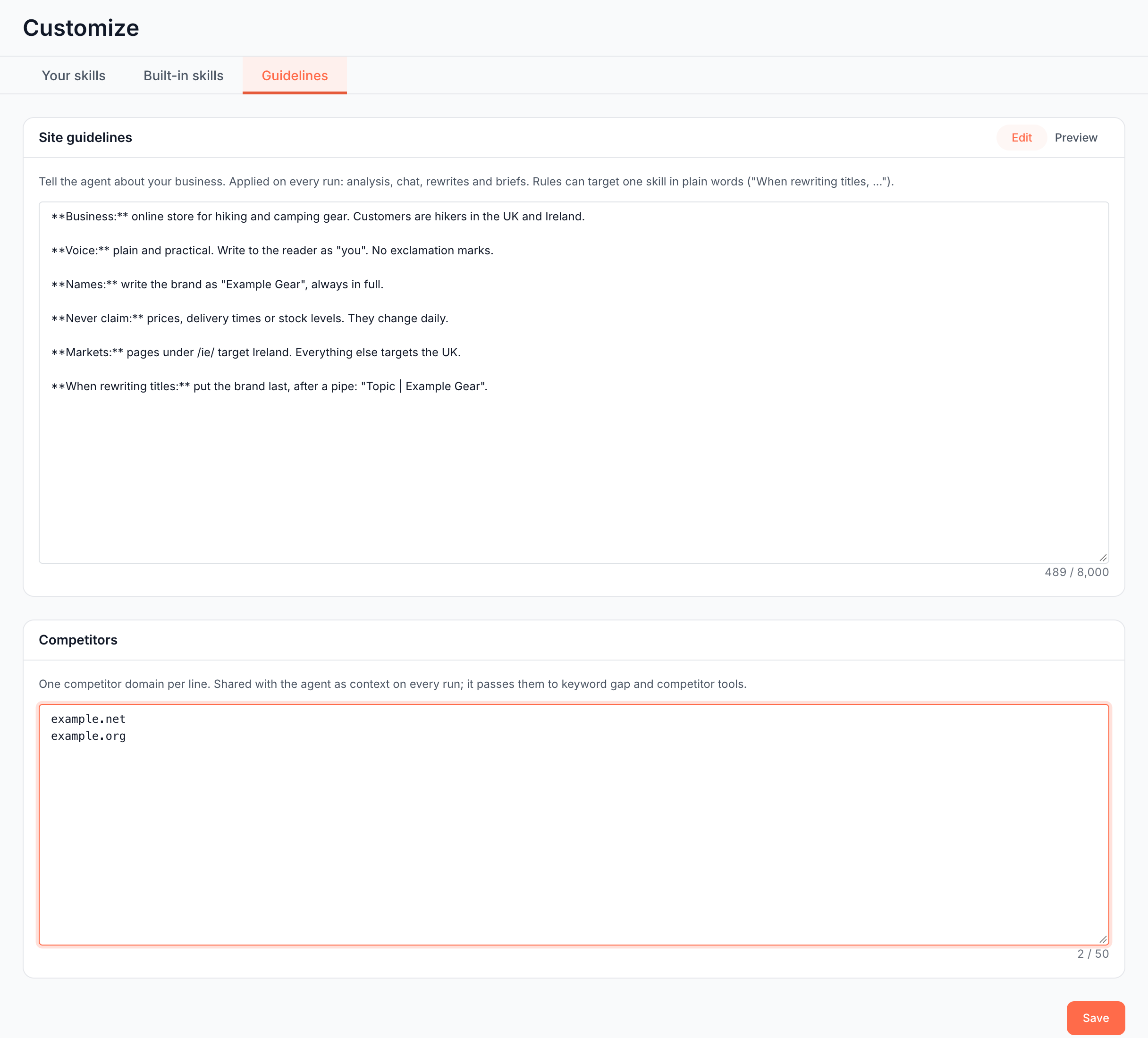
- Under Site guidelines, write your rules in Markdown. The empty box suggests what to cover: "Business and audience, tone, hard rules the agent must always follow."
- Check the result with Preview. The counter under the box shows the length, up to 8,000 characters.
- Click Save. One Save stores both the guidelines and the competitors.
If the save fails, the page shows "Your changes could not be saved. Try again."
Rules for one kind of work
To aim a rule at one kind of work, say which in plain words. The agent applies it only there:
- "When rewriting titles, put the brand last, after a pipe."
- "In content briefs, plan for a comparison table on every product category topic."
- "In developer briefs, name the affected template when the URL pattern shows it."
What to put in guidelines
Write what a new SEO on your team would need to know on the first day:
- Business and audience: what you sell, to whom, and in which markets.
- Voice: the tone, the person you write in, and the words you avoid.
- Names: how to spell your brand and products, and which names never to use.
- Claims: what the agent must never promise, such as prices, delivery times or certifications.
- Markets and languages: which sections target which country or language.
- Priorities: the sections and page types that matter most.
A short example for an outdoor gear store:
**Business:** online store for hiking and camping gear. Customers are hikers in the UK and Ireland.

**Voice:** plain and practical. Write to the reader as "you". No exclamation marks.

**Names:** write the brand as "Example Gear", always in full.

**Never claim:** prices, delivery times or stock levels. They change daily.

**Markets:** pages under /ie/ target Ireland. Everything else targets the UK.

**When rewriting titles:** put the brand last, after a pipe: "Topic | Example Gear".
Add your competitors
List the domains you compete with in search, one per line, up to 50. The agent receives them as context on every run and passes them to the keyword gap, competitor discovery and live search results checks.
- Under Competitors, enter one domain per line, such as
example.com. - Click Save.
EdgeComet keeps the bare domain. It strips https://, paths, query strings and ports, writes the domain in lowercase and drops duplicates. It refuses two kinds of entry:
- Your own domain: "Remove your own domain (example.com) from competitors." This covers the www and non-www forms of your site.
- Anything that is not a domain: ""example" is not a valid domain. Use a bare host like example.com."
The Keyword opportunity research skill uses this list when you leave its Competitors field empty. See Keyword opportunity research skill and Keyword research in Ask.
Guidelines and a run's focus
Guidelines and a run's focus both reach the agent, and they do different jobs:
- Guidelines: standing rules for every run, on every surface, until you change them.
- A run's focus or skill fields: what to concentrate on in this one run, such as "Focus on pages we published this quarter." The agent reads it as direction, not as data to analyze.
Put a rule in Guidelines when you would type it into more than one run. See Choose the scope and focus in the Run dialog.
Where to find it
In the dashboard: Action Board > Skills > Guidelines.