

Filter every crawled page and internal link in a table
EdgeComet Data Explorer > Evergreen Crawl lists every page and every link of an Evergreen Crawl as a table you filter, sort and export. The Evergreen Crawl reports summarize the crawl, and these tables hold the rows behind them. Also called a crawl data export or an internal link list.
An Evergreen Crawl is built from the pages bots and your pre-cache rules fetched through EdgeComet, not from a crawler's own visit. Each page appears as EdgeComet served it, with its Google clicks and its bot fetches in the same row.
The page has three tabs:
- Pages: one row per URL in the crawl.
- Links: one row per link on the crawled pages, with its anchor and where it sits.
- Crawl comparison: each URL in this crawl and its comparison crawl, side by side. See Compare two crawls.
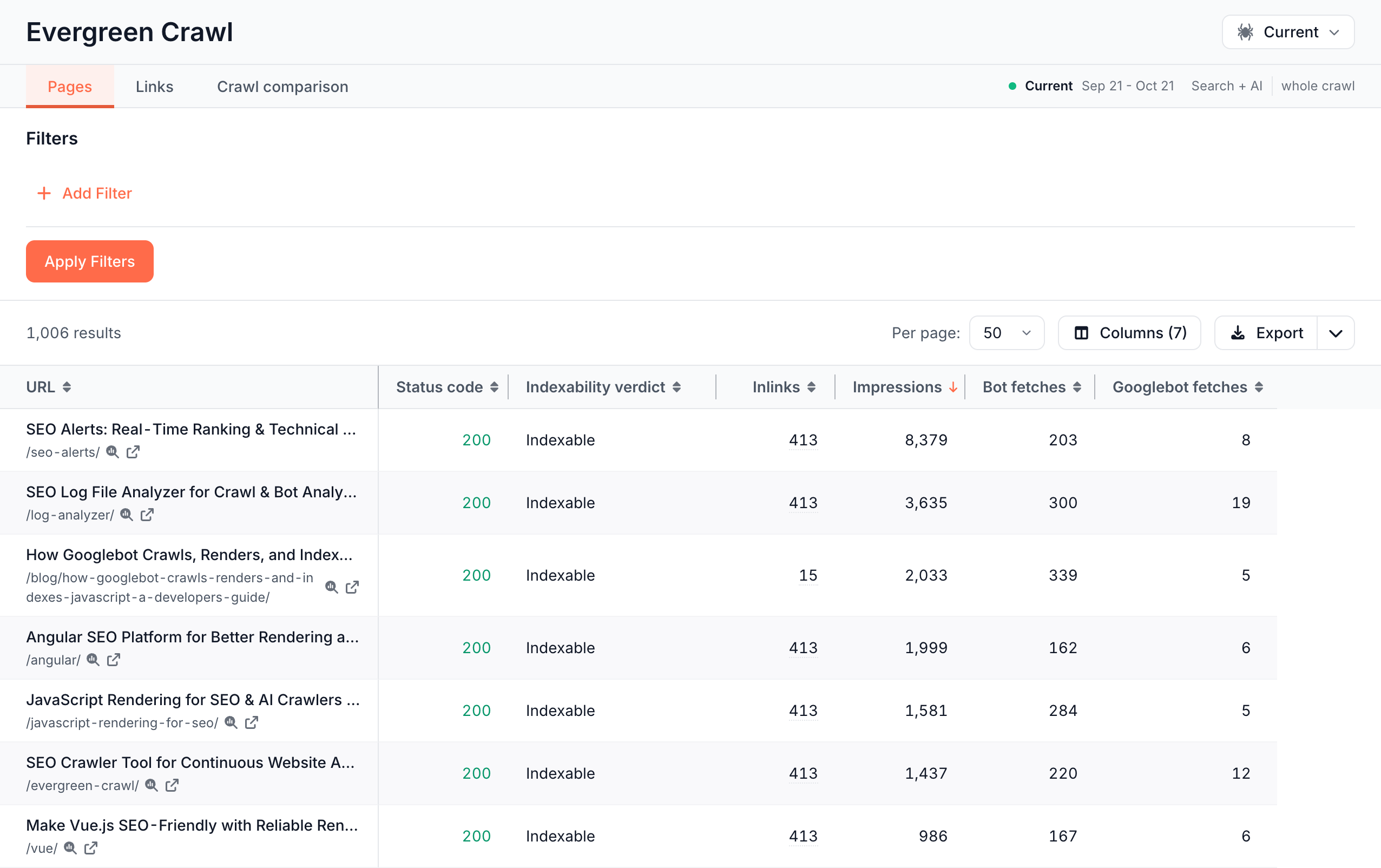
Which crawl the table reads
The tables open on the Current crawl, the rolling crawl of the last 30 days that EdgeComet rebuilds every day. The facts line at the right of the tabs names the crawl, its dates, the bots it covers, such as Search + AI, and whole crawl.
To read another crawl, such as last month's, click the crawl name in the page header to open the Crawls manager and pick one. See Create and compare crawls: Current, monthly and custom.
The tables read every row of the crawl. The whole crawl tooltip reads "Every row of this crawl, including link-only stubs. A segment on the report header narrows the reports, never the explorer."
To narrow to a section, add a URL filter row. The tables have no period, because a crawl covers its own dates.
Pages: one row per URL
Pages opens with URL, Status code, Indexability verdict, Title, Word count, Inlinks, Internal outlinks, Issue count, Impressions and Bot fetches, sorted by Impressions.
Rows for link-only stubs have the Indexability verdict Link-only stub.
Columns offers more than 100 columns, grouped:
| Group | Examples |
|---|---|
| URL | URL, In sitemap, Discovery, Last seen, Edge SEO rules |
| Response | Status code, Page size, Redirect target |
| Indexability | Indexability verdict, Index status, Meta robots |
| Content | Title, Meta description, First H1, H2s, Word count, Images without alt |
| Structured data | Schema types, Markup state, Worst schema issue, Product markup |
| Canonical | Canonical verdict, Canonical, Self-canonical, Canonical target status |
| Hreflang | Hreflang verdict, Hreflang locales, Broken hreflang targets |
| Inlinks | Inlinks, Linking pages, Orphan, Contextual inlinks, Top anchor texts |
| Outlinks | Internal outlinks, External outlinks, Broken internal outlinks, Outlinks to redirects |
| Issues | Issues, Issue count |
| Search Console | Impressions, Clicks |
| Bot fetches | Bot fetches, Googlebot fetches, AI crawler fetches, AI search fetches, AI user fetches |
| E-commerce | Product page, Listing page, In feed, Feed availability |
| Custom extraction | One column per extraction rule |
Product page and Listing page follow your catalog fields. Impressions and Clicks cover the crawl's own dates. In sitemap and In feed read the latest fetch of your sitemaps and your Merchant Center feed, as they are now. Without a Sitemap Re-cache rule, In sitemap reads No on every page.
Find pages with a crawl issue
The Issue filter lists every check in the crawl issue catalog, grouped by category and labeled with its severity, such as P0 Server error on a page with demand. Has any of keeps pages with at least one of the picked issues, and Has none of keeps pages with none.
In Evergreen Crawl > Issues, View rows on an issue opens Pages, or Links for a link issue, with the issue already filtered. See Find and prioritize technical SEO issues.
Questions the Pages tab answers
- Which indexable pages does Googlebot not fetch? Set Indexability verdict to Is any of Indexable and Googlebot fetches to
=0. - Which crawled pages are missing from the sitemap? Set In sitemap to No and Indexability verdict to Is any of Indexable.
- Which pages with clicks have thin content? Set Clicks to
>0 and sort Word count from the lowest. - Which pages have no internal links? Set Orphan to Yes. See Find orphan pages and broken internal links.
Links: one row per link
Links lists every link on the crawled pages, internal and external. Each placement is its own row: a card that links to an article from its title, its image and a "Read Article" button shows three rows.
The table opens with Source URL, Target URL, Anchor, Link region, Nofollow, Target status and Target index status, sorted by Source URL. Other columns are Source index status, Internal link, Sponsored, UGC, Image link and DOM path.
Link region names where the link sits, from the link regions EdgeComet sets up for your site: Main content, Catalog listing, Interlinking, Navigation, Footer, Sidebar, Breadcrumb, Faceted navigation, Pagination, Chrome, Unknown or Uncaptured.
On Pages, the Inlinks and Internal outlinks numbers are links. Inlinks opens Links with every link pointing to the page, titled "Inlinks of {url}", and Internal outlinks opens the page's own links, titled "Outlinks of {url}".
Inlinks counts each page that links to the URL once. Links lists every placement, which makes the "Inlinks of" view longer than the number when one page links to the URL several times, such as an author page that links to an article from its title, its image and a button.
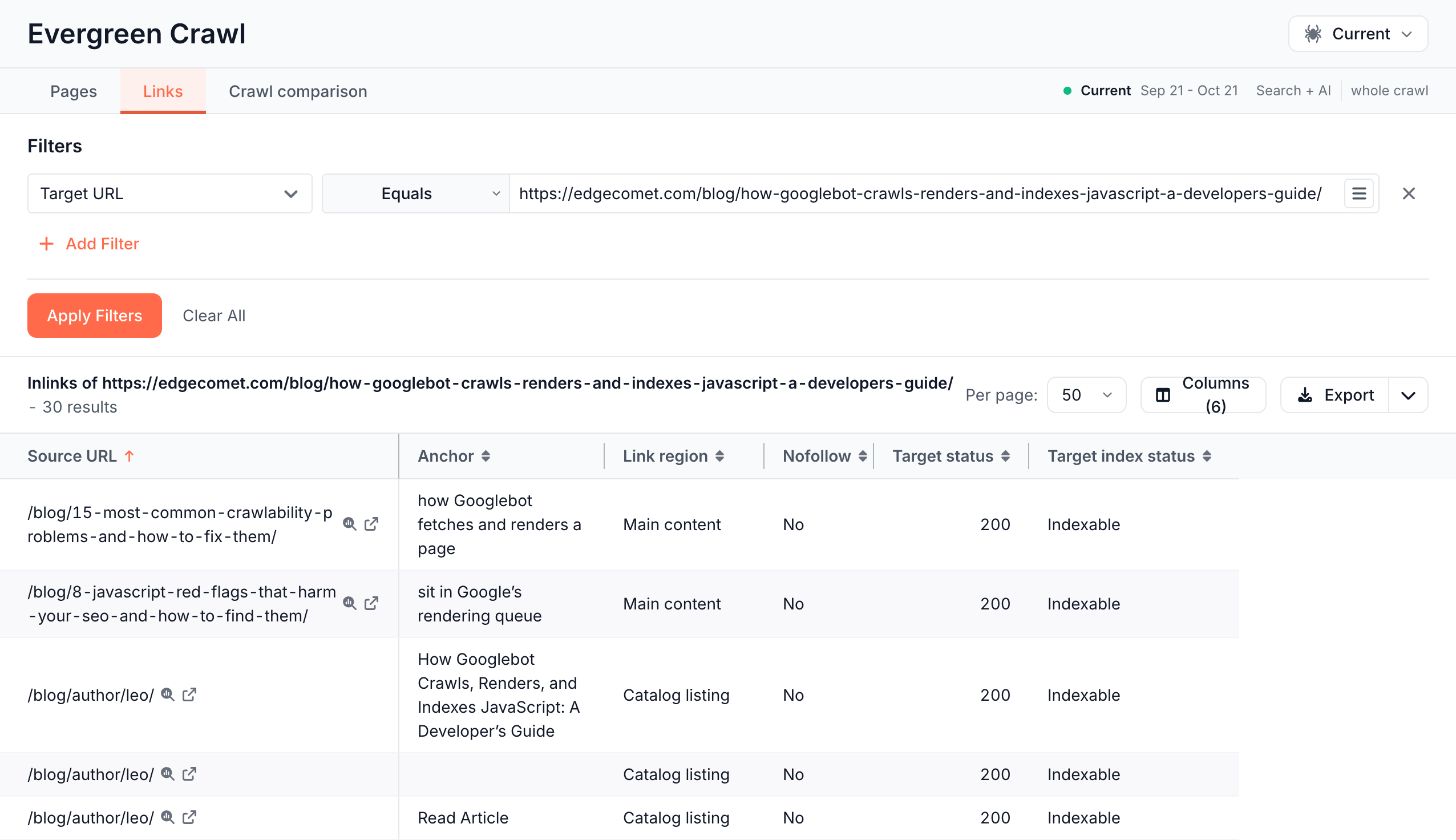
The Issue filter on Links takes one link issue at a time, such as links to broken pages.
If the table does not load
"Internal link data is kept for fewer crawls than page data"
The full message reads "Internal link data is kept for fewer crawls than page data, and this crawl is past that depth - its links have been dropped. Pick a more recent crawl." Open the crawl manager and pick a newer crawl, or the Current crawl.
"This crawl's issues are still being calculated"
The crawl has finished building and EdgeComet is counting its issues. Open the table again in a few minutes. See Watch a crawl build.
Impressions and Clicks are empty
Search Console has no data for the crawl's dates: Search Console is not connected, or a custom crawl covers days Search Console has not reported yet. A filter on these columns reads "Search Console data is not available for this crawl".
Where to find it
In the dashboard: Data Explorer > Evergreen Crawl, with the tabs Pages, Links and Crawl comparison.