

Run SEO split tests (A/B tests) with Edge SEO and an AI agent
An SEO split test changes a group of pages and compares it with a control group of similar pages that stay as they are. Also called SEO A/B testing or page-group testing.
With Edge SEO, an AI agent runs the test: Ask in the dashboard, or an AI client such as Claude or ChatGPT connected over MCP. The agent picks the pages, splits them into balanced groups, drafts the test rule and reads the result. You review the rule and deploy it.
EdgeComet gives the agent the data it reasons from: Search Console clicks for every page, every bot visit and the history of every rule. Every bot and every visitor gets the same version of a given page, which keeps the test clear of cloaking.
How an SEO split test differs from a user A/B test
A user A/B test splits visitors, and an SEO split test splits pages:
- A user A/B test shows each visitor version A or version B of the same page, usually by a cookie or a script. Search engines see only one version: "Googlebot generally doesn't support cookies" (Google Search Central). The test cannot show the change's effect on search.
- An SEO split test gives every page one version for everyone. The test pages carry the change, and search traffic to the two groups shows its effect. Pinterest's engineers put it this way: "Unlike A/B experiments that are typically done by segmenting users, our SEO experiment framework segments pages." (Pinterest Engineering, 2015)
Serving search engines a chosen version is not an option. Google's testing guidance says: "Don't show one set of URLs to Googlebot, and a different set to humans. This is called cloaking, and is against our spam policies, whether you're running a test or not."
Edge SEO rules pick pages by URL and page content, and a rule applies to every bot that requests a matching page. See Is Edge SEO cloaking?
How the agent runs a split test
The agent does the data work at every step, and you make the two decisions that change your site: deploying the test and deploying the result.
| Step | The agent | You |
|---|---|---|
| 1. Choose the pages | Finds groups of similar pages with steady search traffic | Pick the group and the change to test |
| 2. Split them | Splits the pages into a test group and a control group with matching clicks, and checks that the groups move together | Approve the split |
| 3. Change the test group | Drafts one Edge SEO rule for the test pages | Review and deploy the rule |
| 4. Wait for the recrawl | Counts the test pages Googlebot has fetched since the deploy | Mark the start date |
| 5. Read the result | Compares the two groups and explains what the difference means | Roll the change out or roll it back |
Ask works in the dashboard, with no setup. An AI client connects to your data through the EdgeComet MCP server, with the same data and the same drafting tool. The prompts on this page work in both: paste them, or ask in your own words.
The data the agent works from
EdgeComet records every bot request it serves and joins it with your Search Console data. The agent's numbers come from your site, for the same pages and days:
- Search Console per page and per day: clicks, impressions, CTR and position for every URL, with up to 360 days of history and a new day every day. See What EdgeComet imports.
- Every bot visit: when Googlebot, Bingbot and AI assistants such as ChatGPT-User fetched each page.
- The pages bots received: the title, meta tags, headings and other SEO fields of each page EdgeComet served, and the Edge SEO rules that changed it.
- Your rules: what each rule changes, which pages it covers and when it went live.
- Your segments: the page groups you saved, read by name.
See What Ask can read and the MCP query guide.
Choose the pages
Pick pages of one type that share a template and get steady search traffic, such as product pages, category pages or blog posts.
Find groups of at least a few hundred similar pages with steady Search Console clicks over the last 90 days that would suit a title test.
- Enough traffic: the more clicks each group gets per day, and the steadier they are, the smaller the effect a test can show. Etsy, testing titles on a large catalog, used "relatively large groups of 1000 pages each to expect to reach significance quickly" (Etsy Code as Craft, 2016).
- Separate pages: avoid groups whose pages link heavily to each other or compete for the same queries. A change on a test page can then move a control page too.
- Quiet pages: leave out pages you plan to change during the test, such as a section in a redesign.
Split the pages into two groups
The agent splits the pages into a test group and a control group with matching traffic before the test starts.
A plain random split can still give unequal groups. Etsy found that "simple random sampling of our pages into test groups was creating test groups different from each other in a statistically significant way even before the experiment began". The agent ranks the pages by clicks and assigns them to the groups in turn, which keeps their traffic alike:
Split the 400 product pages with the most clicks over the last 90 days into a test group and a control group: rank them by clicks and alternate. Then compare both groups' daily clicks over the last 90 days.
The two groups' daily clicks should rise and fall together. If they do not, ask the agent to rebalance the groups.
To follow the groups in the Search reports as well, save them as segments under Configuration > Segments. The agent then reads each group by its segment name. See Segments, page groups and extracted fields.
Change the test group
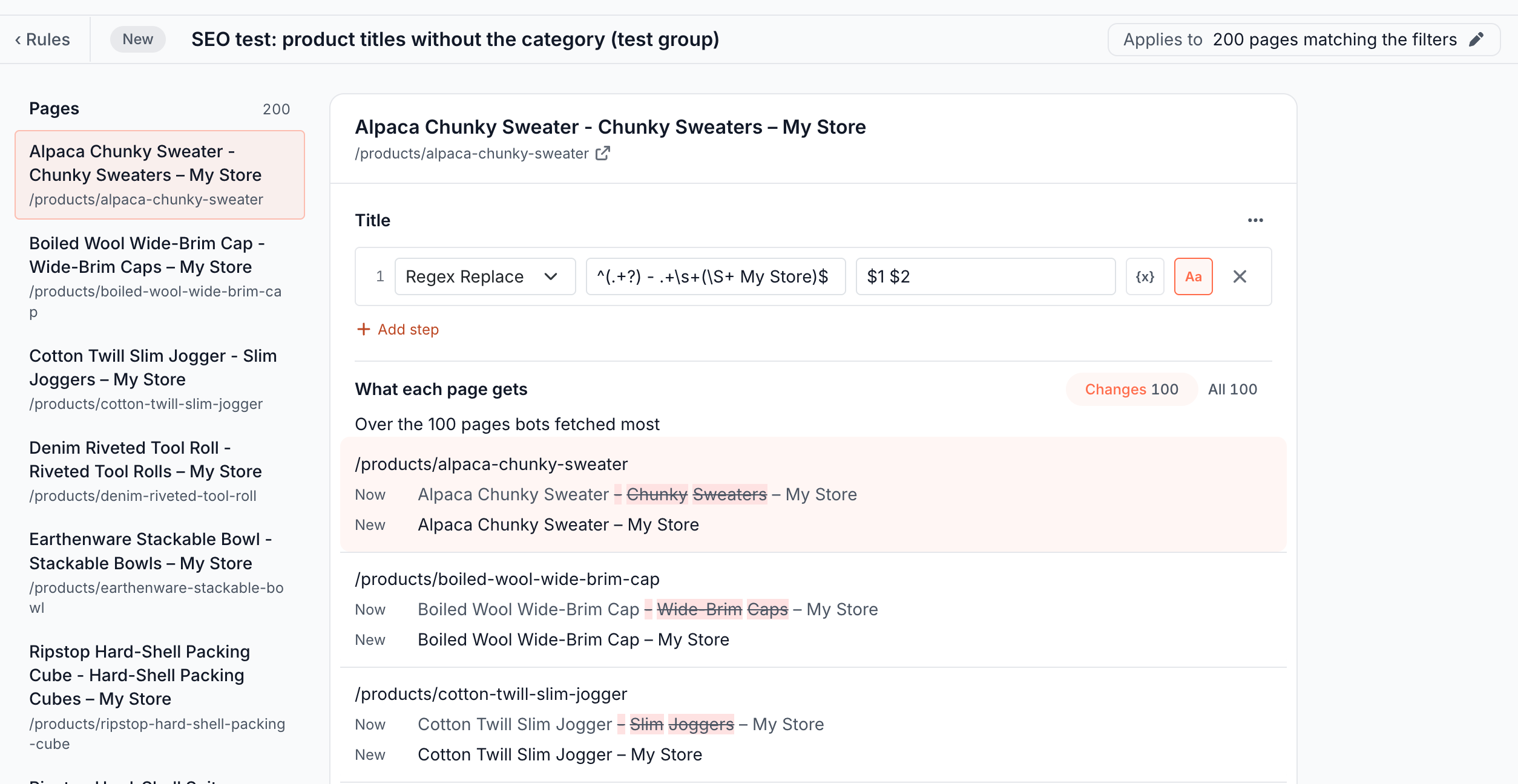
The agent drafts one Edge SEO rule for the test pages, and the control pages stay as they are:
Draft an Edge SEO rule for the test group that removes the category from the product titles.
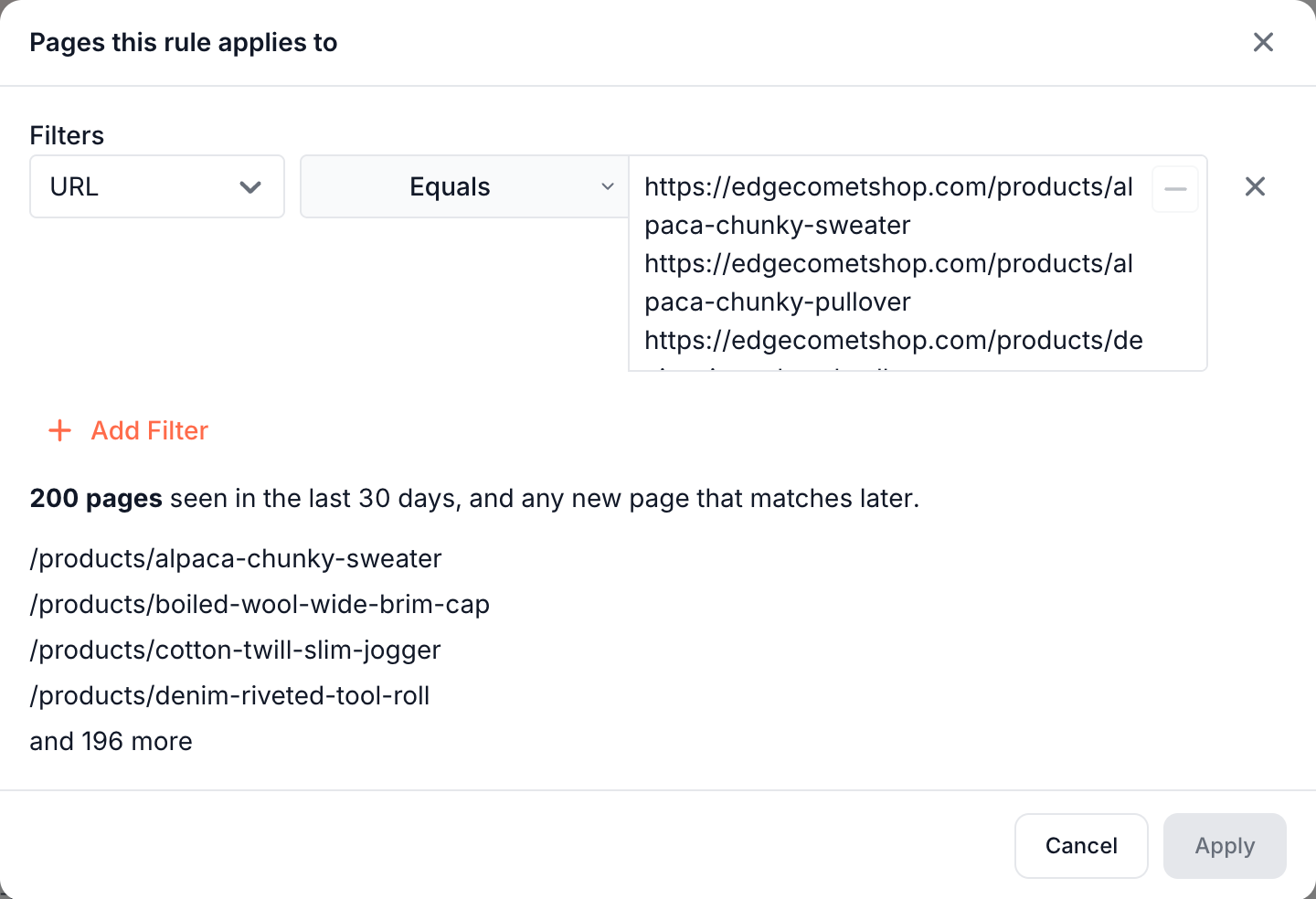
The draft lists the test group's addresses in one filter, up to 200 per filter, and holds the change. A larger group gets one rule per 200 pages. Open the draft from the link in the answer, check what each page gets, and deploy it. A draft never goes live on its own. See Structural fixes with one pattern rule.
Test one change at a time, and leave the test and control pages otherwise unchanged until the test ends. Titles, meta descriptions, H1s, structured data and content blocks can all be tested. See Rewrite titles, meta descriptions and robots tags, Add and edit structured data and Change page content on the page.
You can also build the rule by hand: Multiple pages, a URL Equals filter with one address per line, then the change. See Several values in one filter.
Start the test
Deploy the rule, mark the date, and let the agent watch the recrawl:
- Deploy: EdgeComet recaches the test pages, and bots get the new version on their next request. See What happens when you deploy.
- Mark the date: Cmd+click or Ctrl+click a chart to add a note for the start of the test. Charts also mark Google's ranking updates. See Add an annotation from a chart.
- Watch the recrawl: Google says "Crawling can take anywhere from a few days to a few weeks." (Google Search Central) EdgeComet records each Googlebot visit, which tells you when Google got the new version:
How many test pages has Googlebot fetched since the test rule went live?
Read the result
The agent compares how each group's clicks changed since the start and explains what the difference means:
Compare clicks and impressions of the test and control groups for the 28 days since the test rule went live with the 28 days before. Did the change work?
The result is the difference between the two groups' changes. If the test group gained 12% and the control group 4%, the change accounts for about 8 points. Pinterest measured its tests the same way: "we can compare the averages of the difference before and after the experiment launch."
The agent can go past the headline number, because every figure comes from the same EdgeComet data:
- Was the test ready to read? It checks how many test pages Googlebot fetched after the deploy.
- Ranking or snippet? Impressions move with rankings, and click-through rate moves with the title and description.
- Driven by a few pages? It looks for pages that carry most of the change.
- Still balanced? It checks that the control group kept its usual pattern.
An AI client that runs code, connected over MCP, can also fit a statistical model on the daily clicks of both groups. Google's open-source CausalImpact package is a common choice: "the package constructs a Bayesian structural time-series model" of what the test group would have done without the change (CausalImpact, Brodersen et al., Annals of Applied Statistics, 2015). Etsy used it for its title tests.
To see the groups yourself, the Segment Performance card lists both segments side by side, each with its change against the previous period.
How long to run the test
Run the test for several weeks, until the difference between the groups holds steady. On Pinterest, "The difference between groups continues to grow for a week or two until it becomes steady."
Search Console data reaches EdgeComet about three days after the day it describes. A Google ranking update during the test moves both groups, and the control group accounts for it: check the chart notes for updates before you trust the result.
AI search in the results
Clicks from Google's AI Overviews and AI Mode are already in the test's numbers. Google reports them "in the Performance report, within the "Web" search type" (Google Search Central).
EdgeComet's bot data adds a second view. The agent can compare how often AI assistants such as ChatGPT-User fetched the pages of each group before and after the change.
Roll out or roll back
Apply a winning change to every page, and roll back one that did not help:
The test group won: the agent drafts the same change for the control group, and you deploy it.
The test group won. Draft the same rule for the control group.
No effect, or a loss: click Roll back on the test rule. Bots get the original pages on their next request. See Roll back a rule.
Stop a losing test early. On Pinterest, "Even after we turned off the experiment, it took almost a month for pages in the enabled group to recover from the traffic drop."
How this differs from a dedicated SEO testing platform
There is no separate tool to set up. The agent works from the data EdgeComet already holds for your site, and the test itself is an ordinary Edge SEO rule with the same preview, deploy confirmation, history and Roll back as any other change. Nothing goes into your site's code.
You also see what bots did during the test, not only what Search Console reported. EdgeComet records when Googlebot fetched each test page, and the agent reads those visits next to the clicks.
Where to find it
In the dashboard: Ask for the agent, Edge SEO for the test rule, Configuration > Segments for saved groups, and Search > Performance for the Segment Performance card. To use your own AI client, see Connect a client.