

Track GPTBot, ClaudeBot and other AI bot activity
EdgeComet shows requests from the main AI assistants and AI crawlers in Log Analyzer > AI Bots. It splits them by why the bot came:
- To fetch a page live while a person talks to an assistant.
- To build an AI search index.
- To collect training data.
The report keeps live fetches apart from crawls; see why the purposes are counted separately. AI crawler user agents lists every AI bot EdgeComet recognizes.
What the report shows
AI Bots has four tabs: AI Chatbots for live fetches, AI Crawlers for search and training crawls, AI Attention Map for the sections each AI provider reads, and Efficiency for wasted crawls. Requests from fake bots are left out of every tab. They appear in Bad Bots.
How often do AI assistants fetch your pages for users?
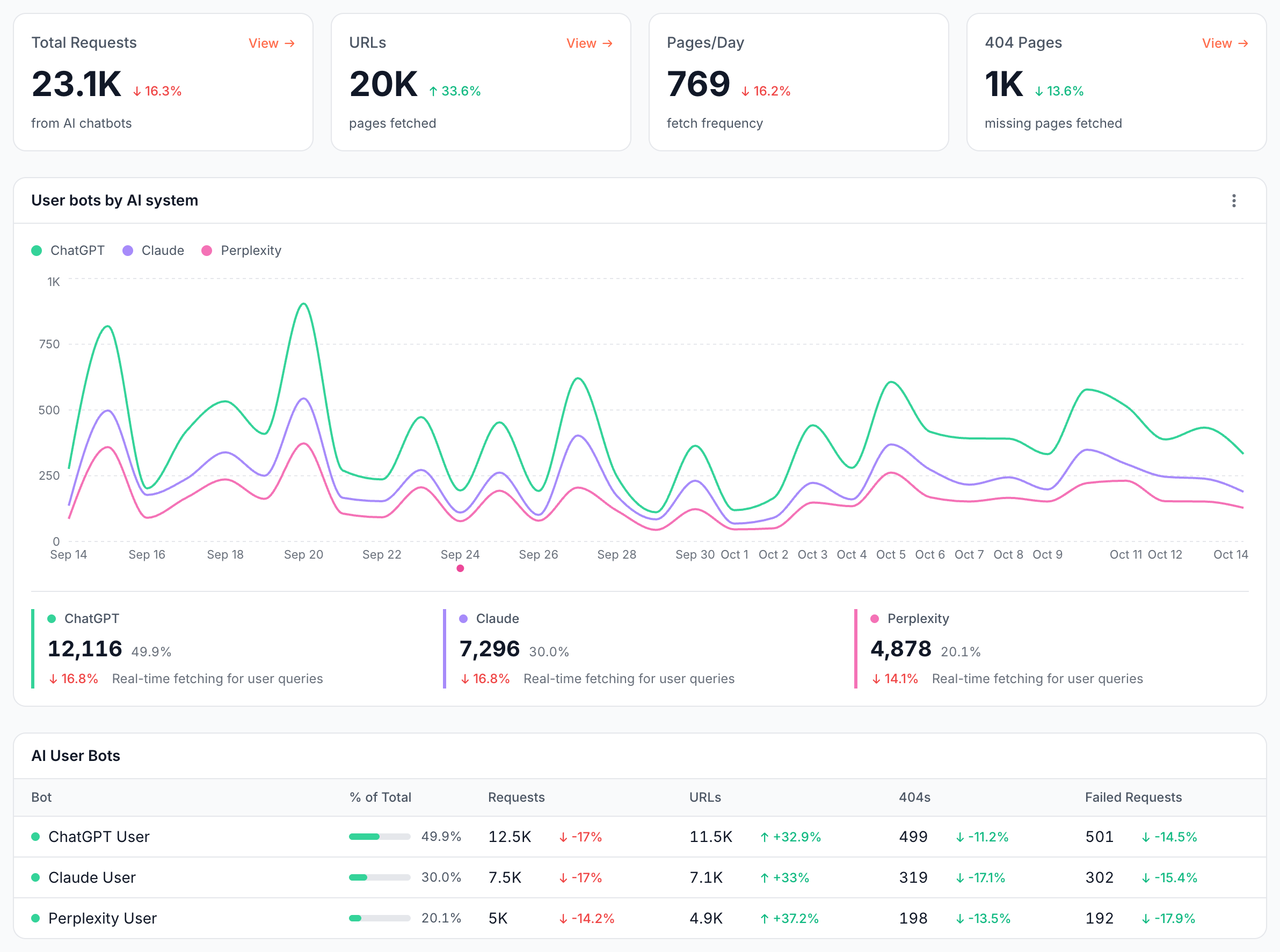
The AI Chatbots tab counts AI user bots: ChatGPT-User, Claude-User and Perplexity-User, and the user bots of Kimi, Mistral AI, Keenable and Exa. These requests show which of your pages people's conversations with assistants reach.
| Card or panel | What it shows |
|---|---|
| Total Requests | Requests from AI user bots |
| URLs | Distinct pages they fetched, counted as unique URLs |
| Pages/Day | Requests divided by the number of days in the period |
| 404 Pages | Requests that got a 404: an assistant tried to read a page that does not exist |
| User bots by AI system | Daily requests from ChatGPT, Claude and Perplexity, with each one's share and change. The other user bots share one dashed Other line |
| AI User Bots | Per user bot: % of Total, Requests, URLs, 404s and Failed Requests, which counts requests that failed or got a 5xx |
| Segment Performance | Per segment: share of fetches, requests, unique URLs, average response time, 4xx and 5xx |
The stat cards count requests EdgeComet answered with a page, the chart also counts error responses, and the AI User Bots table counts every event type. The three totals can differ. View on a card opens the requests behind it in Data Explorer > Bot log.
How many pages do AI search and training crawlers request?
The AI Crawlers tab counts AI search bots and training bots side by side:
- Training Pages and Search Pages: distinct pages each group requested. A page both groups reached counts in both cards.
- Pages/Day: requests from both groups divided by the number of days in the period.
- % of Bot Traffic: AI crawler requests as a share of requests from all bots.
- Search and training bots trend: daily requests of the two groups.
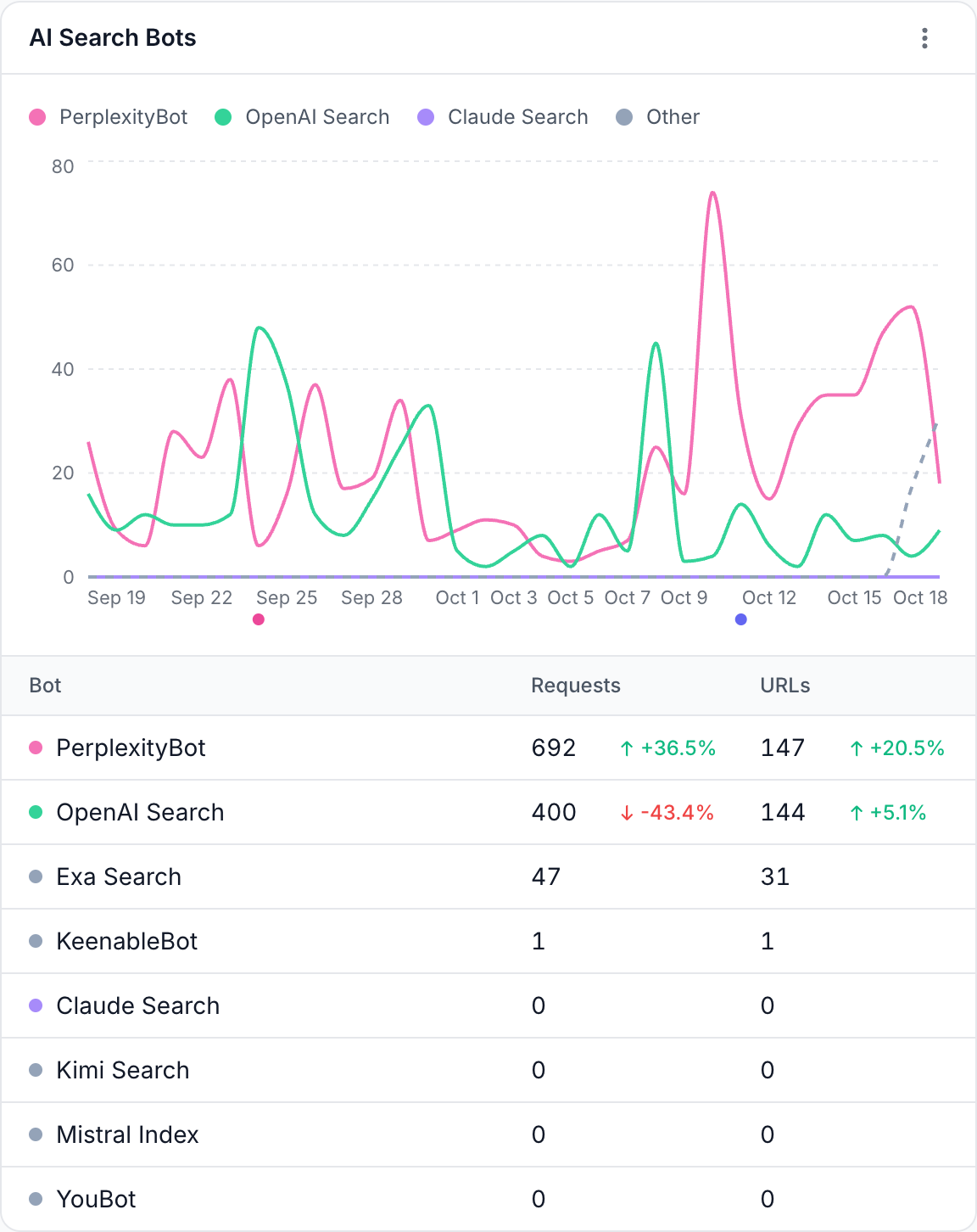
- AI Search Bots and Training Bots: a chart and a table of requests and URLs per bot with change. The chart draws one line each for the bots of OpenAI, Anthropic, Perplexity, Common Crawl, Meta and ByteDance, and one dashed Other line for the rest of the group. The table lists every bot in the group, with zero when it did not visit.
- Bots in each group: search bots are OpenAI Search (OAI-SearchBot), PerplexityBot, Claude Search (Claude-SearchBot), Kimi Search, Mistral Index, KeenableBot, Exa Search and YouBot. Training bots are GPTBot, ClaudeBot, Common Crawl (CCBot), Meta Agent, Bytespider (TikTok), KimiBot, Mistral Training and Reflectionbot.
- Segment Performance: the same per-segment table as on AI Chatbots, with the share of crawl per segment.
How does AI crawling compare with Googlebot?
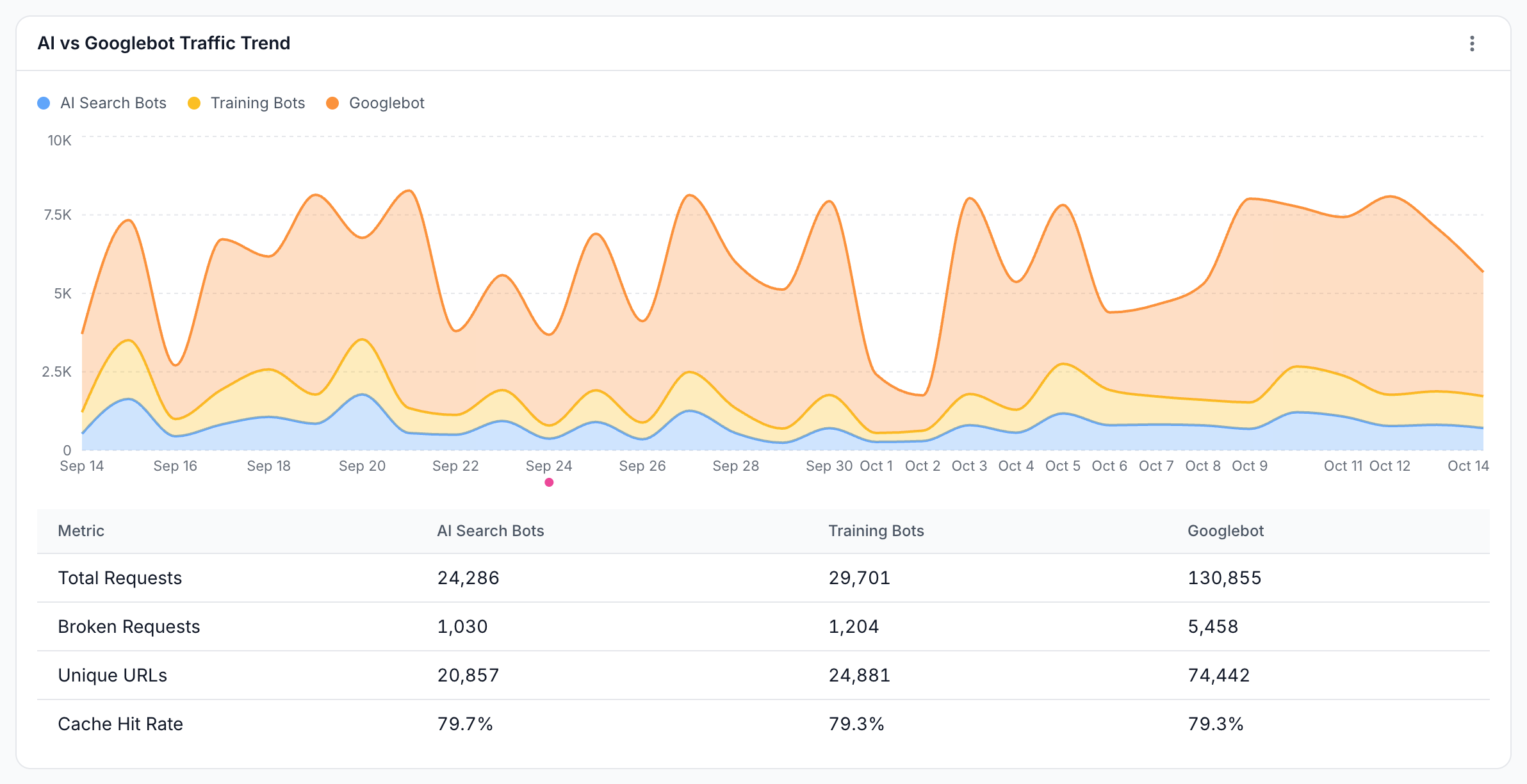
AI vs Googlebot Traffic Trend on the AI Crawlers tab draws AI search bots, training bots and Googlebot (desktop and mobile) on one chart.
The table under the chart compares the three on Total Requests, Broken Requests, Unique URLs and Cache Hit Rate. Broken Requests are requests that failed or got a 5xx, the same measure as Failed Requests on AI Chatbots. Cache Hit Rate is the share of their served requests that came from the EdgeComet cache.
Which sections does each AI provider read?
The AI Attention Map shows one AI provider's requests by purpose and by section of your site. Pick the provider at the top of the card: ChatGPT (GPTBot, OAI-SearchBot and ChatGPT-User), Claude (ClaudeBot, Claude-SearchBot and Claude-User) or Perplexity (PerplexityBot and Perplexity-User).
- AI Attention Map: one band per purpose, Training, Search and User, each split by your segments and sized by requests. The Search and User bands show their size as a percentage of Training. Perplexity has no training crawler, so it draws two bands.
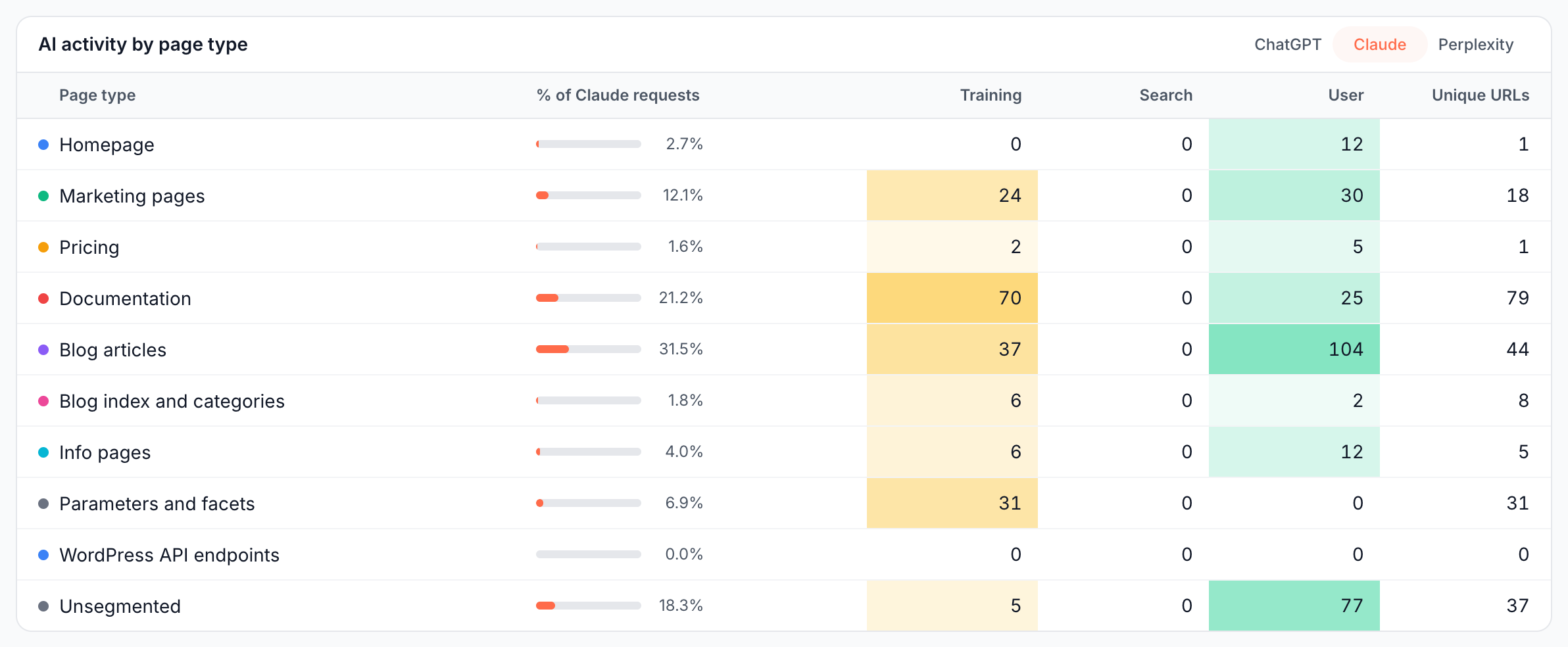
- AI activity by page type: the same numbers as a table, with each segment's share of the provider's requests, the requests per purpose and the unique URLs.
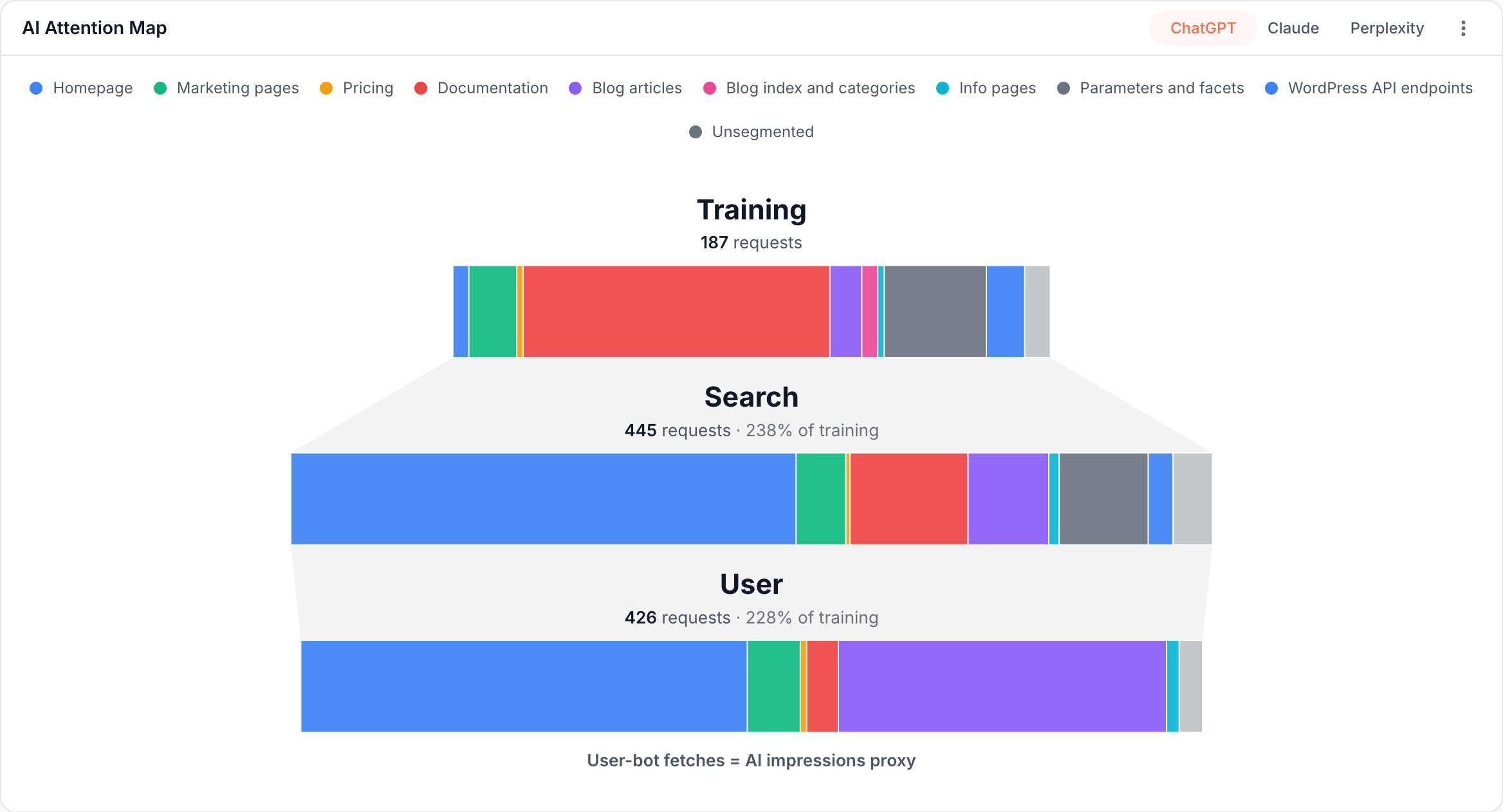
Each request counts in one segment only: the first segment it matches, in the order your segments were created. Requests that match no segment form the Unsegmented row, so the rows add up to the provider's total. A segment that overlaps an earlier one can therefore show fewer requests here than in Segment Performance.
The map offers three providers, ChatGPT, Claude and Perplexity. Bots of other operators, such as Common Crawl, Meta Agent, Bytespider, Kimi and Mistral AI, do not appear on it. When the chosen provider made no requests in the period, the card reads "No AI bot activity in this period".
How much AI crawling is wasted?
The Efficiency tab sorts AI bot requests into valuable, questionable and wasted. Crawl efficiency lists the AI bots it counts.
How to read it
Read user fetches as demand from people and crawls as collection, and compare them by section:
- User fetches are the live signal. Each AI user bot request happened while someone was asking an assistant a question, so a rising line on AI Chatbots means assistants open your pages in more of those conversations. The URLs card shows how many different pages they reached.
- Training crawls are not visits from people. A training bot collects pages for models. A high training share with few user fetches means models collect your pages, but the assistants rarely open them to answer questions.
- A 404 fetched by a user bot is a page an assistant could not read. The assistant went looking for that page for a person and found nothing. Check 404 Pages first.
- Compare sections, not totals. On the AI Attention Map, a section with many training requests but no user fetches is read for training but not opened for answers. To compare with Googlebot, put Segment Performance here next to the one on the Googlebot report: a section AI bots read heavily while Googlebot ignores it, or the reverse, shows where the two audiences differ.
- AI search bots refresh AI search indexes. A drop in Search Pages while Googlebot stays steady can mean an AI search index is reaching fewer of your pages.
What to do next
Fix the pages assistants could not get, then check what AI bots receive:
- Fix pages assistants cannot find. Click View on 404 Pages to list the URLs, then restore the page, link to the right one, or serve a 301 redirect with an Edge SEO rule.
- Check what AI bots receive. In EdgeComet's January 2026 tests on OpenSeoTest, ChatGPT-User never ran JavaScript and GPTBot ran it once in hundreds of requests, so a page that builds its content in the browser can reach them empty. See Do GPTBot, ClaudeBot and other AI bots run JavaScript? and How to see what a bot without JavaScript sees.
- Look into failed requests. Rising Failed Requests in AI User Bots, or
5xxcounts in Segment Performance, point to render or server errors in those sections. See Fix blank, partial or slow prerendered pages. - See what assistants search for. Fan-out queries shows the Google searches AI assistants ran for people that reached your site.
- Group your pages. The Attention Map and the segment tables are only as useful as your segments. On segment tables, Add segment creates one in place, and Manage segments opens the full list.
- Check one page in depth. In Data Explorer > Bot log, filter by URL to see every AI bot request for that page, with its status code and the page it received. Page Analysis, the magnifier icon beside a URL, shows the page's latest snapshot and its bot visits per family.
Where to find it
In the dashboard: Log Analyzer > AI Bots, with the tabs AI Chatbots (the default), AI Crawlers, AI Attention Map and Efficiency.