

Merchant Center feed checks and feed errors
Shelf Edge runs more than 30 checks, in four categories, on your Merchant Center feed every time it fetches the feed. A second group of checks compares each product page bots receive with the feed. Also called feed validation or feed diagnostics.
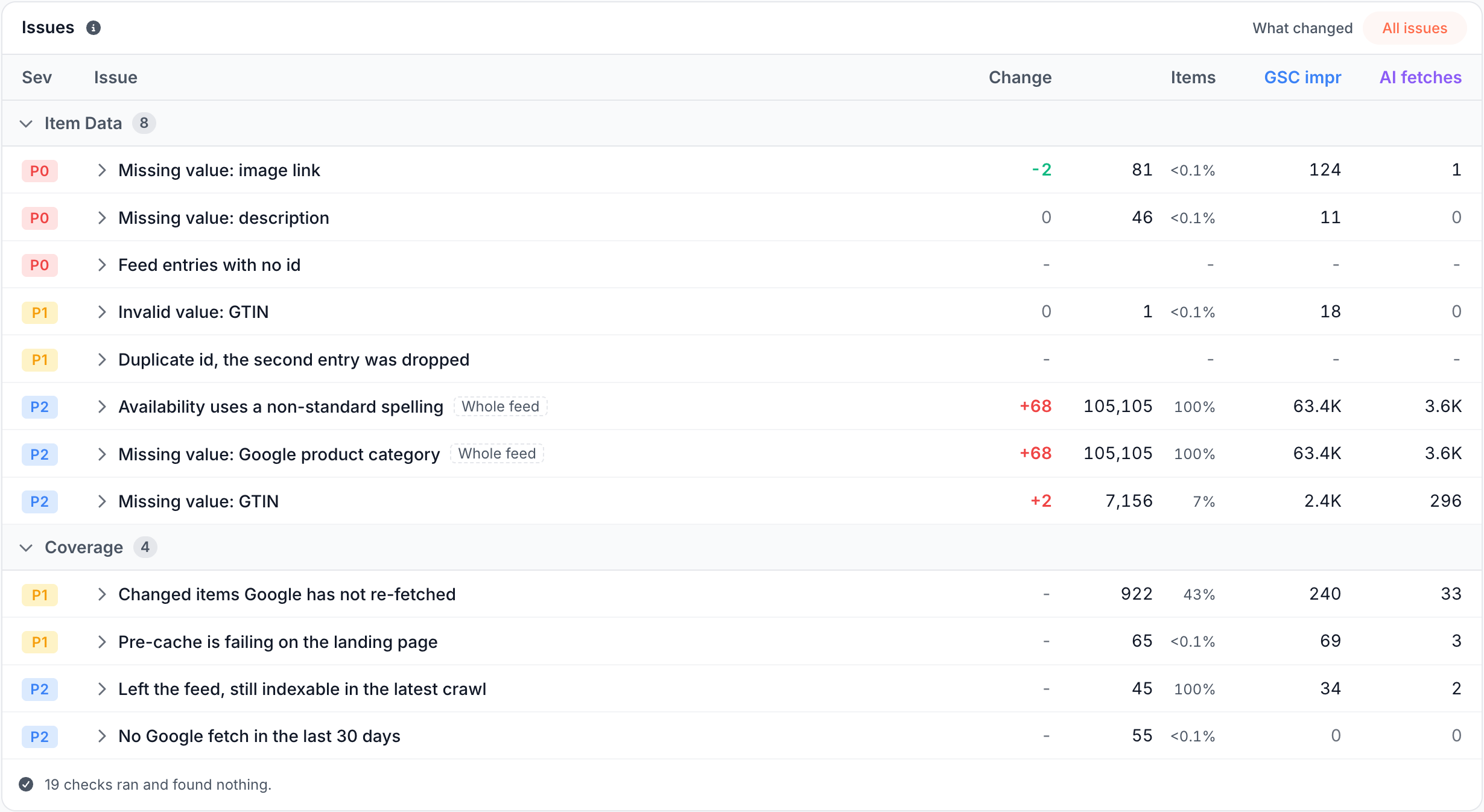
The checks follow Google's product data specification, plus EdgeComet's own rules for links and coverage. Each item check shows the Google impressions and AI assistant fetches on the items it found, which tells you which problem costs the most.
Feed check categories
| Category | What it checks | Counts |
|---|---|---|
| Feed Health | Whether each feed file imported | Feeds |
| Item Data | Each item's values against Google's product data specification | Items (two checks count feed entries) |
| Links & Scope | Each item's landing page link and image link | Items |
| Coverage | Whether Google's crawlers and EdgeComet's cache keep up with the feed | Items |
The checks appear in the Issues card of Product Feed. A check that finds nothing is counted in the card footer, such as "19 checks ran and found nothing."
Feed check severity from P0 to P3
Each feed check has a severity. The dashboard defines them this way:
- P0: "Google rejects the item, or a feed did not import at all".
- P1: "the item ships, but what Google sees is wrong or stale".
- P2: "reach and completeness: fewer surfaces, weaker matching".
- P3: "hygiene".
Within a severity, checks rank by the Google impressions on the items' landing pages, then by AI fetches, then by item count. Crawl issues use their own scale. See Severity from P0 to P3.
Feed check examples by category
Feed Health
- A feed failed on the last fetch (P0): the last fetch could not read a feed to the end, or the whole fetch failed or was refused. The Feeds card names the reason for each feed. See Feed errors.
- A feed has never been imported (P1): a feed URL on the rule has never been read completely. A newly added feed shows it until its first fetch.
Item Data
- Price is missing a currency (P0): the price has a number but no currency code. Google's price format is "Number plus currency (use ISO 4217)", such as
<g:price>15.00 USD</g:price>in an XML feed. (Google Merchant Center Help) - Duplicate id, the second entry was dropped (P1): two entries in one fetch share an id. EdgeComet keeps the first, which leaves the catalog short of the second.
- Missing value: GTIN (P2): the item has no GTIN. EdgeComet skips this check when the item sets
identifier_existstono.
Links & Scope
- Link points outside the configured domains (P0): the item's link is not on one of your website's domains. This is EdgeComet's own rule: EdgeComet stores the item but never re-caches its page.
- Link carries tracking parameters (P3): the link carries parameters EdgeComet strips before caching, which means the address it caches is not the one the feed publishes.
Coverage
- Changed items Google has not re-fetched (P1): a page field, such as the price or availability, changed in the period, and no verified Googlebot, AdsBot or StoreBot request reached the page since the change.
- Pre-cache is failing on the landing page (P1): the latest re-cache of the product page in the last 30 days did not return
200. - Left the feed, still indexable in the latest crawl (P2): an item left the feed in the period, and the latest crawl found its page indexable. This check needs a completed crawl.
What a failing feed item costs: rejected or less reach
The issue dialog says what a failing item costs, in one sentence:
- "Google rejects the item over this field.": for errors, such as a missing price, link or image link.
- "Google still accepts the item; this costs it reach and matching rather than its place in the results.": for warnings, such as a missing GTIN or a title longer than 150 characters.
- "Our own scope rule, not Google's" and "Our own hygiene rule, not Google's": for the two EdgeComet rules under Links & Scope.
Feed Health and Coverage checks carry no verdict: they describe the feed or Google's crawl, not an item value.
The feed issue dialog
Click a check to open its dialog. It shows the items affected, the change in the period, the Google impressions over the last 28 days and the AI fetches over the last 30 days. Below, one paragraph says what the check looks for and, for item checks, what it costs.
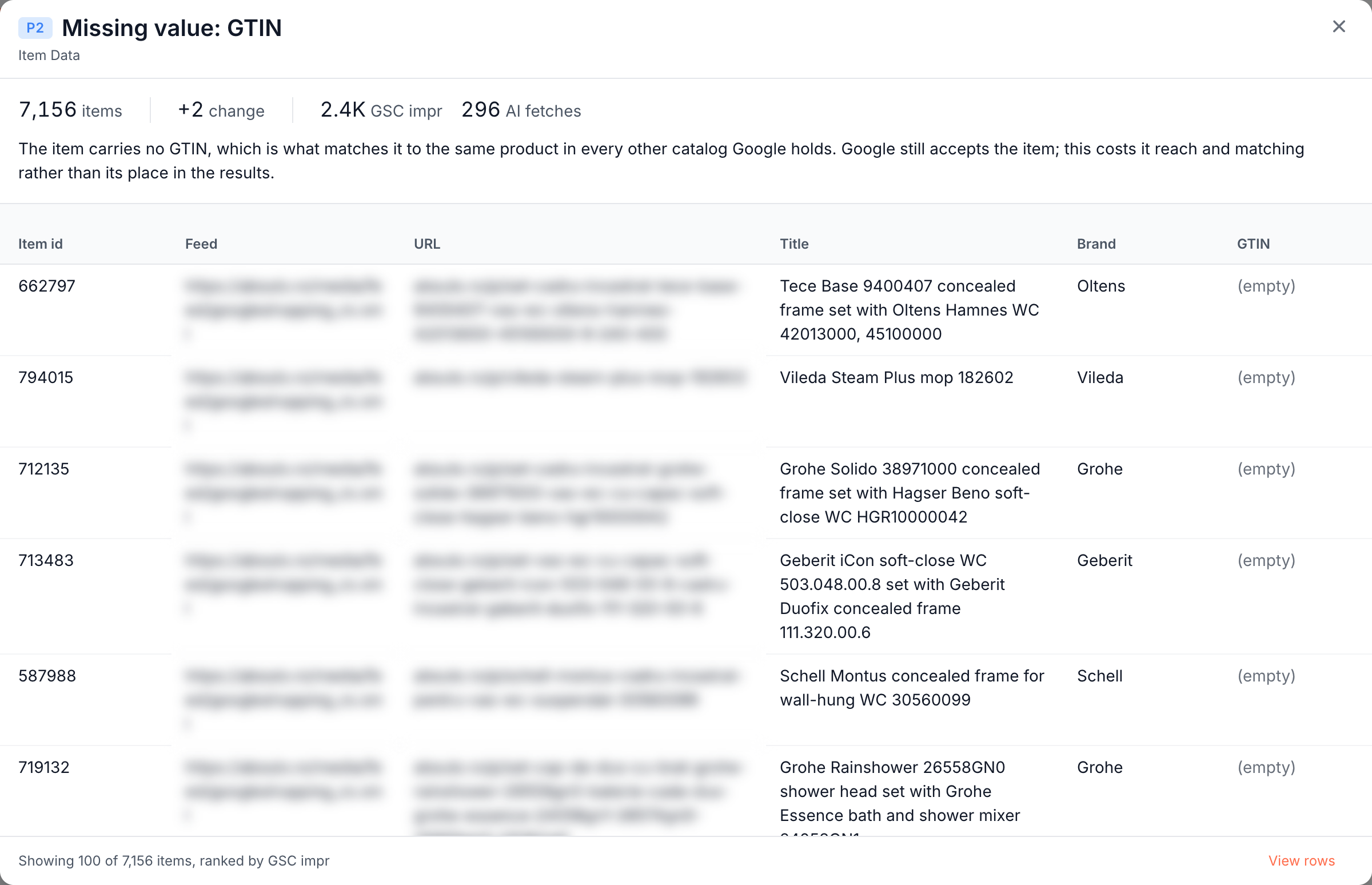
The table lists the affected items, most impressions first. Where the check lists items, View rows opens all of them in the Feed items tab. The open check stays in the page URL, which means you can share a link to it.
Feed errors
When a feed fails to import, the Feeds card and the check A feed failed on the last fetch name the reason. Examples:
| Message | What it means |
|---|---|
| "The response was not an RSS or Atom feed" | The URL returned something else, such as an HTML page, JSON or a CSV file |
| "The feed URL returned an error status (404)" | The server answered with an error status, shown in brackets |
| "The feed returned no items" | A feed that had items came back empty |
| "The fetch failed before this feed could be accepted" | The whole fetch failed or was refused |
When almost every item in a fetch links outside your website's domains, EdgeComet refuses the fetch and re-caches nothing. The Last fetch card in Configuration > Caching > Merchant Feed Re-cache reads: "This feed's products link to a different website, so it was refused - nothing was sent for re-cache. Check the feed URL: it usually means another site's feed was pasted in."
A failed fetch marks no item as removed. Items the fetch did not read keep their earlier values.
Product pages against the feed
Catalog Health crawl checks compare the product page bots received with your feed for price and stock, in both directions: from the feed to the page, and from the page to the feed. Examples:
- Page price differs from the feed (P1): the price on the page falls outside the range of the item's price and sale price in the feed.
- In stock in the feed, not on the page (P1): the feed offers the product, and the page shows it as unavailable or shows no stock at all.
Other checks find feed items with no price on the page, and pages missing from the feed that do not say the product is unavailable. Two more compare the page with its own Product markup, such as Page price differs from its Product markup.
Google asks merchants to "Submit an amount and currency that match the price on your landing page and the checkout pages." (Google Merchant Center Help)
The feed checks need your feed and the catalog fields: the price checks need a price field that stores a number, and the stock checks need the availability field. The two Product markup checks need no feed. They appear on Overview, Products and in Evergreen Crawl issues under Catalog Health.
Where to find it
In the dashboard: E-commerce > Product Feed, card Issues, for the feed checks. E-commerce > Overview and E-commerce > Products, card Issues, and Evergreen Crawl > Issues for the checks that compare pages with the feed.