

Detect fake Googlebot and other bad bot traffic
EdgeComet shows the bot traffic you probably do not want in Log Analyzer > Bad Bots:
- Requests that fake the identity of Googlebot, Bingbot, an AI crawler or another bot EdgeComet can verify.
- Crawlers EdgeComet does not recognize.
- Known SEO tools.
For each, you see how much traffic and render work it takes and which networks it comes from.
Log Analyzer > Security shows which sensitive files scanners request and whether your site exposes any. See Find exposed .env, .git and backup files scanners probe for.
EdgeComet leaves fake requests out of the Googlebot, Bing and AI Bots reports, so they never inflate those numbers.
What the report shows
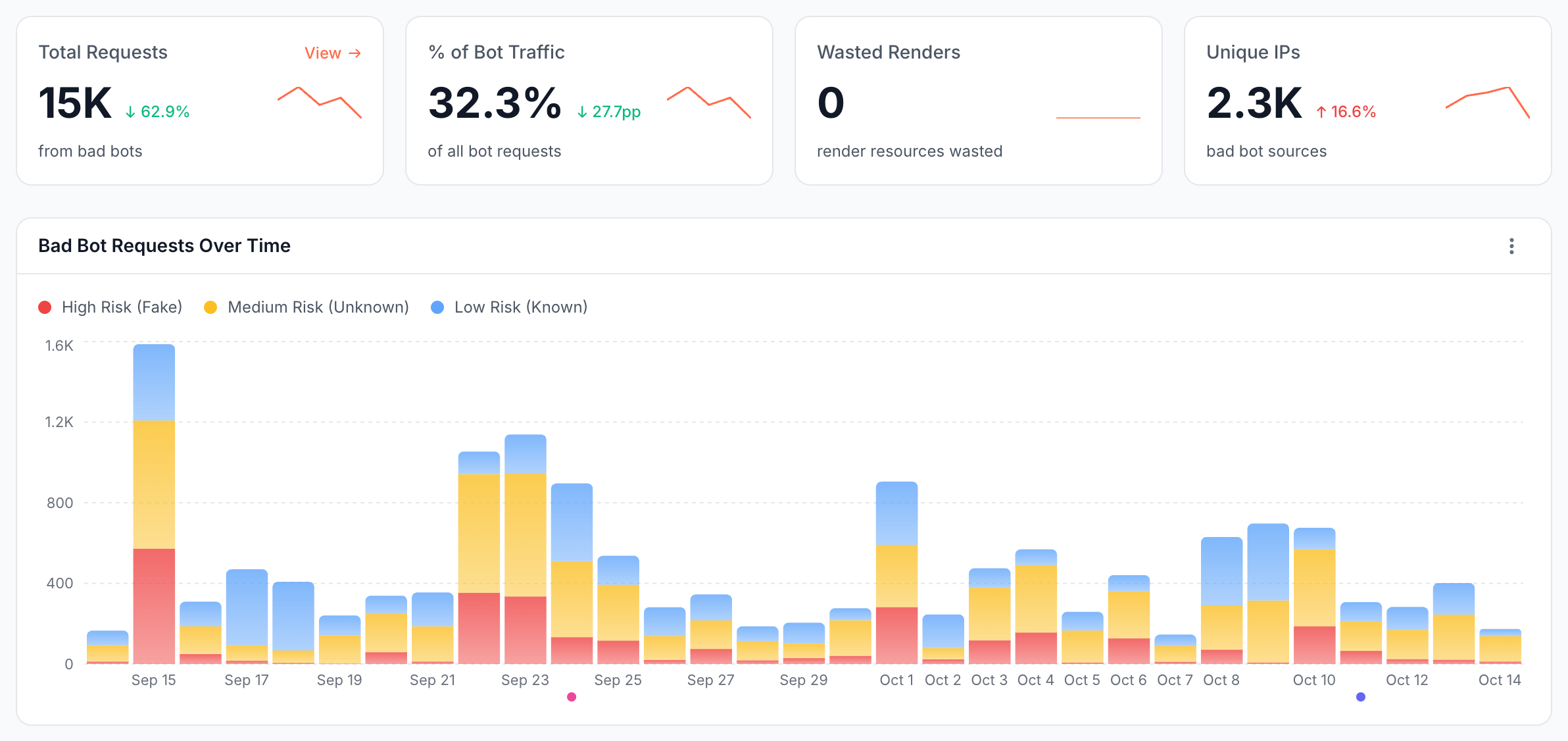
The Bad Bots page sums up bad bot traffic for the period, splits it by risk, and lists the sources. It counts every request from these bots, whatever the status code, including requests EdgeComet answered with an error. Every table is sortable and paginated.
What counts as a bad bot?
A bad bot, in EdgeComet, is a bot whose request failed IP verification, a crawler EdgeComet does not recognize, or a known SEO tool. The label marks traffic you may not want, not proof of harm: an SEO tool you run on purpose counts too.
The link preview fetchers of chat and social apps, such as Facebook, WhatsApp and LinkedIn, are not bad bots and have their own report. A request that fakes one of them still counts as fake. See Track social bots: link previews in chats and social apps.
Why does a request count as bad bot traffic?
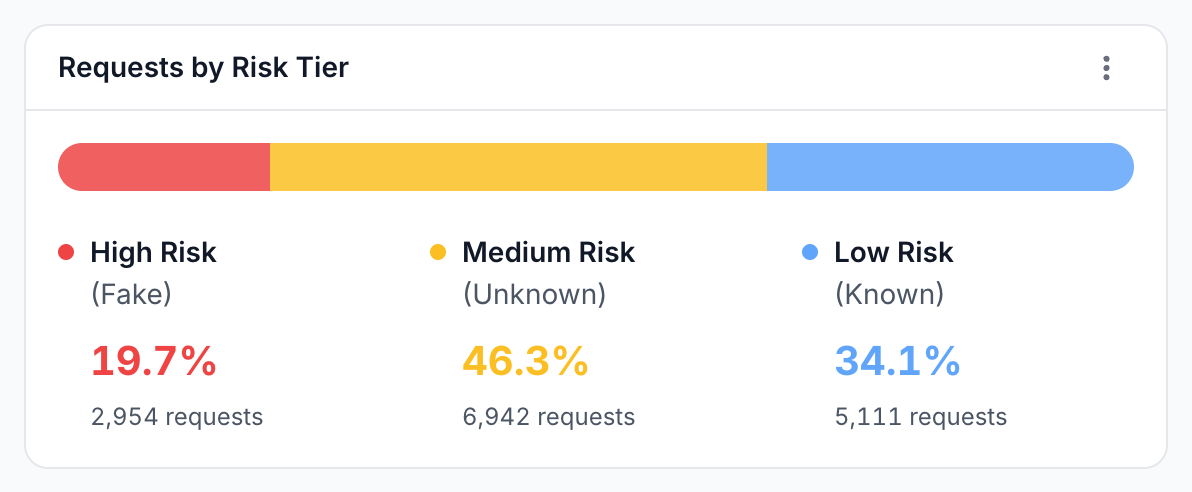
A risk tier is one of three groups that sort bad bot requests by why they count. Each request is in exactly one tier:
| Risk tier | Which requests | Example |
|---|---|---|
| High Risk (Fake) | Requests that failed IP verification, called fake bots | A request with Googlebot's user agent from a hosting provider's network |
| Medium Risk (Unknown) | Unrecognized crawlers: the user agent says bot, crawler, spider or scraper but matches no known bot | A new crawler before EdgeComet adds it to its catalog |
| Low Risk (Known) | Known SEO tools, by bot category | SEMrushBot, AhrefsBot, Screaming Frog |
Requests by Risk Tier shows each tier's share of bad bot traffic, and Bad Bot Requests Over Time shows the tiers per day.
How much bad bot traffic do you get?
| Card | What it shows |
|---|---|
| Total Requests | Requests from bad bots |
| % of Bot Traffic | Bad bot requests as a share of all bot requests, fake ones included, with the change in percentage points |
| Wasted Renders | Renders EdgeComet ran for bad bots. See Wasted renders |
| Unique IPs | Distinct IP addresses the bad bot requests came from |
Each card has a small trend line for the period.
How much render work do bad bots take?
Wasted renders are the renders EdgeComet ran in a browser to answer bad bot requests. A request answered from the cache needs no render, so a site served mostly from the cache shows few or none. Wasted renders are not related to the Wasted bucket of crawl budget allocation.
Which bots do fake requests impersonate?
Impersonated Bots lists the bots whose identity fake requests claimed, such as Googlebot Mobile or ChatGPT User, with the four largest and an Other row. Shares are of fake requests only. The card is empty when no request failed verification. How EdgeComet verifies bots explains how EdgeComet tells a real bot from a fake one.
Where does bad bot traffic come from?
Three tables show the sources:
- Top Subnets: the
/24networks sending the most bad bot traffic, with Tier, Identity (the bots they claim to be), Requests, Renders and Unique IPs. The icon next to a subnet opens a WHOIS lookup that shows who owns the network, and the identity link lists the user agents it sent. - Other Crawlers: the user agents of unrecognized crawlers, with Requests, Renders, Unique URLs and Unique Subnets.
- Known Non-Core Bots: SEO tools by name, with Requests, Renders, Unique URLs and Unique IPs.
How to read it
Read the Bad Bots page by which tier grows and which source dominates:
- Many High Risk requests claim to be Googlebot. Someone is crawling your site with a fake Googlebot user agent, such as a scraper on a rented cloud server. Your Googlebot report is not affected: fake requests are left out of it.
- One subnet dominates. A single network sending thousands of requests can be one crawler or scraper. Look it up with WHOIS.
- Medium Risk grows. New crawlers are visiting. Check Other Crawlers: some are AI or search crawlers EdgeComet does not name yet, others are scrapers. See What happens when a new AI crawler appears?
- Wasted Renders is high. Bad bots are costing render work. Requests answered from the cache need no render, and bots you do not want can be blocked.
- Low Risk includes your own tools. If you run an SEO crawler on purpose, its requests appear under Known Non-Core Bots. That is expected.
How to block a bot
To stop EdgeComet from serving a bot, match its user agent and answer with 403 Forbidden:
- For all URLs: add a dimension with the action Block under Configuration > System Settings > Dimensions. A block dimension answers before any other setting. See Block a bot.
- For some URLs: add a URL rule with Match User-Agent and the action Block (403) under Configuration > System Settings > URL Rules. See Rules for one bot.
Block by user agent only for bots that use their own name, such as an SEO tool or a scraper with its own user agent. A block applies to the requests your CDN routes to EdgeComet.
A fake Googlebot sends Googlebot's user agent, so blocking that user agent would also block the real Googlebot. To stop a fake Googlebot, use a firewall or CDN rule that checks the IP address. See Fake bot.
What to do next
Set an alert, inspect the fake requests, and decide which crawlers to keep:
- Get alerted. The built-in Fake search-engine traffic alert warns you when requests that fake Googlebot or another search engine rise sharply. See Fake search-engine traffic.
- See every fake request. In Data Explorer > Bot log, set the IP Validation filter to Fake to list each request with its IP address and URL.
- Decide on unknown crawlers. For each user agent in Other Crawlers, decide whether it is a crawler you want, then block the ones you do not.
Where to find it
In the dashboard: Log Analyzer > Bad Bots. Fake requests also appear as the Fake Bots family on Log Analyzer > Overview and as the Fake Bots category on its Bot Breakdown tab.