

Cache overview
EdgeComet keeps a copy of every page search engines and AI bots request, and serves the next request for that page from the copy in under 15 ms. Also called a prerender cache or a bot cache.
The cache keeps bot load off your website. EdgeComet serves every bot from its edge, so your server handles a page once per refresh instead of once for every bot that requests it.
Pre-cache puts important and traffic pages in the cache before a bot asks for them. Smart Re-cache, the main pre-cache rule, refreshes each page bots request as often as that page changes. See How EdgeComet keeps cached pages fresh.
How the cache works
EdgeComet looks up each bot request in its cache by URL and device profile, serves a fresh copy at once, and renders or fetches the page only when no fresh copy exists.
- Find the copy. The cache key is your website, the device profile the bot's user agent matches, and the URL.
- Serve a fresh copy. A copy younger than the Cache TTL is served without a request to your server.
- Build a missing or expired copy. EdgeComet renders the page in headless Chrome or fetches it from your server, stores the result and serves it. When several bots ask for the same missing page at once, EdgeComet runs one render and serves the result to all of them.
- Fall back to the expired copy. When that render or fetch fails, EdgeComet serves the expired copy instead. See Expired copies and origin outages.
Pre-cache builds copies of important and traffic pages before bots ask, so requests for those pages end at step 2. Step 3 covers pages no refresh has reached yet.
What a cached copy holds
What the copy holds depends on the serving mode:
- Cache + Render: the page after headless Chrome ran its JavaScript.
- Cache-only: your server's own HTML.
A cached copy holds the HTML, rendered or as your server sent it, the status code, and these response headers from your server: Content-Type, Cache-Control, Expires, Last-Modified, ETag, Location, X-Robots-Tag and Link. A redirect is stored with its Location target, so bots get redirects from the cache too. You can change the header list under Configuration > System Settings > Advanced.
Only responses with a code in Cacheable Status Codes are stored: 200, 301, 302 and 404 on a new website. A response with any other code reaches the bot and is not stored. PDFs, images, video, audio, archives and other binary files are never cached. EdgeComet passes them through from your server.
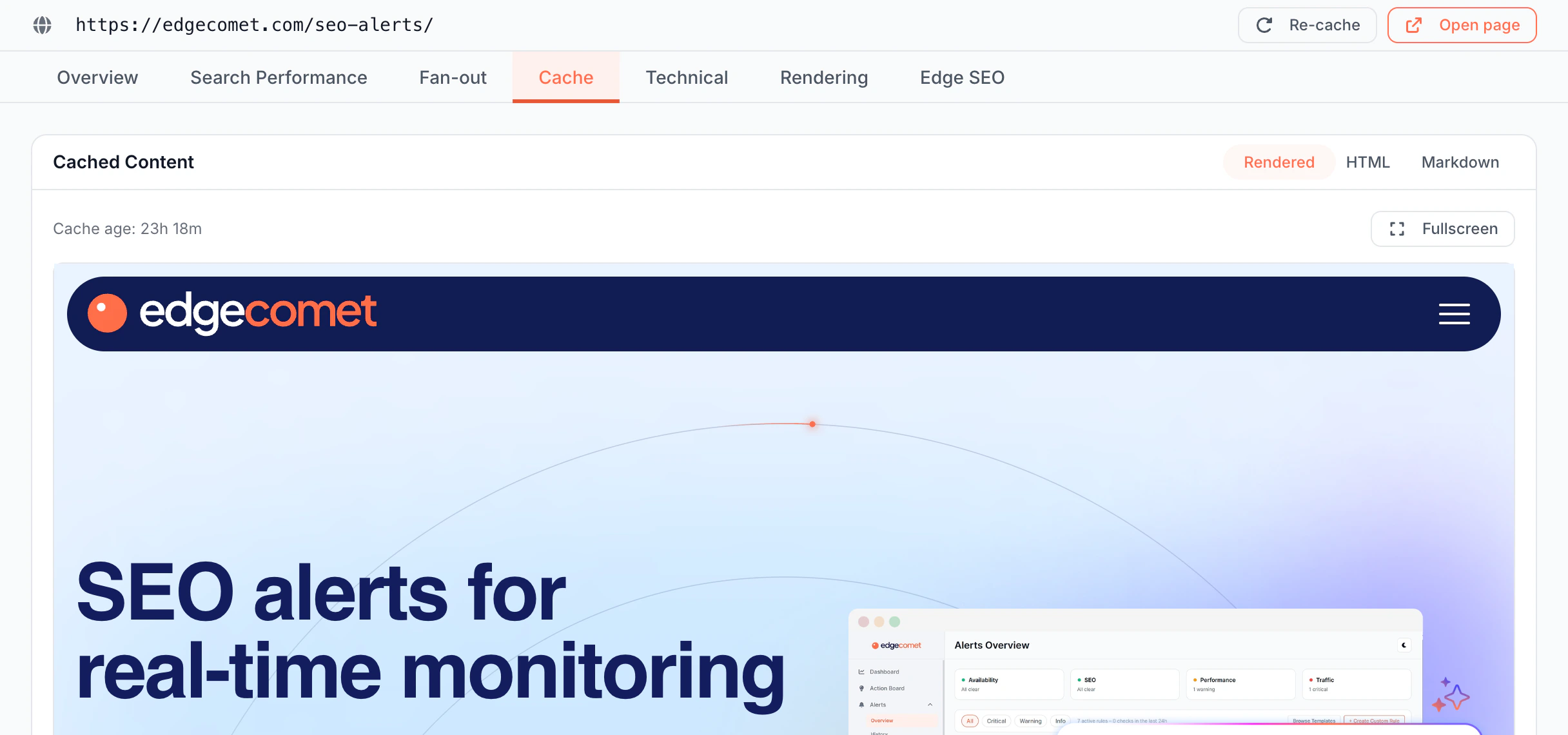
To see the copy bots get for one URL, open Page Analysis > Cache. See See the cached HTML bots receive for one page.
Cache key: one copy per URL and device profile
The cache key decides which requests share a copy: your website, the device profile, and the URL after normalization. Every bot matched to the same device profile, called a dimension, gets the same copy. On a new Cache + Render website:
- Googlebot Smartphone, Bingbot mobile and AI bots such as GPTBot and ClaudeBot share the mobile copy.
- Googlebot Desktop and Bingbot desktop share the desktop copy.
See Where EdgeComet sits in the request path.
Normalization removes tracking parameters such as utm_source, gclid and fbclid and sorts the remaining query parameters, so /shoes?utm_source=newsletter and /shoes share one copy. EdgeComet fetches the normalized URL from your server too. You can edit the tracking parameter list under Configuration > System Settings > Advanced. The URL normalization page in the self-hosted engine docs gives the full rules.
Render cache and bypass cache
EdgeComet keeps two kinds of copies:
- Render cache: pages rendered in headless Chrome. It is always on.
- Bypass cache: your server's HTML, stored for dimensions that bypass rendering. A Cache-only website has it on, so every bot gets your HTML from the cache. A new Cache + Render website has it off, so a bot that no render dimension matches gets your HTML fetched from your server on every request. When on, it uses the render cache's lifetime, status codes and expiry.
Expired copies and origin outages
A stale copy is an expired copy EdgeComet keeps as a fallback.
With Serve stale content if origin is down, the default, the next request after the Cache TTL still renders or fetches the page fresh. EdgeComet serves the expired copy only when that fails, for example when your server returns a 5xx error or does not answer, for up to the Stale TTL, 24 hours on a new website. Bots keep reading your pages through a short outage.
With Delete expired cache, an expired copy is removed and the next request waits for a fresh render or fetch.
How fast bots get a cached page
A cache hit is served in under 15 ms. That is the serve time EdgeComet records for the request, from the moment EdgeComet starts handling it to the moment the response is ready. It does not include the hop from your CDN to EdgeComet or the network between the bot and your CDN.
A page missing from the cache takes as long as its render or your server's answer, usually seconds. That matters for two kinds of bots:
- AI assistants fetching pages live. In EdgeComet's tests, the ChatGPT and Gemini fetchers waited 4 to 5 seconds for a page before giving up. See Do GPTBot, ClaudeBot and other AI bots run JavaScript?
- Googlebot. Google crawls more when your site answers fast and steadily. See Server speed and the crawl capacity limit.
To check it on your site, open Cache > Overview: the Avg Response card is the average serve time of responses from the cache. For one request, the EC-Source header says whether the bot got a cached copy (render_cache or bypass_cache) and EC-Cache-Age gives its age in seconds. See Check the headers bots receive.
What you can change
You control how long copies live, which pages are pre-cached before bots ask, and when a copy is replaced.
Cache lifetime, status codes and expiry
Configuration > Caching > Settings holds the values for the whole website: Cache TTL (1 minute to 30 days, 7 days on a new website), Cacheable Status Codes, When cache expires, Stale TTL and the Bypass cache switch. Changes are saved as a draft and go live when you click Deploy in the banner at the top of the page.
A URL rule under Configuration > System Settings > URL Rules can set a different lifetime for some URLs, for example a shorter one for /products/* than for /blog/*. See Set cache lifetime, status codes and stale content.
Pre-cache rules: refresh pages before bots ask
Pre-cache rules render or fetch pages before bots ask. Turn on Smart Re-cache first: it refreshes the pages bots request as they change. See How EdgeComet decides what to refresh.
The other rules add your own data, which covers pages no bot requested before. Each rule picks its pages from one source:
| Rule | Pages it keeps cached |
|---|---|
| Smart Re-cache | Your homepage and top pages on every run, then each page bots request as often as it changes |
| GSC Re-cache | Your top pages in Search Console by clicks or impressions over the last 28 days, up to 50,000 |
| Sitemap Re-cache | URLs new in your sitemaps since the last run, and every sitemap URL in rotation so its copy stays fresh |
| Merchant Feed Re-cache | Product pages whose price, availability or title changed in your Merchant Center feed first, then the rest of the catalog |
Each rule stores rendered HTML or your server's HTML, as you choose, and takes effect when you save it, without a deploy. The rules are tabs under Configuration > Caching. See Pre-cache pages before bots request them.

Recache, remove and flush copies
You can replace copies on demand:
- Recache renders or fetches a page again and keeps serving the current copy until the new one is stored. It is on Cache > Precache > Cached URLs and, as Re-cache, next to the URL in Page Analysis, and Cache > Precache > Queue takes a list of up to 500 URLs.
- Remove deletes a copy, so the next bot request gets a fresh render or fetch. Flush All removes every copy of the website.
- The API recaches and removes URLs from your own scripts. See Recache and invalidate pages with the API.
When you publish Edge SEO rules, EdgeComet recaches the pages they change, so bots get the new titles, tags and redirects without a manual step. See Recache, invalidate and flush cached pages.
What you can see
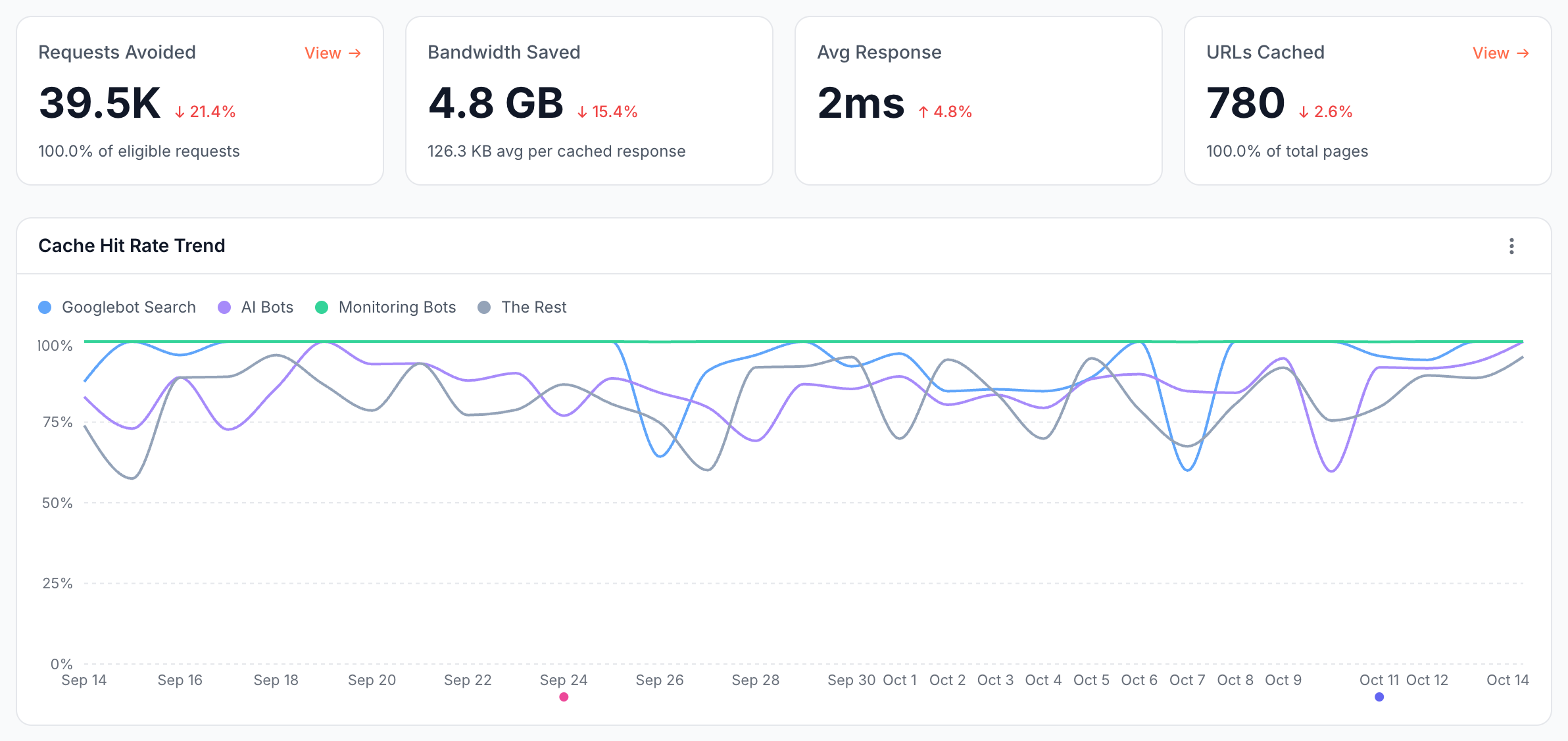
Cache > Overview shows how much bot traffic the cache answers. Its cards are Requests Avoided (the requests answered from the cache instead of a render or your server), Bandwidth Saved, Avg Response and URLs Cached. Below them, Cache Hit Rate Trend, Cache Age Distribution and Cache Efficiency by Bot break the cache down by bot group and by how old the copies were.
Cache > Precache shows pre-cache results, the queue and every cached URL. See Monitor cache hit rate and cached URLs.
How this differs from a CDN cache and a prerender service
Your CDN cache stores what your server sends for every visitor and expires it by your cache headers. EdgeComet's cache is built for bots:
- A copy per device profile, rendered when your site needs it, so a bot that does not run JavaScript still reads your content.
- Refreshed as pages change. Smart Re-cache re-checks each page bots request as often as that page changes, instead of on one schedule for all. The other rules add the pages that earn clicks, new sitemap URLs and products whose price or stock changed.
- Recorded per request. Every cache hit is recorded with the bot that received it, so Log Analyzer shows hit rate and copy age for Googlebot and each AI bot.
A standalone prerender service also caches rendered pages for bots. EdgeComet also caches server-rendered sites without rendering them, picks what to pre-cache from how each page changes and from your Search Console, sitemap, feed and bot data, and feeds every request into its reports. See EdgeComet compared with a standalone prerender service.
What the cache does not do
The cache serves bots, which sets its scope:
- It does not serve human visitors. Visitors reach your site and its own caching as before.
- It does not cache binary files. PDFs, images, video, audio and archives pass through from your server.
- It keeps one copy per device profile, not per bot. Every bot matched to a dimension gets the same copy.
- It does not ask search engines to crawl. Pre-cache makes a copy fresh before a bot arrives. It does not notify Google or Bing, for example through IndexNow.
Where to find it
In the dashboard: Cache > Overview and Cache > Precache (tabs Statistic, Queue and Cached URLs) for what the cache serves, and Configuration > Caching (tabs Settings, Smart Re-cache, GSC Re-cache, Sitemap Re-cache and Merchant Feed Re-cache) for how it behaves.