

Find duplicate, missing and long titles, meta descriptions and H1 tags
The Evergreen Crawl On-Page Tags report checks the title, meta description and H1 of every indexable page bots received. It finds tags that are duplicated, missing or too long, and groups duplicates into clusters, one per fix. When a template stamps the duplicates, one template fix clears the whole cluster.
The report reads the rendered page. It sees the H1 that JavaScript builds and the tags your Edge SEO rules write, the way Googlebot and AI bots got them.
What the report shows
The report has a tab for each tag: Title, Meta description and H1. Every number on a tab is about that tag, counted over the indexable 200 pages named beside the tabs, such as "of 143 indexable pages".
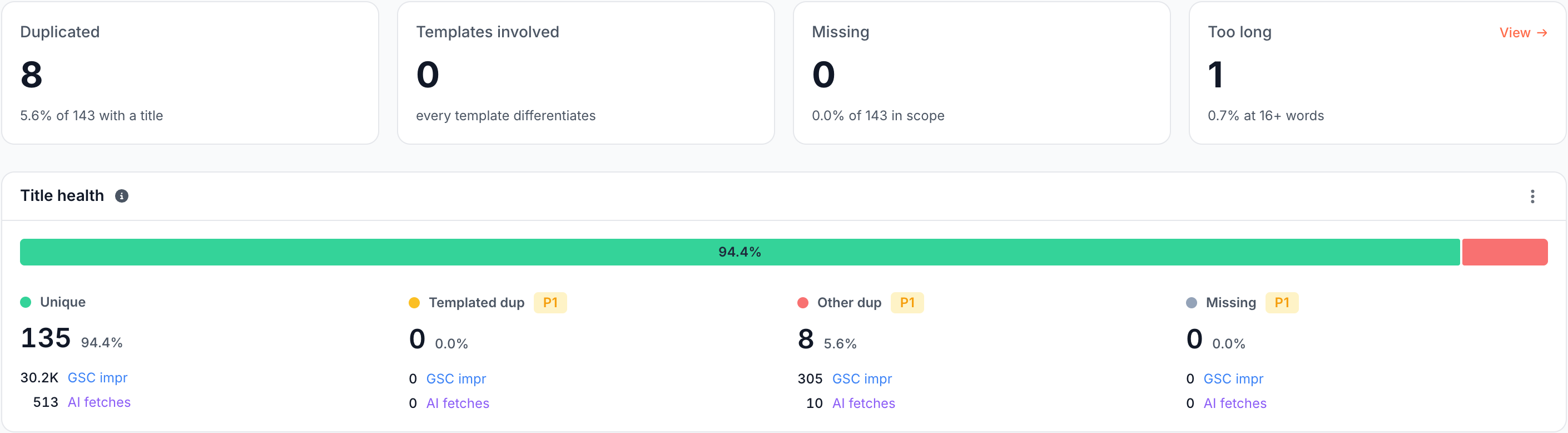
Cards: how many tags need work?
The four cards at the top count the pages whose tag needs work:
- Duplicated: pages whose tag another page also carries.
- Templates involved: template families whose variable part fails to tell pages apart. It reads "every template differentiates" at zero.
- Missing: pages with no tag at all.
- Too long: pages whose tag runs to 16 words or more for titles and H1s, or 50 words or more for meta descriptions.
Tag health: unique, duplicated or missing?
The Title health, Meta description health or H1 health card puts each page in one of four buckets:
- Unique: no other page carries this tag.
- Templated dup: shared with at least one other page, and stamped by a template whose variable part fails to differentiate. One edit per template fixes it.
- Other dup: shared with at least one other page, with no failing template behind it. No single edit clears these.
- Missing: the page carries no tag.
The two duplicate buckets add up to the Duplicated card. Each bucket shows its pages and demand, and the duplicate and missing buckets carry the severity of their check. Click a bucket to list its pages with their tags.
Changed since last crawl: which tags moved?
Changed since last crawl lists the pages whose tag state changed since the comparison crawl, such as Unique, normal length -> Duplicated, ranked by the demand they carried before. The states are Missing, Duplicated, Too long, Unique, normal length and No longer an indexable page. Click a move to see each page's tag before and now. When nothing moved, the card reads "No page changed its title verdict since", or its description or H1 version, and the comparison crawl.
Title issues, Meta description issues and H1 issues
The Title issues, Meta description issues or H1 issues card lists the On-Page Tags checks for the tag on the open tab, such as Exact-duplicate titles - many URLs compete for one head query, Missing title - Google invents one or Multiple H1s on one page.
Duplication clusters: which fix clears the most duplicates?
Duplication clusters has one row per fix: a failing template, or one repeated string with no template behind it. The pages of all clusters add up to the Duplicated card.

Each row shows:
- What repeats: a template chip with the shape the pages share, where
{}marks the slot that fails to differ, or an exact chip with the repeated string. - Where: the URL section that holds the largest share of the cluster's pages, with the number of other sections the rest sit in.
- Pages, Repeats, GSC impr and AI fetches: the cluster's pages, the distinct strings a template cluster repeats, and the demand on those pages.
- Cause: why the tag repeats and what would tell the pages apart: Duplicate pages, URL variants, Template fix, Template fix: use the field, such as the slug or the H1, or No differentiator. Under it, the share of pages each field, such as the body, path, H1 or slug, tells apart.
- Rules: shown when an Edge SEO rule wrote the tag on some of the pages, with the rule numbers.
Title vs on-page H1 alignment: do titles keep the page's promise?
On the Title and H1 tabs, Title vs on-page H1 alignment compares each page's title with its H1 as it appears in the rendered page. A crawler that reads raw HTML cannot see an H1 that JavaScript builds.
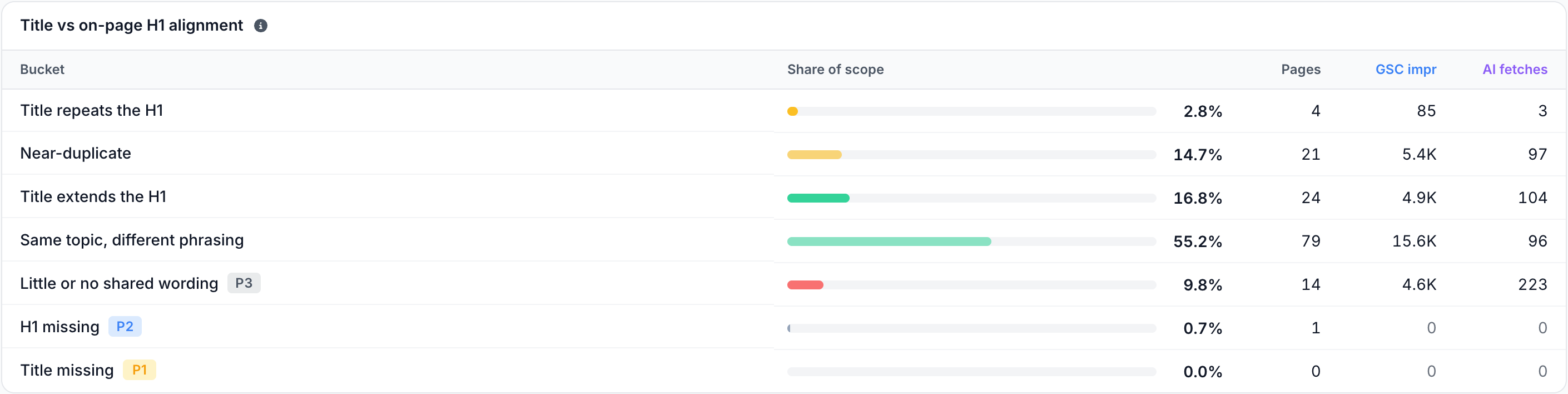
Each page lands in one bucket:
- Title repeats the H1 and Near-duplicate: the two say the same thing, which wastes a slot the title could use for a modifier or a second query. An opportunity, not a defect.
- Title extends the H1: the title says what the heading says and adds its own material, such as a brand or a qualifier. The shape to aim for.
- Same topic, different phrasing: one subject said two ways. Healthy.
- Little or no shared wording: the title barely repeats the heading, and Google may rewrite the result title from the heading.
- H1 missing and Title missing: one of the two tags is absent.
The last three buckets carry the severity of their check.
How to read it
- Start with templated duplicates. One template edit clears every page in the family, which makes a large Templated dup bucket the first place to look.
- Cause names the fix. Each cause needs a different remedy:
- Duplicate pages: the page bodies are the same too, and the tags are not the defect. Unique titles on duplicate pages do not help. Consolidate the pages or point their canonicals at one of them.
- URL variants: one path answers under many query strings. Fix it upstream, with canonicals or by not linking the variants.
- Template fix: use the field: a field on the page, such as the slug or the H1, already tells the pages apart, and the template can read it.
- No differentiator: nothing measured on the pages tells them apart. The pages need distinct content before they can have distinct tags.
- Duplicates with demand come first. The clusters are ordered by GSC impr, then AI fetches, which puts the duplicates people see at the top.
What to do next
- Fix it at the edge. Rewrite titles and descriptions in bulk without a release with an Edge SEO metadata rule, which can fill each page's tag from its own fields with variables, or start from the matching Action Board finding.
- Fix the template. When the cause is a template field your developers own, correct it in your code.
- Ask about it. Ask in the header starts with "Are missing tags widespread?", "Which duplicate fix comes first?" and "Do titles and H1s disagree?".
Where to find it
In the dashboard: Evergreen Crawl > On-Page Tags, with the tabs Title, Meta description and H1.