

Technical SEO audit skill
EdgeComet's Technical SEO audit skill checks your whole site, or one section, for serving and render errors, indexability, crawl reach and crawl budget, based on what Googlebot and AI bots received. It writes one audit document and proposes a finding for each issue class it finds. Also called an AI SEO audit or a site audit.
It ranks issues by consequence: a broken page that still earns clicks comes before hundreds of broken URLs nobody visits. Every count comes with its total, such as "405 of 555 URLs (73%)", which makes the audit readable months later.
Every EdgeComet site has this skill. Run it from Ask with + > Run a skill > Technical SEO audit.
What you get
An audit run delivers three things:
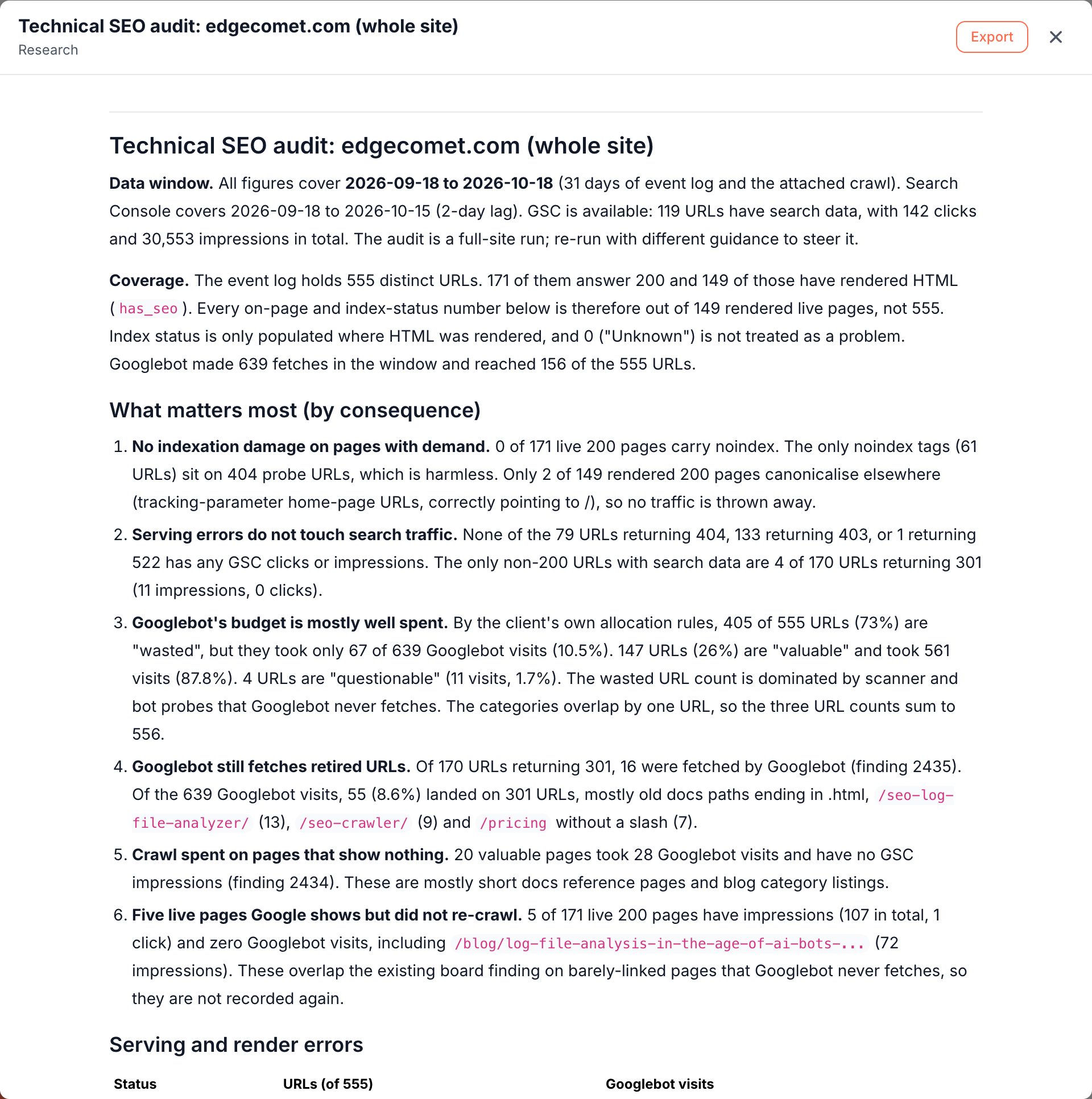
- An audit document titled "Technical SEO audit: " and the scope, such as "Technical SEO audit: edgecomet.com (whole site)". It opens on the canvas and stays in Action Board > Outputs > Documents, ready to export for a client or a ticket. See Documents.
- A proposed finding for each issue class, with its pages as a table. Proposed findings stay off the Action Board until you click Add to board, which lets you choose what your team works on.
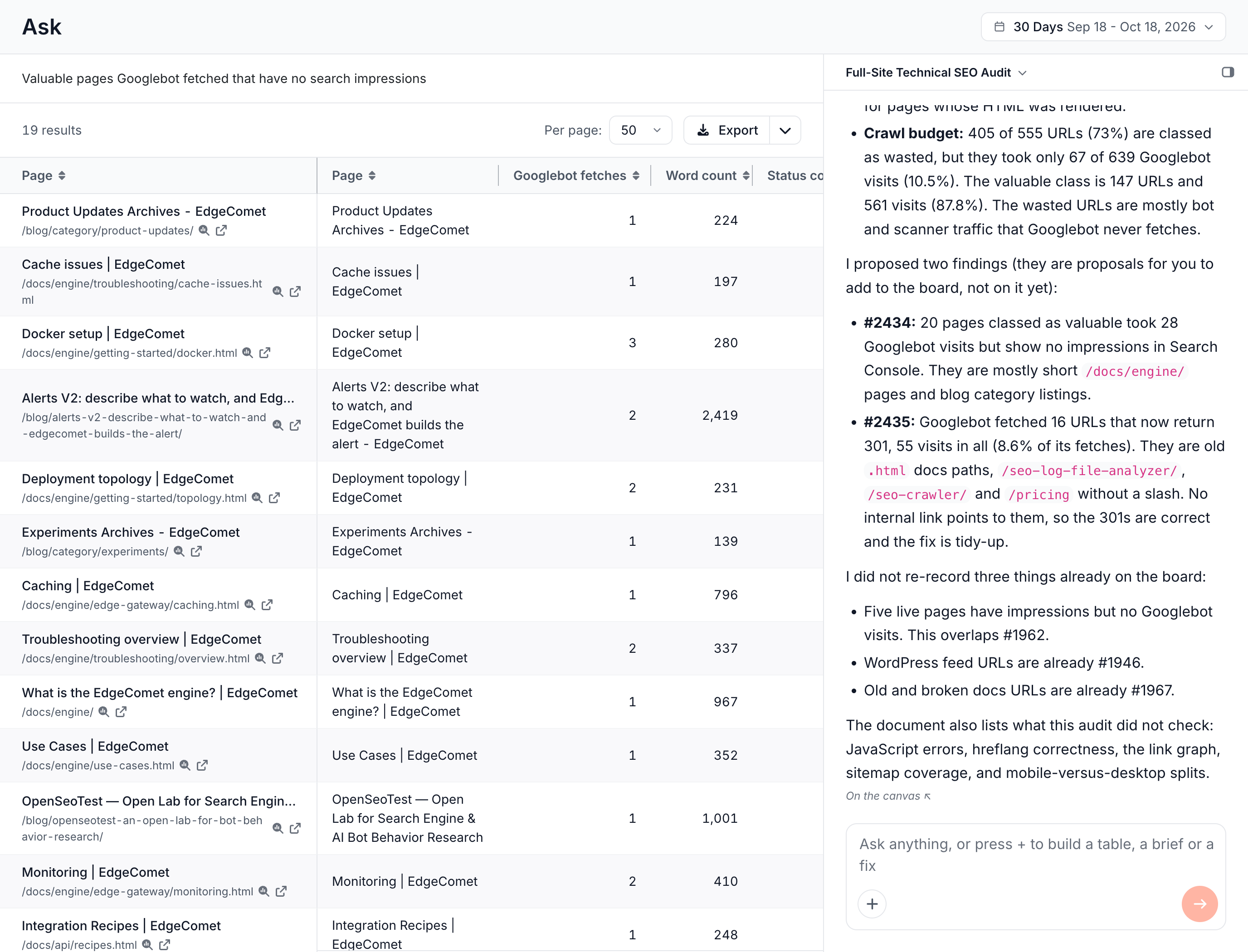
- A summary in the chat: the headline results, the findings it proposed, and the issues it left out because a finding on the board already covers them.
On edgecomet.com, the audit found no indexation damage on pages with search demand. It proposed two crawl budget findings, and skipped three issues that existing board findings already covered.
What the technical SEO audit checks
The audit checks three areas in this order, because each depends on the one before. A page that fails to serve cannot be indexed, and Googlebot visits to a page that cannot be indexed bring no search traffic.
Serving and render errors
- Status codes: 404 and 410 responses counted apart from 5xx errors, because they need different fixes. A 410 often needs only a link cleanup, while a 5xx is an incident.
- Redirects: the 3xx responses, their targets, chains and loops.
- Render failures: the failure types EdgeComet recorded, such as timeouts, browser crashes, failed navigation and origin 5xx responses, and pages that rendered but hit the time limit. One dominant failure type points to one bug, and a spread points to capacity. See Rendering troubleshooting.
- Search impact: every error class joined with Search Console clicks and impressions. A broken page that earns clicks goes to the top.
Indexability
- Index status of the pages EdgeComet rendered: indexable, non-200, blocked and non-canonical.
- noindex on pages with search impressions: pages that earn impressions but tell search engines not to index them.
- Canonicals that point away from pages that earn traffic, ranked by clicks.
- Live pages only: on-page checks count live 200 HTML pages, which keeps redirects and errors out of content numbers.
See Indexation for the same signals as a report.
Crawl reach and budget
- Reach: which pages Googlebot, other search engines and AI bots fetched in the window.
- Two mismatches: pages that show in Google with no Googlebot visit in the window, and pages Googlebot fetches again and again with no impressions.
- Never crawled or crawled long ago: the audit tells the two apart.
- The crawl budget split by your site's own rules into valuable, questionable and wasted, as a share of URLs and a share of Googlebot visits, with the sections behind the waste. See Crawl budget allocation.
- Valuable pages that earn nothing: pages your rules call valuable that take Googlebot visits and earn no impressions. Your rules do not count those visits as waste, but they bring no search traffic.
How the audit reports numbers
The audit states its data window, gives every count with its total, and reports only figures it measured:
- It states the data window first, and whether Search Console has data for the scope. Without Search Console data, it runs as a crawl-only audit and states that, instead of reporting zero clicks.
- Every count has its total. On edgecomet.com, the audit classed "405 of 555 URLs (73%)" as wasted, but those URLs took only "67 of 639 Googlebot visits (10.5%)".
- Directories, with examples. A problem on thousands of URLs usually sits in a few directories, and the audit reports them with their counts and a few example URLs.
- Ordered by impact. The audit says why each item sits where it does, which lets you follow the reasoning and reorder items you disagree with.
- Only measured numbers. Every figure comes from a query over your data. When something cannot be measured, the document says it is unknown.
The audit runs without stopping to ask questions. When it has to choose, it picks the reading best supported by your data and states the assumption at the top of the document.
Run a technical SEO audit
Run the skill from a new Ask conversation:
- Click the Ask tab at the top of the sidebar, then New conversation.
- Press +, choose Run a skill, then Technical SEO audit. You can also click Run next to the skill under Action Board > Skills.
- Under Run against, choose Whole site or Segment. A segment audits one section, such as your blog or product pages, against its own totals. A URL list also works. A URL list run reports in the conversation and proposes no findings.
- Optional: steer the run under Focus for this run, for example "Pay most attention to product pages and old redirects."
- Click Start.
The conversation shows each step while the audit works. See Where the results land.
What the audit document contains
The document has the same sections on every run, which lets you compare two audits section by section:
- Data window and coverage: the dates, whether Search Console had data, and how many pages have rendered HTML.
- What matters most: three to six items ordered by consequence, each with its number and total.
- Serving and render errors, Indexability and Crawl reach and budget: one section each.
- What this audit did not check: the checks outside its scope.
- Next steps: the fix order, tied to the proposed findings.
Each run writes a new document, and earlier audits stay in Outputs > Documents. See Where the results land.
Act on the audit
- Track the issues. Click Add to board on the proposed findings you want, or Add all to board. See Findings from Ask and skills.
- Share the audit. Export the document for a client or a ticket. See Export documents.
- Track the site over time. Run the skill on the same scope each month. The data window and the totals at the top of each document show how the numbers moved.
How this audit differs from a site crawler audit
- A site crawler sends its own bot, sees each page once on the day of the crawl, and lists the issues it finds. The Technical SEO audit reads what Googlebot and AI bots received over the window, with the status codes and renders they got.
- Search impact decides the order. Every error class is joined with Search Console clicks and impressions on the same URLs, which puts the issues that cost traffic first.
- Your own crawl budget rules sort Googlebot's visits into valuable, questionable and wasted, including the URL patterns EdgeComet learned from your site's bot traffic.
- Findings lead to fixes. Each proposed finding you add to the Action Board gets a fix that EdgeComet drafts and confirms with a recount. See Action Board overview.
See EdgeComet compared with a site crawler.
Where to find it
In the dashboard: Ask > New conversation > + > Run a skill > Technical SEO audit. The skill is also listed under Action Board > Skills.
Next
Related Articles
- Prioritizing Technical SEO Fixes by Revenue Impact
- AI Search Indexation Monitoring: What You Can and Can’t Measure Today
- Log File Analysis for SEO: A Practical Guide for 2027
- What is the EdgeComet Action Board
- Evergreen Crawl: A New Way to See Your Site Through Googlebot’s Eyes
- Crawl Rate vs Crawl Budget: What to Monitor and How to Optimize