

Titles and meta descriptions with AI
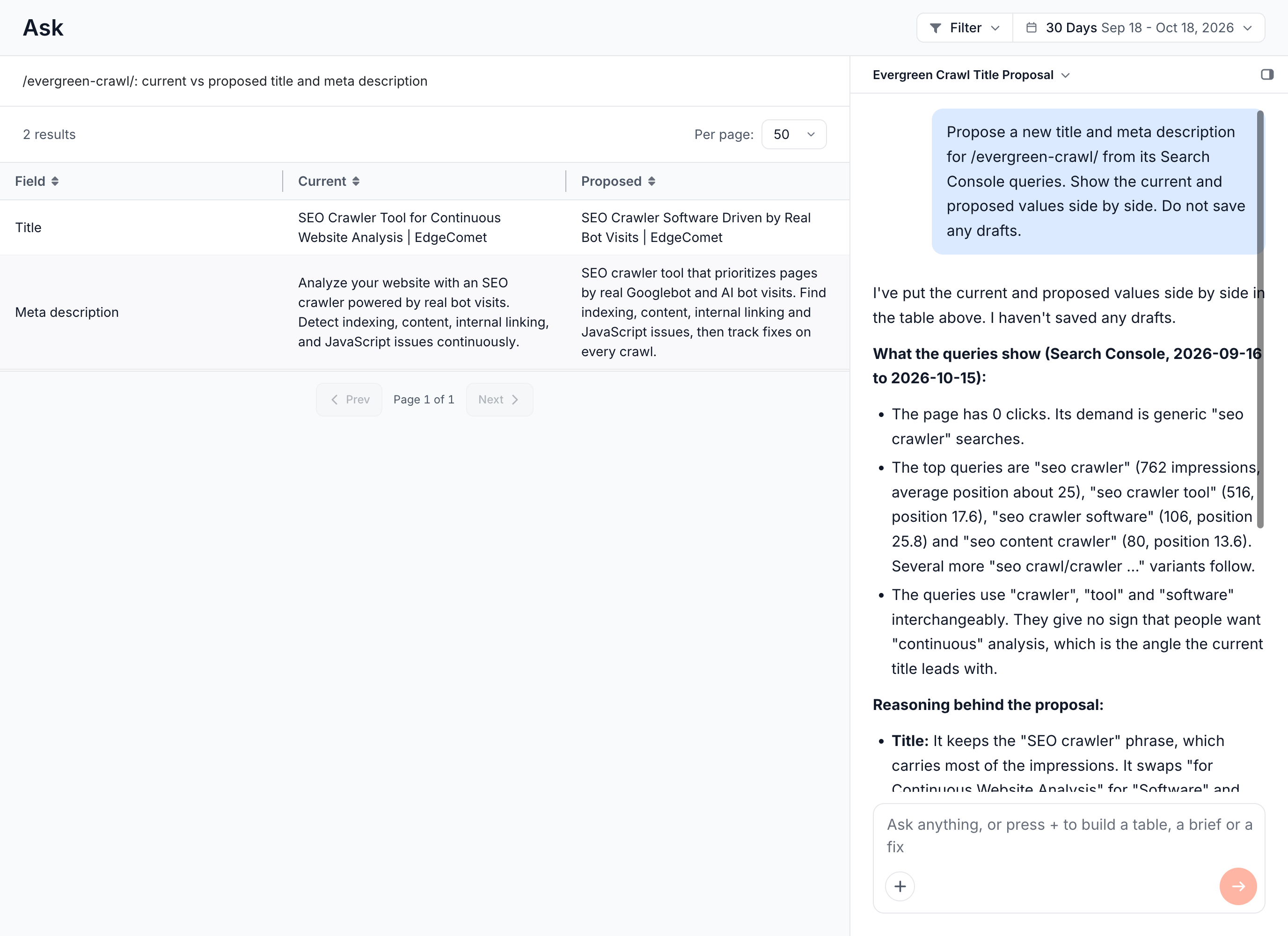
EdgeComet writes new titles, meta descriptions and H1s for your pages from each page's own content and the queries it earns in Search Console. Also called an AI title tag generator or a bulk meta description generator.
You review every new value next to the current one, with flags on values that need a second look. Then you deploy at the edge, and bots get the new values from their next request, with no CMS change or release.
Start in Ask with Rewrite titles and meta, or on an Action Board finding with Fix at the edge.
Where to start
Start in Ask for pages you name, or on an Action Board finding for the pages it lists:
- In Ask, a few pages. Press + and choose the Rewrite titles and meta chip. The field reads "Which pages, and which fields". Ask writes the values, shows each page's current and new value, and saves them as Edge SEO drafts with a link to review them.
- In Ask, many pages. With the same chip, Ask records a finding over the pages and starts a rewrite run on it. The run lands on a task where you review, edit and regenerate the values. See AI generation runs.
- On an Action Board finding. A step that rewrites titles or descriptions offers Fix at the edge, or Fix the top 100 at the edge on a larger step. See Fix routes a step offers.
Pick the pages in Ask with Add pages or a URL list, or name a section, such as "titles of every page under /blog/". See Focus a question on pages. When the pages or the fields are unclear, Ask checks with you before it drafts.
What each rewrite reads
Each rewrite reads the page's own data:
- Search Console queries: the page's top 10 queries, with their impressions, clicks and positions.
- The page content: EdgeComet reads the page as bots receive it when it cannot capture a current value.
- The current values: the title, meta description and H1 the page has now.
- Extracted fields: values your custom extraction rules pull from the page, such as product name, brand, price or category.
- Keyword research: a keyword table attached to the finding, and live keyword research when you ask for it in Ask. See Where the research goes.
- Your guidance: the focus you give the run and your site's Guidelines.
Keyword data covers one market. See Research another market for how EdgeComet picks it.
How EdgeComet writes the values
Every value follows five rules:
- True to the page. No facts, prices or claims the page and its data do not support.
- One set per page. The title, description and H1 share one subject and one intent.
- In the page's language, whatever language you write your instructions in.
- Unique. Each page gets its own text, not one shared with other pages.
- Clean. No placeholder text, template tokens such as
{brand}, ALL CAPS or clickbait.
Each field has its own writing rule:
- Title: leads with the page's primary subject and keeps the brand at the end, in up to 60 characters.
- Meta description: one or two sentences a searcher can act on, with no keyword lists, in up to 155 characters.
See What a run reads for each page.
Review the new values
The task page lists each page with its Now and After values, and flags the values worth reading before they go live:
- Over length: a title over 70 characters or a meta description over 175.
- Unchanged: the new value matches the current one.
- Placeholder: the value holds placeholder text, such as a
{token}, TODO or lorem ipsum. - No keyword grounding: only the page content backs a keyword-targeted value.
See Flags on a drafted value for every flag. Rows with no flag arrive ticked, and flagged rows arrive unticked. On the task page:
- Edit changes the value by hand. Saving the edit ticks the row.
- Regenerate writes that row again.
- Tick all clean and Untick all set every row at once.
See Review the drafted values.
Deploy the new values
Deploy the ticked values at the edge, save them as drafts, or download them:
- Deploy at the edge (N): serves the ticked values to bots from their next request. Roll back undoes it in one click.
- Save as drafts (N): keeps them as Edge SEO drafts to deploy later.
- Download CSV (N): exports them for your CMS team.
See Deploy, save or download the ticked rows.
The edge changes the page bots receive. Where the Edge SEO snippet runs, visitors see the new values too. Your origin code does not change.
Steer how titles are written
Steer the rewrites with a focus for one run, or with Guidelines for every run:
- A focus for one run. The launch dialog of an Action Board fix has Focus for this run (optional), such as "prioritize decayed posts". In Ask, put the instruction in your request. Run again with a focus on the task page reruns with a new one.
- Guidelines for every run. Rules in your site's Guidelines apply to every rewrite. A rule can target one job in plain words, such as "When rewriting titles, put the brand last, after a pipe." See AI SEO agent guidelines.
Where to find it
In the dashboard: Ask > New conversation > + > Rewrite titles and meta, or a finding on the Action Board and Fix at the edge.