

Alert templates: every built-in alert
An EdgeComet alert template is a ready-made alert: what it watches, a default threshold, a severity and how often it checks. You add a rule from it, choose the pages, adjust the numbers and save. Also called built-in alerts or the alert library.
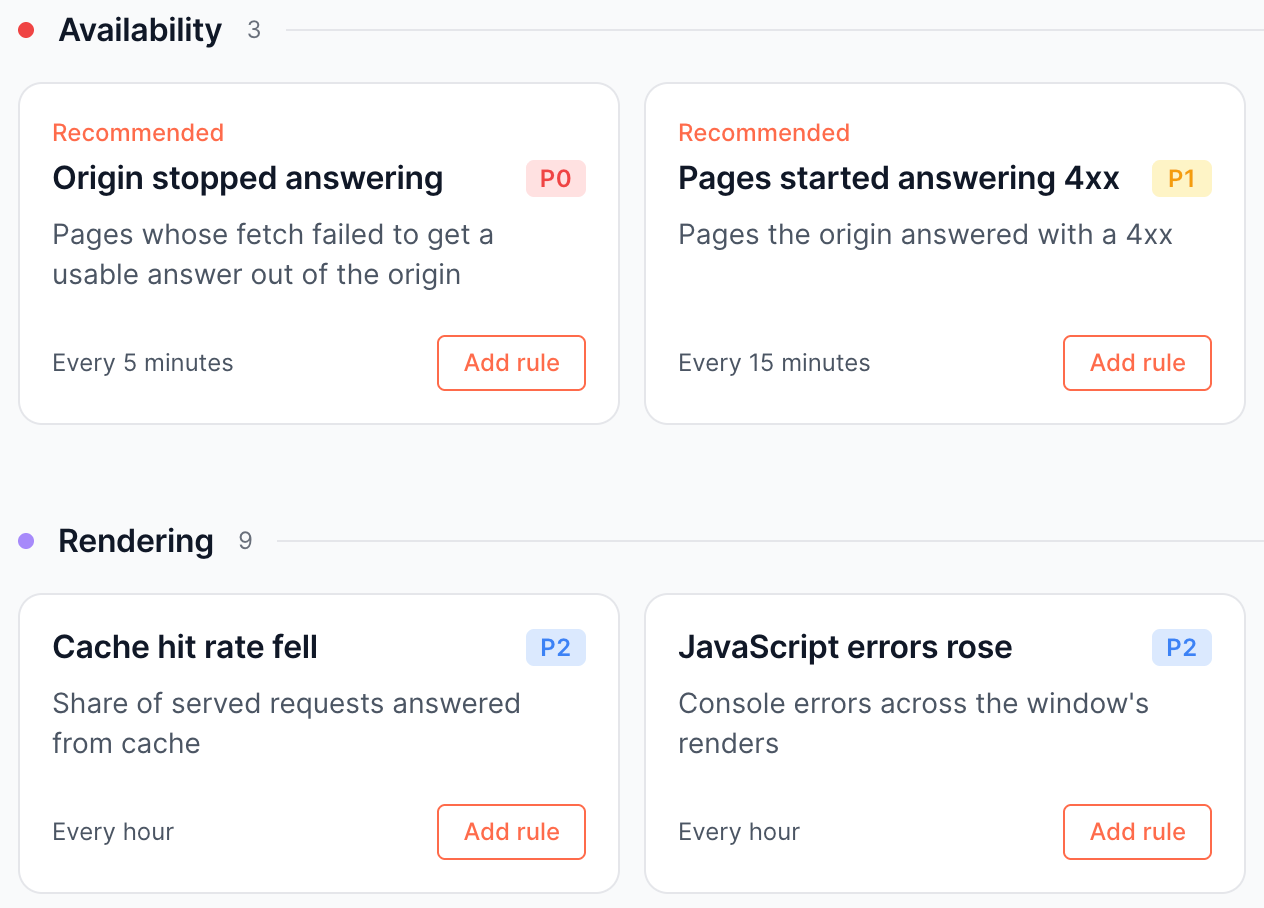
Templates are grouped in six categories. Each category on this page lists what each template catches, its default severity, its check and the threshold it fires at by default.
How to read the lists
Each category on this page is one table. The columns use the same words as the gallery:
- Severity: P0 is critical, P1 warning and P2 info. Info alerts appear in the product only and are never sent. See Severity.
- Checks: "Every 5 minutes" to "Once a day" for bot traffic, "When a crawl finishes" for crawl alerts, and "When Search Console publishes a day" for click alerts. "(changeable)" means you pick the interval on the rule.
- Fires at: the default threshold. A rule fires at the value: "5 pages or more" fires at exactly 5.
- Closes: rules that compare with an earlier reading, such as the same window yesterday, the previous week or the previous crawl, report a rise or a fall. Their incidents close when you acknowledge them, not on their own. See How an incident closes.
- Ignoring: a floor that stops a quiet window from producing a large percentage out of a few events. Setting a floor to 0 turns it off, except where the table says it cannot.
Recommended marks the templates the Alerts page offers on a site with no alerts yet. See Turn on the recommended alerts.
A card the site cannot run yet is greyed out with the reason and a link to fix it, such as "Search Console is not connected for this site." with Connect Search Console, or "This site has not been crawled yet." with Set up a crawl.
While the data is on its way, the card says "Search Console data is still importing." or "Available after the first crawl report."
Availability
The Availability templates watch whether your origin answers bots and whether it exposes files it should not.
| Template | What it catches | Severity | Checks | Fires at |
|---|---|---|---|---|
| Origin stopped answering (Recommended) | Requests EdgeComet passed to your server that got nothing usable back: a server error, a refused connection, a page that never loaded, or an empty response | P0 | Every 5 minutes (changeable) | 5 pages or more |
| Pages started answering 4xx (Recommended) | Pages your server answered with a client error: a 404 for a page that is gone, a 403 for one it refuses, a 410 for one removed on purpose | P1 | Every 15 minutes (changeable) | 20 pages or more |
| Sensitive file exposed (Recommended) | Scanner requests for paths like /.env, /.git/config and debug logs that got a real file back instead of an error page | P0 | Once a day, looking back 30 days | 1 file or more |
| Fake search-engine traffic | Requests that claim to be Googlebot or another search engine from addresses that fail the search engine's own verification | P2 | Every hour (changeable) | A rise above 100% against the same window yesterday, ignoring windows under 200 requests |
While your origin is down, EdgeComet keeps serving the pages it already has: bots get cached pages, and those requests record no failure. Origin stopped answering counts pre-cache attempts too, which is where the outage shows.
Sensitive file exposed counts files, not pages: an answer must be a file that is neither HTML nor an image to count, and a site that answers every probe with an HTML page does not fire. The incident closes, with an email, 30 days after the last fetch that got the file. Log Analyzer > Security lists the probes and every exposed path, HTML pages included. See Find exposed .env, .git and backup files scanners probe for.
Rendering
The Rendering templates watch whether a render produced a usable page at the usual speed.
| Template | What it catches | Severity | Checks | Fires at |
|---|---|---|---|---|
| Renders are failing | Pages EdgeComet could not render: the browser crashed, the render pool had no free slot, the page never finished loading, or the HTML could not be read | P1 | Every 15 minutes (changeable) | 5 pages or more |
| A page block stopped rendering | Live pages that render fine and return HTML, but no longer contain the block you extract, such as the price, the delivery promise or the review stars | P0 | Once a day | Above 5% of the pages in scope, ignoring scopes under 200 pages |
| Renders came back hollow | Pages that answered 200 and produced HTML with almost no content: a soft 404, or a template that rendered its shell and nothing else | P1 | Once a day | Under 50 words or 2,048 bytes of HTML on above 2% of the pages in scope, ignoring scopes under 200 pages |
| Sitemap pages that stopped re-rendering | Pages in your sitemap that pre-cache should have refreshed and that did not render successfully at all | P1 | Once a day | Above 10% of the sitemap pages in scope, ignoring scopes under 500 pages |
| Renders got slower | The median time EdgeComet takes to render one of your pages, against the same window yesterday | P1 | Every hour (changeable) | A rise above 50%, ignoring medians under 500 ms |
| Responses got slower | The median time to answer a request, against the same window yesterday: cache hits, bypasses and renders together, which is what a bot waits for | P1 | Every hour (changeable) | A rise above 50%, ignoring medians under 200 ms |
| JavaScript errors rose | Console errors and uncaught exceptions recorded while rendering your pages, against the same window yesterday | P2 | Every hour (changeable) | A rise above 100%, ignoring windows under 50 errors |
| Sub-resources are failing to load | Scripts, stylesheets and images that failed to load while rendering: a CDN or a third party breaking your pages from the outside | P2 | Every hour (changeable) | A rise above 100%, ignoring windows under 50 failed requests |
| Cache hit rate fell | The share of requests EdgeComet answered from its cache, against the same window yesterday. A fall means more bot traffic reaches your server | P2 | Every hour (changeable) | A fall of 15 points, ignoring windows under 500 served requests. This floor cannot be turned off |
A render can fail on EdgeComet's side, such as a full render pool, or because of the page, such as a timeout or a crash. When a render fails, EdgeComet serves your origin's HTML instead, and the bot gets the page without the content JavaScript adds. See Monitor renders and JavaScript errors.
A page block stopped rendering needs a custom extraction field that pulls one value from your pages. If you disable or delete that field, the rule stops and says so rather than reporting every page as missing the block.
Search
The Search templates watch whether pages lost their audience in Google. Both need Search Console connected and check when Google publishes a complete day, about three days behind.
| Template | What it catches | Severity | Checks | Fires at |
|---|---|---|---|---|
| Pages lost their clicks (Recommended) | Pages whose Search Console clicks fell by half or more against the previous 7 days, counted per page | P1 | When Search Console publishes a day | 10 pages or more, each down 50% or more week over week, counting pages that had 5 clicks or more before |
| Queries earning clicks collapsed | How many different keywords brought you a click in the last 7 days, against the 7 days before: a narrowing of what you rank for, before any page shows it | P2 | When Search Console publishes a day | A fall above 30% week over week, ignoring under 20 queries |
Traffic
The Traffic templates watch whether a section lost its clicks and whether bots still fetch your pages.
| Template | What it catches | Severity | Checks | Fires at |
|---|---|---|---|---|
| A section lost its clicks (Recommended) | The total Search Console clicks of a section against the previous 7 days. Three head pages losing most of their clicks move this, where a per-page alert counts them as three pages | P1 | When Search Console publishes a day | A fall above 30% week over week, ignoring sections under 100 clicks before. This floor cannot be turned off |
| Bots stopped fetching | How many different pages were fetched from your server through EdgeComet, against the same window yesterday | P1 | Once a day | A fall above 50%, ignoring under 100 pages |
A section lost its clicks needs Search Console connected.
SEO
The SEO templates watch directives and page facts on live pages.
| Template | What it catches | Severity | Checks | Fires at |
|---|---|---|---|---|
| Noindex on live pages (Recommended) | Pages that answer 200 but carry a robots noindex tag or header. It reports the state, which also catches a noindex that shipped before the alert existed | P0 | Once a day | 1 page or more |
| Pages changed (Recommended) | Pages where something search engines read changed since the last check: status, redirect, indexability, canonical, title, description, H1, structured data, hreflang, body text or an extracted value | P1 on the card | Every hour (changeable) | 10 pages or more |
| Site releases (Recommended) | A deploy that removes or breaks something search engines read on many pages of one page type. One incident per release, followed while it rolls out and closed when it is reverted | P1 | Every hour | One incident per release |
| A robots directive appeared | Live pages carrying the directive you choose: nofollow (the default), noarchive, nosnippet, noimageindex, or none, which means noindex and nofollow | P1 | Once a day | 5 pages or more |
Pages changed has its own page: which facts it follows, how to narrow each one and why a rule with the default facts is saved as critical. See Get alerted when titles, canonicals or noindex change.
Site releases has no threshold or scope to set: you can change its name and severity.
Only releases that remove or break something open an incident, and edits and gains are recorded on the Changes report. See Get alerted about a release.
Crawl
The Crawl templates check what the newest Evergreen Crawl found and what changed since the one before it. EdgeComet runs no separate crawler: each crawl is built from bot and pre-cache fetches. Every crawl alert checks when a crawl finishes.
| Template | What it catches | Severity | Fires at |
|---|---|---|---|
| Pages fell out of indexability (Recommended) | Pages the previous crawl found indexable that this crawl does not: blocked, redirected, canonicalized elsewhere or broken | P1 | 10 pages or more |
| Redirect loops (Recommended) | Addresses that redirect back to themselves, directly or through one hop. Nothing is at the end of the chain, and a crawler gives up | P1 | 1 redirect or more |
| A crawl issue grew | Pages carrying the crawl issue you choose, against the previous crawl | P1 | A rise above 25% or of at least 50 pages, ignoring issues under 20 pages and rises under 10 pages |
| New pages appeared in a crawl | Pages in this crawl that were not in the previous one: new content, new filters, or URLs a template or a link started producing | P2 | 10 pages or more |
| Newly broken pages in a crawl | Pages that answered normally in the previous crawl and answer 4xx or 5xx in this one: existing pages that broke, not new URLs | P1 | 10 pages or more |
| Pages lost their internal links | Pages the previous crawl reached through an internal link and this one did not, such as a navigation block that stopped rendering | P2 | 10 pages or more |
| Redirect chains | Addresses that redirect to another address that redirects again | P1 | 10 redirects or more |
| Sitemap pages the crawl never reached | Addresses your sitemap lists that the latest crawl did not find: pages nothing links to, or a sitemap listing addresses that no longer exist | P2 | Above 10% of the sitemap pages in scope, ignoring scopes under 500 pages |
Most crawl alerts close at the next crawl that no longer finds the pages. A crawl issue grew reports a rise, and its incident closes when you acknowledge it, or 72 hours after it first fired. An issue can also grow because a more specific issue that claimed its pages shrank.
Changes to this list
- 2026-10-25: New pages appeared in a crawl added to this page; the template already existed.
- 2026-10-22: Site releases added, recommended.
- 2026-10-21: Sensitive file exposed added, recommended.
- 2026-10-18: A crawl issue grew added.
Where to find it
In the dashboard: Alerts > Rules > Templates, or Templates in the header of any alerts page. In Search and ask (Cmd+K or Ctrl+K), New alert rule opens the same gallery.