

EdgeComet configuration
EdgeComet configures itself from your site's own data. After you route bot traffic through EdgeComet and connect Search Console, it sets up branded keywords, segments, custom extractions, crawl budget rules, link regions and the first Action Board over the site's first two weeks. Also called zero configuration or automatic setup.
The Configuration menu of each website holds what EdgeComet set up, where you can review and change it. The same menu holds the settings for serving bots and for access to the website.
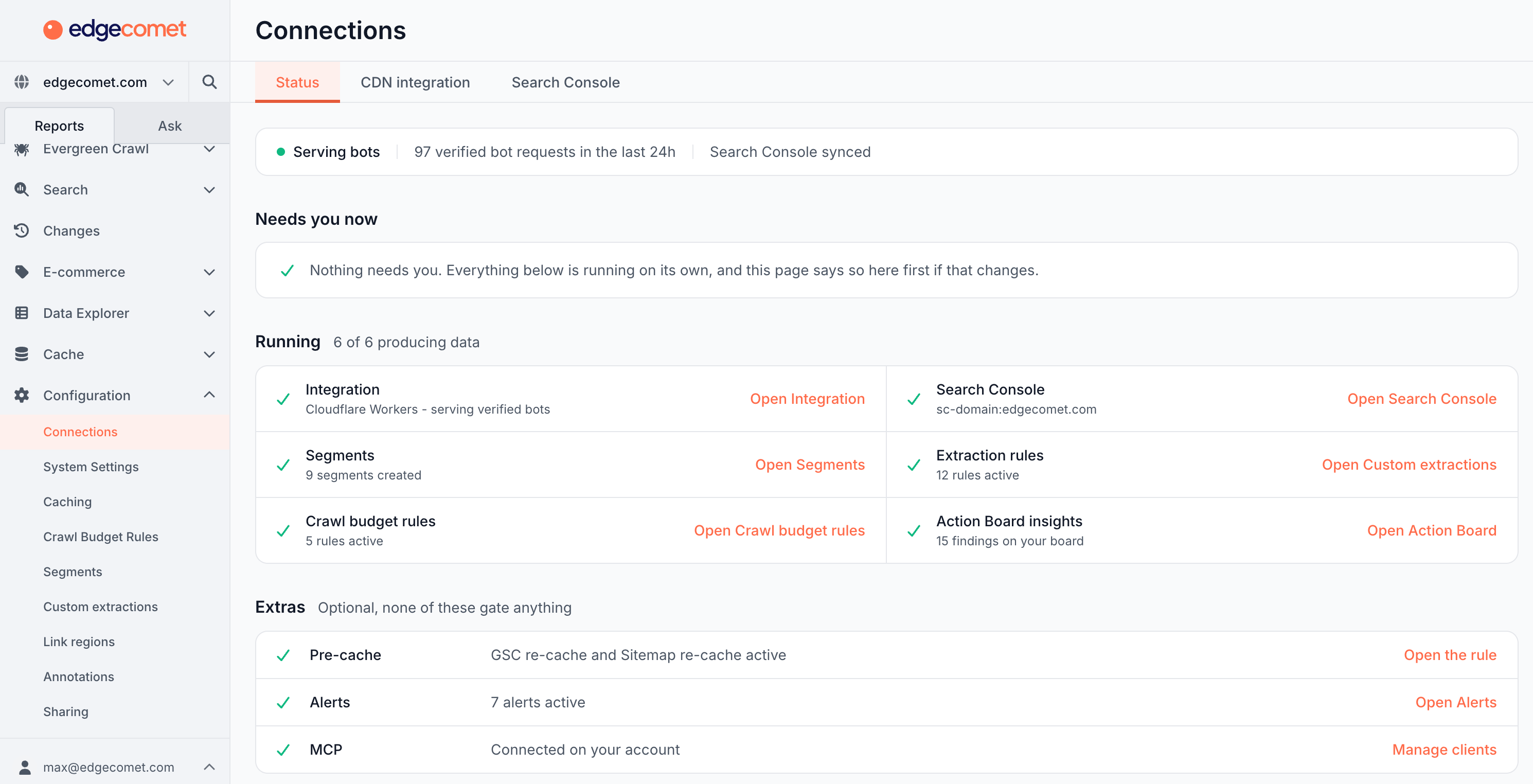
What the Configuration menu holds
The Configuration menu in a website's sidebar lists these entries, in this order:
| Entry | What you do there | Guide |
|---|---|---|
| Connections | The state of the install and of the automatic steps, your CDN and Search Console | Watch integration health, Route bot traffic, Connect Search Console |
| System Settings | Rendering, dimensions, URL rules and deploys | Rendering overview, Deploy, roll back and restore |
| Caching | Cache lifetime and pre-cache rules | Cache settings, Pre-cache rules |
| Crawl Budget Rules | The rules that sort bot requests into valuable, questionable and wasted | Crawl Budget Rules |
| Segments | Groups of pages by type, such as product pages and articles | Segments |
| Custom extractions | Fields read from your pages, such as price, stock or author | Custom extractions |
| Link regions | Where each internal link sits: menu, footer, content and other regions | Link regions |
| Annotations | Your team's notes on report charts | Annotations |
| Sharing | Who can open this website, and with which role | Share one website |
Read-only and Manager members see Connections and the five entries from Crawl Budget Rules to Annotations. Only the Owner sees Sharing. See How limits show in the dashboard.
What EdgeComet configures on its own
EdgeComet runs six setup steps for every website, in a fixed order. Each step starts once the site has the data it needs and the steps it depends on have finished:
| Step | What it sets up | Starts when | Waits for |
|---|---|---|---|
| 1. Branded keywords | The terms that mark a search query as branded | The first Search Console import completes | |
| 2. Segments | Groups of URLs by page type | The first Search Console import completes | |
| 3. Custom extractions | Rules that read the fields your templates carry, such as price or author | Bots have fetched pages over a few days | |
| 4. Crawl budget rules | Waste rules for your URL structure, on top of the baseline every site gets | 7 days after the first verified bot visit, once bots requested at least 300 distinct URLs in 30 days | Segments |
| 5. Link regions | Rules that sort internal links into menu, footer, content and other regions | Links are captured on at least 20 indexable pages, with at least 200 distinct internal links, in the last 30 days | Custom extractions |
| 6. Action Board | The first board of findings, then a new analysis every 14 days | The first crawl report is evaluated | Segments and custom extractions |
For the days on which each step usually lands, see the timeline of your first days.
Automatic steps apply their results without a review step. None of them changes what visitors or bots receive: branded keywords, segments, crawl budget rules and link regions classify data in your reports, and extraction rules only read pages.
Runs you start yourself to generate segments, extraction rules or link regions show their proposals for review before anything is saved. Detect page chrome applies its rules at once. See Page chrome. Once the first days end, Configuration > Connections > Status lists segments, extraction rules, crawl budget rules and the Action Board under Running, each with its state, such as "9 segments created".
How EdgeComet tests what it sets up
The segment, custom extraction, crawl budget and link region steps use AI that reads your site's data, and keep a proposal only after testing it on that data:
- Segments: every filter is run against the URLs bots requested before the segment is kept. A filter that matches too few pages, or that repeats an existing segment, is dropped.
- Custom extractions: a rule is kept only after it produced a value of the right type on real renders of your pages. It is also tried on pages of other types, which keeps a product rule from firing on listings.
- Crawl budget rules: every URL pattern is matched against the URLs bots requested in the last 30 days. A pattern that would match too much of the site is refused.
- Link regions: the whole rule set is measured against your site's captured links before it goes live.
The extraction and link region rules EdgeComet writes avoid class names that your site's build generates, because the next deploy can rename them. A link region rule that still relies on one is marked generated class.
Work you did stays as you made it:
- The automatic segment run only adds segments. It never edits or deletes yours.
- The automatic extraction run starts only on a site with no extraction rules and no earlier extraction run. A rule you delete is not created again behind your back.
- A crawl budget analysis you ran yourself that completed, or a link region run you started, counts as that step done.
When a step cannot run
A step that lacks data waits, and the steps after it do not wait forever:
- No Search Console connection: branded keywords and segments wait for the first import. The steps that depend on them start anyway 21 days after the site's first bot visit, and both run later if you connect Search Console.
- A small site: a step whose threshold the site never reaches keeps waiting, and its dependents start after 21 days. A site with a few dozen pages may never reach the custom extraction threshold.
- A failed automatic run: crawl budget rules try again on their own. Segments get one automatic attempt.
- A link region run that finds no rule: nothing is applied, and the run does not repeat on its own.
You can also start most steps by hand from their own page. See What you can change.
What you can change
For each step, here is what you can change:
- Branded keywords: edit the list, or regenerate it with AI. See Branded keywords.
- Segments: create, edit and delete any segment, or ask the AI for new ones and review them. See Segments and Segments with AI.
- Custom extractions: write, edit and delete rules, choose which ones the Changes report tracks, and revert automatic repairs. See Custom extractions.
- Crawl budget rules: steer the generated rules with notes, then regenerate them. The baseline rules are the same on every site. See Crawl Budget Rules.
- Link regions: generate a new rule set and review it before it goes live, or remove all rules. See Link regions.
- Action Board: analyzes the site again every 14 days. See How often the Action Board runs.
How this differs from setting up an SEO platform by hand
A site crawler or an SEO platform starts generic. Someone has to define the product pages, write the CSS selectors for prices, decide which parameter URLs waste crawl and mark the menu links. That takes days on a new site, and a redesign breaks part of it.
EdgeComet does this work from the requests bots make to your site and from your Search Console data:
- Built from real bot traffic. Segments, crawl budget rules and link regions come from the URLs and links bots received, not from a sample crawl.
- Tested before it is kept. A proposal that never matched a real page or URL is dropped.
- Kept working. Extraction rules are checked every day and repaired when a template changes. See Extraction rule health and automatic repairs.
- Applied to past data. New segments and crawl budget rules apply to past requests in your reports, which keeps period comparisons consistent.
For product comparisons, see EdgeComet compared with an SEO platform that combines a crawler and log analysis and with a site crawler.
What automatic setup does not do
- It does not change your pages or what bots receive. Branded keywords, segments, crawl budget rules and link regions classify data in reports. Extraction rules read pages and change nothing on them.
- It does not set how bots are served. Cache lifetime, pre-cache rules, dimensions and CDN settings keep the values set when you added the website, until you change them. See Cache settings, Pre-cache rules and Dimensions.
- It does not fill in past extraction values. An extraction rule reads pages processed after it goes live. See How values are collected.
Where to find it
In the dashboard: open a website, then Configuration in the sidebar. The state of the segment, extraction rule, crawl budget and Action Board steps is on Configuration > Connections > Status once the site's first days end. Branded keywords and link regions show their state on their own pages.