

Validate structured data across your site
EdgeComet validates the JSON-LD structured data on every indexable page in your crawl, against the schema.org vocabulary and Google's rich result requirements. It lists every problem with the pages it affects and the demand on them. Also called schema validation or structured data testing.
Validation runs on every crawl, with no URLs to paste and no setup. It reads the markup as EdgeComet served it, including markup an Edge SEO rule inserts and, on pages EdgeComet renders, JSON-LD that JavaScript adds.
Google recommends JSON-LD: "In general, Google recommends using JSON-LD for structured data if your site's setup allows it, as it's the easiest solution for website owners to implement and maintain at scale (in other words, less prone to user errors)." (Google Search Central)
How validation works
Every crawl collects the JSON-LD of each page bots fetched, as EdgeComet served it. The validator then reads each node the way Google reads it:
- It parses each block. A block that is not valid JSON is a syntax error, and nothing in it counts.
- It decides what each node is. A node is judged as the type Google treats it as: a SportsEvent is read as an Event, and a Store as a LocalBusiness.
- It checks the vocabulary. Types, properties, dates, URLs, enumeration values and
@idreferences are checked against schema.org. - It checks Google's requirements. For types with a Google rich result, it checks the properties Google requires and recommends.
Each problem it finds is a finding: one property and one problem on one type, such as Article › dateModified: Recommended property missing. A finding counts every page that carries it. A validation finding is not an Action Board finding, which groups pages into one fix.
Critical, Warning and Opportunity
Every finding has one of three severities:
- Critical: blocks a Google rich result: a JSON-LD syntax error, or a Google-required property missing on a Product, Event, JobPosting, Recipe, VideoObject or LocalBusiness.
- Warning: an invalid breadcrumb trail, an invalid value, an unknown property or an Organization gap.
- Opportunity: a recommended property is missing. Ratings are never suggested.
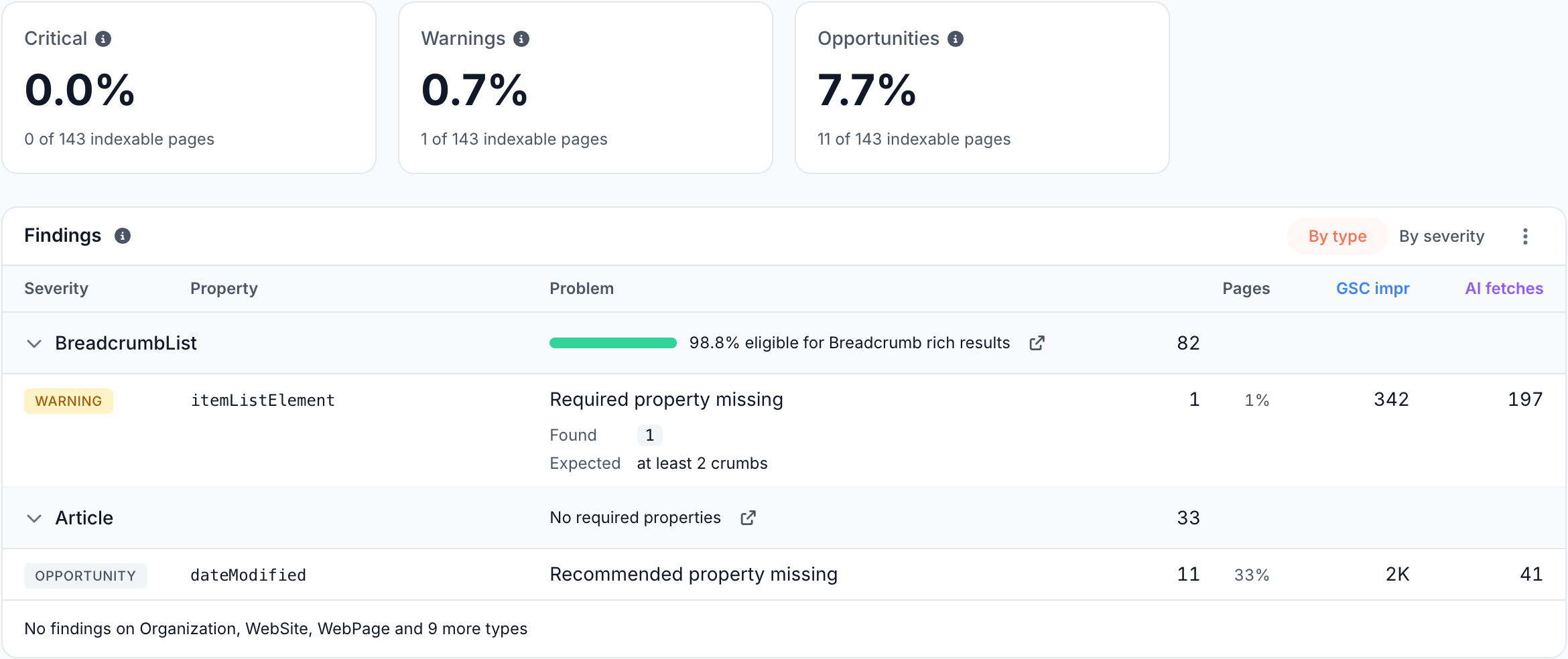
The three cards at the top count the share of indexable pages with at least one finding of each severity. Fix Critical first: those pages cannot earn their rich result until the finding is gone.
What the Findings table shows
The Findings table lists every finding with its Severity, Property, Problem, Pages, GSC impr and AI fetches. Group it two ways:
- By type: one band per type, the type Google judges the node as. This is the default.
- By severity: one band each for Critical, Warnings and Opportunities, with each row named as type and property.
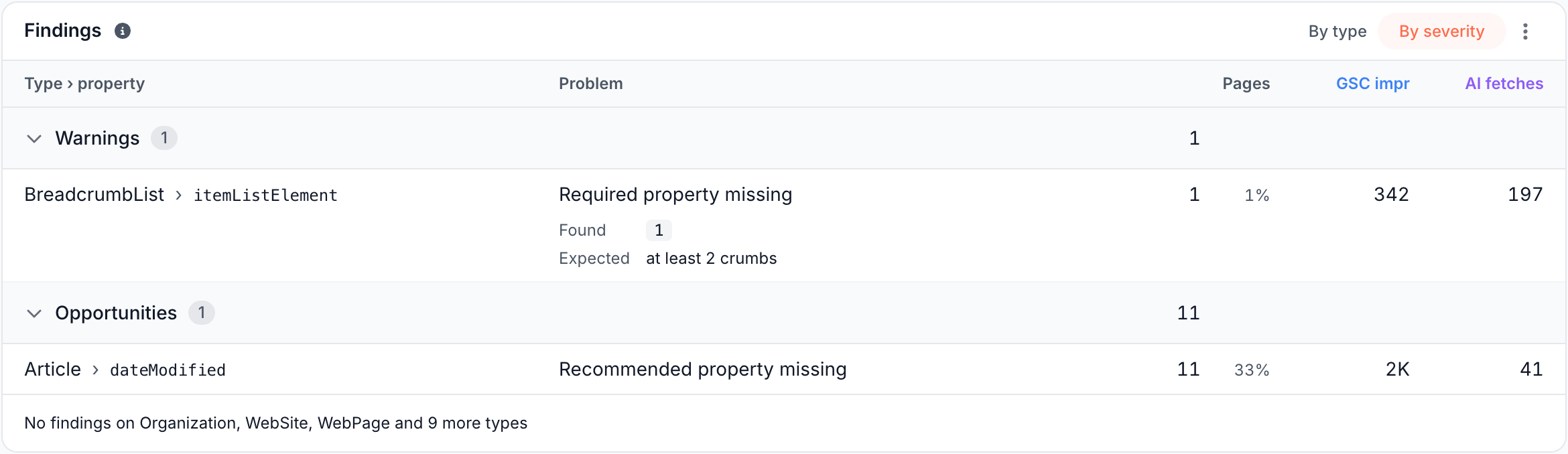
Where the validator read a value, the row shows what it Found and what it Expected, such as found 1 and expected at least 2 crumbs. The share next to Pages is the part of the type's validated pages that carry the finding.
The footer names the types with no findings.
Eligibility per type
In the By type view, each band's header says what Google does with the type:
| Band header | Meaning |
|---|---|
| {share} eligible for {Feature} rich results | The share of the type's pages with every property Google requires, such as "98.8% eligible for Breadcrumb rich results" |
| No required properties | Google lists no required properties for the type, such as Article and Organization |
| Site name, read from the homepage | WebSite: Google reads the site name from the homepage only. See Site identity |
| Product variants not judged yet | ProductGroup: variants are listed, not judged |
| No Google rich result | The type is valid schema.org with no Google rich result, and only vocabulary checks apply |
| Rich result retired by Google | Google no longer shows a rich result for the type |
The external link icon in the band header opens Google's requirements for the type. Findings that belong to no type, such as a syntax error, sit in a band named JSON-LD block.
The pages behind a finding
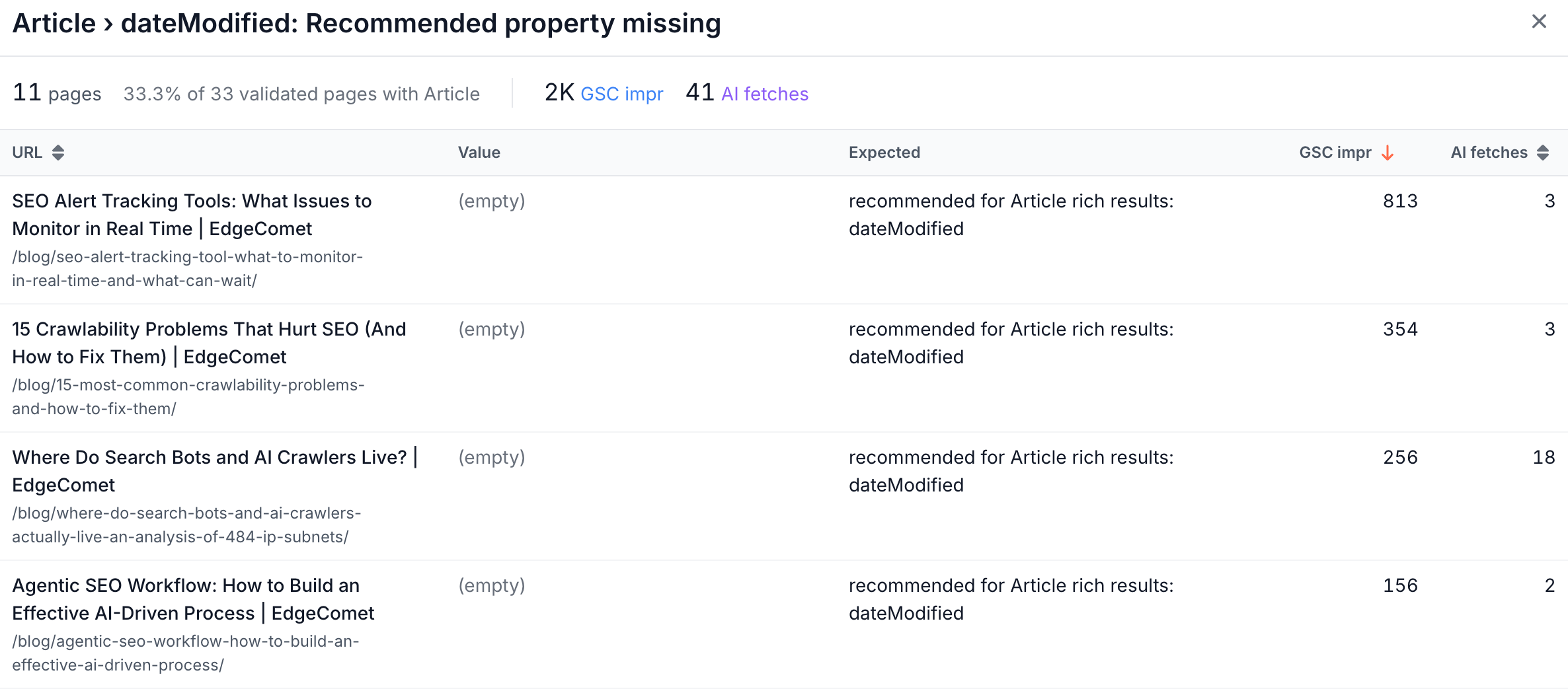
Click the Pages number to list the pages that carry a finding. The list shows the pages with the most Google impressions first, or the most AI fetches without Search Console, each with the value the validator found, what it expected, and the page's GSC impr and AI fetches.
What each problem means
The Problem column uses these labels:
| Problem | What it means | Severity |
|---|---|---|
| Syntax error | The JSON-LD block is not valid JSON, and none of it can be read | Critical |
| Required property missing | A property Google requires for the rich result is absent | Critical on Product, Event, JobPosting, Recipe, VideoObject and LocalBusiness. Warning on BreadcrumbList |
| Recommended property missing | A property Google recommends for the rich result is absent | Opportunity. Warning on Organization |
| Invalid position | A breadcrumb item's position is not a positive whole number | Warning |
| Positions not numbered 1 to N | Breadcrumb positions do not run 1, 2, 3 up to the number of items | Warning |
| Unknown type | The @type is not in the schema.org vocabulary | Warning |
| Invalid @type | The @type is not a string or a list of strings | Warning |
| Node without @type | A top-level or standalone node has properties but no @type | Warning |
| Unknown property | The property is not in the schema.org vocabulary | Warning |
| Property not used on this type | The property exists in schema.org, but not on this type | Warning |
| Invalid enumeration value | The value is not one of the values schema.org allows for the property | Warning |
| Invalid date | A date property holds a value that is not an ISO 8601 date or date-time. A valid date looks like 2026-10-18 | Warning |
| Invalid URL | A URL property holds a value that is not an absolute http or https URL | Warning |
| @id points nowhere | An @id reference names a node the page does not define | Warning |
| @id used twice | Two top-level nodes declare the same @id | Warning |
| Non-object members | The block is a bare value, or a list in it holds members that are not objects | Warning |
| No @context | The block declares no @context | Warning |
Ratings and reviews
Validation never suggests adding review or aggregateRating as an opportunity. The Structured Data & Images checks in the Issues report cover ratings instead. See Where the values appear.
When the tab shows no findings
The tab shows a message instead of findings in these cases:
- "Not enough validated pages in this crawl": too few of the pages with JSON-LD were validated on this crawl for the figures to hold. The next crawl tries again.
- "This crawl was not validated": the crawl was built before validation existed. Pick a newer crawl, or the Current crawl.
- "No JSON-LD on this crawl's indexable pages": none of the indexable pages carries JSON-LD. With a filter, it reads "No JSON-LD on the indexable pages matching this filter".
- "No findings": the validated JSON-LD has no problems on this crawl.
- "This crawl's issues have not been evaluated yet, and these figures are read from that evaluation. It retries automatically in the background.": the crawl's checks are still running, and the figures fill in on their own.
How this differs from a one-page testing tool
Google's Rich Results Test checks one page at a time: "Submit the full URL of the page to test." It can also test a code snippet (Google Search Console Help). It is the tool to preview one page during development.
EdgeComet validation works on the whole site, continuously:
- Every page, every crawl. Each crawl validates every indexable page it holds, with no URLs to submit. The Current crawl rebuilds every day.
- The markup bots received. The page is validated as EdgeComet served it, with Edge SEO changes in place and, on pages EdgeComet renders, JavaScript content too.
- Schema.org and Google together. Types with no Google rich result still get vocabulary checks, such as unknown properties and broken
@idreferences. - Demand on every finding. Each finding shows the Google impressions and AI assistant fetches on its pages, which lets you start with the markup people see.
Google also points site owners to the rich result status reports in Search Console "after deployment, to monitor the validity of your pages, which might break after deployment due to templating or serving issues." (Google Search Central). EdgeComet catches the same template breaks from the pages bots received, and the Structured Data & Images checks in the Issues report show which pages entered and left each check since the comparison crawl.
Fix what validation finds
- Fix it at the edge. Structured data at the edge adds a block filled from each page's own values, or replaces a broken one, on one page or thousands, without a release.
- Start from the Action Board. Missing and broken markup becomes Action Board findings, each with a fix you can start: an Edge SEO rule or a brief for your developers.
- Confirm it. A fixed page leaves the findings once bots fetch it again and the Current crawl rebuilds, which happens every day. To see the change sooner, rebuild the Current crawl after bots fetch the fixed pages.
- Ask about it. Ask in the header starts with "How many pages have critical schema issues?" and "What is broken in our JSON-LD?".
Where to find it
In the dashboard: Evergreen Crawl > Structured Data, tab Validation. The Overview tab shows rich result eligibility per type, missing markup and site identity: see Check structured data and rich result eligibility.