

Action Board overview
The EdgeComet Action Board is the SEO work list the AI SEO agent keeps for your website. It finds what to fix, ranks it by the search and AI traffic at stake, and prepares the fix. Also called the AI Action Board.
It works from what Googlebot and AI bots actually received from your site, joined with your Search Console data. Every finding names its pages and the impressions, AI visits and Googlebot visits on them.
Each finding comes with a fix you can start: new values served at the edge with no release, a brief for your developers, or briefs for your writers. Nothing goes live until a person deploys it.
How the Action Board works
Each analysis builds the board in these steps:
- It reads your data. Evergreen Crawl audits the pages verified bots fetched with more than 150 issue checks. The bot log and Search Console share the same URLs. One finding can combine them, such as noindex pages that still earn clicks.
- It looks past the checks. Three analysis skills, Indexability, Content Quality and Search Performance, look for problems no fixed check covers, such as crawl budget spent on API or tracking-parameter URLs.
- It writes the findings. The agent groups the problems into findings, chooses the fix for each one, and writes the title and the explanation.
- The engine computes every number. Page counts, impressions, AI visits, Googlebot visits and priority come from your data, not from the AI, and are recounted each time the crawl is re-evaluated.
See How the Action Board analyzes your site for each step and the three analysis skills.
A finding is one job: every page on it gets the same instruction. Duplicate titles and missing meta descriptions are two findings. A finding can have several steps, each with its own pages and fix.
The only figures the engine does not recount are research tables attached to a finding, such as keyword or SERP data. See External research.
How often the Action Board runs
The first board opens 3 to 4 days after the first verified bot visit. After that, the Action Board analyzes your site again about every 14 days, on its own.
Between analyses, the board stays current. Each time the crawl is re-evaluated, every day, EdgeComet recounts every finding without the AI: page counts, step progress and priority update, fixed findings resolve, and findings whose pages come back reopen. New findings come from the next analysis.
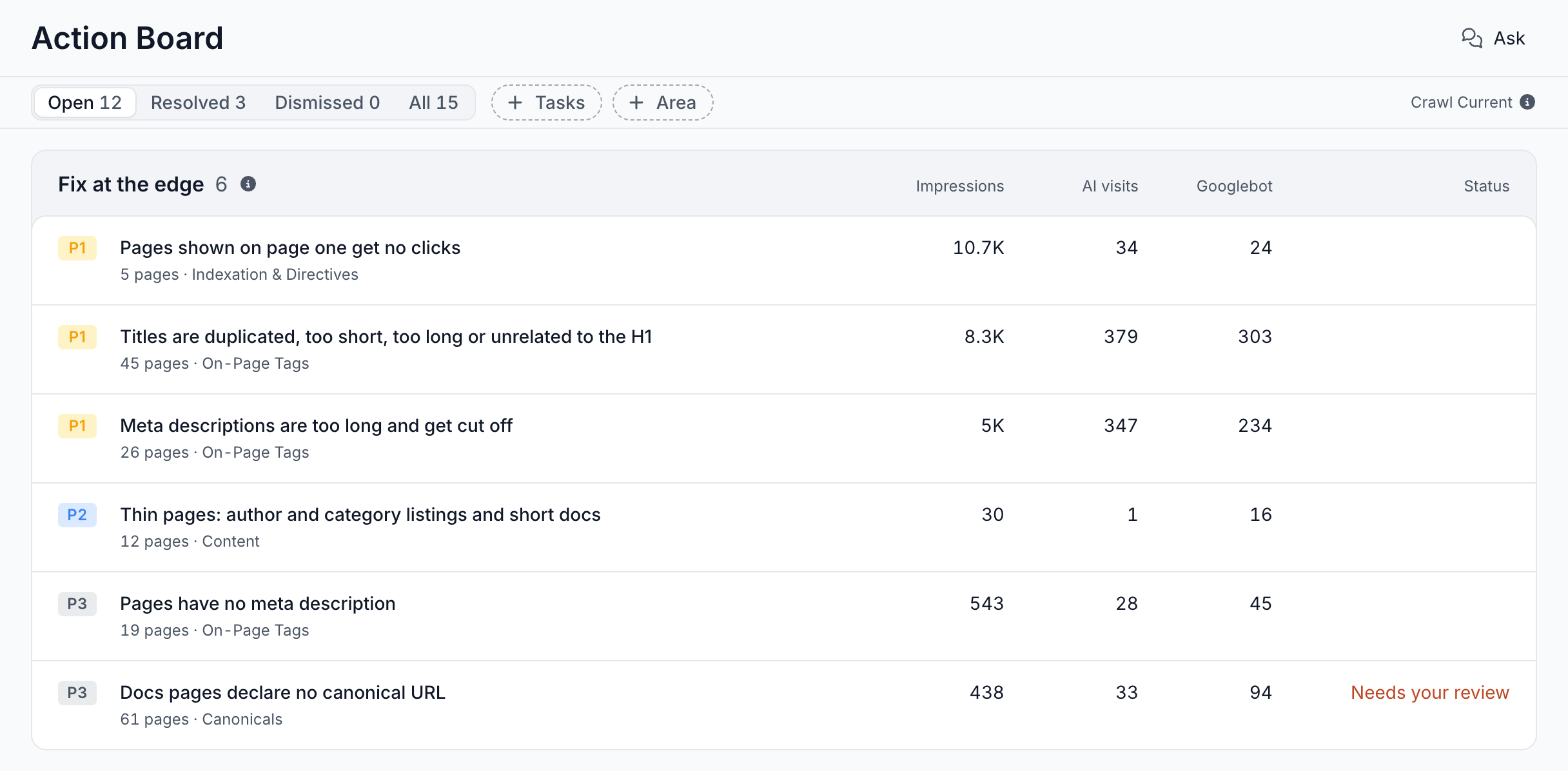
The header names the crawl the numbers come from, such as Crawl Current, and its info icon shows when the last analysis ran.
Until the first board is ready, the page reads "An SEO agent that finds the work and prepares the fix" and shows the steps toward it. See Before your first board and Your first days.
What the board shows
The board answers what to fix first, who fixes it, and where each fix stands.
Lanes: who fixes each finding
The board groups findings into lanes by who fixes them, in this order:
- Fix at the edge: no developer needed. EdgeComet drafts the change, you review it, and the edge serves it to every bot: titles, meta descriptions, H1, canonicals, robots directives, redirects and status codes.
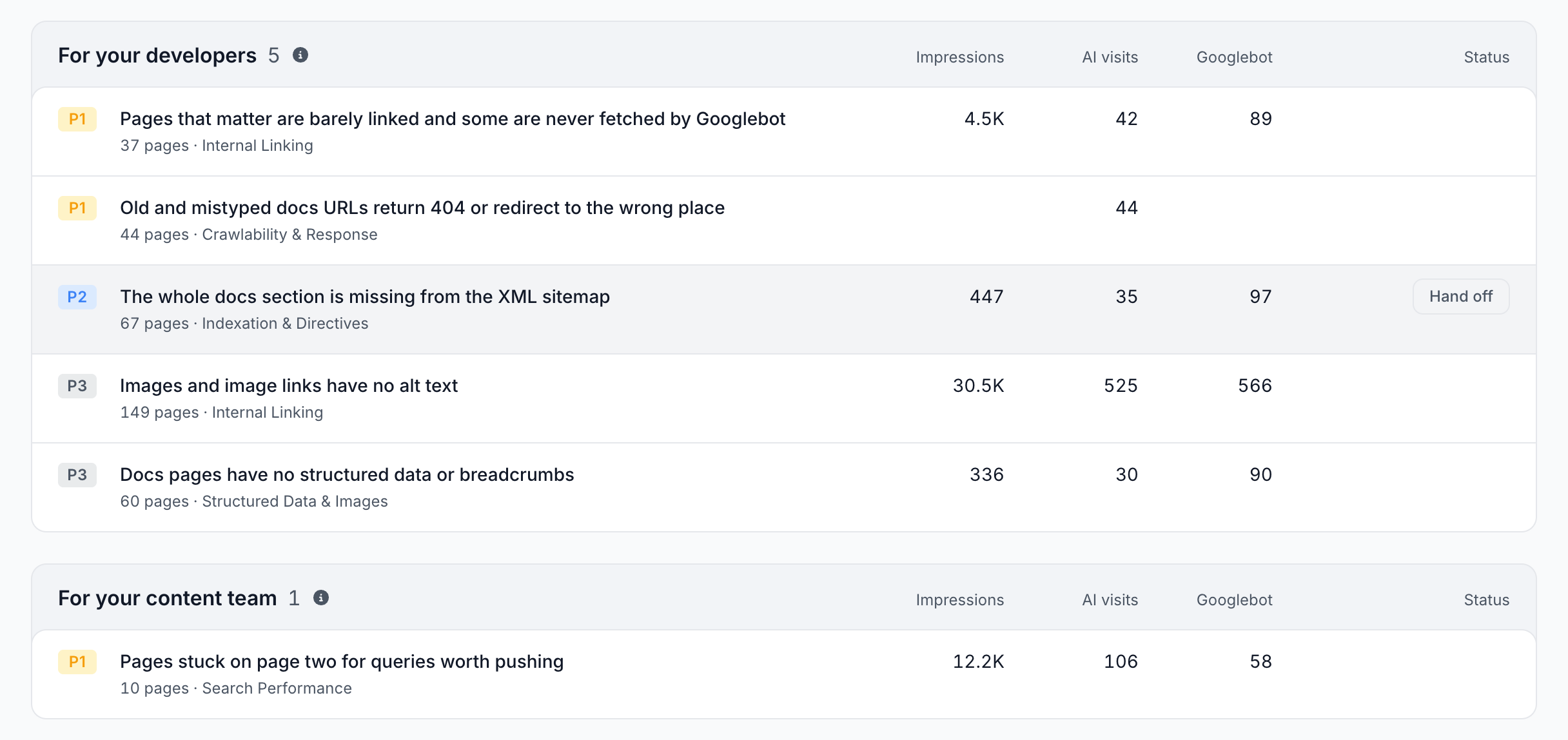
- For your developers: fixes that need a code or template change, such as internal links or the XML sitemap. Each one gets a brief with the problem, the evidence and the fix, ready for a ticket.
- For your content team: pages that need better writing. Each one gets a brief per page with target keywords, gaps and structure.
- Watch: movements worth knowing about that have no direct fix. Ask about one to dig in.
A finding's lane is the fix the Action Board recommends first, and the finding page offers the other routes too.
On a finding with no task yet, hovering its row shows the lane's next move: Fix it now, Hand off, Brief a writer or Ask why. Each one opens the finding, where every fix starts.
Impressions, AI visits and Googlebot
Each finding shows the traffic on its pages:
- Impressions: Search Console impressions.
- AI visits: fetches by AI user bots such as ChatGPT-User, Claude-User and Perplexity-User, which an AI assistant sends when a person asks it about the page. See AI user bots.
- Googlebot: Googlebot visits.
The figures are totals over the 30 days the crawl covers, not monthly averages. A column appears only when a finding on screen has a figure for it. A site without Search Console, for example, has no Impressions column. Click a column to sort the findings inside each lane.
Priority from P0 to P3
Each finding has a priority badge:
- P0, critical: serious harm, such as exposed data or the homepage dropping out of the index.
- P1, high: breaks indexation, or leaves pages AI assistants cannot read.
- P2, medium: ordinary on-page and search-performance work.
- P3, low: hygiene, such as crawl budget spent on non-indexable URLs.
The priority starts from the risk level of the check behind the finding, then weighs the search impressions and AI visits at stake on the pages the finding fixes. A finding on heavily searched pages can outrank one with more pages, and its priority can differ from the level its check shows in the Evergreen Crawl reports.
Within a lane, findings are ordered by priority, then by the search impressions at stake, then by page count.
Status
The Status column stays empty until work starts on a finding, then shows where its fix stands:
- Needs your review or Ready to deploy: the drafts wait for you.
- Live since a date, or Partly live: the fix is deployed at the edge.
- Brief ready to send or Briefs ready to send, then With developers or With writers and the days since, such as With developers · 12 days.
- Fixed: the recount found none of the finding's pages left to fix.
Other task states, such as Preparing or Rolled back, show the same way. See Task states.
Filters
The filter band above the lanes narrows the board:
- Open, Resolved, Dismissed and All, each with its count. Open is the default.
- + Tasks: Untouched or Has tasks. It appears once any finding has a task.
- + Area: one issue area, such as On-Page Tags, Canonicals or Internal Linking.
Clear all removes the Tasks and Area filters. A dismissed finding leaves the open list but keeps being counted, and Reopen on its page brings it back.
From finding to fix
Open a finding to see its pages, the evidence behind it and The fix. For an edge fix, the progress runs through Found, Fix drafted, Live at the edge and Verified. A developer fix moves through Brief written and With developers, a content fix through Briefs written and With writers.
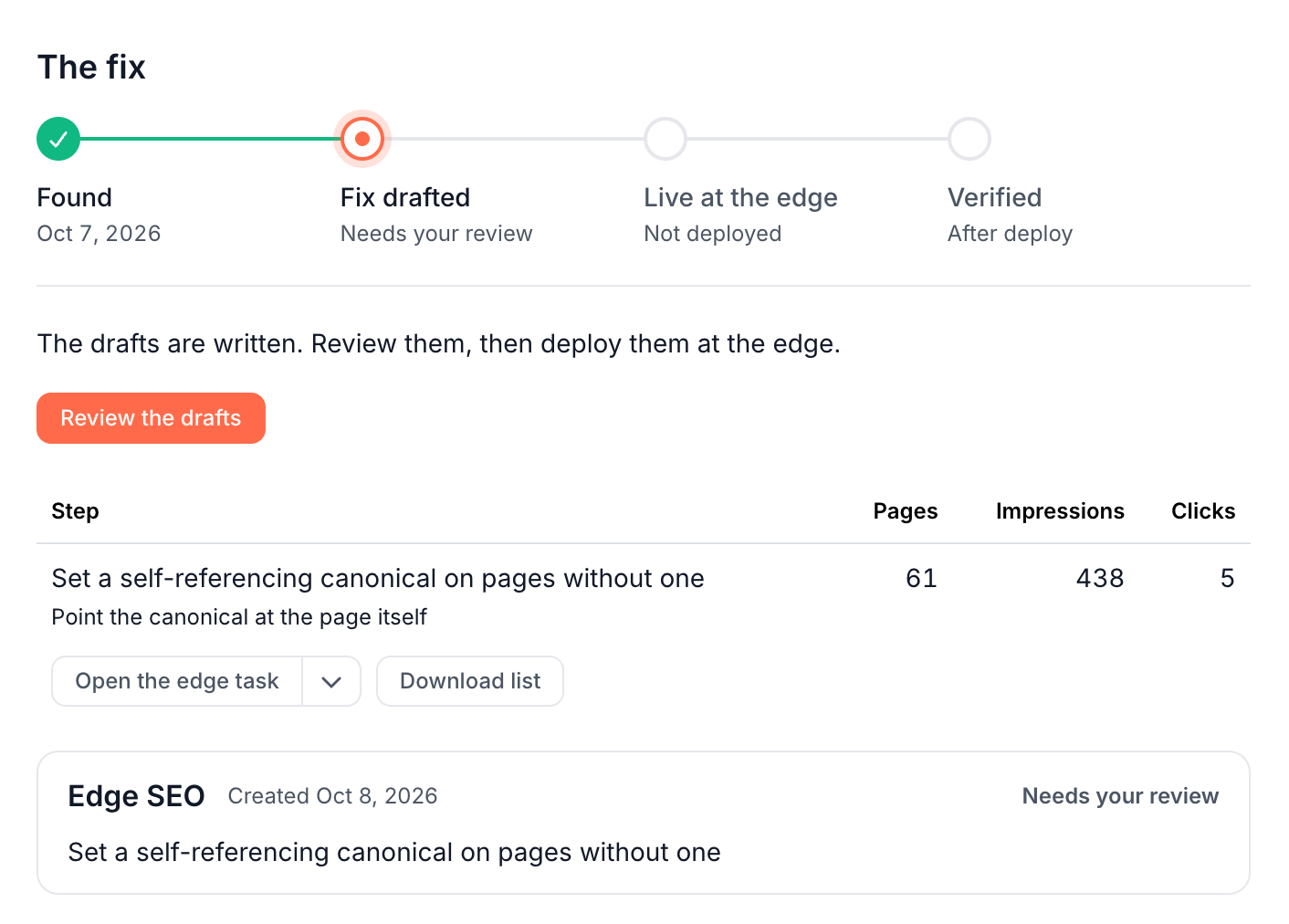
Each step offers the routes that fit it, such as Fix at the edge, Create dev task or Write N content briefs, and Download list exports its pages as a CSV. On a step with more than 100 pages, Fix the top 100 at the edge starts with the pages that matter most.
EdgeComet writes the drafts when you start the fix, grounded in each page's content and its Search Console queries. You review them on the task page, edit or untick rows, then deploy. The edge serves the new values to every bot from its next request, with no release, and Roll back stays one click away. See Review and deploy AI-generated SEO fixes.
After you deploy, EdgeComet recounts the pages each time the crawl is re-evaluated. When none of them is left in the state the finding fixes, the finding resolves and its row reads Fixed. See Confirm an SEO fix worked.
Each part of this flow has its own page:
- Read an Action Board finding: the evidence, the affected pages and the impact.
- Fix an SEO finding: edge fix, dev task or content brief: the routes, the focus and the targets you choose.
- AI generation runs: how EdgeComet drafts SEO fixes: how the AI drafts the new values and briefs.
- Review and deploy fixes from the Action Board: check the drafts, deploy at the edge, roll back.
- SEO developer briefs and tickets from the Action Board and Write content briefs for existing pages: fixes for your developers and writers.
Ask about the board and each finding
Ask in the board header opens a chat beside the board. It starts with What stands out?, What changed?, What should I fix first? and How is this measured?, and answers from your site's data.
Ask is the same AI SEO agent you use anywhere in the dashboard. See Ask overview.
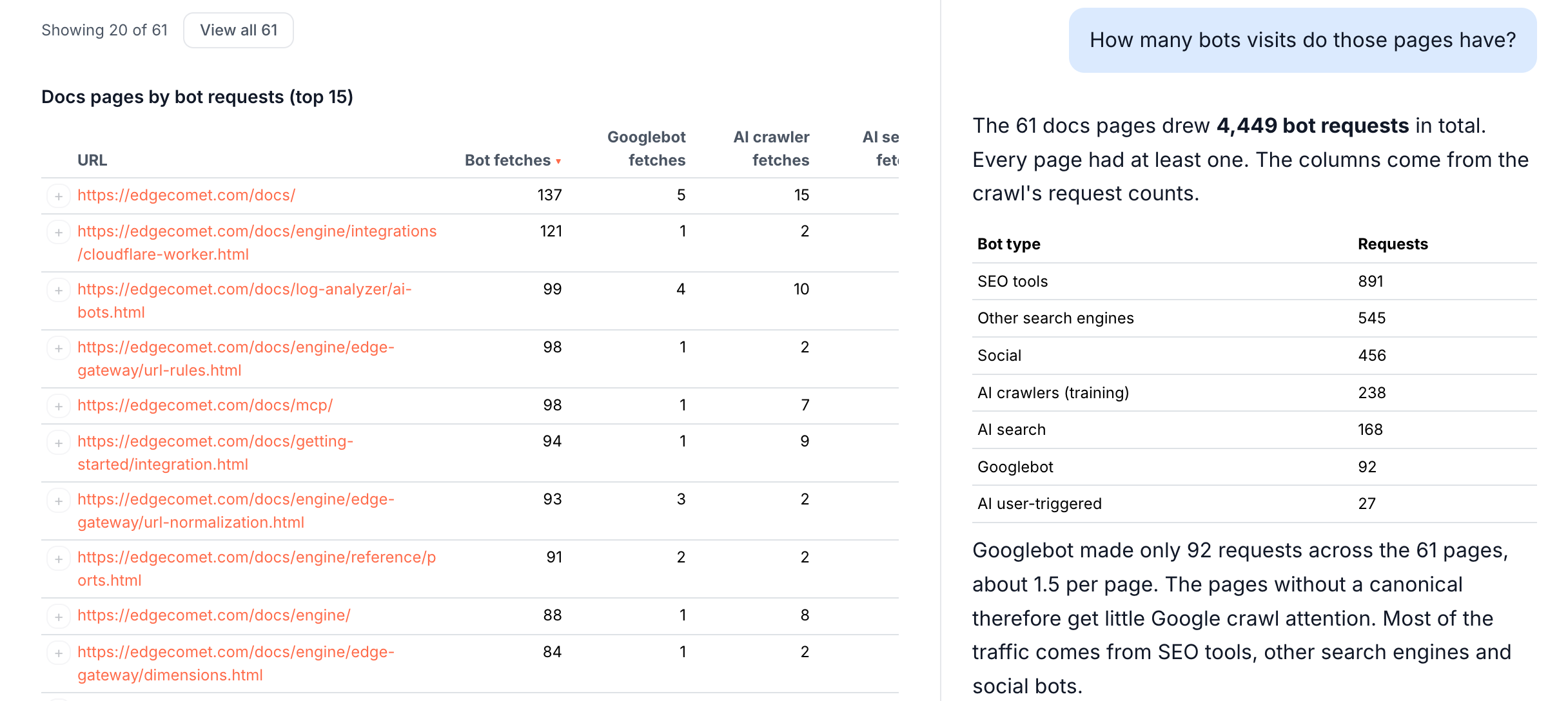
Each finding also has its own chat on the right of the finding page. Tables the chat builds appear on the finding page beside the evidence. When a question narrows a finding to a slice worth its own job, the chat can record it as a new finding, which joins the board when you click Add to board. See Findings from Ask and skills.
Tasks, Outputs and Skills
Three more pages sit under Action Board in the sidebar:
- Tasks: every fix started on the site, with its status and whether the fix was confirmed. Tasks that wait on you come first, under Needs your action. See Tasks.
- Outputs: every generation run under Generations, and every brief, research document and export under Documents, with export to Google Docs or Google Sheets. See Generation runs and Documents and exports.
- Skills: the built-in skills, from the analysis and generation skills the board uses to Ask skills such as keyword research, content briefs and a technical SEO audit. It also holds your own skills and the Guidelines that tell the agent about your business. See Skills and Guidelines.
How the Action Board differs from an audit tool or a DIY agent
- A site crawler sends its own bot and lists the issues it finds. You decide what matters and write the tickets. The Action Board works from what Googlebot and AI bots received, ranks findings by the traffic at stake, and prepares the fix. See EdgeComet compared with a site crawler and with an SEO platform that combines a crawler and log analysis.
- An AI agent built from third-party MCP tools sees only the data those tools provide, and you define its checks and workflow. The Action Board comes with the bot data, the checks and the edge to deploy fixes, and the engine, not the model, computes every number. See the AI Action Board page.
- A list of recommendations stops at what is wrong. The Action Board takes the fix to deploy and confirms it with a recount.
To work with the same data from your own assistant, connect the EdgeComet MCP server.
What the Action Board does not do
- It does not publish on its own. Every change stays a draft until a person deploys it, on the task page or in Edge SEO.
Where to find it
In the dashboard: Action Board > Board, with Tasks, Outputs and Skills under it in the sidebar. A finding opens from its row, and Previous finding and Next finding step through the findings of the same lane.