

Get alerted when titles, canonicals or noindex change
The EdgeComet Pages changed alert fires when a fact search engines read changes on many pages at once: a status code, indexability, a canonical, a title, structured data, or a value you extract from your pages, such as a price. Also called SEO change monitoring.
It compares each page with its own previous fetch, on the pages bots actually request. There is no crawl to schedule and no sample: EdgeComet already holds both versions of every page it served.
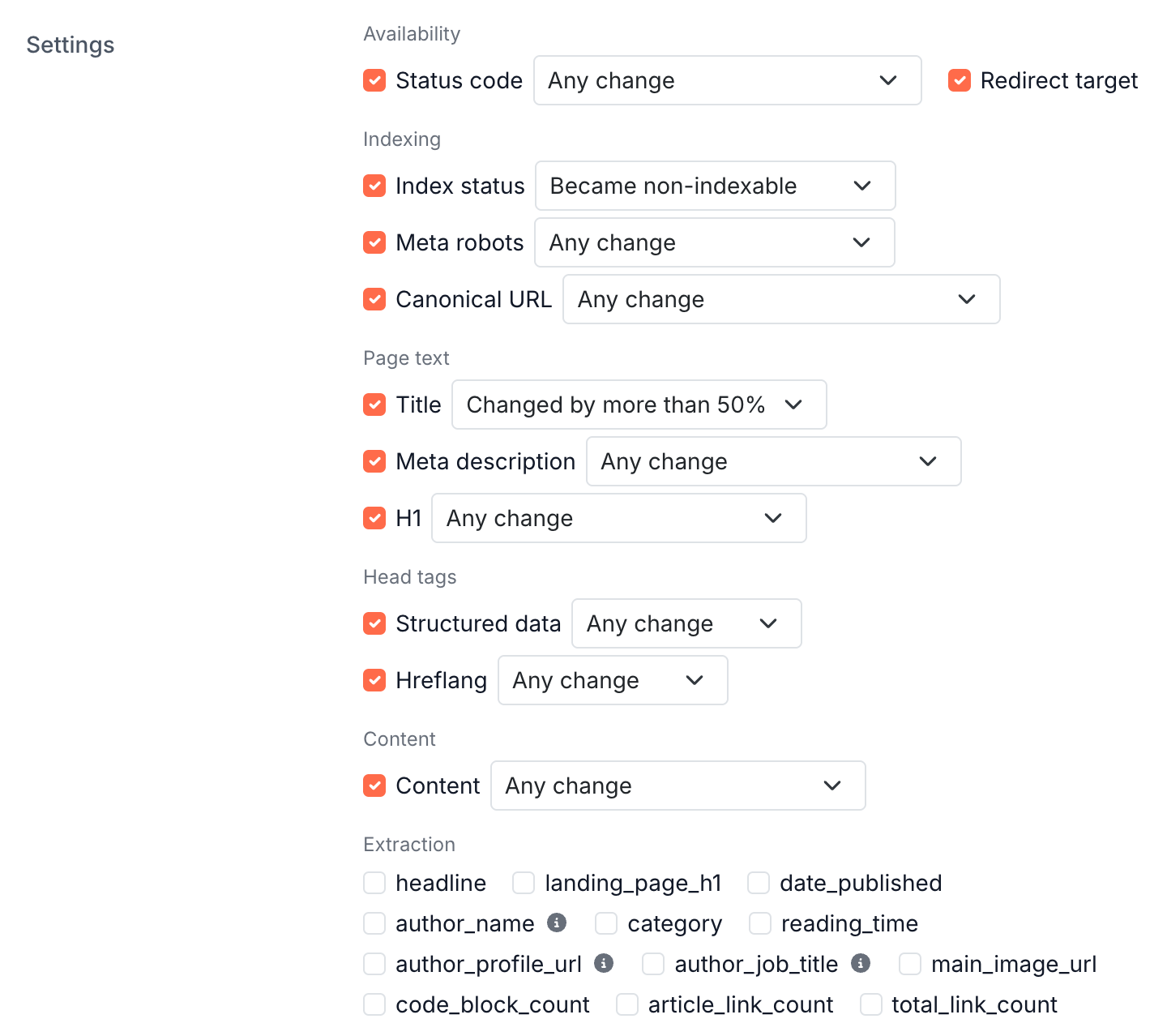
You choose which facts to follow and narrow each one, such as only when a page becomes non-indexable, or only when a title changes by more than half.
How the alert works
Every 5 minutes, EdgeComet compares each page's newest fetch with its last known state and logs every fact that moved. A Pages changed rule reads that log and counts the pages with a change to the facts it follows since its previous check.
A change is logged the next time a bot fetches the page or a pre-cache rule renders it. The pages bots visit most report their changes fastest, and a page nothing requests reports nothing.
A page that redirects or answers with an error logs a status code change. An error page does not count as a title change.
The same log feeds the Changes report. On a change there, Create alert opens this alert with the pages and the facts of that change filled in. For one page's changes, see Track SEO changes on one page against its Google traffic.
Facts you can follow
The Add rule window groups the facts in six groups. A new rule follows the eleven core facts, each on Any change:
| Group | Facts |
|---|---|
| Availability | Status code, Redirect target |
| Indexing | Index status, Meta robots, Canonical URL |
| Page text | Title, Meta description, H1 |
| Head tags | Structured data, Hreflang |
| Content | Content, the page body compared as a whole |
| Extraction | Your custom extraction fields, see Watch your own fields |
Word counts, link counts, image counts, H2 and H3 headings are not followed.
Index status is EdgeComet's own reading of whether the page it received can be indexed: Indexable, Non-200, Blocked or Non-canonical, from the page's status code, robots directives and canonical. It is not a report of what Google has indexed.
Narrow each fact
Each fact you tick gets a menu that narrows it from Any change to the movement you care about:
| Fact | Fires on |
|---|---|
| Status code | Stopped serving 200; Became an error (4xx or 5xx); Became a redirect |
| Redirect target | Any change |
| Index status | Became non-indexable; Became blocked (noindex); Became non-canonical; Became indexable |
| Meta robots | Became non-indexable; Became blocked (noindex) |
| Canonical URL | Emptied; No longer points to the page itself |
| Title, Meta description, H1 | Emptied; Now contains a text you enter; Changed by more than 20%, 50% or 80% |
| Structured data, Hreflang | Emptied; Lost entries; Gained entries |
| Content | Changed by more than 50% or 80% |
A few details matter when you narrow:
- Became indexable counts only pages that had a known non-indexable state before.
- No longer points to the page itself compares the canonical literally: a trailing slash or a scheme difference counts as a change.
- Now contains ignores case and takes up to 200 characters.
Watch your own fields
A custom extraction field pulls one value out of every page as EdgeComet renders it, such as a price, a stock flag, a delivery promise or a review count. Pages changed watches it like any other fact, which takes monitoring past SEO tags to the facts your business runs on.
The menu depends on the field's type:
| Field type | Fires on |
|---|---|
| Text | Emptied; Now contains a text; Became a text; Changed by more than 20%, 50% or 80% |
| Number | Emptied; Became a number; Dropped by more than 10%, 20% or 50%; Rose by more than 10%, 20% or 50% |
| True or false | Became true; Became false |
| Date | Any change |
A rule can fire when prices drop by more than 20% on product pages, or when an in-stock flag turns false, on the pages search engines and AI bots are reading.
The field must have Track changes turned on. Otherwise the save is refused with "This watch follows the extraction rule '{name}', whose changes this site is not tracking." Fields that return a list are not offered.
Set the threshold
The threshold counts pages changed since the previous check, 10 pages or more by default: "Fires when that many pages changed since the previous check." It is per check, not per day. Ten title changes spread over an hour fire an hourly rule and never fire a 5-minute one.
Check sets how often the rule reads the log: every 5 minutes, 15 minutes, hour (the default) or day. A faster check reports sooner, but it does not see a change earlier than the next fetch of the page.
Count changes made by Edge SEO rules is on by default. Turn it off to count only what your origin changed and ignore what your own Edge SEO rules changed.
See how much these pages normally move
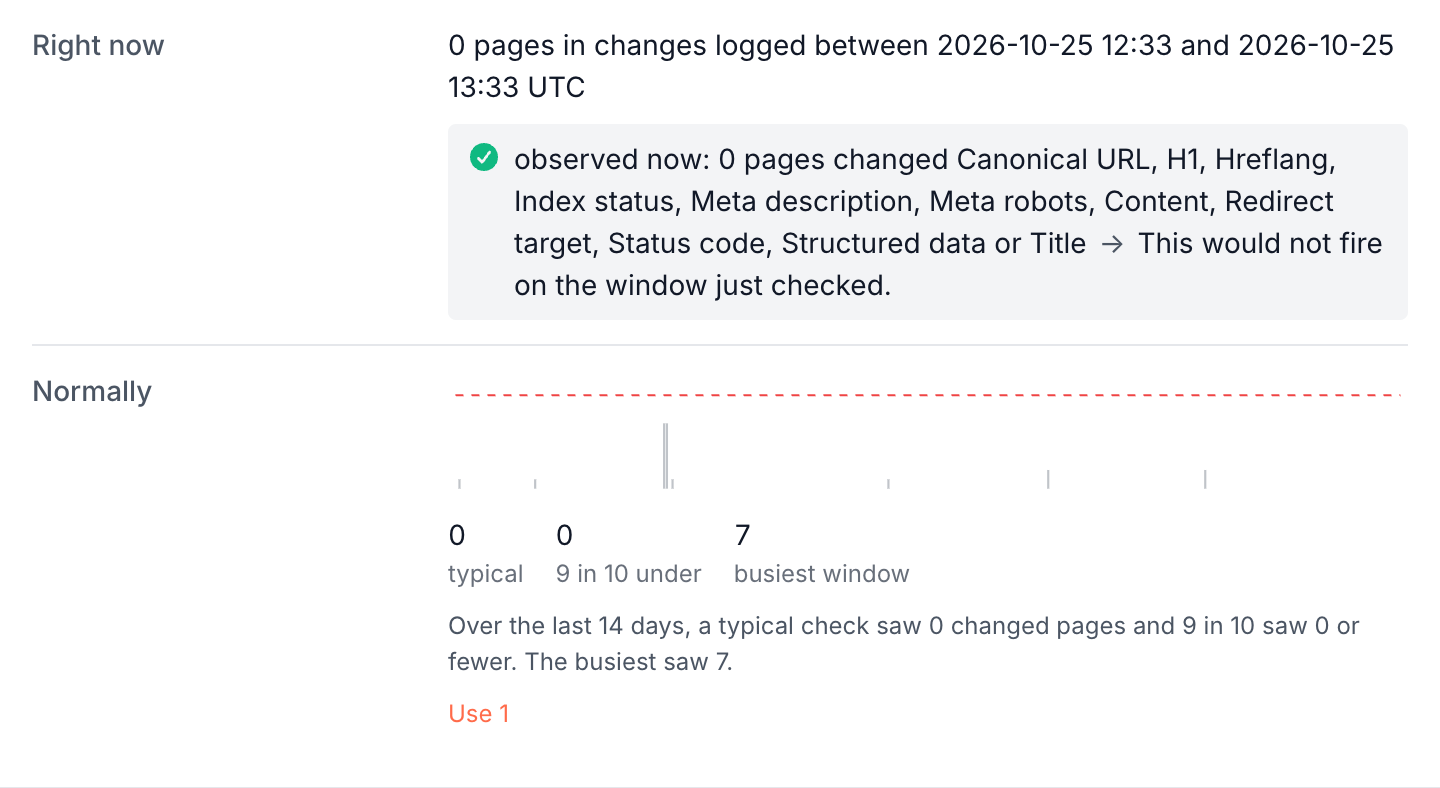
Normally counts the changes on the same pages and facts over the last 14 days, in windows the size of your check. It shows the typical check, the count 9 in 10 under, and the busiest window, with bars above your threshold tinted.
Use N fills in the 9-in-10 figure, at least 1, as the threshold. It never applies anything by itself.
How severity is set
The severity you pick is a floor, raised by the facts the rule follows:
- Critical when it follows Index status, Meta robots, Canonical URL, Status code or Redirect target.
- At least warning for any other fact, including Content and extraction fields.
The default rule follows all eleven facts, and it is saved as critical even though the gallery card shows P1. A Pages changed rule is never info.
When some changed pages are noindex or canonicalized elsewhere and changed only head or body facts, and the other pages alone would not reach the threshold, the incident opens one step quieter, critical to warning or warning to info. It explains why, such as "Lowered from critical: all 11 changed pages are noindex or canonicalised elsewhere." Index status, status codes, redirect targets and extraction fields always count in full.
When it fires and how it closes
A Pages changed rule can fire on its first check: the log already holds the comparison. Its incident lists each page with the fact that moved and its old and new values. A deploy that rewrote a title and repointed a canonical on one page shows two rows.
The incident is about a change, not a state. It closes when you acknowledge it, or after 72 hours.
A later wave inside the rule's cooldown joins the open incident. See Why an alert fired and what to do next.
Pair it with the noindex alert
A deploy that ships noindex to product pages is caught best by two rules with different jobs:
- The fast one: a Pages changed rule on your product section, following Index status narrowed to Became non-indexable, checked every hour. It reports within an hour of a bot or a pre-cache render reaching an affected page.
- The backstop: a Noindex on live pages rule on the same section, once a day. It reports the state, which also catches a noindex that shipped before the rule existed, on pages bots reach rarely.
If parts of your catalogue carry noindex on purpose, such as filtered or out-of-stock pages, leave those folders out of both scopes. See Choose the pages a rule watches.
If it does not work
"The page change log is still being built for this site."
The rule skips its check until the change log for a new site is ready, and holds its state. See Alert rule states: watching, skipped, warming, broken.
The rule never fires
A change is logged only when a bot or a pre-cache rule fetches the page again. Check Normally: when it reads "Nothing changed on these pages in any check counted over the last 14 days", the pages are quiet or rarely fetched. See How fast alerts fire and how many you can create.
Where to find it
In the dashboard: Alerts > Rules > Templates > Pages changed > Add rule, or Create alert on a change in the Changes report.