

Content brief skill: SEO briefs for new articles
EdgeComet's Content brief skill turns a topic you have no page for into an SEO content brief that a copywriter can work from without opening the dashboard. Also called an AI content brief generator or an SEO content brief.
It checks your own Search Console first, qualifies the keyword demand, reads the live search results and the top competing articles, and writes the brief in your site's voice.
Each topic gets one document: the title tag and meta description, a keyword table, the full heading structure, internal links and writing rules.
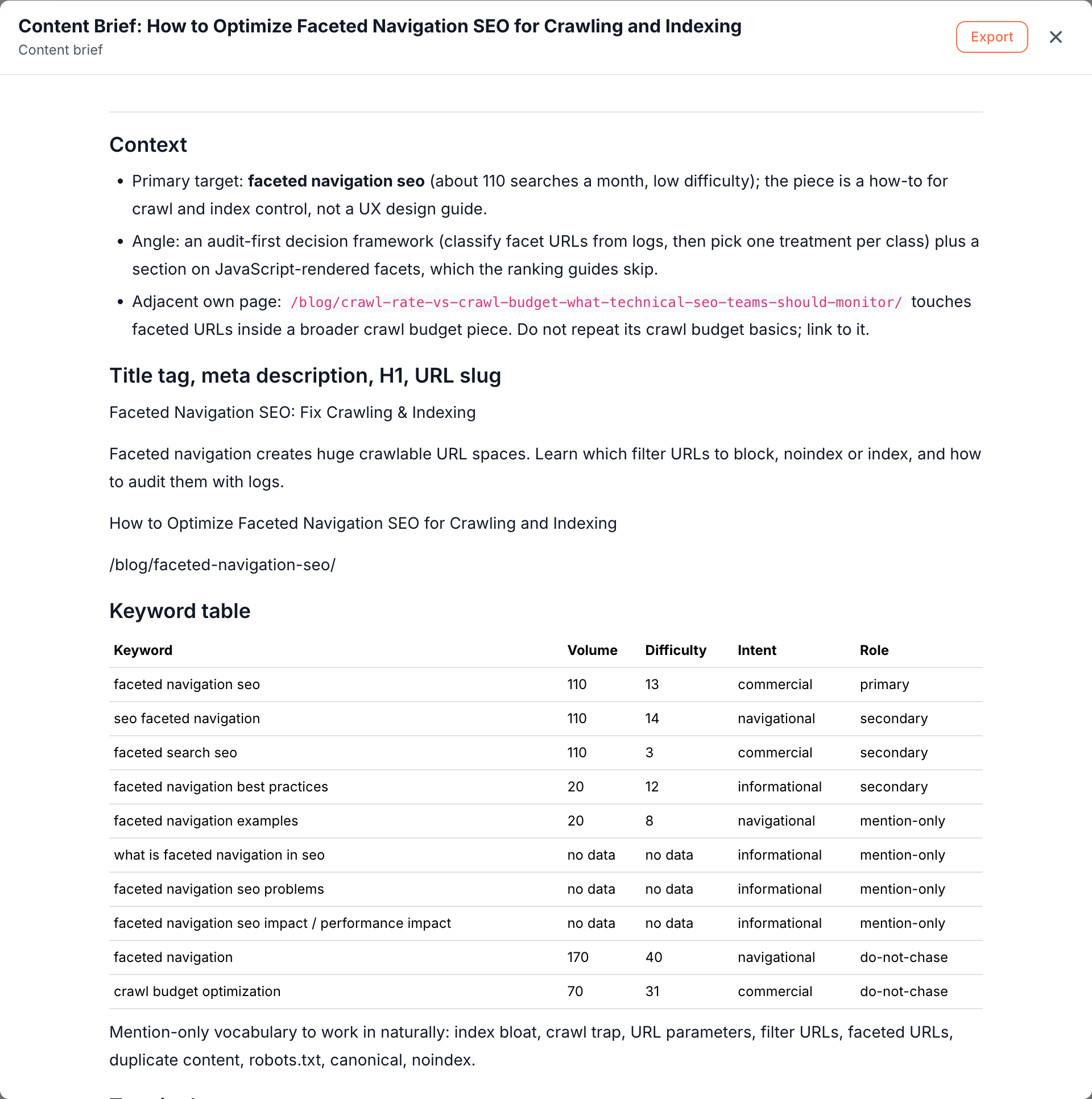
What the content brief contains
The skill writes one document per topic, titled "Content Brief:" followed by the topic, and shows the qualified keyword table on the canvas beside it. Action Board > Outputs > Documents lists every brief.
Each run writes a new brief, and a change you ask for in the same conversation edits it in place. See Where the results land.
The brief holds instructions for the writer rather than research notes. Its sections come in this order:
- Context: the primary target keyword, the angle that sets the article apart, and the nearest page of yours to link to rather than repeat.
- Title tag, meta description, H1 and URL slug: final values, ready to paste.
- Keyword table: each keyword with its volume, difficulty, intent and role: primary, secondary, mention-only or do-not-chase.
- Terminology: only when readers tend to confuse two terms, with the one section that explains each.
- Reference reading: the two or three articles the run read in full, with what each does well.
- Article structure: every H1, H2 and H3, each with a one or two sentence instruction. It names the practical elements a section needs, such as a comparison table with its columns, a checklist, a flow or a worked example.
- Internal linking: a table of target page, anchor text and section, and the existing pages that should link to the new article.
- Where the product fits: a few lines, only when your product relates to the topic.
- Writing rules: a short list, such as answering the question in the first paragraph under every H2.
- Tone and constraints: the voice profile, the target length, and where the primary keyword belongs.
- What to avoid: openings that most ranking articles already use, claims the evidence does not support, and the do-not-chase terms with the reason for each.
An FAQ section appears only when the search results show demand for one, such as a People Also Ask box. Where a fact needs checking, the brief leaves a marked placeholder, such as [CONFIRM ...], instead of inventing it.
On edgecomet.com, the brief "How to Optimize Faceted Navigation SEO for Crawling and Indexing" targets "faceted navigation seo", with about 110 searches a month and low difficulty. It marks "faceted navigation" as do-not-chase because the term is too generic, and plans six internal links. Its structure includes the H2 "Crawl control or index control: pick the right tool" with a decision table per URL class.
How the content brief skill works
For each topic, the skill works in six steps:
- It checks for keyword cannibalization first. Before any research, it looks in Search Console for a page of yours that already targets the topic. If one does, it writes no brief for that topic and suggests improving that page instead, because a second article would compete with it for the same queries.
- It qualifies the demand. It expands the topic and your seed keywords, then looks up volume, difficulty, cost per click and intent. It picks a primary target, secondary terms and terms not to chase.
- It reads the live results. For one or two representative queries, it notes who ranks, the search features and the People Also Ask questions. It also checks whether an AI Overview shows, which sites it cites, and whether yours is one of them.
- It reads the competition in full. It reads the top two or three articles, plus the page the AI Overview cites when that page is not among them. It looks for the structure they share, the practical elements they all carry, and the gaps none of them cover.
- It builds a voice profile. It uses your style guide when you give one. Otherwise it reads one or two articles from your own blog.
- It writes the brief. One document per topic, with the sections listed in What the content brief contains.
Three cases change the brief:
- Light overlap: a page of yours that touches the topic does not block the brief. It becomes an internal link target.
- No measurable volume: the brief builds on the narrower related queries that do show demand, and never invents volume figures.
- Market: live results use the country of a country-code domain, such as
.de, and otherwise the United States in English.
Generate a content brief
Run the skill from a new Ask conversation:
- Click the Ask tab at the top of the sidebar, then New conversation.
- Press + and choose Content brief. You can also click Run next to Content brief (new article) under Action Board > Skills.
- In Topics to brief, type one topic per line, up to five. You can also type the title of a coverage plan that the Keyword opportunity research skill wrote, and the run briefs the clusters it names.
- Optional: in Seed keywords, list terms the article must cover, separated by commas. The run still qualifies the demand itself.
- Click Start.
The skill always runs on your whole site, and the dialog says "Runs across your whole site." Topics to brief is required: left empty, it shows "Fill this in to run." With more than five topics, the run briefs the first five and says which ones a second run can pick up.
Standing rules for every brief, such as your house style, belong in Guidelines. See Run a skill for what all skills share.
Read the result
When the run finishes, the conversation shows:
- The chat: what the run found about existing coverage, demand and the search results, the angle it chose, and its assumptions, such as the market and the article it took the voice from. Assumptions stay in the chat and out of the brief.
- The keyword table: a snapshot table of the qualified keywords and their roles.
- The brief: a document card with Open, Export and Read full document.
A run can end without a brief. The chat then says why: a page of yours already owns the topic, or the topic has no search demand and no angle for a thought-leadership article.
Act on the result
- Send it to a writer. Export the brief to Google Docs or download it as Markdown. See Export documents.
- Change it in place. Ask for edits in the same conversation, such as a shorter structure or another angle. Ask edits the document instead of writing a new one.
- Ask follow-ups. Ask for related work in the same conversation. On edgecomet.com, a follow-up to the faceted navigation brief got a research prompt on the same topic.
- Improve the article later. Once the article is live and earning impressions, run Article optimization on it.
Content briefs for new articles and for existing pages
This skill briefs topics that have no page yet. To brief pages you already have, start Write N content briefs from a finding on the Action Board: it writes one brief per page, aimed at that finding. See Content briefs for existing pages.
How this skill differs from a content brief tool
- A content brief tool starts from a keyword and the top results. This skill first checks your Search Console, which stops it from briefing a topic you already rank for, and it plans internal links into the pages you already have.
- A generic brief describes the topic. This skill writes the brief for your site: in your voice, around your product where it fits, with placeholders where a fact needs checking.
Where to find it
In the dashboard: Ask > New conversation > + > Content brief, or Action Board > Skills. Briefs are under Action Board > Outputs > Documents.