

Ask about any report
The Ask panel opens a chat beside any report, and its answers read that report's own numbers for the period and segment on screen. Click Ask in the report header, or press Cmd+. (Ctrl+.). Also called the report chat.
Each report suggests questions written for it, such as "Is the hit rate falling?" on the Cache report. The panel is the same Ask as the full Ask page, with every data source and skill.
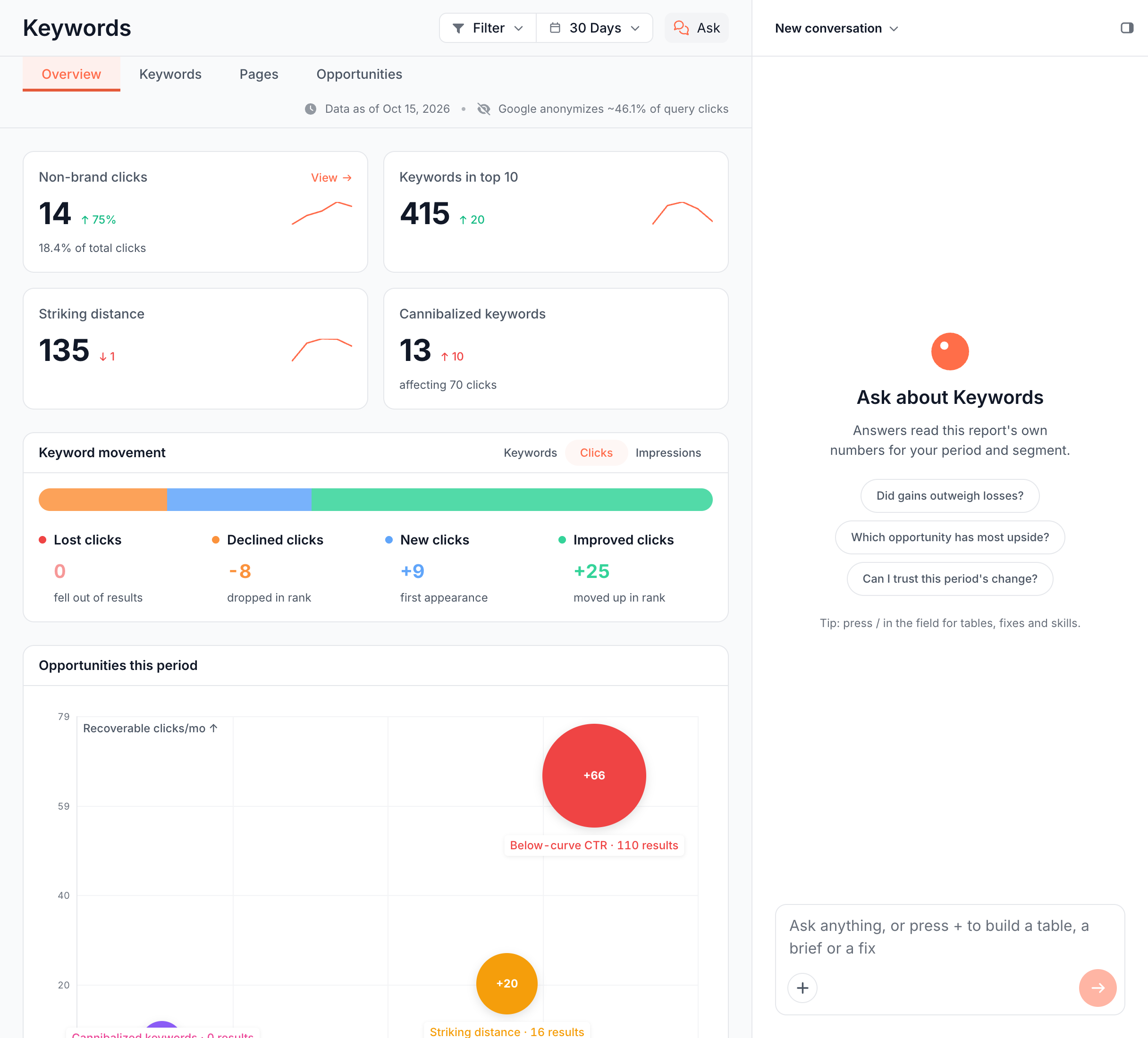
Open the panel
- Open any report, such as Log Analyzer or Search Overview.
- Click Ask in the report header, or press Cmd+. (Ctrl+.). The shortcut works from inside text fields too.
- Type a question, or click a starter question.
Press Cmd+. again, or click Hide chat in the panel header, to close it. Drag the panel's left edge to make it wider or narrower. Your browser keeps the width and whether the panel was open.
On a phone the panel opens full width, with a close button.
The panel opens on every report page, on Page Analysis and on saved custom reports. The Action Board has its own Ask panel in the board header. See Ask about the board and each finding.
Starter questions
Each report offers starter questions written for its own numbers. Click one to send it with the report's name, such as "In the Cache report, is the hit rate falling?". Examples from the main reports:
| Report | Starter questions |
|---|---|
| Log Analyzer | Which bot drives most requests? How much crawl hits errors? How common are slow responses? |
| AI Bots | Do live fetches beat training? Which segment do chatbots read? Does AI crawl track Googlebot? |
| Crawl Efficiency | What wastes the most crawl? Are bots reaching new pages? Is waste growing? |
| Cache | Is the hit rate falling? How old is the cached HTML? Which bot misses the cache most? |
| Bad Bots | Which bot identity is forged most? Which risk tier drives traffic? How many renders go to bad bots? |
| Search Overview | Did impressions or CTR fall? Are rankings improving? Is mobile CTR behind desktop? |
| Cannibalization | How much click dilution is there? Which conflicts need action first? Is cannibalization growing? |
| Traffic Decay | Which segment loses most clicks? Which decay cause dominates? Is decay acute or persistent? |
| Crawl Issues | Which issue affects most pages? Where would one fix help most? What changed since the baseline? |
| Structured Data | How many pages have critical schema issues? Which product pages have no JSON-LD Product? What is broken in our JSON-LD? |
| Page Analysis | Are impressions or CTR falling? Is this page indexable? Are its renders failing? Which questions does it answer? |
A report without its own starters offers four general ones: What stands out?, What changed?, What should I fix first? and How is this measured?. On a crawl report, What changed? compares with the previous crawl. On other reports it compares with the previous period.
What the panel reads
A question in the panel reads the report on screen first: its numbers, the period, the segment and, on crawl reports, the crawl and its comparison. Its figures match the report, because it reads the same cache as the page.
The panel can also read every other source Ask reads, such as the bot log, Search Console or a page's content. See What data Ask can read.
When an answer opens the Ask page
Short answers stay in the panel. An answer that holds a table or a chart opens on the Ask conversation page, where the canvas has room for it, with a link back to the report.
Earlier answers with a table show Open in Ask ↗ under the reply. Answers that only record a finding, start a run or export a file stay in the panel.
Which conversation the panel opens
The panel remembers the last conversation you used on this website. When its newest message is more than two days old, the panel opens on an empty chat instead.
Earlier conversations stay in the panel's title menu and open at any age. Open in Ask in the same menu opens the full conversation page. The panel never swaps out a conversation while an answer in it is still running.
Beside a saved custom report
On a saved custom report, the panel opens on that report's own conversation. Its greeting reads "Ask about its numbers, or ask to add, change or remove a block.", and What could this report add? replaces What should I fix first? among the starters.
A question that changes the report saves the answer as the report's next version, and the page redraws on it. The chat marks it with Saved as version N. See Edit a custom report to move, resize or remove blocks yourself, and Versions for earlier versions.
Fix fan-out gaps on a page
Fix N gaps in Ask runs the Article optimization skill on one page to answer the AI questions it misses. The button sits on the Fan-out tab of Page Analysis, in the card Questions AI asks about this page. It appears once the coverage check finds questions the page answers only partly or not at all.
- Click Fix N gaps in Ask.
- The dialog Run "Article optimization (keyword-gap rewrites)" on this page? opens, with guidance filled in from the gaps. Edit the guidance if you want.
- Confirm. The Article optimization skill runs in the panel on that one page and returns ready-to-paste edits.
The button appears only when the site has the Article optimization skill enabled. See AI SEO skills in Ask. To find gaps across many articles at once, run Blog fan-out coverage.
Where to find it
In the dashboard: Ask in the header of any report, or Cmd+. (Ctrl+.).