

How EdgeComet routes bot traffic
Every EdgeComet integration is one routing rule at your CDN, edge or reverse proxy. The rule sends page requests from search engine and AI bots to EdgeComet and every other request to your origin. EdgeComet answers bots with a cached or rendered copy of the page and records the request.
This page lists the rules that the Cloudflare Worker, the VCL, Lambda@Edge, Property Manager and server configurations all implement. Use it to review an integration or to build one for a platform EdgeComet has no guide for. The same pattern is called prerender middleware or dynamic rendering elsewhere.
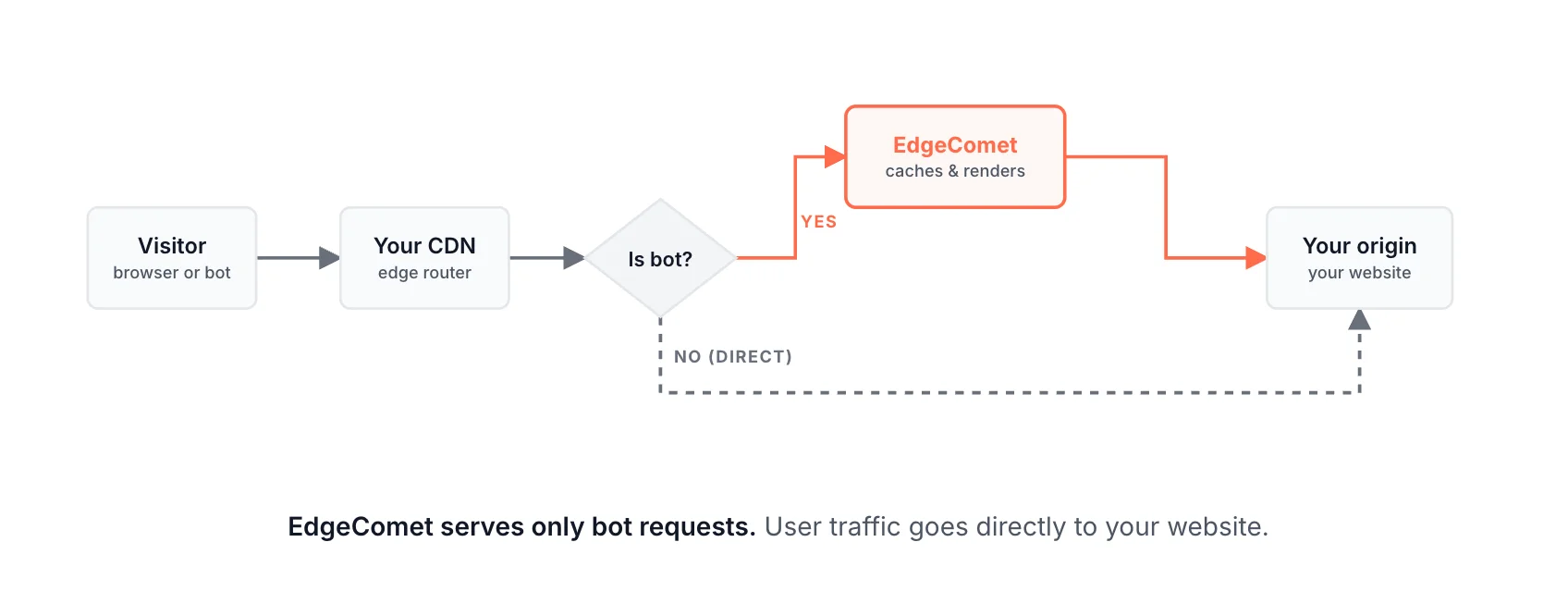
The routing rule in brief
A request goes to EdgeComet when all four conditions hold:
- The method is
GETorHEAD. - The request has no
X-Edge-Renderheader. - The path does not end in a static file extension.
- The user agent matches a crawler pattern.
The rule sends it to https://{render-host}/render?url={encoded page URL} with your render key and serves the answer when it carries an EC-Source header and a status below 500. In every other case, including errors and timeouts, the request goes to your origin.
Which requests go to EdgeComet
Check the conditions in this order. The first one that fails sends the request to your origin.
- Method: only
GETandHEAD. EdgeComet answers other methods with405. - Loop prevention: a request with an
X-Edge-Renderheader, whatever its value, goes to your origin. EdgeComet adds this header to every request it makes to your site, and those requests pass through the same CDN. Without this check, EdgeComet's own fetch would be routed back to EdgeComet. - Static files: paths that end, in any letter case, in
.avif,.css,.eot,.gif,.gz,.ico,.jpeg,.jpg,.js,.json,.map,.mp3,.mp4,.ogg,.otf,.pdf,.png,.svg,.ttf,.txt,.wasm,.wav,.webm,.webmanifest,.webp,.woff,.woff2,.xmlor.zip. Yourrobots.txtand XML sitemaps stay on your origin. - Crawler user agents: a case-insensitive match on any of
bot,crawl,spiderorslurp, plusWhatsApp,Snapchat,facebookexternalhit,AMZN-User,Claude-User,Perplexity-UserandChatGPT-User, which have no generic keyword in their names.
The four generic keywords cover Googlebot, Bingbot, GPTBot, ClaudeBot, PerplexityBot and most other crawlers. For the bots EdgeComet recognizes, see AI bots and Search engine bots.
The request to EdgeComet
Send the bot's method to the render endpoint, with the full page URL encoded as the url parameter:
GET https://render-us.edgecomet.com/render?url=https%3A%2F%2Fexample.com%2Fblog%2Fpost%3Fid%3D42The url value is the scheme, host, path and query string of the original request, URL-encoded as one parameter. An unencoded query string breaks the URL: in ?url=https://example.com/p?a=1&b=2, EdgeComet would read b=2 as a separate parameter and drop it.
| Header | Required | Value |
|---|---|---|
X-Render-Key | Yes | Your site's render key |
User-Agent | Yes | The bot's user agent, unchanged. It picks the dimension and is recorded with the request |
X-Forwarded-For | Recommended | The bot's IP address. See The bot's IP address |
X-Forwarded-Proto | Recommended | https or http, the scheme of the original request. CloudFront cannot send it, and the scheme still reaches EdgeComet inside url |
EC-Request-ID | Optional | A trace ID. EdgeComet creates one when it is missing and returns it in the response |
Connect over HTTPS to your render host. Your dashboard guide shows it:
| Render host | Location |
|---|---|
render-us.edgecomet.com | United States, the default |
render-de.edgecomet.com | Germany, EU |
The Cloudflare Worker also forwards the bot's other request headers, such as Accept and Accept-Language, and EdgeComet records them with the request. Do not follow redirects from EdgeComet: pass a 3xx and its Location to the bot.
The bot's IP address
EdgeComet verifies Googlebot, Bingbot and other bots by their IP address, which it reads from X-Forwarded-For. See How EdgeComet verifies bots.
EdgeComet reads X-Forwarded-For from right to left and takes the first address that is not the proxy connecting to it, a Cloudflare address or a private network address. Put the bot's IP address in X-Forwarded-For, or append it to the existing chain.
EdgeComet does not read True-Client-IP from an integration. If your CDN puts the client address only in that header, copy it into X-Forwarded-For.
When the bot IPs in your reports belong to your CDN or proxy, this header is missing or wrong. See What if every Googlebot request shows as a fake bot?
What EdgeComet answers
Every response EdgeComet's pipeline produces carries an EC-Source header, which says whether the bot got a render, a cached copy, your server's HTML or a status from a rule. It also carries EC-Cache-Age and EC-Request-ID. For the values, see Check the headers bots receive.
Requests EdgeComet rejects before its pipeline get no EC-Source header:
| Status | Body | Cause |
|---|---|---|
400 | Invalid URL: ... | The url parameter is missing, longer than 2,048 characters, not an http or https URL, without a host, with credentials, or pointing at a loopback address |
401 | Authentication failed: invalid render key or domain mismatch | The render key is wrong, the URL's host is not one of your website's domains, or the website is inactive |
404 | Not Found | The path is not /render |
405 | Method not allowed | The method is not GET or HEAD |
502 | No healthy backend or Upstream request failed | EdgeComet could not reach a render server |
Fall back to your origin
Send the original request to your origin, as if EdgeComet were not there, when:
- EdgeComet does not answer, the connection fails, or the request times out;
- the response has no
EC-Sourceheader; - the status is
500or higher.
Serve every other response to the bot as EdgeComet sent it, including redirects, 404 and 410. URL rules and Edge SEO response rules produce these on purpose, and they carry EC-Source.
With this fallback, an EdgeComet outage or a misconfigured key sends bots your regular pages, not an error. Each platform page shows how its configuration implements it, and what it cannot cover.
On CloudFront, for example, bots get a 401 for a wrong key. See What bots get when EdgeComet cannot answer.
Timeouts
Wait long enough for a render. The Cloudflare Worker waits 60 seconds, and most guides here use the same value.
Keep EdgeComet's render timeout below your routing timeout: it defaults to 15 seconds. A shorter routing timeout cuts off renders that would have succeeded, and bots get your origin's HTML instead. See Render settings.
The render key
The render key is your site's private credential for EdgeComet: a random 128-bit value written as 32 hexadecimal characters, one per website. EdgeComet accepts it only for the domains of that website.
The key has two jobs:
- Your routing rule sends it in
X-Render-Keyto authenticate requests to EdgeComet. - EdgeComet sends it back in
X-Render-Keyon every page request to your site. Your firewall allow rule trusts requests that carry it. See Let EdgeComet through your firewall.
Treat it like a password: share it only with the people who configure your CDN. The dashboard shows it masked under Configuration > System Settings > General, with Copy, and in full in each setup guide.
To rotate it, click Regenerate, which sends a rotation request to support. After the rotation, put the new key in your routing rule and your firewall rule. The automatic Cloudflare install updates its firewall rule when you click Re-run checks.
Requests EdgeComet sends to your site
EdgeComet fetches your pages on a cache miss, a refresh or a render. Every page request carries X-Edge-Render and X-Render-Key, no cookies, and by default a mobile Chrome user agent.
They reach your site through your CDN, where the X-Edge-Render check sends them to your origin. On CloudFront, which removes X-Edge- headers, their browser user agent does the same job.
For the full list of headers, render behavior and the load these requests add, see What EdgeComet sends to your origin.
Integrations that implement these rules
| Platform | Where the rule runs | Page |
|---|---|---|
| Cloudflare | A Worker on your zone, installed for you | Cloudflare |
| Cloudflare, with a Worker you already run | EdgeComet's routing added to your Worker | Existing Cloudflare Worker |
| Fastly | VCL snippets | Fastly |
| AWS CloudFront | Two Lambda@Edge functions | CloudFront |
| Akamai | A Property Manager rule | Akamai |
| Nginx | map blocks and a named location | Nginx |
| Apache | mod_rewrite and mod_proxy | Apache |
| HAProxy | ACLs and a backend | HAProxy |
| IIS | A URL Rewrite rule proxied through ARR | IIS |
| Shopify, Salesforce Commerce Cloud | Your own Cloudflare zone in front of the store | Shopify, Salesforce Commerce Cloud |
| Anything else | Your own implementation | Other CDNs and proxies |