

Crawl efficiency: valuable, questionable and wasted crawls
Crawl efficiency, in EdgeComet, is how a bot family's requests split into valuable, questionable and wasted crawls. EdgeComet shows it on the Efficiency tab of Log Analyzer > Googlebot, Bing and AI Bots, together with the pages the bot found, crawled less or crawled too often.
The Crawl Efficiency card on Log Analyzer > Overview is a different number, the share of 2xx responses; see Overview tab.
For crawl budget, crawl waste and the rules behind the three buckets, see Crawl budget and crawl waste explained.

What the report shows
The Efficiency tab shows four stat cards, the Crawl Budget Allocation split, URL Inventory and the Crawl Waste Breakdown for one bot family, compared with the previous period. Each family counts these bots:
- Googlebot: Googlebot desktop and mobile.
- Bing: Bingbot desktop and mobile.
- AI Bots: GPTBot, ChatGPT-User, OAI-SearchBot, ClaudeBot, Claude-User, Claude-SearchBot, PerplexityBot, Perplexity-User and CCBot.
It counts the requests EdgeComet served to these bots, whatever the status code. It leaves out fake bots and pre-cache refreshes.
How many pages did the bot newly find, crawl less or overcrawl?
Total Requests is the bot's crawl volume, with the change against the previous period. The other three cards count pages, not requests, and already compare this period with the previous one, so they show no change figure:
- New URLs Found: pages the bot requested this period but not in the previous period of the same length.
- Declining Crawl: pages the bot requested last period that got at least 50% fewer requests this period, including pages it stopped requesting.
- Overcrawled: pages above this period's 99th percentile of requests per page, roughly the busiest 1% of the pages the bot requested.
View on a card lists the pages in Data Explorer.
Where does the bot's crawl go: valuable, questionable or wasted?
The Crawl Budget Allocation card splits the bot's requests into Valuable, Questionable and Wasted, with the share and request count of each. Your site's baseline and generated rules decide the bucket. Settings on the card opens them, and each bucket opens its requests in Data Explorer.
Which URLs did the bot find or lose?
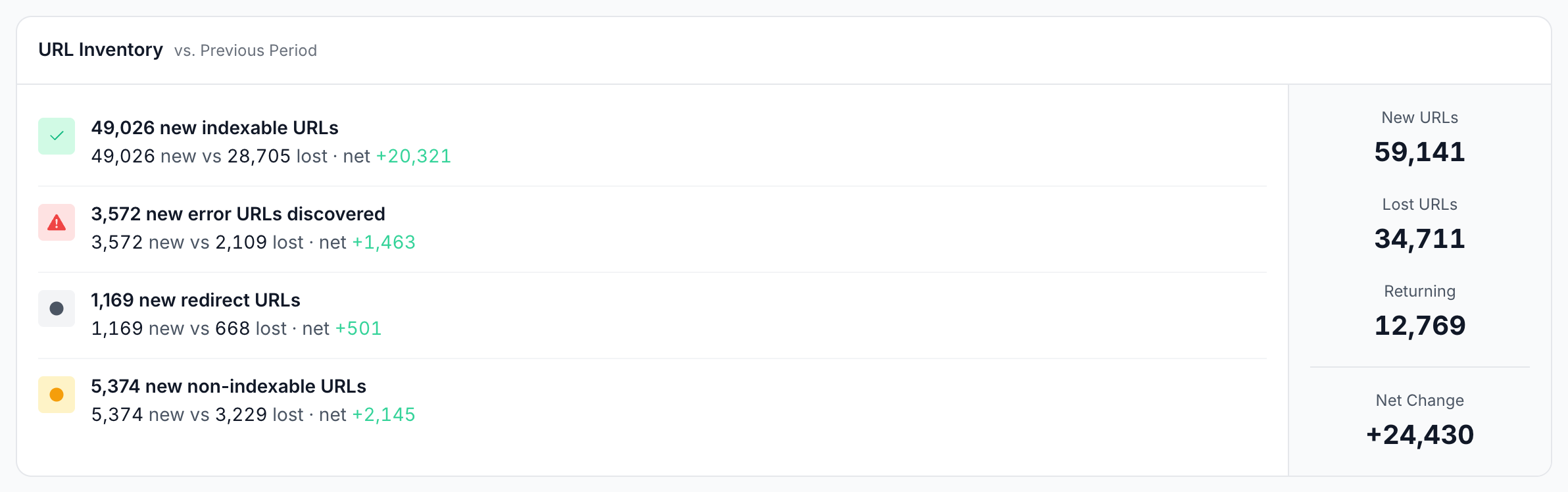
URL Inventory compares the pages the bot requested this period with the previous period. Each row is one kind of page, classified by the bot's latest request for it in the period:
- New indexable URLs, new error URLs, new redirect URLs and new non-indexable URLs, each with the number new, the number lost and the net change, such as "49,026 new vs 28,705 lost · net +20,321".
- The card's totals: New URLs, Lost URLs, Returning (pages requested in both periods) and Net Change.
New URLs count the same pages as New URLs Found. A lost URL is one the bot requested last period but not this period. A page the bot fetches only now and then can be new in one period and lost in the next without anything changing on your site. Every number opens the pages in New and lost URLs.
What kinds of waste does the bot hit?
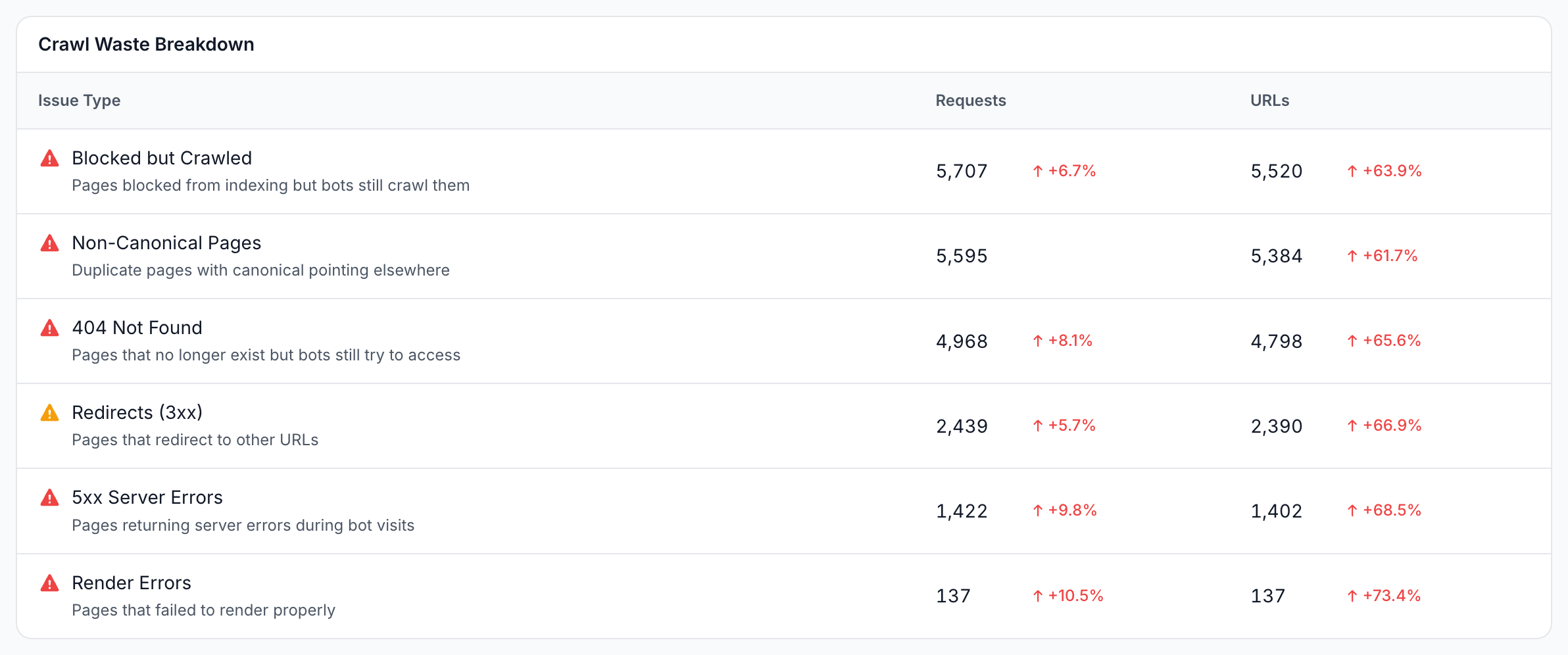
A waste condition is one of six fixed checks, listed as the Issue Type rows of the Crawl Waste Breakdown table, each with its requests, its URLs and the change against the previous period:
| Issue Type | Severity | Matches |
|---|---|---|
| 404 Not Found | Critical | Requests answered with 404 |
| 5xx Server Errors | Critical | Requests answered with a 5xx status |
| Non-Canonical Pages | Critical | Pages whose canonical tag points to another URL |
| Blocked but Crawled | Critical | Pages with a noindex robots meta tag that the bot still requests |
| Render Errors | Critical | Pages that failed to render |
| Redirects (3xx) | Warning | Requests answered with a redirect |
One request can match several conditions, such as a redirect to a non-canonical page, so the rows do not add up to the bot's traffic. Every condition is listed, even at zero.
The table uses the same six checks on every site and does not change with your Crawl Budget Rules. Its counts are separate from the Wasted bucket of Crawl Budget Allocation, so the two do not match.
How to read it
These patterns on the Efficiency tab point to waste or discovery problems:
- The Wasted share grows. More of the bot's crawl lands on URLs that cannot rank. Open the Wasted bucket to see which URLs.
- New URLs are mostly errors or non-indexable. The bot is discovering URLs you do not want crawled, such as parameter URLs or broken links. Check where they come from in Data Explorer.
- Few new indexable URLs after you published pages. The bot has not found the new pages yet. Check that your sitemaps and internal links point to them.
- Many lost indexable URLs. The bot stopped requesting pages it requested before. If you did not expect the drop, open Lost URLs in Data Explorer to see which sections the bot stopped requesting.
- Overcrawled pages are not your key pages. Feeds, calendars, filters and other parameter URLs that take outsized crawl are candidates for a fix at the source or a note that steers the generated rules.
- Blocked but Crawled or Non-Canonical Pages grows. The bot spends requests on pages you marked
noindexor canonicalized to another URL. Check whether internal links still point to them.
What to do next
Each finding leads to a fix at its cause, a rule change, or a closer look at one bot or section:
- Fix the causes of waste. Return
404or410for removed pages, from your server or with an Edge SEO rule, point links at final URLs, add canonical tags to duplicates. See how to fix each cause of crawl waste, including fixes Edge SEO serves without a release. - Tune what counts as waste. Steer the generated rules on Configuration > Crawl Budget Rules. See how to change what counts as crawl waste.
- Compare bots. Open the same tab under Googlebot, Bing and AI Bots to see whether AI crawlers waste requests on the same URLs as Googlebot.
- Filter by section. Pick a saved segment in the report's filter to see one section's waste, such as product pages or internal search. See Periods, comparisons and filters.
Where to find it
In the dashboard: Log Analyzer > Googlebot, Bing or AI Bots, tab Efficiency.