

Link regions: separate menu, footer and content links
Link regions sort every internal link EdgeComet records by where it sits on the page: navigation, footer, sidebar, main content and the rest. They let EdgeComet tell a link written into page content from a link a template repeats on every page. Also called link blocks or link placement.
EdgeComet generates the rules for your site from its own pages and applies them on its own. Rules label links when EdgeComet builds a crawl, and change nothing on your pages or in the HTML bots receive.
What link regions are
A link region is a named part of the page where links sit, such as Navigation or Main content. A content link, also called a contextual link, sits in Main content or a Catalog listing. A template link sits in any other region.
A page linked from the footer of every page but from no article is weakly linked, and a plain link count hides that. The Internal Linking report reads link regions to find those pages.
Regions and what counts as content
Every rule sorts links into one of ten regions:
| Region | Holds | Counts as content |
|---|---|---|
| Main content | The page's own body: prose, product descriptions | Yes |
| Catalog listing | Item links in a listing, grid, archive or category index | Yes |
| Interlinking | Related, see-also, you-may-also-like and next-article modules | No |
| Navigation | Header navigation, mega menus, mobile menus, utility navigation | No |
| Footer | Footer links | No |
| Sidebar | A side rail or widget column on every page | No |
| Breadcrumb | The breadcrumb trail | No |
| Faceted navigation | Filter, facet and sort links, not the item links | No |
| Pagination | Numbered pagers, next and previous | No |
| Chrome | Cookie banners, promo bars, skip links | No |
Two more labels are not regions you assign. Unknown is a link no rule matches. Uncaptured is a link whose position on the page was not recorded.
How rules match links
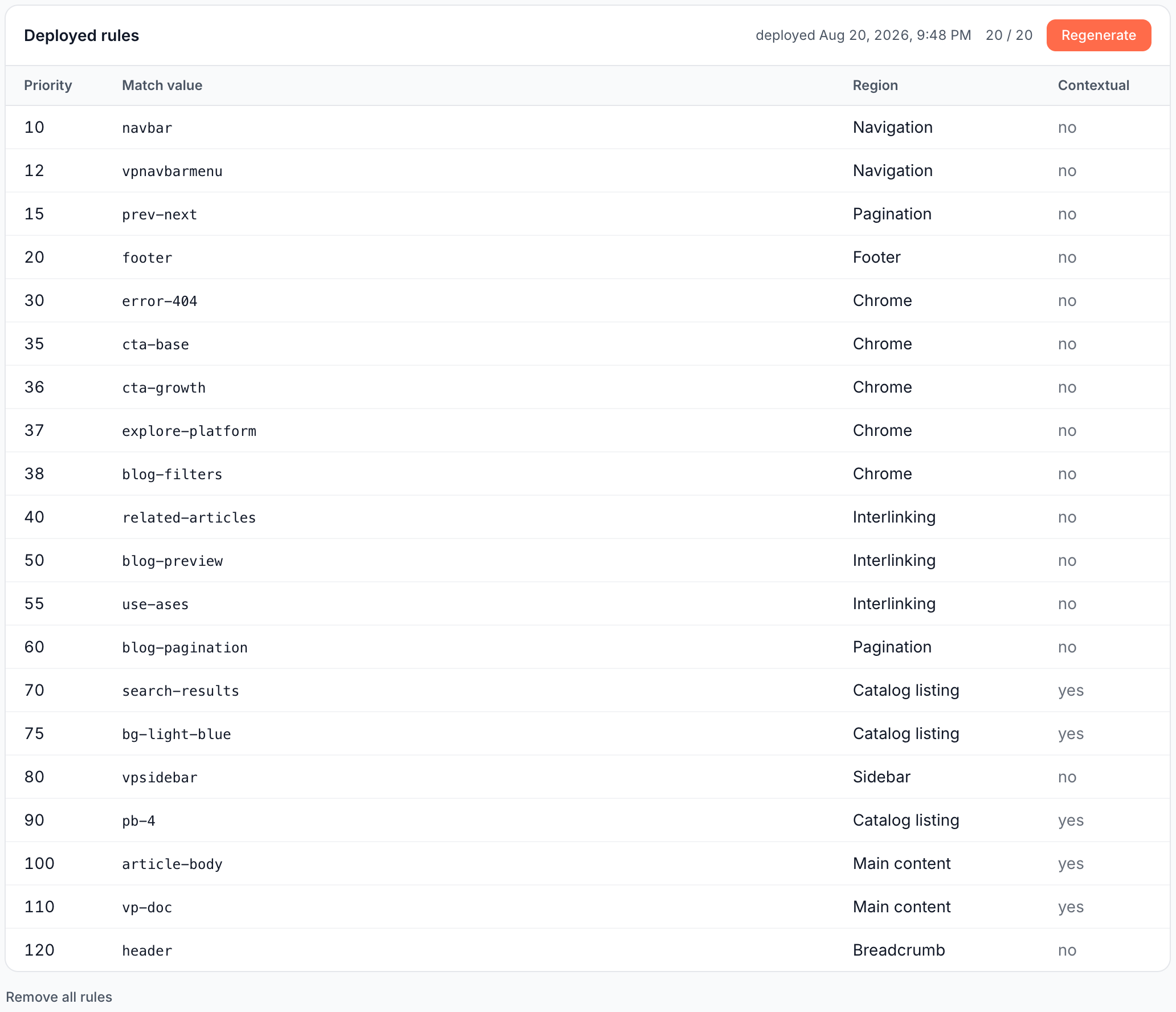
A rule has a Priority, a Match value and a Region. EdgeComet checks the rules from the lowest priority number up, and the first rule that matches decides the link's region.
The match value is one word from the page's markup: a tag name, an id, a class name or a role, such as navbar, footer or article-body. It matches when any element around the link carries it, from the link up to the page body.
Rules label every link EdgeComet records, including nofollowed and external links. The run measures its rules on followed internal links, the ones without nofollow, sponsored or ugc, and the content and template counts in Internal Linking count only those. A site has up to 20 rules, and the page counts them as "20 / 20".
How EdgeComet sets up link regions
After the custom extraction step, once the site has captured links on at least 20 indexable pages and 200 internal links, EdgeComet generates link region rules and applies them on its own. A run that finds no rule it can trust is discarded, and the links stay Unknown. See What EdgeComet configures on its own.
The run works from where links sit on the rendered pages bots received over the last 30 days:
- Ordered rule set: the run proposes rules from the markup tokens around your links, and renders a few of your page types to read the layout.
- Measured on your links: the run counts the links, pages and targets each region gets before it keeps the set.
- Content regions checked: a region marked as content that links the same targets from many pages behaves like a template, and the run flags it.
EdgeComet writes the position rules for your own templates and measures them on your own links, with nothing to write by hand.
What the link regions page shows
Configuration > Link regions shows one of three states:
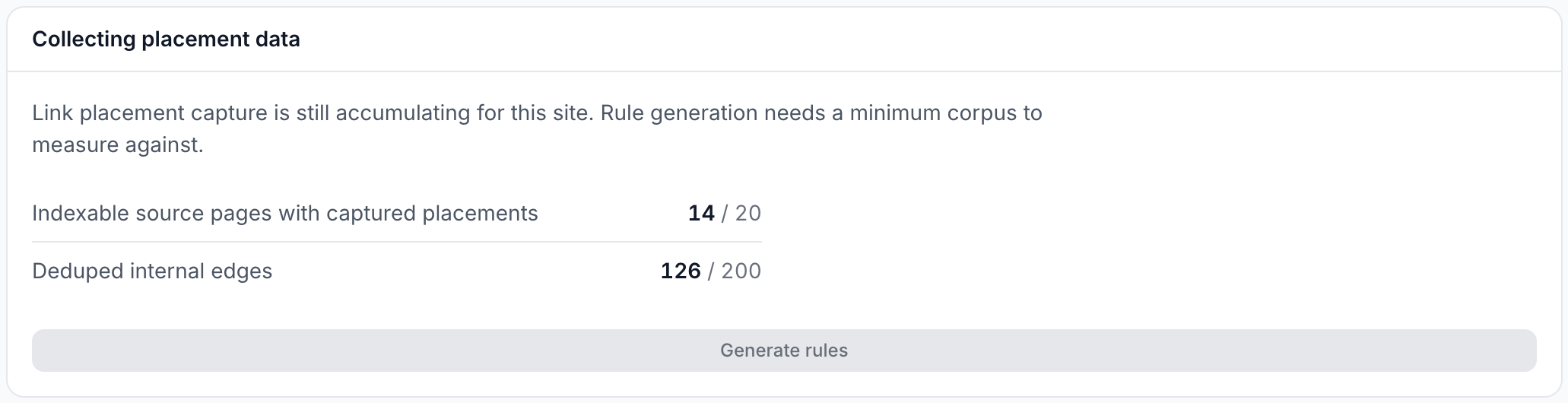
- Collecting placement data: the site has not captured enough links yet. The card counts progress, "Indexable source pages with captured placements {N} / 20" and "Deduped internal edges {N} / 200", and Generate rules stays disabled.
- No link region rules yet: enough links are captured, and Generate rules starts a run.
- Deployed rules: the rules in use, with the date they were deployed, the count out of 20, Regenerate and Remove all rules. The table lists Priority, Match value, Region and Contextual, which reads "yes" for content regions.
Generate or regenerate rules
Run the generator yourself to set up link regions sooner, or to update them after a redesign:
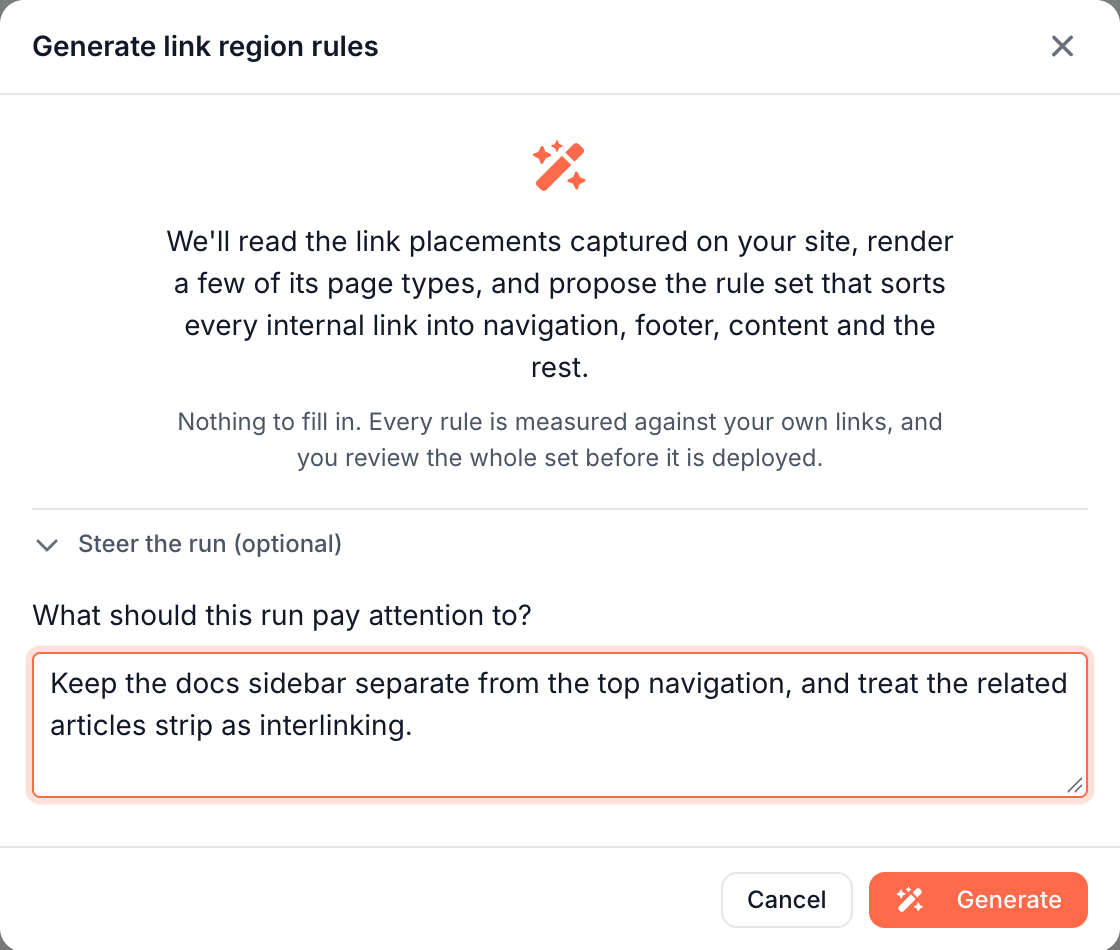
- Open Configuration > Link regions and click Generate rules, or Regenerate when rules are deployed.
- Optionally open Steer the run (optional) and describe what to watch under What should this run pay attention to?, such as "keep the docs sidebar separate from the top nav".
- Click Generate.
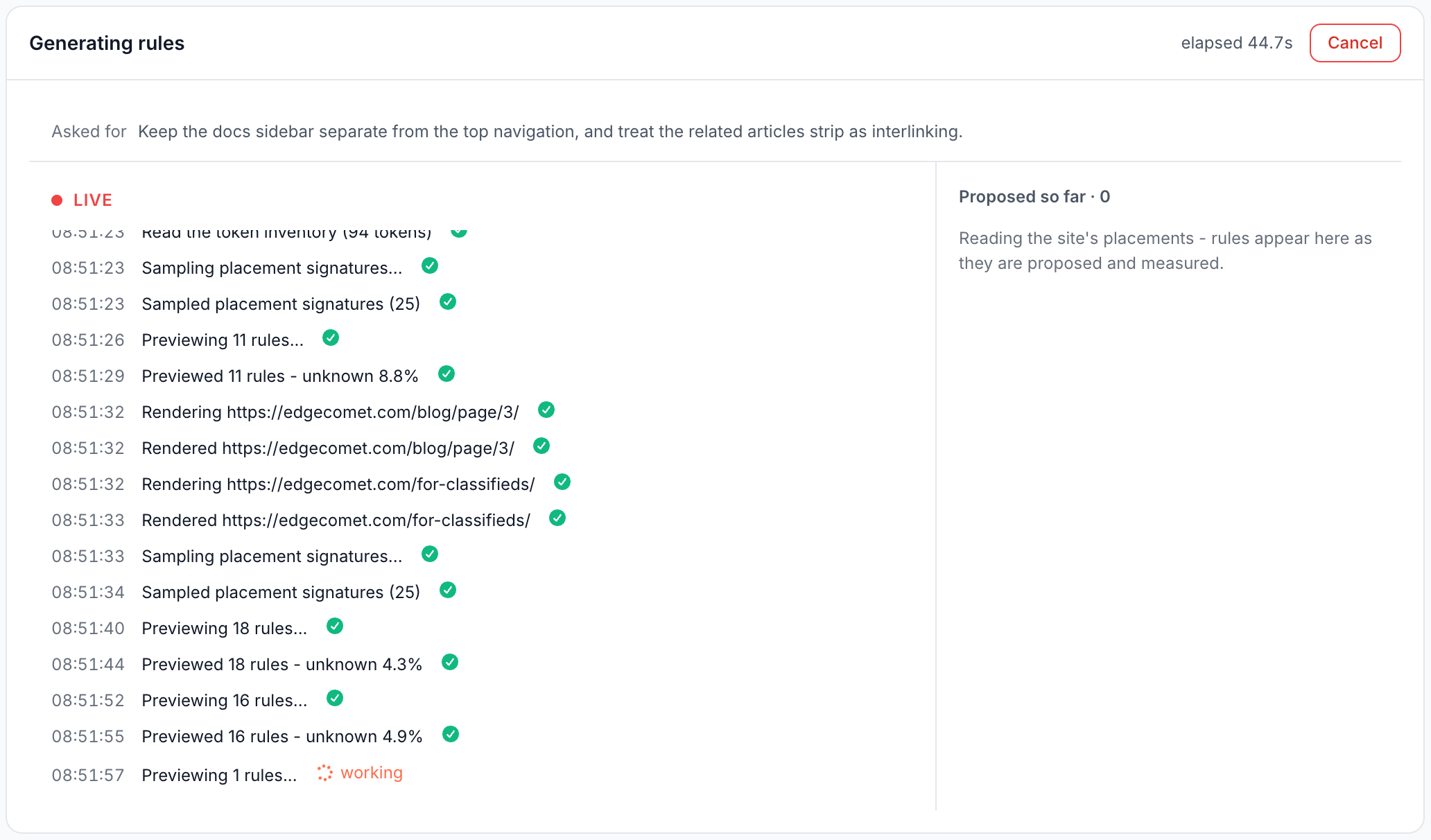
The card reads Generating rules, with Cancel, and Proposed so far lists rules by region as they are measured. Your deployed rules stay in use meanwhile.
Review the proposed rules
When the run finishes, Proposed rules waits for you, marked "awaiting your review". Its header shows the share of links the set leaves Unknown.
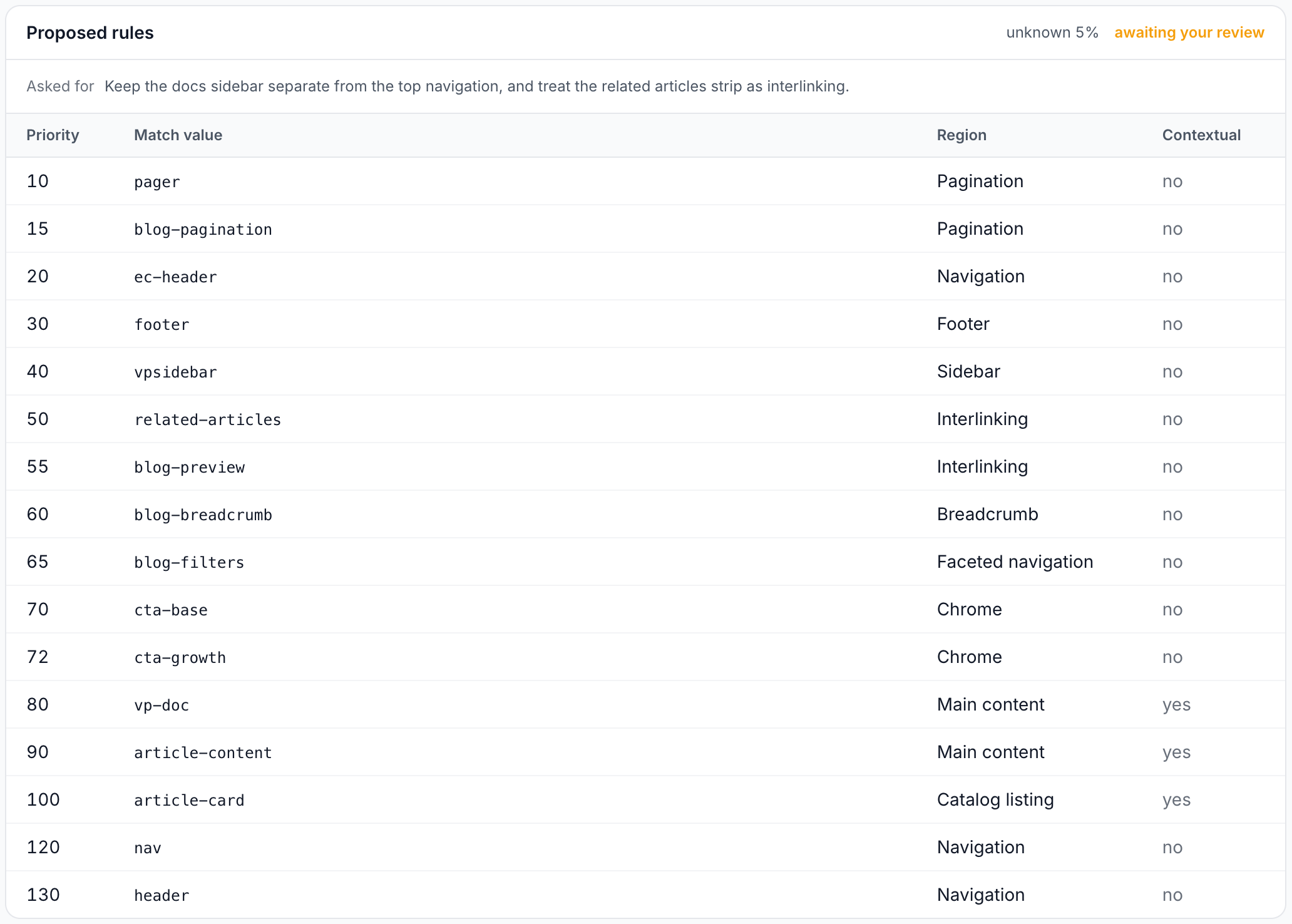
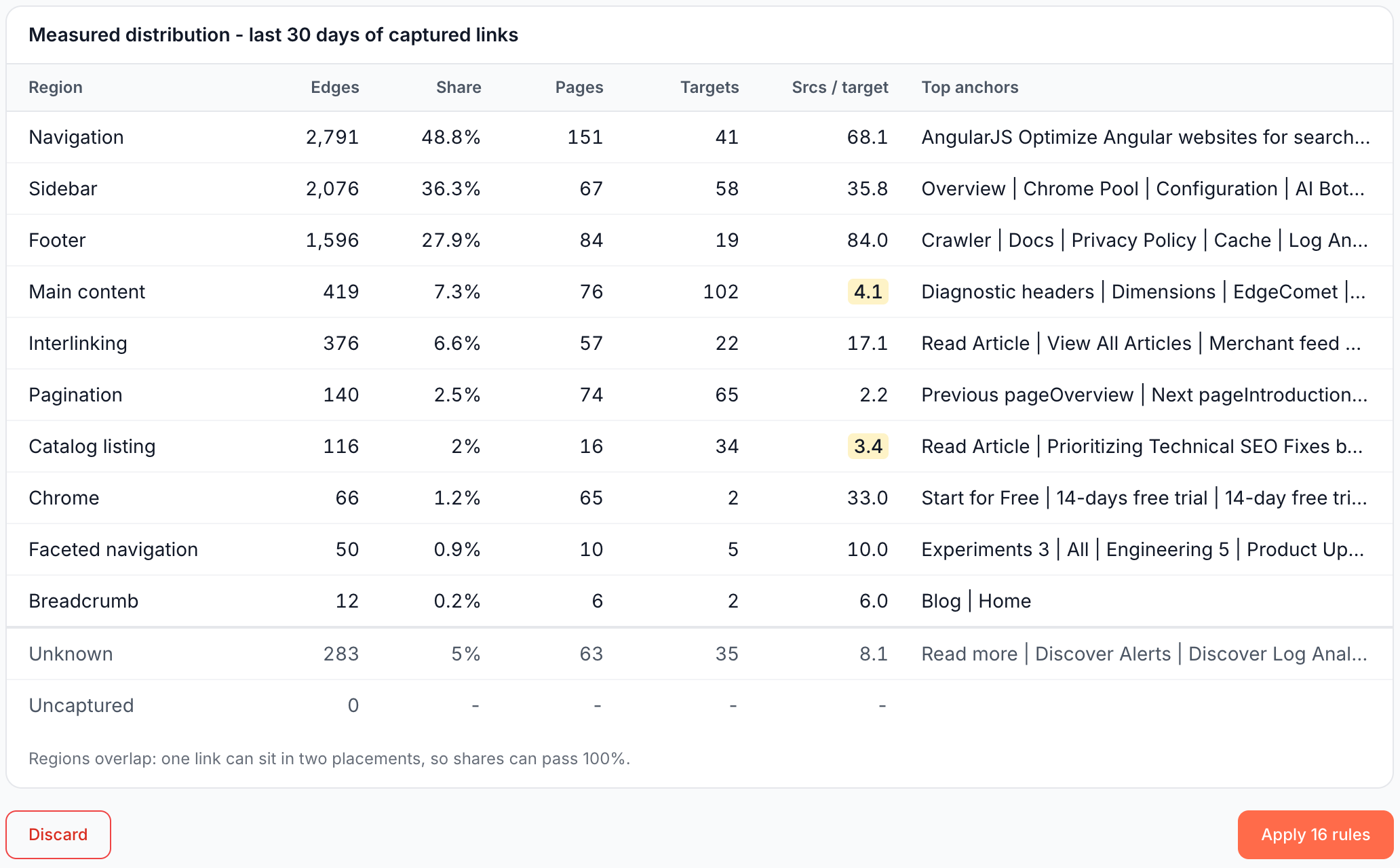
The card lists the proposed rules, then Measured distribution - last 30 days of captured links, with one row per region:
| Column | What it shows |
|---|---|
| Edges | Links the region would hold |
| Share | Their share of all captured links |
| Pages | Pages with links in the region |
| Targets | Distinct pages the region links to |
| Srcs / target | Source pages per linked target. Near 1, the region is the page's own content. In the tens or hundreds, the same targets are linked from every page |
| Top anchors | The most common link texts |
One link can sit in two placements, which is why shares can pass 100%. A content region with a high Srcs / target is highlighted as a likely template placement.
Apply or discard
- Apply N rules deploys the whole set and replaces the rules in use. The page then reads "The rules have been deployed".
- Discard drops the set and keeps your current rules.
A run that finds nothing reads "Run finished with no proposable rules" and offers only Discard, because an empty set would clear your rules.
Rules change as a set. To change one region, regenerate with a steer that names it, such as "treat the You may also like strip as interlinking".
Remove all rules
Remove all rules under the table clears every rule for the site. Confirm "Remove all rules?" with Remove all rules, or click Keep the rules. From the next crawl, every internal link is Unknown again until a new set is applied.
Build-generated class names
A rule marked generated class matches a class name your site's build generates, such as a CSS Modules or CSS-in-JS hash. The tooltip reads "The site's build generates this class name. A redeploy can rename it, and the rule then stops matching until link regions are generated again."
After a release that renames classes, regenerate the rules.
Where link regions apply
Link regions feed every view that separates content links from template links:
- Internal Linking, Overview tab. Template link share, Median contextual inlinks, the split columns of Internal links per page, Starved winners and the inlink profile. See What the Overview tab shows.
- Internal Linking, Changes tab. Content links added and removed, newly orphaned pages, and Template edits per region. See Changes tab.
- Crawl issues. "Broken links in the main menu", "Broken links in the footer", "Broken links in faceted navigation", "Menu, footer and facet links point at redirects", "Menu, footer or facet links are nofollowed", "Ranking or AI-cited page with almost no contextual inlinks", "Listings earning impressions or AI fetches with no contextual inlink" and "Withdrawn products with no route onward". Without link regions, they list under Needs setup.
- Data Explorer. The Link region column of the Evergreen Crawl Links table. See Links.
- Ask and MCP. Link counts in answers about internal links follow the crawl's link regions.
When new rules take effect
EdgeComet applies link regions when it builds a crawl. New rules label the next crawl and every crawl after it, and crawls built before them keep their old labels.
On a crawl built before any rules, the Internal Linking cards read "Link regions not configured", and the Internal links per page chart says "No link region rule set has classified this crawl, so content and template links cannot be told apart." The Current crawl rebuilds every day, or at once with Rebuild now. See Rebuild the Current crawl.
The Changes tab compares two crawls only when the same rules labeled both. Otherwise it explains that "a change between the two would be the rules moving rather than the site."
If it does not work
Generate rules is disabled
The page reads Collecting placement data: the site has not captured links on 20 indexable pages and 200 internal links in the last 30 days. A run started early answers "This site has not captured enough link placements yet to measure a rule set against." Wait for more bot visits.
"Link regions not configured" after you applied rules
The crawl you are viewing was built before the rules. Open the latest Current crawl, or rebuild it. See When new rules take effect.
"A run is already in progress for this site."
The page opens the open run. Review, apply or discard it first.
"The rule set was rejected and nothing was deployed. Your current rules are unchanged."
The message lists each refused rule by priority. Discard the run and generate again.
Generate rules or Remove all rules fails
Your role on this website lets you view link regions but not change them. See Team roles and permissions.
Where to find it
In the dashboard: Configuration > Link regions, at /websites/{id}/link-blocks. The Set up links on unclassified Internal Linking cards open the same page.