

Extraction rule health and automatic repairs
EdgeComet checks every custom extraction rule each day and repairs rules that stopped matching, such as after a site release renamed the element a rule reads. Also called self-healing extraction rules.
Every repair goes into the Repair changelog with the old and the new rule, and you can revert it in one click.
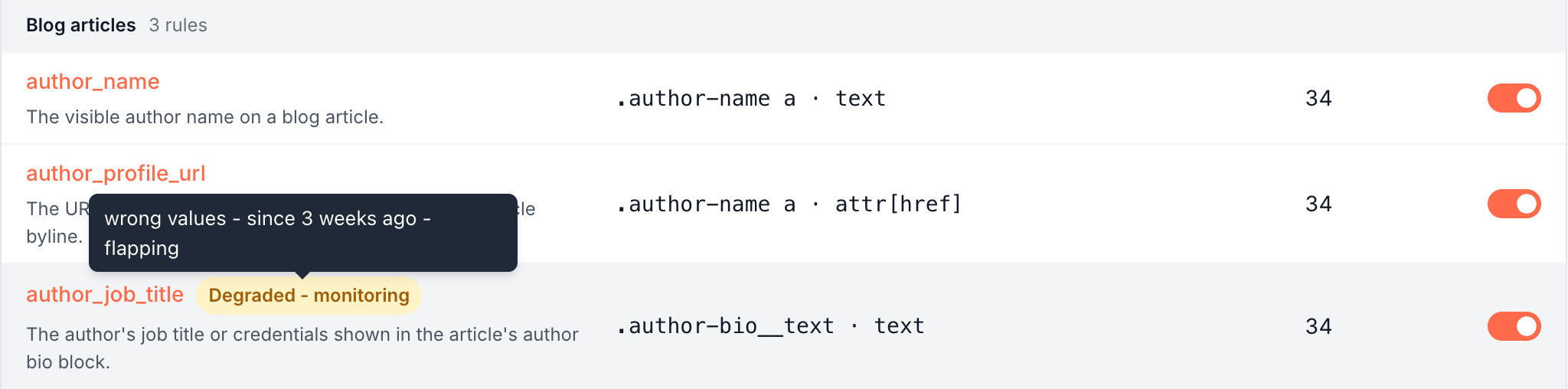
A rule with a problem shows a label next to its name on Configuration > Custom extractions. A rule with no label is healthy.
How EdgeComet checks rules
Every day, EdgeComet checks each field rule of your site against the values it collected:
- Matching: does the rule still find values on the pages it used to? A rule that suddenly finds nothing, or finds far fewer pages than before, is a suspect. EdgeComet renders the failing pages again to confirm the break before it acts.
- Values: do the values still match what the rule's name and description say, such as a price rule that now returns a shipping note?
- Value quality: are the values usable? The check flags numbers stored as text, values with HTML markup in them, the same value on every page, the same values as another rule, a rule that never produced a value, and a selector that rests on build-generated class names.
The checks read pages that answered 200. A rule you just created or edited gets time to collect values before the matching check judges it. Page chrome rules have no health check: they remove text and produce no values.
Health labels
| Label | What it means | What happens next |
|---|---|---|
| Degraded - monitoring | EdgeComet confirmed that the rule stopped matching or returns wrong values | EdgeComet watches it for a short time, then repairs it. If the rule recovers on its own, the label goes away |
| Repairing | A repair is running | Above the list, the chip reads "Repairing extractions that stopped matching" |
| Needs attention | A value quality problem | EdgeComet tries to fix rules it wrote. Rules you wrote wait for you: edit the rule or dismiss the finding |
| Muted | You dismissed the finding or reverted a repair | EdgeComet leaves the rule alone until you click Resume monitoring |
The red N need attention count above the rules counts the Needs attention labels.
Hover a label to see what broke, since when and why, such as "not matching - since 3 days ago". The failure reads not matching, wrong values or value quality. The reason can read:
- "extracts the same value as other rules"
- "numeric values stored as text"
- "values contain HTML markup"
- "the same value on every page"
- "has never produced a value"
- "selector relies on build-generated class names"
After a repair that could not fix the rule, the label returns to Degraded - monitoring with a reason such as "unfixed", "data gone" or "flapping", and EdgeComet tries again later.
Automatic repairs
When a rule stays broken, EdgeComet repairs it. An AI pass rewrites the selector or the pattern and tests the new version on the rule's own failing pages and on pages across the site. The repair goes live with no review step.
- Every rule can be repaired, including rules you wrote. The rule keeps its name, its description and its history in Data Explorer, Changes and alerts.
- Each repair is logged in the Repair changelog, where you can revert it.
- Rules EdgeComet wrote also get one improvement pass for value quality problems, such as numbers stored as text or values with HTML in them. While it runs, the chip above the list reads "Improving how extracted values are stored". Rules you wrote keep their Needs attention label instead, and duplicate or constant values are always left to you.
After a site release, EdgeComet repairs the rules it can without anyone rewriting selectors, and the changelog shows each change.
Undo a repair from the changelog
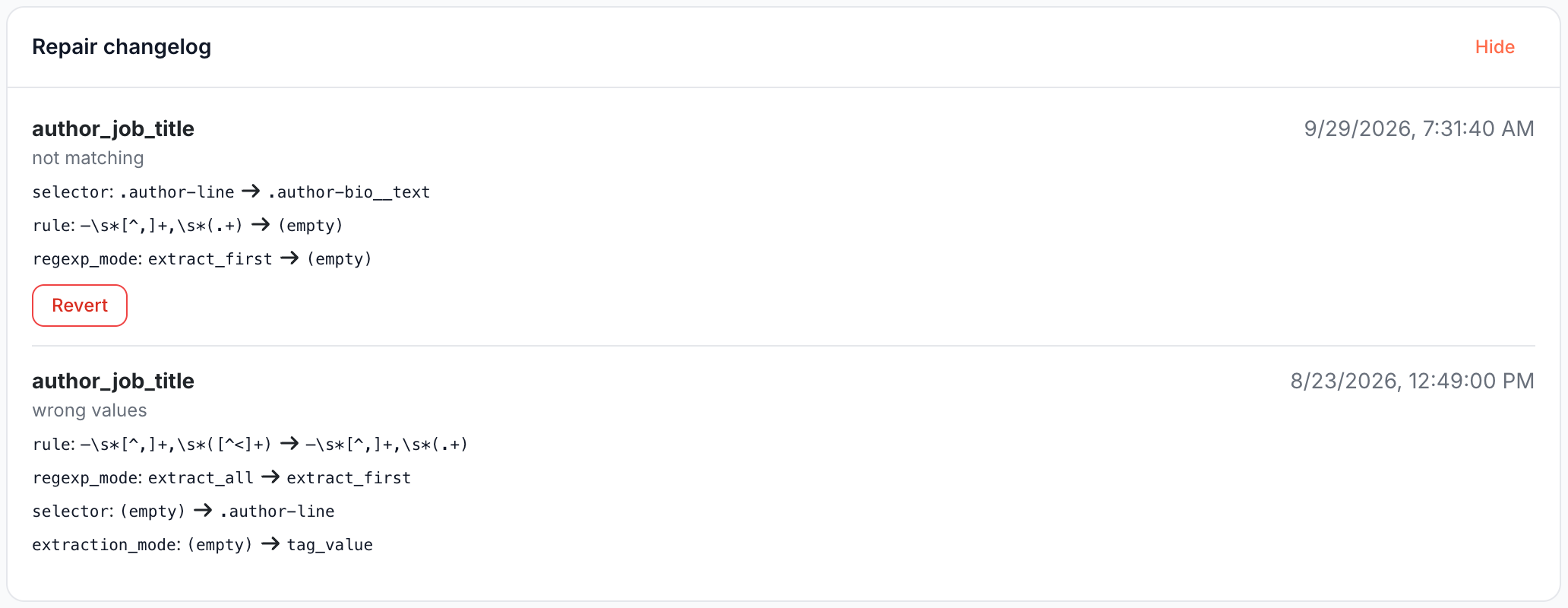
Repair changelog under the rules table opens the log of automatic changes, repairs and improvements, newest first.
Each entry shows the rule name, the time, the failure it fixed, and every changed part by its key, such as selector, rule for the pattern or regexp_mode for the match handling, with its value before and after. "(empty)" marks a part that was blank, and "(reverted)" an entry you reverted. Before any repair, the log reads "No automatic repairs yet."
Revert puts the earlier version of the rule back live. The rule then reads Muted, which stops EdgeComet from repairing it again until you click Resume monitoring.
Revert shows while the entry is still the rule's latest version. When the rule changed after the page loaded, the revert is refused with "This change was already reverted.", "The rule no longer exists." or "A later repair or edit owns this rule now."
Dismiss a finding or resume monitoring
Open the rule's quick view from its name. The health block shows the label and its reason, with an action:
- Dismiss on a Needs attention finding mutes it. Use it when the value is right for your site, such as a store where every product page has the same delivery text.
- Resume monitoring on a Muted rule clears the label. The next daily check judges the rule again.
Degraded - monitoring and Repairing have no action: EdgeComet is already on it. While a rule reads Degraded - monitoring, you can fix it yourself at once: edit it and check the new version with Test a URL. Editing or deleting a rule also clears its label.
Build-generated class names
Many frameworks write class names at build time, such as CSS Modules and CSS-in-JS hashes like Title_root__x7Kq2. The next deploy of your site can rename them, and a rule that rests on one silently stops matching.
- AI runs never rest a selector on them. They anchor on an id, a
data-*,itemprop,roleorariaattribute, a tag inside a stable landmark such asmain h1, a readable class, or a match on a readable part of the name, such as[class*="Title_root__"]. - Rules that already use one get Needs attention with "selector relies on build-generated class names". For rules EdgeComet wrote, it tries once to move the selector to a stable hook on the same element, with the same values.
- You can still save one by hand. The next daily check then marks the rule as a warning.
The same check runs when Ask, the Action Board or an AI client over MCP drafts Edge SEO changes, and EdgeComet marks link region rules that rely on one.
If it does not work
A repair changed a rule you wrote
Open Repair changelog and click Revert on the entry. The rule goes back to your version and reads Muted. Fix the selector yourself, then click Resume monitoring.
The label came back after you edited the rule
The edit cleared the old label, and a later daily check found the problem again. Run Test a URL on a few pages of the rule's page type to see what it reads now.
A rule reads "has never produced a value"
The field is not on the pages EdgeComet processed, or the selector does not match them. Test it on a page that shows the field, and delete rules for fields your site no longer has.
Where to find it
In the dashboard: Configuration > Custom extractions. Labels sit next to rule names, actions in each rule's quick view, and the Repair changelog under the table.