

How EdgeComet collects data: no log files, no crawler
Request-path capture in brief
EdgeComet collects bot data by request-path capture: your CDN sends bot requests to EdgeComet, EdgeComet serves each one, and it records the request together with the page the bot received. Human visitors go straight to your site, so EdgeComet records bots only.
The record, called the Bot log in the dashboard, does the job of server log file analysis without the log files. EdgeComet's site audit is built from it instead of from a crawler.
Alongside the bot log, EdgeComet reads Google Search Console, your XML sitemaps and your Merchant Center product feeds.
How request-path capture replaces server log files
What a server log file is
A server log file, also called an access log, is a text file that your web server or CDN writes with one line per request, from people and bots alike. In the default combined format of nginx, for example, a line holds the IP address, the time, the requested URL, the status code, the response size, the referring page and the user agent, the name the visitor gives itself.
To study bots with these files, you export them from each server or your CDN, store them, parse their format, keep the bot lines, check which bots are real, and repeat for every new batch. Even then, the files say that a bot came and which status code it got, not what the page contained. A request your CDN answered from its own cache never reaches your server's log.
What request-path capture is
Request-path capture means recording each request inside the service that answers it, at the moment it answers. EdgeComet sits in the request path: your CDN routes bot requests to EdgeComet, and EdgeComet sends back the page. See where EdgeComet sits in the request path.
Because EdgeComet produced the response, its record holds what a log line holds, with the bot's identity and IP verdict stored on every row. It also holds what only the service that answered knows: whether the page came from the cache, a fresh render or your server, and an SEO snapshot of the HTML the bot received. That comes to about 90 fields per request.
The snapshot is taken from the page EdgeComet already served, so recording adds no requests to your site.
One Googlebot request in an access log and in EdgeComet
At 10:02, Googlebot requests /product/123. A web server or CDN access log records it as one line:
66.249.66.1 - - [14/Oct/2026:10:02:13 +0000] "GET /product/123 HTTP/1.1" 200 48211 "-" "Mozilla/5.0 (compatible; Googlebot/2.1; +http://www.google.com/bot.html)"The line says that an address claiming to be Googlebot got a 200 and 48,211 bytes. EdgeComet knows more about the same request:
| Field | What EdgeComet records |
|---|---|
| Bot | Googlebot, a search engine bot |
| IP Validation | Verified: the address is in a range Google publishes for Googlebot |
| How it was served | Cache Hit: a copy rendered 6 hours earlier, served in 2 ms. The page fields below come from that render |
| Title | Trail running shoe X2, Example Store |
| Canonical | https://example.com/product/123 |
| Robots meta tag | noindex |
| Word count | 812 |
The log line looks healthy. The record shows that Googlebot received a page telling it not to index the product. To learn that from a log file, you would have to fetch the page yourself, run its JavaScript and hope the result matched what Googlebot got at 10:02.
In Data Explorer > Bot log, every request is one row. On edgecomet.com, the requests below were served from the bypass cache:
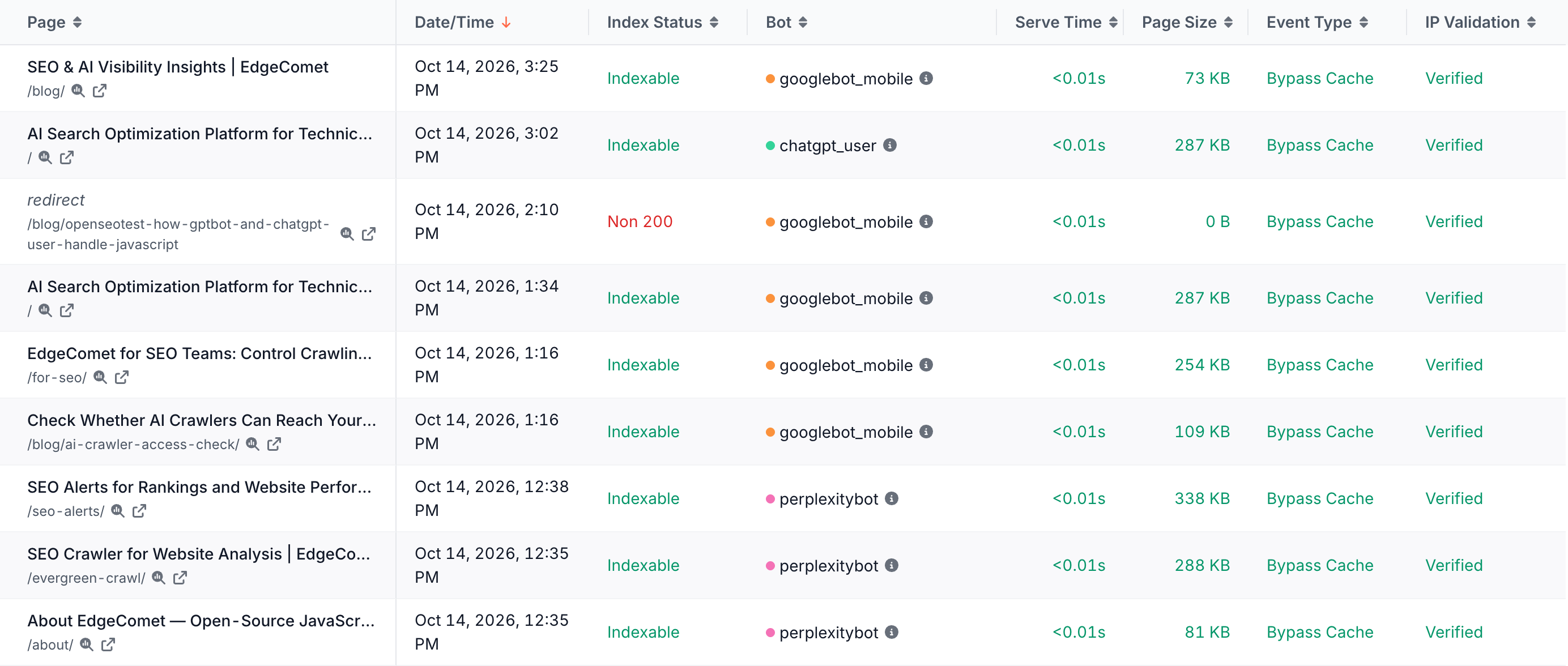
EdgeComet event types
An event type is the field of each record that says how EdgeComet handled the request, shown as Event Type in Data Explorer > Bot log.
| Event type | What happened |
|---|---|
| Cache Hit | EdgeComet served a rendered copy of the page from its cache |
| Render | EdgeComet rendered the page in headless Chrome for this request and served the result |
| Bypass | EdgeComet fetched your server's HTML for this request and served it without rendering |
| Bypass Cache | EdgeComet served a cached copy of your server's HTML |
| Precache | EdgeComet rendered or fetched the page on its own to fill the cache before a bot asked. No bot was involved |
| Error | EdgeComet answered with an error instead of a page, for example because the request was blocked or failed |
A Cache Hit or Bypass Cache record carries the request, the bot, the timing, and the status code, title and index status stored with the cached copy. The full page snapshot is on the Render, Precache or Bypass record that produced the copy. Data Explorer > Bot log hides Precache rows by default with a filter row you can remove.
The sources EdgeComet reads
EdgeComet reads four sources and derives two more. Bot requests need only your routing; each other source starts when you connect it or turn on its rule. Data sources, freshness and retention lists the delay and history of each.
Bot requests EdgeComet serves
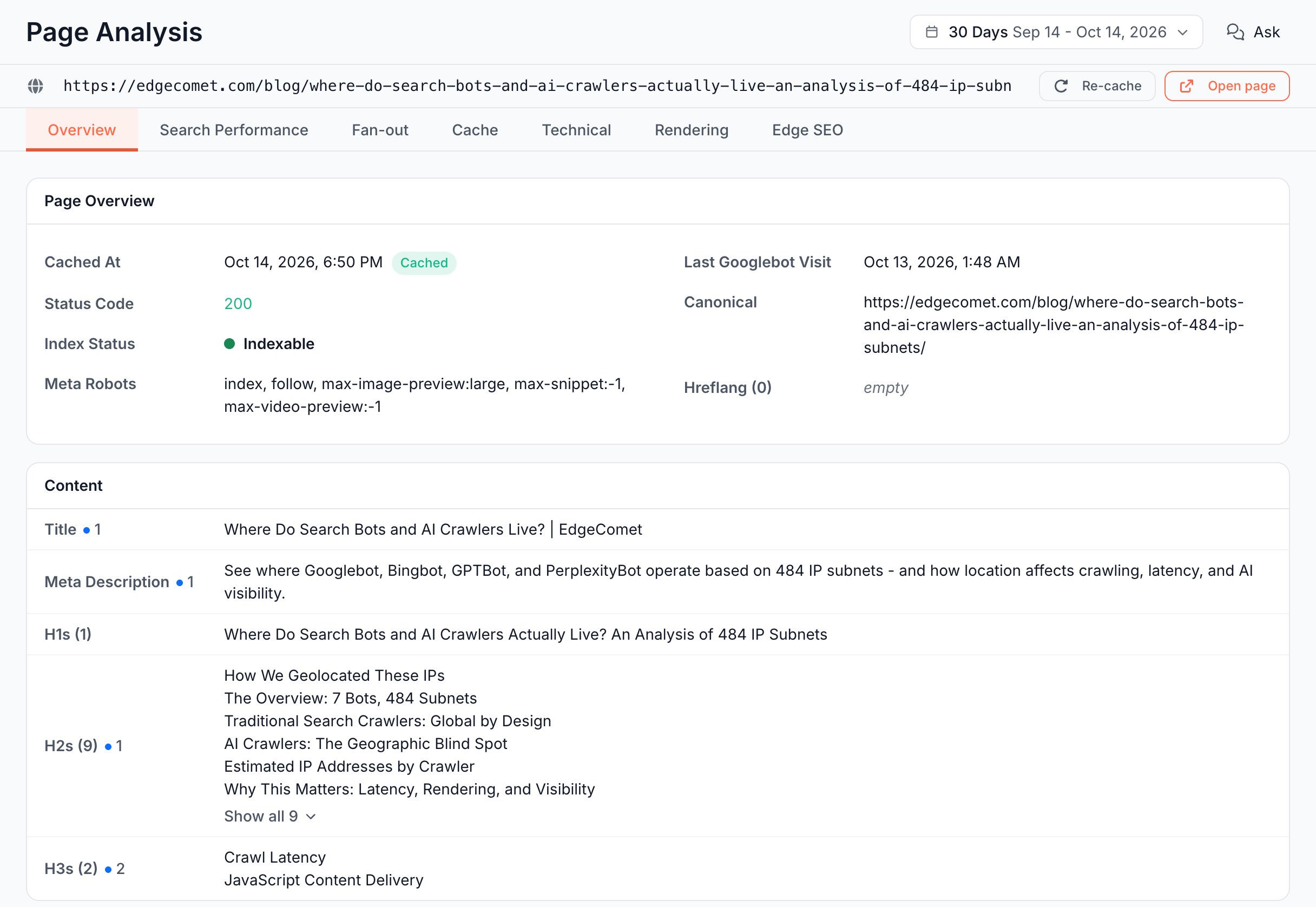
Every bot request your routing sends to EdgeComet, with the page the bot received, recorded as it is served. You see them in Log Analyzer and Data Explorer > Bot log, and they feed Evergreen Crawl, the page change log, alerts and the Action Board. Page Analysis shows one page's latest snapshot next to its bot visits.
Google Search Console performance data
Clicks, impressions, click-through rate and average position for each page and query, joined to the bot data by URL. EdgeComet imports the last 360 days on a paid plan, or 180 days during a trial, when you connect Search Console, then one new day every day, about 3 days behind. You see it under Search and in Data Explorer > Search Console. See Search reports overview.
XML sitemaps EdgeComet fetches
The URLs your site says exist, with their last-modified dates. EdgeComet fetches the sitemaps you list in the Sitemap Re-cache rule under Configuration > Caching, every 12 hours by default, and can pre-cache the URLs in them. Data Explorer > Feeds > Sitemap lists every URL from your sitemaps.
Merchant Center product feeds
What your shop says it sells: each product's link, title, price, sale price and availability. EdgeComet fetches the Google Merchant Center feed URLs you list in the Merchant Feed Re-cache rule under Configuration > Caching, every hour by default, re-caches product pages whose feed data changed, and checks whether each page agrees with the feed. You see it under E-commerce > Product Feed and in Data Explorer > Feeds > Merchant feed.
The EdgeComet page change log
What changed on each page between the fetches that gave EdgeComet a fresh copy: renders, origin fetches and pre-cache warm-ups. Every 5 minutes, EdgeComet compares each page's newest fetch with its last known state and logs changes to fields such as the status code, title, canonical, robots meta tag, indexability, structured data, hreflang and main content. You see it under Changes and Changes > Change log. See the Changes overview.
Evergreen Crawl, built from bot and pre-cache fetches
A site audit assembled from the pages bots and your pre-cache rules fetched, instead of from a crawler's own visit, so each page appears as EdgeComet served it. The Current crawl covers the last 30 days and is rebuilt every day. You see it under Evergreen Crawl and in Data Explorer > Evergreen Crawl. See the Evergreen Crawl overview.
Log files, crawlers and request-path capture compared
A site crawler is a tool that follows links through your site and records each page it reaches. Each method answers a different question: a log file shows which requests reached your server, a crawler shows what your pages look like to the crawler, and request-path capture shows what each real bot asked for and received.
| Server log files | Site crawler | Request-path capture in EdgeComet | |
|---|---|---|---|
| What it records | Every request that reached the server or CDN writing the log, from people and bots | The pages the crawler fetched on its own run | Every bot request routed to EdgeComet |
| Details per request or page | IP address, time, method and URL, status code, size, referrer, user agent, often response time | The page as the crawler saw it: tags, links, content | The log fields plus bot identity, IP verification, how the page was served and an SEO snapshot of the page, about 90 fields |
| Shows the page a real bot received | No. A log line holds no page content | No. It shows its own copy, from its own visit | Yes, as EdgeComet served it, rendered or not |
| Bot verification | Possible: a log analyzer can check IP addresses against the ranges bot operators publish | Not applicable: no real bots | Built in: each request is checked against the IP ranges its bot's operator publishes, where the operator publishes them |
| Setup | Log exports or a log-shipping connector, storage, format mapping | Crawl settings, limits and a schedule | One routing rule at your CDN or proxy |
| Freshness | As of the last export, or minutes behind with streaming | As of the last crawl run | As each request is served |
| History before you start | As far back as you kept the files | None. Each run is a new snapshot | Starts when routing is active. Search Console adds up to 360 days before you connected it |
| Extra requests to your site | None | The crawler's own requests | None for recording |
| Gaps | Page content and rendered state. On your origin server, requests your CDN answered from its cache | Which pages real bots request, how often, and what they get | Pages no bot requested. Requests that do not pass through EdgeComet, such as human visitors, files your routing sends to your origin, bots that skip your CDN, and bots that use a browser user agent |
A good log analyzer can also identify bots and verify their IP addresses, so the difference is not the technique. It is what a log line cannot hold: the page the bot received, its rendered state and SEO tags, how it was served, and anything since the last export.
A crawler's strength is reach: it follows links to pages no bot has requested yet. EdgeComet covers part of that gap. See Does EdgeComet find pages bots never visit?
For product comparisons, see EdgeComet compared with an SEO platform that combines a crawler and log analysis and with a site crawler.
Common questions
Do I need to upload my server log files to EdgeComet?
No. EdgeComet sees each bot request as it serves it, a step beyond working with log files: no exports to schedule, no storage buckets, no log format to map, no wait for the next import, and every request comes with the page the bot received. Once your routing is active, data arrives on its own.
Can I import historical logs into EdgeComet?
EdgeComet's bot data comes from the requests it serves, so bot history starts when routing is active, and bot reports start at the first verified bot visit, usually within 24 hours of the install. For the months before, Search Console fills in: when you connect it, EdgeComet imports the last 360 days of clicks, impressions and queries on a paid plan, or the last 180 days during a trial, so search reports cover those days before you connected it.
How long does EdgeComet keep bot data?
For as long as your subscription is active.
Which log formats does EdgeComet support?
None is needed. EdgeComet records requests itself, so it works the same whether your server runs Apache, IIS, nginx or anything else. It needs a CDN or proxy that can route bot requests to it.
Does EdgeComet crawl my site?
Not with a crawler of its own. EdgeComet requests a page from your server when it has no fresh copy to serve, or when a pre-cache rule refreshes it, and it fetches the sitemaps and product feeds you list in its rules. It does not follow links to find pages: Evergreen Crawl, its site audit, is assembled from the pages bots and your pre-cache rules fetched.
Does EdgeComet find pages bots never visit?
Partly. Five places show pages that no bot requested:
- Sitemaps. In Data Explorer > Feeds > Sitemap, the quick filter Googlebot not fetched since lastmod lists sitemap URLs Googlebot has not fetched since they changed.
- Search Console. In Data Explorer > Search Console, the filter Bot log: Requested set to No lists pages with search data but no request in the bot log for the period.
- Links. Evergreen Crawl also lists URLs that fetched pages link to, even when no bot requested them.
- Pre-cache. Pre-cache rules render pages before bots ask, for example the URLs in your sitemaps, and those pages enter the Current crawl too. A crawl started under New crawl with the Precache bots option, under More bots, audits only the pre-cached pages.
- Product feeds. On E-commerce > Products, the Known product URLs footer counts as source only the feed products the crawl never fetched or saw a link to. Not fetched by Googlebot counts known product URLs with no Googlebot fetch in the crawl's dates.
A page that appears in none of these stays outside EdgeComet's data.
Related
Related Articles
- Log File Analysis for SEO: A Practical Guide for 2027
- Evergreen Crawl: A New Way to See Your Site Through Googlebot’s Eyes
- Why You Won’t Find Google-Extended in Your Logs
- Request headers – what Googlebot and AI bots send with every request
- Best SEO Log Analysis Tools in 2027: Features, Use Cases & Comparison
- Can Google Analytics Detect Bot Traffic? Why Server Logs Tell a Different Story