

Alerts
Alerts tell you when something on your site breaks, using the data EdgeComet already collects. Every bot request is recorded as it is served, so an alert reads real traffic rather than a scheduled recrawl.
You create a rule, which says what to watch and on which pages. When the rule's condition holds, an incident opens, and unless the rule is set to info severity or the site is muted, a notification goes out to your email addresses, Slack channels and webhooks. The incident carries the pages behind the number, so you start from the evidence rather than from a graph.
What alerts watch
Alerts read the requests search and AI bots actually make, recorded as EdgeComet serves them. There is no scan to schedule and no separate crawler to configure, and every rule works from the same HTML the crawler received.
This is live traffic in its real pattern. Googlebot, Bingbot and the AI crawlers return to your most important pages constantly, so those pages are the ones carrying the freshest evidence behind every check. You are alerted on what the crawlers actually saw, at the moment they saw it, rather than on what a test crawl would have found from a different network at a different time with a different user agent.
Cadence varies by alert. An outage check runs every 5 minutes, a noindex check once a day, and a crawl comparison when the next crawl is assembled. Check frequency gives the cadence for each.
Start here
If you are setting up alerts for the first time, these eight cover the failures that cost the most:
| Alert | What it catches |
|---|---|
| Origin stopped answering | Your origin returning errors, refusing connections, or sending nothing usable |
| Noindex on live pages | Pages that answer 200 and carry a robots noindex |
| Pages started answering 4xx | The 404 wave after a migration, or a rule that went in too wide |
| Pages lost their clicks | Pages whose Search Console clicks fell by half or more week over week |
| A section lost its clicks | The total clicks of a section falling, which is what people mean by "traffic is down" |
| Redirect loops | Addresses that redirect back to themselves, so a crawler gives up |
| Pages fell out of indexability | Pages the previous crawl found indexable that this crawl does not |
| Pages changed | Titles, canonicals, indexability or content moving on pages you care about |
On a site with no rules yet, the Alerts page offers these as a starter pack and measures what each one would find on your site right now, before you turn any of them on.
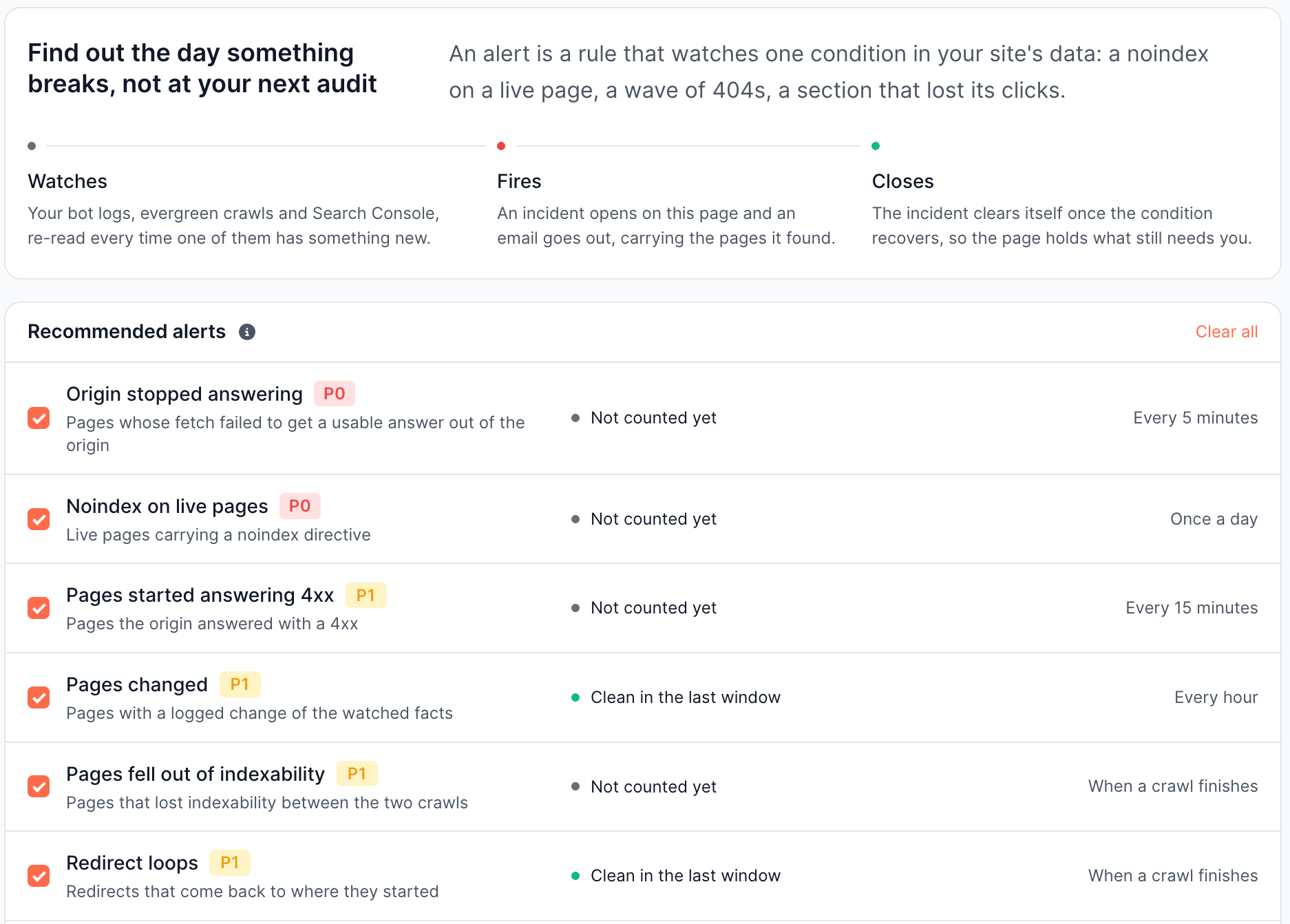
Tick the ones you want and they are created together. See Creating an alert.
The full catalogue
Twenty five alerts ship built in, grouped into six categories.
Availability
Whether your origin is answering bots at all.
| Alert | What it catches | Checks |
|---|---|---|
| Origin stopped answering | Requests that reached for your origin and got nothing usable back: a server error, a refused connection, a navigation that never completed, or an empty response | Every 5 minutes |
| Pages started answering 4xx | Client errors coming back from your origin, such as the 404 wave after a migration or a 403 from a rule that went in too wide | Every 15 minutes |
| Fake search-engine traffic | Requests claiming to be Googlebot or another search engine whose address fails verification, and the load they put on your origin | Every hour |
While your origin is down EdgeComet keeps serving cached pages, so bots go on reading your site. Live requests record no failure in that state, and the outage shows up through pre-cache attempts.
Rendering
Whether a render produced a usable page.
| Alert | What it catches | Checks |
|---|---|---|
| Renders are failing | Pages the rendering fleet could not finish: Chrome died, the pool had nothing to hand out, the page never loaded, or the HTML came back unparseable | Every 15 minutes |
| Renders got slower | Median render time rising against the same window yesterday | Every hour |
| Responses got slower | Median serve time rising against the same window yesterday | Every hour |
| JavaScript errors rose | Errors thrown while rendering, against the same window yesterday | Every hour |
| Sub-resources are failing to load | Scripts, stylesheets and images that failed while rendering, which is a CDN or a third party breaking your pages from the outside | Every hour |
| Cache hit rate fell | The share of requests EdgeComet answered from its own cache falling, which means more traffic is reaching your origin | Every hour |
| A page block stopped rendering | Live pages that render fine and return HTML but no longer contain the block you extract, such as the price or the review stars | Once a day |
| Renders came back hollow | Pages that answered 200 and produced HTML but almost no content: the soft 404, and the template that rendered its shell and nothing else | Once a day |
| Sitemap pages that stopped re-rendering | Pages in your sitemap that pre-cache should have refreshed and did not | Once a day |
A rendering failure is a failure of the rendering fleet, not of your site. When rendering is unavailable, traffic falls back to your origin and keeps being served, so nothing a visitor sees changes and the failure shows up only on these rows.
"A page block stopped rendering" needs at least one active custom extraction field on the site.
Search
Whether pages lost their audience in Google.
| Alert | What it catches | Checks |
|---|---|---|
| Pages lost their clicks | Pages whose Search Console clicks fell by half or more against the previous seven days, counted one page at a time | When Search Console publishes a day |
| Queries earning clicks collapsed | How many distinct queries brought you a click, narrowing before any single page shows it | When Search Console publishes a day |
Both need Search Console connected.
Traffic
Whether EdgeComet is still being asked for pages.
| Alert | What it catches | Checks |
|---|---|---|
| A section lost its clicks | The total Search Console clicks of a section against the previous seven days. Three head pages losing eighty percent moves this, where no per-page rule would count them as more than three pages | When Search Console publishes a day |
| Bots stopped fetching | How many distinct pages were fetched from your origin at all, against the same window yesterday | Once a day |
SEO
Directives and page facts.
| Alert | What it catches | Checks |
|---|---|---|
| Noindex on live pages | Pages that answer 200 and carry a robots noindex. This watches the state, not the moment it changed, so it also catches a noindex that shipped before the rule existed | Once a day |
| A robots directive appeared | Live pages carrying the directive you choose: nofollow, noarchive, nosnippet, noimageindex, or none | Once a day |
| Pages changed | Pages whose status, redirect target, indexability, canonical, title, description, headings, structured data, hreflang, content or extracted values moved since the rule last looked | Every hour |
"Pages changed" works differently from the rest and has its own section below.
Crawl
EdgeComet runs no separate crawler. A crawl here is one snapshot of Evergreen Crawl, assembled from the bot visits of the last 30 days. These alerts compare the newest snapshot against the one before it, which is how they can report what changed since the previous crawl and which pages lost their internal links. See Bot data for how Evergreen Crawl is built.
| Alert | What it catches | Checks |
|---|---|---|
| Redirect chains | Addresses that redirect to another address which redirects again. Every extra hop is a request a crawler pays for | When a crawl finishes |
| Redirect loops | Addresses that redirect back to themselves, directly or through one hop. Nothing is at the end of the chain | When a crawl finishes |
| New broken pages in a crawl | Pages that answered normally in the previous crawl and answer 4xx or 5xx in this one | When a crawl finishes |
| Pages fell out of indexability | Pages the previous crawl found indexable that this crawl does not: blocked, redirected, canonicalised elsewhere or broken | When a crawl finishes |
| Pages lost their internal links | Pages the previous crawl reached through an internal link and this one did not, such as a navigation block that stopped rendering | When a crawl finishes |
| Sitemap pages the crawl never reached | Addresses your sitemap lists that the latest crawl did not find | When a crawl finishes |
Watching pages for change
Because every page bots request passes through EdgeComet, every page carries its own history. "Pages changed" compares each page against its own last observation and tells you exactly what moved, on the real pages bots fetched, with no sampling and no separate crawl to set up.
Change detection built on a crawler has to re-crawl a site to find out what moved, which is why it answers in days and only for the pages that crawl reached. EdgeComet already has both observations.
What you can follow
| Group | Facts |
|---|---|
| Availability | Status code, redirect target |
| Indexing | Index status, meta robots, canonical URL |
| Page text | Title, meta description, H1 |
| Head tags | Structured data, hreflang |
| Content | Body content |
| Extraction | Any custom extraction field you have set to track changes |
Each fact narrows further, so a rule fires on the movement you care about rather than on any edit at all. A title can fire on any change, on emptied, on now contains, or on changed by more than 20, 50 or 80 percent. A status code can fire on stopped serving 200, became an error, or became a redirect. Index status can fire on became non-indexable, became blocked, or became indexable.
Index status is EdgeComet's own reading of whether the page it received could be indexed, taken from that page's directives, canonical and status code. It is not a report of whether Google has indexed the URL.
Watching your own data, not just SEO tags
The Extraction group is what takes this past standard SEO monitoring. A custom extraction is a rule you define that pulls one value out of your pages as they render, such as a price, a stock flag, a delivery promise or a review count. Any extraction field you set to track changes becomes something a rule can watch, and the operations offered follow the field's type:
| Field type | Fires on |
|---|---|
| Text | Any change, emptied, now contains a value, became a value, changed by more than 20, 50 or 80 percent |
| Number | Any change, emptied, became a value, dropped by more than 10, 20 or 50 percent, rose by more than 10, 20 or 50 percent |
| Boolean | Any change, became true, became false |
So a rule can watch a price drop by more than 20 percent, an in-stock flag turn false, a delivery promise change wording, or a review count fall, on the pages search engines and AI crawlers are reading right now. These are business facts rather than SEO tags, and they are checked from the same rendered HTML the crawler received.
A change is picked up at the next fetch or pre-cache render of the page, so the pages bots visit most often are the ones that report their changes fastest.
A few things are left out on purpose, because on a normal site they move on almost every fetch and would bury the signal: word counts, link counts, image counts, dates, page size, and H2 and H3 headings.
Next
- Creating an alert covers the three ways to make a rule and how to test one before you arm it.
- When an alert fires covers incidents, evidence, and how they close.
- Email notifications covers delivery.
- Check frequency covers how soon you hear.