

Find thin category pages and faceted navigation URLs
The Shelf Edge Listings report sizes every category and search results page by the products it displays, finds thin and near-empty listings, and shows which URL parameters spawn filter and sort variants. Also called a category page audit or a faceted navigation audit.
Listings are counted on their own URL, with no query string. Variants with a query string, such as ?p=3 or ?color=red, are left out of the cards, the size table and the change card. The facet table and the Issues card count them.
Pagination in the path, such as /page/2, has no query string and counts as a listing. A shop whose categories exist only as query-string URLs reads zero listings.
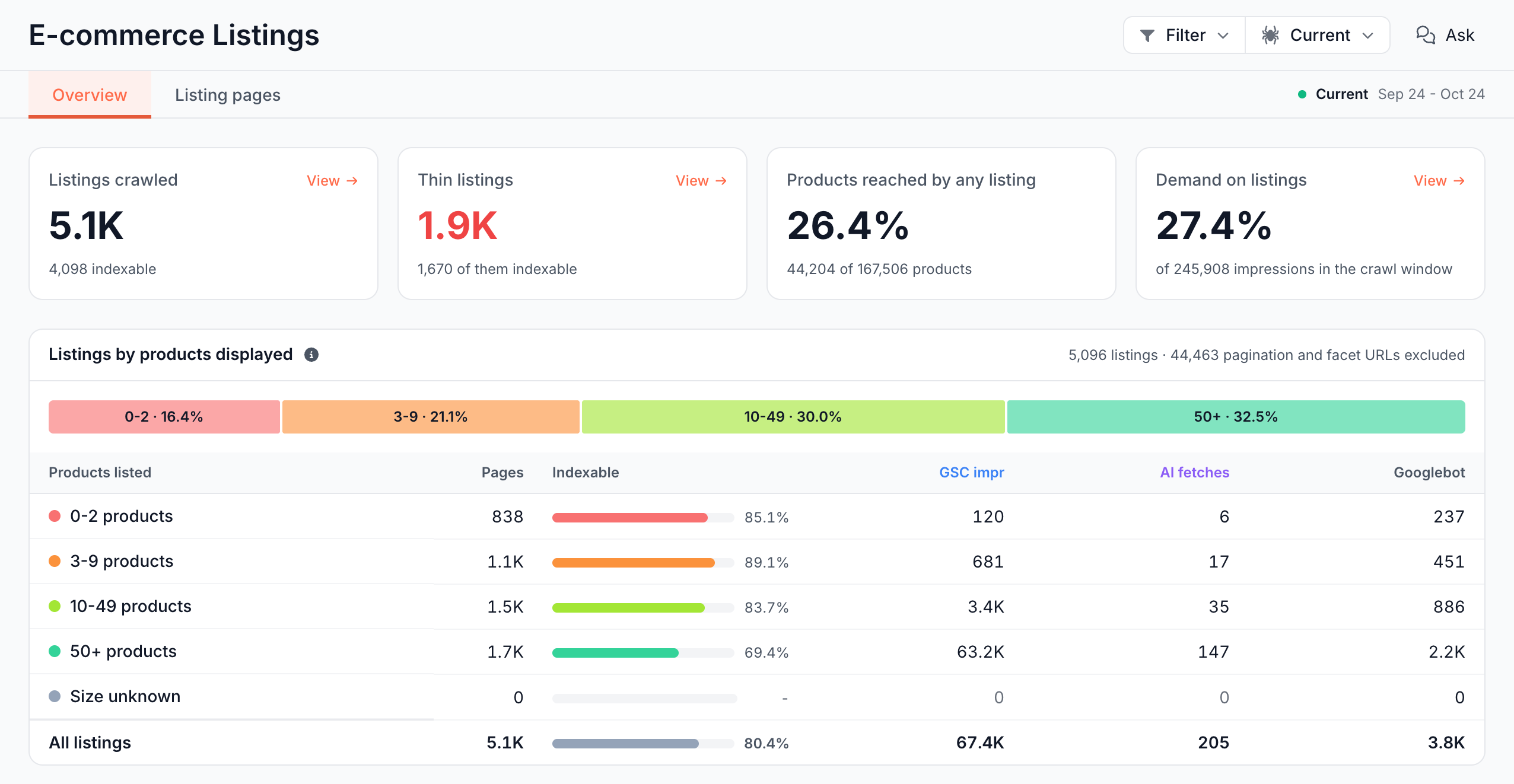
What the report shows
Listings reads the listing pages of one crawl. It has two tabs: Overview and Listing pages.
Cards: how many listings are thin, and how much do they reach?
- Listings crawled: listing pages on their own URL, with how many are indexable.
- Thin listings: listings in the 0-2 products and 3-9 products bands of Listings by products displayed. Red above zero. The footer counts the indexable ones.
- Products reached by any listing: the share of product pages that get at least one followed internal link from a listing page on its own URL, such as "44,204 of 167,506 products". On a crawl older than the four most recent, the card reads "Links are kept for the four most recent crawls; this crawl's links have expired" instead of a share.
- Demand on listings: listing pages' Google impressions as a share of the impressions of every page the crawl fetched.
Listings by products displayed: how big is each category page?
A listing's size is its result_count value. Without one, it is the number of products shown, from items_on_page. If you have a pagination_present field, a listing that shows a pager but has no result count is Size unknown.
The bands are 0-2 products (near-empty), 3-9 products (thin), 10-49 products and 50+ products. Each row shows Pages, Indexable (a share), GSC impr, AI fetches and Googlebot.
The header note counts the pagination and facet URLs left out, such as "5,096 listings · 44,463 pagination and facet URLs excluded". Click a band to open its listings.
In the Listing pages tab, the Listing size column names the bands Near-empty, Thin, Mid-size, Large and Size unknown.
Issues: what is wrong on listing pages?
The Issues card lists the Catalog Health checks that found listing pages, worst first, with the demand on the pages. These rows count every indexable listing, including parameter variants. Examples:
- Near-empty listing pages: listings that show almost no products.
- Thin listings search engines ignore: thin listings that Googlebot did not fetch and that earned no Google click.
- Listings with zero links to crawled product pages: listings with no followed link to any product page.
All categories opens the full issue catalog in Evergreen Crawl > Issues. See Find and prioritize technical SEO issues.
Facet layer by parameter: which parameters create listing URLs?
The facet layer is the set of listing URLs that carry a query string, grouped by parameter name, such as ?price= or ?p=. A URL with two parameters counts under both.
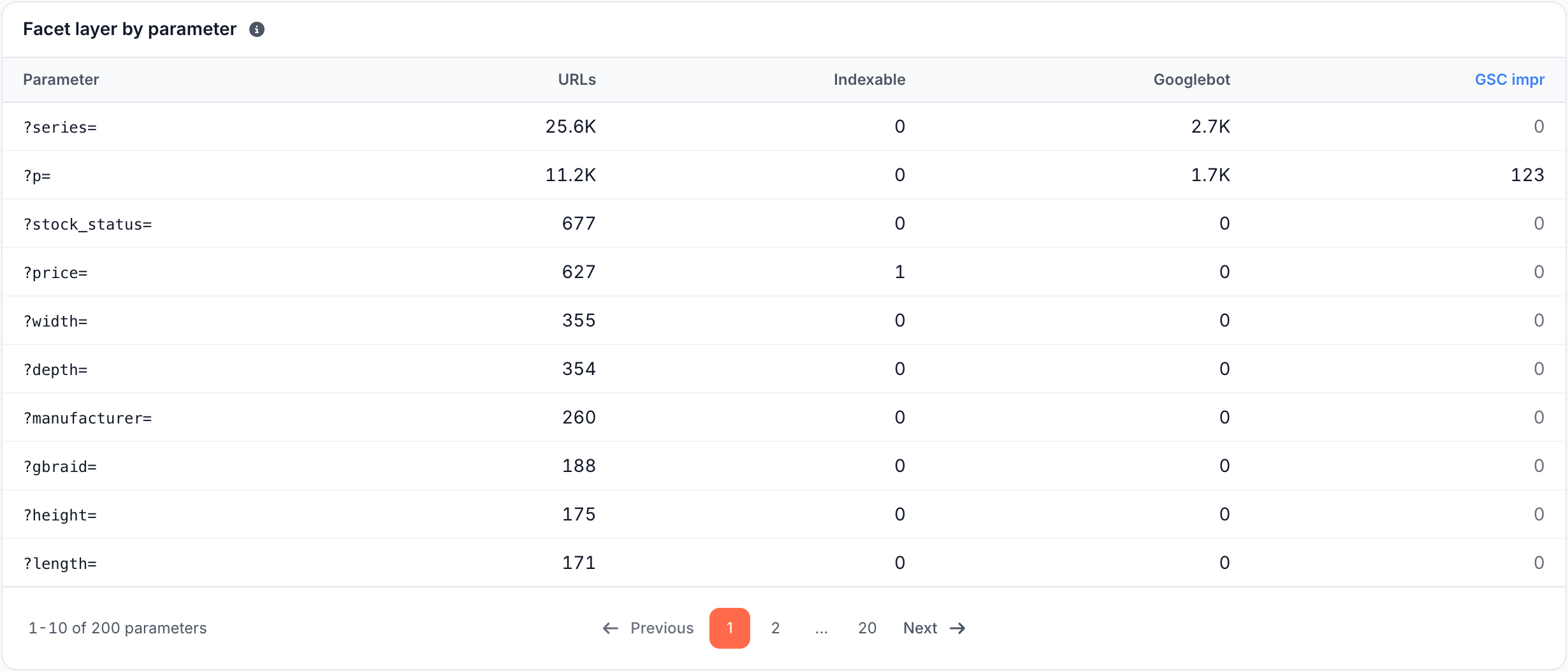
Each row shows URLs, Indexable (a count here), Googlebot and GSC impr. The parameter with the most URLs comes first, 10 per page. When a crawl has more parameters than the table lists, the rest are summed in one row on the last page, such as "12 other parameters". Click a parameter to open its listings in the Listing pages tab.
When no listing URL in the crawl carries a query string, the card reads "No listing of this crawl carries a query string, so there is no facet layer."
Changed since last crawl: which listings changed size or indexability?
This card lists the listings whose state changed since the comparison crawl, ranked by the demand at stake:
- Indexability: Indexable -> Not indexable, or back.
- Size: a move between bands, such as 50+ products -> 10-49 products. A listing can also move into Size unknown, listed after the losses, but not out of it.
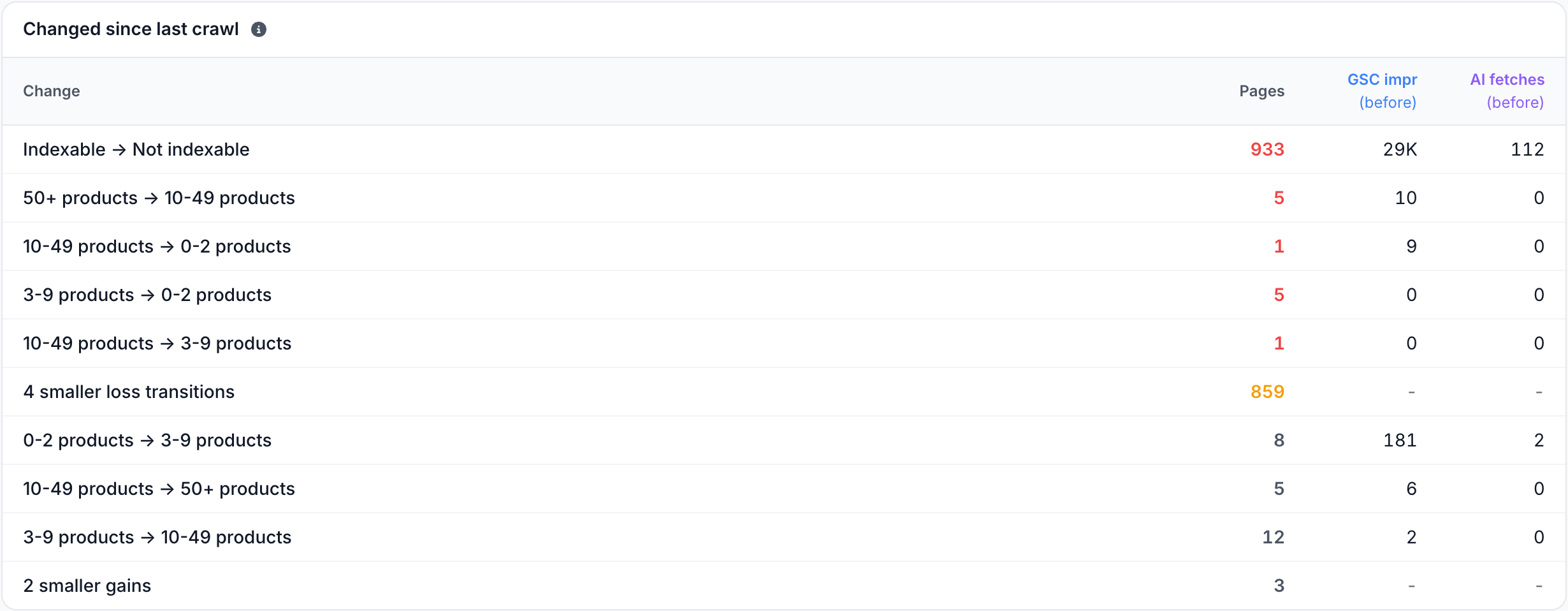
Losses come first, then gains, with smaller moves summed. The demand columns show what the listings earned in the comparison crawl. Click a move to list its listings with the value before and now. Summary rows do not open.
Listing pages tab: what does each listing page show?
The Listing pages tab opens with the filter Listing URL form Is any of Own path. Remove it to see the Parameter variant URLs too. Columns: URL, Products listed, Listing size, Indexability verdict, Inlinks, Contextual inlinks, Impressions, Clicks, AI user fetches and Googlebot fetches, most impressions first.
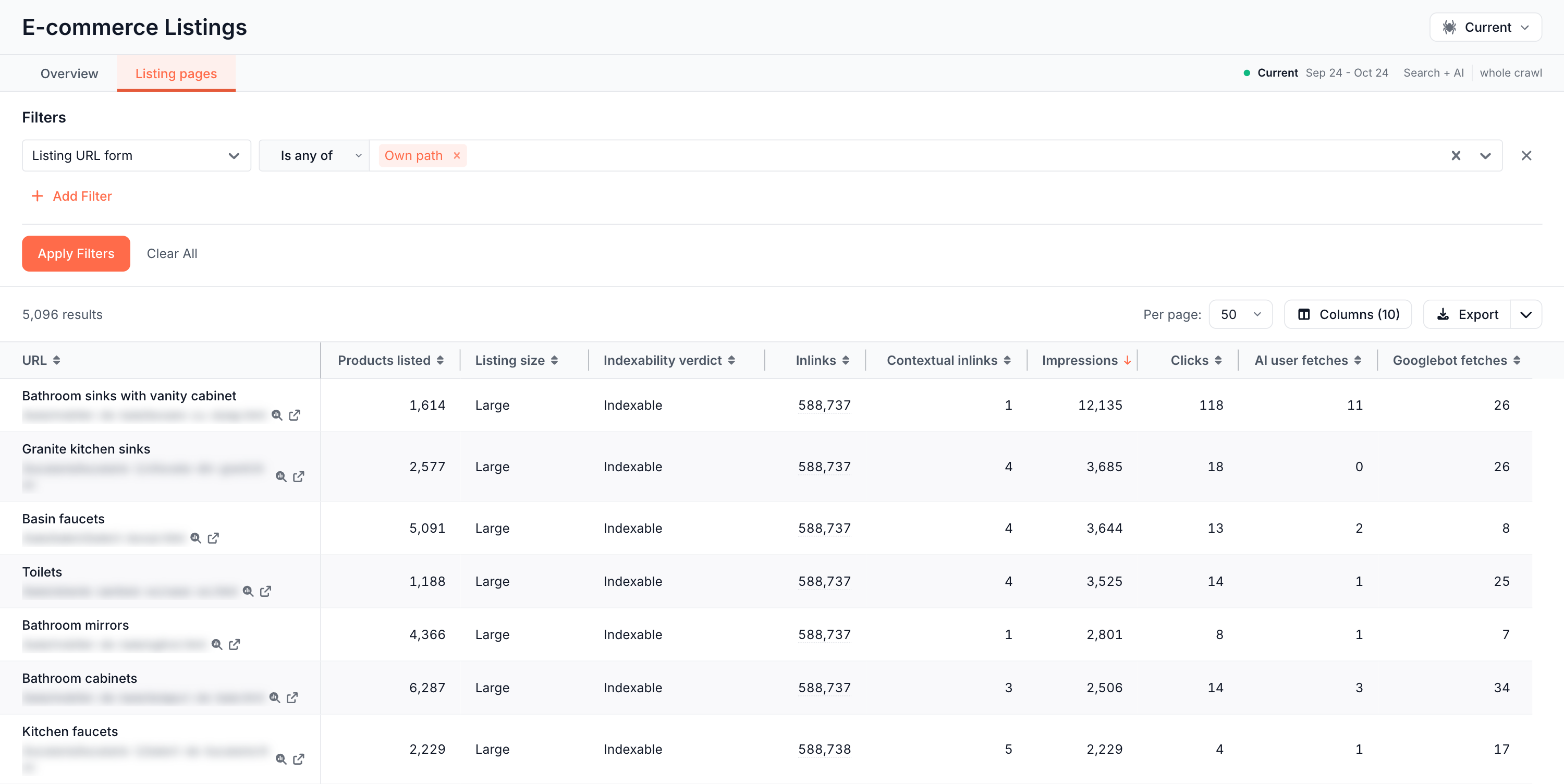
Contextual inlinks counts links from page content, not menus or footers. See Content links and template links.
How to read it
- Thin listings that earn impressions: people search for them. Add products, merge them into a parent category, or enrich the content.
- Thin listings search engines ignore: Googlebot did not fetch them in the crawl's dates, and they earn no clicks. Merge, redirect or
noindexthem. - A parameter with many URLs, Googlebot fetches and no impressions: crawl waste. On the example store,
?series=carries 25.6K URLs and 2.7K Googlebot fetches with no impressions. - A low Products reached by any listing share: many products get no followed link from any category page. Link them from their categories.
- Many inlinks, few contextual inlinks: most links to the category sit in templates such as menus and footers.
What to do next
- Cut crawl spent on facets and sort parameters. See Does EdgeComet stop bots from crawling wasted URLs?
- Add
noindexto thin listings at the edge, without a site release. See Rewrite titles, meta descriptions and robots tags. - Redirect merged categories at the edge. See Serve 301 redirects and 404 or 410 at the edge.
- Check how Googlebot crawls the same URLs over time. See Crawl efficiency: valuable, questionable and wasted crawls.
- Ask "Do thin listings earn impressions?" or "Which facet eats the most crawl?" with the Ask button.
Where to find it
In the dashboard: E-commerce > Listings, with the tabs Overview and Listing pages. The crawl picker in the header sets the crawl.